• Hey Guest. Check out your NeoGAF Wrapped 2025 results here!

Detailed blog post/impressions about the Steam Controller

Courtesy of Nzyme32. Probably the most detailed write-up on the new model yet. The person who wrote this is one of the 300 testers who got the early model in 2013. He also wrote about that back then.

Spotted this a blog post on Reddit with impressions and details of the Controller

http://devinandrewwhite.com/2015/07/07/everything-you-need-to-know-about-valves-steam-controller/

Seem to be quite a positive write up; the controller itself has shaped up very well, but right now without a community behind it to help with providing strong bindings, it can require a lot of fiddling to find good solutions for some games thanks to the large amount of customisation and no real guidance.

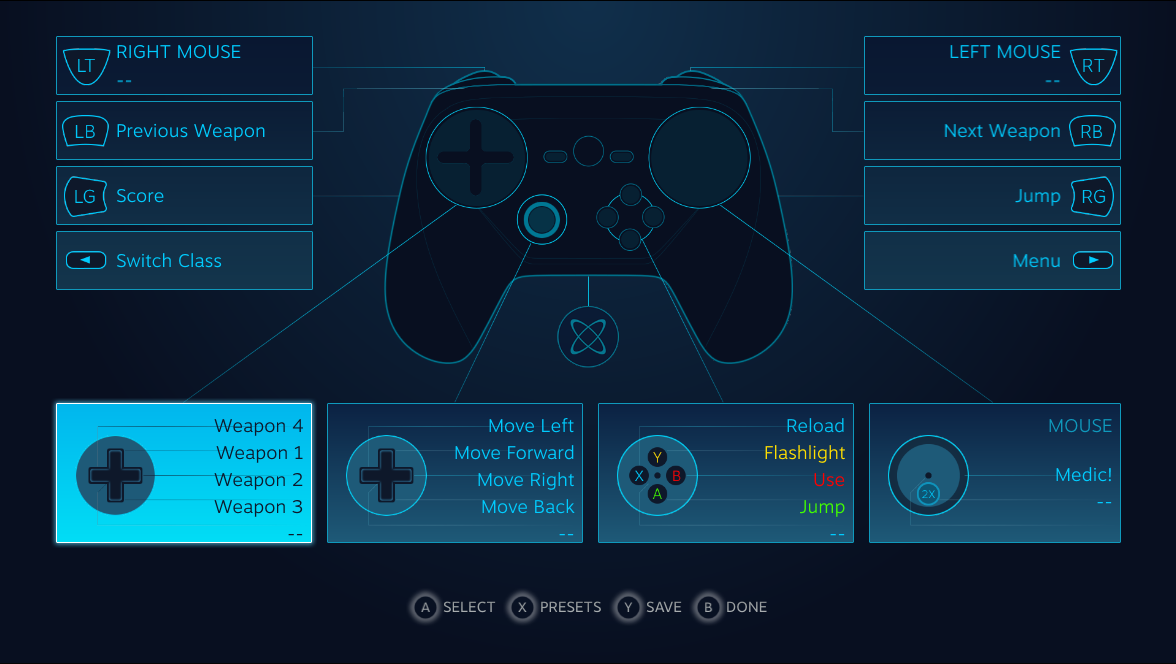
Also some pictures:

steam_ui_analog.png


steam_ui_controller.png


11655578_10153465075069108_1460585325_n-e1436239351526.jpg
 
I do not like the back. Maybe I'm just jaded by the way the back controls of the vita work so here's to hoping this will work better.
 
Every single button, from the face buttons to the grips, on the controller is remappable. If you want to assign Reload to the Y button and Jump to clicking in the analog stick, you can do that for any game that has a Reload and a Jump.

However, that is only the beginning of the customization options.

You can also assign modifier buttons. So you can make the A button jump, right trigger + A button dodge, left grip + A button cast a spell, etc. The button combinations seem only limited by your muscle memory.
This sounds really promising.

Really cool! Can't wait to get my hands on it.
Really promising for cooking quickly too.
 
Wait... wtf? We have to aim with that big ass circle on the top right? Why is it out of line with the analog stick? If it weren't for that, this controller would be perfect. :/
 
I can't wait for this controller. Building my own custom control schemes per game for use with my mouse and keyboard is one of the main reasons I prefer gaming on PC in general, and the customization on show here looks profound. I really want to mess around with one of these for a while.
 
That's nice and all, but the lack of demo kiosks by Valve around the country isn't really inspiring confidence in me. Only when I'm able to hold it will I be converted/dislike it. Writes ups don't really help with controllers in that regard: Actually holding it and using it does.
 
Are the 'edge spin' settings for a jog-wheel type simulation, or something less interesting? I haven't heard of it before but it seemed like a natural fit for what the controller can do.

Edit: NVM it's probably just a trackball setting.
 
I'm really looking forward to this. I have a M+K setup for my couch that uses an ikea lap desk that is serviceable, but I'd still rather use a controller when given the option.

One thing that he didn't touch on were the gyro controls. I think I read in one of these threads about being able to map mouse look to gyro. I've really grown to like the gyro controls in Splatoon so I'm curious to see if they work well.

The amount of customization is extremely impressive.
 
That's nice and all, but the lack of demo kiosks by Valve around the country isn't really inspiring confidence in me. Only when I'm able to hold it will I be converted/dislike it. Writes ups don't really help with controllers in that regard: Actually holding it and using it does.

Would be nice if they did that.
 
That's nice and all, but the lack of demo kiosks by Valve around the country isn't really inspiring confidence in me. Only when I'm able to hold it will I be converted/dislike it. Writes ups don't really help with controllers in that regard: Actually holding it and using it does.

Demo kiosks? It's not even out for 3 months. Not sure a $50 peripheral will get a demo kiosk, but if it does, it won't be until it's on shelves
 
That's nice and all, but the lack of demo kiosks by Valve around the country isn't really inspiring confidence in me. Only when I'm able to hold it will I be converted/dislike it. Writes ups don't really help with controllers in that regard: Actually holding it and using it does.

Vendors selling the Steam Machines can set these up in retail if they want to in order to help sell their machines. Seems like an effort not worth doing. Demo kiosks seem to be pretty subpar for this controller, considering how most people who use it report an acclimation time to the different way it works.

Honestly, this is either a controller you really know you need (because it is a legit effort at making mouse+keyboard-driven PC games playable via gamepad) or know you don't really need.
 
It's nice to see GW2 in that article, it's one of the games I wanted to try it with. I'm curious how he got it working, and if he was able to work out the right mouse being held down all the time or if he's just controlling the cursor like a mouse.

Guess I'll just ask him in the comments.
 
Surprised he wasn't able to input text.

I thought text boxes were recognized and one used a split keyboard on each trackpad to enter text?

Unless he was not playing in Steam OS perhaps?

That would be a bummer if that feature does not make it into the final version.
 
Surprised he wasn't able to input text.

I thought text boxes were recognized and one used a split keyboard on each trackpad to enter text?

Unless he was not playing in Steam OS perhaps?

That would be a bummer if that feature does not make it into the final version.

It might not be implemented in BPM / SteamOS yet for the Steam Controller. In the demo vid they use the guide and back buttons to activate the keyboard on the Steam Controller.
 
It might not be implemented in BPM / SteamOS yet for the Steam Controller. In the demo vid they use the guide and back buttons to activate the keyboard on the Steam Controller.

Awesome. He kind of made it seem final. Thanks for clearing that up.
 
Maybe he hasn't tried pressing the guide button, but only pressed the button that brings up chat.Someone could ask him. But it's possible it's not implemented yet.
 
It's been very long since I was this excited about a piece of hardware. Having an all-encompassing solution for couch PC gaming with full legacy support across all genres is nothing short of amazing, not to mention the possibility of developers using this controller's unique features in new and never seen before ways. Can't. Freaking. Wait!
 
He said he can access the keyboard in the Steam UI, but not in-game.

I really hope this gets fixed, because this was one of the features in the latest demo video that really made me go wow along with the dual-stage triggers. The video does show the keyboard coming up inside Cities: Skylines to input text into an in-game field.
 
This sounds really promising.

Yup, Elite:Dangerous does this for mapping a ton of controls onto a 360 controller and it works well. Sort of like a chording keyboard but not quite as difficult. B+up for landing gear, B+down for cargo scoop, etc.
 
I really hope this gets fixed, because this was one of the features in the latest demo video that really made me go wow along with the dual-stage triggers. The video does show the keyboard coming up inside Cities: Skylines to input text into an in-game field.

It should be in by the time the controller launches. Would be an oversight otherwise.
 
That's nice and all, but the lack of demo kiosks by Valve around the country isn't really inspiring confidence in me. Only when I'm able to hold it will I be converted/dislike it. Writes ups don't really help with controllers in that regard: Actually holding it and using it does.
Problem is that you need time unlearn traditional controllers. This thing is much closer to a mouse and kb, but still it takes some getting used to and you won't get a feel for it in a kiosk.
 
That's nice and all, but the lack of demo kiosks by Valve around the country isn't really inspiring confidence in me.

Didn't they put a shit ton of prototypes out into the wild a while back? Already more than you can say for most of these atypical input devices. Even with a company like Valve, I highly doubt they could ring up a Best Buy or Target or Walmart and request floor space for a PC gaming device.
 
Problem is that you need time unlearn traditional controllers. This thing is much closer to a mouse and kb, but still it takes some getting used to and you won't get a feel for it in a kiosk.

Yeah, I'm not convinced at all that a kiosk is a good idea.
 
That's nice and all, but the lack of demo kiosks by Valve around the country isn't really inspiring confidence in me. Only when I'm able to hold it will I be converted/dislike it. Writes ups don't really help with controllers in that regard: Actually holding it and using it does.

Demo kiosks for a niche PC controller? That's a strange expectation. I'd love to try it first and not buy it blind, but I don't see how that is logistically feasible for this sort of project.
 
I'm really looking forward to this. I have a M+K setup for my couch that uses an ikea lap desk that is serviceable, but I'd still rather use a controller when given the option.

One thing that he didn't touch on were the gyro controls. I think I read in one of these threads about being able to map mouse look to gyro. I've really grown to like the gyro controls in Splatoon so I'm curious to see if they work well.

The amount of customization is extremely impressive.

Krejlooc said that

XDvlU8t.jpg


One thing everyone seems to miss? See the gyration logo in the middle of the screen? These things have imus inside. You know the motion control fine tune controls in stuff like splatoon or uncharted? You can make every game have those if you want.

I'm going to ask the blogger if the tried it out.
 
Yes. That's why I ask if you use those controllers is that still in, or you're using the new one, but with sticks instead of the pads.
 
Ordered my controlle the first day it was up for order. Unfortunately my PC has but the dust.

2 months or so till I have the funds to replace it, hopefully just in time for the arrival of this baby.
 
Wait... wtf? We have to aim with that big ass circle on the top right? Why is it out of line with the analog stick? If it weren't for that, this controller would be perfect. :/

That's because you want to move with the analog stick, which is there for backwards compatibility. The pads are much more capable control inputs.
 
the controller does not play well with other Xbox 360 controllers. Have not been able to get the Steam controller and a wired 360 controller both working at the same time

This is a shame, but otherwise looks positive.
 
This is a shame, but otherwise looks positive.

I have this problem with normal Xbox controllers if I plug them both into the front facing USB ports on my PC.

Plugging them in to the back of my PC works...wonder if this person has tried that.
 
Wait... wtf? We have to aim with that big ass circle on the top right? Why is it out of line with the analog stick? If it weren't for that, this controller would be perfect. :/

Yeah, you are encouraged to use the more accurate control method to aim.
 
Hopefully the controller ends up being good for all situations. I really do hope that the Steam controller isn't too much like a m + kb that it can't offer a good experience at even 30 FPS though.
 
It just doesn't look clean movement wise....or aiming wise.

PoliteTartCranefly.gif


That wall to the left of the doorway and that far wall sure are dead though. (do decals normally disappear that quick?)

My interest only lies in playing Strategy games from my couch with this controller. FPS I've seen being played with it look less accurate than a joystick based pad.
 
Top Bottom