

-
Hey Guest. Check out your NeoGAF Wrapped 2025 results here!
You are using an out of date browser. It may not display this or other websites correctly.
You should upgrade or use an alternative browser.
You should upgrade or use an alternative browser.
GAF Photography 2007 - Q4
- Thread starter el jacko
- Start date
- Status
- Not open for further replies.


Ok, this is shameful - not only did I repost my images because I was at the bottom of a page, I think I'm going to have to repost for being at the bottom of the old thread!
Oh well, I'll just do my favourite one:
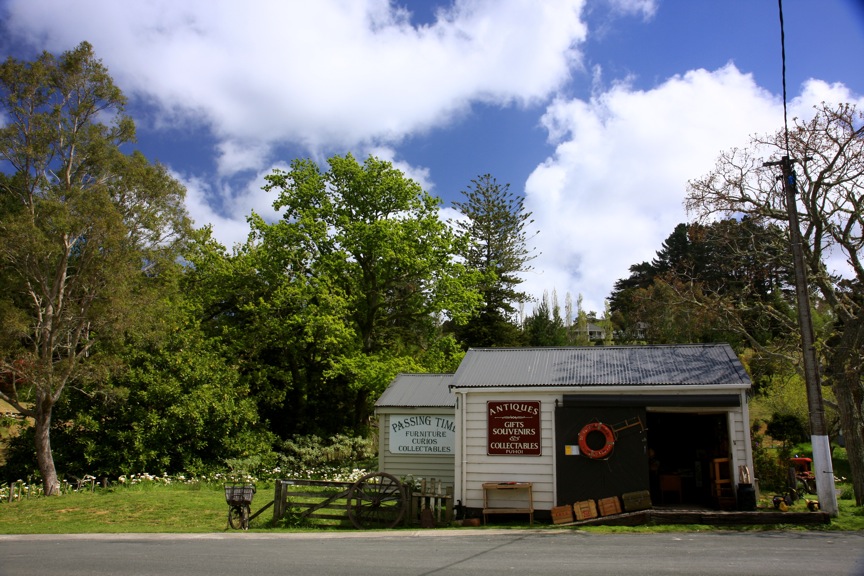
efs17-55IS, 17mm, f8.0, 1/60s, iso100, circular polariser, adjusted in iPhoto
Great King Bowser
Property of Kaz Harai
I was going to buy a new laptop and give my old one to my sister. But now she bought a new laptop and I don't actually need to replace this one.
40D get as well?
40D get as well?
teepo said:omg i almost have enough money to buy a eos 40d. omgmomgogmogg.
Go I love the 40D. I upgraded from the 350D - no sleight on the 350D - it served me extremely well, but it feels like a toy in comparison.
Great King Bowser
Property of Kaz Harai
Aaaaand yet more Phuket photos. Sorry, I have nothing else to contribute at this point in time. :lol


That's the dog my sister has sort of taken in as a pet. He started coming every night that I was over there and apparently is still going to her house now that i've gone! We named him Steeeeeeeeeeeve.
That's the dog my sister has sort of taken in as a pet. He started coming every night that I was over there and apparently is still going to her house now that i've gone! We named him Steeeeeeeeeeeve.
Great King Bowser said:Aaaaand yet more Phuket photos. Sorry, I have nothing else to contribute at this point in time. :lol
.
Well, I'd imagine you must have thousands of Thailand shots! Nevermind, I could look at them all day. Cute dog. Is it a stray, or just a frequent visitor?
Your shots are so clean and professional looking.
Great King Bowser
Property of Kaz Harai
mrkgoo said:Well, I'd imagine you must have thousands of Thailand shots! Nevermind, I could look at them all day. Cute dog. Is it a stray, or just a frequent visitor?
Your shots are so clean and professional looking.
Thanks, I'm a massive fan of your contributions as well, that too, goes to a vast number of other posters in this thread. Always great stuff.
Not entirely sure if Steve has an owner, he did seem reasonably clean for a stray. He'd show up in the evenings around 7pm and we'd leave him out some food which he'd wolf down. Then when it was time to retire to bed he'd be put out on the porch. When morning came round he'd knock on the door and have breakfast. :lol
Then when I went out for the day he'd go wander the streets doing whatever he does during the day. Then the process would be repeated. This literally happened every day for 4 weeks, with him first making an appearance the 2nd night I was there. I really should have tailed him during the day just to see what he got up to. All I know is that when he came back at nights he'd bring an awful lot of road dust and sand with him, much to the displeasure of my sister.
I'm glad he's still returning now that i'm gone. My sister just started a new teaching job out in Phuket so she's out there in a new house living by herself. So a pet to keep her company is a relief. I miss Steve.

Thus concludes the story of how Steve and I became holiday-buddies. :lol
hey_monkey
Banned
Man, I feel like I never get quite the vibrant colors that you guys do -- this especially makes me sad when I realize mrkgoo does so little processing. My photos feel washed out in comparison. Sad.
I have a question -- how do I know what iso to use? That's one thing my photography professor has just neglected to tell us. He told us what he wants us to use for class, but not how to decide what's best for any given situation. I'm guessing low iso for bright light and higher for darker lights, but I'm not really sure.
I have some to post later, but I just wanted to comment on all the color I've seen in here so far! Especially in the sky. I said wow.
I have a question -- how do I know what iso to use? That's one thing my photography professor has just neglected to tell us. He told us what he wants us to use for class, but not how to decide what's best for any given situation. I'm guessing low iso for bright light and higher for darker lights, but I'm not really sure.
I have some to post later, but I just wanted to comment on all the color I've seen in here so far! Especially in the sky. I said wow.
BlueTsunami
there is joy in sucking dick
hey_monkey said:Man, I feel like I never get quite the vibrant colors that you guys do -- this especially makes me sad when I realize mrkgoo does so little processing. My photos feel washed out in comparison. Sad.
I was very happy about my New Hampshire shots I took a month or so ago but yeah, I feel that the "scope" of the pictures would have been much better if the sky and land were equally balanced (and was more saturated). Being able to buy a Circular Polarizer and completely avoid any post processing to attempt and balance out a picture seems like a worthwhile purchase to me.
hey_monkey said:I'm guessing low iso for bright light and higher for darker lights, but I'm not really sure
The way I figure, if I can't get a good enough exposure at a certain speed/f-stop I need in a lower light, I raise the ISO just enough to get the meter to center.
hey_monkey said:Man, I feel like I never get quite the vibrant colors that you guys do -- this especially makes me sad when I realize mrkgoo does so little processing. My photos feel washed out in comparison. Sad.
I have a question -- how do I know what iso to use? That's one thing my photography professor has just neglected to tell us. He told us what he wants us to use for class, but not how to decide what's best for any given situation. I'm guessing low iso for bright light and higher for darker lights, but I'm not really sure.
I have some to post later, but I just wanted to comment on all the color I've seen in here so far! Especially in the sky. I said wow.
To explain a bit more fully, I don't post process much for a lot of reasons, but the top one is mostly because I'm kinda lazy. I do like 'getting it right in camera', but I also realise the camera essentially post-processes, so one can never be against post-processing in the digital era (or even film, for that matter). I just don't want to spend a lot of time tweaking this and that to get a picture perfect - it is definitely another skill to develop, but one I choose not to expand upon just yet (lack of really decent software and hardware being a couple of reasons). You see, I'm really indecisive b nature, and I spend enough time just choosing keepers between several shots, let alone giving me the near infinite options to minutely adjust. Is anyone else really indecisive like this? It's a curse
 .
.Anyway, i did process a little on this shot - I love iPhoto, and in iPhoto there's an 'effects' button - namely I used the 'boost colour' button once. But on top of that, I *think* I took this picture using the 'landscape' picture style on my camera (hey_mokney, you have the Xti, am I right? I think that also has similar picture styles). Landscape, in my experiments, saturates greens and blues a bit more. So in final, I used this camera processing, plus a polariser, plus a final boost to get the vivid blues and greens.
For record, here's what it looked like before post-processing (but after pre-processing, if I can call it that):

As for iso, my general technique is to use as low an iso I can get away with (to minimise noise), selectt he aperture I want, and then adjust shutter to get the exposure needle in centre (or wherever I need it for the shot - always learning here!). I typically use manual exposure, and I have an IS lens, so I can get away with slower shutters. I will boost iso up to 400 very happily, depending on the shot, but with my 40D I feel comfortable in using iso 800, and even 1600. For handheld night shots, I may even go to 3200. I did a noise comparison with my 350D, and I don't think there is a drastic improvement (there is an improvement), but I kind of stopped pixel peeping, so maybe it was more a psychological thing when being able to use high iso.
hey_monkey
Banned
Nah, I have a Nikon D80. I'm about to ask what's probably a stupid question -- what's a polarizer? From the last two posts, I'm guessing it helps with that color. (edit: okay, just researched, now want. want. want.)
I don't ever do anything in iPhoto anymore, even though I like some of the features, because I switched to RAW and that seems to move it to .jpg automatically. So I do everything in Photoshop now. In most pictures, it isn't much... of the batch that's uploading to flickr right now, I think the most I did to one was select some areas and adjust them specifically in addition to adjusting the whole picture a little. I almost always at least open levels and curves, even if my adjustments are barely noticeable. I've noticed that even the slightest touches with curves can really bring a picture to life. But RAW seems kind of washed out to me anyway.
I don't use any of the settings on my camera -- everything I do is in manual, from focus to adjustments -- but I do have the "more vivid" setting selected. Just kinda seemed like the thing to do, though I probably shouldn't leave it like that.
BlueTsunami, thank you -- that helps me figure out this iso business. I swear, I feel like my professor just doesn't really teach us the basics. Showing slides does help, but only if we understand how to get those results.
Oh, I didn't see your stuff on it, mrkgoo. Yeah, I've been somewhat distressed by noise lately. I didn't notice any in the first pics I took -- at 100 iso -- and then he wanted us on 400 or 800, and I definitely notice more.
I don't ever do anything in iPhoto anymore, even though I like some of the features, because I switched to RAW and that seems to move it to .jpg automatically. So I do everything in Photoshop now. In most pictures, it isn't much... of the batch that's uploading to flickr right now, I think the most I did to one was select some areas and adjust them specifically in addition to adjusting the whole picture a little. I almost always at least open levels and curves, even if my adjustments are barely noticeable. I've noticed that even the slightest touches with curves can really bring a picture to life. But RAW seems kind of washed out to me anyway.
I don't use any of the settings on my camera -- everything I do is in manual, from focus to adjustments -- but I do have the "more vivid" setting selected. Just kinda seemed like the thing to do, though I probably shouldn't leave it like that.
BlueTsunami, thank you -- that helps me figure out this iso business. I swear, I feel like my professor just doesn't really teach us the basics.
Showing slides does help, but only if we understand how to get those results.Oh, I didn't see your stuff on it, mrkgoo. Yeah, I've been somewhat distressed by noise lately. I didn't notice any in the first pics I took -- at 100 iso -- and then he wanted us on 400 or 800, and I definitely notice more.
hey_monkey said:Nah, I have a Nikon D80. I'm about to ask what's probably a stupid question -- what's a polarizer? From the last two posts, I'm guessing it helps with that color.
I don't ever do anything in iPhoto anymore, even though I like some of the features, because I switched to RAW and that seems to move it to .jpg automatically. So I do everything in Photoshop now. In most pictures, it isn't much... of the batch that's uploading to flickr right now, I think the most I did to one was select some areas and adjust them specifically in addition to adjusting the whole picture a little. I almost always at least open levels and curves, even if my adjustments are barely noticeable. I've noticed that even the slightest touches with curves can really bring a picture to life. But RAW seems kind of washed out to me anyway.
I don't use any of the settings on my camera -- everything I do is in manual, from focus to adjustments -- but I do have the "more vivid" setting selected. Just kinda seemed like the thing to do, though I probably shouldn't leave it like that.
BlueTsunami, thank you -- that helps me figure out this iso business. I swear, I feel like my professor just doesn't really teach us the basics.
Oh, I didn't see your stuff on it, mrkgoo. Yeah, I've been somewhat distressed by noise lately. I didn't notice any in the first pics I took -- at 100 iso -- and then he wanted us on 400 or 800, and I definitely notice more.
Ah, I see. My understanding of RAW is that it's the raw data from the sensor - not really a picture. I don't think camera settings has any bearing on your RAW data (well, ideally, its not supposed to) - they are mostly for the inbuilt conversion to JPEG.
The advantage of RAW is that you can adjust things without damaging your final image. The RAW data is typically 12-bit information - 4096 luminance levels per pixel. A JPEG is only 8-bit, so only 256 levels per pixel (of which can be red, green or blue). By using RAW, you can tweak and tweak, and when you get process your JPEG, it will convert to that 256 level. Or something. IT's actually more complex than that, because on the sensor, each pixel is either red, green, or blue, but this information gets converted to a single pixel which has Red/Green/Blue channels, of 8-bit each. I'm not exactly sure how it all works out. But regardless, editing a JPEG is reasonably destructive. Each time you edit and save, the JPEG engine recompresses (depending on quality setting), thus losing some information.
In the end, it all doesn't matter to me though - I'm not doing this for a job, so what does it matter if I do a small amount of post-processing afterwards? The end result is the picture, and noone ever views it at 100% anyway, so pixel-peeping can be a real curse (I do it anyway, though
).As for polariser, I briefly explained it in my final posts in the Q3 thread, with an example:
http://www.neogaf.com/forum/showpost.php?p=8117742&postcount=502
A polarising filter, if I understood high-school science well, 'polarises' light - a source of unpolarised light comes as a beam made up of every 'plane of light'. Think about an incoming beam being made up of sheets of light - vertical, horizontal, and every angle in between. A polarising filter is like a fence or grill - it will only allow the sheet of light that is parallel to it, through.
In practice, this can do a lot of things. Think about a flat reflective surface, such as glass, or water - light hitting the surface reflects off, and into your eyes (or other imaging source). The light is polarised - the sheet of light that actually gets reflected is the one parallel to that surface - you can use a polarising filter to block that light, and thus eliminate reflections. It's a reason why fishermen use polarised glasses - it blocks all the horizontal light being reflected from the surface allowing them to see directly into the water.
How does this affect skylight? Well, the light 90 degrees from the sun (ie if the sun is in the north, the east-to west arc overhead) is polarised - using a polariser can darken the sky in those areas, which allow for a more even exposure of sky and land - in effect, this makes skies bluer (less over exposure), and land greener (less under exposure).
The fence/grill of a polariser is actually linear. It's called a circular polariser, because it is actually two filters - it polarises light linearly, but because linear polarised light can screw with the exposure meter or something, circular polarisers have a second filter which makes light circular again as it exits the filter, so that you can continue to meter.
I think I have all this correct, at least, this is how I understand everything - please somebody let me know if I am totally astray!
On the topic of iso - this is the sensor 'sensitivity'. The higher the iso, the higher the 'sensitivity', so the sensor requires less light to achieve appropriate exposure.
It's not really increasing sensitivity, however - the sensor just amplifies the signals it gets. Because of this small errors/variance in recording light values are also amplified, and this manifests as noise.
As I sai, I always try to use as low an iso as I can get away with. Larger cameras have larger sensors, and larger pixels, which can capture light more readily and have less errors/variance, and so have less noise. Also an argument for LOWER resolution sensors. Higher resolution tends to mean smaller pixels, which are less capable of recording light accurately, resulting in noise. A supreme advantage of SLR cameras is the size of its sensor and resulting pixel size - larger means less noise. Try magnifying a point and shoot image taken at high iso, and you will be horrified!
edit: I found perhaps the best article on high iso and noise that I learnt a great deal from:
http://www.dpreview.com/articles/compactcamerahighiso/
It's not really increasing sensitivity, however - the sensor just amplifies the signals it gets. Because of this small errors/variance in recording light values are also amplified, and this manifests as noise.
As I sai, I always try to use as low an iso as I can get away with. Larger cameras have larger sensors, and larger pixels, which can capture light more readily and have less errors/variance, and so have less noise. Also an argument for LOWER resolution sensors. Higher resolution tends to mean smaller pixels, which are less capable of recording light accurately, resulting in noise. A supreme advantage of SLR cameras is the size of its sensor and resulting pixel size - larger means less noise. Try magnifying a point and shoot image taken at high iso, and you will be horrified!
edit: I found perhaps the best article on high iso and noise that I learnt a great deal from:
http://www.dpreview.com/articles/compactcamerahighiso/
hey_monkey
Banned
Okay, double post (oops, not now, mrkgoo is fast) for some pictures from my flickr account!  I haven't posted in a while, so I figured it's time.
These were taken at Mount Holly cemetery, which is a really neat old (very old) cemetery here in Little Rock:
1

2

3

4 - I thought these statues were so weird. They look like hooded figures tied together. Not particularly comforting.

5 - I thought this was about the most fitting tree for a cemetery ever.

6

And then, took a couple at the River Market earlier in the week:
7

8

These were all for class (pretty much), which means eventually they'll be in black and white.
I haven't posted in a while, so I figured it's time. These were taken at Mount Holly cemetery, which is a really neat old (very old) cemetery here in Little Rock:
1
2
3
4 - I thought these statues were so weird. They look like hooded figures tied together. Not particularly comforting.
5 - I thought this was about the most fitting tree for a cemetery ever.
6
And then, took a couple at the River Market earlier in the week:
7
8
These were all for class (pretty much), which means eventually they'll be in black and white.
Nice!
I like that first shot and the way you frame the bench over the lettering.
Those statues are indeed creepy - kind of silent hill like. Hmm...gives me an idea for an assignment theme...
The hoods are part of the statue?
The cemetery statues of the people is intriguing - I don't know much about using tones and B&W, but I think the texture will work really well here.
I especially like the last shot - I have a thing for powerlines.
If I had to offer criticism, for shots 2,3,4, and 7, there doesn't seem to be much in the way of composition - kind of a bit 'snapshoty', if you know what I mean. I do see that you were trying to capture a butterfly, and number 7 is positioned so that the statue is holding the beam, but those shots appear a bit flat (and not on purpose flat).
I like that first shot and the way you frame the bench over the lettering.
Those statues are indeed creepy - kind of silent hill like. Hmm...gives me an idea for an assignment theme...
The hoods are part of the statue?
The cemetery statues of the people is intriguing - I don't know much about using tones and B&W, but I think the texture will work really well here.
I especially like the last shot - I have a thing for powerlines.
If I had to offer criticism, for shots 2,3,4, and 7, there doesn't seem to be much in the way of composition - kind of a bit 'snapshoty', if you know what I mean. I do see that you were trying to capture a butterfly, and number 7 is positioned so that the statue is holding the beam, but those shots appear a bit flat (and not on purpose flat).


Great King Bowser said:I was going to buy a new laptop and give my old one to my sister. But now she bought a new laptop and I don't actually need to replace this one.
40D get as well?
Nice camera - a large upgrade in useability from a 350D. Won't do a HUGe deal in the way of image quality, but you won't regret it if that cash is burning a hole in your pocket. If you're a bit strapped, or actually want a larger variety in your image taking, the 40D won't help you there. The 40D won't help you take anything you can't already do on your 350D, save for perhaps slightly better focusing, allowing for much better tracking shots (reminds me, I should go out and give this a whirl).
Personally, I've been itching to upgrade for a while, and am glad I did (only regrets are that I can't get some of the other toys I wanted - but as with technology, the more I wait, the better and cheaper those other toys become).
Roi: You are whole again! And not wasting any time.... love that second pic.
Great King Bowser
Property of Kaz Harai
Some great insight there from mrkgoo in regards to exposure and circular polarisers. I too, often use a circular polariser just to get more vividness in the skies. Such in the case of that beach photo I posted earlier. The sky wouldn't have been so deep a shade of blue without it.
Another technique you can use to balance your exposures in landscape photography is to invest in a neutral density filter, such as the Cokin series of filters and holders. These are basically a set of square cut filters that are put in front of the lens (mounted on a holder) which are darker at the top than the bottom, this allows you to darken the sky whilst exposing for the foreground. This should result in a more balanced exposure between foreground interest and the sky. You can get these neutral density in a number of different intensities as well.
Edit - Forgot, you actually need a 'graduated' neutral density filter for what I mean!

Ahoy!
Another technique you can use to balance your exposures in landscape photography is to invest in a neutral density filter, such as the Cokin series of filters and holders. These are basically a set of square cut filters that are put in front of the lens (mounted on a holder) which are darker at the top than the bottom, this allows you to darken the sky whilst exposing for the foreground. This should result in a more balanced exposure between foreground interest and the sky. You can get these neutral density in a number of different intensities as well.
Edit - Forgot, you actually need a 'graduated' neutral density filter for what I mean!
Ahoy!

ScientificNinja
Member


ScientificNinja
Member
samusx said:Here is a few of mine from the last week or so.
All shot with Canon EOS Kiss Digital X and Tamron 17-50 or 18-250 lenses.

Wow... what the heck is that?

if you have a 350d and are considering a 40D - go for it!
high ISO is more usable (I found 1600 on the 350d too noisy for even small prints)
AF is faster
AF is more accurate on all AF points
more fps (although I usually only use one shot)
Live view is fanastic if you take macro shots.
Its just overall a much nicer camera to use and if you're good at taking photos I think you'll really enjoy it.
high ISO is more usable (I found 1600 on the 350d too noisy for even small prints)
AF is faster
AF is more accurate on all AF points
more fps (although I usually only use one shot)
Live view is fanastic if you take macro shots.
Its just overall a much nicer camera to use and if you're good at taking photos I think you'll really enjoy it.
mrklaw said:if you have a 350d and are considering a 40D - go for it!
high ISO is more usable (I found 1600 on the 350d too noisy for even small prints)
AF is faster
AF is more accurate on all AF points
more fps (although I usually only use one shot)
Live view is fanastic if you take macro shots.
Its just overall a much nicer camera to use and if you're good at taking photos I think you'll really enjoy it.
Did you get one too?
mrkgoo said:Ah, I see. My understanding of RAW is that it's the raw data from the sensor - not really a picture. I don't think camera settings has any bearing on your RAW data (well, ideally, its not supposed to) - they are mostly for the inbuilt conversion to JPEG.
The advantage of RAW is that you can adjust things without damaging your final image. The RAW data is typically 12-bit information - 4096 luminance levels per pixel. A JPEG is only 8-bit, so only 256 levels per pixel (of which can be red, green or blue). By using RAW, you can tweak and tweak, and when you get process your JPEG, it will convert to that 256 level. Or something. IT's actually more complex than that, because on the sensor, each pixel is either red, green, or blue, but this information gets converted to a single pixel which has Red/Green/Blue channels, of 8-bit each. I'm not exactly sure how it all works out. But regardless, editing a JPEG is reasonably destructive. Each time you edit and save, the JPEG engine recompresses (depending on quality setting), thus losing some information.
RAW formats are dumps of the image sensor data for a capture + some metadata. some RAW formats are compressed (somewhat lossily) as well (eg, nikon Dx0(0) series).
with only a few exceptions, digicam sensors are grids of photo-intensity devices overlaid by a bayer filter (and some other junk), so RAW sensor data requires a color interpolation step to yield a color image. this is basically RAW conversion, and where a lot of mojo happens. (exceptions are fuji's S series sensor, which is weird, and the one sigma uses, which is RGB)
one generally manipulates raw rather than interpolated data because of the potential for losing information during the interpolation stage. however, this is a little counterintuitive as the typical interpolation algorithm generates a color image of the same pixel-size as the bayer image (the nikon D1 generated an image 1/4 the size of the sensor: i believe this was done at the interpolation step, and the fuji sensor is again, weird), and no digicam sensor that i know of carries nearly 24 bits of information from the sensor. the trick is that no practical interpolation algorithm guarantees an invertible transformation (information can be thought of as akin to energy in this sense).
on top of that, the JPEG compressor is quite lossy, and some editors will sit there recompressing your image until the cows come home, but the point is that even if you were to store your color images in lossless TIFF or something there's a high chance you couldn't ever recover the sensor data again from a color product of your image sensor.
as an aside on jpeg, don't work with an editor that's silly enough to recompress your jpeg every time you save and then hand you back the decompressed pixels. that's just silly. there are competent non-destructive editors for free on every major desktop platform now, so take advantage of them.
another aside on camera data affecting your RAW data. yes! it can happen, and there's nothing wrong with it. the only things guaranteed not to affect your raw data are post-process settings like color balance/color anything else, sharpening, etc. in particular, the 40d has this setting for highlight preservation which changes the gain mode of the sensor amps to attempt to keep you from blowing out your shots. in the camera is actually where you want stuff like this to happen, because the camera is the only thing that has mutable access to sensor and shutter specifics at the time of capture.
final aside: raw bayer sensor data is totally a picture! it's just a very funky one.
fart said:RAW formats are dumps of the image sensor data for a capture + some metadata. some RAW formats are compressed (somewhat lossily) as well (eg, nikon Dx0(0) series).
with only a few exceptions, digicam sensors are grids of photo-intensity devices overlaid by a bayer filter (and some other junk), so RAW sensor data requires a color interpolation step to yield a color image. this is basically RAW conversion, and where a lot of mojo happens. (exceptions are fuji's S series sensor, which is weird, and the one sigma uses, which is RGB)
one generally manipulates raw rather than interpolated data because of the potential for losing information during the interpolation stage. however, this is a little counterintuitive as the typical interpolation algorithm generates a color image of the same pixel-size as the bayer image (the nikon D1 generated an image 1/4 the size of the sensor: i believe this was done at the interpolation step, and the fuji sensor is again, weird), and no digicam sensor that i know of carries nearly 24 bits of information from the sensor. the trick is that no practical interpolation algorithm guarantees an invertible transformation (information can be thought of as akin to energy in this sense).
on top of that, the JPEG compressor is quite lossy, and some editors will sit there recompressing your image until the cows come home, but the point is that even if you were to store your color images in lossless TIFF or something there's a high chance you couldn't ever recover the sensor data again from a color product of your image sensor.
as an aside on jpeg, don't work with an editor that's silly enough to recompress your jpeg every time you save and then hand you back the decompressed pixels. that's just silly. there are competent non-destructive editors for free on every major desktop platform now, so take advantage of them.
another aside on camera data affecting your RAW data. yes! it can happen, and there's nothing wrong with it. the only things guaranteed not to affect your raw data are post-process settings like color balance/color anything else, sharpening, etc. in particular, the 40d has this setting for highlight preservation which changes the gain mode of the sensor amps to attempt to keep you from blowing out your shots. in the camera is actually where you want stuff like this to happen, because the camera is the only thing that has mutable access to sensor and shutter specifics at the time of capture.
Thanks for the information - very...informative.
You know, regarding jpeg compression and editing - are you referring to non-destructive editors as an editor that will not recompress data much, or something more akin to iPhoto, which records a list of changes, and reloads the original each time, and reapplies the changes?
non-destructive is kind of a buzzword right now for the latter, and everyone's doing it (and by everyone i mean apple, adobe, and picasa), which is great, but in most cases it's kind of overkill. at a bare minimum i think a non-persistent multi-level undo and lossless intermediate format is fine for most purposes, and much less resource intensive in most cases (i think these checkpoint editors try to save the transformation instead of the image whenever it's invertible, and limit the possible transformations to mostly nice linear ones, which is kind of a lame tradeoff).
fart said:non-destructive is kind of a buzzword right now for the latter, and everyone's doing it (and by everyone i mean apple, adobe, and picasa), which is great, but in most cases it's kind of overkill. at a bare minimum i think a non-persistent multi-level undo and lossless intermediate format is fine for most purposes, and much less resource intensive in most cases (i think these checkpoint editors try to save the transformation instead of the image whenever it's invertible, and limit the possible transformations to mostly nice linear ones, which is kind of a lame tradeoff).
Right.
It does seem a bit processor intensive - I basically only use iPhoto08...and I'm on a PPCG4. It works mostly - I do like the idea that I can return to a picture and 'add' new edits. But whatever - I was pretty happy with it just saving a copy when you made changes so you could always revert (if that counts as non-destructive). But then, I''m not a huge post-processor.
that is exactly the degenerate non-destructive editor behavior, and it's insanely disk intensive when you have to do that for every single change you make to an image.mrkgoo said:I was pretty happy with it just saving a copy when you made changes so you could always revert (if that counts as non-destructive).
fart said:that is exactly the degenerate non-destructive editor behavior, and it's insanely disk intensive when you have to do that for every single change you make to an image.
Hmm.
My understanding of iPhoto06 and before was that edits actually recompressed a new jpeg (with all changes you made), but saved it as a modified picture, leaving your original untouched (so you could always revert). If you edited it a second time, it would load your modified image, and thus would recompress it again.
As for iPhoto08, I believe it loads teh original image... then creates a list of changes (probably a very small file)...then applies that list on exit and saves a modified jpeg. If you export the image, it always uses the modified. If you choose to edit it again, it loads the original, and reapplies the list of changes (you can see the changes and sliders changed). So it only ever has two jpegs, and a small list with changes. Not hugely intensive (except when reapplying lots of changes).
It makes me think of another piece of software I use, regarding 3-dimensional models, which had files which were coordinates in space. EVERY change you made was out put as a new set of coordinates (100,000's of points). This was so you could 'undo' any edit - it simply loaded the previous set of entire coordinates. THAT was disk intensive!
mrklaw said:
God, I love it - didn't really improve my photographs, so much as improve my photography, as I like to say. The whole camera has a better feel - and the 350D seems like a toy in comparison. Only problem I have is how heavy and big it is (I have small hands).if true, that's just mind bogglingly stupid.mrkgoo said:Hmm.
My understanding of iPhoto06 and before was that edits actually recompressed a new jpeg (with all changes you made), but saved it as a modified picture, leaving your original untouched (so you could always revert). If you edited it a second time, it would load your modified image, and thus would recompress it again.
well, it can get away with this largely because the user isn't expected to make many changes (and there aren't many one can make in iphoto), and they're relatively inexpensive changes to make. that said, much much smarter than the previous scheme if you're right about these. i'd be willing to be that picasa is similar to this scheme (although the spectrum of operations you're allowed in picasa would have trouble filling a thimble)As for iPhoto08, I believe it loads teh original image... then creates a list of changes (probably a very small file)...then applies that list on exit and saves a modified jpeg. If you export the image, it always uses the modified. If you choose to edit it again, it loads the original, and reapplies the list of changes (you can see the changes and sliders changed). So it only ever has two jpegs, and a small list with changes. Not hugely intensive (except when reapplying lots of changes).
at one point the photoshop history basically did this, and it's one of the major things that started chewing up photoshop disk cache. that of course is not persistent, and may have a slightly smarter implementation now, but it's still a monster. capture NX tries to do something similar but with limited persistence (and a limited spectrum of operations), and the amount of disk it can eat up doing this is mind boggling -- gigs and gigs for a single 10mb raw.It makes me think of another piece of software I use, regarding 3-dimensional models, which had files which were coordinates in space. EVERY change you made was out put as a new set of coordinates (100,000's of points). This was so you could 'undo' any edit - it simply loaded the previous set of entire coordinates. THAT was disk intensive!
yeah, its definitely nicer handling.
Although I hope it does improve my images. I took some photos of my son's birthday party indoors in low light and was forced to use 1600 ISO and the images were very noisy, even at 6x4" prints.
I'd already been looking at the 40D but that sealed the deal for me.
Although I hope it does improve my images. I took some photos of my son's birthday party indoors in low light and was forced to use 1600 ISO and the images were very noisy, even at 6x4" prints.
I'd already been looking at the 40D but that sealed the deal for me.
mrklaw said:yeah, its definitely nicer handling.
Although I hope it does improve my images. I took some photos of my son's birthday party indoors in low light and was forced to use 1600 ISO and the images were very noisy, even at 6x4" prints.
I'd already been looking at the 40D but that sealed the deal for me.
You mean you used your 350D at iso1600? I think I tried to avoid 1600 as much as possible! On my 40D, I'm fairly comfortable with iso800, and somewhat 1600 - particularly with the high-iso noise reductions turned on - I don't see any loss of detail, but definitely a reduction in chromatic noise. But at the same time, I have become somewhat less of a pixelpeeper, so that's part of it too.
fart: yeah, the original iPhotos are kind of weird in that regard - but they have never really marketed to be strong editors, but just some touchups for simple users. At least it even saved a copy, and never touched the original! The newer iPhoto is actually quite a bit better in regards to editing tools. There's now shadow and highlight detail sliders, and a noise reduction tool. The sharpening leaves a lot to be desired, because I feel you need more control over threshold to be useful. But for a simple user like me, I'm pretty satisfied.
yep, 1600. Didn't have a choice, it was a large sports center so flash wasn't possible, and I only have f4 lenses.
as for editing, I love iphoto 08 for organising, but found the editing too limited. So I bought photoshop elements. The two work well together. I import/organise in iphoto, but then I can launch elements from iphoto, and when I come back to iphoto, the image is properly updated.
as for editing, I love iphoto 08 for organising, but found the editing too limited. So I bought photoshop elements. The two work well together. I import/organise in iphoto, but then I can launch elements from iphoto, and when I come back to iphoto, the image is properly updated.
mrklaw said:yep, 1600. Didn't have a choice, it was a large sports center so flash wasn't possible, and I only have f4 lenses.
as for editing, I love iphoto 08 for organising, but found the editing too limited. So I bought photoshop elements. The two work well together. I import/organise in iphoto, but then I can launch elements from iphoto, and when I come back to iphoto, the image is properly updated.
Yeah, that sounds like a good combo - I would probably want the newer photoshop elements, if my computer can run it well. I had tried using Graphic converter as my external editor, but that runs like a dog when I use the clone tool. Pixelmator is nice and pretty, but also runs abit crappy on my computer.

hey_monkey
Banned
mrkgoo said:If I had to offer criticism, for shots 2,3,4, and 7, there doesn't seem to be much in the way of composition - kind of a bit 'snapshoty', if you know what I mean. I do see that you were trying to capture a butterfly, and number 7 is positioned so that the statue is holding the beam, but those shots appear a bit flat (and not on purpose flat).
I wonder if part of this is because I suck at cropping. I'm about to put up some more that I haven't really touched (except for cropping another one of those weird statues). My professor found a lot of my shots (he hadn't seen the cemetery shots yet) flat as well. Looks like most of the class misunderstood the assignment; he focused so much on geometrical shapes during the last lecture that most of us went out looking for shapes and continued or connected lines, and then he said we weren't making good use of foreground or background. With that in mind, I went out and reshot a bunch of pictures yesterday after class.
I don't really know much about composition, really. He's trying to teach us in pieces, as much as I can figure -- first we did light and dark, now space, and next frame -- but he also has a very disjointed teaching style (example: there is a paragraph in a recent photoshop handout about how he doesn't like the icon for the lass. a paragraph. written. on a handout.) and some of the things he does I think just reinforced bad habits. Like he chose one of my pictures from the last assignment that was blown out and overexposed in places -- not in a good way -- because "that didn't matter for patterning of light and dark." I see what he's saying, but shouldn't he not encourage simple bad photography? sigh.
I spend most classes either confused or angry or both, and feel like I learn more here with you guys. Speaking of, there's a lot of info to digest since I last visited....
hey_monkey
Banned
Aaaand here are (some of) my reshoots. Please feel free to criticize the hell out of them... I want to avoid the snapshotish thing.
1. I did process this one -- original was a bit dark. Just a little work with levels and curves. The rest are completely untouched.

2

3

4

5

and another of the creepy statues, just because. yes, the hoods are part of them, as is the "rope" around them:

1. I did process this one -- original was a bit dark. Just a little work with levels and curves. The rest are completely untouched.
2
3
4
5
and another of the creepy statues, just because. yes, the hoods are part of them, as is the "rope" around them:
starchild excalibur
Member


- Status
- Not open for further replies.