• Hey Guest. Check out your NeoGAF Wrapped 2025 results here!

|OT| The official thread of a lynx getting a new maverick playmate: Ubuntu 10.10!

Status
Not open for further replies.

Vanillalite

Ask me about the GAF Notebook
Ubuntu_10_10_by_pr09studio_half2-2.png


Introducing: Ubuntu 10.10
Code Name: Maverick Meerkat
Release Date: October 10th 2010

INFO: The latest GNU/Linux release from Canonical

Features:
1. Linux Kernel 2.6.35

2. Gnome 2.32

3. Evolution 2.30 (Supposedly much faster than what's in 10.04 LTS)

4. Gwibber Update: Bug fixes, performance improvement, and in line with the new Twitter authentication system

5. New combined sound applet indicator
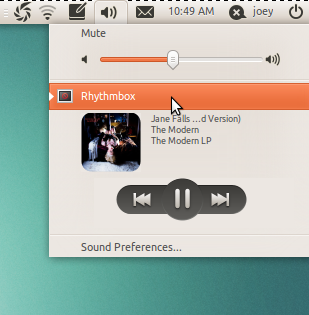
Selection_0022.png


6. New official Ubuntu Font (Just got in not sure if it's gonna be default though)

writersblock.png


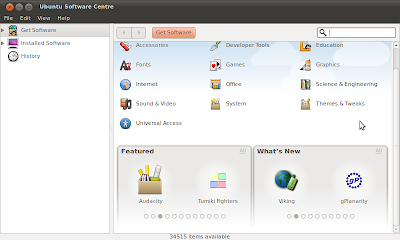
7. Redone Software Center with a shiny new look

Ubuntu Software Centre hits 3.0
C:%5Cfakepath%5CScreenshot.png


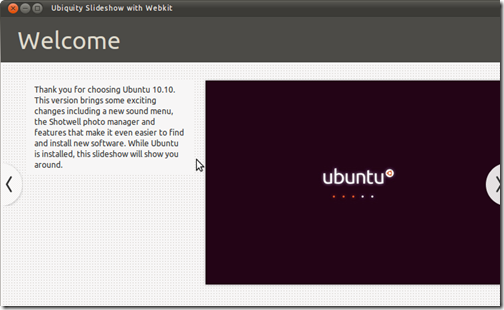
8. Streamlined Install

UbiquitySlideshowwithWebkit_019_thumb1.png


Other Goodies:

1. Ubuntu One: Better OS integration, new sign up an sign in process, and much improved performance!

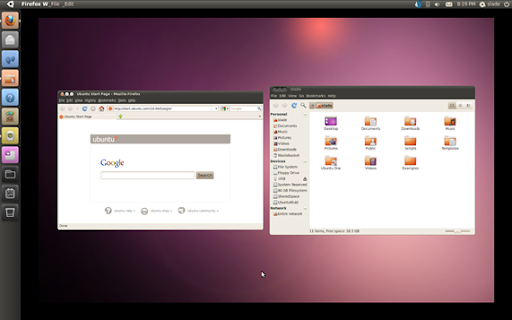
2. Brand new Unity Interface for the Netbook Remix Edition!
Workspace%201_003%5B5%5D.png


3. Additional fixes, tweaks, and addons to the Server/Cloud version of Ubuntu.

Additional Tidbits

1. Some programs such as f-spot have been swapped out for shotwell

2. Kubuntu should be ready to go on launch day with KDE 4.5.X being the default.

3. The new btrfs file system may now be used during installation via manual partitioning, as long as /boot is on some other file system.

4. New set of stock wallaper preinstalled which you can check out at the OmgUbuntu Blog!


What to do on Download Day!

1. Head over to Ubuntu's Official Website to grab the latest version of Ubuntu. It's usually available via many download sources as well as a torrent. Heads up though that it might take a while depending for the website to update on the 10th. Burn the ISO and GO GO GO!!!

2. If you already have Ubuntu installed then you can just upgrade!

A) To upgrade from Ubuntu 10.04 LTS on a desktop system, press Alt+F2 and type in "update-manager -d" (without the quotes) into the command box. Update Manager should open up and tell you: New distribution release '10.10' is available. Click Upgrade and follow the on-screen instructions.

B) To upgrade from Ubuntu 10.04 LTS on a server system: install the update-manager-core package if it is not already installed; edit /etc/update-manager/release-upgrades and set Prompt=normal; launch the upgrade tool with the command sudo do-release-upgrade -d; and follow the on-screen instructions.

C) To upgrade from Kubuntu 10.04 LTS follow the instructions at https://help.ubuntu.com/community/MaverickUpgrades/Kubuntu

3. If your just curious about the release you can always follow step 1. Then when you insert the burned ISO just let it start, and select run as a live cd. For those not familar you're just running the OS straight off the CD, and not installing anything. It's a great way to just try out a distro to see what's up!

4. If your running Windows there is a handy little installer made called Wubi! You download this small file, and then you can run it in windows. It'll ask you what version of Ubuntu you want, setup your login info, and how much space you want to give it. Then it'll auto download, handle all the partitioning, and then just ask you to reboot to finish the install. What's great about this is to get rid of Ubuntu since you installed via Wubi in Windows you just go to add/remove programs and select Ubuntu from the list!

5. Finally if you want to be cool and have your Ubuntu fix on the go you can always use the UNetbootin program which works in both Linux and Windows. It'll easily let you create a Ubuntu built on your USB Flash drive. Heck it'll let you chose alot of different distros even if Ubuntu isn't your cup of GNU/Linux tea!


RELEASE DATE COUNTDOWN!
banner4.png
banner3.png

banner2.png
banner1.png


References:

1. Ubuntu Official Website
2. Kubuntu Official Website
3. Linux Distro Noob thread of Linux noobs: The Official Neogaf Linux Topic!
4. OmgUbuntu: Best Ubuntu Blog on the Web! (Credit to them for some of the pics in this topic!)
5. Wubi Installer Page
6. UNetbootin Installer Page

PS:

1. Ubuntu 11.04's code name is Nawty Narwhal
2. Don't forget to check out the Ubuntu Artwork Flickr Group! You can submit your artwork and twice a year they select some of these photos to be included as Official Wallpaper in the actual release!
 
So yeah I'm pretty pumped for the next release. I think I've decided I want to reformat though. Just want to clean out a bunch of old random files as well as some of the kubuntu shit I have downloaded that I never use. Plus I'd like to change my partition size I have in regards to Ubuntu verses Win 7.

Thankfully I have all my music and pics backed up as well as a few other random docs.
 
Man. I love Ubuntu so much. I've switched and don't think I'll ever go back again. It's just too friendly.
 
Veidt said:
Man. I love Ubuntu so much. I've switched and don't think I'll ever go back again. It's just too friendly.

Just curious, but what did you switch from? Windows? OSX? Another Nix distro?
 
Brettison said:
Just curious, but what did you switch from? Windows? OSX? Another Nix distro?
Windows 7 of all OS's. :lol

It's just windows I presume, it's only a matter of time before you end up with a computer that takes longer to start up than a car in the freezing winter.
 
I really like how they are integrating the default apps into the notification area. Maverick looks really good, hopefully it'll be almost as stable as Lucid as well.
 
Quick tip for those who are already on linux and want to update on day one without crawling with slow isos.

Disclaimer: This worked for me on every linux upgrade but it can be broken for this release, no way of knowing it.


There is this great linux util to copy files across networks called zsync:
zsync is a file transfer program. It allows you to download a file from a remote server, where you have a copy of an older version of the file on your computer already. zsync downloads only the new parts of the file. It uses the same algorithm as rsync. However, where rsync is designed for synchronising data from one computer to another within an organisation, zsync is designed for file distribution, with one file on a server to be distributed to thousands of downloaders. zsync requires no special server software — just a web server to host the files — and imposes no extra load on the server, making it ideal for large scale file distribution.

zsync is open source, distributed under version 2 of the Artistic License. Feedback, bugs reports and patches are welcome.


So the way we are gonna do it is simple.

1)Download the RC release (ubuntu-10.10-rc-desktop-i386.iso/ubuntu-10.10-rc-desktop-amd64.iso)
2)Zsync it the release day so it updates the iso to the final version
3)??????
4)PROFIT

Easy as hell, just make sure you have a copy of the iso in case things go wrong but it's too simple.

go to a terminal, navigate where the iso is and do:
Code:
zsync -o ubuntu-10.10-rc-desktop-i386.iso http://cdimage.ubuntu.com/releases/10.10/release/ubuntu-10.10-desktop-i386.iso.zsync

Or if you are using a 64 bit release:
Code:
zsync -o ubuntu-10.10-rc-desktop-amd64.iso http://cdimage.ubuntu.com/releases/10.10/release/ubuntu-10.10-desktop-amd64.iso.zsync

Normally the RC and the final iso only have minor changes (sometimes they are even the same one!) so this should take a few seconds to finish.
 
Hey cool thanks for that. It totally makes sense though I've never heard of doing this before. Definitely useful info for a ton of things similar to this honestly. Gonna keep this as a mental note! :D
 
Warning for ATI users, the built in open drivers are so slow they can't even handle DVD playback, and the automatic installation/detection for the proprietary drivers appears to be broken in the RC.
 
aswedc said:
Warning for ATI users, the built in open drivers are so slow they can't even handle DVD playback, and the automatic installation/detection for the proprietary drivers appears to be broken in the RC.

Hmmm thanks for the heads up as I have an ATI card. I'm not that anal though about open source stuff, and always install the proprietary drivers though. Hope even if it doesn't come up that I can just go to system -> admin -> hardware drivers and have them come up in a scan.

I gotta feel this would be a high priority fix during the RC.
 
I miss Ubuntu.

Unfortunately, Slackware, Arch and Cent are more relevant to my interest.

The closest I will get to this is Backtrack.
 
Has the GDM restored the ability to use custom Login screens yet?

If not, I'll probably just stick with the LTS since the other bullet points don't interest me.
 
Diablos said:
Why is 64-bit Ubuntu not recommended for daily desktop usage? It's 2010...
I think this comes down to all packages not being available in 64-bit. I think that Flash wasn't in 10.4 and that I had to fix that by installing a substitute or workaround or something. I might be wrong.

But basically, it's recommended if you're the type who can work around those problems.
 
peakish said:
I think this comes down to all packages not being available in 64-bit. I think that Flash wasn't in 10.4 and that I had to fix that by installing a substitute or workaround or something. I might be wrong.

But basically, it's recommended if you're the type who can work around those problems.


Yeah I to immediately thought it was probably a flash thing. :lol

Either way I've been using 64 bit on Lucid and see no reason why I won't on Maverick!
 
Alright, I'll bite. Never used Linux previously.

I'm installing that wubi program on Windows 7 x64. Do you think this is the best simple option to give it a trial run?
 
Sanjuro Tsubaki said:
Alright, I'll bite. Never used Linux previously.

I'm installing that wubi program on Windows 7 x64. Do you think this is the best simple option to give it a trial run?

Hmmm that depends... the live cd option is probably the easiest but you'd have to waste a cd...

Wubi is easy though as is putting it on a flash drive....
 
Sanjuro Tsubaki said:
Alright, I'll bite. Never used Linux previously.

I'm installing that wubi program on Windows 7 x64. Do you think this is the best simple option to give it a trial run?
It is, yes.
 
I used wubi, liking the entire feel and interface.

Two things,

1. Will I be able to simply upgrade to 10.10 in Linux?

2. I can't find a solution to unpacking .rar reasonably.
 
Sanjuro Tsubaki said:
I used wubi, liking the entire feel and interface.

Two things,

1. Will I be able to simply upgrade to 10.10 in Linux?

2. I can't find a solution to unpacking .rar reasonably.

1. Yes, shouldn't be too hard, or you can wait a few days and get 10.10 this sunday en make a clean install with that.

2. Start the terminal, type: sudo apt-get install unrar, then it will ask for your password. Type it, and you're done. Or if you'd rather do it the windows way, install WINE (you can probably find it in the Ubuntu software centre, and after that install winrar. That also works. :)
 
peakish said:
I really like how they are integrating the default apps into the notification area. Maverick looks really good, hopefully it'll be almost as stable as Lucid as well.
I hate this. It used to be that you had a separate volume applet that you could put anywhere on the panel, so I put it in the corner so I could quickly change volume just by throwing the pointer there and scroll. Now that's impossible and I have to hunt down the right icon on the bar. Worse yet, the indicator applet has no tooltips as part of the design, so checking the state of anything requires clicking. And clicking the volume icon disables the scroll wheel to change volume functionality, requiring a second click to dismiss the volume menu before you can use the shortcut to change the volume.

And that's just for volume, they have similarly cut functionality and provided a sub-par substitute for Rhythmbox, Empathy and something I forgot that actually required uninstalling of software in order to get the fuck off my panel.

I guess I'll be back later to ask if the indicator applet in Maverick has improved from Lucid.
 
Cronos said:
1. Yes, shouldn't be too hard, or you can wait a few days and get 10.10 this sunday en make a clean install with that.

2. Start the terminal, type: sudo apt-get install unrar, then it will ask for your password. Type it, and you're done. Or if you'd rather do it the windows way, install WINE (you can probably find it in the Ubuntu software centre, and after that install winrar. That also works. :)
Excellent, thanks. I'm not going to lie I'm enjoying the hell out of this interface. It's like Windows and OSX had sex and had a much cooler child.
 
Sanjuro Tsubaki said:
Excellent, thanks. I'm not going to lie I'm enjoying the hell out of this interface. It's like Windows and OSX had sex and had a much cooler child.

It's funny cause it's true, but a ton of the hardcore nix fans were bitching about it with 9.10 and 10.04. It was either it's to much like OSX or to much like Windows, but they never said why they hated things. Just that it was to much like those two things in some form or another. :lol :lol :lol
 
Brettison said:
It's funny cause it's true
I don't know about Windows as I haven't used that OS post 2k, but one thing that tries to be like OSX is the Metacity theme. I'd like to hear you defend that one.
 
pmj said:
I don't know about Windows as I haven't used that OS post 2k, but one thing that tries to be like OSX is the Metacity theme. I'd like to hear you defend that one.

It's not a defense thing. I mean I see no reason not to ape good things others come up with. It was more like in 10.04 they switched the min/max/close buttons to the left, and everyone was like zomg you guys are trying to be apple. Then people were like so we put it on the right and we are trying to be windows? There was a big joke about putting the buttons in the middle. :lol :lol
 
Veidt said:
Windows 7 of all OS's. :lol

It's just windows I presume, it's only a matter of time before you end up with a computer that takes longer to start up than a car in the freezing winter.

Solid State drives are your friend.
 
TheExodu5 said:
Solid State drives are your friend.

Speaking of SSD, does the Wudi! installer handle SSD drives alright? I know there's issues with 4k alignment, but I'm not sure if that could possibly be done wrong by something like Wudi if no coded correctly. I know putting XP on an SSD first could ruin the alignment and that older versions of Acronis Image software were also having issues (I think 2011 version of Acronis is ok though).
 
Sanjuro Tsubaki said:
Excellent, thanks. I'm not going to lie I'm enjoying the hell out of this interface. It's like Windows and OSX had sex and had a much cooler child.
This is truth. What do you guys like for a media player?
 
Brettison said:
It's not a defense thing. I mean I see no reason not to ape good things others come up with. It was more like in 10.04 they switched the min/max/close buttons to the left, and everyone was like zomg you guys are trying to be apple. Then people were like so we put it on the right and we are trying to be windows? There was a big joke about putting the buttons in the middle. :lol :lol
I disagree that having the buttons on the left side is an improvement, and ignoring that the theme is still ugly even by Ubuntu standards. Clearlooks is infinitely more attractive but they had to ditch it and instead ape OSX, and do a terrible job at it.

And then there's my rant on the indicator applet above. Not related to either Windows or OSX, but not everyone is happy with the direction Canonical is trying to take the Linux desktop.

KamenSenshi said:
This is truth. What do you guys like for a media player?
What kind of media? I like MPD + GMPC for music, but Rhythmbox is alright as well.

For videos I'm more or less stuck with SMPlayer. I hate its GUI, but I don't know of any alternative that's good enough to even be considered.
 
Are there any other commands or features I should or might want to enter to enable other aspects of the OS?

Recommended programs?

I went back and added more hard drive space to the allocation...looks like I'm going to be using this for a while. :)
 
Haven't used Ubuntu in a few years now and it looks like its come a long way since then. Might have to give it a shot when it comes out.
 
Sanjuro Tsubaki said:
Are there any other commands or features I should or might want to enter to enable other aspects of the OS?

Recommended programs?

I went back and added more hard drive space to the allocation...looks like I'm going to be using this for a while. :)

Yeah, it's in the first post of Linux Distro Noob thread of Linux noobs

Also I really enjoy gnome-do.:D

Some other programs I use a lot are Krusader (it's in the repo's), which is a Total Commander-like file manager. And if you want a good Foobar alternative, try DeaDBeeF. It's my default audio player. :)
 
I used to have to (or at least thought I had to) run cvs versions of a ton of stuff but nowadays I'm fine with the defaults, for the most part. The only things I feel I absolutely have to do when installing Ubuntu is change the theme, move the buttons from left to right and get win32codecs via medibuntu. And maybe get up-to-date Wine from their repo.

Transmission is great and I'm not sure why you'd replace it with Deluge of all things. And SMPlayer > VLC by far. I'm not sure why VLC even exists anymore.
 
KamenSenshi said:
Yeah I was thinking all purpose or video mainly. Ill have to look into SM.


If you got an nvidia card smplayer with vdpau output is fucking win. 1080p videos with almost no performance hit
 
itxaka said:
If you got an nvidia card smplayer with vdpau output is fucking win. 1080p videos with almost no performance hit
I like the sound of this as I was considering getting a new gpu in a while with those rumors lately, so this would be sweet.
 
Count me in as someone who uses SMPlayer as well. Though I'll admit both MPlayer and VLC are rather old in terms of what's in the current 10.04 repositories. Think the newer versions will end up in 10.10 though.
 
pmj said:
I disagree that having the buttons on the left side is an improvement, and ignoring that the theme is still ugly even by Ubuntu standards. Clearlooks is infinitely more attractive but they had to ditch it and instead ape OSX, and do a terrible job at it.

And then there's my rant on the indicator applet above. Not related to either Windows or OSX, but not everyone is happy with the direction Canonical is trying to take the Linux desktop.
I disagree, I don't think Clearlooks looks very good at all... I didn't like 10.04's theme either, but the improvements in 10.10 are great.

I don't get why you have trouble with the window buttons being on the left, while at the same time you like to customize your taskbar to move the volume button. Isn't that the same thing? A choice that they made, which you don't agree with, so you change it?

For the record, I don't understand the left-handed buttons either, but I think the hate is overblown, it's easy enough to get used to.

Brettison said:
It's not a defense thing. I mean I see no reason not to ape good things others come up with. It was more like in 10.04 they switched the min/max/close buttons to the left, and everyone was like zomg you guys are trying to be apple. Then people were like so we put it on the right and we are trying to be windows? There was a big joke about putting the buttons in the middle. :lol :lol
Yeah... I remember when Ivanka (the Design Team Lead) was on the Ubuntu UK Podcast (which is great, btw). It was ridiculous, she just flat out said "I don't see the similarities..."

That's just goddamn bullshit. Look, things like monochrome icons? They're used everywhere, they look great, they work well. No biggie. But when you add an abstract purple wallpaper with what seem to be stars, move the windows buttons to the left, and add other stuff a certain other OS also has, yeah then you're gonna get comparisons.

And that's fine, really! Like you said, if another OS does something right, I don't see the problem in aping it. But don't deny it as if you simply hadn't noticed.

(I don't like Ivanka in general, tbh...)


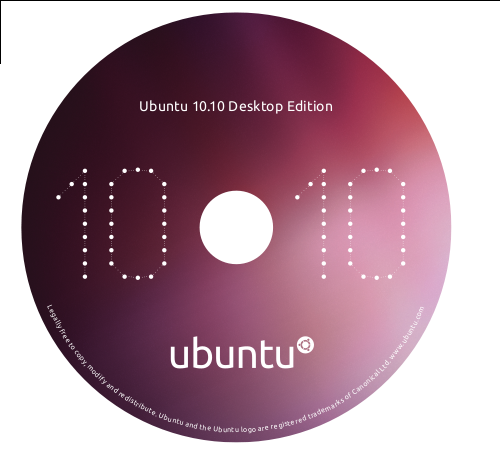
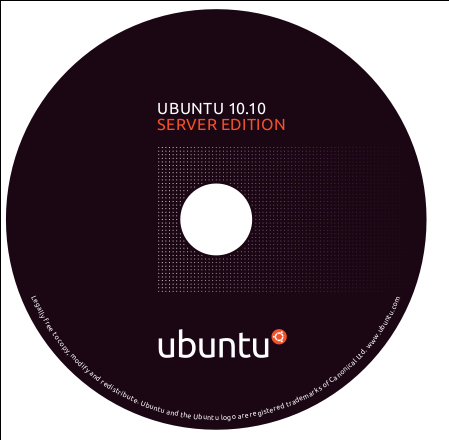
The server CD wallet looks awesome, btw! <3
 
I tried updating to 10.10 and it seemed to bork the Linux OS where it just reboots after having some quick DOS font after switching which OS I want.
 
Suitcase Test said:
(I don't like Ivanka in general, tbh...)


The server CD wallet looks awesome, btw! <3

It's cool. I'm not THAT familar from Ivanka, but your not the 1st person that I've seen put out an open dislike to the person. I think that feeling might be shared by many.

I actually really like both wallets honestly. Think they look rather slick though I think I like the server cover better.

Sanjuro Tsubaki said:
I tried updating to 10.10 and it seemed to bork the Linux OS where it just reboots after having some quick DOS font after switching which OS I want.

LOL I swear you're just trying to do everything aren't you. LOL :lol

Not trying to hate, but why didn't you just wait to try everything on Sunday? Anyways did you resolve your issue? If not I'd suggest posting in the GAF Linux thread and we can help you fix things! :D
 
Brettison said:
LOL I swear you're just trying to do everything aren't you. LOL :lol

Not trying to hate, but why didn't you just wait to try everything on Sunday? Anyways did you resolve your issue? If not I'd suggest posting in the GAF Linux thread and we can help you fix things! :D
I'm a bit adventurous. I appreciate the help if any, I will be participating more in the threads post-Sunday and everything. All I was doing was a few day trial run to get the feel and I think it will be a pleasant experience for the future.

I also was trying to get more information as I need to install Ubuntu for some guy on his MacBook for work. I appreciate all the help though to familiarize it!
 
Brettison said:
Are you using a Wubi install?

Not sure if this is your problem, but this is a recent common Wubi problem...

Grub Boot Fix!
I just re-installed. I think the problem came when I did the update it asked if I wanted to keep or remove some files, I chose remove. When chose to keep the install went nice and smooth.

On 10.10 now. :)
 
Sanjuro Tsubaki said:
I just re-installed. I think the problem came when I did the update it asked if I wanted to keep or remove some files, I chose remove. When chose to keep the install went nice and smooth.

On 10.10 now. :)

Good to hear you fixed it on your own! Now that your on the 10.10 RC your ahead of most of us in this thread. :P
 
Status
Not open for further replies.
Top Bottom