• Hey Guest. Check out your NeoGAF Wrapped 2025 results here!

Call of Duty: Modern Warfare Remastered PC performance thread

JaseC

gave away the keys to the kingdom.

(Click for general game info.)

System requirements:
codmwrsysreqsh4oqc.jpg


Latest drivers: (as at 21/12/2017)
Nvidia: 388.71
AMD: 17.12.2
Intel: Depends on your processor; download the driver update utility

Benchmarks:
TBD.

Tips and tricks:
Cap the framerate/potentially improve frametimes: Download RivaTuner Statistics Server, input your desired framerate limit in the "Framerate limit" box, and hit enter (the program comes bundled with MSI Afterburner and earlier versions of EVGA PrecisionX). Alternatively, those with an Nvidia GPU have the option of Nvidia Inspector, which can also be used to impose a framerate cap, either in a similar manner to RTSS or by way of forcing a different vsync interval (click the small tool icon to open the game profile section).
Note: Useful if you your system can't maintain, say, 60fps and you're sensitive to the wild fluctuations, or you're experiencing uneven frametimes. The greater window the engine has to render a given frame, if you're imposing a lower framerate than the game can otherwise provide, may also help in alleviating stuttering related to data streaming.
Stop the game from crashing after 15 minutes on touch-capable systems running Windows 10: Open the task manager, switch to the Services tab and disable TabletInputService.

icon_warning.png
When posting your own tip/trick or something else you'd like to see here in the OP, be sure to mention my username as this way the post will appear among the results when I search for my username after an absence. I may miss your suggestion otherwise.

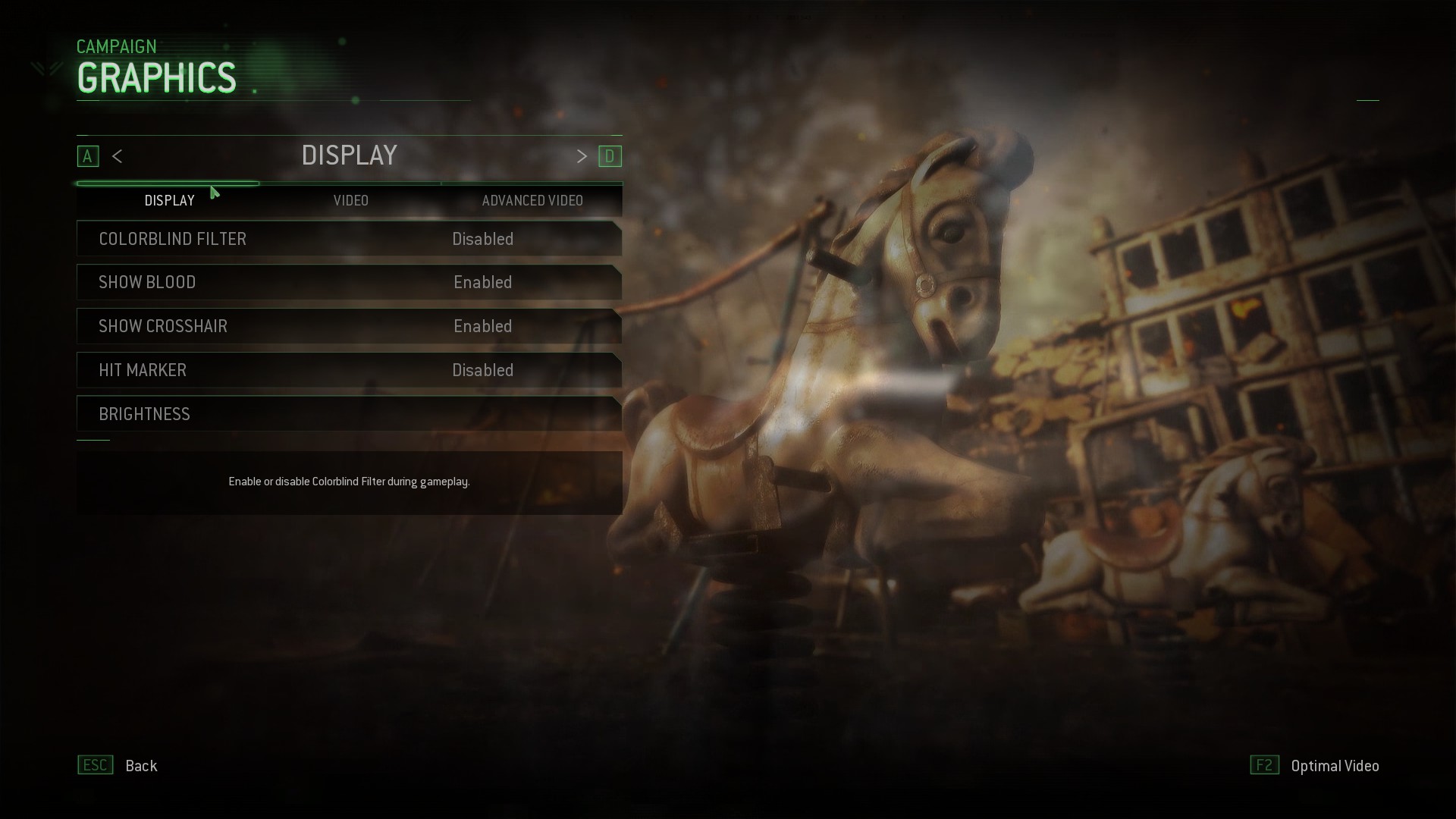
Graphics settings:

Colourblind filter: Disabled/Enabled
Show blood: Disabled/Enabled
Show crosshair: Disabled/Enabled
Hit marker: Disabled/Enabled
Brightness: Self-explanatory


Display mode: Windowed; Windowed (fullscreen); Fullscreen
Monitor: Self-explanatory
Resolution: Self-explanatory
Screen refresh rate Self-explanatory


Display adaptor: Self-explanatory
Sync every frame: Off/On
Monitor aspect ratio: Self-explanatory
Native render resolution: Off/On
Render resolution: 40% -> 200% in increments of 10%

Texture resolution: Low; Normal; High; Extra
Normal map resolution: Low; Normal; High; Extra
Specular map resolution: Low; Normal; High; Extra


Fill remaining memory: Off/On
Anisotropic filtering: Low; Normal; High

Shadows: Off/On
Shadow map resolution: Normal; High; Extra
Cache sun shadow maps: Off/On
Cache spot shadows maps: Off/On

Depth of field: Off; Low quality; Medium quality; High quality


Motion blur: Off; Low quality; Medium quality; High quality
Screen space ambient occlusion: Off; Normal; High; HBAO+
Medium distant ambient occlusion: Off/On
Subsurface scattering: Off/On
Depth prepass: Off/On

Post-process anti-aliasing: Off; FXAA; SMAA 1x; SMAA T2x; Filmic SMAA 1x; Filmic SMAA T2x
Supersampling: Off; 2x; 4x; 8x; 16x


Shader preload: Off/On
Shader preload during cinematics: Off/On

Bullet impacts: Off/On
Dynamic light limit: 2 -> 8 in increments of 1
Ragdoll: Off/On
 
Just tried it without the latest Nvidia drivers.

Everything max at 1440p on a GTX 980ti and 2500k was.... ok. Probably mostly 60 fps but not stellar. Putting downsampling on top of that made it chug.

D/ling latest drivers now.
 
What's your 2500K clocked at?

4.4GHZ.

Anyways. Better performance with the latest Nvidia patch.

Playing SP I can play at max at 1440p plus 2x SSAA and mostly get 60ish, but there are some areas it tanks hard (I notice it less because of g-sync).

Don't use SSAA if you want to stay above 60fps.
 
GTX 1080 Strix OC 1999 mhz or whatever version, i7 6700k, 32 gb ddr 4 3000 ram, 1 tb samsung ssd etc...

9 fps.

Hit refund so fast.
 
GTX 1080 Strix OC 1999 mhz or whatever version, i7 6700k, 32 gb ddr 4 3000 ram, 1 tb samsung ssd etc...

9 fps.

Hit refund so fast.

Yeah pretty much identical setup to you, but 16gb ram and it runs SOMETIMES at 60 or above but to much for my liking it drops very low that i cant play it
 
Played 10 mins of MP last night. I could not tell if the game runs like shit or i was on a server with the internet capabilities of a piece of wood. Mostly around 60fps with lots of slowdown.


MSI GTX 1080 @ 1974mhz
I7 4790k @4.4ghz
16GB RAm @ 1866mhz
Installed on a 7200rpm hdd
Latest Nvidia Drivers
 
Idk why but last night when I was setting it up it wouldn't let me do 1440p 144hzs unless it was full screen which is a little annoying.
 
Oh nice. So I guess infinite doesn't have the depth prepass option, but this still does.

I always thought it was kinda cool to have that as an option.

I'm getting horrible stuttering with drops to 10-20fps on GTX 1080.

[/QUOTE] You're also getting a vra...it - or is that system ram? I don't remember.
 
Oh nice. So I guess infinite doesn't have the depth prepass option, but this still does.

I always thought it was kinda cool to have that as an option.

IW7 is a completely different renderer, we require the depth data from the prepass for a variety of novel rendering techniques. I imagine @MichalDrobot will present or publish on it at some point, if you're curious.
 
Ran np on my PC, 60 fps consistently (6600k @ 4.5, 16gb 2400 ddr4, 970 - latest nvidia driver, and win10).

Nvidia's Vsync and Riva Tuner's 60 fps limit were on.

Set the settings to these:

Fullscreen
1080p
59.94 hz
Vsync off

Texture Resolution - Extra
Normal Map Resolution - Extra
Specular Map Resolution - Extra
Fill Remaining Memory - Off
Anisotropic Filtering - High

Shadows - On
Shadow Map Resolution - High
Cache Sun Shadow Maps - Off
Cache Spot Shadow Maps - Off

Depth of Field - High Quality
Motion Blur - Off
Screen Space Ambient Occlusion - HBAO+
Medium Distance Ambient Occlusion - On
Subsurface Scattering - On
Depth Prepass - On

Post Process Anti-Aliasing - SMAA T2x
SuperSampling - Off

Shader Preload - On
Shader Preload During Cinematics - On

Bullet Impacts - On
Dynamic Light Limite - 8
Ragdoll - On
 
I don't understand these impressions. Just played an hour of SP and lowest I saw was 130fps. Playing @ 1440p on a 6700k and gtx1080. And I think I had everything maxed.
 
Does Windowed Fullscreen improve performance drastically like Infinite Warfare? Had to re-download the game because it wasn't starting after deleting the single player portion, thinking they were separate. I don't get why we can't launch one without having the other installed :/
 
And sure enough, Windowed Fullscreen solves all my performance woes. Everything maxed except extended shadow settings, light samples at 8. After trying it in Infinite Warfare, and now here, I have no complaints minus the half empty match lobbies. Having a great time!
 
And sure enough, Windowed Fullscreen solves all my performance woes. Everything maxed except extended shadow settings, light samples at 8. After trying it in Infinite Warfare, and now here, I have no complaints minus the half empty match lobbies. Having a great time!

Nice. Windowed Fullscreen mode solved the stuttering mess i had with IW. No problem with MWR though; don't need to use Windowed Fullscreen for it.
 
Had a quick look at this at 8K (most settings at low and medium, some off) and I think I was hitting around 30fps. No fps counter is a shame, unless I've missed it. At least I could set the resolution in this unlike in Infinite Warfare.
 
Modern Warfare Remastered reports my 4G AMD Fury has 2035MB of video memory. I have two of them in Crossfire, but Crossfire is disabled.

I've seen other games do this as well. It's as if they're dividing the total video memory by two, except doing it on a single card as well.
 
Is anyone able to confirm if it has FOV options and 21:9 support? Thanks.

No FoV setting, but 21:9 support is in. Regarding the former, Neizel mentioned above that the remake was built using the Advanced Warfare engine, which would explain the discrepancy between this game and IW as AW required a hack for an adjustable FoV in SP.
 
MWR single player campaign ran fine for the bit that I tried of it. I was between 80-100+ FPS for most of it with a couple of areas dropping a bit lower but nothing jarring.

Multiplayer on the other hand was a real shitshow. Even with settings lower than what I used with SP, the framerate was constantly dropping and stuttering all over the place. One second it'd be fine (60ish FPS), the the next it hitches, framerate drops to 20s, etc. Even when I tried to access the menu to get to the options (to lower settings) while in a match the framerate was 13. 13FPS in a menu.

This was all in fullscreen already.

On an i5-2500K @ 4.2GHz, 8GB RAM, GTX 770 4GB.
 
IW7 is a completely different renderer, we require the depth data from the prepass for a variety of novel rendering techniques. I imagine @MichalDrobot will present or publish on it at some point, if you're curious.

Any chance we'll see meaningful SLI or Crossfire support for either IW or MWR?
 
No FoV setting, but 21:9 support is in. Regarding the former, Neizel mentioned above that the remake was built using the Advanced Warfare engine, which would explain the discrepancy between this game and IW as AW required a hack for an adjustable FoV in SP.

Thanks for letting me know. That's a bummer. Although, I could have sworn AW had FOV options? Or was that something patched in late?

Either way, that's made my decision not to buy.
 
Thanks for letting me know. That's a bummer. Although, I could have sworn AW had FOV options? Or was that something patched in late?

Either way, that's made my decision not to buy.

There's a FoV setting for the MP but not the SP, which is definitely odd.
 
Game does not run nearly as nice as IW does. Framerates are going at a pretty constant 90fps but getting a lot of stuttering.
 
Any chance we'll see meaningful SLI or Crossfire support for either IW or MWR?

It's a bit complicated--IHVs can produce driver profiles that enable AFR underneath the app, or the developer can explicitly code for it. I have a large change that will get into a patch that enables explicit AFR, but it's been difficult work as IW aggressively uses temporal reprojection/resampling (for instance the tetrahedral lightgrid lookups, the volumetrics, etc.), which naturally makes multi-GPU work difficult as those resources need to be transferred between cards to ensure correct rendering.
 
I am not seeing this game added to GeForce Experience on my end. I have Infinite Warfare added, but not MWR. I read in the patch notes for 375.70 that MWR was added, but not seeing it. I scanned for games, but no luck.
 
Is there a way to turn off vsync in borderless windowed mode?
It gets locked out when I activate windowed mode, and I highly suspect that to be the source of the insufferable framerate I'm experiencing.

Or the game is simply in dire need of a patch.
 
Is there a way to turn off vsync in borderless windowed mode?
It gets locked out when I activate windowed mode, and I highly suspect that to be the source of the insufferable framerate I'm experiencing.

Or the game is simply in dire need of a patch.

The vsync setting is disabled when running the game in a borderless window as doing so essentially forces triple buffering, which is refresh rate-independent, so vsync isn't required.
 
I'm getting horrible stuttering with drops to 10-20fps on GTX 1080.

https://www.youtube.com/watch?v=DSjfQeiZhsM

GTX 1080 Strix OC 1999 mhz or whatever version, i7 6700k, 32 gb ddr 4 3000 ram, 1 tb samsung ssd etc...

9 fps.

Hit refund so fast.

Yeah pretty much identical setup to you, but 16gb ram and it runs SOMETIMES at 60 or above but to much for my liking it drops very low that i cant play it


GTX 1080 (latest drivers)
i5 2500k @ 4.5GHz
16GB RAM

I haven't played online, but in the campaign I get a solid 60fps with max settings at 4K.
 
I get crazy stuttering at the start of almost every match in the multiplayer. It's driving me mad. It doesn't even show as low FPS in the steam counter but it must be hitting 10fps.

Is there a fix? :(
 
Top Bottom