• Hey Guest. Check out your NeoGAF Wrapped 2025 results here!

Everybody's Gone to the Rapture | PC Performance thread

GavinUK86

Member
aUBAjVh.jpg


swzGd1G.png


OgSIoCQ.png
GwqFSO8.png


Video settings menu:

Graphical settings comparisons:

I'm getting awful performance on an i7 2600K, 8GB RAM and a GTX 970. Can't seem to hit 60fps, outside of a small room, on any setting at any resolution.

Settings go from Low to Very High. Framerate cap has a 30, 60 or off option.
 
Quite curious on this. Unfortunately I can't buy it for a fair while. All my spare money has just been thrown at Stellaris
 
I'm getting awful performance on an i7 2600K, 8GB RAM and a GTX 970. Can't seem to hit 60fps, outside of a small room, on any setting at any resolution.

Settings go from Low to Very High. Framerate cap has a 30, 60 or off option.

Guess I'm not buying this one. Damn, I was excited to play it.
 
Do we really need to hit 60 fps in this game. I'm sure the ps4 version ran at like 20 fps sometimes and it never made it unplayable. The graphics are very good in this
 
980 oc'd, 6700k 4.6, 32 gb ram running 30-40fps all settings maxed, turning it to all high gives me around 60.

Any way to change the FOV? Please tell me yes.
 
Am I crazy or is there barely any difference between those low and very high screenshots?
The only noticeable differences for me are the anti-aliasing and foliage, and maybe AO.
 

Hey look, I'm in the OT~

My poor 660 GTX was not ready for the demands Rapture placed on it. I figured I could manage a steady framerate with some settings decreased, but I didn't anticipate that it would be a stuttery, unresponsive mess even with everything turned to low. I tried a garden variety of config tweaks, none of which Rapture seemed to even acknowledge. I even attempted to mod the movement speed, which has a CVAR right in the user.cfg, but it still refused to make any changes.

I was able to improve the frame stability and eek out some performance on my rig by running Rapture through Borderless Gaming. I completed the game with a few crashes popping up, but I'm not sure if it's Rapture or Borderless Gaming's fault there. Gorgeous game, but it does feel like it's being too harsh on systems. With any luck, they'll be able to drop a few more advanced tweaks into the game, stylized panic-manual entries and all.
 
Its cryengine. Modern versions of cryengine perform poorly on nvidia. See ryse for example. I dont understand your dx11 comment either

Sorry, wasn't really thinking of Cryengine performance problems. With Rise of the Tomb Raider, Hitman, and Quantum Break having a performance benefit for AMD in DX12, I thought you were making a DX12 comment.
 
Sorry, wasn't really thinking of Cryengine performance problems. With Rise of the Tomb Raider, Hitman, and Quantum Break having a performance benefit for AMD in DX12, I thought you were making a DX12 comment.

amd generally outperforms nvidia in dx11 lately, dx12 just widens the gap
 
980 oc'd, 6700k 4.6, 32 gb ram running 30-40fps all settings maxed, turning it to all high gives me around 60.

Any way to change the FOV? Please tell me yes.
What's your RAM frequency? My 970 drops below 60fps even when according to afterburner my GPU utilization is nowhere near 100%. CPU core utilization in that same scene: 20/20/80/20%.

I suspect another Fallout 4 / Ryse situation where RAM speed is the main bottleneck.
 
I was really looking forward to this-- it has some beautiful art direction. Unfortunately, I'm getting such terrible performance on a Titan X. The very first vantage point looking out after the title and I'm in the 40 fps range. It does goes over 60 when I turn around, but the game does not feel smooth.
 
so you think an alpha is a more reliable data point than a finished game? werent you recently saying the exact opposite when people were using the doom alpha against nvidia?

Hah, of course not, and we should wait for a release version to judge the performance of _this particular game_.

This is just a counter illustration to your thesis on how late CryEngine run worse on NV GPUs based on an old console port of Ryse - a PC exclusive Wolcen which is basically the latest CryEngine game we have at the moment doesn't support this allegation.

What this does show is that you can't use performance results of some game on the same engine as another one to predict where this another game will end up. It also calls for at least a couple of performance comparisons being made in Rapture specifically before starting the talk on how the game may run badly on NV h/w.
 
Just to chime in, I'm running a 970 and an i5 2500K (OC'd to 4.2 GHz) and the game kinda keeps around 60 FPS on Medium settings.

I refuse to play at 30 FPS. It looks like ass.
 
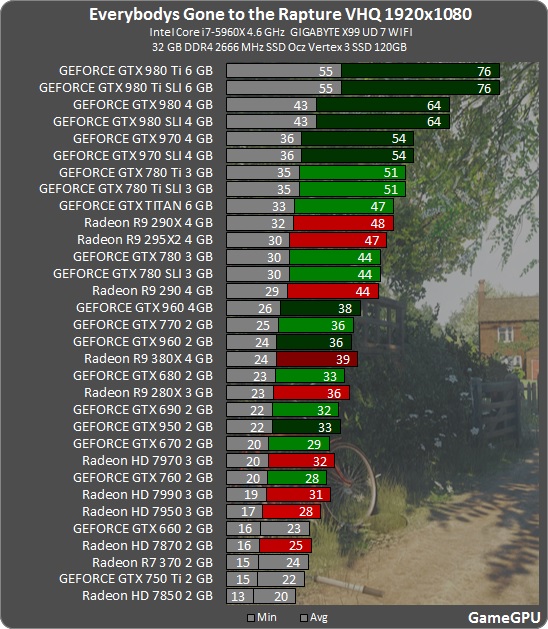
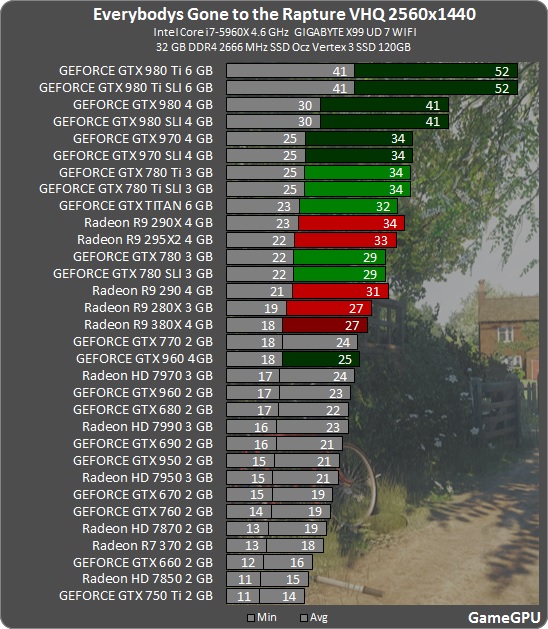
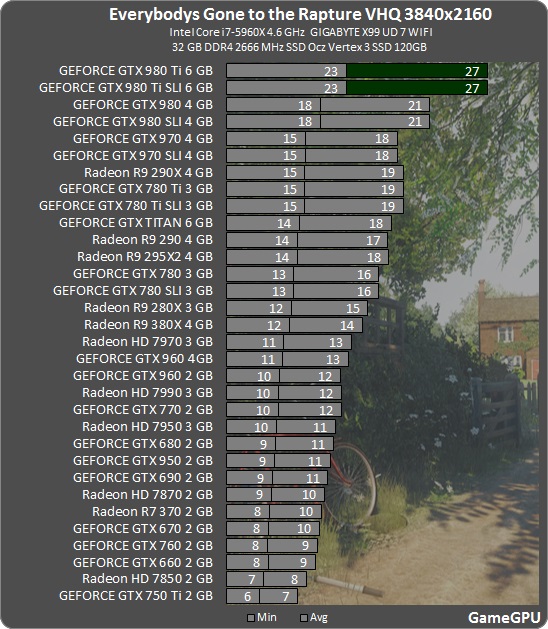
some wins for nvidia, surprisingly. time will tell if amd perf changes in a new driver/patch.

Most indie games on 3rd party engines work fine on NV and this doesn't change with drivers as it's not a driver issue, it's an engine optimization issue.
 
Top Bottom