• Hey Guest. Check out your NeoGAF Wrapped 2025 results here!

Lez talk mechanical keyboards

So... my keyboard came in with 4 broken keys. That's what I get for ordering used I guess. But there is a bright side. Seller refunded the purchase and said to just keep it.

So... how do I replace switches? I've got a Ducky Zero with Cherry Browns. Do I need to solder? I know how but I don't have any equipment near me. Could I just take it to a shop or
Geek Squad
and have them fix it for me?
Just show someone at geek squad a video of soldering it. Buy cherry switches first though.

http://www.ebay.com/itm/TG3-KBA-nBL...258887?hash=item1eb0aeb687:g:TRMAAOSwwpdW6WMg

This thing has legitimate Cherry MX Black switches, if anyone here wants a mechanical keyboard for 22$
 
Right on. I'm asking about the Chroma version of that one, though.

https://www.amazon.com/dp/B01CVOLFUG/?tag=neogaf0e-20

On that page it says:


Of course we know the bolded is a bunch of horse shit. I'm just curious if anyone ever used the Tournamant Edition or the full size Chroma and could explain how Razer's keys feel in comparison to Cherry MX.

I now own a blackwidow x chroma TE and have used cherry mx blues. In all honesty, they feel nearly identical with maybe the razer green switches having a little bit less travel.

With regards to the keyboard itself, it looks fantastic (much better in person than how it looks through photos online) and the build feels premium; I was quite surprised by this considering how plastic-y razer mice I've owned in the past have felt. The board has a good weight and the backlighting customisation is very good. One issue I did have with my initial board was a stiff shift key and the plastic piece that holds the razer logo being scratched. I contacted their CS about this and got a replacement. The whole RMA process took nearly 1.5 weeks which, frankly, is ridiculous. My replacement's keys were fine this time around but I still had a scratch on the new board on nearly the exact same spot (with the scratch orientation being rotated 90 deg); I'm a bit frustrated by it but I can live with it. I only went with a razer board due to the nearly non-existant options which it comes to TKL+RGB+clicky keyboard in the UK. My only real other option was to import the blue masterkey pro s but that would have cost £150. Considering the bw x chroma TE was £100 with a student discount, it was a no-brainer.

Overall, its a very solid option but with some minor QC issues. If you do get a dodgy board, the RMA process will be long winded but free (razer provides prepaid shipping labels). The keyboard is no where near as bad as what the razer hate circlejerk had led me to believe, initially. I can't, however, comment on the longevity of the board as I've only owned in for about 3 weeks. If it does break in the near future, you'll see me complaining here ;)
 
Either one. All things being equal, I'd probably prefer different colors, but I imagine that would be more expensive, so I'd have to make a decision weighing that against the price.

And budget?

I've been really into the Ducky series. Love their stuff and have heard nothing but good things. You can get the Ducky One in single LED or RGB on mechanicalkeyboards.com.

Or if you want a name brand there's the Logitech G610 with Red switches. It's one LED and available for 90$ or less if you get it on Jet.com with coupon code.
 
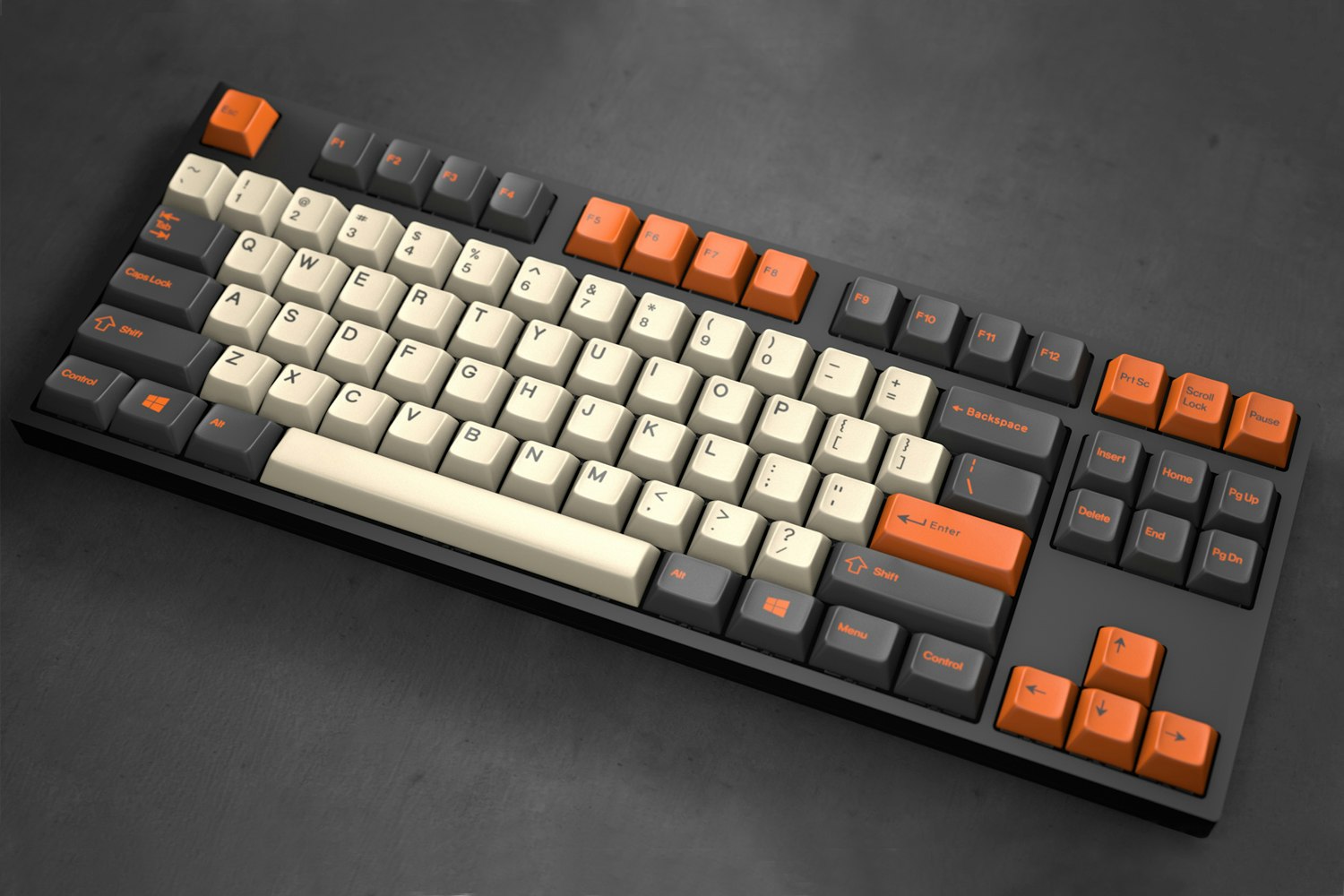
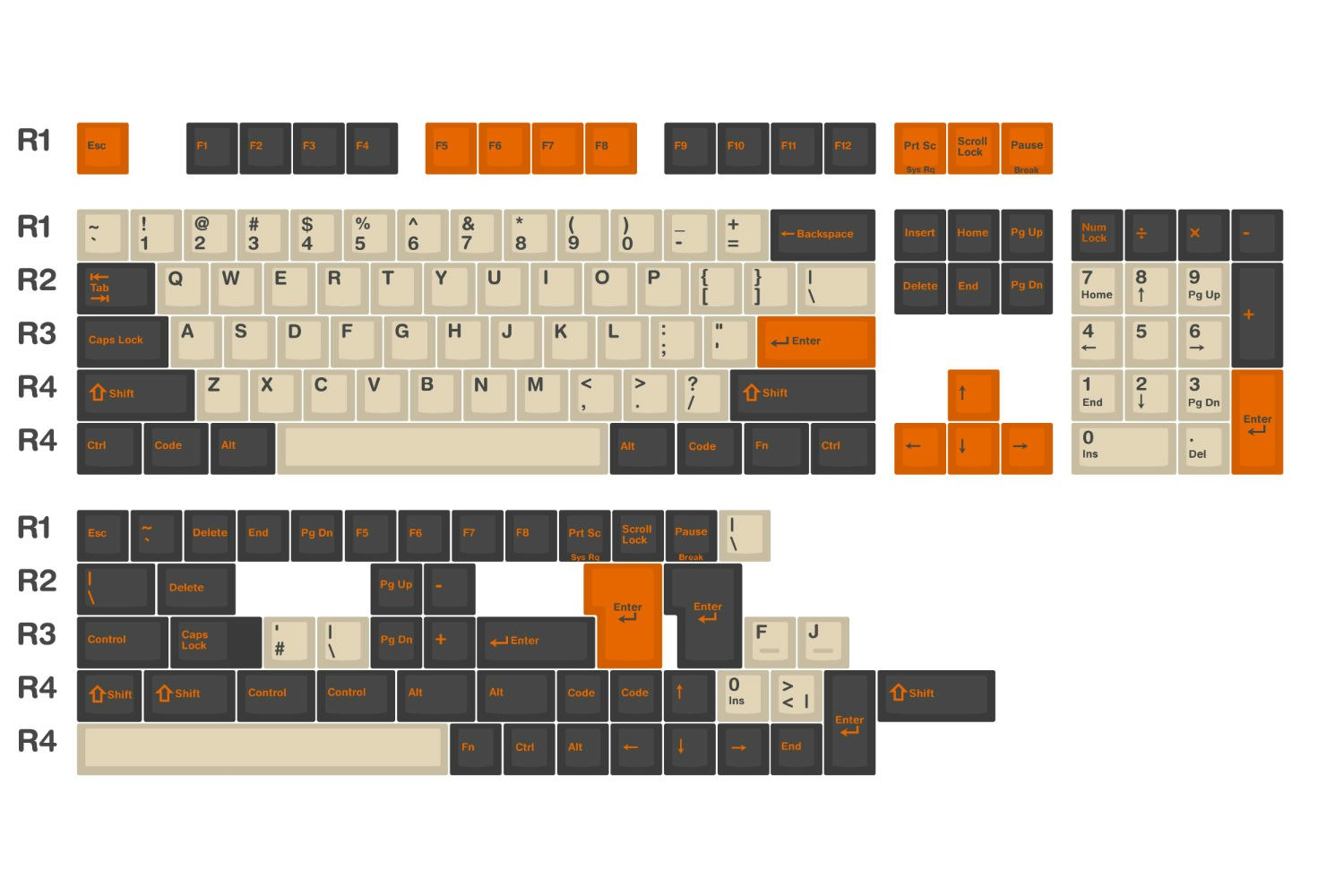
Just got these keycaps off a Mass Drop.

MD-17923_20160709095238_1b36fb53d93857f2.jpg


MD-17923_20160721144152_6acb29b9d642e5b8.jpg


Coming in October, but when it arrives my Das Keyboard is going to look very nice.
 
And budget?

I've been really into the Ducky series. Love their stuff and have heard nothing but good things. You can get the Ducky One in single LED or RGB on mechanicalkeyboards.com.

Or if you want a name brand there's the Logitech G610 with Red switches. It's one LED and available for 90$ or less if you get it on Jet.com with coupon code.
< $200

Nothing hard and fast besides that but obviously the less expensive the better.
 
To whom it may concern,

EK just received another shipment of Realforce 87U Tenkeyless 55g (White/Gray).

They had been out of stock for a while and on back order. I got ahold of one of the guys who works there yesterday and they said they should be receiving stock today and they told me that this shipment should last them about a week and a half.

I kept checking the site but nothing changed, it still said out of stock. So I called and they said they got the shipment in but nobody updated the site. They updated it while I was on the phone and I grabbed one.

This will be my first mechanical keyboard... I am so excited!

I'm going to try to do something like this when I feel confident enough,

xZ8F8DQ.jpg
 
I have a pretty old corsair mechanical, no backlit and an old raptor m4 mouse, what would be a worthwhile upgrade for both? Is a spoiling at a desthaddr chroma and maybe a black widow chroma?
 
I have a pretty old corsair mechanical, no backlit and an old raptor m4 mouse, what would be a worthwhile upgrade for both? Is a spoiling at a desthaddr chroma and maybe a black widow chroma?

Keyboard: Go for anything by Ducky or Cooler Master, these two brands have the best build quality out of all gaming brands

Ducky One, Ducky Shine 5

Cooler Master Quickfire Rapid-i, Masterkeys Pro S/L

there's also the Filco Majestouch 2, which is basically the keyboard with the best build quality but doesn't have any backlight.

for a mouse, it really depends on what you play. If you're not that picky and just want a good mouse for general pc usage and gaming, get a Logitech G502 or a Corsair M65 Pro.
 
I've been rocking a Ducky Shine Blue Key for the last 2 years as my work keyboard at home.

For gaming I picked up a SteelSeries MX800 Apex and thats "kinda" mechanical.

Both are utterly fantastic and highly recommended.
 
< $200

Nothing hard and fast besides that but obviously the less expensive the better.

Go for the Ducky Shine or Ducky One. I don't believe there's much difference except the bezels on the One are slimmer. Are you in America? MechanicalKeyboards.com is your best bet I believe.

Are you 100% on the red/black switches? Have you tried them out personally?
 
Go for the Ducky Shine or Ducky One. I don't believe there's much difference except the bezels on the One are slimmer. Are you in America? MechanicalKeyboards.com is your best bet I believe.

Are you 100% on the red/black switches? Have you tried them out personally?
I am in the US. I'm not 100%, and I don't think I really have an easy way to try them out - I was just going off that wiki link in the OP since it had a description for each switch type.
 
I am in the US. I'm not 100%, and I don't think I really have an easy way to try them out - I was just going off that wiki link in the OP since it had a description for each switch type.

Just bought my first mechanical keyboards a couple of months ago, and I thought description would be enough. Thought better of it and went to the store. At first I thought I liked the Browns, over the Reds, but then I messed around with Blues in store @ B&H and I liked the clicky sound because it reminded me of an old legacy IBM KB I had to use at my very first job.

Ended up ordering a Pok3r with blues, I wanted a 60% board for home use, but it was banged up so I had to return it. Ended up picking up MX Clears, and I liked the resistance versus the Blues, but I missed the clicky sound. Reordered a Pok3r with Blues, but I'm used to the resistance of Clears. Greens may be the best of both worlds, but I think you see where I'm going with this.

If you can try in store do it, once you go down the rabbit hole... If you want more opinions you can always check out reddit and the like, take your time and find what you're looking for.
 
I'm more concerned with the blues supposed having trouble picking up rapid-fire key presses - I'm often hammering hotkeys in the games I play.
 
I'm more concerned with the blues supposed having trouble picking up rapid-fire key presses - I'm often hammering hotkeys in the games I play.

I think you might like Clears, a bit more resistance than Browns since it sounds like you like to really slam on the keys. Ultimately, it's best to try a few out only way to truly know, but Clears are nice to type on, a bit scratchy but that's until you break it in.
 
I am in the US. I'm not 100%, and I don't think I really have an easy way to try them out - I was just going off that wiki link in the OP since it had a description for each switch type.

You could always buy things on Amazon and return them. Or try Bestbuy. They carry Logitech G610 in brown and red keys, and probably other brands with blue switches.

The blues are a bit hard to mash if you're playing games. That's actually the biggest reason why I'm switching to browns. Red were just a little too linear for me, typing just felt plain and boring. I would say try out Browns, I never had a problem with those when gaming.
 
So I'm stumped, and maybe one of you will have an idea. I purchased a Corsair K70 in Feb. First mech and I love it. I swapped out the WASD for the contoured/textured keys that came with it.

About a month ago playing PoE I couldn't use an ability. Noticed that when typing the W key was no longer working. The cap was firmly secured, and when removed the switch still works. When put back on the button would activate for awhile and then would stop once again after some use.

I swapped it out for the original key cap and everything has been fine. In comparing the keycap to every other damn keycap on the board, there is no discernable difference between this "faulty" one and the rest. No foreign objects, no blemishes, no size differences, etc. Now obviously there must be some tiny imperfection causing the cap to not cause the switch to activate, but are mech keyboards actually that sensitive to variations?

My mind is legitimately blown as to how this cap mysteriously stops working when depressed.
 
I've been on and off looking into mechanical keyboards for a number of years now and am split between blues and browns. A good friend of mine swears by blues and has been using them for years and between tapping away on his once and the one time I pressed the arrow keys on a Razer keyboard, which as I understand was likely Razer greens, I figure blues are alright.

That being said, things I have read online (including this thread) have made me question whether browns would be more appropriate. I do play games on my PC but the hysteresis seems like more of an issue on something like a rhythm game and I figure if Razer are using a very similar switch (and have sold keyboards with blues) it probably isn't a bad choice.

Also, watching videos, I much prefer the click of blue to just the dull clack of bottoming out the other switches (in fact, this video makes me think even if using dampeners I would prefer blues). So I don't think it being louder is a downside to me.


The blues are a bit hard to mash if you're playing games. That's actually the biggest reason why I'm switching to browns. Red were just a little too linear for me, typing just felt plain and boring. I would say try out Browns, I never had a problem with those when gaming.

If it wasn't for comments like this I think just typing out the above had convinced me blues were what I wanted. I would still really like to hear from people with experience on multiple switches and if people really do think blues are crap for gaming on.
 
I've just sent a webnote to Overclockers asking if I can return my Ducky One with Red switches. I've decided that typing is passable, but I want to be a lot more sure for the money mechanicals cost. I've actually more comfortable on this cheap £10 or so Microsoft keyboard I got, more likely than not because the membrane gives a bit of feedback. I think I'm going to have to do what I didn't want to do in the first place, which is buy a switch tester. Maybe browns, but maybe something a bit more pressure required like Clears. The one thing I know for certain is that I want the keyboard to be as close to silent as possible. Sorry Blue switch enthusiasts, that's just how I roll.
 
I've just sent a webnote to Overclockers asking if I can return my Ducky One with Red switches. I've decided that typing is passable, but I want to be a lot more sure for the money mechanicals cost. I've actually more comfortable on this cheap £10 or so Microsoft keyboard I got, more likely than not because the membrane gives a bit of feedback. I think I'm going to have to do what I didn't want to do in the first place, which is buy a switch tester. Maybe browns, but maybe something a bit more pressure required like Clears. The one thing I know for certain is that I want the keyboard to be as close to silent as possible. Sorry Blue switch enthusiasts, that's just how I roll.

If it helps, browns are sometimes referred to as dirty reds, and that clears are what browns should've been.
 
To whom it may concern,

EK just received another shipment of Realforce 87U Tenkeyless 55g (White/Gray).

They had been out of stock for a while and on back order. I got ahold of one of the guys who works there yesterday and they said they should be receiving stock today and they told me that this shipment should last them about a week and a half.

I kept checking the site but nothing changed, it still said out of stock. So I called and they said they got the shipment in but nobody updated the site. They updated it while I was on the phone and I grabbed one.

This will be my first mechanical keyboard... I am so excited!

I'm going to try to do something like this when I feel confident enough,

xZ8F8DQ.jpg

I have this one, but one of the rubber feet came off.. EK did not answer when I asked, do you or anyone here know about where I can get replacements? I'd like to get the exact same kind, if possible.

Are there any mechanical keyboards without all the fiddly extra buttons and keys? My current keyboard has really big keys which I love, but these days all I see are extra keys everywhere which means smaller keys in general.

I recommend Realforce.
 
I have this one, but one of the rubber feet came off.. EK did not answer when I asked, do you or anyone here know about where I can get replacements? I'd like to get the exact same kind, if possible.

I wish I knew man.

Best thing I can think of is maybe getting some of these and cutting and shaping one to size for now until you find a replacement. The reviews say they don't leave any residue when removed in case you where wondering.

Oh, and you should try calling them, they are nice people over there at EK.
 
If it helps, browns are sometimes referred to as dirty reds, and that clears are what browns should've been.

That's funny and interesting, and it's possible I'll end up agreeing with that.

Looking for a TKL Clear switch keyboard led me to WASD Keyboards' CODE line. Looks pretty damn good, and they even sell a Green switch one as well as a Clear.

Now I'm annoyed at myself for ordering a switch sampler that only has Red/Brown/Blue/Black. I'd like to try out Green with dampeners and Clear for myself.
 
To whom it may concern,

EK just received another shipment of Realforce 87U Tenkeyless 55g (White/Gray).

They had been out of stock for a while and on back order. I got ahold of one of the guys who works there yesterday and they said they should be receiving stock today and they told me that this shipment should last them about a week and a half.

I kept checking the site but nothing changed, it still said out of stock. So I called and they said they got the shipment in but nobody updated the site. They updated it while I was on the phone and I grabbed one.

This will be my first mechanical keyboard... I am so excited!

I'm going to try to do something like this when I feel confident enough,

xZ8F8DQ.jpg

Where would you get those keycaps?!
 
Where would you get those keycaps?!

The keycaps where from a MassDrop group buy. But I found out that you have to modify your topre switches in order to be able to fit them which means that you won't be able to use normal topre keycaps again... Kind of a win/lose situation. I don't know what the various keycaps have to offer feel wise yet as I am just getting into all of this so it's prob going to be a while till I try it if I ever do.

I know that massdrop, ctrlalt.io, keyclack and a few other places sell topre caps on the rare occasion. Oh, and r/mechmarket is a great place to find topre caps as well. A lot of artisans sell their stuff there and you can find topre stuff from grap/crap bags that people put up for sale there pretty often.
 
I've been on and off looking into mechanical keyboards for a number of years now and am split between blues and browns. A good friend of mine swears by blues and has been using them for years and between tapping away on his once and the one time I pressed the arrow keys on a Razer keyboard, which as I understand was likely Razer greens, I figure blues are alright.

That being said, things I have read online (including this thread) have made me question whether browns would be more appropriate. I do play games on my PC but the hysteresis seems like more of an issue on something like a rhythm game and I figure if Razer are using a very similar switch (and have sold keyboards with blues) it probably isn't a bad choice.

Also, watching videos, I much prefer the click of blue to just the dull clack of bottoming out the other switches (in fact, this video makes me think even if using dampeners I would prefer blues). So I don't think it being louder is a downside to me.


If it wasn't for comments like this I think just typing out the above had convinced me blues were what I wanted. I would still really like to hear from people with experience on multiple switches and if people really do think blues are crap for gaming on.

Don't get me wrong, it's not impossible to game on the blues. I could easily live with my blues. The main reason I switched is because I wanted a nicer looking board itself and thought I might as well change to browns while I'm at it. I like to mash really quickly, and the tactile bump on the blues makes it just a tad bit more difficult than others. I will say though, I'm going to miss the sound and feel of the blues when typing.

I've just sent a webnote to Overclockers asking if I can return my Ducky One with Red switches. I've decided that typing is passable, but I want to be a lot more sure for the money mechanicals cost. I've actually more comfortable on this cheap £10 or so Microsoft keyboard I got, more likely than not because the membrane gives a bit of feedback. I think I'm going to have to do what I didn't want to do in the first place, which is buy a switch tester. Maybe browns, but maybe something a bit more pressure required like Clears. The one thing I know for certain is that I want the keyboard to be as close to silent as possible. Sorry Blue switch enthusiasts, that's just how I roll.

I personally didn't like clears. The added pressure was a bit too much. I could probably get used to it but seemed unnecessary when Browns exist. It might help with sound though since you would probably not be bottoming out as easily.
 
Does anyone have a suggestion for the best "switch sampler" currently available? I had one for the Cherry MX switches some time ago but I'd be interested in one that includes some switches from the other manufacturers as well.

Thanks!
 
Does anyone have a suggestion for the best "switch sampler" currently available? I had one for the Cherry MX switches some time ago but I'd be interested in one that includes some switches from the other manufacturers as well.

Thanks!
Copying what I wrote earlier in the thread:

I have one of these and love it. It has nine Cherry MX switches and three Greetech ones.
 
The keycaps where from a MassDrop group buy. But I found out that you have to modify your topre switches in order to be able to fit them which means that you won't be able to use normal topre keycaps again... Kind of a win/lose situation. I don't know what the various keycaps have to offer feel wise yet as I am just getting into all of this so it's prob going to be a while till I try it if I ever do.

I know that massdrop, ctrlalt.io, keyclack and a few other places sell topre caps on the rare occasion. Oh, and r/mechmarket is a great place to find topre caps as well. A lot of artisans sell their stuff there and you can find topre stuff from grap/crap bags that people put up for sale there pretty often.

You're going to need to harvest Cherry-MX compatible stems from Cooler Master's Novatouch TKL. I've done this and it's not a difficult process (expensive though)

Personally, I'd keep the Realforce stock. SA keys feel really weird on 55g Topres, and the PBT keys that come with the HHKB and Realforce are top notch.
 
You're going to need to harvest Cherry-MX compatible stems from Cooler Master's Novatouch TKL. I've done this and it's not a difficult process (expensive though)

Personally, I'd keep the Realforce stock. SA keys feel really weird on 55g Topres, and the PBT keys that come with the HHKB and Realforce are top notch.

Yeah, I think I'm just going to wait for a massdrop custom topre set to happen. If it ever does... :(
 
After much research, I've decided to get a Cherry MX Brown keyboard. Currently eyeing the Rosewill RK9000-V2. It's $89.99 on Amazon. Any other choices in that price range?
 
Got my Ducky One with Browns in and I really like it. At first I thought man, these are kind of boring compared to the blues. This is true but it just feels smoother when typing.

My biggest issue with it is that the spacebar makes this really high pitched clink sound when you press it. It's a completely different sound than any other key. Anybody know why? Feels super cheap compared to the rest of the board and is the loudest key by FAR

After much research, I've decided to get a Cherry MX Brown keyboard. Currently eyeing the Rosewill RK9000-V2. It's $89.99 on Amazon. Any other choices in that price range?

Logitech G610 in Browns
 
I've been on and off looking into mechanical keyboards for a number of years now and am split between blues and browns. A good friend of mine swears by blues and has been using them for years and between tapping away on his once and the one time I pressed the arrow keys on a Razer keyboard, which as I understand was likely Razer greens, I figure blues are alright.

That being said, things I have read online (including this thread) have made me question whether browns would be more appropriate. I do play games on my PC but the hysteresis seems like more of an issue on something like a rhythm game and I figure if Razer are using a very similar switch (and have sold keyboards with blues) it probably isn't a bad choice.

Also, watching videos, I much prefer the click of blue to just the dull clack of bottoming out the other switches (in fact, this video makes me think even if using dampeners I would prefer blues). So I don't think it being louder is a downside to me.


If it wasn't for comments like this I think just typing out the above had convinced me blues were what I wanted. I would still really like to hear from people with experience on multiple switches and if people really do think blues are crap for gaming on.


I have been agonizing over blues vs. browns but don't really care about the impact on gaming, I want a better keyboard for typing. I'm fairly certain neither will make me worse at games, and I'm not good enough, or play enough competitive games for it to matter.

Now with the RGB Pok3rs in stock, I need to pull the trigger on one. I want to take my keyboard to work and I'm a bit worried that the blues will be too loud/a annoying for my co-workers. On the other hand I've seen several videos that show the decibel range while typing and the typist bottoms out more on the browns so they end up louder than the blues. I was at Fry's the other day and the browns I tried seemed just a bit mushy where the blues were nice and crisp. I also called mechanicalkeyboards.com today to see if the Pok3r RGB's were in and asked their opinion, the guy said "They are both like a bowl of ice cream, but the click on the blues are like sprinkles on top. I like my ice cream with sprinkels, if you are buying a mechanical keyboard you should go with the click. Maybe you don't like sprinkles though.".

My OCD has gone far enough on this and I think coming from rubber domes I'm sure I will love either one. I preferred the blues when I was at the store and I'm just going to go ahead and order the Pok3r with blues. I've put off buying a nice keyboard for to long. Good luck on your decision.
 
I have been agonizing over blues vs. browns but don't really care about the impact on gaming, I want a better keyboard for typing. I'm fairly certain neither will make me worse at games, and I'm not good enough, or play enough competitive games for it to matter.

Now with the RGB Pok3rs in stock, I need to pull the trigger on one. I want to take my keyboard to work and I'm a bit worried that the blues will be too loud/a annoying for my co-workers. On the other hand I've seen several videos that show the decibel range while typing and the typist bottoms out more on the browns so they end up louder than the blues. I was at Fry's the other day and the browns I tried seemed just a bit mushy where the blues were nice and crisp. I also called mechanicalkeyboards.com today to see if the Pok3r RGB's were in and asked their opinion, the guy said "They are both like a bowl of ice cream, but the click on the blues are like sprinkles on top. I like my ice cream with sprinkels, if you are buying a mechanical keyboard you should go with the click. Maybe you don't like sprinkles though.".

My OCD has gone far enough on this and I think coming from rubber domes I'm sure I will love either one. I preferred the blues when I was at the store and I'm just going to go ahead and order the Pok3r with blues. I've put off buying a nice keyboard for to long. Good luck on your decision.

The blues absolutely will be too loud in your office. I would hate it if my coworker had blues.
 
The blues absolutely will be too loud in your office. I would hate it if my coworker had blues.
I have seen several videos and one written review showing the browns are actually louder. Is it the sound level, or the higher pitched click that would be the problem?
 
You're going to need to harvest Cherry-MX compatible stems from Cooler Master's Novatouch TKL. I've done this and it's not a difficult process (expensive though)

Personally, I'd keep the Realforce stock. SA keys feel really weird on 55g Topres, and the PBT keys that come with the HHKB and Realforce are top notch.

:/ *sigh*

Yeah, gutting a Novatouch just for the stems is really expensive... but there is hope that CM will eventually release replacement stems.

Still, I got a Realforce 87U Silent, which has stems with more travel to compensate for the o-rings, so... I'll probably stick with my keyset forever, and maybe just buy a red ESC key, lol.
 
I have seen several videos and one written review showing the browns are actually louder. Is it the sound level, or the higher pitched click that would be the problem?

They both will bottom out unless you are SUPER careful. But the blues have that click that is very, very annoying. Yes the browns can be loud as well when bottoming out, but that sound just isn't as grating. I have read many people say their officemates hate their blue switches.
 
I just purchased a Logitech G900 (a high end wireless gaming mouse) and I would like a high end wireless mechanical keyboard to go along with it. Is there anything like that out there?
 
They both will bottom out unless you are SUPER careful. But the blues have that click that is very, very annoying. Yes the browns can be loud as well when bottoming out, but that sound just isn't as grating. I have read many people say their officemates hate their blue switches.

This is kind of killing it for me, I'm a heavy typist and had settled in browns until I tried them. They are really soft and while they are supposed to be tactile I couldn't feel it. I guess I will have to go back to Fry's to see if I can live with browns. I really wanted that RGB Pok3r and it seems like I'll end up with a backlit Pok3r with Cherry MX clears, or something else, if I can find boards with other switches to try.
 
Help!

Something happened to my Ducky. Keys on the left side, mainly Tab and Caps Lock, will not "stay pressed" when I push them down. In FPS hitting Tab will bring up the score overlay, holding it will keep the overlay there, right? If I do that the overlay keeps appearing/disappearing like I'm hitting the button a million times a second.

I use Caps Lock for Push to Talk and it is the same. People say it sounds super choppy, like it is getting cut off and on super quickly.


Its a great keyboard. Is there a way I check try and fix this or is it time to look for a new one?
 
This is kind of killing it for me, I'm a heavy typist and had settled in browns until I tried them. They are really soft and while they are supposed to be tactile I couldn't feel it. I guess I will have to go back to Fry's to see if I can live with browns. I really wanted that RGB Pok3r and it seems like I'll end up with a backlit Pok3r with Cherry MX clears, or something else, if I can find boards with other switches to try.

The tactile bump on the MX Browns isn't that nice. It´s a bit scratchy and they don't have enough weight to them. The best tactile switch besides Topre is the Zealio but that means you'd have to build yourself a custom 60% board.
 
This is kind of killing it for me, I'm a heavy typist and had settled in browns until I tried them. They are really soft and while they are supposed to be tactile I couldn't feel it. I guess I will have to go back to Fry's to see if I can live with browns. I really wanted that RGB Pok3r and it seems like I'll end up with a backlit Pok3r with Cherry MX clears, or something else, if I can find boards with other switches to try.

The browns are definitely noticeably softer than blues. Honestly if you want that tactile feel, you won't be satisfied with browns. Maybe if you tried reds you would be able to appreciate the tactile feel of the browns. But if you are in an office environment...I just can't recommend blues. They are annoying lol.
 
The browns are definitely noticeably softer than blues. Honestly if you want that tactile feel, you won't be satisfied with browns. Maybe if you tried reds you would be able to appreciate the tactile feel of the browns. But if you are in an office environment...I just can't recommend blues. They are annoying lol.
I went back to Fry's with an open mind to see if I really had to have the Cherry MX blues. I spent about an hour there, I'm sure they think I'm nuts. The first thing I noticed was the browns I typed on last time were Kailh.

I asked if I could try a board with Cherry MX browns, there was one that was clearly opened so no big deal. Still not as crisp as the blues, I spent a lot of time typing on the board with the Cherry browns and they are not as soft as my initial impression. I feel like the Kailh switches were softer, and the Cherry MX brown switches do have a slight catch, scratch is not inaccurare, that I didn't feel on the Kailh Browns. I spent time typing on a couple keyboards with Cherry MX Reds also, having spent the last decade or more typing on rubber domes keyboards I doubt I would truly dislike any of the mechanical switches. Thanks for convincing me to go back and spend more time with the different keyboards. I'm sure I'll be perfectly happy with a Pok3r RGB with Cherry MX Browns.
 
I just received my mechanical keyboard. http://www.newegg.com/Product/Product.aspx?Item=N82E16823816015
I know there's a RGB version but those cost like $129. So I rather save some money and got this instead. Very solid built.

Prior to getting this I got the sampler keys to try out varies mx switches. Good thing my local bestbuy has a logictech G910 ORION SPECTRUM RGB for me to try out their Romer-G switches.

I highly recommend people to get the sampler https://www.amazon.com/gp/product/B00N6DXTW4/?tag=neogaf0e-20 to try the mx switches in person.

Just from reading is not enough. My first reading impression leaded me to believe either the Romer-G or brown switches was the one I'm looking for but after trying it out, I find the red switches are more comfortable for me.

Like some mention, those brown switch has a tactile bump but that bump felt like a scratch/or worn out membrane keys if pressed slowly. That leaded me into either getting red switch or romer-G (from logictech). Romer-G almost felt like brown and but more silent thus I end up with red switch that has a smooth downward pressing feel.
 
I went back to Fry's with an open mind to see if I really had to have the Cherry MX blues. I spent about an hour there, I'm sure they think I'm nuts. The first thing I noticed was the browns I typed on last time were Kailh.

I asked if I could try a board with Cherry MX browns, there was one that was clearly opened so no big deal. Still not as crisp as the blues, I spent a lot of time typing on the board with the Cherry browns and they are not as soft as my initial impression. I feel like the Kailh switches were softer, and the Cherry MX brown switches do have a slight catch, scratch is not inaccurare, that I didn't feel on the Kailh Browns. I spent time typing on a couple keyboards with Cherry MX Reds also, having spent the last decade or more typing on rubber domes keyboards I doubt I would truly dislike any of the mechanical switches. Thanks for convincing me to go back and spend more time with the different keyboards. I'm sure I'll be perfectly happy with a Pok3r RGB with Cherry MX Browns.

You're welcome! Funny thing is that the Browns on my Ducky One aren't very tactile at all, not even scratchy. When I compare it to my coworkers CM Stealth MX Browns they are noticeably more tactile. Very strange. I was expecting it to be more tactile. There is still the catch if I type slowly, but I just don't feel it when typing.

Hmm, I was thinking of getting a WASD CODE keyboard as my first mechanical keyboard.

But for the UK layout they just have the 'Clear' type, not brown.
Apparently these require a stronger press?
Thoughts?

http://www.wasdkeyboards.com/index.php/products/code-keyboard/code-105-key-uk-mechanical-keyboard.html

Codes are solid boards. From my limited time with Clears, they are tactile like browns but require more force. I don't think I could get used to it, my fingers would get tired. It's definitely noticeable
 
I went back to Fry's with an open mind to see if I really had to have the Cherry MX blues. I spent about an hour there, I'm sure they think I'm nuts. The first thing I noticed was the browns I typed on last time were Kailh.

I asked if I could try a board with Cherry MX browns, there was one that was clearly opened so no big deal. Still not as crisp as the blues, I spent a lot of time typing on the board with the Cherry browns and they are not as soft as my initial impression. I feel like the Kailh switches were softer, and the Cherry MX brown switches do have a slight catch, scratch is not inaccurare, that I didn't feel on the Kailh Browns. I spent time typing on a couple keyboards with Cherry MX Reds also, having spent the last decade or more typing on rubber domes keyboards I doubt I would truly dislike any of the mechanical switches. Thanks for convincing me to go back and spend more time with the different keyboards. I'm sure I'll be perfectly happy with a Pok3r RGB with Cherry MX Browns.

have you try the green switches? those are similar clicky feel as blue but more sensitive and perhaps better for double tapping more?
think razer blackwidow chroma uses them.
 
Top Bottom