• Hey Guest. Check out your NeoGAF Wrapped 2025 results here!

Battlefield 1 PC Performance Thread

Bleh my performance is still complete shit. I stood somewhere where i was getting 40 fps. Changed resolution scale to 200% and was still getting 40 fps. It's completely CPU bound and pretty much unplayable to me at least with 64 players, I've yet to try 40.

I really can't upgrade my CPU at the moment and it just sucks because I spent a lot on this game and premium, the beta ran super well for me and I played over 50 hours of it. Now I can't even be bothered to play these 10 hours because it's so bad..

I'm running this with a overclocked 4670K as well and have had no issues. What type of performance are you aiming for exactly?
 
I'm running this with a overclocked 4670K as well and have had no issues. What type of performance are you aiming for exactly?
I just want a solid 60 fps. I can't get it no matter what I try. I tried overclocking as high as possible without crashing and also back to default speed and still frame drops every 2 seconds in 64 player conquest, even down into the 30s sometimes.
No other game gives me this kind of problem, just usually I know I'm a little lower than most gtx 1080 benchmarks because of CPU but it's never an issue because 60 fps is always still easily achievable. Not in this game for me though.
I did a DDU clean and reinstall of drivers and nothing changed, am 100% sure it's a CPU cause.
 
I'm running this with a overclocked 4670K as well and have had no issues. What type of performance are you aiming for exactly?

I just want a solid 60 fps. I can't get it no matter what I try. I tried overclocking as high as possible without crashing and also back to default speed and still frame drops every 2 seconds in 64 player conquest, even down into the 30s sometimes.
No other game gives me this kind of problem, just usually I know I'm a little lower than most gtx 1080 benchmarks because of CPU but it's never an issue because 60 fps is always still easily achievable. Not in this game for me though.
I did a DDU clean and reinstall of drivers and nothing changed, am 100% sure it's a CPU cause.

This version of the game is more demanding on CPU than beta was. I'm running i5 6600K @ 4.2GHz and game uses ~20% more of my CPU now than in beta. Running game with 60FPS lock has CPU around ~85%-90% and uncapped FPS pushes CPU to 100%.

This when on 64p CQ server.
 
I just want a solid 60 fps. I can't get it no matter what I try. I tried overclocking as high as possible without crashing and also back to default speed and still frame drops every 2 seconds in 64 player conquest, even down into the 30s sometimes.
No other game gives me this kind of problem, just usually I know I'm a little lower than most gtx 1080 benchmarks because of CPU but it's never an issue because 60 fps is always still easily achievable. Not in this game for me though.
I did a DDU clean and reinstall of drivers and nothing changed, am 100% sure it's a CPU cause.

What settings are you playing on?
 
This version of the game is more demanding on CPU than beta was. I'm running i5 6600K @ 4.2GHz and game uses ~20% more of my CPU now than in beta. Running game with 60FPS lock has CPU around ~85%-90% and uncapped FPS pushes CPU to 100%.

This when on 64p CQ server.
Yeah I understand that it's just a bummer that even consoles are having a better experience in 64 players with still some frame drops I know, but I don't think as bad as mine and my cpu should be way above the console at least to be able to do solid 60 fps. I put Resolution scale to 25% and it still couldn't keep a solid 60 fps.
It's always at 99% or 100% usage.
I checked for other processes eating any of the cpu resources and couldn't find any.
 
Yo - we have the exact same system. What resources are you using to OC your CPU? I've OC'd GPUs before but all of the guides I saw for CPU stuff seem way more intimidating. Still running at stock as a result.

I'm overclocking directly in the BIOS. I use CPUID's HWMonitor to check temps & voltage, and test with Prime95.

I had a stable clock of 4.2 at 1.175 volts, but the temps were a little higher than I wanted. I decided to revert back to stock and order some new thermal paste and can re-seat my heatsink when that comes in the mail on saturday.
 
DX12 introduced terrible stuttering, so I have it back on DX11. I guess I'm just going to have to accept the lower framerates in large servers, other than that the game runs great.

Upgrading my computer wasn't on my short list, but I think it might be getting close to that time.
 
Yeah I understand that it's just a bummer that even consoles are having a better experience in 64 players with still some frame drops I know, but I don't think as bad as mine and my cpu should be way above the console at least to be able to do solid 60 fps. I put Resolution scale to 25% and it still couldn't keep a solid 60 fps.
It's always at 99% or 100% usage.
I checked for other processes eating any of the cpu resources and couldn't find any.

I've actually been wondering the same thing. How can consoles run this behemoth on their ancient CPUs?

Anyway, I've read that Shadowplay can severely limit CPU performance in BF1. Do you by chance have it active and running? It might be the source of your bottleneck.
 
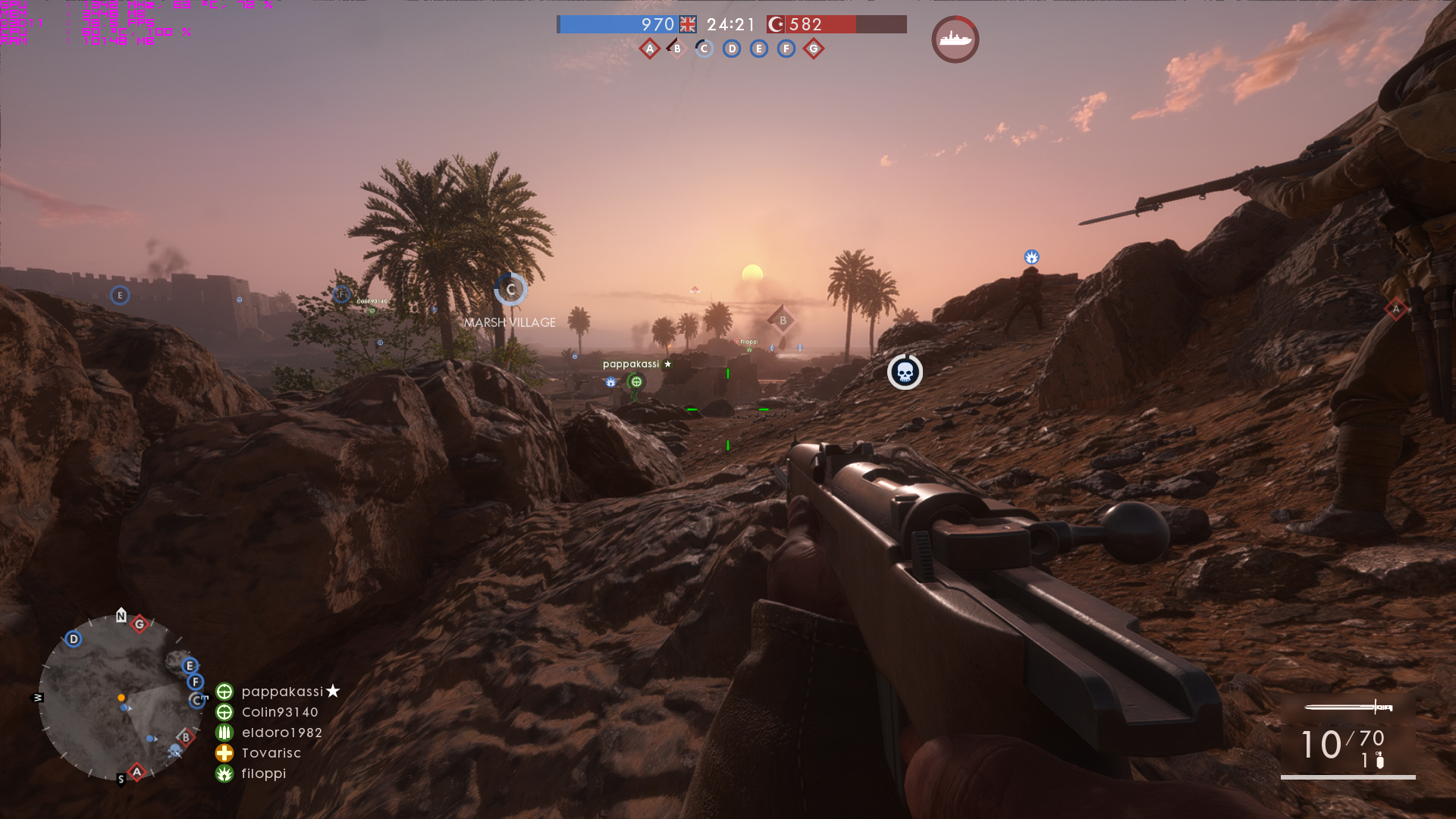
What average performance looks like when 1080p @ Ultra with;
i5 6600K @ 4.2GHz
16GB
980Ti
bf1trial_2016_10_14_0enl30.png
It uses 10GB RAM???=O
 
Plays super-smooth here, but had a C2D in the first 5 minutes of the campaign. It's kinda ironic, as the games other people have problems with, I never do, and this seems a complete switch! lol

I'm hoping it was just related to my internet connection being screwy at the time. Maybe it kicks you to desktop if your connection drops. Might be related to the copy protection I guess.
 
I just want a solid 60 fps. I can't get it no matter what I try. I tried overclocking as high as possible without crashing and also back to default speed and still frame drops every 2 seconds in 64 player conquest, even down into the 30s sometimes.
No other game gives me this kind of problem, just usually I know I'm a little lower than most gtx 1080 benchmarks because of CPU but it's never an issue because 60 fps is always still easily achievable. Not in this game for me though.
I did a DDU clean and reinstall of drivers and nothing changed, am 100% sure it's a CPU cause.

What CPU/clock?

EDIT: I checked your post history and found your specs. That doesn't make sense. My i5 3570k at 4.4ghz has me at 60fps with some drops but nothing like you're describing. Is 4.2ghz your limit? Try to get it to 4.4 and see what happens??? That ain't right.

What should I expect with 980ti 6600K (4.4ghz) at 1440p? Thanks!

60fps 99% of the time on ultra
 
Just changed everything to medium but texture filtering to ultra to get as close to 100fps (or more). Its hard getting good performance with a GTX970 on 1440p.
 
I just want a solid 60 fps. I can't get it no matter what I try. I tried overclocking as high as possible without crashing and also back to default speed and still frame drops every 2 seconds in 64 player conquest, even down into the 30s sometimes.
No other game gives me this kind of problem, just usually I know I'm a little lower than most gtx 1080 benchmarks because of CPU but it's never an issue because 60 fps is always still easily achievable. Not in this game for me though.
I did a DDU clean and reinstall of drivers and nothing changed, am 100% sure it's a CPU cause.
What is your RAM speed?
 
DX12 introduced terrible stuttering, so I have it back on DX11. I guess I'm just going to have to accept the lower framerates in large servers, other than that the game runs great.

Upgrading my computer wasn't on my short list, but I think it might be getting close to that time.

DX12 mode sucks for with a 4790k and an OCed 980 ti.

DX 11 it runs like a dream on ultra @ 3440x1440
 
DX12 mode sucks for with a 4790k and an OCed 980 ti.

DX 11 it runs like a dream on ultra @ 3440x1440

I've got a similar setup. What performance are you getting? If it's 60 on ultra I'll be happy... those Asus and Acer 21:9 gsync/faster refresh rate monitors are just a bit out of reach :(
 
Does anyone have more in-depth knowledge about the resolution scale slider?

I run 1080p native - I know that 200 % on RS should be closeish to 4k - but what is 150 % on RS? 125 % 175 %? :)
 
I've got a similar setup. What performance are you getting? If it's 60 on ultra I'll be happy... those Asus and Acer 21:9 gsync/faster refresh rate monitors are just a bit out of reach :(

I'm getting solid 60 fps all around, have it vsynced so I don't know how much higher it goes.

In some very rare ocasions it dips a little, but not even udner heavy fog/dust and itnense firefights do I ever notice it as a bad thing.

It runs like a dream.
 
Anyone tested using DX12 with a 1080 GTX? Is it an improvement?
I have a GTX 1080 and DX12 does noting for me.
So what is the consensus on CPU usage? Most people getting 90-100% or is it just older processors only?
i5 3570 k @ 3.4 GHz and my CPU usage is 100%. I get random drops to ~45 fps for a few seconds when there is a lot of chaos happening in the game. But sometimes when there is a lot of chaos happening, it doesn't occur. Besides that, the majority of the time my fps is ~85-120 depending on the map.
 
Also seeing very high CPU usage on my i5-2500K @ 4.4 GHz in 64 player games. Lowest it ever goes is approx 80% usage on all cores with it occasionally using up 100% in hectic moments, causing frame drops.

DX12 seemed to improve this slightly, less moments of 100% load but that mode has its own issues with stutter, GPU utilisation drops and minor input lag. The stutters seemed to mainly occur at the start of games and progressively got better the longer the game went though.

I'm still holding out on game updates and the eventual game ready NVIDIA driver release (on a GTX 1070 which never seen more than 80% usage on Ultra at 1440p) to improve things, but this could well be the first non-AI heavy game that has brought this CPU to its knees.
 
I'm overclocking directly in the BIOS. I use CPUID's HWMonitor to check temps & voltage, and test with Prime95.

I had a stable clock of 4.2 at 1.175 volts, but the temps were a little higher than I wanted. I decided to revert back to stock and order some new thermal paste and can re-seat my heatsink when that comes in the mail on saturday.

Thanks man! I used OC Genie in the BIOS to get it up to 4.0 but wasn't happy with the temps. Lowering the votalge might help me there as I was definitely running above 1.175.

Hitting 50 while idle and Prime95 took me to the 90s. I shut that down real quick. I have an aftermarket cooler with new thermal paste but temps are not great. Didn't bother to see what I was getting beforehand at stock clocks, will check that once I'm home. Maybe the new cooler isn't seated right? Who knows. Might just be a voltage thing.
 
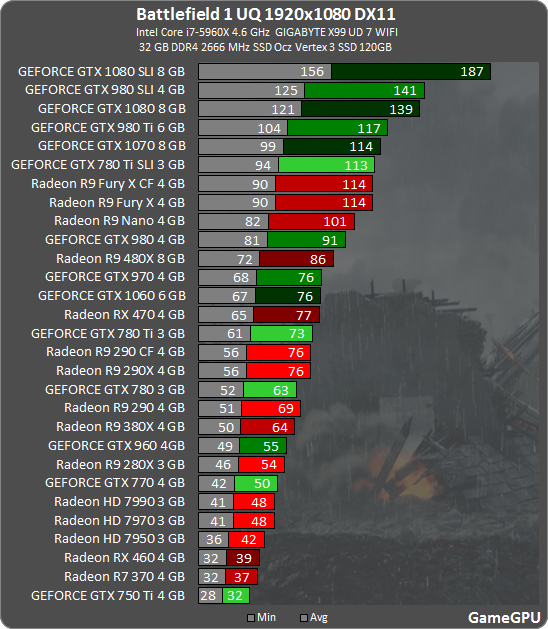
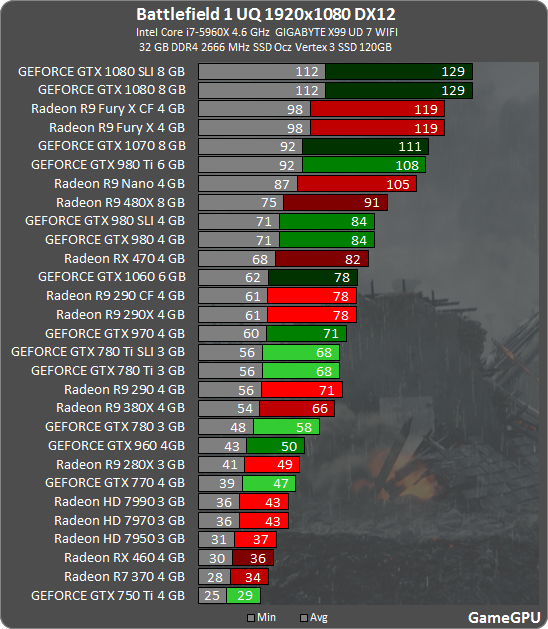
The Fury X in DX12 beats the 980ti in DX11.

117 vs 119 fps is well withing a margin of error and hardly something which you would notice without measurement. I call this "even".

And I was talking about stuff like this: Battlefield 1 review: benchmarks met 13 videokaarten

KUcc.png


Basically DX12 is still shit in BF1, less than in beta but still doesn't really worth using, even on Radeons.

And by anyone, you mean it is worth it for rx470/480/390 users, for example :P

Not really as you can see above. GameGPUs results aren't the only benchmark on the planet, and they tend to change between systems and benchmarking scenes.
 
Sorry if it has already been answered, didn't go through the thread

Is Ultra the maximum setting in this game (excluding SSAA)? or is there some setting that's not been set to max in ultra?
 
I've had my graphics drivers crash twice now on St. Quentin Scar (GTX 680, 372.90) but not on any other maps. It's very strange. I've put a good two hours in on the other maps and the two times I've gotten Scar, they crashed about a minute in.
 
Used console command to uncap FPS to 120, then used in-game FPS counter.

i3-6300 3.80ghz
16GB DDR4
GTX 970, latest drivers

1920x1080, high settings, floats around 60fps with some minor dips (~5-10fps) in borderless windowed mode. I enabled the netgraph commands that show CPU and CPU usage, but couldn't make sense of them.
 
Top Bottom