

• Hey Guest. Check out your NeoGAF Wrapped 2025 results here!

1080p Content on a 4k T.V.?

Status
Not open for further replies.

Cmerrill

You don't need to be empathetic towards me.
I'm in the market for a new TV(like many others)and I'm trying to find some info on what my current blu-ray collection will look like if I happen to buy a new 4k TV.

I'm sure loads of people here have experience, so my question(s) is, how does it hold up compared to a native 1080p display?
Should I just buy a 1080p TV or does a 4k TV and its upscaling look at least as good as a 1080p display? Do you need a special blu-ray player to upscale them or will the TV do it for you if played from a PS4?
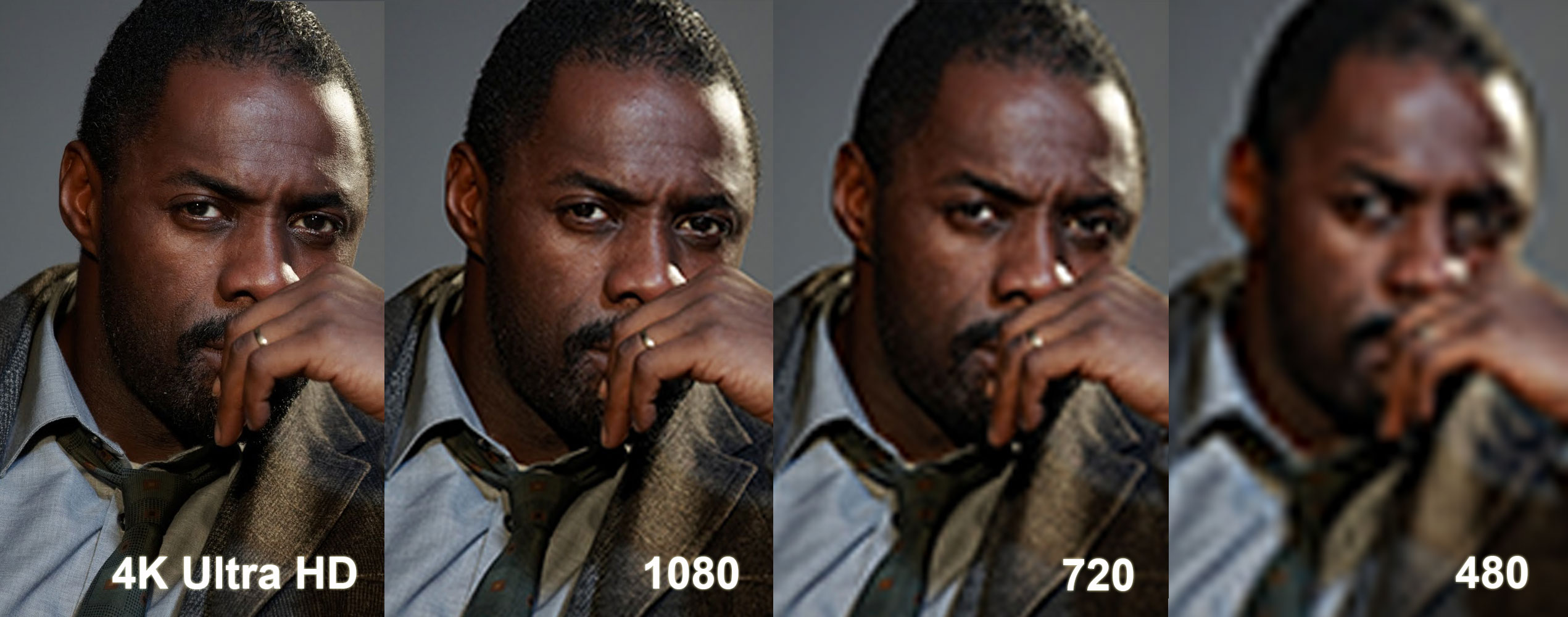
Luther-Resolution-Large.jpg
 
What I want to know is if there is really much delay to worry about playing 1080p on 4K displays
 
It looks fine. The scaling from 4K to 1080p is exactly 2:1 in both directions, so you'll still get a 1080p image, where each pixel is actually 4 pixels.
 
I'm in the market for a new TV(like many others)and I'm trying to find some info on what my current blu-ray collection will look like if I happen to buy a new 4k TV.

I'm sure loads of people here have experience, so my question(s) is, how does it hold up compared to a native 1080p display?
Should I just buy a 1080p TV or does a 4k TV and its upscaling look at least as good as a 1080p display? Do you need a special blu-ray player to upscale them or will the TV do it for you if played from a PS4?

Luther-Resolution-Large.jpg

There is no way that image is accurate.
 
Unless you're going for an 80 inch or above screen OP, 4K is a waste of time and the huge price difference is not worth the slight upgrade. 1080p looks just as good at anything smaller than that.

3D flopped so now they are trying it with 4K and curved TV screens. No thanks.
 
Unless you're going for an 80 inch or above screen OP, 4K is a waste of time and the huge price difference is not worth the slight upgrade. 1080p looks just as good at anything smaller than that.

3D flopped so now they are trying it with 4K and curved TV screens. No thanks.

My buddy works for Samsung and is getting me 60% off a new tv, so I will be paying much less than its retail value.
 
Unless you're going for an 80 inch or above screen OP, 4K is a waste of time and the huge price difference is not worth the slight upgrade. 1080p looks just as good at anything smaller than that.

3D flopped so now they are trying it with 4K and curved TV screens. No thanks.

...what?

4K has made huge differences on laptop and desktop monitor sizes. Granted, those are closer, but, still...
 
Unless you're going for an 80 inch or above screen OP, 4K is a waste of time and the huge price difference is not worth the slight upgrade. 1080p looks just as good at anything smaller than that.

3D flopped so now they are trying it with 4K and curved TV screens. No thanks.

Wat
 
It looks fine. The scaling from 4K to 1080p is exactly 2:1 in both directions, so you'll still get a 1080p image, where each pixel is actually 4 pixels.
While potentially some TVs may offer a 4:1 mode like this, that is not the norm. They extrapolate data, and the results can vary.
 
I have a 4k Samsung and I can see the difference the up scaling offers on 1080p content. Is it life altering? No...but it does look nice and I have rented some 4k movies and they were gorgeous. My vote is if the budget is there then go for it.
 
I have 4K, it's not a huge improvement, but it's nice. With the release of the M series today, 4k has gotten even cheaper. So you might as well.

The 2015 Vizio M series are in and I think we have a bang-for-buck winner for gaming tvs:

They have a wide variety of sizes, 4K resolution, local dimming 18.5 millisecond input lag (perfect for gaming) and best of all, they are reasonably priced!

43" M43-C1 $599
http://www.bestbuy.com/site/vizio-m...D=2&siteID=Qn3VZ7ygV30-_cL5hBzdatf6ZFF51931IA

50" M50-C1 $899
http://www.bestbuy.com/site/vizio-m...D=2&siteID=Qn3VZ7ygV30-d0U4ZFJSgUojXMlcC1X4sg

55" M55-C2 $999
http://www.amazon.com/gp/product/B00T63YW38/?tag=neogaf0e-20

60" M60-C3 $1499
http://www.amazon.com/gp/product/B00T63YMGK/?tag=neogaf0e-20

65" M65-C1 $1699
http://www.bestbuy.com/site/vizio-m...D=2&siteID=Qn3VZ7ygV30-msGSNa5io2a723_uwwJTRw

70" M70-C3 $2199
http://www.amazon.com/gp/product/B00T63YVAM/?tag=neogaf0e-20

80" M80-C3 $3999
http://www.bestbuy.com/site/vizio-m...D=2&siteID=Qn3VZ7ygV30-Cof4dvVn5A1Dg0eLm6wyEg


Again, these tvs have been tested with the Leo Bodnar device to have 18.5ms input lag, which would make them better than all the 2014 Sony's, save the (much more expensive) W950B, which was tested at a similar 17.8ms input lag.

http://www.rtings.com/info/input-lag-tvs
 
That's an awesome option, is that standard in all 4k TV's? Or at least mid to high level ones?

I am not sure about other brands, the model in the pic is a Panasonic l65wt600 I got in 2013, id assume Panasonic's current models have the same feature.
 
I am not sure about other brands, the model in the pic is a Panasonic l65wt600 I got in 2013, id assume Panasonic's current models have the same feature.

Awesome. You find it looks just as good at a 1080p display? better?
 
Awesome. You find it looks just as good at a 1080p display? better?

Yes it is just like a 1080p display in that mode, but I actually rarely use that mode. I let the display upscale to 4k as the upscaling is really good and straight 1080p looks soft in comparison.
 
Yes it is just like a 1080p display in that mode, but I actually rarely use that mode. I let the display upscale to 4k as the upscaling is really good and straight 1080p looks soft in comparison.
Considering how variable HDTV interpolation can be I think it's great that there's at least one model giving people the option.
 
Here's a comparison between 4K, FHD, HD and SD images, cropped to 720x480 for each image.

4kcomparisoncropcds2d.png


I searched for sharp 4K wallpapers on Google, then reduced the image size to 1920x1080, 1280x720, and 720x480, then stretched them back to 3840x2160. All image processing was done in Photoshop CS6.
 
Here's a comparison between 4K, FHD, HD and SD images, cropped to 720x480 for each image.

4kcomparisoncropcds2d.png


I searched for sharp 4K wallpapers on Google, then reduced the image size to 1920x1080, 1280x720, and 720x480, then stretched them back to 3840x2160. All image processing was done in Photoshop CS6.
Interesting. Really sells you on the fact you don't need a 4K TV.
 
4k definitely looks better, but my primary concern is how will my 1080p blu-rays look on a 4k tv If they're upscaled to 4k, will they look better than a native 1080p display displaying the same movies??
 
Unless you're going for an 80 inch or above screen OP, 4K is a waste of time and the huge price difference is not worth the slight upgrade. 1080p looks just as good at anything smaller than that.

3D flopped so now they are trying it with 4K and curved TV screens. No thanks.

Next thing you're going to post that bullshit ass chart that relates screen size, viewing distance, and resolution.
 
Interesting. Really sells you on the fact you don't need a 4K TV.

Actually you're right. I remember the jump from SD to HD and it was awe-inspiring.

The jump from HD to FHD was impressive, but less so than the previous bump in resolution.

Now from FHD to QHD I'm really starting to see diminishing returns.

If you sit six feet away from a 50" plasma and watch SD content, then switch to HD content, the difference is night and day.

Switch from HD to FHD on the same screen at the same viewing distance, and it's not nearly as noticeable.

Given the above, I think if, given the same circumstances, the bump from FHD to QHD is nearly imperceptible.

Honestly, I prefer having FHD 3D rather than QHD. At least with 3D I can bob and weave my head and say "hey, the perspective is shifting!"
 
Here's a comparison between 4K, FHD, HD and SD images, cropped to 720x480 for each image.

4kcomparisoncropcds2d.png


I searched for sharp 4K wallpapers on Google, then reduced the image size to 1920x1080, 1280x720, and 720x480, then stretched them back to 3840x2160. All image processing was done in Photoshop CS6.

Yeah 1080p looks fine!
 
Here's a comparison between 4K, FHD, HD and SD images, cropped to 720x480 for each image.

4kcomparisoncropcds2d.png


I searched for sharp 4K wallpapers on Google, then reduced the image size to 1920x1080, 1280x720, and 720x480, then stretched them back to 3840x2160. All image processing was done in Photoshop CS6.

Perfect. The original picture is hilarious.

I own a 4KTV and you are not missing much because there's barely any 4K content and the difference is small.
 
Anyone here have their PC connected to their 4K TV? Specifically ones with HDMI 2.0. That seems like the main source of 4K content as of now as long as you have a capable graphics card(or two)
 
Status
Not open for further replies.
Top Bottom