

• Hey Guest. Check out your NeoGAF Wrapped 2025 results here!

144Hz gaming monitors, drop the knowledge on me please

  • Thread starter Thread starter Deleted member 325805
  • Start date Start date
D

Deleted member 325805

Unconfirmed Member
I've been thinking about grabbing a 1080p, 144Hz gaming monitor for awhile now, and you can get a BenQ for around £200 which is reasonable but I have a couple of questions.

. Do you need 144FPS to benefit from it?
. If you don't reach 144FPS without dips will it be choppy, like it is when you can't maintain 60fps on a 60Hz monitor?
. I'm guessing you still need VSync as it isn't GSync?
. Can you lock it to 60Hz if you can only get 60FPS in the game you're playing?

I know it'll be great for CS GO, and I get like 300 - 400FPS in that, but I'm more worried about games like the Witcher 3 which I can't get 144FPS in.
 
1. Well, Windows will always be running at 144Hz which is like a buttery dream. You will enjoy just doing things on your computer quite a bit more. If we're talking about games, then in a sense, yes, you obviously need to render the frames in order to display them. However, more on this at a later point...

2. A dip from 144 to 120 is definitely less noticable than from 60 to, say, 45. It will still only feel completely right when it's locked at the maximum framerate, however. Still, I'd always prefer slightly varying framerates above 100 over locking at 60 personally.

3. So, V-Sync is a bit interesting. There's a lot less noticeable tearing on high framerates, and I think the input lag from V-Sync is also diminished, but don't quote me on this. However, in regards to V-Sync, one of the main advantages of a high refresh rate display is that there are more divisions the V-Sync can lock onto. So instead of dropping all the way from 60 to 30 or whatever a regular screen would do, it will only drop from 144 to 120. Even if you're running at 60 there are still more intervals it can drop to instead of dropping all the way. At least I think that's how it works - wouldn't mind being corrected by more technically knowledgeable posters.

4. Yes, just select 60Hz in Windows and make sure the game doesn't override this. In the case of Witcher 3 you can just opt to lock the game to 60 in the options though, so no need for this.
 
No, anything more than 60 will still see benefit. But shoot for the stars, man.

Not really, that only happens sub-60 because the difference in fluidity between 60 and 45 is massive. Between 120 and 90 is not. Sure, you might notice a change but it's not the pain inducing choppiness of sub-60.

V-sync is evil so don't worry about it.

Yes, but why would you? I can't see any benefit from lowering the monitor's refresh rate. By all means limit the frame rate of the games, but leave the poor monitor alone.
Edit: Especially when you forget to change it back to full refresh rate. After hundreds of hours in CS:GO at this, I hopped on one day and wondered why it felt like a fucking slideshow.
Turns out that some of the configuration I had been doing earlier with my monitor setup had stepped down the refresh rate of my 144hz monitors to 60. That's the only downside of 120/144hz monitors, smooth framerates are relative.
 
Thanks guys, I won't be able to pull the trigger until September but I definitely think I'll go for it. The BenQ I linked seems to be the one people suggest for CS GO especially so I'm going to keep my eye on it and see if it drops in price any time soon.
 
Thanks guys, I won't be able to pull the trigger until September but I definitely think I'll go for it. The BenQ I linked seems to be the one people suggest for CS GO especially so I'm going to keep my eye on it and see if it drops in price any time soon.

I have that monitor and it's quite nice considering the price. I have mine set to 120 Hz (60 fps stutter on 144 Hz) and it's really nice to get 120 fps in Pillars of Eternity, Wasteland 2 and other similar games with a lot of mouse control. It's certainly a big difference from 60 fps.

Obviously, The Witcher 3 and similar games isn't going to run at those framerates, but that's no problem. Personally I play games suited for a controller on my TV anyway, so I'm not even trying to get 120 fps in those games.

1. Well, Windows will always be running at 144Hz which is like a buttery dream. You will enjoy just doing things on your computer quite a bit more.

And this.
 
I've been using a 24 BENQ 144hz for gaming (sc2 and CS:GO) both running well above 144fps, and its amazing!, once going to 144hz, there's no going back!

NOTE: there is only a very slight difference between 120hz and 144hz
 
Vsync problems are very rare on a 120hz monitor based on my experience. I can only think of two games in recent memory I played that ran into issues, Stanley Parable and RE5 (on a GTX 970). Generally if I'm running a game over 100fps I'm gonna start downsampling.

My roommate has a 1440p, 144hz monitor with g-sync, but he never uses g-sync. He uses the strobing thing that reduces motion blur instead (which is awesome).
 
Thanks guys, I won't be able to pull the trigger until September but I definitely think I'll go for it. The BenQ I linked seems to be the one people suggest for CS GO especially so I'm going to keep my eye on it and see if it drops in price any time soon.
I have that same exact model I believe. I quite like it a lot. Color could be better, yes, but it isn't terrible. It is closer to better color accuracy than most. But 144hz is amazing and butter smooth.

Edit: it also has a 1ms response time. It is godly.
 
Also, yes, if you can't keep the framerate and you don't have a GSYNC monitor, there will be stuttering. If I play a game at 120 fps for example and it drops even 1-2 fps, there will be stutter. That's just how it is. Some people don't notice it though, but I definitely do.
 
I've been thinking about grabbing a 1080p, 144Hz gaming monitor for awhile now, and you can get a BenQ for around £200 which is reasonable but I have a couple of questions.

. Do you need 144FPS to benefit from it?
. If you don't reach 144FPS without dips will it be choppy, like it is when you can't maintain 60fps on a 60Hz monitor?
. I'm guessing you still need VSync as it isn't GSync?
. Can you lock it to 60Hz if you can only get 60FPS in the game you're playing?

I know it'll be great for CS GO, and I get like 300 - 400FPS in that, but I'm more worried about games like the Witcher 3 which I can't get 144FPS in.

you can lock it to 60Hz but why would you? there's no benefit

the other day I decided to screw around and see the difference, it's disgusting.
 
1. Do you need 144FPS to benefit from it?

2. If you don't reach 144FPS without dips will it be choppy, like it is when you can't maintain 60fps on a 60Hz monitor?

3. I'm guessing you still need VSync as it isn't GSync?

4. Can you lock it to 60Hz if you can only get 60FPS in the game you're playing?
1. Nope.

2. Nope

3. Not at all you don't need any sync.

4. Yes you can choose between 60 100 120 and 144. But you should always keep it 144Hz

I've had my 144Hz monitor for a little over a year now and its been great.
 
I've had my LG 24GM77 144Hz monitor for around a month so far and it's been great, all around significant improvement over my old 21.5" ASUS VH226H monitor that's now my secondary monitor when needed. The only time I've notice any screen tearing was in Arkham Knight (which is locked at 30 without INI editing) when it got defaulted to 60Hz from my disabling and later enabling it in the NVIDIA control panel. Haven't actually played a game yet to actually reach 144FPS but no issues with it below that. A couple games I've played seem to have a 100FPS limit in place.

Got my monitor from Amazon for less than $300 after a small refund due to Amazon's lowering its price briefly a couple weeks after I bought it.
 
you can lock it to 60Hz but why would you? there's no benefit

the other day I decided to screw around and see the difference, it's disgusting.

Well in my brain locking it to 60Hz at 60fps would be smoother than 144Hz at 60fps, but if that's not the case then there is no reason to lower the refresh rate. It would only be for games where I couldn't maintain 144fps without dips.

Also, yes, if you can't keep the framerate and you don't have a GSYNC monitor, there will be stuttering. If I play a game at 120 fps for example and it drops even 1-2 fps, there will be stutter. That's just how it is. Some people don't notice it though, but I definitely do.

I'm one of those people that would notice, I notice when I drop a few frames from 60fps. That's why I asked about locking it to 60Hz for games where you can get more than 60fps.
 
Well in my brain locking it to 60Hz at 60fps would be smoother than 144Hz at 60fps, but if that's not the case then there is no reason to lower the refresh rate. It would only be for games where I couldn't maintain 144fps without dips.


I'm one of those people that would notice, I notice when I drop a few frames from 60fps. That's why I asked about locking it to 60Hz for games where you can get more than 60fps.

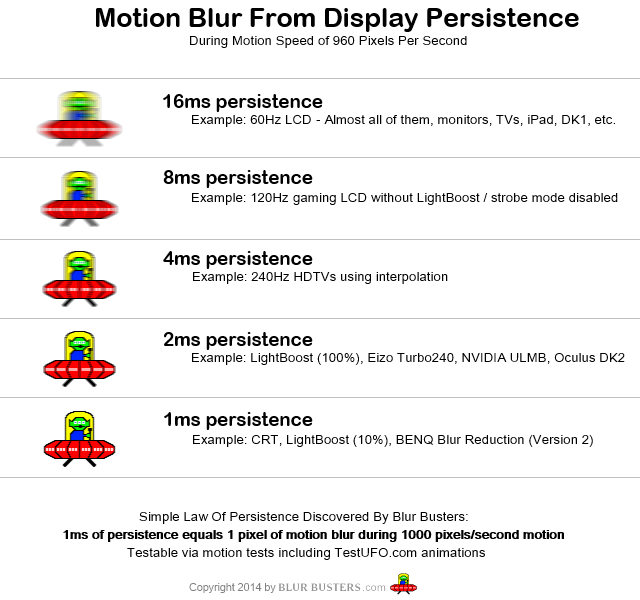
Even if you're running the game at 60 fps, do not change the display to 60 Hz. Doing so badly affects the motion resolution. In that scenario, you're better off running the display at 120 Hz, which divides evenly by 60 and should provide the best experience possible.

motion_blur_from_persistence.png
 
Even if you're running the game at 60 fps, do not change the display to 60 Hz. Doing so badly affects the motion resolution. In that scenario, you're better off running the display at 120 Hz, which divides evenly into 60 and should provide the best experience possible.

Yup, this is what you should do. The screen should be 120Hz and the game locked to 60 fps. No need to lock the screen to 60Hz.
 
First post was very informative and gives you pretty much everything you need to know to get you started. I upgraded to a 144hz Monitor a few months ago (BenQ XL2411z) and I couldn't go back. EVERYTHING is smoother, there's definitely less input lag and there's seemingly less tearing without V-Sync. One of the best gaming upgrades I've ever made.
 
There's no going back.

This is literally the only reason why I haven't jumped on a 144Hz panel yet. I'm afraid I'll get addicted and I'll only want to play games at 144 fps, which isn't something you can easily get with modern games unless you seriously buckle down on GPUs (which I don't have the funds for).
 
This is literally the only reason why I haven't jumped on a 144Hz panel yet. I'm afraid I'll get addicted and I'll only want to play games at 144 fps, which isn't something you can easily get with modern games unless you seriously buckle down on GPUs (which I don't have the funds for).

The highest I've played at is 120 FPS, because that is my monitor's max. But I can still handle games being played at 60 and yes, even sometimes 30. I really only like the 120 FPS for first person games where fast reaction times can mean the difference between killing someone or dying. I feel like I'm at a disadvantage playing at 60 or even less.

RPGs on the other hand... I don't mind playing in the 30-60 range. Especially if the visuals are so damn gorgeous that I don't want to compromise on them. 30 does feel kinda slow though. Luckily the only time I'm limited to 30 FPS right now is running around in the Witcher 3 at 5120x2880. Solid 60 at 4K :)

I think jumping to a 144hz gsync monitor is going to feel like a dream. I just need to wait for a monitor that doesn't have a 50% chance of arriving without a shit ton of quality defects (I'm looking at you, Acer XB270HU).
 
This is literally the only reason why I haven't jumped on a 144Hz panel yet. I'm afraid I'll get addicted and I'll only want to play games at 144 fps, which isn't something you can easily get with modern games unless you seriously buckle down on GPUs (which I don't have the funds for).

I was partially kidding. Like the guy above, 60FPS is still great if you prefer high IQ. I cannot go back to 30FPS at this point though.

G-Sync + 144FPS + 1440p is the real point of no return.
 
144hz is great but then you might spend all your time trying to reach it with underpowered hardware like me :V
 
I am on 120hz and I sometimes find it hard to play games @ 60 (but you have to for the extra pretty/demanding games). I can scarcely imagine what a 144hz Gsync one must be like (or ULMB!).
 
mkenyon talked me into a 144hz monitor and I'm sure glad I took the plunge. What an excellent piece of equipment.
 
They're fantastic things.

I'll take the leap to a g-sync/freesync at some point when they aren't more than twice the cost of a 144hz monitor here.

And when I have the horsepower to run something above 1080p at that framerate.
 
I am on 120hz and I sometimes find it hard to play games @ 60 (but you have to for the extra pretty/demanding games). I can scarcely imagine what a 144hz Gsync one must be like (or ULMB!).
tbh, I don't notice much of a difference between 120 Hz w/ strobing and 144 Hz w/ strobing or G-Sync. I'd say that G-Sync in the 90Hz+ range feels a lot like straight 120Hz though, so that's nice.
mkenyon talked me into a 144hz monitor and I'm sure glad I took the plunge. What an excellent piece of equipment.
\m/

Best PC upgrade possible right now. Better than SSD, IMO.
 
I jumped in blind and got a 24" AOC G2460PG for about £300. 144hz, G-Sync, 1080p. I adore it. So glad I got it. Like the thread title says: G-Sync is the god-tier gaming upgrade.

Someone said V-Sync isn't necessary, but I disagree. G-Sync turned itself off once and I noticed it instantly and everywhere. When you've played without it, for example in GTA5, any sort of tearing is awful. It's shorter tearing at 120fps, but it's tearing nonetheless.

For a while I thought 30 was unplayable, and I've made posts saying as such, but recently I disabled 60fps in Dark Souls (not just the toggle, I'm sure there's a difference) and it's okay. Your brain tends to get used to it and fill in the gaps.

Like above, I have a hard time telling between 90 and 120fps. Which is only natural, faster framerates have diminishing returns. But the overall smoothness when you're going fast, for example driving in Sleeping Dogs, is fantastic.

But seriously, I love framerates above 60.

120fps + ULMB is lovely in something like HL2, if you have the 1ms/1pixel mode mentioned in an image above it will be even better. It's so great.
 
Even though my current monitor can do 120hz, I decided to try the 144hz ROG Swift. The reason being that I can just pick one up from Microcenter rather than waiting for the Acer Predator to ship out to me with numerous RMA-worthy quality defects...

I mostly just wanted to see how gsync worked. And holy crap, the difference in The Witcher 3 is phenomenal. That game is affected by variable framerate hitching more than any other game I've ever played, so I always have to cap it at my typical minimum framerate. But with gsync it felt great uncapped.

Sadly, the TN panel looks so bad sat right next to my QNIX, which probably isn't the best IPS (well, "PLS") screen out there. So I think I'm giving that monitor back tomorrow and waiting for Amazon or Microcenter to get the Acer in stock... sigh.
 
I debated long and hard between ~300 CAD for 1080p 144hz and ~600 CAD for 1080p 144hz GSync

I decided to yolo the gsync a few months back and its the best decision I have ever made gaming wise.

Before gsync worked in windowed applications, sometimes I would have games accidentally become fullscreen-windowed and disable my gsync.. and it looks like absolute garbage ..relatively.

Do I hate the price paid? Yes. Would I ever want to go back to non-variable refresh rate?HELL NO.

The ignorant will say, oh you got 144hz you don't need vsync/gsync now. This is terribly wrong.

144hz just means your screen will refresh and tear a frame in half that much more often, granted the tears themselves will tend to be "quicker",.

and of course vsync has input lags and stutters, and if you drop below 60 with vsync god help you.
Anyway, my advice, do whatever it takes to get yourself into adaptive refresh rates.
It is indescribably smooth/CLEAR, and when I turn it off its like going to the dark age (even still with 144hz).

I will try to sum it up like this: I have a gtx 970 and a 1080p 60 screen. After having experienced gsync, I would rather spend 300$ on gsync, instead of a second gtx 970 (not to say I won't sli later on potentially).
The witcher 3 at 40-80 fps with gsync would be a MUCH more enjoyable experience than whatever sli would add (with no gsync) imo.
 
Since y'all seem very knowledgeable, answer me for this question:

I have 2x cheap-ass Packard Bell 24" 1080p TN panel screens, 60hz.
I'm getting a BenQ XL2411Z 144hz 1080p 24" for really cheap from a friend and i want to set these all screens for triple screen layout on iRacing.com (racing simulator).

Now, i would believe it would be the best to run the BenQ at this layout using the 60hz mode as the other screens are 60hz and i dont think i can run it at 120fps + that could cause flickering in 60hz screens. Is this true?
 
I'm currently looking for a 1440p 144hz gsync iOS monitor, sadly it seems the Acer released has poor qc :( hoping Asus takes abit more care
 
Even though my current monitor can do 120hz, I decided to try the 144hz ROG Swift. The reason being that I can just pick one up from Microcenter rather than waiting for the Acer Predator to ship out to me with numerous RMA-worthy quality defects...

I mostly just wanted to see how gsync worked. And holy crap, the difference in The Witcher 3 is phenomenal. That game is affected by variable framerate hitching more than any other game I've ever played, so I always have to cap it at my typical minimum framerate. But with gsync it felt great uncapped.

Sadly, the TN panel looks so bad sat right next to my QNIX, which probably isn't the best IPS (well, "PLS") screen out there. So I think I'm giving that monitor back tomorrow and waiting for Amazon or Microcenter to get the Acer in stock... sigh.

Wait for the Asus Swift this fall that will be IPS+144hz. Ive had the the OG Swift since release and like it a lot. Need IPS tho. When i go back to my dell u3011 the PQ difference is very obvious.
 
Wait for the Asus Swift this fall that will be IPS+144hz. Ive had the the OG Swift since release and like it a lot. Need IPS tho. When i go back to my dell u3011 the PQ difference is very obvious.

I'm torn between the IPS Swift and their upcoming 60 Hz 4k IPS gsync model.

In either case, my GTX 670 isn't enough to drive modern games anywhere near 144 Hz or anywhere near 4K resolution, so it would be a choice of high refresh rates in older games and on the desktop vs. 4K resolution in some older games and much more usable desktop space for everyday productivity
and lack thereof.

Waiting for Pascal to upgrade the GPU since IPS gsync-anything is the #1 priority for me at the moment. After seeing the current Swift in person, running the Heaven benchmark so smoothly on a lowly GTX 760...there is nothing else.
 
I'm torn between the IPS Swift and their upcoming 60 Hz 4k IPS gsync model.

In either case, my GTX 670 isn't enough to drive modern games anywhere near 144 Hz or anywhere near 4K resolution, so it would be a choice of high refresh rates in older games and on the desktop vs. 4K resolution in some older games and much more usable desktop space for everyday productivity
and lack thereof.

Unless Windows 10 handles desktop scaling a lot better than earlier versions, be careful about 4K. Earlier versions don't do a very good job.

If you're interested in more desktop space for Windows, I find 1440p or 1600p much preferable to 1080p.
 
Unless Windows 10 handles desktop scaling a lot better than earlier versions, be careful about 4K. Earlier versions don't do a very good job.

If you're interested in more desktop space for Windows, I find 1440p or 1600p much preferable to 1080p.

Good point. I was actually thinking of eschewing DPI scaling altogether but reading text at 4K on a 28" screen might not be easy on the eyes in the long run.

Plus, I would be rotating out an older 1650 x 1050 monitor that I could EDIT: use for productivity/browsing, not gaming in tandem with a 1440p monitor. Decisions, decisions...
 
1. No, you can benefit from it with anything higher than 60fps. Even 75 fps feels a lot different from 60.

2. You will notice a good difference from 60-144 fps. If it's not consistent frames it does feel a little weird, but not nearly as bad as 30-60.

3. Ever since I got my 144hz tearing is nonexistent. If it's there you really gotta be looking for it.

4. Yes, I guess this depends on the monitor, but mine certainly can be locked to 60hz.
 
Wait for the Asus Swift this fall that will be IPS+144hz. Ive had the the OG Swift since release and like it a lot. Need IPS tho. When i go back to my dell u3011 the PQ difference is very obvious.

Oooooo. That's tempting. I like everything about the ROG Swift except for the TN panel. In games like The Witcher 3, I can choose which monitor to show the game on and when I swtich it to my IPS, it just looks so much better. There's also this weird side effect of everything looking more aliased on the ROG, even though they're both 27" and don't seem to have any sharpness setting that I can detect.

I guess I can wait. Maybe. I'm not very patient...
 
Good point. I was actually thinking of eschewing DPI scaling altogether but reading text at 4K on a 28" screen might not be easy on the eyes in the long run.

Plus, I would be rotating out an older 1650 x 1050 monitor that I could EDIT: use for productivity/browsing, not gaming in tandem with a 1440p monitor. Decisions, decisions...

Personally I would never buy a display for PC gaming that's limited to 60 Hz. Great, you get good resolution for still images and it's OK for low motion, but as soon as something moves at a somewhat decent rate, all those pixels are smeared across the display. Your effective resolution is cut considerably because motion resolution is poor at 60 Hz.
 
Top Bottom