• Hey Guest. Check out your NeoGAF Wrapped 2025 results here!

240Hz vs 144Hz vs 120Hz vs 60Hz

Look at this video from Microsoft Research that demonstrates how good a fast response time looks. You can clearly see the lag in real time.
Microsoft Research Applied Sciences Group: High Performance Touch 100-1 ms difference

1000 fps = 1 ms
100 fps = 10 ms
60 fps = 16 ms
30 fps = 33 ms
20 fps = 50 ms
10 fps = 100 ms

86% of Gamers prefer 120 hz displays

Higher refresh rate displays can also reduce stutter and judder for movies.

low latency is one of the things we lost in the move from resistive to capacitative displays, in addition to precision.
 
Honestly, that sounds like you are bad at hitting a good price/performance spot in you PC component selection.
Unless you live somewhere where everything costs literally twice as much as in Europe or the US, because I'd say a very good gaming PC is more in the ~1250 range.

I live in the Middle East and getting a GTX 1080, i7 7700k equipped PC cost me 25% more than what it would have cost me in the US.

That said, i got mine almost at release, and if i where to buy one today i'd go for the S2417DG instead.
If you get the S2716DG, Check out this thread! You'll find a lot of profiles there!
Also, Dells return and warranty policies are top notch, just wanted to add that.
http://www.overclock.net/t/1577511/dell-s2716dg-1440-144-hz-g-sync-owners-thread/3500_100

Thanks for the info. And I'm of similar opinion and wish I could get a 24 inch screen but unfortunately there are no 1440p options for me right now.
 
Thanks for the info. And I'm of similar opinion and wish I could get a 24 inch screen but unfortunately there are no 1440p options for me right now.

I'm positive that it's on its way.... I hope. I think...

Another thing that i should mention regarding the S2716DG.
In the early revisions they all had a "design fault" which resulted in what the community started calling "butt marks". Essentially after about 3-5 days of normal usage you could see what looked like butt marks in low contrast environments.
This caused a lot of people (myself included) to exchange it promptly, which only resulted in getting another screen that would do the same a couple days later. That's how i know that Dells return policy is top notch, i exchanged my monitor like 3-4 times. The last time the exchange took longer because the whole EU was out of S2716DG's (this was right after release), and on a whim i took it out the box again and started it. This was after two weeks i believe, and the butt marks was gone completely. There's tonnes of people on overclock.net that's experienced the same thing. So, if you buy it and get a panel that you love in terms of gamma/colours and what not, but you get that issue... Give it time, it will 100% go away with time. The only people on overclock.net complaining about it (still) is those that haven't actually kept the monitor long enough.
Why this happens? I dunno (it's something about the backlight "settling in"), and newer revisions should (hopefully) not have this kind of issue at all.
So don't freak out if it happens, and if it doesn't settle after a couple of weeks, you still have like at least a year of free pickup-and-replace warranty (or w/e it's called) from Dell. So exchanging it wouldn't be an issue at all.

EDIT:
Sorry, i forgot. I'm derailing the thread. If you have any questions regarding S2716DG, feel free to PM me!
 
But... 60FPS is a major sacrifice to visual quality. I'd argue that most games look better on High @ 100FPS than Ultra @ 60FPS, easily. The framerate makes a much bigger visual difference than most graphical settings in modern games.

I see what you're saying, but playing at 60fps isn't a "sacrifice" to most PC gamers because they've never experienced the high-framerate alternative. Perhaps someday higher framerates will be common enough for that not to be the case.

it's niche, sure, but, so is high-end PC gaming in general — it's not like expensive GPUs never get discussed around these parts. if anything, i'm surprised proper high-refresh-rate monitors don't get talked about more, given that they're one of the few good ways to actually make use of something like a 1080 Ti right now.

frankly the relentless focus on achieving 4K at 30fps and regular console graphics "settings" from sony and microsoft is what's turned me back onto this. i like the idea of console spec bumps but the implementation seems like a total waste of power to me when i can get better, smoother results at 1440p on PC.

That's true, and I totally agree regarding the emphasis on 4K. I still can't believe we're already pushing in that direction when we don't even have games that perform well at 1080p across the board yet.

Honestly, that sounds like you are bad at hitting a good price/performance spot in you PC component selection.

Unless you live somewhere where everything costs literally twice as much as in Europe or the US, because I'd say a very good gaming PC is more in the ~1250 range.

To your first paragraph, probably. Based on which I'll avoid looking dumb by trying to address your second paragraph.

If that happens every time, don't you think there might be some truth to it?
Also, if you quote a price in Australian dollars, just calling it "dollars" unqualified on an international forum is slightly misleading since that alone is already a ~30% difference.

Yup, that's on me.

I doubt AUD prices for PC components are that much different than NZD prices, but really, I don't think a 2500USD PC can't even hit 60FPS unless you bought a really bad prebuilt.

Two notes to clarify: the machine was around $2,500 AUD, so more like $1,900 in USD. This was back in 2012 too, at which time it ran new releases really well. Not sure I could've pushed for 120fps without dialing way back on the visual settings though.
 
I see what you're saying, but playing at 60fps isn't a "sacrifice" to most PC gamers because they've never experienced the high-framerate alternative. Perhaps someday higher framerates will be common enough for that not to be the case.

Not sure what you're getting at here. With that logic there's no reason to ever upgrade anything as you could just choose not to experience something better than what you have.
 
This is why I love and really miss plasma technology. 60fps on a plasma is much closer to the look and feel of 120fps on an LED monitor than it is to 60fps on an LED monitor. Comparing 60/60 on each technology side by side shows a start difference in quality of the motion.

On my Asus 144hz monitor, diminishing returns start to happen at around 110fps and 120/144 is virtually identical.

I haven't seen a 240hz monitor in person yet, that would have to be crazy fluid.
 
One thing about that smooth mouse movement everybody's talking about here...

I'm at 60hz at the moment and even on high DPI mouse (a few different types) I always feel that those smallest, almost pixel perfect movements are jerky. Like there are small jumps, it's just not as smooth as I'd like.

Does higher refresh rate improve that in windows?

Polling rate is 1000 Hz, so it's not that.
 
Not sure what you're getting at here. With that logic there's no reason to ever upgrade anything as you could just choose not to experience something better than what you have.

high frame rates and g-sync in particular are kind of difficult to explain to someone who hasn't experienced them, and 60fps really will feel "good enough" to most. but the ability to push resolution or higher graphics settings is plainly different — you can see the effect in screenshots.

i think if you take 1080p/60 as a baseline, 1440p/100+ is a much bigger upgrade than 4K/30-60, but i see why the former is a harder sell.
 
The video kind of misses the point by slowing the footage down - of course you'll see more information between refresh rates because you've expanded the threshold it comes in. If you ran it in real-time on an actual 240hz monitor, you probably wouldn't notice a discernible difference in the higher refresh rates.

Very much a case of diminishing returns.
 
What I find weird is if you run any hz lower than your monitor native max refresh it will look like stuuter.
For example, I got a 144hz monitor A and if I run 60hz on it, I'll notice the stuttering. But if I use a native max 60hz monitor B and run 60hz, then I don't see the stuttering.
Anyone else that have a 144hz and 60hz monitor do this test for me too? I use the strobing ufo website to check.
 
I could never tell the difference between 60 and 120. At 144 and up I notice things getting smoother.

This makes no sense.

One thing about that smooth mouse movement everybody's talking about here...

I'm at 60hz at the moment and even on high DPI mouse (a few different types) I always feel that those smallest, almost pixel perfect movements are jerky. Like there are small jumps, it's just not as smooth as I'd like.

Does higher refresh rate improve that in windows?

Polling rate is 1000 Hz, so it's not that.

Yes, massively.
 
high frame rates and g-sync in particular are kind of difficult to explain to someone who hasn't experienced them, and 60fps really will feel "good enough" to most. but the ability to push resolution or higher graphics settings is plainly different — you can see the effect in screenshots.

i think if you take 1080p/60 as a baseline, 1440p/100+ is a much bigger upgrade than 4K/30-60, but i see why the former is a harder sell.

Yeah, with high refresh rates in particular you really can't describe it to someone who hasn't seen it in person. A small part of me regrets getting my 144Hz monitor because now 60Hz looks so choppy by comparison.
 
Most monitors out there max out at 60Hz refresh rate so you won't know the difference unless you watch slo-mo youtube comparison vids.

I can't wait to get GSync but those prices.

k8765j7h45h45.gif
 
I'm still stuck deciding between the S2716DG and the PG279Q, both look like great monitors but I'm not sure if just the IPS panel justifies an additional 200 euros.
 
The point of G-Sync is that the refresh rate matches the framerate, instead of always running at the maximum.
What you're probably seeing is the difference between a really fast TN panel and whatever you had before, as well as the much better controlled overdrive that G-Sync panels have compared to most other displays.

No, you are misunderstanding what I am saying. When you engage gsync with a high refresh rate monitor it only updates the image at the frame rate the game is running at, but the monitor scans out the image at your monitors highest refresh rate. So with a 240hz monitor the image is scanned out at 240hz when the image changes regardless of the actual frame rate of the game. This leads to a large reduction in blur when the image is moving.

Basically:

60hz max refresh = 16.6 ms scan out
120hz max refresh = 8.3 ms scan out
240hz max refresh = 4.2 ms scan out

The faster you scan the image out the less blur caused by persistence.

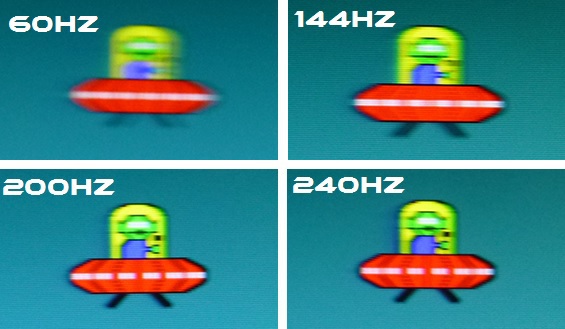
Here is the PG258Q and the motion blur at each scan rate:

pg258q_pursuit_1vxsqs.jpg
 
https://www.youtube.com/watch?v=Q1cmhZs1P54

Just shows really well here why 60fps is not that smooth when you compare it to anything over 100fps.

Then consoles and 30fps, im not gonna even start.

I don't know why this video keeps making the rounds. If you take 240fps and slow it down by a factor of 20, then you're looking at 12fps. Slowing down frame rates is not a good way to judge how they look at normal speed, because otherwise you're just looking at slow frame rates.
 
I can force my projector to output 120hz via some voodoo in Windows that makes it think its getting a frame packed 3D signal.

It looks smoother but not that much smoother. 60 fps is a pretty good sweet spot imo.
 
I don't know why this video keeps making the rounds. If you take 240fps and slow it down by a factor of 20, then you're looking at 12fps. Slowing down frame rates is not a good way to judge how they look at normal speed, because otherwise you're just looking at slow frame rates.

it's showing the update frequency. Otherwise you can't see anything above the monitor's refresh rate which maxes out at 60 for most people right now.
 
Didn't Valve had some study that 90 fps was to point where you can't see the difference anymore and thus also being the best fps for VR or something?

I think I've seen that some time too. However, if you slow down the footage to 1/4th it gonna be more noticeable.

If I can't tell the difference in real-time, I don't care. This is pointing out the obvious.
 
I'm still stuck deciding between the S2716DG and the PG279Q, both look like great monitors but I'm not sure if just the IPS panel justifies an additional 200 euros.

i have the PG279Q and for me, totally worth it. i really can't bear to look at a TN panel, especially for the price you end up paying with g-sync, whereas the PG279Q is like a matte non-retina imac — the panel is much better than i was expecting.

What I find weird is if you run any hz lower than your monitor native max refresh it will look like stuuter.
For example, I got a 144hz monitor A and if I run 60hz on it, I'll notice the stuttering. But if I use a native max 60hz monitor B and run 60hz, then I don't see the stuttering.
Anyone else that have a 144hz and 60hz monitor do this test for me too? I use the strobing ufo website to check.

this is what g-sync solves, though you should be able to put your 144hz monitor into a 60hz mode at least.
 
No, you are misunderstanding what I am saying. When you engage gsync with a high refresh rate monitor it only updates the image at the frame rate the game is running at, but the monitor scans out the image at your monitors highest refresh rate. So with a 240hz monitor the image is scanned out at 240hz when the image changes regardless of the actual frame rate of the game. This leads to a large reduction in blur when the image is moving.

Basically:

60hz max refresh = 16.6 ms scan out
120hz max refresh = 8.3 ms scan out
240hz max refresh = 4.2 ms scan out

The faster you scan the image out the less blur caused by persistence.

Here is the PG258Q and the motion blur at each scan rate:
https://abload.de/img/pg258q_pursuit_1vxsqs.jpg
Scanout doesn't affect image persistence at all - or motion blur.
The image is still held on-screen for the same amount of time.
The main thing it affects is image skew for horizontal motion.

Are you sure that G-Sync displays are even using fast scan-out?
I would have thought they'd avoid that since it adds latency - you have to wait for the complete frame to be sent to the display first, instead of drawing the frame as it's scanning out.
I've seen it suggested that some of them do - at least under certain conditions - but haven't seen a source confirming this one way or the other.
 
Are you sure that G-Sync displays are even using fast scan-out?
I would have thought they'd avoid that since it adds latency - you have to wait for the complete frame to be sent to the display first, instead of drawing the frame as it's scanning out.
I've seen it suggested that some of them do - at least under certain conditions - but haven't seen a source confirming this one way or the other.

Yes, it's how the technology works. It doesn't add to the latency because the video card sends the frame buffer at the fastest refresh rate the monitor supports as soon as the frame is completed. In fact this should be a reduction in latency at lower frame rates because the image is displayed in less time than if it was scanned out at the current frame rate. Even with a normal 120/144hz monitor you gain this benefit as long as you are refreshing at 120/144hz with lower frame rate media. So it's not like this unusual.
 
Yes, it's how the technology works. It doesn't add to the latency because the video card sends the frame buffer at the fastest refresh rate the monitor supports as soon as the frame is completed. In fact this should be a reduction in latency at lower frame rates because the image is displayed in less time than if it was scanned out at the current frame rate. Even with a normal 120/144hz monitor you gain this benefit as long as you are refreshing at 120/144hz with lower frame rate media. So it's not like this unusual.
I just came back to say that Blur Busters' new G-Sync 101 article confirms that it uses accelerated scan-out.
However while that affects (improves) latency, faster scan-out still doesn't change image persistence or motion blur.
Higher framerates or low-persistence modes (ULMB) do that.
 
I've been wanting a monitor with better Hz but don't know where to look

Look on amazon, you can fill your boots with any one of dozens of low quality TN or backlight -bleeding-to-hell-IPS models, with crappy shiny plastic bezels and all round poor design...for ridiculously high prices.
 
I just came back to say that Blur Busters' new G-Sync 101 article confirms that it uses accelerated scan-out.
However while that affects (improves) latency, faster scan-out still doesn't change image persistence or motion blur.
Higher framerates or low-persistence modes (ULMB) do that.

It absolutely does minimize motion blur. That's what the image I posted was demonstrating. The amount of motion blur using the pursuit UFO.

pg258q_pursuit_1vxsqs.jpg


You can see the additional blur reduction for each increase in refresh rate. At 240hz with gsync you will get that level of blur reduction, but the smoothness of the object in motion will decrease as the frame rate drops. You would get nearly the same image of the UFO, but with a slight ghosting of the UFO in the position the UFO was in during the previous frame. You absolutely do not get an image that blurs like the 60hz image when you are playing a 60 fps game with gsync on a 240hz monitor. I noticed a huge improvement in the scrolling of Spelunky for instance on my 240hz monitor.
 
I dunno, I like 60fps, and I like 1080p. I really do struggle to see improvements beyond that (though I've never sat and played at 144hz.)


It also comes down to cost and longevity of a machine too. I built a gaming PC for $450 that runs everything on high or ultra at 1080p at right around 60 (esports go well beyond that but Im capped by my monitor at 75)

And, the PC will do this for probably 3+ years, and at that time, buying whatever the $115 GPU of the day is (call it the 1350ti for argument sake) brings me right back to 1080/60/ultra. Eventually I can find an old i5-7xxx or i7-7xxxx and replace my g4560 too on the cheap.

The monitor cost ALONE to go over 1080/60 is a leap too, I have 2 nice monitors I got refurbed for a total combined price of 144 dollars. A 1440/144 would cost twice that for one...

Its prefences, budgets, etc, and If money was no object I'd be rocking dual 1080s and 3 4k widescreens at 144hz, but 1080/60ish Ultra gaming is really nice / accessible.
 
It absolutely does minimize motion blur. That's what the image I posted was demonstrating. The amount of motion blur using the pursuit UFO.
https://abload.de/img/pg258q_pursuit_1vxsqs.jpg
You can see the additional blur reduction for each increase in refresh rate.
Because the framerate is also higher.
60 FPS at 60Hz or 60 FPS at 6000Hz would still have the same amount of motion blur on a flicker-free display because the frames are still being updated every 16.67ms; i.e. image persistence is the same.
There are advantages to fast scan-out, but not as far as motion blur is concerned.

You absolutely do not get an image that blurs like the 60hz image when you are playing a 60 fps game with gsync on a 240hz monitor. I noticed a huge improvement in the scrolling of Spelunky for instance on my 240hz monitor.
You're seeing a difference between displays, not refresh rates.
 
Because the framerate is also higher.
60 FPS at 60Hz or 60 FPS at 6000Hz would still have the same amount of motion blur on a flicker-free display because the frames are still being updated every 16.67ms; i.e. image persistence is the same.
There are advantages to fast scan-out, but not as far as motion blur is concerned.

You're seeing a difference between displays, not refresh rates.

You are incorrect, the blur reduction is the reduction in ghosting due to the G2G pixel transition time being reduced to near 4.2ms. Going from 16.6ms to 4.2ms transition times is a huge improvement. The closer you get to 0.0ms the less ghosting there is. At 0.0 there would be no ghosting at all. This is how ULMB works. It simulates a 0.0 G2G response time by strobing the backlight to eliminate the veiwing of the pixel transitions happening.
 
I play at 144hz all the time and have no problem going back to 60 or even 30 as long, and this is very important, as I don't go from high framerates to lower ones one right after the other. In other words, if I'm playing anything over a 100hz on my PC, I can't just switch over to console, even 60 fps, immediately after because the difference is jarring. On the other hand, if I'm consistently just playing a game at lower frame rate (last one I played at 30hz was Horizon) I have no problem at all. I enjoy it for what it is. Also, I couldn't see much of a difference between 60 and 120hz at first, other than that it was just a bit smoother looking, but now I can even tell the difference between 60 and about 80 and up. It's all noticeable.
 
Paragon's right. The test you're referencing (UFO pursuit test) runs the test at the maximum frame rate possible. So the 240 Hz image you show is the test running at 240 fps and 240 hz.

From a recent TFTCentral review, emphasis mine:

TFTCentral said:
We used the Blurbusters.com Ghosting Motion Test which is designed to be used with pursuit camera setups. The pursuit camera method is explained at BlurBusters as well as covered in this research paper. We carried out the tests at various refresh rates, with and without Blur Reduction enabled. These UFO objects were moving horizontally at 960 pixels per second, at a frame rate matching refresh rate of the monitor.

You're talking at crossed purposes I think. You might see a reduction in ghosting at 240 Hz, but ghosting is not image / pixel persistence.
So it's fair to say you may see an improvement in motion resolution, but image / pixel persistence is the same at 60 fps / 60 Hz or 60 fps / 600 Hz on these types of displays.
 
Paragon's right. The test you're referencing (UFO pursuit test) runs the test at the maximum frame rate possible. So the 240 Hz image you show is the test running at 240 fps and 240 hz.

From a recent TFTCentral review, emphasis mine:


You're talking at crossed purposes I think. You might see a reduction in ghosting at 240 Hz, but ghosting is not image / pixel persistence.
So it's fair to say you may see an improvement in motion resolution, but image / pixel persistence is the same at 60 fps / 60 Hz or 60 fps / 600 Hz on these types of displays.

I am viewing the ufo chase on my 240hz monitor right now. The 60hz looks like multiple ufo's overlapping as opposed to just a blurry mess. It's a similar effect as viewing the 60hz ufo with 120hz ULMB on except it's nowhere near as sharp. Did neither of you use a circa 2000 laptop LCD with the horrific ghosting the technology had back then? The faster the G2G transitions the larger the reduction in ghosting.
 
I'm not disputing that ghosting is reduced, but like I say ghosting is not pixel / image persistence which is what paragon was referring to. You're both using the term motion blur when one of you means ghosting and the other means image persistence.
 
I'm still stuck deciding between the S2716DG and the PG279Q, both look like great monitors but I'm not sure if just the IPS panel justifies an additional 200 euros.

that's where I am too, I like the IPS but I really don't like the overall look of the PG279Q (did they really have to etch 'republic of gamers' into the stand?)

is there a 144hz gsync IPS monitor that has a nice clean design?
 
You are incorrect, the blur reduction is the reduction in ghosting due to the G2G pixel transition time being reduced to near 4.2ms. Going from 16.6ms to 4.2ms transition times is a huge improvement. The closer you get to 0.0ms the less ghosting there is. At 0.0 there would be no ghosting at all. This is how ULMB works. It simulates a 0.0 G2G response time by strobing the backlight to eliminate the veiwing of the pixel transitions happening.
You are confusing scan-out time with response time, and response time with image persistence.
They are all completely separate things.

Scan-out time is how long it takes for the display to draw a new frame - typically from the top to the bottom of the screen.
Response time is how long it takes for pixels to transition from one state to another.
Image persistence is how long an image is held on-screen.


  • A 60Hz CRT has a scan-out time of 16.67ms, a response time of <0.1ms, and image persistence of around 0.5ms. (varies depending on the phosphors used)
  • Current OLED TVs have a scan-out time of 16.67ms, a response time of about 0.1ms, but image persistence of 16.67ms at 60Hz, since they are flicker-free displays.
  • An average 60Hz LCD monitor will have a scan-out time of 16.67ms, a response time of maybe 12ms, and image persistence of 16.67ms.
  • A 240Hz G-Sync display will have a scan-out time of 4.17ms, a response time of about 3ms, and image persistence of 16.67ms with a 60 FPS source, since they are also flicker-free displays.
The primary cause of motion blur is image persistence rather than response time or scan-out time.
Response time may cause image smearing/ghosting, but not motion blur, unless it's really bad.

So the OLED, the G-Sync monitor, and the 'average' LCD will have similar amounts of motion blur, despite varying response times and scan-out times, because the image is still being held on-screen for 16.67ms.
The CRT will have significantly less motion blur than the OLED, despite scan-out and response time being similar, because the image is only held on-screen for a fraction of the time.

And this shows in real-world tests:
Motion blur largely covers up most of the difference in response time between OLED and LCD.
Not all of it, and it may be more visible on certain color transitions, but response time is largely not a factor with fast motion.

When you enable low-persistence backlight strobing (similar to ULMB) the motion blur is significantly reduced.
This makes the LCD have far less motion blur than the OLED TV, though it also makes its poor response times far more apparent with distinct after-images from the previous two frames now being visible.

This change did not come from faster response times or scan-out time, but from reduced image persistence by switching the backlight off, causing the screen to flicker, instead of holding the image on-screen until the next frame.

Now I will add that, at slower speeds, response time differences are likely to be more noticeable, but it just isn't much of a factor for motion blur with moderately fast motion.
Higher refresh rate LCDs do sometimes have marginally faster response times when driven at high refresh rates due to other factors, but it's really 1-2ms at most.
What you will mainly be seeing is the difference in response time between a TN panel with ~3ms pixel response and very well-tuned overdrive, compared to whatever your previous 60Hz display was, rather than it having anything to do with scan-out time.

The reason for that should be obvious: you need a much faster LCD panel to produce a 240Hz display than a 60Hz one.
If the average response time was higher than 4ms, it would be blending frames together - which is what happened with the 200Hz (5ms) VA panels that had 11ms response times on average.

 
What you will mainly be seeing is the difference in response time between a TN panel with ~3ms pixel response and very well-tuned overdrive, compared to whatever your previous 60Hz display was, rather than it having anything to do with scan-out time.

Except I previously used a VG248QE with the gsync module added. It was considered the best gaming monitor available at the time. It's overdrive was also "very well tuned". The level of ghosting is a night and day difference between it's 144hz and PG258Q's 240hz when playing 60hz games with gsync on. I had them set up side by side for a while before I passed the monitor on to my daughters.
 
Top Bottom