

-
Hey Guest. Check out your NeoGAF Wrapped 2025 results here!
You are using an out of date browser. It may not display this or other websites correctly.
You should upgrade or use an alternative browser.
You should upgrade or use an alternative browser.
3DS HOMEBREW Discussion Thread [exploits/carts/applications/games]
- Thread starter Dash Kappei
- Start date

Arcane0ne
Gold Member
Uhh, OTP dump is possible on that firmware. Not sure if there's any tools to do it for 2.2 though. Definitely worth doing some research to see if it's possible to dump it while you're still on that firmware. As it allows quicker booting and brick recovery through software than standard emuNAND.
Thanks for response.
You should check out this guideI know how to do on version 9.2,yesterday i did it on my old 3ds xl,but can´t find how to do softmod on 3ds ver 2.2.0 - 0E.
Anyone knows where can i look for do this ?
https://github.com/Plailect/OTP/blob/master/Old_3DS_Spider.md
I'm not 100% that the browser exploit will work to dump OTP on 2.2. But I think you can skip straight to section 3.
Think you will have to upgrade with a cart to 4.x or something to get full blown exploits.
Later Alligator
Member
is there any update to get the OTP or easier way to downgrade to 2.1 ?
i am still afraid.
if it's not worth the risk to you, stick to emunand. there are a few downsides but it works well
the OTP requirement is unlikely to change from what I've read
BeatnikGunsoo
Member
so I can install cia's [in this case i'm talking about homebrew launcher and fbi] using pastaCFW on sysNAND
but they refuse to install on reiNAND on emunand
i'm using fbi injection in health and safety
my sysnand and emunand are unlinked
what am I doing wrong lol?
but they refuse to install on reiNAND on emunand
i'm using fbi injection in health and safety
my sysnand and emunand are unlinked
what am I doing wrong lol?
if it's not worth the risk to you, stick to emunand. there are a few downsides but it works well
the OTP requirement is unlikely to change from what I've read
When a CFW version that can boot 2.1 emunand is created, we would be able to test 2.1 emunand before flashing it to NAND. That would essentially make it brick proof since Decrypt9 is extremely stable.
Really the most obvious thing to improve the safety of the downgrade.
Edit: Anyone wanna compile a arm9loaderhax.3dsx for me? Want to check if my compiles MD5 matches. Compiled from dark_samus' fork of it.
Is there someone on NeoGAF who does hardmods? I've been trying to open up my n3DS for a little while now to try it myself but I stripped one of the screws and it's made me reconsider, perhaps I'd prefer if someone else did it. What's the going rate?
Still looking for help on this. I'm happy to pay shipping and a fee for someone to hardmod my n3DS, help me out here!!

BeatnikGunsoo
Member
so I can install cia's [in this case i'm talking about homebrew launcher and fbi] using pastaCFW on sysNAND
but they refuse to install on reiNAND on emunand
i'm using fbi injection in health and safety
my sysnand and emunand are unlinked
what am I doing wrong lol?
Ok I forgot to do the database thing for reinand so I did that and that fixed it

Skyfireblaze
Member
I honestly don't see the reason either. Will keep my emunand security blanket.
Pumped about this new arm9lh update though, will do it when I get home from work.
Yeah same for me, even if I go ARM9LH down the road, I will keep it on emuNAND level so I have a fallback for the worst case scenarios.
Yeah same for me, even if I go ARM9LH down the road, I will keep it on emuNAND level so I have a fallback for the worst case scenarios.
Mate go arm9 it's amazing!
Alex Stroud
Banned
Since screen init essentially eliminates the need for emuNAND, is there a way to remove that partition without having to format the entire card?
HowardRoark
Member
Since screen init essentially eliminates the need for emuNAND, is there a way to remove that partition without having to format the entire card?
You could use a partition manager on your PC.


Robin64
Member
Edit: Anyone wanna compile a arm9loaderhax.3dsx for me? Want to check if my compiles MD5 matches. Compiled from dark_samus' fork of it.
Sure. Upload your otp somewhere and let us know the md5 of it.
Sure. Upload your otp somewhere and let us know the md5 of it.
Hope sharing through OneDrive works.
MD5: BFBE4F55561090490731FCBB191FEBDC

max_505
Member
It didn't match with what I got: 256A29C675D68F19F5FF3116AE845894
Gonna wait for Robin64 because it might just be my system, although I used fresh files and folders when I compiled this one.
You uploaded an "a9f.bin" file, so you haven't renamed it to "otp.bin" at that point. I'm curious if that's enough to change the MD5 values once arm9loaderhax.bin has been compiled.
Gonna wait for Robin64 because it might just be my system, although I used fresh files and folders when I compiled this one.
You uploaded an "a9f.bin" file, so you haven't renamed it to "otp.bin" at that point. I'm curious if that's enough to change the MD5 values once arm9loaderhax.bin has been compiled.
I'm almost certain I've seen a tool but the name escapes me.What homebrew tool(s) can I use to transfer my ripped GB .sav onto a virtual console title? I already ripped my saves from my carts.
The fact that we could Potentially bring our Pokemon from our original carts to gen 7 with the use of home brew is blowing my mind.
I'm almost certain I've seen a tool but the name escapes me.
The fact that we could Potentially bring our Pokemon from our original carts to gen 7 with the use of home brew is blowing my mind.
I mostly want to do this because I want to play my actual Pokemon carts on my actual Gameboy (backlit modded) just for nostalgia's sake. Then upload them to my 3DS later on to upload to Bank then to Sun/Moon.

What's the best method fr getting files off and on the sd card? Sick of constantly unscrewing the back of my 3ds. I know about the sd card manger and some homebrew ftp stuff but what's the easiest? There any cia of it I can install on aureinand?
Robin64
Member
What's the best method fr getting files off and on the sd card? Sick of constantly unscrewing the back of my 3ds. I know about the sd card manger and some homebrew ftp stuff but what's the easiest? There any cia of it I can install on aureinand?
ftbrony's latest cia is what I use, mostly without any problems.
ftbrony's latest cia is what I use, mostly without any problems.
Right on, thanks!
It didn't match with what I got: 256A29C675D68F19F5FF3116AE845894
Gonna wait for Robin64 because it might just be my system, although I used fresh files and folders when I compiled this one.
You uploaded an "a9f.bin" file, so you haven't renamed it to "otp.bin" at that point. I'm curious if that's enough to change the MD5 values once arm9loaderhax.bin has been compiled.
I highly doubt it.
Did you use dark_samus' fork to compile it with though?
max_505
Member
I highly doubt it.
Did you use dark_samus' fork to compile it with though?
That's probably it. Used the one from this guide, so it won't match. Will try again with that setup once I get home.
That's probably it. Used the one from this guide, so it won't match. Will try again with that setup once I get home.
Also I renamed it to OTP before compiling. The link was just my safety backup I made right after dumping it.
Phenomenal Flea
Member
Would anybody happen to have any idea why I'm be receiving the 002-0119 error when I try to play online, even though my emuNAND is on the latest firmware and I'm able to access the eShop?
I have a Japanese O3DS LL, and a PAL cart of Pokemon X. I'm not able to open it straight from the menu with rxtools, presumably because the card can be seen on out-of-region 3DSes and has a special "cannot be played" message.
In the past, I've been working around this by loading the game through the Homebrew Launcher cia.
But it's been a while, and it's hard for me to keep on top of the 3DS hacking scene, and perhaps I've missed something. But for some reason, I got that 002-0119 error as I tried to go online. I went and double checked in settings, and when I try to update, it says I'm already on the latest firmware. I've even made sure I have the latest Pokemon X patch.
So I'm stumped as to why I'm getting this error. Any ideas? Any help would be greatly appreciated!
I have a Japanese O3DS LL, and a PAL cart of Pokemon X. I'm not able to open it straight from the menu with rxtools, presumably because the card can be seen on out-of-region 3DSes and has a special "cannot be played" message.
In the past, I've been working around this by loading the game through the Homebrew Launcher cia.
But it's been a while, and it's hard for me to keep on top of the 3DS hacking scene, and perhaps I've missed something. But for some reason, I got that 002-0119 error as I tried to go online. I went and double checked in settings, and when I try to update, it says I'm already on the latest firmware. I've even made sure I have the latest Pokemon X patch.
So I'm stumped as to why I'm getting this error. Any ideas? Any help would be greatly appreciated!
Would anybody happen to have any idea why I'm be receiving the 002-0119 error when I try to play online, even though my emuNAND is on the latest firmware and I'm able to access the eShop?
I have a Japanese O3DS LL, and a PAL cart of Pokemon X. I'm not able to open it straight from the menu with rxtools, presumably because the card can be seen on out-of-region 3DSes and has a special "cannot be played" message.
In the past, I've been working around this by loading the game through the Homebrew Launcher cia.
But it's been a while, and it's hard for me to keep on top of the 3DS hacking scene, and perhaps I've missed something. But for some reason, I got that 002-0119 error as I tried to go online. I went and double checked in settings, and when I try to update, it says I'm already on the latest firmware. I've even made sure I have the latest Pokemon X patch.
So I'm stumped as to why I'm getting this error. Any ideas? Any help would be greatly appreciated!
Not to scare you, but I'm pretty certain thats the banned message.

Daniel Jackson
Member
These new developments are all going so fast...
If I understand correctly, with a9lh you can now have 10.6 on sysnand running a CFW?
If I understand correctly, with a9lh you can now have 10.6 on sysnand running a CFW?
Phenomenal Flea
Member
Not to scare you, but I'm pretty certain thats the banned message.
Really? Darn! Would that be my cart that's banned or my system? I wonder why. All I've done online is redeem mystery gifts.
 (Today I was trying to redeem a Mew).
EDIT: Here's the error message, by the way. All it's saying is that I need to update the system in order to use network services. I had a quick google search, and it seems banned messages don't mention needing to update.

I'm thinking of doing the OTP-dump and A9LH installation now (rather than after Fire Emblem Fates arrives). Currently running 9.2 SysNAND / 10.5 EmuNAND (Reinand CFW) on a european N3DS via homemenuhax (or is it themehax, or are those the same things? the nomenclature can be rather confusing).
Anyhow! Is this the recommended guide to follow? https://plailect.github.io/OTP/
Anyhow! Is this the recommended guide to follow? https://plailect.github.io/OTP/
I'm thinking of doing the OTP-dump and A9LH installation now (rather than after Fire Emblem Fates arrives). Currently running 9.2 SysNAND / 10.5 EmuNAND (Reinand CFW) on a european N3DS via homemenuhax (or is it themehax, or are those the same things? the nomenclature can be rather confusing).
Anyhow! Is this the recommended guide to follow? https://plailect.github.io/OTP/
Yep!
ColtraineGF
Member
Seems that I've messed up here, RIP me.
So a while back, I updated my 3DS using a cart update, to get it to 9.4.0-9U.
Browserhax works for all versions less than or equal to 10.1.0-27.
After trying for a bit, I decide to go to the actual source of the exploit.
https://github.com/yellows8/3ds_browserhax_common
So I am pretty much stuck here, unless I can get that 9 to 21 (the NUPVER for 9.4.0). And if I had known this, I would have never updated. This info wasn't on the main screen for browserhax either.
That's most of my week wasted.
So a while back, I updated my 3DS using a cart update, to get it to 9.4.0-9U.
Browserhax works for all versions less than or equal to 10.1.0-27.
After trying for a bit, I decide to go to the actual source of the exploit.
https://github.com/yellows8/3ds_browserhax_common
Also note that with the system web-browser, only the last number in the system-version(X.X.X-NUPVER) actually matters for the browser version. Loading arm11code for pre-v5.0 Old3DS browser versions is only supported with pre-v5.0 NATIVE_FIRM. For example, arm11code loading wouldn't work if the system-version is X.Y.Z-NUPVER, where NUPVER is less than 11 and "X.Y.Z" is at least "5.0.0".
So I am pretty much stuck here, unless I can get that 9 to 21 (the NUPVER for 9.4.0). And if I had known this, I would have never updated. This info wasn't on the main screen for browserhax either.
That's most of my week wasted.

Sanic
Member
Any tips on getting browserhax to work? I'm on a 10.3 o3DS and about half the time I attempt the exploit, I get kicked back to the home menu saying an error has occured. The other times i'll see a bunch of text appear on the top screen for about half a second (I think it says menuhax near the top?) and then it'll blank out and the system will lock up.
Don't have an O3DS myself but I've heard zooming reduces success rate if you're doing that to touch the side. Make sure the boot.3dsx is on the root of the SD card.Any tips on getting browserhax to work? I'm on a 10.3 o3DS and about half the time I attempt the exploit, I get kicked back to the home menu saying an error has occured. The other times i'll see a bunch of text appear on the top screen for about half a second (I think it says menuhax near the top?) and then it'll blank out and the system will lock up.
max_505
Member
Used dark-samus' fork and it finally matched. Hope it runs smoothly!

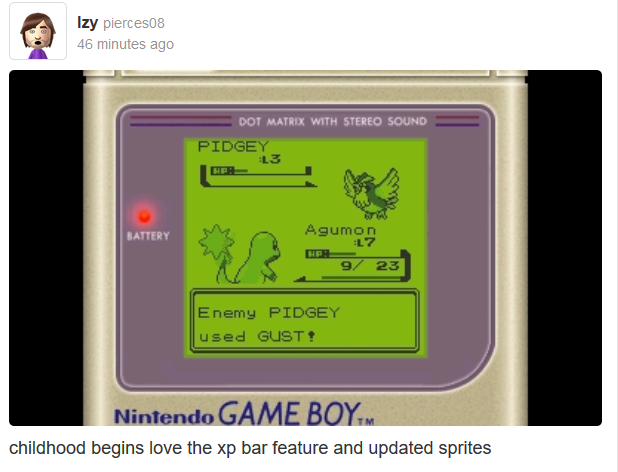
So, I just bought Pokemon Red...and it includes a new version of the GB emulator!
You can inject it with Pokemon Gold/Silver/Crystal and it works fine, including link cable and transfers to pokemon bank! ha! I just went into romhacking.net and downloaded a few patches, patched them to the ROM and they work fine (exp meter, B button to dash). The colour patch works too, but with glitches unfortunately.
You can inject it with Pokemon Gold/Silver/Crystal and it works fine, including link cable and transfers to pokemon bank! ha! I just went into romhacking.net and downloaded a few patches, patched them to the ROM and they work fine (exp meter, B button to dash). The colour patch works too, but with glitches unfortunately.
Used dark-samus' fork and it finally matched. Hope it runs smoothly!
Nice, thank you very much!
So, I just bought Pokemon Red...and it includes a new version of the GB emulator!
You can inject it with Pokemon Gold/Silver/Crystal and it works fine, including link cable and transfers to pokemon bank! ha! I just went into romhacking.net and downloaded a few patches, patched them to the ROM and they work fine (exp meter, B button to dash). The colour patch works too, but with glitches unfortunately.
don't forget to get the spirits patch
BTW , i just tried installing the mod, it's cia file
but it give me error and won't install
So, I just bought Pokemon Red...and it includes a new version of the GB emulator!
You can inject it with Pokemon Gold/Silver/Crystal and it works fine, including link cable and transfers to pokemon bank! ha! I just went into romhacking.net and downloaded a few patches, patched them to the ROM and they work fine (exp meter, B button to dash). The colour patch works too, but with glitches unfortunately.
Any guide of how to do it? And can you still have the game you injected to afterwards as well?
GamingOblivion
Banned
You can ROM hack the games? Please someone give me a guide for hacking 3DS plox

Dark Rider
Member
Seems that I've messed up here, RIP me.
So a while back, I updated my 3DS using a cart update, to get it to 9.4.0-9U.
Browserhax works for all versions less than or equal to 10.1.0-27.
After trying for a bit, I decide to go to the actual source of the exploit.
https://github.com/yellows8/3ds_browserhax_common
So I am pretty much stuck here, unless I can get that 9 to 21 (the NUPVER for 9.4.0). And if I had known this, I would have never updated. This info wasn't on the main screen for browserhax either.
That's most of my week wasted.
you updated to this FW using a cart and you can get out of it using another cart update
get another cart that contains an update to another version just make sure it is 10.3 or less if you want to go the CFW route
ColtraineGF
Member
Unless a cart update exists that increments that last number (tied to the webkit version), I can't use Browserhax as it is.you updated to this FW using a cart and you can get out of it using another cart update
get another cart that contains an update to another version just make sure it is 10.3 or less if you want to go the CFW route
Unless a cart update exists that increments that last number, I can't use Browserhax as it is.
Buy cubic ninja or OoT + Power save. Then you can use that to downgrade to 9.2.
ColtraineGF
Member
If I can't find my copy of CN (it's around somewhere... maybe), then I'm going to bite the bullet on OoT, because I'm not rebuying CN at these prices.Buy cubic ninja or OoT + Power save. Then you can use that to downgrade to 9.2.
Sanic
Member
Don't have an O3DS myself but I've heard zooming reduces success rate if you're doing that to touch the side. Make sure the boot.3dsx is on the root of the SD card.
...touch the side? Should I be touching something? I thought I just had to hit the URL and the menu would pop up?
...touch the side? Should I be touching something? I thought I just had to hit the URL and the menu would pop up?
You're supposed to tap the slider on the left on O3DS from what I've read. That might just be if you're on 10.1 or below though.
O3DS browserhax is pretty unstable though so just keep on trying.