• Hey Guest. Check out your NeoGAF Wrapped 2025 results here!

Adjustable graphics settings that don't faze you

This thread is giving me shivers. Proper shadows are essential for a realistic scene.

I mean sure, drop down the quality a bit if your rig is struggling, but there are ten settings i'd disable before even considering turning off shadows.

AA is the thing I downgrade first, but I NEVER go without AA completely. Draw distance I dial down without much issues unless i'm playing open-world games and stuff like reflections and motion blur are also expendable.
 
DoF - I think its terrible and kills fps depending on strength
Shadow quality - no problem turning this down, but not to be confused with shadow distance
SSAO - Turning this down/off helps to regain fps
Motion Blur - Usually I dislike this
AA - FXAA, SMAA, or TAA+lumasharpen, msaa is super demanding
Chromatic aberation - Blinding
Lens effects - depends on how overdone it is
Color correction - warframe is a perfect example of why this should be turned off

Everything else like AF, texture/shader quality, i try to max out (or until the point the difference between high and ultra is barely notable and not worth performance loss).
 
AF.

I'm always surprised to see people complain about this on PS4. Never once in 20+ years of gaming have i been bothered by lack of AF or even noticed it.
On the other hand i can't understand the people mentioning AA. Nothing kills immersion more for me than those ugly, jaggy lines.
Lens flares and everything similar are also pointless for me. I want to feel like i'm IN the game not like watching it through a camera lens.
 
Shadow Distance in GTAV, primarily because turning it up makes it more jarring. The way GTAV streams shadows is pretty cack.
 
CA off
Film Grain off
AA off (i...like jaggies)
Mess around with draw distance and foliage dd
Shadows from ultra to high if needed
Wont reduce AO from the max setting unless i REALLY need to.

Yall nuking shadows, ao and AF are cray
 
The first thing I turn off if I have to is AA. Perhaps because of many years playing on low power PCs, I learned not to mind jaggies too much. Also, I'm on a 21" 1080p monitor, the resolution is relatively high for the screen size so they never bother too much.
 
For anyone not quite understanding what AO is doing for the scene it's basically adding shadows everywhere and that's why you get such a performance hit in some titles depending on the strength of the implementation. If we had an awesome global illumination solution which could run in any engine and properly mimick the sun or other light sources it would be kind of unnecessary because those tiny shadows would generate themselves naturally based on the actual shapes of the 3D geometry/textures.

You can notice AO when you look in the nooks and crannies of a scene it's actually really cool tech and adds a richness to the image. I think tessellation is awesome for similar reasons but I can understand turning that one down - UNLESS you are playing cobblestone street racer 1773.
 
For anyone not quite understanding what AO is doing for the scene it's basically adding shadows everywhere and that's why you get such a performance hit in some titles depending on the strength of the implementation. If we had an awesome global illumination solution which could run in any engine and properly mimick the sun or other light sources it would be kind of unnecessary because those tiny shadows would generate themselves naturally based on the actual shapes of the 3D geometry/textures.

You can notice AO when you look in the nooks and crannies of a scene it's actually really cool tech and adds a richness to the image. I think tessellation is awesome for similar reasons but I can understand turning that one down - UNLESS you are playing cobblestone street racer 1773.

Yeah. I mean, look at this:

25789232984_5138866511_o.png


Doesn't even need textures to be beautiful. I think we need an AO Appreciation Thread.
 
Shadows and AO are the first thing to be downgraded, as much as some of the people in this thread will be upset by it. But I would never get rid of either of them entirely. My 970 is my first GPU and when I need to turn either of them off will upgrade.

Yeah. I mean, look at this:

25789232984_5138866511_o.png


Doesn't even need textures to be beautiful. I think we need an AO Appreciation Thread.
Zoomed out that looks like a decent shaded pencil drawing.
 
AF.

I'm always surprised to see people complain about this on PS4. Never once in 20+ years of gaming have i been bothered by lack of AF or even noticed it.
On the other hand i can't understand the people mentioning AA. Nothing kills immersion more for me than those ugly, jaggy lines.
Lens flares and everything similar are also pointless for me. I want to feel like i'm IN the game not like watching it through a camera lens.

Really? So you don't notice the lack of AF, say, here:

mBdc.jpg


nBdc.jpg
 
I can lower shadow resolution to medium in most games, if I need the extra performance. I also don't care about gimmicky physics effects like HairWorks.
 
One of my favorite things about PC gaming.
CA off
motion blur off
film grain off
bloom off
FXAA off (if it's this or nothing I go with nothing)

Because I don't know about you, but I just LOVE getting worst performance in exchange for shitty effects I hate.

That and those mods that remove "camera" effects. So much work for so much nothing.

Also DoF, at least how most do it. *OFF*
 
I don't get why there was no forums reaction to Witcher 2 having no AF support at all, no way to even force it. It looked so bad whenever there wasn't any foliage to cover it up.
 
Honestly ? In most games the setting I notice the least but which seems to impact preformance pretty harshly is specifically going from Very High to ULTRA with textures. Rise of the Tomb Raider even had a warning not to use it if you had less than 6GB of VRAM. Witcher 3 has one like this too, I can't see the difference between the 2. In witcher, it lead to a lot of frame hitches when I still had just a 4GB video card , Tomb Raider it flat out crashed the game multiple times.

I also have a hard time seeing the difference when Ambient Occlusion mapping is turned on or off but it's a very demanding feature. Far as I can tell it just seems to add more shadows .. which I suppose if you've got a game that looks photo real , helps. Thing is most games ... still look like games.
 
16X AF is a must. Without it I can't help but notice shimmery textures up ahead or at angles. Also makes GameCube and Wii games a lot cleaner and sharper in Dolphin. And again, it has almost 0 performance impact.
 
Anti-aliasing (so long as its native monitor resolution. Otherwise there's always upscalled resolutions)
Shadows quality (assuming it is not that jagged looking)
 
Yep.

Every single game that's ever had it, I've turned it off.

Every. One.

Only game I own that supports VXAO is Tomb Raider and it looks incredible in that game. Adds way more depth to the image even compared to HBAO+. The performance hit is ridiculous though, but it's more worthwhile than shit like PCSS.
 
When Global Offensive launched and you could still remove shadows, I kept them at a minimum. Then, in Train, I saw a T pop first because I saw his shadow first. So I keep shadows in competitive FPSs because ONCE they helped me.

Otherwise, they go off.
 
I barely notice it myself and I hardly care for it. It's the first thing I turn off for fps gains.

The comparisons here will help clue you in on what you're missing. But the intensity of the effect definitely varies from game to game.
http://www.geforce.com/whats-new/gu...ide#rise-of-the-tomb-raider-ambient-occlusion

http://images.nvidia.com/geforce-co...eractive-comparison-008-hbao-plus-vs-off.html

Notice the scene has lots more subtle depth and realism with HBAO+. It looks stark and flat when off.
 
This thread makes me question whether people even pay attention to half the stuff on screen. I mean, how is it possible that you can't tell the difference when settings like AF, AO and shadows are set to low?
 
Water physics: Most games you're not even around water that much for it to even matter.

Vignette: Don't care about it when it's on really, but I will always turn it off if given the option.

AA: First thing I go to if I'm not getting good FPS. Jaggies don't bother me at 1080p or higher.

AO: TBH I never notice what this stuff does during gameplay, but I generally keep it on low if not entirely off.

Shadows: As low as I can stand them to look (usually around Medium). But not off though lol.

Motion blur: Varies game to game, but if the performance hit is signficant or the effect is hideous then its gotta go. I try to keep it though.
 
I am honestly baffled by how many people are saying they can't tell any difference with AO on and off. Look at these comparisons:

http://images.nvidia.com/geforce-com/international/comparisons/tom-clancys-the-division/tom-clancys-the-division-ambient-occlusion-interactive-comparison-001-nvidia-hbao-plus-vs-off.html

http://images.nvidia.com/geforce-com/international/comparisons/tom-clancys-the-division/tom-clancys-the-division-ambient-occlusion-interactive-comparison-004-nvidia-hbao-plus-vs-off.html

The difference is huge with HBAO+ on. I don't like using this term, but you literally have to be blind to not see the difference. Now, it's arguable that in gameplay you won't focus on the background details, but I'd argue back that AO adds a lot to the overall visual fidelity on screen regardless.
 
It's extremely easy to see the difference between off/AO/HBAO+/VXAO in ROTR because the settings menu is transparent and you can switch options on the fly.
 
I really dislike chromatic aberration and post-processing filters like film grain.

Ambient Occlusion can be nice, but I feel I barely notice it so I'm happy to turn it off for performance. The hit is often pretty massive if I recall correctly.
 
Motion Blur is the first thing I turn off before looking at anything else really.

Bloom and Depth of Field... Still don't truly know what they do.
 
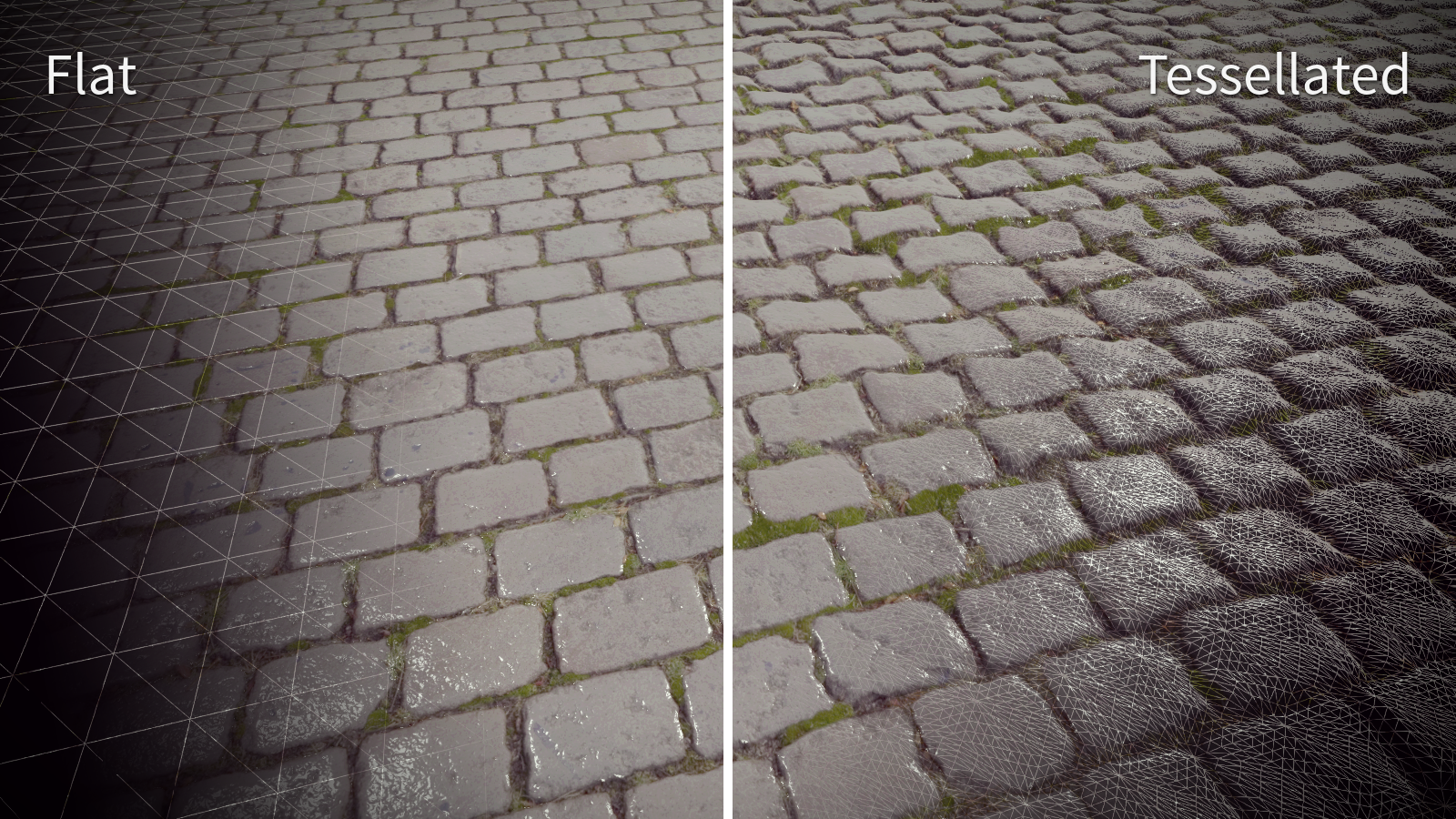
tessellation for me.

I usually set this to either medium or low.
Max settings sometimes makes things a little off putting.

tessellated-displacement.png


That ^ is about perfect.
Anymore and it looks like a bunch of boulders.
 
tessellation for me.

I usually set this to either medium or low.
Max settings sometimes makes things a little off putting.

tessellated-displacement.png


That ^ is about perfect.
Anymore and it looks like a bunch of boulders.

Left is what city planners imagine pretty cobblestone roads to be like. The right is reality once it's worn down a bit. A nightmare to bike on.
 
I'm fortunate enough to have the hardware that I don't have to turn anything down. But if I had to, I guess I'd probably start with shadows and other lighting effects. But I'd rather have no shadows at all than crappy looking ones, so I'd probably have to go all the way down.

Fascinating to see other preferences on this. I can't imagine turning AA off... it's a must-have for me. I crank AA as high as I can and even supersample when possible. Jaggies annoy the ever living hell out of me. The only thing worse than jaggies is screen tearing.
 
Shadows first and foremost if I'm having frame rate issues, I'm also not that hung up on AA I'll turn it on if I have spare headroom otherwise I can be fine with jaggies that generally aren't that noticeable at 1080p without it. Also not that into Super Sampling/DSR either.

I also hate DoF and Motion Blur, that shit is an instant disable.

EDIT: Oh yeah, Chromatic Aberration whenever there's the option to because it's an aberration to good image quality.
 
Antialiasing always goes first for me.

Then what settings go down depends on visual impact versus the expected look of the game at Ultra settings.

If things goes obviously missing and I'm still unable to get acceptable performance I usually just start capping frame rate or drop the resolution outright.

Sterile-looking games look really terrible in my opinion, even more than a game that is just rendering at 720p and/or 30 FPS. Some video games really do not handle having its setting set to below normal (what an Xbox One can do).
 
Really loving this thread, shows that everyone has their own unique tastes and cares when it comes to image quality and graphical fidelity.

Personally I start with AA, never off but will drop to FXAA if higher quality from there drains enough to warrant it. MSAA is just not even a possibility any more for modern games, hell simply turning on 2x for R6 Siege incurs a massive performance hit and that's even with it being the only AA option on.

AF will always be at 16x, always. Those citing negligible performance hits are not entirely correct though, it honestly depends on the game. Take RoTR for example, with everything maxed in the large, open Soviet Relay base area dropping from 16x to 4x or 2x gained about 8fps or so. I have a 980ti and was at 1440p, max settings. Granted that and the Geothermal valley are really stressing areas but still, it proves the point.

Shadows I can drop to a notch below the max normally if needed, really prefer not to any further than that though as the jagged edges often become too noticeable. I suppose it depends on how fast paced the game is.

AO I try to keep max on every game, it just adds so much to the scenery.

DOF I like at max to often times get Bokeh quality but I can live with reducing it to a base "On" setting if necessary.

Tesselation I always leave on regardless, the more realistic looking scenery and character models really add a lot to the visuals. I think the only time I've cut it was back when I played Crysis 3 often, if I wanted to keep 60fps of any description.

I'll say this, there's a lot of settings to consider for any given game but I'll never go below console quality unless for some reason a setting is broken on PC. I don't have a PC VS Console complex, I own all of them and play them all at different rates, but knowing I payed 1.5 times an entire current gen console itself just for my GPU alone keeps me from accepting visuals below what the console version of a game has.

 
I'll say this, there's a lot of settings to consider for any given game but I'll never go below console quality unless for some reason a setting is broken on PC. I don't have a PC VS Console complex, I own all of them and play them all at different rates, but knowing I payed 1.5 times an entire current gen console itself just for my GPU alone keeps me from accepting visuals below what the console version of a game has.


Indeed... Even when I'm gaming on my laptop which has "just" a 760M which is slightly weaker than a 750 I try my best to keep a game from looking like a sad shell of itself, compared to what consoles are pushing. I have noticed that these slightly old laptop chips are more at home with 720p than anything else, mostly thanks to their fill rates being relatively low for its available compute power. The resolution difference sometimes amounted to Low and Ultra.
 
Top Bottom