

-
Hey Guest. Check out your NeoGAF Wrapped 2025 results here!
You are using an out of date browser. It may not display this or other websites correctly.
You should upgrade or use an alternative browser.
You should upgrade or use an alternative browser.


BeardSpike
Member
I love how they just mashed the two titles together initiallyNew Game Support
- Death Crimson Desert
- Stranding 2
 .
.
CrustyBritches
Gold Member
Awesome!
I pulled the leaked 4.1 driver(I wasn't using Optiscaler, I was using the Adrenaline package extraction and .dll replacement method), tested RE Requiem and it showed 4.0.3. Installed the new 26.3.1 driver and tested RE Requiem and it now shows FSR 4.1 again. Hell yeah. I guess this means it's system-wide now?
I pulled the leaked 4.1 driver(I wasn't using Optiscaler, I was using the Adrenaline package extraction and .dll replacement method), tested RE Requiem and it showed 4.0.3. Installed the new 26.3.1 driver and tested RE Requiem and it now shows FSR 4.1 again. Hell yeah. I guess this means it's system-wide now?

Branded
Member
RR 1.1
Oh wow that 4.1 footage of the grass/flowers looks so much better.
Hope devs and AMD add more titles soon.

ValiantInstance
Member
Can't wait for Death Crimson Desert and Stranding 2.

M1987
Member
Yeah it will be in every game that supports FSR3.1 and FSR4Awesome!
I pulled the leaked 4.1 driver(I wasn't using Optiscaler, I was using the Adrenaline package extraction and .dll replacement method), tested RE Requiem and it showed 4.0.3. Installed the new 26.3.1 driver and tested RE Requiem and it now shows FSR 4.1 again. Hell yeah. I guess this means it's system-wide now?

winjer
Gold Member
I love how they just mashed the two titles together initially
AMD is also into the AI slop business.

BTW, have you tried the dll for Ray Regeneration 1.1?
M1987
Member
Is it not included in the new driver? looks like RR performance is shit on the 9070XT compared to the performance DF showedAMD is also into the AI slop business.
BTW, have you tried the dll for Ray Regeneration 1.1?
winjer
Gold Member
Is it not included in the new driver? looks like RR performance is shit on the 9070XT compared to the performance DF showed
AMD's Ray Regeneration and Nvidia's Ray Reconstruction have the same performance impact.
The problem with Crimson Desert is that when RR is enabled, be it nvidia's or AMD's, they automatically enable the highest RT mode, which causes a big performance drop. So performance is RT bound, not RR bound.
Both Hardware Unboxed and Daniel Owen have already tested and confirmed what is going on. DF are just incompetent and don't understand what is going on.
DF also really fucked up with their DLSS 5 video. But fortunately, Daniel Owen managed to make a proper video clarifying what is really going on.
No the RR dll is not in the driver, it's in the game. I posted a zip file in a previous post, with the newest dlls. Including RR 1.1
Last edited:
BeardSpike
Member
Don't install the latest updates on Win11. They cause stutter fest on newest AMD drivers.
Windows 11 KB5079473 March 2026: Install Failures and GPU Regressions Explained
The thread analyzes widespread issues triggered by Windows 11 KB5079473 (March 2026 Patch Tuesday), highlighting install failures, reboot loops, black s...
 windowsforum.com
Last edited:

b0uncyfr0
Member
I dont have any stutters.
Don't install the latest updates on Win11. They cause stutter fest on newest AMD drivers.
Windows 11 KB5079473 March 2026: Install Failures and GPU Regressions Explained
The thread analyzes widespread issues triggered by Windows 11 KB5079473 (March 2026 Patch Tuesday), highlighting install failures, reboot loops, black s...

SolidQ
Member
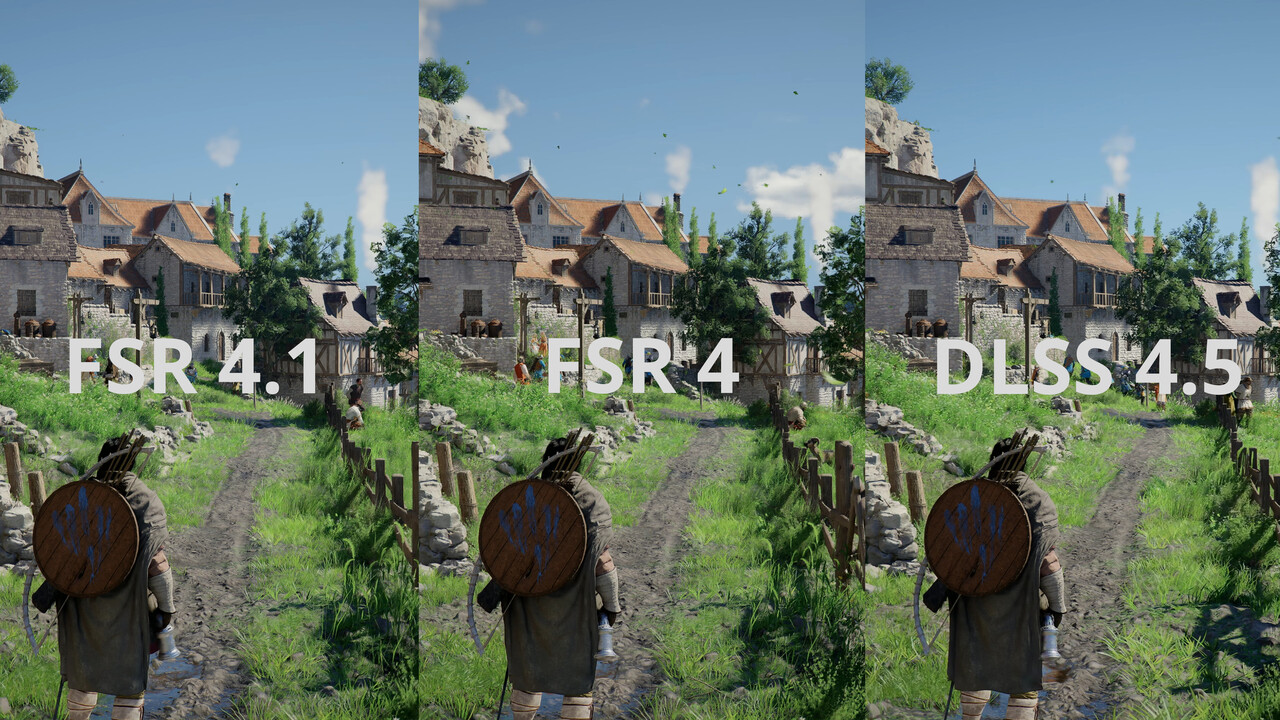
Erste Analyse: AMD FSR 4.1 vs. FSR 4 & Nvidia DLSS 4.5
Wie gut ist AMD FSR 4.1? Eine erste Analyse in Crimson Desert und Death Stranding 2 inklusive Vergleich mit FSR 4 und DLSS 4.5.

OLED_Gamer
Member
MS really can't get their shit together. Its wild had badly they are dropping the ball.
Don't install the latest updates on Win11. They cause stutter fest on newest AMD drivers.
Windows 11 KB5079473 March 2026: Install Failures and GPU Regressions Explained
The thread analyzes widespread issues triggered by Windows 11 KB5079473 (March 2026 Patch Tuesday), highlighting install failures, reboot loops, black s...
I can confirm no issues with the latest update and 26.3.1 drivers.
BeardSpike
Member
So results are inconsistent. Some folks have it, others don't. Good thing at least we can uninstall updates fairly easily though.MS really can't get their shit together. Its wild had badly they are dropping the ball.
I can confirm no issues with the latest update and 26.3.1 drivers.
Last edited:
M1987
Member
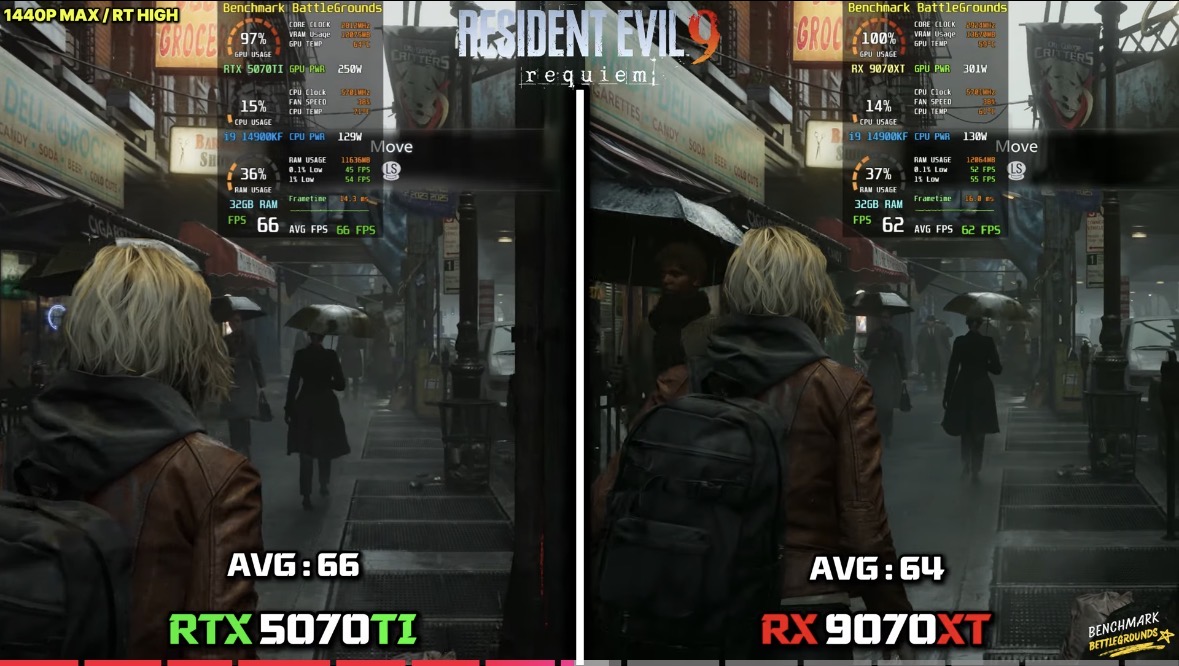
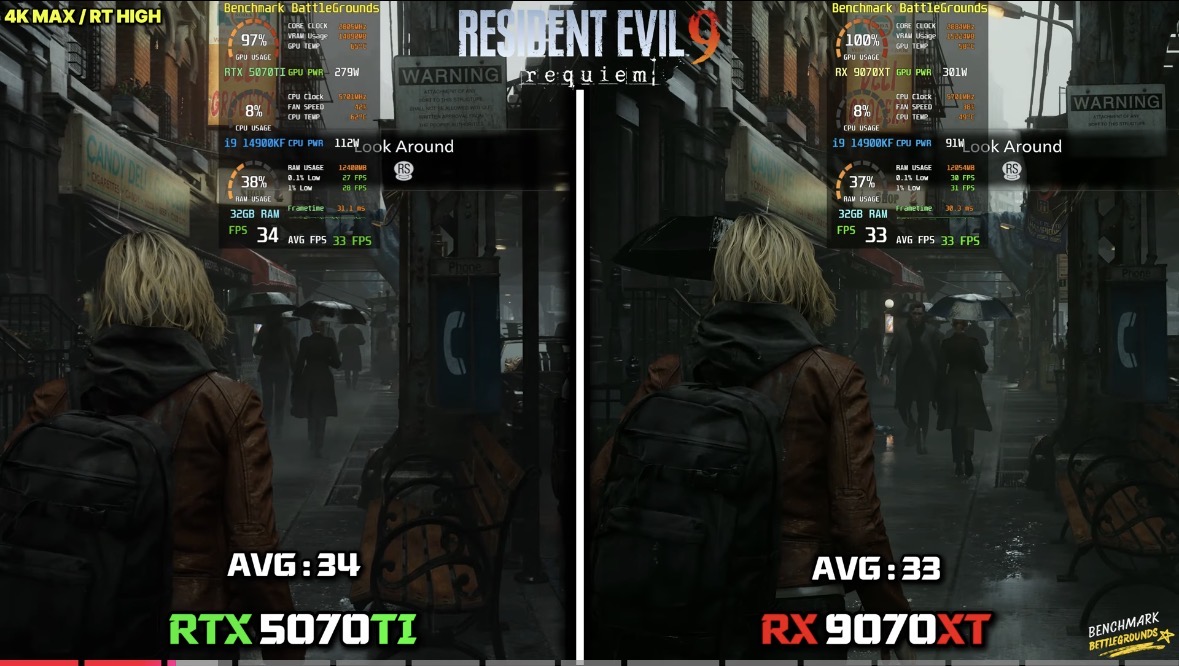
No it's basically a 5070ti with worse RT and PTIs it close to a 5080 now? I have a hard time understanding where AMD performance actually stand with all the buts and ifs
OLED_Gamer
Member
Seems so.So results are inconsistent. Some folks have it, others don't. Good thing at least we can uninstall updates fairly easily though.
PT absolutely. Normal RT they can be fairly equal but that can be game dependent (Black Myth Wukong). RE9 for example:No it's basically a 5070ti with worse RT and PT
M1987
Member
Yeah the RT is not that far behind anymore,it's just PT where the 9070XT is still far behindSeems so.
PT absolutely. Normal RT they can be fairly equal but that can be game dependent (Black Myth Wukong). RE9 for example:
Last edited:

Pokedot
Member
Seems so.
PT absolutely. Normal RT they can be fairly equal but that can be game dependent (Black Myth Wukong). RE9 for example:
Considering the price difference between the 2 cards can be as much as $300, it's better value to get the 9070XT if you don't mind dealing with Optiscaler and put the savings into your PC build getting a better CPU or more RAM.
Last edited:

Bojji
Gold Member
Just checked and I have the KB5079473 installed since the 10th. But I haven't had any problems so far, be it with 26.2.2 or 26.3.1

Pretty much every Windows update since dawn of time have caused problems for SOME people - that might have been related to update or not (just a coincidence), there are hundreds of millions of W11 users.
Last edited:
winjer
Gold Member
AMD releases FSR SDK 2.2 with
The AMD FSR™ SDK is our easy-to-integrate solution for developers looking to include FSR "Redstone" features into their games without any of the hassle of complicated porting procedures. This revision to the SDK updates a number of AMD FSR "Redstone" technologies:
Also includes:
- AMD FSR Upscaling 4.1.0
- AMD FSR Ray Regeneration 1.1.0
Supports:
- AMD FSR Frame Generation 4.0.0
- AMD FSR Radiance Caching 0.9.0 (technical preview)
- DirectX® 12.
- Unreal® Engine 5 (AMD FSR plugin).
Ona different note, the Optiscaler team released today version Optiscaler_0.9.0-pre12 (20260323)
Last edited:


hououinkyouma00
Member
I'm curious what people think as well. I'm also on a 4070 Super as well and have thought about going to the 9070 XT multiple times and just giving my 4070 Super to my girlfriend who is on my old 3060ti.Would there be much point going from a 4070 Super to a 9070 XT?
For reference I play on a 4k screen and like to use ray tracing and DLSS performance mode.
winjer
Gold Member
Would there be much point going from a 4070 Super to a 9070 XT?
For reference I play on a 4k screen and like to use ray tracing and DLSS performance mode.
Probably not worth it. The 9070XT is 30% faster in raster. But you lose Path Tracing performance.
You gain 4GB of vram, but are you that much limited?
You are probably better to just wait for the next generation of GPUs, for a meaningful upgrade.
Considering how expensive GPUs are, an upgrade should be close to double the performance.

rnlval
Member
NVIDIA's path trading is already using DXR tier 1.2-like features with recent NVAPI extensions.Probably not worth it. The 9070XT is 30% faster in raster. But you lose Path Tracing performance.
You gain 4GB of vram, but are you that much limited?
You are probably better to just wait for the next generation of GPUs, for a meaningful upgrade.
Considering how expensive GPUs are, an upgrade should be close to double the performance.

Spyxos
Member
Would there be much point going from a 4070 Super to a 9070 XT?
For reference I play on a 4k screen and like to use ray tracing and DLSS performance mode.
I switched from a 4070 Super to a 9070 XT. I'd say it's not worth it. Sure, the ~30% performance boost was nice. And I usually aim for at least 50% in performance boost. But FSR4 is noticeably worse than DLSS, and ray tracing/path tracing has a lot more visual noise. Then on Geforce. Wait for the next gen.I'm curious what people think as well. I'm also on a 4070 Super as well and have thought about going to the 9070 XT multiple times and just giving my 4070 Super to my girlfriend who is on my old 3060ti.
Last edited:
winjer
Gold Member
OptiScaler v0.9 Final has been released
The link is to the official Github page.
New and improved MAJOR features in 0.9:
- FG settings received a major rewrite/revamp - added XeFG (+XeLL), Redstone FSR4-FG, separated options into FG Sources and Outputs, added shortcut etc (a big part thanks to @FakeMichau)
- All of these options explained more in the Wiki in Frame Generation Options
- Added enable/disable FG shortcut key - default is End (customisable, Keybinds in Overlay, FGShortcutKey in INI)
- Some options aren't supported and may be implemented down the line (e.g. XeFG as FG Source, DLSSG as FG Output)
- HUDless logic improved
- OptiScaler now comes bundled with latest Fakenvapi (1.4) and Nukems dlssg-to-fsr3 (0.130)
- FG Sources (game FG inputs AKA what you select in the game) and FG Outputs(what you want to use through Opti) - you need to select both now
- DLSSG via SL FG Source is recommended, then FSR-FG then OptiFG/Upscaler as a final resort
- DLSSG via Streamline inputs (only DX12 and Streamline 2+ games, doesn't support a small number of old SL1 games, tooltip warns about unsupported version)
- Required to enable DLSS-FG in the game and then tick (FG) Active in Opti's overlay
- This is our own equivalent of Nukem's mod which is a lot more versatile, albeit a bit less (legacy) compatible as noted
- Nukem's DLSSG is locked to FSR3.1 FG as that's the only option (Nukem's DLSSG -> FSR3-FG via Nukem's)
- Also requires DLSS-FG activated in-game
- OptiFG (Upscaler) now also supports XeFG, in addition to FSR3/4-FG
- OptiFG is without the HUDless resource, but unlike FSR3 FG, XeFG/FSR4-FG does interpolate the HUD variably well (might not even require HUDfix), while FSR3-FG requires HUDfix always
- FSR 3.1/FSR3.0 FG Sources
- Also a new addition for games that have native FSR3.1/FSR3.0 FG, can be a bit finnicky
- Requires FSR-FG enabled in game settings
- Updated to XeSS 3.0 SDK - yellow XeFG restart text must be followed, otherwise ghosting will be noticeable
- XeFG doesn't work in exclusive fullscreen. Requires using Borderless Windowed/Borderless Fullscreen/Fullscreen Windowed!
- Due to how XeFG works, you might need to activate XeFG once and then restart the game for all settings to apply - hence the yellow warning text.
- All XeFG constraints explained more in the Wiki in Frame Generation Options
- MFG support officially added (still Arc only
)
- Now able to change interpolated frame count on the fly
- freezes between 2x <-> 3x/4x are expected
- Extra XeFG checks to prevent crashes with older binaries
- Added XeFG UI Composition option
- Enabling this option reverts XeFG to previous XeFG 2.0 behaviour where it doesn't try interpolating the HUD - fixes artifacting for transparent HUDs
- Updated to FFX 2.2 SDK (big part thanks to @FakeMichau) - FSR 4.1 upscaler, FSR-FG 4.0.0 (ML-FG) (RDNA4 only!!!)
- 4.0.0 ML-FG doesn't work with Nukems, as that mod only uses FSR3-FG!
- All of the FSR Redstone features officially support only RDNA4, so unless you're willing to use Linux with FP8-to-FP16 emulation (or AMD decides otherwise), supporting other gens isn't happening. FSR4 INT8 upscaler (4.0.2) is the only version prior gens can use, and you'll have to find it yourself, Opti does not ship it.
- Switching between FSR3-FG and FSR4-FG is possible while FG is active
- Fixed model selection on FSR 4.0.3 and FSR 4.1 (thanks to @FakeMichau and @TheRazerMD)
- Added FSR4 Debug options - FSR4 Debug view and FSR4 Watermark (Watermark requires game restart, thanks to @Astyyyyy for fixed WM) as well as FSR4-FG Watermark debug option (MLFI)
- Updated FG and FSR4 model menu displays (thanks to @TheRazerMD)
- Should make it more clear which FG settings to (not) use for FSR4-FG and what the models represent
- Added FSR4 Vulkan w/Dx12 support – FSR3.x/4 VK w/Dx12, as well as FSR 2.1 VK w/Dx12
- This enables using FSR4 on Vulkan games - works through the DX12 interop, thus the upscaler cost will be noticeably higher
- Added RCAS and Output Scaling to Vulkan upscalers
- Also updated all downscalers for Output Scaling
- Sharper Bicubic, added Lanczos 2 & 3, added Kaiser 2 & 3
- Added missing Vulkan hooks
- This fixed NMS VR crash
- Added separate Non-Linear Color Space option for FSR4
- Quirks reorganising and support improvement (thanks to @TheRazerMD)
- WinGDK versions should now also be supported if they stick to the regular filenames
- Various game quirks added for a better out-of-the-box experience
- General BAT improvements and updated Uninstaller scripts to remove additional files, along with old Opti versions, and unused files (nvapi64.dll etc) (thanks to @TheRazerMD)
- Also added OptiPatcher support to the BAT (thanks to @realdody for the initial commit, and @TheRazerMD for bugfixing and improving afterwards)
- Another side project of ours - OptiPatcher - an ASI Plugin for OptiScaler for exposing DLSS and DLSS-FG inputs without adapter spoofing in supported games and avoiding any kind of performance overhead.
- OptiFG improvements
- Should stop The Callisto Protocol from crashing with its special heaps spamming
- CPU usage should now also be reduced
- Removed DlssOverrides folder
- Reg files weren't required for a long time now and have already been integrated into Opti itself
- Autoapplying fixes and quirks for Luma Unreal Enginemod
- Luma UE should now be working properly without any editing (check the Compatibility Entry for preferred method of loading, also the FSR4 list for confirmed working games so far)
- Should also work fine for Win 10 users (FSR4 still requires AgilitySDK upgrade on Win 10)
- Added VRR FPS limit calculator under Framerate tab to select an optimal framecap
- Added Active Quirks info to overlay menus
- Allow auto option for menu scale, as well as saving of menu scale 1.0
- Helps games that cycle from Windowed to Fullscreen on boot and mess with Opti (e.g. MH Wilds)
- Added FSR2 DX11 input support - e.g. Trails in the Sky 1st Chapter
- Added FSR2 Vulkan input support - e.g. WWZ
- Separated DLSS/DLSSD preset overrides, also added ability to revert back to game's original preset
- Added XeSS DX11 inputs
- Added Process Filter option (thanks to Schmidts) and DLL blacklisting
- Stops logging hijacking and prevents crashes caused by Windhawk, MacType etc.
- Significant compilation speed boost (thanks to @ZachHembree)
- Hopefully fixed Nvidia XeLL/Reflex latency issue
- Added FrameTime input selection
- By default, Opti is now using FrameTime calculations from DLSSG/FSR-FG, this should improve pacing in some problematic games
- HACK: Allow XeSS/XeFG to run on newer AMD drivers (FakeMichau)
- Should fix the XeFG crashing on 26.1.1+ drivers in the meantime, until AMD fixes the underlying driver issue
- Added option to disable HUDFix resource tracking in the INI (DisableHUDFix)
- Useful for reducing the CPU overhead when using OptiFG with ML FG that handles the HUD well enough already without HUDFix
- Added Opti Wiki link button to the overlay
- Block the EGS Overlay by default when any FG is present (since it keeps crashing)
New and improved minor features in 0.9 include:
- Move all loadlibrary and freelibrary checks to ntdll hooks
- Improved Streamline compatibility, added missing NVSDK init params
- JWE3 FG should work now, CP2077 benchmark should not show 0 FPS anymore
- INI improvements
- More unused code removal and general revamping
- AF and mipmap bias improvements
- Removed DLSS Enabler integration
- Splash screen updates
- Also enabled Splash screen on Linux
- Added FG info to FPS overlay
- Fixed overlay options that weren't saving to the config properly
- Change FFX API DLL order
- Now Opti will try to load loader.dll first, if it can't find it, falls back to old dll
- Added HDR16 check
- Improved handling of wide characters (thanks to @FakeMichau)
- Should fix crashes when the file path contains e.g. Chinese characters
- Apply barrier fixup to RTX Remix (thanks to @FakeMichau)
- Removed Disable HQ font on Linux
- Tweaked Reflex Markers Overlay for HDR
- Shouldn't be blinding anymore
- Fixed low fps when menu is open
- Fixed compiler warnings
- Generalize FFX modules and type check (thanks to @FakeMichau)
- Some Load Order tweaks - should help Reshade
- Shader clean up and small refactor (thanks to @FakeMichau)
- Make Linux setup script take args for various automation projects (thanks to @xXJSONDeruloXx and @FakeMichau)
- Disable NTShared for Dx11 by default
- Fixed fallback fps limit on Linux (@FakeMichau)
- Fixed menu and fps overlay scaling (@FakeMichau)
- Fixed a w/dx12 crash when ffx is missing (@FakeMichau)
Branded
Member
Can someone explain Optiscaler? Does it introduce input delay? What are the benefits over FSR 4.1?OptiScaler v0.9 Final has been released
The link is to the official Github page.
winjer
Gold Member
Can someone explain Optiscaler? Does it introduce input delay? What are the benefits over FSR 4.1?
Just read this first.
GitHub - optiscaler/OptiScaler: OptiScaler bridges upscaling/frame gen across GPUs. Supports DLSS2+/XeSS/FSR2+ inputs, replaces native upscalers, enables FSR3 FG on non-FG titles. Supports Nukem mod for DLSSG-to-FSR3 FG.
OptiScaler bridges upscaling/frame gen across GPUs. Supports DLSS2+/XeSS/FSR2+ inputs, replaces native upscalers, enables FSR3 FG on non-FG titles. Supports Nukem mod for DLSSG-to-FSR3 FG. - optisc...
 github.com
Branded
Member
Fuck you.Just read this first.

GitHub - optiscaler/OptiScaler: OptiScaler bridges upscaling/frame gen across GPUs. Supports DLSS2+/XeSS/FSR2+ inputs, replaces native upscalers, enables FSR3 FG on non-FG titles. Supports Nukem mod for DLSSG-to-FSR3 FG.
OptiScaler bridges upscaling/frame gen across GPUs. Supports DLSS2+/XeSS/FSR2+ inputs, replaces native upscalers, enables FSR3 FG on non-FG titles. Supports Nukem mod for DLSSG-to-FSR3 FG. - optisc...
(okay thank you I will <3)
winjer
Gold Member
Fuck you.
(okay thank you I will <3)
If you have any doubts or need help installing. All you have to do is ask.