

• Hey Guest. Check out your NeoGAF Wrapped 2025 results here!

Battlefield 1 PC Performance Thread

I played about 40 minutes last night with a 3570k at 4.4GHz, and I saw framerate drops down to ~40-45fps in 64 player multiplayer matches. This was at 1080p ultra with 100% scaling, but I tried dropping settings and it wasn't making a difference, it was all cpu bottleneck, my 980ti was hovering around 60% utilization.

I didn't get to test DX12 to see if I noticed an improvement, I will be doing that tonight. The SP portions were just fine at locked 60 with a bit of breathing room, and I did not try a smaller lobby to see how improvements were with less people.

Not surprising. Battlefield 3 and 4 with a full server on larger scale maps could hammer a 2600k@4.7Ghz with 70-90% usage and a 2500k or non-HT 2600k would be at a constant 100% CPU usage with terrible and unplayable performance.

This is why I chose not to waste my money in 2010 on a non-HT CPU since I knew there would occasionally be a game that comes along that needs the extra breathing room HT provided.

I was laughed at for spending the extra $100 and that a 2500k was the way to go, but the ones laughing, I had to hold back snickering when I saw them forced to upgrade their 2500k's to either the 3770k/4770k while I was still sitting perfectly fine until affordable 6c/12t CPUs came out.

Non-HT CPU's with gaming intentions have been a waste of money for going on half a decade now.
 
I'm overclocking directly in the BIOS. I use CPUID's HWMonitor to check temps & voltage, and test with Prime95.

I had a stable clock of 4.2 at 1.175 volts, but the temps were a little higher than I wanted. I decided to revert back to stock and order some new thermal paste and can re-seat my heatsink when that comes in the mail on saturday.

I put a custom ARCTIC Alpine 11 Pro Rev.2 cooler on my i5-4690k and set an aggressive fan curve. This helped drop the idle temps by 15 Celsius. I then set the voltage to 1.175 and speed to 4200 (fixed across all cores).

I did Prime 95 for 10 minutes and I hit 100 Celsius on Cores 1 + 4 and the very high 90s on Cores 2 + 3. Is this too high? The new fan came with a thin layer of thermal paste already attached underneath. I cleaned off the old paste with rubbing alcohol and attached it with this, but didn't add more. Would that solve it or did I just lose the silicon lottery?
 
Depends what is old CPU, would you count i5 6600K as old?
Seems to be affecting 2nd and 3rd gen the most, haven't really payed attention to reports from newer processors.

I have a GTX 1080 and DX12 does noting for me.

i5 3570 k @ 3.4 GHz and my CPU usage is 100%. I get random drops to ~45 fps for a few seconds when there is a lot of chaos happening in the game. But sometimes when there is a lot of chaos happening, it doesn't occur. Besides that, the majority of the time my fps is ~85-120 depending on the map.

Also seeing very high CPU usage on my i5-2500K @ 4.4 GHz in 64 player games. Lowest it ever goes is approx 80% usage on all cores with it occasionally using up 100% in hectic moments, causing frame drops.

DX12 seemed to improve this slightly, less moments of 100% load but that mode has its own issues with stutter, GPU utilisation drops and minor input lag. The stutters seemed to mainly occur at the start of games and progressively got better the longer the game went though.

I'm still holding out on game updates and the eventual game ready NVIDIA driver release (on a GTX 1070 which never seen more than 80% usage on Ultra at 1440p) to improve things, but this could well be the first non-AI heavy game that has brought this CPU to its knees.

I have a 2500k at 4.0GHz and noticed the same thing, usage is around 90%, sometimes a bit more or a bit less depending on what's happening. When it hits 100% sometimes I get FPS drops, mostly around 55-50.

Every now and then at least on Amiens I get really big FPS drops around the 40's when looking at a specific point in the map, then it all goes back to 60, seems like CPU chugs every now and then causing this huge drops to happen then it stabilizes itself.

Anyone know what settings have the biggest impact on the CPU? I'd like to take some of the load off the CPU as oc'ing does not help much.
 
Just been posting in the early access thread and was rudely told to come here!

Nah just messing I forgot about this thread :(

Ok so ive downloaded the game and pressed start trial and it just goes grey and does nothing, i went and spoke to someone at ea and they said do a repair...so did a repair nothing...they said update drives, can you run it etc, so in the end i was told to redownload it, so i did, same thing still happens, ive completely wiped my graphics drivers and still nothing happens!
 
Just been posting in the early access thread and was rudely told to come here!

Nah just messing I forgot about this thread :(

Ok so ive downloaded the game and pressed start trial and it just goes grey and does nothing, i went and spoke to someone at ea and they said do a repair...so did a repair nothing...they said update drives, can you run it etc, so in the end i was told to redownload it, so i did, same thing still happens, ive completely wiped my graphics drivers and still nothing happens!

Do you have Windows 10? The Anniversary update fucked a lot of programs, drivers, etc, so it might be something related to that which is preventing BF1 from starting.

Also, are you using any type of overlays like Afterburner, etc? Sometimes some games crash when certain overlays are on.
 
Yeah im on windows 10, and do have the anniversary update installed too

Nothing like afterburner that i can think of at all, its very strange that even clicking the .exe does absolutley nothing
 
Loving the impressions on the GTX 1070. Anyone try it in 4K yet?

Also, any issues with the i7-4790K? Got it clocked at 4.0 GHz

I did to help test my overclock (new gpu). 60fps isn't possible on ultra settings, but it should be doable if you're willing to turn stuff down.

bf1_4k_ultra_maxc5jl4.jpg

I settled for 1080p + 50% (~2880x1620). It runs fine and way over target this way.
https://www.youtube.com/watch?v=pfHN6KJ2pUM
 
i74770k
2x GTX 1080's
Max settings
60fps locked at 4K

Very impressed as this might be the best game I've ever seen visually, some levels are absolutely breathtaking:o
 
Ok i actually got it opened, by running bf1trial.exe and activationui.exe as admin...now another problem...I have 3 monitors set up and it only detects two, and obviously the one it doesnt detect is the best one :/
 
Ok i actually got it opened, by running bf1trial.exe and activationui.exe as admin...now another problem...I have 3 monitors set up and it only detects two, and obviously the one it doesnt detect is the best one :/

Try disabling the monitor in the device manager, start the game and activate it afterwards.
 
Not surprising. Battlefield 3 and 4 with a full server on larger scale maps could hammer a 2600k@4.7Ghz with 70-90% usage and a 2500k or non-HT 2600k would be at a constant 100% CPU usage with terrible and unplayable performance.

This is why I chose not to waste my money in 2010 on a non-HT CPU since I knew there would occasionally be a game that comes along that needs the extra breathing room HT provided.

I was laughed at for spending the extra $100 and that a 2500k was the way to go, but the ones laughing, I had to hold back snickering when I saw them forced to upgrade their 2500k's to either the 3770k/4770k while I was still sitting perfectly fine until affordable 6c/12t CPUs came out.

Non-HT CPU's with gaming intentions have been a waste of money for going on half a decade now.

This isn't necessarily true. I've had my 2500k for nearly 5 years now, and it has never CPU limited a game unless it has a heavy reliance on AI. These are usually RTS games (which I play only rarely), racing games with large AI grids and some open world games like GTA V.

There's been more cases of games hardly utilising the HT cores on i7s than there has been games that do, so that's why i5s continue to be a decent option for gaming builds.

I played hundreds of hours all up in BF3 and BF4s multiplayer, almost exclusively in 64p Conquest, and never have those games pushed the CPU as much as BF1 is doing right now.

Considering the age of the CPU and the fact it is still quite playable even with the frame drops, I'm not too fussed. Plus if DX12 mode is improved that could lower the CPU usage enough to provide a more stable experience down the line.
 
Sounds like you're trying to justify a wasted purchase, either upgrade to an adequate CPU or live with the same performance as previous BF games and refrain from complaining and clogging up performance threads whining when a game is actually pushing more than 4 cores/threads.

Your cooperation would be appreciated so we can have competent discussion about any actual performance issues encountered in the game.
 
I had zero issues with my i5 2500K through Battlefield 3 and 4.
 
I put a custom ARCTIC Alpine 11 Pro Rev.2 cooler on my i5-4690k and set an aggressive fan curve. This helped drop the idle temps by 15 Celsius. I then set the voltage to 1.175 and speed to 4200 (fixed across all cores).

I did Prime 95 for 10 minutes and I hit 100 Celsius on Cores 1 + 4 and the very high 90s on Cores 2 + 3. Is this too high? The new fan came with a thin layer of thermal paste already attached underneath. I cleaned off the old paste with rubbing alcohol and attached it with this, but didn't add more. Would that solve it or did I just lose the silicon lottery?

The thermal paste on your new fan would be enough, but I'm just not sure how good it is. The reason I ordered some new stuff was due to my thermal paste just being some crap that came with a heatsink or motherboard I bought ages ago..

Those temps are pretty high. People are saying that benchmarking temps should be in the 70's, but when I first started OCing I set my voltage at 1.200 and I was getting temps in the 90's'. It was when I reduced my voltage to 1.175 that I got temps in the 80's, I'm hoping some better thermal paste will push me down into the 70's. Once you can go 15ish minutes on Prime95 and stay in the 70's then let it run for an hour and that will ensure your system is stable. If your temps reach over 80 frequently I'd reduce voltage, and if you crash then you might need to reduce your clock speed to match your lower voltage. You can have temps in the 90's for brief benchmarking periods, but I wouldn't sustain those for very long. Once you can go an hour in Prime95 with temps primarily in the 70's you're golden, if you occasionally stray in to the early 80's I wouldn't bat an eye, but some overclockers are adamant that you stay under 80 at all times.
 
I had zero issues with my i5 2500K through Battlefield 3 and 4.

It's fine if you don't mind dropping frames below 60 with max settings in large scale battles, just kindly pointing out that it will happen on a non-HT CPU. :) It's not exactly a performance issue when a game is actually demanding on a CPU. Now if the issue at hand was one core/thread being utilized at 100% and the others not seeing much action, that is a verified problem that should be complained about. I'm personally tired of the complaining going on wasting space in performance threads about well optimized games that are simply too demanding for outdated CPU technology.
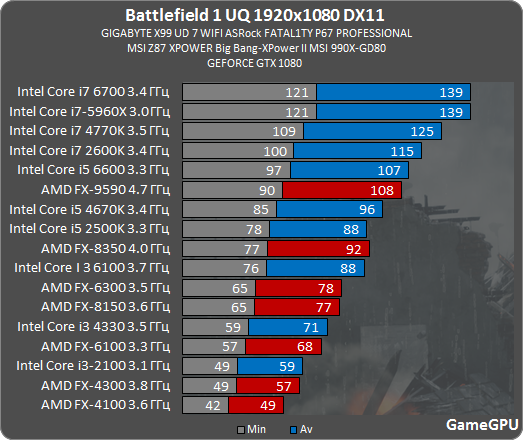
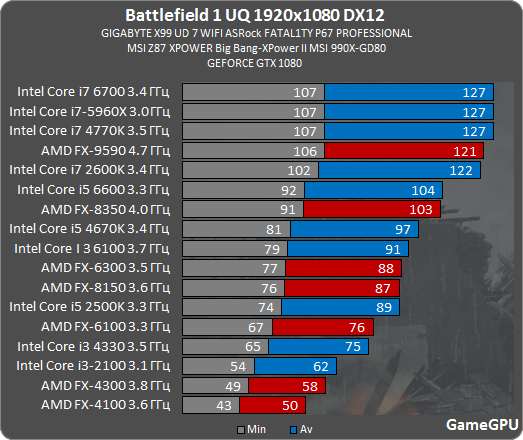

i5-2500k @4.2Ghz
1070
16gb RAM
On an SSD

1080p/60fps

Yay or nay?

Single player will be absolute Aces on that setup, if you want to stay at 1080p60 on larger multiplayer matches (32+ player) you will start running into issues unless you lower settings or upgrade to a better CPU.
 
It's fine if you don't mind dropping frames below 60 with max settings in large scale battles, just kindly pointing out that it will happen on a non-HT CPU. :) It's not exactly a performance issue when a game is actually demanding on a CPU. Now if the issue at hand was one core/thread being utilized at 100% and the others not seeing much action, that is a verified problem that should be complained about. I'm personally tired of the complaining going on wasting space in performance threads about well optimized games that are simply too demanding for outdated CPU technology.


Single player will be absolute Aces on that setup, if you want to stay at 1080p60 on larger multiplayer matches (32+ player) you will start running into issues unless you lower settings or upgrade to a better CPU.

That's fine by me, I'm most interested in the single player now anyway, thanks!
 
Which video settings should I take down a notch to squeeze out 5-10 more frames, but won't have too noticeable of an impact visually? Trying to hold ~100 fps, but shit gets crazy sometimes. Thanks.

i7 3770 / 980 Ti.
 
Is the destruction what's causing the CPU be so maxed out? I never had an issue in BF4 with the same player count and I'd also argue a lot more was going on in the game with all the vehicles and different rockets flying around. I liked BC2 destruction more too but I guess this is a more accurate way of crumbling probably.

Anyway got into a Sinai Desert 64 player match and it was dropping frames more than I ever did in the beta which ran almost perfectly smooth for 50 hours of play.
So idk what they did but it seems a little more demanding for not much reason. Hopefully it can brought down a bit in the future.
 
Is the destruction what's causing the CPU be so maxed out? I never had an issue in BF4 with the same player count and I'd also argue a lot more was going on in the game with all the vehicles and different rockets flying around. I liked BC2 destruction more too but I guess this is a more accurate way of crumbling probably.

Anyway got into a Sinai Desert 64 player match and it was dropping frames more than I ever did in the beta which ran almost perfectly smooth for 50 hours of play.
So idk what they did but it seems a little more demanding for not much reason. Hopefully it can brought down a bit in the future.

I think if destruction was reason then we would see spikes in CPU usage here and there as destruction events take place, but we are talking about what is ~20-25% increase in baseline CPU usage between beta and now.
 
117 vs 119 fps is well withing a margin of error and hardly something which you would notice without measurement. I call this "even".

And I was talking about stuff like this: Battlefield 1 review: benchmarks met 13 videokaarten

KUcc.png


Basically DX12 is still shit in BF1, less than in beta but still doesn't really worth using, even on Radeons.


Not really as you can see above. GameGPUs results aren't the only benchmark on the planet, and they tend to change between systems and benchmarking scenes.
+14 to the minimum and +11 to the average for the AMD 8350 seems pretty non-shitty to me. I have an AMD processor in one of my rigs so I'm eager to give it a shot.

edit: Also, like I was speculating, the 480 shows signifcant improvements in frametimes in the most stressing scenario in the benches you posted.
 
+14 to the minimum and +11 to the average for the AMD 8350 seems pretty non-shitty to me. I have an AMD processor in one of my rigs so I'm eager to give it a shot.

edit: Also, like I was speculating, the 480 shows signifcant improvements in frametimes in the most stressing scenario in the benches you posted.

On a slow CPU you may get much better results in DX12, that's true. That would also be most likely true for NV h/w as well. But on a modern Intel one there's literally no win of any sort on any h/w.
 
On a slow CPU you may get much better results in DX12, that's true. That would also be most likely true for NV h/w as well. But on a modern Intel one there's literally no win of any sort on any h/w.
If you get slightly worse framerates and much better frametimes with Intel I would switch to DX12 and not look back. But no one is doing frametime benchmarks for CPUs :(

Also, DX12 seems to have some issues with stuttering and input lag so it may be a no go right now regardless. BF4 also had godawful input lag with vsync.
 
Anyone with a 4670k @ stock with a 970 seeing random 0-1 FPS chokes running on Ultra @ 1080? They're seemingly random but otherwise smooth. Happens maybe 1-2 times a match.
 
Tell me he damage of wanting to try and run this:

I7 4770k
Asus gtx 760 (2 gb)
16 gb ram

Think it is possible to run 1080p with other settings lowered?
 
How come some many people are reporting sub-60 drops due to CPU bottlenecks? I played the beta without a single drop, max settings, on a 3570k @ 4.3 GHz. Surely the full game can't be that much more demanding?
 
Älg;220226853 said:
How come some many people are reporting sub-60 drops due to CPU bottlenecks? I played the beta without a single drop, max settings, on a 3570k @ 4.3 GHz. Surely the full game can't be that much more demanding?

This version of the game is ~20-25% more taxing on my i5 6600K than alpha and beta were. Why? No idea, game isn't doing anything what earlier versions already didn't do.
 
It's fine if you don't mind dropping frames below 60 with max settings in large scale battles, just kindly pointing out that it will happen on a non-HT CPU. :) It's not exactly a performance issue when a game is actually demanding on a CPU. Now if the issue at hand was one core/thread being utilized at 100% and the others not seeing much action, that is a verified problem that should be complained about. I'm personally tired of the complaining going on wasting space in performance threads about well optimized games that are simply too demanding for outdated CPU technology.


Single player will be absolute Aces on that setup, if you want to stay at 1080p60 on larger multiplayer matches (32+ player) you will start running into issues unless you lower settings or upgrade to a better CPU.

I have a 2500k (3.4Ghz), 16GB ram, 780ti, and I run BF4 at 2560x1600p on all ultra (with the exception of shadows on medium) at a rock-solid 60fps.
 
Anyone with a FX 8350? Im getting really bad performance, it really doesnt matter which preset, be it low or ultra. Dips to 40 fps on all maps but the urban one, name starts with A.

I got a 1070 too, so that probably isnt the problem. Would be helpful if anyone got the same CPU. Tried DX 12 but getting even worse stutter and fps.

*edit* Beta ran much better.
 
Really regret getting the 6600K over the 6700K now. I had no plans to get a Titan at the time, but now I have the fastest GPU ever made and an I5.

My wife is going to kill me spending even more on my PC lol.
 
This version of the game is ~20-25% more taxing on my i5 6600K than alpha and beta were. Why? No idea, game isn't doing anything what earlier versions already didn't do.

It might be nothing, but I immediately noticed the complete absence of a shadow quality option in the menu during the beta, and said shadows were really low-res, even at the Ultra preset.

Maybe higher shadow quality is taxing on the CPU in the retail version of this game.
 
Playing maxed out at 1440p with a 1080 and 6800k at 4.4 I saw some drops to the 60-70s when flying and looking around quickly on the ground it seems to stay around 80-90s pretty consistently, I'm thinking of locking frame rate at 60hz.

Overall looks beautiful and performs really well.
 
I'm so glad I found my i7 6700 for $260. Was close to buying the i5 6600 on Newegg for $230 until I scored on the i7 for only $30 elsewhere.

BF1 ran like a dream for me from what I played so far.
 
This version of the game is ~20-25% more taxing on my i5 6600K than alpha and beta were. Why? No idea, game isn't doing anything what earlier versions already didn't do.
I really hope they bring it back down, I had no problems in the beta. This is the first game that has ever been so bottlenecks by my i5 and I've played around 100 new games just this year. Even Sinai desert runs worse than beta.

I won't cancel pre-order because everything else under 64 players runs perfectly. I'll just have to stay in 40 player servers for a while.
 
May have found out why the release version is running like ass.

http://answers.ea.com/t5/Origin/QtWebEngineProcess-exe-process/td-p/5553613/page/1

This process got added recently to Origin. For me it runs at a constant 10% of my CPU without a game running. For some it uses 20% of the CPU at all times. This is a pretty huge issue and could explain why my FPS sometimes hits 0 FPS once a game.

I did see that in my task manager and tried closing but it would just auto restart. I didn't think it was anything because of never personally checked at what processes Origin does and thought I just hadn't noticed it before. But if it's new and is definitely not necessary that sucks balls.

Edit: Nevermind, ran the game in windowed and got the same frame drops, watched the cpu usage on that process and it was mostly under 1% and most it reached was 2%. The game itself just seems more demanding than beta. I don't really know why but it is.
 
Do the console versions run 64 players? Even if it's 32 players being CPU limited something is very wrong here (unless they're doing crazy extra physics or something)
 
Is the cutscene before the operations match running at 29fps for anyone else? It looks very choppy and slow on my end.
 
Top Bottom