• Hey Guest. Check out your NeoGAF Wrapped 2025 results here!

Best upgrade path for new PC monitor?

21:9 is tempting me.

What is the relative performance hit? Can a 1070 comfortable handle an ultra wide?

Also what happens if the game doesn't support it? Black bars?
 
21:9 is tempting me.

What is the relative performance hit? Can a 1070 comfortable handle an ultra wide?

Also what happens if the game doesn't support it? Black bars?

1070 is completely fine in ultrawide, more so if you have the 8GB variant. Here's some benches

http://techgage.com/article/nvidia-geforce-gtx-1070-review-a-look-at-1440p-4k-ultra-wide-gaming/2/

One of two things will happen in a game that doesn't support it:

1. The game will stretch the image out to your monitor like mufuckin laffy taffy
2. If it aspect ratio is preserved, it will just have black bars on the side.


Why are you reading this, buy a 21:9 NOW!
 
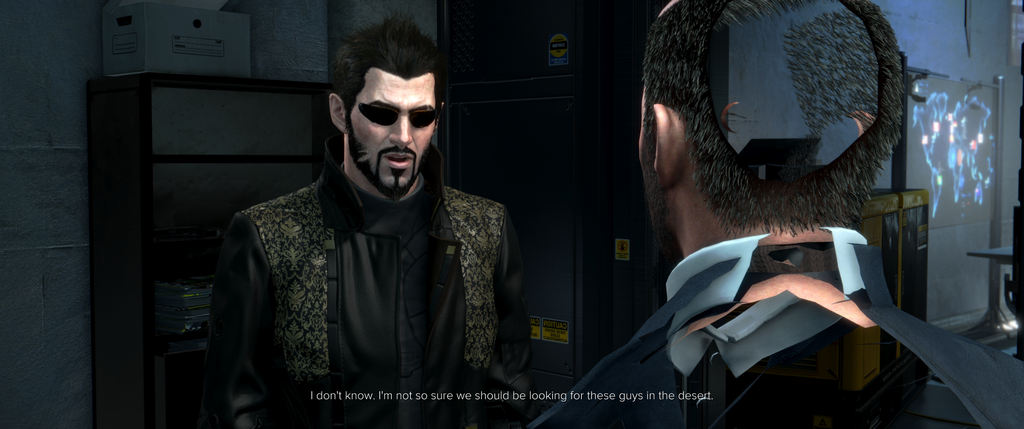
Note that while many games claim 21:9 support, hardly any work without some issues or compromises. Cutscenes will be pillarboxed most likely, and if they aren't, you can expect shit like this:

DXMD_2016_10_02_18_19_16_866.png


The reality is multiplats are made for 16:9, and support for 21:9 is always going to be iffy. I wouldn't put 1000+ €/$ into any of the 21:9 1440p IPS panels out there now. I'd just go for the 27" 2560x1440 model, or go straight to 40" 4K. I've done a 3840x1600 custom 21:9 res with my monitor, and honestly I'll much rather have the bigger 16:9 image without worries of 21:9 support. The expanded fov is great in theory, but falls short in practice. And this is coming from someone who had 3x1 Eyefinity for several years. It can be a lot of fun, but you have to expect constant tinkering and occasionally complete lack of support.
 
21:9 is tempting me.

What is the relative performance hit? Can a 1070 comfortable handle an ultra wide?

Also what happens if the game doesn't support it? Black bars?

1070 should be more than fine for most games. Only the most exceptionally demanding stuff at 1440p will give a bit of a hit. I had to turn down some settings on a GTX 970 when Rise of the Tomb Raider launched earlier this year as an example, but that game is very demanding if dialed way up. Most everything else ran flawlessly for me at Ultra, and I imagine a 1070 will give less issues.

If a game is 16:9-only you will get vertical black bars on the edges cutting off the extra inches of screen space on the side(also known as "pillar-bars".

Keep in mind also that many games have full 21:9 support but certain cutscenes/cinematic moments will still play out in 16:9, thus you get those black sidebars during those moments until gameplay resumes. No top/bottom bars, just left/right. It's really not a big deal as they are cutscenes, but should be mentioned as it is a thing that happens.

Edit: I have never seen anything like the above Deus Ex pic in my experience. I also have not played Mankind Divided, so maybe its a unique problem with that game? Generally though, I rarely need to do any tinkering outside of some extreme cases(or trying to hardwire older games to support it).
 
Note that while many games claim 21:9 support, hardly any work without some issues or compromises. Cutscenes will be pillarboxed most likely, and if they aren't, you can expect shit like this:

DXMD_2016_10_02_18_19_16_866.png


The reality is multiplats are made for 16:9, and support for 21:9 is always going to be iffy. I wouldn't put 1000+ €/$ into any of the 21:9 1440p IPS panels out there now. I'd just go for the 27" 2560x1440 model, or go straight to 40" 4K. I've done a 3840x1600 custom 21:9 res with my monitor, and honestly I'll much rather have the bigger 16:9 image without worries of 21:9 support. The expanded fov is great in theory, but falls short in practice. And this is coming from someone who had 3x1 Eyefinity for several years. It can be a lot of fun, but you have to expect constant tinkering and occasionally complete lack of support.

That doesn't look like a 21:9 issue, IMO. The model is clipping through even where a 16:9 area would be, looks to be just the camera in Deus Ex acting wonky.

https://youtu.be/YmaIy9zciE4?t=92

Not saying 21:9 is completely trouble free, there are definitely some cases where you have to tinker but.....

eiVATiA.jpg


I personally can't ever go back
 
That doesn't look like a 21:9 issue, IMO. The model is clipping through even where a 16:9 area would be, looks to be just the camera in Deus Ex acting wonky.

https://youtu.be/YmaIy9zciE4?t=92

It's there in 21:9 and not in 16:9 so it is very much a 21:9 issue. Of course it's not clipping in most scenes, but the cutscenes are made for 16:9 in mind, and they often look weird in 21:9. That's why most games simply pillarbox them to begin with. It's pretty jarring imo, a constant reminder of not playing the game in its native aspect ratio.
 
Pretty much every major release fully supports 21:9 natively. I posted(just a few posts above yours) only three major examples in 2016 off the top of my head that didn't quite support it.

-Dragon's Dogma (fixed within hours after launch thanks to a community modder with a simple copy/paste file, so full 21:9 if you do the 30s of work)
-Skyrim SE (Can play just fine in 21:9 by editing an .ini file, but the UI doesn't scale correctly so you miss some info that is cut off in inventory, hoping for patch support from Bethesda or the community to apply a proper fix...)
-Overwatch (Blizzard took it out for competitive reasons...not sure if they reinstated?)

It's actually more difficult to think of games(at least those deserving of GAF attention) that don't support it. Hell, even GAF darlings Trails in the Sky and Stardew Valley support 21:9 natively on Steam.

Speaking of Steam, there is a community curator group that keeps abreast of 21:9 supported games that come to Steam.

Seriously, this thread should have begun and ended with 21:9 monitor recommendations. Just be mindful the monitors aren't cheap, but next to a videocard upgrade, 21:9 is the best investment a PC gamer can make for a rig if you appreciate being drawn into as much lush visuals as your peripheral vision can handle currently.


My experience is the opposite. The majority of the content I've tried, both in terms of games and movies, is not supporting 21:9, and if they do, there are often issues with UI, LoD, FoV, clipping or something else. And that's not unexpected, since pretty much 100% of all games are made for 16:9.

Blu-ray movies have black borders around the whole image, due to the Blu-ray specification (always 1080p encoded, with all black borders rendered) unless you're using software that can detect them and crop them.

I'd only recommend 21:9 as an extra monitor for occasional gaming, if you have the money and are willing to tweak. It's not a plug and play experience.

Not to mention the selection of WALLPAPERS.
 
"The answer is Gsync"

"This message is brought to you by Nvidia"

Essentially.

The answer is adaptive sync. And it's brought to you by AMD and Vesa as a standard in Display Port and HDMI (now or soon) . Why? Because it's a an extremely cheap, relatively open alternative that can be cheaply implemented into anything with a proper scaler and doesn't require ecosystem lock in and high cost specialized logic board to do it. The faster it's embraced, the faster it can be improved. Consoles and Televisions will never see the benefits from such tech with Gsync's high cost proprietary nature.

I will never give up this fight even though it seems nobody cares, because even as someone who owns a 1070 I will not support the kind of practice that creates lock in and lock out that doesn't benefit consumers.
 
Lately I feel like if I don't buy either of the $1200 Acer or Asus 34" monitors, I'm going to skimp on something. Mostly because that gets you 21:9, Gsync, 1440p and all that. Why choose when you get can get all of it?

The problem for me personally is that spending more than like $400 for a monitor seems crazy to me. Right now I'm using a roughly $200 Asus 27" 1080p monitor and it's working well.

I think the smart move is to wait until all of that tech gets cheaper than $1200! Or just go all in and get the top of the line unit that won't be woefully out of date in like 3 years. I have a feeling that we're just in a weird place with monitors until some of that tech gets down into the $300 range.
 
Lately I feel like if I don't buy either of the $1200 Acer or Asus 34" monitors, I'm going to skimp on something. Mostly because that gets you 21:9, Gsync, 1440p and all that. Why choose when you get can get all of it?

The problem for me personally is that spending more than like $400 for a monitor seems crazy to me. Right now I'm using a roughly $200 Asus 27" 1080p monitor and it's working well.

I think the smart move is to wait until all of that tech gets cheaper than $1200! Or just go all in and get the top of the line unit that won't be woefully out of date in like 3 years. I have a feeling that we're just in a weird place with monitors until some of that tech gets down into the $300 range.

There were several times the Woot App had the 34" Acer predator for $600-700 refurbished. Was really tempting.

Monitor I have is the Asus MG279Q 27" 144hz Freesync monitor. Got it on a flash deal from newegg for $440. Fantastic monitor. I have a 1070 though so I can't use adaptive sync because Nvidia disabled it on the Display Ports.
 
YdkWsPR.jpg

AzIW6e4.jpg

S2g8Ogn.jpg

DUgeIhH.jpg


21:9 can sometimes require effort, but for me it's always worth it. The benefits in presentation and immersion outweigh any problems.
 
There were several times the Woot App had the 34" Acer predator for $600-700 refurbished. Was really tempting.

Monitor I have is the Asus MG279Q 27" 144hz Freesync monitor. Got it on a flash deal from newegg for $440. Fantastic monitor. I have a 1070 though so I can't use adaptive sync because Nvidia disabled it on the Display Ports.

So what you're saying is, since I have a 1070 too, G-Sync is the answer?
 
I imagine 21:9 4K 60 Hz HDR is gonna launch next year at around 1200-1500 dollars. It's going to take time for this tech to come down.


You might want to get a better value on something less high tech and then upgrade in 3-4 years. By that point we might see 40-inch 21:9 monitors with all the bells and whites in 4K.
 
Lately I feel like if I don't buy either of the $1200 Acer or Asus 34" monitors, I'm going to skimp on something. Mostly because that gets you 21:9, Gsync, 1440p and all that. Why choose when you get can get all of it?

The problem for me personally is that spending more than like $400 for a monitor seems crazy to me. Right now I'm using a roughly $200 Asus 27" 1080p monitor and it's working well.

I think the smart move is to wait until all of that tech gets cheaper than $1200! Or just go all in and get the top of the line unit that won't be woefully out of date in like 3 years. I have a feeling that we're just in a weird place with monitors until some of that tech gets down into the $300 range.

One of my favorite monitors debuted at 2k. What they charged now is nothing for what we get despite flaws of flat panels I complain about.

You're panel has all that and then some. Outside of color accuracy and 4k there is not much to ask for and 4k is overrated till current performance when until high fps becomes common in that range, will be long time before I see any current game do that at 100fps on high, ultra, or max. 60fps or less with pixel persistence is just outright disgusting to me these days.
 
So what you're saying is, since I have a 1070 too, G-Sync is the answer?

If we continue to support it, it won't evolve and become more than the beginning.

Gsync is not a solution that can go to the many, and we need a solution that can benefit all games. That is Adaptive Sync.
 
GAF, what's the best upgrade path for a new PC monitor right now?

I recently built a new rig with a 6600k, GTX 1070 and 16gb 3000mhz ddr4 ram. I also am running an SSD.

I'm still rocking a 1080p Dell ultrasharp 60hz IPS monitor. The monitor is fantastic and has treated me well, but the 1070 is overkill in most games. I'm downsampling at max settings in most games because I just have extra performance to spare. I feel like the next logical upgrade path for my PC experience is a new display.

Problem is, right now seems a bad time to upgrade, or at least an uncertain time. There are a number of options:

- 1440p and higher refresh (120 or 144 Hz)

- 1440p Gsync

- 21:9 ultra wide

- 4k 60hz

- wait for 4k HDR (2017?)

What do you think is the smartest move? I'm thinking just waiting to see what 2017 holds in terms of possibly getting 4k HDR monitors. Jumping to 1400p right now seems a waste. Especially if I want to add a ps4 pro or Scorpio in the future.

Thoughts?

If your hell bent on hdr monitors then wait. If your hell bent on 4K then wait your card won't cut it for 4K native with the 1070 for newer games. ( I know as I was running a 1070 on a 40" 4K). The biggest thing you need to think about is your screen size. A 27" monitor 1440p has the same ppi as 4K 40" with in a margin of 2ppi. 27" 4K does double your ppi but your returns are greatly diminished while needing 2x computing power which falls outside your spec of your pc realistically. So unless you are looking at bigger than 29-30" a 1440p with gsync should keep you happy with your 1070 for a good while.

The last part regarding the Scorpio or ps pro. Neither of them are going to hit 4K native for newer games often if so they won't be above 30 fps for newer titles. Also I'm still waiting to see if 1440p native will be added to the settings for these systems. I know the pro doesn't at this time but doesn't mean support for this won't happen, but there are no sure things.
 
Sure wish there were more options for 1080p G-sync. 1440p is a half step up from 1080p at best. Plus unless you have a 1080 or Titan X, you're not getting to 120fps at max setting on most graphically challenging games anyways. 4k is the future and I wouldn't buy anything that isn't 4k/HDR right now.
 
What kind of IQ improvement could I expect moving to a 1440p panel vs. just downsampling from 1440p to 1080p on my current monitor?

I downsample from 1440p with most games on my 1070, and it looks pretty great. I'm sure having a 1440p native panel would improve the image, but how much?

I feel like, as others have given me similar feedback, that the 1070 is more a 1440p card. 4K is obviously a stretch unless I want to play at 30fps (ugh).

My other question is, if I go for a smaller sized 4K HDR TV, what is the scaling from 1080 or 1440 to 4K like? Will it look crappy?
 
What kind of IQ improvement could I expect moving to a 1440p panel vs. just downsampling from 1440p to 1080p on my current monitor?

I downsample from 1440p with most games on my 1070, and it looks pretty great. I'm sure having a 1440p native panel would improve the image, but how much?

I feel like, as others have given me similar feedback, that the 1070 is more a 1440p card. 4K is obviously a stretch unless I want to play at 30fps (ugh).

My other question is, if I go for a smaller sized 4K HDR TV, what is the scaling from 1080 or 1440 to 4K like? Will it look crappy?

Well 1080p to 4K is 1:4 so it maps pretty well. 1440p upscaled to 4K should give your more detail than 1080p even though it doesn't match as well. Problem is in my opinion, if you are using a 40"+ monitor it seems almost too big as a pc monitor. That's one reason I went back to a 27", as you had to look around parts of the monitor if you are sitting at a pc desk for gaming which was distracting.
 
This thread just made me want to upgrade from my Asus 24 inch 144hz monitor lol. Stopping at the Micro Center on my way home from work today. Most likely going to go with the ASUS PG348Q and test it there for blacklight bleed. Never owned an IPS panel either, so I can't wait to see the upgrade.
 
This thread just made me want to upgrade from my Asus 24 inch 144hz monitor lol. Stopping at the Micro Center on my way home from work today. Most likely going to go with the ASUS PG348Q and test it there for blacklight bleed. Never owned an IPS panel either, so I can't wait to see the upgrade.

Microcenter has a good return policy where they will swap out the PG348Q I believe within 14 days and infinite number of times until you get the monitor you're happy with. And IPS was an amazing jump in quality.
 
Microcenter has a good return policy where they will swap out the PG348Q I believe within 14 days and infinite number of times until you get the monitor you're happy with. And IPS was an amazing jump in quality.

Yeah Microcenter has always been good so far. Hoping I get a good one my first try. Can't wait to get that bad boy set up today when I get home.

Edit: Does the PG348Q need a lot of calibration to get the best image quality?
 
This thread just made me want to upgrade from my Asus 24 inch 144hz monitor lol. Stopping at the Micro Center on my way home from work today. Most likely going to go with the ASUS PG348Q and test it there for blacklight bleed. Never owned an IPS panel either, so I can't wait to see the upgrade.
Man, if I had a monitor like that I'd just never stop gaming. Looks insane. Over $1k !

Let us know how it is.
 
I heard the scaling issues for 4K at 27 inches looks terrible and that you should go minimum 32" for 4K.

Is this true?
 
It's a very bad time to buy a monitor right now. The ones that are out right now are relatively old/outdated, we need monitors that weren't possible without display port 1.4. I'd wait for a 21:9 1440p 144 Hz monitor with HDR and Gsync/Freesync. Replace 21:9 with 4k as an alternative, but that will require a Titan XP or 1080 SLI for high performance at 4k with ultra settings.
 
Can two monitors run gsync at the same time? I have an Acer 27" G-Sync monitor now and love it. I also have my two old 24" ASUS monitors in a triple setup. I was considering dropping the extra two and picking up an ultrawide. Could I run G-Sync with both? I'm currently on a 980Ti, in the queue for a 1080 step up.

I wouldn't want to be playing games across both monitors, the ultrawide would mostly be for non-games or if I had a specific game I wanted to play in UW. I do a lot of multitasking and use my secondary monitors for TV/Web browsing while playing some games.
 
The answer is a 1440p 144-165hz IPS Gsync/Freesync monitor. No compromises. Such displays are available for 500€ and you use a good display for a long time (at least I do, usually for 5-10 years)
 
I wish the 1440p & gsync & IPS monitors were cheaper :( I still find that combo way too expensive for what i can spend.

Though i am looking for smaller screens on a second thought (not more then 24" cause i like being close to monitor but i can't do that to my liking with big screens), but there are no 1440p option on small screens which limits me severly (+ every good gaming monitor i would want is too big for me). I am truly afraid of the time when my 22" 5y old monitor dies due to its age...
 
Ok finally got it all set up and my god is this thing freaking huge lol.

http://i.imgur.com/CBW37g1.jpg
https://i.imgur.com/R0q6DZ0.jpg

These pictures were taken from my cell phone and it really does not do it justice, but the monitor looks absolutely amazing. My desk is definitely not big enough with the default stand lol and it is literally in my face haha. I ended up ordering this mount from amazon https://www.amazon.com/gp/product/B001IWOBGI/?tag=neogaf0e-20.

Also here is a picture from someone else using the mount.

https://i.imgur.com/ogwm5bo.jpg

When I get that mount Monday everything should be perfect. For now my eyes might have to melt for the next two days lol. Can't wait to start really getting into games with this.

Edit: http://i.imgur.com/QBdvNsF.jpg changed the background. These colors are amazing.
 
I keep trying to convince myself to go 21:9 but I'm trying to figure out if it would be useful outside of gaming since I do less of that nowadays but really need a new monitor (and use monitors for like ten years before retiring them).

I think my Lightroom and research writing workflows would benefit from the aspect ratio though.
 
Ok finally got it all set up and my god is this thing freaking huge lol.
Glad you are enjoying it!

I changed my stand as well as my current desk has no such room for a behemoth, I had it at a stupid ass angle and it was in my face and I actually was getting dizzy haha.

I ended up getting this startech stand for an iMac, works super well!


I keep trying to convince myself to go 21:9 but I'm trying to figure out if it would be useful outside of gaming since I do less of that nowadays but really need a new monitor (and use monitors for like ten years before retiring them).

I think my Lightroom and research writing workflows would benefit from the aspect ratio though.

Dude yes, productivity is the bees kness, love it for making music.


I realize we are off topic here, so I apologize to OP!
 
I currently have a 27" qnix monitor which is 1440p 60hz although it does overclock to 100hz.

I am tempted to upgrade to either a G sync monitor of the same size but 144hz or to a 21:9 job.

Which?
 
Just picked up a second monitor 144Hz, holy shit. I have never gamed on a screen with higher refresh rate than 60Hz. Buttery smooth, the only downside is that its a 1080p/TN panel sitting next to a 1440p IPS panel :/

Time to learn some Mcree.
 
-Skyrim SE (Can play just fine in 21:9 by editing an .ini file, but the UI doesn't scale correctly so you miss some info that is cut off in inventory, hoping for patch support from Bethesda or the community to apply a proper fix...)

I've been using this mod to fix the UI scaling. The perks menu is a little messed up but otherwise I haven't noticed any further problems.
 
Hey guys, sorry for the bump but figured this was a good place to ask. My trusty Dell monitor of five years suddenly died on me, and I need to buy a new one. It's was bought mostly for work purposes (illustration and design), but since I spend about the same amount of time gaming on it, I figured I want something with G-Sync/144hz. So, is there a monitor out there with a nice high gamut and contrast that also has G-Sync?
(another silly question since I'm not on the up and up with this new tech - if I have an nVidia card, I need a G-Sync over Freesync monitor, right?)
My dear departed monitor was 1440p, and I'd like to go 4K but I guess it's not a must. It was 27" and I'd like something in that size, since I don't think I'll have the desk space for something bigger.

Thanks a lot in advance!
 
I'll probably got the adaptive/freesync route. The 21:9 is tempting and every time I think about buying it, it's implemented like shit in Dota so I don't bother.

And the 34s are still expensive unless I get the 34 @ 1080p.

So I'll wait, no rush.
 
If you have a 1080 or Titan why would you care for gsync? Besides spending more money for a tech that you wouldn't really benefit from?

Variable refresh.

I've got a 60Hz Dell U2711, but my 980 Ti puts out well over 60fps in most cases. In these situations the tearing is very, very bad. G-Sync will ensure zero tearing from 1fps right up to the refresh rate limit of the display. (I understand Freesync does the same, but the variable refresh lower limit is 40fps - i.e. Freesync is also good for powerful PCs - someone correct me if I'm wrong).

165Hz G-Sync will be my next purchase for sure. If I had an AMD card I'd go for Freesync as those displays are quite a bit cheaper.
 
Consider the following gsync monitors:
-Asus PG279Q ROG
-Acer predator XB271HU

So CES has come and gone, time to re-enter the discussion I started here.

I didn't really see anything compelling at CES that is close to affordable. I'm still rocking my Dell 24" 1080p IPS 60hz monitor. Some recent games have given my 1070 a run for it's money even at 1080p. Ghost recon Wildlands for example, I need to turn some settings down to get 1080p 60fps.

Right now I'm leaning towards going with one of the quoted displays. 4k 60 still doesn't seem within reach for the most part. The 11 series cards will probably change that, but I'm thinking going 1440p at a size of 27" will be a nice PPI and provide enough eye candy for years. I also really want to go Gsync at this point, with some games hitting the 1070 hard and causing drops below 60fps.

What does everyone think now? My current concerns/thinking are:

- running games at 1440p with the 1070?
- need IPS, I just can't do TN
- going to pass on 21:9 for now
- I think I need Gsync in my life...
- I plan to get a Scorpio, hoping it has 1440 output

The Acer Predator xb271hu keeps popping up on Amazon for $545 certified refurbished. I'm tempted to pull the trigger. Are refurbished safe?
 
So CES has come and gone, time to re-enter the discussion I started here.

I didn't really see anything compelling at CES that is close to affordable. I'm still rocking my Dell 24" 1080p IPS 60hz monitor. Some recent games have given my 1070 a run for it's money even at 1080p. Ghost recon Wildlands for example, I need to turn some settings down to get 1080p 60fps.

Right now I'm leaning towards going with one of the quoted displays. 4k 60 still doesn't seem within reach for the most part. The 11 series cards will probably change that, but I'm thinking going 1440p at a size of 27" will be a nice PPI and provide enough eye candy for years. I also really want to go Gsync at this point, with some games hitting the 1070 hard and causing drops below 60fps.

What does everyone think now? My current concerns/thinking are:

- running games at 1440p with the 1070?
- need IPS, I just can't do TN
- going to pass on 21:9 for now
- I think I need Gsync in my life...
- I plan to get a Scorpio, hoping it has 1440 output

The Acer Predator xb271hu keeps popping up on Amazon for $545 certified refurbished. I'm tempted to pull the trigger. Are refurbished safe?

Wildlands has some issues. I run a 1070 at 2560x1440 on a Gsync Monitor and it jumps from 50s-80s. I haven't done the last Nivida driver update. I have no issues with running anything I play. Battlefield 1,Doom,Gears,Forza 3(had some issues as well in certain parts) Running a 1070 at 2560x1440p isn't a problem.
 
Wildlands has some issues. I run a 1070 at 2560x1440 on a Gsync Monitor and it jumps from 50s-80s. I haven't done the last Nivida driver update. I have no issues with running anything I play. Battlefield 1,Doom,Gears,Forza 3(had some issues as well in certain parts) Running a 1070 at 2560x1440p isn't a problem.

Yeah, I've been downsampling games from 1440 quite a bit with my 1070 and performance is fairly good. I think it will do me fine until the 11 series is out. Lord knows I won't be able to hold back on upgrading.

I've been sitting on this monitor upgrade now for like 6 months. It feels like an uncertain time to choose a path. I think I am leaning towards the Acer xb271hu refurb for $545 US. Assuming its like new, that seems like a steal.

Still burns me that freesync variants are so much cheaper. I'm not sure if AMDs new cards should be a consideration for this. The last few years they seem to be targeting below the high end market with their GPU s.
 
Top Bottom