

-
Hey Guest. Check out your NeoGAF Wrapped 2025 results here!
You are using an out of date browser. It may not display this or other websites correctly.
You should upgrade or use an alternative browser.
You should upgrade or use an alternative browser.
Console Controllers on PC Preference Thread
- Thread starter TriAceJP
- Start date
X360 wired controller is the easiest to set up and most comfortable for me. Long cable, sits well in my hands, nicely rounded buttons. Bad points are that analogue triggers cause problems with most old games and the mediocre dpad (have had worse in usb 1.0 days).
WiiU Pro /w Mayflash adapter is a close second because it's also comfortable to hold, plug and play thanks to the adapter, has ABXY buttons, long battery life and it has no problems with mapping buttons in old games. Only reason why I don't use it as much is cos I sometimes can't remember where I put the mayflash thingy - you just don't have these problems with a wired controller.
I dislike the sticks and hate the triggers on DS3.
WiiU Pro /w Mayflash adapter is a close second because it's also comfortable to hold, plug and play thanks to the adapter, has ABXY buttons, long battery life and it has no problems with mapping buttons in old games. Only reason why I don't use it as much is cos I sometimes can't remember where I put the mayflash thingy - you just don't have these problems with a wired controller.
I dislike the sticks and hate the triggers on DS3.
I don't play fighting and racing games much and haven't had a chance to use XB1 and DS4 pads yet.
Mister Chippy
Member
mouse/keyboard + dualshock 4 is all I'll ever need for PC control options
Same, although add in a fightstick for me. DS4 is a great controller, plus it's what I have. It's given me no reason to want to go out and get a new one though.
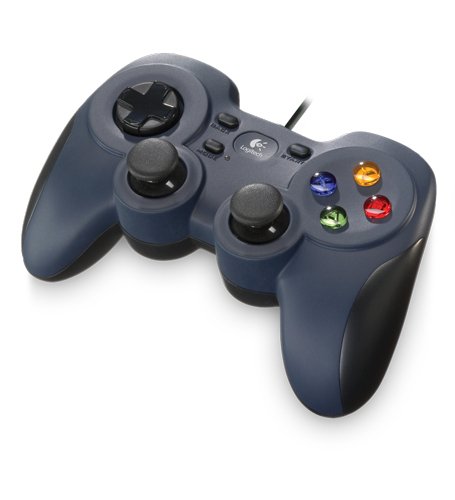
Still rocking this, where is my next gen version Logitech?
This is what I use and it's perfect especially because I prefer the design of the Playstation controllers.

Nabs
Member
Used DSWindows and various forks for a couple hundred hours now, including Dark Souls II, DMC series, MGR, Mordor, and FFXIII.
Worked great, little issues, and my LED is green.
My LED is way cooler with Blue - (Isaac - Green, OlliOlli - Orange, NFS - Red).
I mostly use a 360 controller, but might switch to the Xbone controller as soon as a wired version is released. For 2D games though, I use either the PS4 controller or the logitech below:
I think it's good for 2D games even if the D-pad is a little unstable (shouldn't be able to move/rotate so much). As far as 3D games are concerned the triggers are too stiff and analogue pads too loose. It could also be more ergonomically designed, which one especially notices when using the triggers that aren't in quite the correct position.
Still rocking this, where is my next gen version Logitech?
I think it's good for 2D games even if the D-pad is a little unstable (shouldn't be able to move/rotate so much). As far as 3D games are concerned the triggers are too stiff and analogue pads too loose. It could also be more ergonomically designed, which one especially notices when using the triggers that aren't in quite the correct position.

Leafhopper
Banned
I don't bother with wireless that much. I am using an Xbox 1 controller. Got it this summer. The D-pad is amazing as well as the triggers. I have gotten used to the bumpers that people have complained about, they aren't that bad.
Previously I used one of my Dualshock 3 controllers. It was okay but I didn't find it too great. I don't hate the DS3 like a lot of people do though however.
I recommend an XB1 controller, heck I even use it when playing fighting games. I own a fightstick but it is one of the early PS3 fightsticks by Mad Catz when Super Street Fighter 4 came out and its a pain to get it to work on PC. That said I think I am better with a pad now anyway.
Just wish MS updated the drivers so I can have some options on Windows 7 so I can have more options for the controller. From what I seen there are more options on Windows 8.
Other controllers I would recommend, which has already been suggested in the thread, is the Logitech Rumble pads. However as other have said getting used to the swivel like D-pad.
Previously I used one of my Dualshock 3 controllers. It was okay but I didn't find it too great. I don't hate the DS3 like a lot of people do though however.
I recommend an XB1 controller, heck I even use it when playing fighting games. I own a fightstick but it is one of the early PS3 fightsticks by Mad Catz when Super Street Fighter 4 came out and its a pain to get it to work on PC. That said I think I am better with a pad now anyway.
Just wish MS updated the drivers so I can have some options on Windows 7 so I can have more options for the controller. From what I seen there are more options on Windows 8.
Other controllers I would recommend, which has already been suggested in the thread, is the Logitech Rumble pads. However as other have said getting used to the swivel like D-pad.
Is there a recommended Saturn USB controller? I bought a Buffalo SNES controller, but for Sega a Saturn controller would be far better.
The Club Sega one, but you have to go trollin' E-bay for one.
Holy Order Sol
Member
As the person who wrote the review thread for the Wii U mayflash adapter, definitely get the mayflash adapter. If time is money, even if you only consider yourself minimum wage, it pays for itself.
It -literally- makes syncing the Wii U Pro controller to your PC easier than syncing to your Wii U.
Also its the best controller. :x
Never thought about it but yeah, this is true. XD
This is probably a dumb question:
Do you only need one 360 adapter for multiple controllers? Part of me wants to assume that it can accept inputs from multiple "channels" but I really don't know much about how they work.
Thanks.
Yes, one adapter for the maximum of 4 controller at the same time.
JumpJeff84
Member
I bought an XboxOne controller to use on PC. I love it. I didn't wanna mess around with trying to set up the Dual Shock 4.
I don't mind that it's wired use only, as I sit about a foot away from my PC tower anyway.
I don't mind that it's wired use only, as I sit about a foot away from my PC tower anyway.

TriAceJP
Member
Got any link OP? I'm tired of my DS2 to USB controller because few games only support x360 native. I saw a lot of cheap(like $15-$20) x360 controller but I'm not sure if it was manufactured by Microsoft. The original MS x360 controller (taken directly from x360 consoles) costs about $30 in my area, is this the best deal I can get?
There are a few used controllers on amazon for under $25.

Dualshock 4 seems more flexible with Dinput support, most game inputs have XBO/360 controller button prompts so that's where it starts and ends with me.
That's my least favorite thing. Why can't developers offer both? Particualarly in games that appear on both consoles, so the art/ability is already there?
ROBOKITTYZILLA
Member
I'm still searching for the perfect solution.
I like using the DS3/DS4 controllers but they require some additional setup and don't follow the PC standard ABXY button layout. Regarding the button layout, it's more of a presentation issue as it doesn't really cause a problem with gameplay. The DS4 battery life is also somewhat lacking. I also like the Wii U Pro as it combines most of what I like about the DS3/DS4 and the 360 controller, but the lack of analog triggers and the reversed BAYX Nintendo standard button layout keeps it from becoming my primary controller.
I primarily use the wired 360 controller, but I miss the freedom of wireless and the directional pad is simply terrible. I like having the option of wireless, but the wireless dongles for the 360 controllers have been prone to failure in my experience. I've had 1/2 fail and 1/2 of the cheap knock-off dongles that you can buy as replacements fail. The dongle itself also adds additional clutter to your setup. Microsoft will likely be phasing these out at some point in favor of the XONE controller.
The Xbox One controller seems to have a much better directional pad but wireless functionality isn't available yet. I might make the switch if they ever get that working.
I like using the DS3/DS4 controllers but they require some additional setup and don't follow the PC standard ABXY button layout. Regarding the button layout, it's more of a presentation issue as it doesn't really cause a problem with gameplay. The DS4 battery life is also somewhat lacking. I also like the Wii U Pro as it combines most of what I like about the DS3/DS4 and the 360 controller, but the lack of analog triggers and the reversed BAYX Nintendo standard button layout keeps it from becoming my primary controller.
I primarily use the wired 360 controller, but I miss the freedom of wireless and the directional pad is simply terrible. I like having the option of wireless, but the wireless dongles for the 360 controllers have been prone to failure in my experience. I've had 1/2 fail and 1/2 of the cheap knock-off dongles that you can buy as replacements fail. The dongle itself also adds additional clutter to your setup. Microsoft will likely be phasing these out at some point in favor of the XONE controller.
The Xbox One controller seems to have a much better directional pad but wireless functionality isn't available yet. I might make the switch if they ever get that working.


SaiyanRaoh
Member
Is there really no way to fix the button placement problem on the mayflash wii U? I don't know why but I've owned it for a few months and I can never get used to the way the buttons are placed.
MightyHedgehog
Member
Wireless X360 pad or wired X360 stick, but I'd switch out to the X1 pad as soon as MS gets a wireless receiver out there since I prefer that pad over the last gen one if given the choice.
I mostly use a 360 controller, but might switch to the Xbone controller as soon as a wired version is released. For 2D games though, I use either the PS4 controller or the logitech below:
I think it's good for 2D games even if the D-pad is a little unstable (shouldn't be able to move/rotate so much). As far as 3D games are concerned the triggers are too stiff and analogue pads too loose. It could also be more ergonomically designed, which one especially notices when using the triggers that aren't in quite the correct position.
I used one of those (The F510), and the sticks were definitely not too lose. They were on the stiff side. The thing I disliked about it most were the dead zones.
Markitron
Is currently staging a hunger strike outside Gearbox HQ while trying to hate them to death
Since I recently got a decent PC for the first time in years, I have now gone to the effort of hooking it up to my AV receiver and TV. I have been using the dualshock 4 and loving it, the button prompts for the MS controllers isn't really a problem for me as my muscle memory takes over.
I was considering getting an XB1 pad just for PC but I did not know that it can't be used wirelessly. That's a dealbreaker for me, ill just get another DS4 instead.
I was considering getting an XB1 pad just for PC but I did not know that it can't be used wirelessly. That's a dealbreaker for me, ill just get another DS4 instead.

MrCunningham
Member
Still rocking this, where is my next gen version Logitech?
The only issue I have with this controller is the heavy resistance on the analogue triggers, other than that it is really solid. The d-pad on these controllers are rock solid and better than what you would find on an official 360 controller. I have not tried an Xbox One pad for comparison yet.
Wired 360 pad, as it's the most comfortable for me to use, and you just plug it in and it works without any messing around.
It just works.
Wired 360 pad, as it's the most comfortable for me to use, and you just plug it in and it works without any messing around.
This! I'm surprised no one else said this earlier in the thread. Wired 360 all the way
Been using a 360 pad wired and I was like okay this is okay.
Got a DS4 and I was okay, this is pretty good, but I hated the analog sticks and I haven't found a good use for the touchpad yet.
Went back to the 360 wired and...this shit is amazing. The tension of the sticks, the face buttons have the perfect resistance, the ergonomics are amazing as well.
If the DPAD on the 360 was good, it would be the best controller of all time.
I have Xbone sticks coming in for my DS4 and I'll make my judgment then, but until then, the 360 pad is definitely my favorite.
Got a DS4 and I was okay, this is pretty good, but I hated the analog sticks and I haven't found a good use for the touchpad yet.
Went back to the 360 wired and...this shit is amazing. The tension of the sticks, the face buttons have the perfect resistance, the ergonomics are amazing as well.
If the DPAD on the 360 was good, it would be the best controller of all time.
I have Xbone sticks coming in for my DS4 and I'll make my judgment then, but until then, the 360 pad is definitely my favorite.
MarcoZombieCannon
Member
I use a wired 360 pad, and probably will for the foreseeable future.. I have some for multiplayer and then a spare for when my main one bites the dust.
I'm using the wired X360 controller and it gets the job done, I'm satisfied. Has a great feel to it. Not sure if I'm missing out by not trying the other ones, but I doubt it. I was close to buying an XBO controller for pc though, felt as nice as the X360 if not a little better, but I couldn't justify the 30 price difference. I'll be rocking this one until it stops working.
JumpJeff84
Member
I'm using the wired X360 controller and it gets the job done, I'm satisfied. Has a great feel to it. Not sure if I'm missing out by not trying the other ones, but I doubt it. I was close to buying an XBO controller for pc though, felt as nice as the X360 if not a little better, but I couldn't justify the 30 price difference. I'll be rocking this one until it stops working.
I bought the XboxOne controller for my PC because I hated the d-pad on the 360 wired. I had one of the older controllers where the d-pad just flat-out didn't work right.
Big Chief Crazy Cone
Member
For those that use a DS3, can you recommend a driver or wrapper that works well and isn't shady? It can be hard to tell just through googling.
I'm on an 07 MBP with boot camp W7 x64, if that matters
I'm on an 07 MBP with boot camp W7 x64, if that matters

Caffeine
Member
i just replaced my old white 360 controller it would keep disconnecting if the wire was moved. replaced it with a third party licenced one

For those that use a DS3, can you recommend a driver or wrapper that works well and isn't shady? It can be hard to tell just through googling.
I'm on an 07 MBP with boot camp W7 x64, if that matters
Look here
http://forums.pcsx2.net/Thread-XInput-Wrapper-for-DS3-and-Play-com-USB-Dual-DS2-Controller
ThoseDeafMutes
Member
Xbox One controller is my fave. God tier triggers, much improved D-pad. PS4 pad is an improvement over PS3, but I don't even think it's as good as the 360 pad, with the exception of the headphone jack.
My current favorite for 2D games:
I think I'd prefer to use my arcade stick, but it's too loud for me to use at night.

I think I'd prefer to use my arcade stick, but it's too loud for me to use at night.
Xbox One controller is my fave. God tier triggers, much improved D-pad. PS4 pad is an improvement over PS3, but I don't even think it's as good as the 360 pad, with the exception of the headphone jack.
MS need to hurry up with that wireless receiver. I'll give it a shot once that happens.
Wii U Pro with that Mayflash thing.
Pro
- insanely easy to set up
- best battery
- best d-pad
Con
- button placement is different and you have to get used to it at first, especially weird when you have other consoles you use
As to other controllers: the Xbox 360 controller is not an option, the d-pad is the worst. DS3 works fine with a dongle, but there are better controllers. DS4 I haven't used that much so far but its battery life is really bad on the PS4.
Is there any input lag?
Wireless 360 controller, I tried the Wii U Pro Controller for a while, but the difference button placements irritates me. After getting the wireless 360 adapter, I can't believe I stuck with the logitech ones for so long.
I also use have a SNES USB controller for when I need a good d-pad.
I also use have a SNES USB controller for when I need a good d-pad.

MidgarBlowedUp
Member
Still use my wireless Xbox360 controller, but also have 2 Logitech Dual Action wired controllers that I use for older games. Only reason I bought it is there was a buy one get one free sale when they came out, so I got two for like $14.
adamantypants
Member
PS4 controller + bluetooth = perfection
Not having to worry about needing a mouse is a godsend.
Not having to worry about needing a mouse is a godsend.
Pro pad is my current favorite. The only downside is that I have to switch to the 360 pad if a game requires analog triggers, but that's a very rare occurrence. I use it constantly and rarely have to charge it, and ended up buying another one so I don't have to keep resyncing between PC and Wii U.
I'd like to get a DS4 sometime, but the reports of shoddy build quality and poor battery life have scared me off for now. I also hate the left stick placement. It's about time they fixed that.
I'd like to get a DS4 sometime, but the reports of shoddy build quality and poor battery life have scared me off for now. I also hate the left stick placement. It's about time they fixed that.
Isn't that exactly what the DS4 is?
Still rocking this, where is my next gen version Logitech?
I love my Wii U Pro, but I will be getting a DS4, to see if it can help scratch a certain itch.
whiteninja
Member
Dualshock 3 with scp driver. I can plug in it to my pc and it gets recognized/charges just as if it was a ps3. Or plug it back into ps3 to use there, no need to fiddle with the software.
I initially had problems finding a bt adapter that would work but I think thats due to crappy knockoffs from dealxtreme.
I just wish more devs would also add playstation button prompts to pc versions of games.Recently during Mordor I would sometimes get mixed up by the xbox prompts.
I initially had problems finding a bt adapter that would work but I think thats due to crappy knockoffs from dealxtreme.
I just wish more devs would also add playstation button prompts to pc versions of games.Recently during Mordor I would sometimes get mixed up by the xbox prompts.