

-
Hey Guest. Check out your NeoGAF Wrapped 2025 results here!
You are using an out of date browser. It may not display this or other websites correctly.
You should upgrade or use an alternative browser.
You should upgrade or use an alternative browser.
DF Retro: The Super Nes Classic Mini Review
- Thread starter Acidote
- Start date
Naked Snake
Member
Colors look muted on Wii U SNES. Looks worse than on the Classic.SNES on Wii U looks nice, one of the few consoles on that VC that looks good. Wouldn't mind a comparison to that actually.
Cow Mengde
Banned
I think the only thing that bothers me is the noise and the input lag. The latter you can't completely blame the hardware.
I have an android device built specifically to play emulated games. I wonder how well it works on that? I know for a fact RetroArch is on android.
It's a frontend like program that runs it's own emulation cores. That means existing emulators need to be ported as cores first but after that they all share the same interface. It's like Open Emu on Mac but it has more capabilities.
It might be complicated at first but i assure you, it's worth it when you get used to it. You get perfect sound/video sync, options to lower input lag and the best CRT shaders. And that OG gameboy shader, jesus...
I have an android device built specifically to play emulated games. I wonder how well it works on that? I know for a fact RetroArch is on android.
Cow Mengde
Banned
Double Post.
SNES on Wii U looks nice, one of the few consoles on that VC that looks good. Wouldn't mind a comparison to that actually.
I disagree. It's dim as hell and offers no options. I played through some of Earthbound on it and thought it looked awful.
Panajev2001a
GAF's Pleasant Genius
OH MY GOD!!!!!!!!!!!!!, the slow down on Super Ghouls & Ghost is just ridiculous!!!!!. Growing up i played the PAL 50hz version and due to the slower clock speed of the UK machine it had nowhere near as much slow down as the NTSC counter part but man playing this now in 60hz with all the slowdown happening is just killing my enjoyment of the game
Great video btw John!!
At least the SNES mini is tackling the it was all 60 FPS locked all the time back in my days myth
 .
.That CRT filter though...what on earth? Other that that and some issues, it seems like a fine way to play games on HDTVs/PC monitors, plus having Star Fox 2 is a great thing.
I wouldn't mind getting an OSSC though.
The weird thing is, as counter-intuitive as it sounds, accurate CRT emulation requires a lot of horsepower, and amusingly, >4K resolution, because you'd have to emulate the actual CRT grille.
That CRT filter though...what on earth?
I don't know....I actually love it. Even more than the CRT filter on the NES Mini Classic.
The CRT filter is certainly gonna be my standard filter when playing on the SNES Classic Mini.
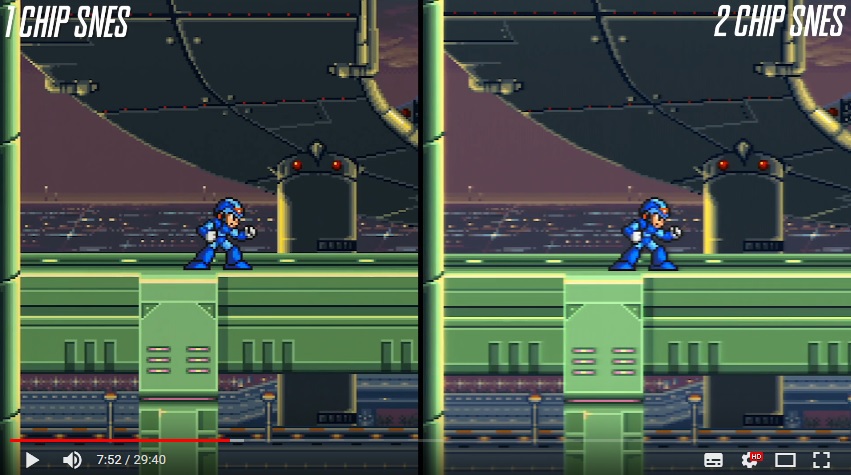
But that's just me. When they compared the picture quality of the 1-chip- and the 2-chip-SNES, I also preferred the softer look of the 2-chip-version:

Lynd7
Member
I disagree. It's dim as hell and offers no options. I played through some of Earthbound on it and thought it looked awful.
Looked alright to me last time, I didn't think it looked dim. I thought it didn't have the dark filter on it. Sure, it doesn't have options for visuals etc, but does it have the video noise and other bits?
I thought most considered SNES on Wii U not too bad.
Beer Monkey
Member
I disagree. It's dim as hell and offers no options. I played through some of Earthbound on it and thought it looked awful.
Also it is impossible to get a 1:1 scaled image out of Wii U VC regardless of your overscan settings. 240p can integer scale to 480p. But Wii U won't do it.
Yeah, it seems that way probably, oh well, as long as it can happen, that's fine by me.The weird thing is, as counter-intuitive as it sounds, accurate CRT emulation requires a lot of horsepower, and amusingly, >4K resolution, because you'd have to emulate the actual CRT grille.
The video showed that the CRT filter looked blurrier...I don't like that, I prefer a crisp and sharp image.I don't know....I actually love it. Even more than the CRT filter on the NES Mini Classic.
The CRT filter is certainly gonna be my standard filter when playing on the SNES Classic Mini.
But that's just me. When they compared the picture quality of the 1-chip- and the 2-chip-SNES, I also preferred the softer look of the 2-chip-version:
John talks about the 8bitdo SNES/SFC controllers occasionally recognizing unintended down presses on the d-pad. Has anyone tried a scotch tape fix a la Switch Pro controller?
Very curious about this.
tried it. helped a little bit.
Why would you do that?
Member
My only gripe with the system is that I think the Super FX chip emulation is the wrong speed, or inaccurate. I have no way to test this for sure right now, but the intro "scramble" sequence and the credits of Star Fox I'm pretty sure are ever so slightly faster than on real hardware. You can tell because, similar to inaccurate, non-Byuu SNES emulators, the sound in those sequences plays at a different speed from the action.
Beyond that, I'm having a bast with the system. I haven't realized how much I've been Jonesing to play SNES games again until after I got my hands on it.
Beyond that, I'm having a bast with the system. I haven't realized how much I've been Jonesing to play SNES games again until after I got my hands on it.
AtomicShroom
Member
Another excellent video!
One small thing that popped out at me, though -- when you're talking about some of the missing sound effects, you use a segment of Super Mario World where he jumps up to get the super leaf, and it doesn't make the usual "leaf retrieval" sound. But (and this might be me not remembering correctly), I am pretty sure that issue also happens on the real SNES (even at that same spot! But you'd have to do it in the exact same way on the real hardware as you did it on the Mini).
I can totally attest to this! Its a timing/random thing but it totally happens on the real hardware as well.
SmiteOfHand
Member
The video showed that the CRT filter looked blurrier...I don't like that, I prefer a crisp and sharp image.
Do we actually prefer it or have we just been playing on emulators so long we've strayed from god's ghostly blendy light?

KojiKnight
Member
Do we actually prefer it or have we just been playing on emulators so long we've strayed from god's ghostly blendy light?
I've been playing snes games on emulators since the late 90's... Sharp pixels always looked bad. It's why even back then we had scan lines and SuperEagle filters. There are certainly filters that go to far, but I don't think the snesce is that.
I think this is interesting.Do we actually prefer it or have we just been playing on emulators so long we've strayed from god's ghostly blendy light?
If you take the comparison from the video and then add in a camera shot from a consumer CRT (a mid to lower end Toshiba 27A40 CRT) you can see that, yes, it looks very different from the PVM but also the SNES Mini filter looks different from both. My issue with the Mini filter is simply that it looks like a simple bilinear filter with very faint scanlines. It doesn't attempt to simulate the phosphors of a CRT or the scanlines, really. I just don't think it's a good filter.

This is still my favorite (this is the Soft filter but both Sonic Mania filters are amazing)


More like a real CRT. Modern displays tend to be much brighter.The Sonic Mania CRT filter makes the game a bit too much darker, though.
Baron_Calamity
Member
the CRT filter seems a best fit for the cgi render games like Donkey Kong Country.
Naked Snake
Member
2D Sonic is so gorgeous.
KojiKnight
Member
I'm not interested in heavy overbearing scanlines myself.
Speaking on Sanic, the original was definitely not designed to be looked at in "raw pixel" form.


It's far more noticable on Genesis/Mega Drive due to how much more limited in colors the system is, but SNES uses the same sort of techniques since it does have a limit on the amount of colors per mode, sprite, and screen.
Still, the difference between 512 colors and 32k colors means that the SNES had to use a lot fewer instances of dithering. Especially since the SNES supported transparencies in hardware..
The Sonic Mania CRT filter makes the game a bit too much darker, though.
Most CRT filters get gamma wrong. They assume that a CRT has a gamma of 2.50 when it's really closer to 2.35 when properly calibrated.
I'm not arguing that it's a good filter, but you have to remember that the SNES Classic is a low-power device and only capable of a 720p output, so it can't do scanlines properly. You either need an even multiple on the vertical axis or a lot of resolution to do good scanlines.I think this is interesting.
If you take the comparison from the video and then add in a camera shot from a consumer CRT (a mid to lower end Toshiba 27A40 CRT) you can see that, yes, it looks very different from the PVM but also the SNES Mini filter looks different from both. My issue with the Mini filter is simply that it looks like a simple bilinear filter with very faint scanlines. It doesn't attempt to simulate the phosphors of a CRT or the scanlines, really. I just don't think it's a good filter. http://i.picpar.com/TR5c.jpg
This is still my favorite (this is the Soft filter but both Sonic Mania filters are amazing) http://i.picpar.com/UR5c.jpg
Sonic Mania's filter isn't bad, but it doesn't appear to simulate variable beam width like CRT Royale does, for example.
Your examples are blending in gamma light rather than linear light, which makes the water darker and more transparent.I'm not interested in heavy overbearing scanlines myself.
Speaking on Sanic, the original was definitely not designed to be looked at in "raw pixel" form.
http://i.imgur.com/9pI7cK3.png
https://blz.la/rgb/img/2014/dithering.png
This is what it looks like when you blend the colors in linear light, which is the technically correct way of doing it:


That said, I'd be really curious to see what the result is on a professional monitor if you feed it a composite signal. I wouldn't be surprised if it ended up darker like your example.
My preference is to use a de-dithering filter before applying a CRT filter on top, rather than blurring the image enough that those lines blend together.
I was disappointed that Sonic Mania did not use transparency for the effects, or at least have an option for it.
Sorry, I meant I just wanted a clear picture without blur or anything like that.Do we actually prefer it or have we just been playing on emulators so long we've strayed from god's ghostly blendy light?
My biggest complaint is no option to remove scanlines with the CRT filter. Some games, like FFVI look noticeably better with the CRT filter due to the nature of the pixel art. The more rounded pixels and color bleed really help the pixel art render as intended. Unfortunately that means I need to put up with annoying scanlines, which serve no real purpose.
Naked Snake
Member
My biggest complaint is no option to remove scanlines with the CRT filter. Some games, like FFVI look noticeably better with the CRT filter due to the nature of the pixel art. The more rounded pixels and color bleed really help the pixel art render as intended. Unfortunately that means I need to put up with annoying scanlines, which serve no real purpose.


T8SC
Member
Shout out for the Turrican t-shirt
Came here to comment on the t-shirt too.

KojiKnight
Member
1 thing that would be good to know is, why was the Super Nintendo conceptualised with a weak CPU? What prevented Nintendo going with SUPER power on that front?
Cost. What they lost in CPU power they gained in colors and advanced hardware effects.
Compare Genesis 512 colors to the SNES 32k with hardware transparency and things like mode 7.
It was also designed from day 1 to allow carts to contain extra processors which cover for the cpu. The genesis can't make up it's lack of colors with cartridges (though the 32x composites 2 images together, the results were super mixed)

InfiniteCombo
Banned
I can totally attest to this! Its a timing/random thing but it totally happens on the real hardware as well.
Huh! Good to know I wasn't crazy! Thanks for the confirmation/backup
lol what
The Super Nes, Classic Mini-Review.
In that case, maybe, but I've played a *LOT* of Super Mario World and I noticed many more instances of missing sounds. It felt like it just was happening a lot more than usual. It's the kind of thing I had a difficult time getting capture of but, while playing naturally, I kept feeling that something was off with the sound playback.I can totally attest to this! Its a timing/random thing but it totally happens on the real hardware as well.
Isn't it amazing what romhackers can accomplish?OH MY GOD!!!!!!!!!!!!!, the slow down on Super Ghouls & Ghost is just ridiculous!!!!!. Growing up i played the PAL 50hz version and due to the slower clock speed of the UK machine it had nowhere near as much slow down as the NTSC counter part but man playing this now in 60hz with all the slowdown happening is just killing my enjoyment of the game
Great video btw John!!
Here's a similar patch that fixes slowdowns in Mega Man 3 that I also thought was awesome.
Here's the thing, the CRT filter isn't great, but it's much closer to how the games were meant to be viewed than perfect pixel or stretched to 4:3.
Here's an example posted from gaf years ago.

Versus

Specifically, look at the brickwork and see how a little bit of expected bluriness is used to give of greater detail.
Now personally that filter used is much stronger than I'd like, and certainly more so than the SNESCE crt filter.
PP and 4:3 do not work on modern tvs. Want to see where pp it's perfect? Try on a 3ds! The pixel density looks gorgeous there.
Hehe. My screenshots still being used to this day.
FF VI is still one of the best arguments for even simple bilinear filtering. The art really doesn't fare well as pure pixel art. There is a lot of depth in the images that is completely lost when displayed as pure pixel art.
Wish I had the hardware to take a screenshot of this scene on an SNES Mini to compare.
Hehe. My screenshots still being used to this day.
FF VI is still one of the best arguments for even simple bilinear filtering. The art really doesn't fare well as pure pixel art. There is a lot of depth in the images that is completely lost when displayed as pure pixel art.
Wish I had the hardware to take a screenshot of this scene on an SNES Mini to compare.
Is that your screenshot? You're gonna have to tell us how you achieved the second picture.
Is that your screenshot? You're gonna have to tell us how you achieved the second picture.
Yeah. Unfortunately I can't 100% remember. I think it was just blaarg's CRT filter in SNES 9X with some tweaking for color. Also set to 4:3 rather than 8:7 for the top picture.
And yeah, the screen grab was blown up in size just to really show how distorted pixel art becomes without any filtering whatsoever. The smaller the image, the less of an issue it is.
My original post is still on here somewhere, though the hotlinked images aren't there anymore. Not sure if I can find it in my post history, though.
edit:
Found it! BSNES NTSC filter. Here was the original thread/post.
http://www.neogaf.com/forum/showthread.php?p=28052261#post28052261
Here's the config:
BSNES's NTSC filter. (I think it's blaarg's NTSC filter...I've seen it in ZSNES or SNES9x I think, but it didn't look nearly as nice). I set it to the RGB preset (though you can set RF, Composite, and S-Video as well), and calibrated the brightness to avoid any black crush.
Kudos for including Plok music in the background.
Yes more people need to hear that. Also Gradius 3 Cosmo Plant is too good.
Why would you do that?
Member
In that case, maybe, but I've played a *LOT* of Super Mario World and I noticed many more instances of missing sounds. It felt like it just was happening a lot more than usual. It's the kind of thing I had a difficult time getting capture of but, while playing naturally, I kept feeling that something was off with the sound playback.
In the version of Mario World I grew up with, if you get a powerup, the sound effect will always be partially cancelled out or glitched out or something by pausing or hitting a ceiling (which itself plays a sound effect) or doing other actions. It's probably an instance of sound effects cancelling each other out because of the limited sound channels. Maybe it was fixed in newer versions of the game or something.
Also, I'm almost positive I watched a YouTube video of Touch Fuzzy, Get Dizzy where the background also disappeared like that a few days ago... But I can't find it now.
 Though if I'm not crazy, maybe that's a regional or version thing, too.
Nice. Will have to replace that room once it's possible.

Jerry Orbach
Member
1 thing that would be good to know is, why was the Super Nintendo conceptualised with a weak CPU? What prevented Nintendo going with SUPER power on that front?
The SNES wasn't particularly well designed. Nintendo had a choice between an inexpensive 6502-derivative that required expensive low-latency RAM (as in the TurboGrafx), or a costlier 68000 that would work just fine with cheap commodity RAM (as in the Genesis). Nintendo split the difference, pairing the cheap processor with cheap RAM, essentially crippling it. It wasn't until games started shipping on low-latency ROM chips that we finally saw what the SNES CPU could really do. On top of that, the SNES had overly expensive sound hardware, and a buggy PPU that was markedly less capable of handling sprites than the VDP in the Genesis (more colours, though, so it had that going for it).
The SNES came out two years after the Genesis and cost just as much, if not more. It should've been a Super Genesis! Instead, it was barely a Super NES. Nintendo's lucky none of that stopped it from having the best games.
1 thing that would be good to know is, why was the Super Nintendo conceptualised with a weak CPU? What prevented Nintendo going with SUPER power on that front?
Price. The sound and video chips were probably pretty expensive for the time.
SNES had more problems than just the CPU though. Lower bandwidth and DMA speeds, along with a less flexible sprite engine really limited it's potential (or at least made it a lot harder to reach). The genesis and pc engine were older technology but not nearly as handicapped for what they were.
Honestly, I think I will be sticking to emulation and selling the one I got as a gift. I don't like the look of that filter at all.
BSNES through retro with CRT easy mode is the way to go for me. And for Yoshi's Island scalefx cannot be beat for my money. I would need to see their crt filter with better quality to make a final judgement though.
BSNES through retro with CRT easy mode is the way to go for me. And for Yoshi's Island scalefx cannot be beat for my money. I would need to see their crt filter with better quality to make a final judgement though.
I think this is interesting.
If you take the comparison from the video and then add in a camera shot from a consumer CRT (a mid to lower end Toshiba 27A40 CRT) you can see that, yes, it looks very different from the PVM but also the SNES Mini filter looks different from both. My issue with the Mini filter is simply that it looks like a simple bilinear filter with very faint scanlines. It doesn't attempt to simulate the phosphors of a CRT or the scanlines, really. I just don't think it's a good filter.
I use bilinear and easy mode CRT on retroarch, and to me that mega man shot on the right looks super duper blurry compared to what I see in my emulator with my calibrated spec.
This is still my favorite (this is the Soft filter but both Sonic Mania filters are amazing)
Agreed that the Mania filter is ten times better. Not sure about the quality rep on the SNES shot there. Seems really blown up and weirdly blurry.
Are you talking about the bottom right being the mini classic filter? Because that looks a hell of a lot better than the large horizontal darkness of the other one to me. Those scanlines are simply WAY too huge on a 42 inch+ IMO. I'd be staring at half darkness on the screen.
I prefer my games to have a faint filter that blends perfectly. I don't give a damn about what is used to look like. That one shot looks awful to me. The SNES one does not look very good though.
Take that kind of filter on the bottom right and make it better in retroarch and that is my preferred way to play. The upper right one looks decent enough.
Here is a shot of Yoshi with ScaleFX and CRT easy mode both with bilinear: https://imgur.com/a/DBjHv
I don't like my images to be harsh. That SNES mini shot looks off. Need to see it in action.

Freshmaker
I am Korean.
Do we actually prefer it or have we just been playing on emulators so long we've strayed from god's ghostly blendy light?
I've always preferred pixels over making it look like I'm playing a game while remote viewing the game from Robocop's eyes. Never remember overt scanlines on my CRT's.
SmiteOfHand
Member
...look like I'm playing a game while remote viewing the game from Robocop's eyes.


I've always preferred pixels over making it look like I'm playing a game while remote viewing the game from Robocop's eyes. Never remember overt scanlines on my CRT's.
I agree. And that is why I prefer the shot I posted above with Yoshi or the Sonic Mania type filter. I have no idea whatsoever how people like the robocop image. It looks awful.
I think the SNES one is probably fine it's just blown up in a bad comparison.
That's literally how scanlines work for 240p signals. Half of the lines are blanked out.Agreed that the Mania filter is ten times better. What were they thinking with that blurry mess on the bottom right?
Are you talking about the bottom right being the mini classic filter? Because that looks a hell of a lot better than the large horizontal darkness of the other one to me. Those scanlines are simply WAY too huge on a 42 inch+ IMO. I'd be staring at half darkness on the screen.
I prefer my games to have a faint filter that blends perfectly. I don't give a damn about what is used to look like. That one shot looks awful to me. The SNES one does not look very good though.
Take that kind of filter on the bottom right and make it better in retroarch and that is my preferred way to play. The upper right one looks decent enough.
The quality of the CRT and the analog nature of them determines how thick the scanlines end up.
- A low quality CRT will have the lines bleed so much that there will be hardly any gap at all.
- A high quality CRT, like the PVM pictured on the left, will display clearly defined scanlines.
- The spot size of a CRT also varies with intensity, which is why the width of the scanlines varies depending on what is being displayed.
Something like Super Mario World looks best with raw pixels, while something like Donkey Kong Country needs all the help it can get if you're viewing it on a modern display.