

• Hey Guest. Check out your NeoGAF Wrapped 2025 results here!

Dishonored 2 PC performance thread

Yeah, even if the first core gets more load, it isn't maxed, so it's hard to detect a bottleneck here.
He's got a lot of CPU space left too, I don't think he's CPU limited either

Both the GPU and the CPU have headroom, but the FPS is tanked. That's a sign of some bad juju going on in the code...

GPU bottlenecks are really straightforward, but CPU ones are not. If one of your cores is at 90% utilization and probably fluctuates constantly to 95% or so, that means that you are limited by this core in some kind of job in the game system.

----

People praising Doom are forgetting how it run before Vulkan patch. You got very CPU limited after 100fps.
 
980ti
i7 6700k
16gb

I use high FXAA, FoV set at 100, v-sync on and run everything at ultra. I average around 45-60fps for the most part at 1080p, but the jaggies sure look pronounced as fuck for high FXAA. It's playable, but really should run better given my setup.
 
He's got a lot of CPU space left too, I don't think he's CPU limited either

Both the GPU and the CPU have headroom, but the FPS is tanked. That's a sign of some bad juju going on in the code...

Just because the CPU isn't 99% on any single core doesn't mean the game isn't CPU bottlenecked. If the GPU isn't fully utilized, and the VRAM isn't overloaded, poor performance is usually due to a single thread bottlenecking the system.

I guess Doom must have impressed me so much performance and gameplay wise that I forgot about the Evil Within and New Order's issues with ID Tech 5. Oh well I'll make sure to follow this rule again.

It's more about games like Doom being designed for 60 FPS from the get go. While they might look just as good or better than these low performing 30 FPS titles, a lot of it is thanks to the level design going for a lot less fine detail and lower object counts. Not to say that idTech 6 isn't well optimized on top of that too, or that Void doesn't have issues that need solving. This sort of performance profile just shouldn't be acceptable on PC.
 
GPU bottlenecks are really straightforward, but CPU ones are not. If one of your cores is at 90% utilization and probably fluctuates constantly to 95% or so, that means that you are limited by this core in some kind of job in the game system.

----

People praising Doom are forgetting how it run before Vulkan patch. You got very CPU limited after 100fps.

I'm guessing there's no way of alleviating this on my end. My CPU isn't even OCable.
 
Just because the CPU isn't 99% on any single core doesn't mean the game isn't CPU bottlenecked. If the GPU isn't fully utilized, and the VRAM isn't overloaded, poor performance is usually due to a single thread bottlenecking the system.
Understood. But it shouldn't be. A big argument for a game being unoptimized is it's inability to spread CPU usage amongst the cores/threads. His chip should have a decent amount of horsepower left. The game appears poorly optimized

I understand not every process can be perfectly multithreaded, but since there isn't anything we know of special about D2 that makes it an exception, I'd expect better
 
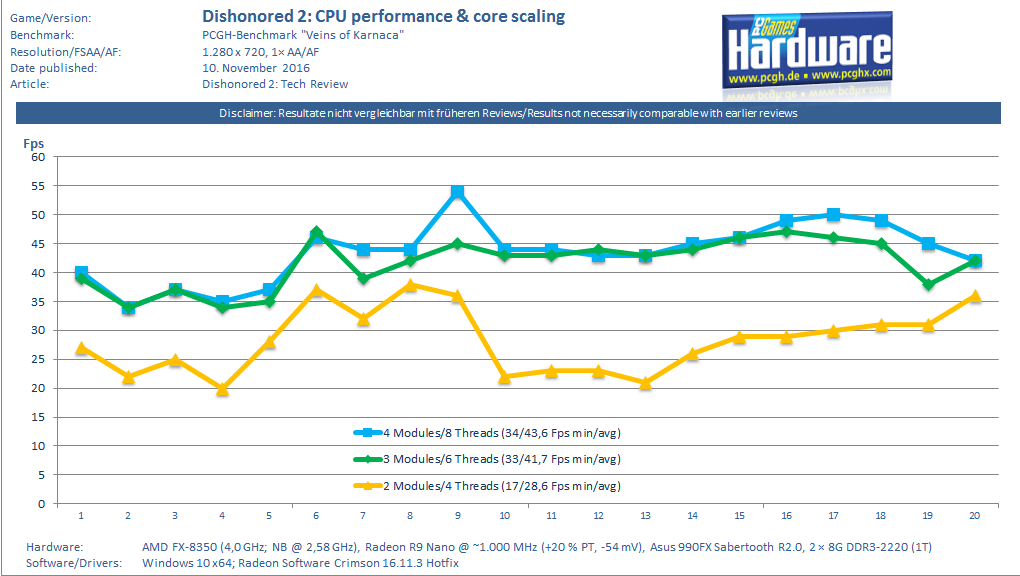
Dishonored-2-Review-CPU-Performance-Core-Scaling-Benchmark-pcgh.png

http://www.pcgameshardware.de/Dishonored-2-Spiel-54640/Specials/Benchmark-Test-Systemanforderungen-1212965/#comment
Well at least on Bulldozer it does scale nearly linear to 6 threads.
There are DX12 hints in the data-files according to Computerbase, so maybe the new renderer will patched in later?
 
There is a certain story related ability in this game in chapter 7 that absolutely tanks performance. I'm talking close to halving the performance.

The non spoilery way of describing it would be that it's intensive for the similar kind of reason planar reflections are intensive...expect this one is full native resolution and takes up about a fourth or fifth of your screen space and isn't actually a reflection. As such you can imagine why it would tank the performance.
 
There is a certain story related ability in this game in chapter 7 that absolutely tanks performance. I'm taking close to halving the performance.

The non spoilery way of describing it would be that it's intensive for the similar kind of reason planar reflections are intensive...expect this one is full native resolution and takes up about a fourth or fifth of your screen space and isn't actually a reflection. As such you can imagine why it would tank the performance.

I haven't found it to be *that* much of a perf impact. Maybe slamming me down to my 30FPS sync instead of 60. No worse than the outdoor areas for me.
 
r_fullscreen "0" (or 1 maybe ?) in dishonored2Config.cfg did it for me. But It didn't look like it improved anything.
File is in C:\Users\<User>\Saved Games\Arkane Studios\dishonored2\base

yeah that worked, thanks.

9CJnz1j.png


heh, at the pc booth. i wonder what rig they're demoing it on.
 
Alright, I managed to test most of the settings.

The entries marked "???" are those I simply couldn't find a difference with, or couldn't test yet because of how early in I am (
first town after escape/boat ride
):

  • Screen Resolution: Realtime
  • Windowed Mode: Switching from Fullscreen to Borderless Windowed and back doesn't apply.
  • Brightness: Realtime
  • Field of Vision: Realtime
  • V-Sync: Realtime
  • Adaptive Resolution: Not working
  • Nvidia HBAO+: Realtime
  • Texture Details: Realtime
  • Model Details: Realtime
  • Environment Details: ???
  • Water Quality: Realtime
  • View Distance: Realtime
  • Shadow Quality: Requires Restart
  • Decal Quality: ???
  • Fog Quality: Realtime
  • Anti-aliasing: Realtime
  • Bloom: Realtime
  • Depth of Field: Realtime
  • Lens Flare: Realtime
  • Volumetric Lightning: Realtime
  • God Rays: Realtime
  • Rat Shadows: Realtime
  • Bloodfly Shadows: ???
Looks like the only setting that requires a restart is "Shadow Quality." That said, with or without a restart, switching between certain settings combinations can create some serious weirdness. That is, if you set something up or down, and then back again, it doesn't seem to always stick.

For instance, upon a single restart after applying "Shadows Quality" from "Ultra" to "Very Low," the shadow changes took effect (pretty much disappeared). I then set them back to Ultra and restarted the game again. The shadows were gone when I loaded up the identical save point...until I moved. And a screenshot comparison tests made it evident the same Ultra Shadows weren't covering the same area in the same way as before the first restart. I'm wondering if all the shadows are completely baked in at this point.

This game. I'm not going to bother testing further until the patch comes out.
 
OK it started happening at the end of Mission 2. Massive frame drops and audio cuts. Guess I'll wait for a patch....ugh

1070
i7 4770K
 
i finished dishonored 1 just then and that game ran smooth as butter. but it also did on my ancient ass PC too. wish they just went with unreal engine for this one.
 
Using the ReShade sharpening preset to counter the blur caused by TXAA really makes a big difference to the IQ of the game! It's been mentioned before in this thread but here is a comparison for everyone.

FXAA High (Note the jaggies)

YFdF6kx.png


TXAA (Note the blur/loss of crispness)

HTKwcBg.png


TXAA + ReShade

bugrJK0.png

Best compared when opened in seperate tabs and flicked between.
 
Doom was an outlier. Bethesda really doesn't seem to put much emphasis on performance before it gives the go-ahead to ship.

Why would they? People buy a bajillion copies of every fallout/scrolls game they release regardless of how little effort they put into technical improvements and QA. The amount of people that bought the Skyrim remaster (asset update) was absolutely baffling. They have so much brand recognition and media/fan apologism now that they could re-release Oblivion with new box art and make more profit than most other publishers make for a dozen games over an entire year. I say that as someone who has played and enjoyed many of the games they released over the past several years. I'm not ragging on them, I'm just bummed that they have no real incentive to put more effort into performance and QA based on the reception they get for their most popular game releases.
 
"There is a post on Reddit that appears to be working for most people that have used it. Seems to be bringing the game to a completely playable state until they release a patch. He found that Ansel seems to be a big effect on most people, even when it isn't really utilized in the game."

https://www.reddit.com/r/dishonored...nored_2_is_playable_for_me_right_now_here_is/

It did nothing for me.

I also question that Ansel is at the root of the issues. If that were the case I would expect that AMD users would be getting much better performance than Nvidia users, not the opposite.
 
Using the ReShade sharpening preset to counter the blur caused by TXAA really makes a big difference to the IQ of the game! It's been mentioned before in this thread but here is a comparison for everyone.

This looks great. I hate jaggies and love temporal AA, I don't mind the blur that much, but I think in Dishonored 2 the blur with TXAA on is really noticeable (especially on the painting). Mankind Divided also has blurry TAA implementation (and poor sharpening solution which oversharpens) and Lumasharpen works well too. I'm surprised so few devs offer sharpening as an in game option when using temporal AA - how hard can it be? I think The Division has that option.
 
This looks great. I hate jaggies and love temporal AA, I don't mind the blur that much, but I think in Dishonored 2 the blur with TXAA on is really noticeable (especially on the painting). Mankind Divided also has blurry TAA implementation (and poor sharpening solution which oversharpens) and Lumasharpen works well too. I'm surprised so few devs offer sharpening as an in game option when using temporal AA - how hard can it be? I think The Division has that option.

Great part about the preset and the ReShade tool is you can switch off individual tweaks. I prefer to keep the colour tone as is so turned off the colour correction.
 
Is it possible to disable the toggle nature of lean? Having to combine the keys with alt isn't exactly ideal.
 
You should be able to just lean with default [q] and [e]. You must hold those keys to do it.

You don't need to hold them down as it's toggle-based, which is where my annoyance lies. I just realised I misread the tooltip earlier; I wasn't paying much attention to it and thought it said that you can switch to press behaviour by holding alt.

Edit: Also, Use/F regularly doesn't work. I just had to press it a few times to read a highlighted book.
 
I haven't found it to be *that* much of a perf impact. Maybe slamming me down to my 30FPS sync instead of 60. No worse than the outdoor areas for me.
Well that is halving the performance isn't it? Going to 30 from 60.

I would go from 70-80 to 40s and at times I'd go down to from 40-50 to 25-30.
 
Spoke too soon on my performance, I guess, as it runs much worse now than it did on Friday. Starting over and experimenting, I find that my performance hit comes entirely from reflections in water and glass surfaces. For instance, in the first room Emily gets put in, it's a solid 60 until you look at the glass case with the model ship in it, then it drops to 45ish. Dropping the settings to Very Low doesn't have any effect on this.
 
just to add to the theme of this thread

I7 3770K
16GB RAM
1080 GTX

it runs anywhere from 20-60 fps no matter the quality settings of the graphics. With V-Sync disabled there are times it goes beyond 70-80fps but it drops to below 60 so frequently and apparently randomly that it's unplayable. I haven't tried any of the possible fixes of this thread, I'll just wait for the patch. But so far this port is a joke.
 
"There is a post on Reddit that appears to be working for most people that have used it. Seems to be bringing the game to a completely playable state until they release a patch. He found that Ansel seems to be a big effect on most people, even when it isn't really utilized in the game."

https://www.reddit.com/r/dishonored...nored_2_is_playable_for_me_right_now_here_is/

Followed all of these steps - it's made a huge improvement for me. 1080p on very high, getting a pretty solid 60 FPS on my 1070.
 
Followed all of these steps - it's made a huge improvement for me. 1080p on very high, getting a pretty solid 60 FPS on my 1070.

Same here, huge improvement. Game was unplayable before, stands between 45-60 fps now and feels less juggy. Didn't help that much for the mouse but decided to use a controller until things get fixed.

I5 6600K
16GB RAM
980 TI
@1440P, Very high, FXAA High
 
I7 6700 k @4ghz
Gtx 1080
16 gig ram

Really like the game but i just cant play it, in the second chapter where theres sun graphical effects its just all over the place, drops from 90 to 30 at will
 
Reading some of Harvey's more recent tweets, he now seems fully aware of how widespread the issues on PC are, and has expressed his frustration that so many of their biggest fans are unable to enjoy the game they've worked on.

Definitely appreciate the shift in the tone of his responses, and I do really feel for him and the team, must be upsetting.
 
Reading some of Harvey's more recent tweets, he now seems fully aware of how widespread the issues on PC are, and has expressed his frustration that so many of their biggest fans are unable to enjoy the game they've worked on.

Definitely appreciate the shift in the tone of his responses, and I do really feel for him and the team, must be upsetting.

There is only so much damage control you can do before it becomes obvious to everyone that your product is deeply flawed and causing all kinds of issues to many of its users.
 
I have full stable 70fps in Karnaca, at least the beginning of Karnaca, but it feels worse than previous mission in the same framerate. Its probably something regarding the LoD loading.

There also few instances that i got to 99% GPU utilization which is bonkers for High settings with Medium at 1080p on GTX 1080.
 
So seeing everyone's issues I am torn. I am going to return my wife's copy of titanfall and grab something else. Already have most of the holiday releases so not really sure if I should grab this in hopes of it getting fixed.
 
Top Bottom