

-
Hey Guest. Check out your NeoGAF Wrapped 2025 results here!
You are using an out of date browser. It may not display this or other websites correctly.
You should upgrade or use an alternative browser.
You should upgrade or use an alternative browser.
Dishonored 2 PC performance thread
- Thread starter JaseC
- Start date
Probably already shared.
DF Dishonored 2 Analysis.
The mention of the Titan X not keeping a steady 60fps at 1080p on ultra settings..
This is odd. I have a Titan XP and since the beta patches I have played chapter 3 and 4 on ultra settings @ 3440x1440 and have had very few slight drops, it's remained at 60 99% of the time.
Before the patches it was fucking terrible though. Maybe I'm in a less demanding area as it's been mainly indoors.
BRocknRolla
Member
This is odd. I have a Titan XP and since the beta patches I have played chapter 3 and 4 on ultra settings @ 3440x1440 and have had very few slight drops, it's remained at 60 99% of the time.
Before the patches it was fucking terrible though. Maybe I'm in a less demanding area as it's been mainly indoors.
That could absolutely make the difference. The harbor area when first coming into Karnaka seems to drop the framerate pretty much no matter what you do. I'm sure other areas of the game are less demanding/better optimized.
That could absolutely make the difference. The harbor area when first coming into Karnaka seems to drop the framerate pretty much no matter what you do. I'm sure other areas of the game are less demanding/better optimized.
The are after the wall of light at the docks is the most demanding part I've found
Fine:
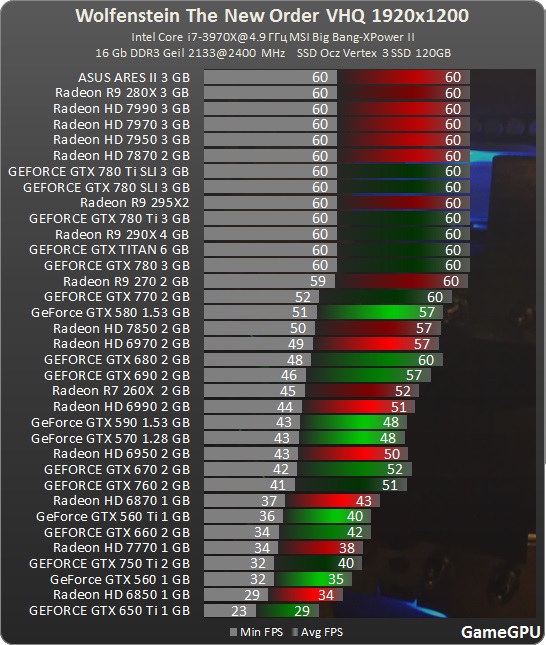
But The Old Blood introduced screen-space reflections, which impacted performance quite significantly (I assume everything but MSAA was maxed out as the article makes no mention of it):
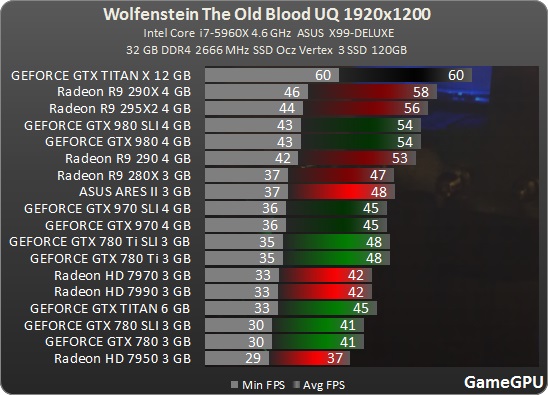
Even with SSR off I couldn't get a locked 60 on a 280X lol I dunno how accurate that graph is with the 270 having a low point of 59 FPS. Unless my 6300 is to blame, but then lowering GPU dependant settings wouldn't help as much as it does.
Anyway, I really hope they can fix this up :|
Fine:
But The Old Blood introduced screen-space reflections, which impacted performance quite significantly (I assume everything but MSAA was maxed out as the article makes no mention of it):
I could never get proper framepacing in TNO. Ever. Even with console command shit and RTSS it would never feel smooth. idTech 5 to me is fucking GARBAGE.
Thanks for the reference. I guess I wait for the next patch, then, or play with everything on low. Maybe a refund would be an option, too, to show that this isn't acceptable.
I beat it playing on medium settings with 70+ fps and the mouse was very smooth for me (I didn't bother testing other graphics settings). Way better than launch. Not perfect by any means but it was playable for me on my 980ti and latest NVIDIA driver. If you own it no harm in trying.
New Beta Patch 1.3 is out now:
Update v 1.3 overview:
General performance and optimization improvements
Added a setting to turn OFF Camera Motion Blur
Additional mouse improvements
Fixed various issues related to user interface
Fixed various issues related to the Option menu
Fixed various issues related to multiple monitors
Update 1.3 notes:
Options
Added a setting to turn OFF Camera Motion Blur
Fixed a bug which caused some textures to be missing when Texture Quality was set above Medium for some GPUs
Fixed a bug where the game sometimes launched in the previously saved resolution in the top left corner of the screen
Fixed a bug where "Adaptive Resolution" was incorrectly set to "Manual"
Fixed a bug where changing the Screen Resolution, Monitor, Windowed Mode or Triple Buffering did not properly revert after selecting "No"
Fixed a bug where the player was incorrectly asked to confirm changes when no changes were made
Fixed a bug where V-Sync settings did not match the monitor refresh rate when higher than 60hz
Fixed a bug where pressing "No" in the confirmation prompt when changing Triple Buffering setting sometimes made the prompt appear again
Display / Monitor
Fixed a bug with multiple monitors which caused the game to not display on the primary monitor by default
Fixed a bug which caused some UI elements to be misplaced when using 5:4 or 4:3 aspect ratios
Fixed a bug which caused the game window to appear off screen when resolution was set below the native resolution for 1440P and 2160P monitors.
Fixed a bug which caused incorrect Resolution Scale FPS Target when changing V-Sync mode
Set default value for Resolution Scaling Quality to "Quality"
Rendering / Performance
Fixed a rendering bug affecting the lighting on some NPCs which sometimes caused a red glow
FPS limiter set to 60 FPS by default
Adjusted Shadow Quality settings – “High” setting and below have a more significant visual and performance adjustment
Reduced performance impact of transparent surfaces & VFX
Mouse
Fixed a bug impacting mouse movement speed
Known Issues
Switching off the V-Sync a second time sets the FPS Limiter to 30 instead of 60 by default
Changing the settings from TXAA to FXAA and not applying the change sets the TXAA Sharpness to 1 instead of its previous value
Disconnecting and reconnecting a controller during gameplay may cause the controls to become locked
----->Alt-tabbing or pressing the Xbox button on the controller should return controls
The game crashes to desktop when loading into gameplay on a Phenom II processor
----->Phenom II processors are currently not supported
Adaptive Resolution can get stuck at -1 when restoring video settings
----->Changing the V-Sync option will allow the Adaptive Resolution slider to move again
Update v 1.3 overview:
General performance and optimization improvements
Added a setting to turn OFF Camera Motion Blur
Additional mouse improvements
Fixed various issues related to user interface
Fixed various issues related to the Option menu
Fixed various issues related to multiple monitors
Update 1.3 notes:
Options
Added a setting to turn OFF Camera Motion Blur
Fixed a bug which caused some textures to be missing when Texture Quality was set above Medium for some GPUs
Fixed a bug where the game sometimes launched in the previously saved resolution in the top left corner of the screen
Fixed a bug where "Adaptive Resolution" was incorrectly set to "Manual"
Fixed a bug where changing the Screen Resolution, Monitor, Windowed Mode or Triple Buffering did not properly revert after selecting "No"
Fixed a bug where the player was incorrectly asked to confirm changes when no changes were made
Fixed a bug where V-Sync settings did not match the monitor refresh rate when higher than 60hz
Fixed a bug where pressing "No" in the confirmation prompt when changing Triple Buffering setting sometimes made the prompt appear again
Display / Monitor
Fixed a bug with multiple monitors which caused the game to not display on the primary monitor by default
Fixed a bug which caused some UI elements to be misplaced when using 5:4 or 4:3 aspect ratios
Fixed a bug which caused the game window to appear off screen when resolution was set below the native resolution for 1440P and 2160P monitors.
Fixed a bug which caused incorrect Resolution Scale FPS Target when changing V-Sync mode
Set default value for Resolution Scaling Quality to "Quality"
Rendering / Performance
Fixed a rendering bug affecting the lighting on some NPCs which sometimes caused a red glow
FPS limiter set to 60 FPS by default
Adjusted Shadow Quality settings – “High” setting and below have a more significant visual and performance adjustment
Reduced performance impact of transparent surfaces & VFX
Mouse
Fixed a bug impacting mouse movement speed
Known Issues
Switching off the V-Sync a second time sets the FPS Limiter to 30 instead of 60 by default
Changing the settings from TXAA to FXAA and not applying the change sets the TXAA Sharpness to 1 instead of its previous value
Disconnecting and reconnecting a controller during gameplay may cause the controls to become locked
----->Alt-tabbing or pressing the Xbox button on the controller should return controls
The game crashes to desktop when loading into gameplay on a Phenom II processor
----->Phenom II processors are currently not supported
Adaptive Resolution can get stuck at -1 when restoring video settings
----->Changing the V-Sync option will allow the Adaptive Resolution slider to move again
It's the betapatch branch that's been updated, to be clear, not the public one. A reminder that opting in is a simple matter of right-clicking the game within the Steam client -> selecting "Properties" -> changing to the "Betas" tab and -> selecting "betapatch" from the drop-down list.
The download size is only 287.3MB, provided you're kept the game up-to-date thus far.
The download size is only 287.3MB, provided you're kept the game up-to-date thus far.
OmarTheHippo
Member
RE: 1.3 patch
I've finally got decent performance on my 980Ti at 1440p
After quite a few tweaks to NVInspector (60fps v2 frame rate limit, Prefer Max Performance) and in game (no Vsync, no adaptive, no triple, 120fps limit, mix of high to very high) my framerate and frametime issues are FINALLY resolved
I can run around the throne room at a rock solid 16/17ms frametime with no spikes and judder. Before I'd constantly get spikes to 25ms using in the in-game fps lock. AKA constant stuttering. And adaptive resolution kept underclocking my GPU and resulting in blurry downsampling, while still fluttering around 60fps
I don't know how much is the patch, and how much is finding the right settings, but I'm willing to do a playthrough. Excited
I've finally got decent performance on my 980Ti at 1440p
After quite a few tweaks to NVInspector (60fps v2 frame rate limit, Prefer Max Performance) and in game (no Vsync, no adaptive, no triple, 120fps limit, mix of high to very high) my framerate and frametime issues are FINALLY resolved
I can run around the throne room at a rock solid 16/17ms frametime with no spikes and judder. Before I'd constantly get spikes to 25ms using in the in-game fps lock. AKA constant stuttering. And adaptive resolution kept underclocking my GPU and resulting in blurry downsampling, while still fluttering around 60fps
I don't know how much is the patch, and how much is finding the right settings, but I'm willing to do a playthrough. Excited
RE: 1.3 patch
I've finally got decent performance on my 980Ti at 1440p
After quite a few tweaks to NVInspector (60fps v2 frame rate limit, Prefer Max Performance) and in game (no Vsync, no adaptive, no triple, 120fps limit, mix of high to very high) my framerate and frametime issues are FINALLY resolved
I can run around the throne room at a rock solid 16/17ms frametime with no spikes and judder. Before I'd constantly get spikes to 25ms using in the in-game fps lock. AKA constant stuttering. And adaptive resolution kept underclocking my GPU and resulting in blurry downsampling, while still fluttering around 60fps
I don't know how much is the patch, and how much is finding the right settings, but I'm willing to do a playthrough. Excited
This apply to running around Karnaca mystery FPS drops? Like in the 3 way intersection with the bloody road, and around the whales?
jim2point0
Banned
My game's been running rock solid with no stuttering since 1.2. My only gripe has been the forced-on motion blur. They've finally given us the option to remove that. WOOO!
OmarTheHippo
Member
Dunno. I haven't played past the throne room. I was told this was one of the most taxing, and it was a stuttery sub-60 mess, so I've been waiting to advance until that area was solid for meThis apply to running around Karnaca mystery FPS drops? Like in the 3 way intersection with the bloody road, and around the whales?
My biggest gripe has been the frametime issues since solid 60fps isn't enjoyable for me with stutter. Not sure how related the frame pacing issues are with the FPS drops
Dunno. I haven't played past the throne room. I was told this was one of the most taxing, and it was a stuttery sub-60 mess, so I've been waiting to advance until that area was solid for me
My biggest gripe has been the frametime issues since solid 60fps isn't enjoyable for me with stutter. Not sure how related the frame pacing issues are with the FPS drops
The frame pacing would make the movement jittery. To some causing motion sickness. But overall it just feels off. The drops in FPS are pretty significant in Karnaca. Curious to see how you do there.
jim2point0
Banned
RE: 1.3 patch
I've finally got decent performance on my 980Ti at 1440p
mix of high to very high
That was the key for me. Putting the settings to high \ very high solved 95% of my problems. Once I did that, no more stuttering or frame pacing issues. Mostly stays at 60 and it's been playing like a dream.
The only time I had FPS drops were when I would whip the camera around in busy areas and motion blur kicked in. I'm hoping that the option to kill motion blur will clear that up for me.
RE: 1.3 patch
After quite a few tweaks to NVInspector (60fps v2 frame rate limit,
Is v2 fps limit in inspector better than the limit in Riva Tuner Statistics Server?
OmarTheHippo
Member
Not sure. I was just experimenting with as many different settings as I could, and I had NVInspector open already when tinkering. RivaTuner's fps locked helped with frametime issues on the launch day version, but I'd turned it off to test the in-game implementation for the first patchIs v2 fps limit in inspector better than the limit in Riva Tuner Statistics Server?
The Dear Leader
Banned
Feels a lot more smooth for me now, the mouse responsiveness seems to be fixed, and I didn't notice any stuttering (although the framerate was still spotty) on the Karnaka docks area. Need to play some more to be for sure.
Is v2 fps limit in inspector better than the limit in Riva Tuner Statistics Server?
With Nvidia inspector I think you can lock framerates down to the decimal which can be helpful at times, don't think you can do that with RTSS.
Would be glad to be wrong though.
BarelyLegalAlien
Member
Improved, but still can't go very high on the Karnaca Canal (35-40).
With Nvidia inspector I think you can lock framerates down to the decimal which can be helpful at times, don't think you can do that with RTSS.
Would be glad to be wrong though.
You can in the newest version:
Version 6.5.1
- Added power user oriented profile setting, allowing you to customize framerate denominator for the built-in framerate limiter. The denominator can be customized to adjust the limit in fractional steps (e.g. denominator 10 to adjust the limit in 1/10 FPS steps)
Very fiddly, but it can be done now.
You can in the newest version:
Very fiddly, but it can be done now.
Sweet, thanks for reminding me I need to update.

is there a way to activate powers via hotkey? not just select them?
No.
Brerlappin
Member
@ 1080p, I can get 50-60fps. Still not solid. At 1440p it plummets to like 30fps. This is at the start of mission 4. And the game just CTD'd on me. Fucking wonderful.
Well at the very least, the claims that they fixed the secondary monitor bug is false, it still starts on the wrong screen and goes completely haywire.
EDIT: As for performance, the graphics options actually seem to do something now. On Mission 7 I believe I was getting between 40 and 60 fluctuating on Ultra, turned it down to High (which is what the auto detect recommends) and disabled Motion Blur/Bloom/DOF, I got a locked 60.
i7-4770k, 32 GB RAM, GF980.
EDIT: As for performance, the graphics options actually seem to do something now. On Mission 7 I believe I was getting between 40 and 60 fluctuating on Ultra, turned it down to High (which is what the auto detect recommends) and disabled Motion Blur/Bloom/DOF, I got a locked 60.
i7-4770k, 32 GB RAM, GF980.
RE: 1.3 patch
I've finally got decent performance on my 980Ti at 1440p
After quite a few tweaks to NVInspector (60fps v2 frame rate limit, Prefer Max Performance) and in game (no Vsync, no adaptive, no triple, 120fps limit, mix of high to very high) my framerate and frametime issues are FINALLY resolved
If I change my nvidia control panel power management from what I normally use as default 'adaptive' to 'prefer maximum performance' do i need to restart pc for it to take effect? because my GPU clocks stay low when I idle desktop instead of being at max clock, unless I restart.
BarelyLegalAlien
Member
Anyone with a r9 290 able to post impressions with this patch?
I can. I can still get 50-60 FPS with a mix of High and Very High, and the Throne Room was improved (50 FPS now). Karnaca improved slightly. It's not at around 40 in the docks, and 36-40 in the canal. It was around 26 in the canal previously.
is there a way to activate powers via hotkey? not just select them?
There certainly should be a way. But no, you have to select it first. I want to say it's a side effect of the controller support but Diablo 2 did the same thing. Drove me nuts.
The beta patch performance honestly feels a bit worse on my 1060/4790k in Karnaca. Previously I was getting 55-60 on High/Very high and now I'm seeing drops to 50 in the same areas. Hopefully those are just anomalies that will smooth out over longer play session.
Edit: I stand corrected. Apparently a couple of my graphics settings swapped (maybe I was testing previously and forgot) and that was responsible for the drop. When I reverted to 1.2 my framerate was actually even lower in the same areas, and once I figured it out and swapped everything back I am actually seeing a small improvement in Karnaca.
Edit: I stand corrected. Apparently a couple of my graphics settings swapped (maybe I was testing previously and forgot) and that was responsible for the drop. When I reverted to 1.2 my framerate was actually even lower in the same areas, and once I figured it out and swapped everything back I am actually seeing a small improvement in Karnaca.

Efren is G.O.A.T.
Member
So is the game finally fixed and worth the purchase now or are the patches still not up to task yet?
flipswitch
Member
Can't really tell if the latest patch made it smoother. I'm just playing through the game now, not really concerning myself with performance. It's actually a great game!
It's playable. Performance is still far worse than you'd expect and oh god that polygon seam problem is awful but it's no longer broken.So is the game finally fixed and worth the purchase now or are the patches still not up to task yet?
edit: Do consoles also have the white dots that appear in certain corners and ceilings? It's everywhere on PC.
It's playable. Performance is still far worse than you'd expect and oh god that polygon seam problem is awful but it's no longer broken.
edit: Do consoles also have the white dots that appear in certain corners and ceilings? It's everywhere on PC.
I assume they don't because TXAA is enabled at all times. I only saw the dots when TXAA was disabled.
edit: Do consoles also have the white dots that appear in certain corners and ceilings? It's everywhere on PC.
Yeah, it still creeps in here and there.
I assume they don't because TXAA is enabled at all times. I only saw the dots when TXAA was disabled.
Even TXAA doesn't completely eliminate it. I've encountered a handful of "seams" throughout my playthrough.
OmarTheHippo
Member
You shouldn't need a restart of the PC. If you change the power management setting on the Dishonored 2 game profile (rather than global) it shouldn't have any impact on your desktopIf I change my nvidia control panel power management from what I normally use as default 'adaptive' to 'prefer maximum performance' do i need to restart pc for it to take effect? because my GPU clocks stay low when I idle desktop instead of being at max clock, unless I restart.
Also, you should not change this preference in a global profile, as this will disable energy saving features of your video card (lower clocks). Every time the gpu is used (youtube video, whatever), it will use full clocks, even when it's not necessary. Always set it on a per application basis.
Yeah, it still creeps in here and there.
Even TXAA doesn't completely eliminate it. I've encountered a handful of "seams" throughout my playthrough.
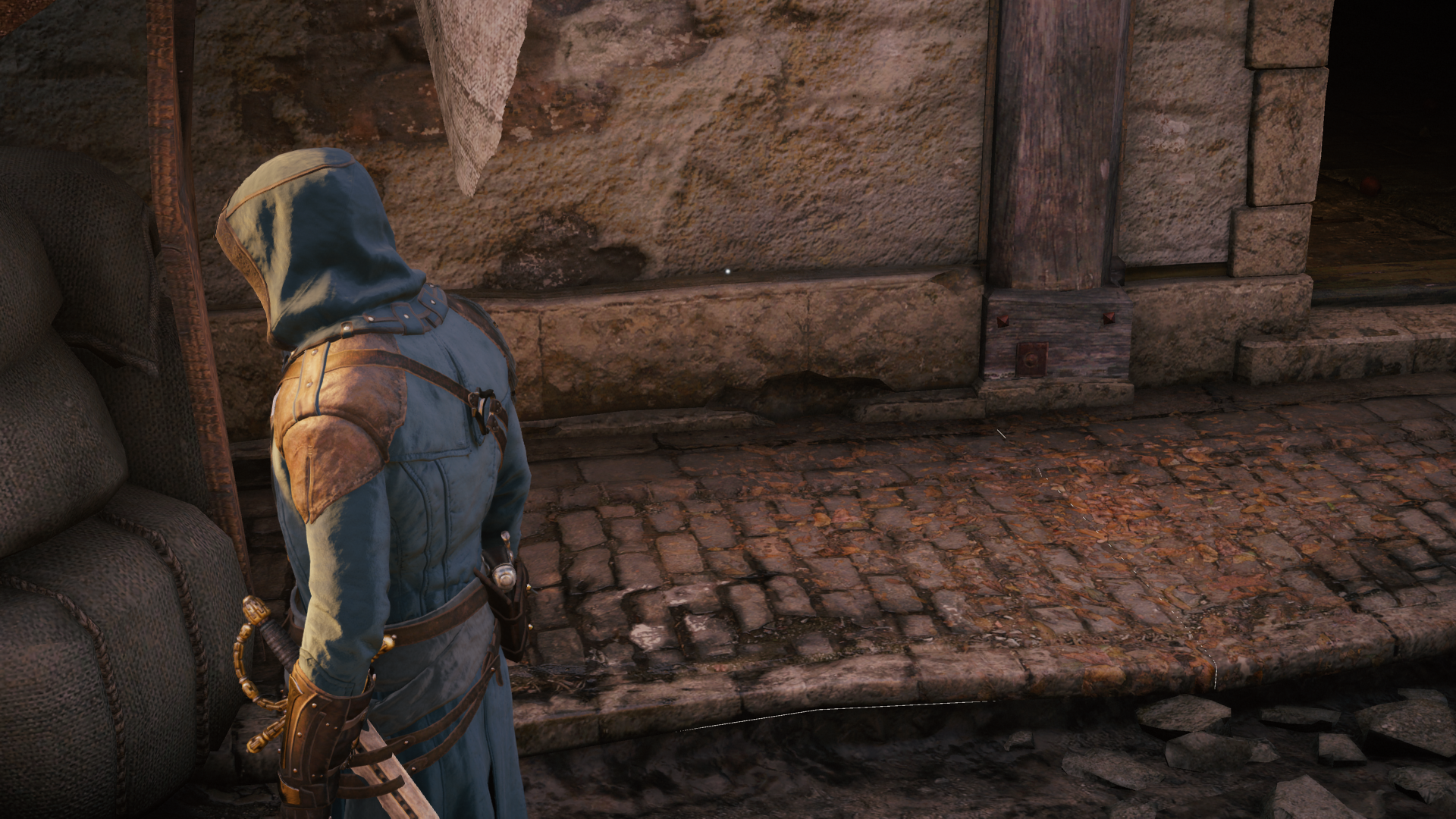
AC: Unity had the same issue. I don't think it was ever fixed either (note the sidewalk):
Laurentius
Member
15CgT
Last edited:
Cannon Goose
Member
The in game vsync seems to kill performance for me on my 1070 (with 376.09). Turning it off bumped my average FPS from around 30-40 to 60 at the start in Karnaca. But then the screen tearing is pretty bad...
60hz monitor. Forcing vsync through nvidia control panel (with or without triple buffering) gave me the same performance hit. Adaptive vsync + triple buffering gave better performance, but I was still seeing screen tearing with that and a bit of jitter.
Limiting the framerate with nvidia inspector seems to work decently, but I'm still getting some screen tearing. Any tips on that?
I may just deal with the tearing, because I usually stop noticing that after awhile (much less irritating than concept framerate drops at least).
Give borderless fullscreen a try.
Laurentius
Member
IX8id
Last edited:
Cannon Goose
Member
That totally worked, thank you!! Now getting 55-60 at the docks instead of 35-40 with in game vsync enabled and tearing mostly gone.
Out of curiosity, is that a thing that's common to vsync in games? That it works better in borderless fullscreen? Or is it a quirk of Dishonored 2?
There are other people here who can explain it better than I can but it should work like that for any game.
That totally worked, thank you!! Now getting 55-60 at the docks instead of 35-40 with in game vsync enabled and tearing mostly gone.
Out of curiosity, is that a thing that's common to vsync in games? That it works better in borderless fullscreen? Or is it a quirk of Dishonored 2?
V-Sync locks the framerate to an even denomination of your monitor's refresh rate (so for 60hz you're looking at 60, 45, 30, 15) so it was working as intended. Triple Buffering alleviates this issue with V-Sync and is enabled by default on anything running in borderless windowed mode.
Laurentius
Member
7JK8d
Last edited: