
Ewwwww. Has anyone tried locking it to 30 fps?It's not something that only happens every few seconds. Fraps says 60 FPS but it looks like 40.

-
Hey Guest. Check out your NeoGAF Wrapped 2025 results here!
You are using an out of date browser. It may not display this or other websites correctly.
You should upgrade or use an alternative browser.
You should upgrade or use an alternative browser.
Dishonored 2 PC performance thread
- Thread starter JaseC
- Start date
Modest Mauser
Member
Ewwwww. Has anyone tried locking it to 30 fps?
I tried with RTSS, it makes it feel worse if anything. Maybe also enabling half refresh v-sync in the nvidia control panel would help, I don't know. I'm tired of messing with stuff like this until a game plays alright. I'll wait for a patch or guide.
There is a bug where locking to 30 fps will cause game loads to last several minutes.
oh and also this
CrichtonKicks
Member
Ewwwww. Has anyone tried locking it to 30 fps?
There is a bug where locking to 30 fps will cause game loads to last several minutes.
What on earth is adaptive resolution ?
Probably the same feature like on ps4 or x0 - game scale the resolution in fly.
Can someone tell me why the heck FXAA looks so ugly? TXAA make the game so blurry and it looks even worse I think.
When I tried ti use DSR for 1440p, screens go black but this is maybe because I use 373.06 driver which give me better fps.
Sounds like their multi-threaded code isn't up to par. Assigning the process a low priority automatically makes the threads of the process get a low priority and that's what matters: windows schedules on threads (not processes like linux).Forcing the game to high priority just keeps crashing it after a while. Clearly something is very wrong with this build and there is a reason Windows assigns it to Low...
Speculation of course, but this could be the problem: It's a problem with timing between producer and consumer: the consumer thread will wait for data coming from the producer thread, however if the producer is a lower priority thread than the consumer, it will get less time on the CPU than the consumer thread as that is scheduled a higher priority which is a classical race condition. I think they discovered a problem within their threading code where their thread (consumer) waits for data coming from the OS, but had timing issues because of that, and by scheduling the process to 'low' this went away. By manually scheduling it to high this problem is re-introduced.
It's not easy to get multi-threading code right btw. In high-performance code, things like semaphores and OS provided locks are too slow ('slow' as in, they're not really useful if you have to call them a lot in a single frame), so 3D engines often use simple byte / word sized flags. These are less reliable but as they control all code inside the 3D engine, it can pan out properly, if the developers are careful. Two versions of the same engine even can be less reliable due to this. AC Unity's engine had a single byte timestop flag to stop all the threads doing engine work. Setting it to 1 made the world stop and it did that reliably. When I found the timestop in AC Syndicate's engine however, same byte sized flag, I found out it was less reliable: after a while threads would start to keel over and the game would crash.
I seriously hope their problem isn't a threading issue they 'solved' by making the game run on low priority but chances are it is: a process isn't run on 'low' by default or due to an error: you have to deliberately set it on 'low', so someone put code in there to make it run on Low.
What on earth is adaptive resolution ?
I believe it adjusts the resolution dynamically. For example when the game introduces a performance intensive area it will lower the resolution. The number is the percentage, so default is 75% lower res and no less. 100% would mean no change or lowering of resolution if you wish for it not to change.
I believe it adjusts the resolution dynamically. For example when the game introduces a performance intensive area it will lower the resolution. The number is the percentage, so default is 75% lower res and no less. 100% would mean no change or lowering of resolution if you wish for it not to change.
So if I set it to say .. 25% should I expect an increase in fps ?

The minimum should be 50% afaik. Perf should increase but image quality will take a hit, since you won't be playing at your native res anymore, at least in those scenes which are more demanding.
The whole game is a broken demanding mess

Then you will play with an upscaled resolution all the time.
Just wait for fixes, when playing becomes frustrating due to technical issues is better not going further (maybe they should also put this in their faq lol).
It's a standard already, I guess thats why they didnt send out review copies

Moff
Member
This is just a big "fuck you it's your fault"

Fix your damn game, until then negative rating and refund
GwyndolinCinder
Member
Might go grab a ps4 pro, since it seems to not look like shite on it somehow
This is just a big "fuck you it's your fault"
Fix your damn game, until then negative rating and refund
lmao "we're working on a faq" as in, bro... you dont know how to game
They better work on a patch or may I say, they should have had a patch ready, im 100% they knew about these massive performance issues.
I don't think this has anything to do with idTech5 vs IdTech 6. Both Void and idTech6 are branch off from idTech5. So if idTech6 could manage to do well despite being a modified idTech5 then so could Void.
But it didn't, so it just leads me to believe that the developers prioritised console version. The first game didn't have any issues cause it was UE3 and one had to try really hard to not have that engine run well on PC.
Also...this year had Mafia 3.
But it didn't, so it just leads me to believe that the developers prioritised console version. The first game didn't have any issues cause it was UE3 and one had to try really hard to not have that engine run well on PC.
But Deus Ex is a fantastic port, the performance issues came from ultra preset enabling super sampling..which people didn't realise until later.This is the first PC version this year that I've actually felt slighted by. Not even Deus Ex was this bad.
Also...this year had Mafia 3.
EatChildren
Currently polling second in Australia's federal election (first in the Gold Coast), this feral may one day be your Bogan King.
I am firmly in the camp of PC gamers sometimes having completely fucking batshit expectations from their systems, even high end hardware. Like when some crank stupidly demanding niche settings with zero understanding of what's going on under the hood, then having a good sook as low performance with no appreciation for what might be eating up framerate even it if doesn't seem like it. Especially with modern games where something as simple like ultra high quality transparency filtering and reflections can mangle performance even on cutting edge hardware.
But I consider a game having weird technical issues when my reported framerate is still very high, but the actual feel of input and frame timing, along with data streaming, is still fucked, a real problem. And that's my issue with Dishonored 2 at the moment. It's contrasted by Battlefield 1 which despite also framerate fluctuations (I think I'm using 130% resolution on top of 1440p) never feels anywhere near as jittery and weird as this.
But I consider a game having weird technical issues when my reported framerate is still very high, but the actual feel of input and frame timing, along with data streaming, is still fucked, a real problem. And that's my issue with Dishonored 2 at the moment. It's contrasted by Battlefield 1 which despite also framerate fluctuations (I think I'm using 130% resolution on top of 1440p) never feels anywhere near as jittery and weird as this.
So in less demanding scenes you will still get native resolution, even with adaptive resolution at 75% or less?I believe it adjusts the resolution dynamically. For example when the game introduces a performance intensive area it will lower the resolution. The number is the percentage, so default is 75% lower res and no less. 100% would mean no change or lowering of resolution if you wish for it not to change.
alexanderftw
Banned
So, did anyone figure out a way to not use TXAA and avoid the white specks on certain walls? Its kind of annoying, or would a sharpening post process work well with TXAA because the textures are annoyingly blurry with it on.. :\ Also someone mentioned in the thread that the visual settings dont change much at all, and funny enough I went on to try the adaptive scaling thing and dropped it down to 50%, had no performance improvement nor a visual downgrade...is it even working properly..?
Hierophant
Banned
man this sucks, i can clearly see how good this game is its just i also see microstutters
So, did anyone figure out a way to not use TXAA and avoid the white specks on certain walls? Its kind of annoying, or would a sharpening post process work well with TXAA because the textures are annoyingly blurry with it on.. :\ Also someone mentioned in the thread that the visual settings dont change much at all, and funny enough I went on to try the adaptive scaling thing and dropped it down to 50%, had no performance improvement nor a visual downgrade...is it even working properly..?
Yea those jaggies/white peck which are visible with FXAA are just shit. I use TXAA because FXAA looks even worse :/. What with SweetFX presets?
If they will tell "hey, read faq and change graphics setting" I will go there and shit on their table.

Bulletzen72
Member
Sigh...Everything is fine in Dunwall however the minute I pull up into Karnaca harbor the game shuts down and I have a message saying I've run out of memory. Very frustrating.
Playing on very high presets, Nvidia HBAO+ off, FXAA @ 3440x1440.
i74930 @4.1GHz
2x Nvidia 1080 sli
16GB ram
Playing on very high presets, Nvidia HBAO+ off, FXAA @ 3440x1440.
i74930 @4.1GHz
2x Nvidia 1080 sli
16GB ram
Anyone here with a 780/780Ti ?
I'd like to know how it performs at 1080P on high/V.High....not ultra.
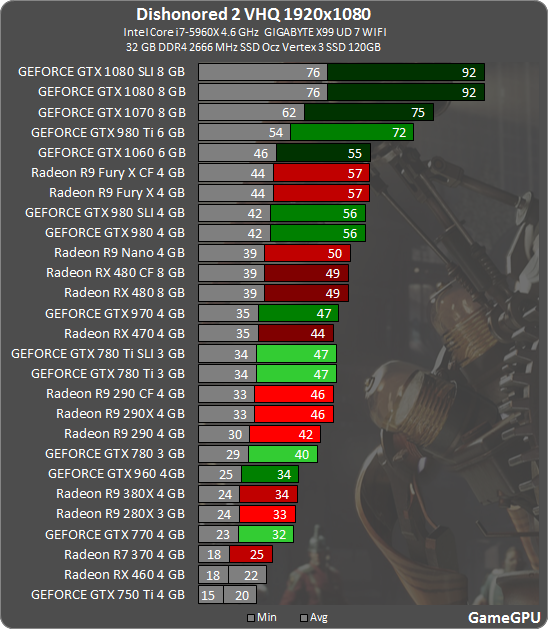
780ti sli 34-47 fps
But SLI seems useless as the game doesnt have sli support
EatChildren
Currently polling second in Australia's federal election (first in the Gold Coast), this feral may one day be your Bogan King.
Bowing out until the mouse stuff gets patched.
To its credit, it seems like a 100% faithful successor to the first game in almost all the right ways. Unlike Mankind Divided I don't feel...off about the setting and design of the game. This is totally Dishonored and fucking hell it feels good.
But man, fuck this tech shit. The frame pacing is horrendous and the mouse stuff despite tweaks feels awful. In a game where smoothness of play and input response is paramount, I just can't do this.
It doesn't have the same aesthetic/stylistic grievances that Mankind Divided had for me, but it shares similar technical bullshit issues. What a shit year for me and PC builds of hugely anticipated sequels.
To its credit, it seems like a 100% faithful successor to the first game in almost all the right ways. Unlike Mankind Divided I don't feel...off about the setting and design of the game. This is totally Dishonored and fucking hell it feels good.
But man, fuck this tech shit. The frame pacing is horrendous and the mouse stuff despite tweaks feels awful. In a game where smoothness of play and input response is paramount, I just can't do this.
It doesn't have the same aesthetic/stylistic grievances that Mankind Divided had for me, but it shares similar technical bullshit issues. What a shit year for me and PC builds of hugely anticipated sequels.

Drama Zed Nod
Member
Anyone here with a 780/780Ti ?
I'd like to know how it performs at 1080P on high/V.High....not ultra.
i'm playing @1440p on all "Very High"settings with HBAO+ turned on.
I have a 780ti SLI rig running a 4770k.
The frame rate fluctuates wildly from 30 to 60 +
I'm not seeing any frame pacing or juddering (but many others are) but that might be due to my g-sync monitor (or running it from an SSD or the speed of my RAM etc etc etc).
I'm also playing with a controller (i played the first on Xbox so i'ts not a huge deal for me) to avoid the weird mouse issues.
I'm getting on fine with it so far. I finished the tutorial and chapter one without much of an issue.
Been played at 3440x1440 with an i7 3770k and GTX 1070 and it's constantly fluctuating. Getting 55-70fps on Very high with Ultra textures. which is playable but, not constant.
Then when I got outside this one spot it dropped to 40fps and regardless of change in graphics it barely went any higher. Even on all low it hit 50fps.
This is so poorly optimised.
Then when I got outside this one spot it dropped to 40fps and regardless of change in graphics it barely went any higher. Even on all low it hit 50fps.
This is so poorly optimised.
Deputy Dangle
Member
It really grinds my gears that on top of all the issues people are having, I'll only make the act of playing more of a nuisance if I lock my framerate to 30 on more modest leaning specs. It already pains me that I've had no time to even start the game yet, but reading this thread is like experiencing deja vu again. I'm so tired of having to fight with all the id tech 5, and to a lesser extent id tech 6, games because of this hacky, grossly inefficient engine. It'd be so easy to avoid if the few games that have used it weren't really good or at least worthwhile.
Using Nvidia Inspector and the "60 fps ( Frame Rate Limiter v2 )" option like what I did on SKSE I managed to get a working 60fps lock.
It's not perfect but it mitigate a lot of the mouse sensibility issues, I'm not randomly doing 180° turn because of frame rate drops.
The first launch was very slow to get to the menu but it got better now.
It's not perfect but it mitigate a lot of the mouse sensibility issues, I'm not randomly doing 180° turn because of frame rate drops.
The first launch was very slow to get to the menu but it got better now.
I can't even get the game to run in a window. I click windowed mode in the options, and it still just displays it as fullscreen - same with borderless, too. Have tried changing the resolution down to 1080p (on a 1440p monitor) and windowed, but it'll just do 1080p fullscreen. Weird.
Let's also discuss the absolutely atrocious sound engine/mixing in this game. In fact the whole game is buggy as fuck.
This game needs another 6 months.
I have a feeling we'll see another "Batman Arkham Knight" like scheme where they pull the game from the market and release it again a few months later, but I doubt Bertha will do that, I am actually 1000% it will not happen.
I've just started the game, so tutorial section only. The first thing I usually get right when starting games is the v-sync/60fps cap. Sometimes I use the in-game settings (if frame times are good, and input is responsive) but other times I use nVidia inspector (RTSS) to cap the frame rate.
Certainly for me, in the tutorial section, RTSS frame rate capping causes terrible judder. So I'm using the in-game v-sync and it's smooth without any noticeable input lag.
So yeah, now that I'm happy with the v-sync I'll crack on. I have a 970 (playing at 1920x1080) and the game has recommended 'High' settings across the board with HBAO+ off. I know frame rates are likely to tank later in the game, so we'll see how it pans out.
One thing to note is that 'Adaptive Resolution' changes back to 75 every time I start the game. Is everyone else seeing the same? Might explain why people are complaining of poor image quality. If anyone else experiences the same issue it's likely they don't know that the game has dropped to 75.
Certainly for me, in the tutorial section, RTSS frame rate capping causes terrible judder. So I'm using the in-game v-sync and it's smooth without any noticeable input lag.
So yeah, now that I'm happy with the v-sync I'll crack on. I have a 970 (playing at 1920x1080) and the game has recommended 'High' settings across the board with HBAO+ off. I know frame rates are likely to tank later in the game, so we'll see how it pans out.
One thing to note is that 'Adaptive Resolution' changes back to 75 every time I start the game. Is everyone else seeing the same? Might explain why people are complaining of poor image quality. If anyone else experiences the same issue it's likely they don't know that the game has dropped to 75.
"I think they'll do this but I'm sure they won't"?I have a feeling we'll see another "Batman Arkham Knight" like scheme where they pull the game from the market and release it again a few months later, but I doubt Bertha will do that, I am actually 1000% it will not happen.
I would very much appreciate them doing something like that. Whatever it takes to get the game fixed.
flipswitch
Member
Awesome!.
"I think they'll do this but I'm sure they won't"?
I would very much appreciate them doing something like that. Whatever it takes to get the game fixed.
Releasing the game in a playable state would have been fantastic, something like Dishonored 1 which was had a pleasant launch and was fine since day1.
Nowadays you pay 50+ euros for a broken piece of software and you're most likely to enjoy it after they finish patching it, 3-5 months.
Harvey Smith is replying to tons of tweets and has mentioned as of 1 hour ago that they have are working on PC performance, CPU priority and mouse issues. No ETA but hopefully not too long.
Excellent. Let's hope they don't take too long. I can't wait to get back to Karnaca.
Comrade Crunch
Member
I have a feeling we'll see another "Batman Arkham Knight" like scheme where they pull the game from the market and release it again a few months later, but I doubt Bertha will do that, I am actually 1000% it will not happen.
It's not nearly as bad as Arkham Knight was at launch. That game couldnt even maintain 30fps on beefier machines, (which is the framerate it was locked at), crashed frequently, and stuttered so badly it was basically unplayable. This is on pretty much any graphical setting too.
Dishonored 2 on the other hand is perfectly playable, even on max settings.
Harvey Smith is replying to tons of tweets and has mentioned as of 1 hour ago that they have are working on PC performance, CPU priority and mouse issues. No ETA but hopefully not too long.
I know it's petty and probably not at all fair, but the persistent use of the phrase"some people" in his tweets irritates me to no end. At what point does "some" become "a lot" or even "most"?
EatChildren
Currently polling second in Australia's federal election (first in the Gold Coast), this feral may one day be your Bogan King.
I have a feeling we'll see another "Batman Arkham Knight" like scheme where they pull the game from the market and release it again a few months later, but I doubt Bertha will do that, I am actually 1000% it will not happen.
Arkham Knight was straight up broken for a lot of people. I don't feel Dishonored 2 is quite there. A single patch simply improving mouse input and frame timing would do a world of good on top of other issues. It's on the fringe of something great as the core game design seems legitimately fucking fantastic.
I think that's the one thing I'd encourage, to those jumping in now and disappointed with the technical quirks. This is absolutely Dishonored.
Harvey Smith is replying to tons of tweets and has mentioned as of 1 hour ago that they have are working on PC performance, CPU priority and mouse issues. No ETA but hopefully not too long.
That's awesome. Harvey is legit. I'll buy this as soon as they fix things.
Arkham Knight was straight up broken for a lot of people. I don't feel Dishonored 2 is quite there. A single patch simply improving mouse input and frame timing would do a world of good on top of other issues. It's on the fringe of something great as the core game design seems legitimately fucking fantastic.
I think that's the one thing I'd encourage, to those jumping in now and disappointed with the technical quirks. This is absolutely Dishonored.
I agree that the game is amazing, but it only makes the performance issues worse in that I really don't want to wait weeks or months for them to fix this.
A game that looks like this and yet has troubles running at 1440P/Ultra on high-end rigs doesn't make sense.
ussjtrunks
Member
Wonder what settings the consoles are running the game at if a 750 ti is getting 15-20fps on VH, Probably medium with high textures or something
matrix-cat
Member
I think that's the one thing I'd encourage, to those jumping in now and disappointed with the technical quirks. This is absolutely Dishonored.
That's great to hear. I have it sitting on my hard drive waiting to go, but I want to wait until it's all there before I jump in. Plenty of other stuff to play in the meantime.

Pop On Arrival
Banned
Arkham Knight was straight up broken for a lot of people. I don't feel Dishonored 2 is quite there. A single patch simply improving mouse input and frame timing would do a world of good on top of other issues. It's on the fringe of something great as the core game design seems legitimately fucking fantastic.
I think that's the one thing I'd encourage, to those jumping in now and disappointed with the technical quirks. This is absolutely Dishonored.
eggsackly. I'm just playing other shit for now and hoping/praying for a patch that'll resolve the issues. You're right about this being a fast paced game(when you want it to be), the frame pacing is of absolute importance. Specially if you have a high refresh rate monitor I think
I just hope it doesnt take as long to fix arkham knight. How long did that take for anyone that knows? I only got it a few weeks ago and aside from a few crashes in certain spots, it ran perfect
Dick Justice
Banned
Pretty fucking funny seeing this thread after the Polygon thread.