• Hey Guest. Check out your NeoGAF Wrapped 2025 results here!

Dishonored 2 PC performance thread

Just tried this on my gaming laptop and it seems to be that there is no jittering on high or very high settings, with a more stable 60FPS, along with TXAA being on, I don't get it.
Specs for the laptop:
GTX 1070 8GB running at 1700MHZ with turbo to 1900MHZ
DDR4 RAM @ 2400MHZ, 32GB
I7 6820K @ 3.6 GHZ

Gonna test the desktop again and post what I find at the same settings.
 
Man, I'm so glad that I decided to wait on this after getting burned by Forza and Mafia this year.

The state that games release in is completely unacceptable.
 
I felt sad for picking Titanfall 2 instead of Dishonored 2 so close to the release date.
Not anymore.

I'm definitely skipping this for a month or two until the game gets fixed.
 
Man, I'm so glad that I decided to wait on this after getting burned by Forza and Mafia this year.

The state that games release in is completely unacceptable.

People who pay money for these frauds are basically beta testers (including me, i took the bait and bought it), it's intolerable yet a standard nowadays
 
Tested again on my desktop and turned down to high it still drops 2-5 frames while jittering whereas my laptop doesn't jitter, did I miss something because both computers should run this fine.
Guess I'm waiting for a performance patch.
 
People who pay money for these frauds are basically beta testers (including me, i took the bait and bought it), it's intolerable yet a standard nowadays

It's so hit and miss though. I mean, there's literally no harm in waiting (it's the smart choice), but take something like Battlefield 1; Battlefield 3 and 4 launched with a shitfit of issues on PC right down to outright broken maps. Battlefront launched without regional server filtering. Yet Battlefield 1's launch has been really incredible.

From Bethesda's end Fallout 4 was (predictably) plagued with issues, but DOOM was a surprising technical success. Off the back of that, and the original Dishonored despite its engine differences launching well, I don't think it's unfair for people to expect Dishonored 2 to be up to scratch.

It's such a shame. I don't think it's as crazy broken as something like Arkham Knight, not by a longshot. But those little things so integral to the PC ecosystem and culture, like goddamn raw mouse input, being absent is a severe hindrance.

Patchable though. Fingers crossed.
 
Harvey Smith is replying to tons of tweets and has mentioned as of 1 hour ago that they have are working on PC performance, CPU priority and mouse issues. No ETA but hopefully not too long.

Today being a holiday in France I'm not sure if they will work on it before Monday.
But game industry is know for not being very friendly to the concept of "day off" so who know.
 
It's so hit and miss though. I mean, there's literally no harm in waiting (it's the smart choice), but take something like Battlefield 1; Battlefield 3 and 4 launched with a shitfit of issues on PC right down to outright broken maps. Battlefront launched without regional server filtering. Yet Battlefield 1's launch has been really incredible.

From Bethesda's end Fallout 4 was (predictably) plagued with issues, but DOOM was a surprising technical success. Off the back of that, and the original Dishonored despite its engine differences launching well, I don't think it's unfair for people to expect Dishonored 2 to be up to scratch.

It's such a shame. I don't think it's as crazy broken as something like Arkham Knight, not by a longshot. But those little things so integral to the PC ecosystem and culture, like goddamn raw mouse input, being absent is a severe hindrance.

Patchable though. Fingers crossed.

You are right, susprisingly, Battlefield 1 had a very successful launch when compared to BF4, sadly the game is also plagued by performance issues ( mostly the cpu 100% one which is making the game a professional CPU Benchmarking Tool, im sure Futuremark is already looking into their technology, quality coding )
 
Today being a holiday in France I'm not sure if they will work on it before Monday.
But game industry is know for not being very friendly to the concept of "day off" so who know.

Who knows, but I expect people will work over the weekend. I imagine immediate post-launch period to be one of the most intense during development, since you're basically bombarded with issues from your now-greatly-expanded QA team (i.e. your customers).
 
Just going to confirm that there are mouse and microstutter issues, both of which seem to be there no matter the graphics or mouse settings. They are not immensily bad, but they are there, and if you are sensitive to these things, they will bother you. The framerate is high enough in the tutorial area, even on ultra, but it doesn't feel smooth, and the mouse basically feels like playing a game locked at 30fps, inducing a hefty amount of input lag.

6770k @ 4.6
16Gigs DDR4/2666
GTX1080 @ ~2050/5200
Win10 64bit
1440p
gsync
 
Just going to confirm that there are mouse and microstutter issues, both of which seem to be there no matter the graphics or mouse settings. They are not immensily bad, but they are there, and if you are sensitive to these things, they will bother you. The framerate is high enough in the tutorial area, even on ultra, but it doesn't feel smooth, and the mouse basically feels like playing a game locked at 30fps, inducing a hefty amount of input lag.

6770k @ 4.6
16Gigs DDR4/2666
GTX1080 @ ~2050/5200
Win10 64bit
1440p
gsync

If folks with 1080s are having issues with the game, me with my gtx 960.. im hopeless
 
Arkham Knight was straight up broken for a lot of people. I don't feel Dishonored 2 is quite there. A single patch simply improving mouse input and frame timing would do a world of good on top of other issues. It's on the fringe of something great as the core game design seems legitimately fucking fantastic.

I think that's the one thing I'd encourage, to those jumping in now and disappointed with the technical quirks. This is absolutely Dishonored.

Honestly, if they just fixed the frame pacing all my issue would go away. Can't remember the last time I played a game where I couldn't resolve frame pacing issues between some combination of RTSS, VSync, and Fullscreen/Borderless Window Mode.

IFrom Bethesda's end Fallout 4 was (predictably) plagued with issues, but DOOM was a surprising technical success. Off the back of that, and the original Dishonored despite its engine differences launching well, I don't think it's unfair for people to expect Dishonored 2 to be up to scratch.
By the standards of major RPG launches, I thought Fallout 4 was relatively smooth. It had it's quirks but it was probably the smoothest Bethesda Games Studios that I can recall. I think most of the outcry there was on the quality of the game itself, not the technical quality.
Patchable though. Fingers crossed.
I

Dishonored 1 sold over 2 million copies on PC. My gut tells me that Bethesda isn't going to ignore the issues and lose that market even if they try their best to save face and never admit there were egregious problems.
 
Games can make me motion sick very easily. I have a Rad 480 and after turning it down to default medium it seems to be running OK even in the outdoor environments. It may not be the prettiest but I'm able to have fun. If it wasn't running somewhat smoothly my body would tell me.
 
X-posting, judge for yourself if performance hit is worth it.

1080p
UaLJIw3.png
4k

i5 6600K @ 4,2
16GB
980Ti

Settings are on Ultra across the board, TXAA x1 (maybe could disable on 4k?) and HBAO+ On.
 
1070
6820hk
16gb ram
1080p, Everything max, game is installed on a SSD

I'm only in the first area, but the framerate fluctuates between 55-90 no jitters.. Will have to test it more later
 
What does this stutter feel like? Is it like the micro stutter Source Engine games have?

But I consider a game having weird technical issues when my reported framerate is still very high, but the actual feel of input and frame timing, along with data streaming, is still fucked, a real problem. And that's my issue with Dishonored 2 at the moment. It's contrasted by Battlefield 1 which despite also framerate fluctuations (I think I'm using 130% resolution on top of 1440p) never feels anywhere near as jittery and weird as this.

Just going to confirm that there are mouse and microstutter issues, both of which seem to be there no matter the graphics or mouse settings. They are not immensily bad, but they are there, and if you are sensitive to these things, they will bother you. The framerate is high enough in the tutorial area, even on ultra, but it doesn't feel smooth, and the mouse basically feels like playing a game locked at 30fps, inducing a hefty amount of input lag.

Honestly, if they just fixed the frame pacing all my issue would go away. Can't remember the last time I played a game where I couldn't resolve frame pacing issues between some combination of RTSS, VSync, and Fullscreen/Borderless Window Mode.

I've never experienced a game with this frame pacing issue, and it doesn't go away, even at the lowest setting with every effect disabled.

I'm not sure if any of you have already caught it, but I posted a video a couple pages back attempting to show the issue (worse in person w/G-Sync @144Hz). I'm not sure if I succeeded, but watch @1080/60 in fullscreen, and see if you can spot it:
https://www.youtube.com/watch?v=tuYiKtllHn0

That's simply strafing, no mouse involved. It's like it isn't just the mouse triggering the issue, it's like the whole animation rig is. It would be interesting to see if a noclip/free camera would trigger the same behavior.

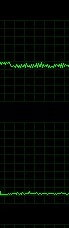
Framerate (top), frametime (bottom) for this scene:

38b23bd407b00ec4ea9681c625736a7c.png


Frametime looks fine, but the framerate graph is a tight sawtooth pattern; the fps is rapidly fluctuating any time I move at all...while looking at the floor and moving the span of a few feet left and right -_-

Weird one this.

I almost wonder if it has something to do with the dynamic settings/resolution not working as intended, but I don't see how. I'm stumped.
 
I almost wonder if it has something to do with the dynamic settings/resolution not working as intended, but I don't see how. I'm stumped.

I definitely think the dynamic resolution is screwed up somehow. My frame pacing gets better when I take it to 100 from 75. It's still screwed up but a fair bit more tolerable.
 
I almost wonder if it has something to do with the dynamic settings/resolution not working as intended, but I don't see how. I'm stumped.

I'd say that's warranted, given that the setting resets to 75 every time you start the game.

EDIT:

BTW, guys, does your game always start in borderless fullscreen, no matter the setting? And do you know a way to force a game to start in exclusive fullscreen?
 
I'd be very curious to talk to the Arkane guys about it... it sounds like something in their dynamic resolution is causing blocks on swap chain surfaces... but normally it's the other way around, with 1:1 on the swap chain you'd attempt to bind that as a render target to elide a temporary in the post, and then get a stall on the CPU causing weird sync + micro-stutter.
 
I'd say that's warranted, given that the setting resets to 75 every time you start the game.

EDIT:

BTW, guys, does your game always start in borderless fullscreen, no matter the setting? And do you know a way to force a game to start in exclusive fullscreen?

Once you set it to borderless the setting is bugged and you can only change it back by editing the config file under your user folder/saved games
 
Performance is bizaare. Yesterday on the third mission where there was the Wall of Light early on, I was dipping down to like 30 and below on a 1080 at 1440p.

Now it's performing perfectly fine.
 
I know it's petty and probably not at all fair, but the persistent use of the phrase"some people" in his tweets irritates me to no end. At what point does "some" become "a lot" or even "most"?

For every one of us who notices/cares about running a game smoothly at 60 fps, input latency, etc, there are probably 500 people who have never turned on a frame counter in their life or think that anything >= 30 is "fine". Looking at forums outside of gaf/reddit makes it immediately obvious that "most" people actually think that we're just idiots who don't know how to install drivers or change settings. Ignorance is bliss, and the majority of people never go down the rabbit hole of understanding performance to the point that they can identify problems and be bothered by them.
 
BTW, guys, does your game always start in borderless fullscreen, no matter the setting? And do you know a way to force a game to start in exclusive fullscreen?

It does actually. One of the reason G-Sync wasn't working, since I had G-Sync set to work in fullscreen only. I had to alt+tab out and back in to trigger exclusive fullscreen. I tried setting it in the config file, but it reverted to borderless on launch again, at which point the in-game menu wouldn't let me switch either. Ever since, the only way to fix it is to alt+enter into windowed mode, and then alt+enter into fullscreen.
 
For every one of us who notices/cares about running a game smoothly at 60 fps, input latency, etc, there are probably 500 people who have never turned on a frame counter in their life or think that anything >= 30 is "fine". Looking at forums outside of gaf/reddit makes it immediately obvious that "most" people actually think that we're just idiots who don't know how to install drivers or change settings. Ignorance is bliss, and the majority of people never go down the rabbit hole of understanding performance to the point that they can identify problems and be bothered by them.

Even RPS's Adam Smith did not report any issues in his preview:
"There are loads of options for visual settings, including a wide range for FoV, and I’ve had to move down to ‘high’ settings across the board to keep a consistent framerate on my GTX 970 at 1920*1080."

Though he did follow up with this article: https://www.rockpapershotgun.com/2016/11/11/dishonored-2-performance-faq/

This also highlight technical problems: https://www.rockpapershotgun.com/2016/11/11/dishonored-2-issues/
 
It does actually. One of the reason G-Sync wasn't working, since I had G-Sync set to work in fullscreen only. I had to alt+tab out and back in to trigger exclusive fullscreen. I tried setting it in the config file, but it reverted to borderless on launch again, at which point the in-game menu wouldn't let me switch either. Ever since, the only way to fix it is to alt+enter into windowed mode, and then alt+enter into fullscreen.

Problem is, I think that alt-tabbing is causing my GPU usage fluctuations, as another user previously suggested.
 
Can get a locked 30 fps at ultra on a 970 with process hacker, but for some reason it makes loading times minutes instead of seconds . This is one weird game!
 
.
But Deus Ex is a fantastic port, the performance issues came from ultra preset enabling

Deus Ex had the same issue as Dishonored 2 for me, certain areas would tank the framerate no matter what settings were used. There was a wall I could stare at and see 40 fps, look away from it and back to 60+.
 
Has anyone messed around with forcing a different AA solution with the nvidia control panel? I'm currently playing with on ultra/1080p with AA turned off. The texture work is so good! FXAA and TXAA really blurs the image.

DSR also isn't working for me. Anyone else have any luck?
 
Deus Ex had the same issue as Dishonored 2 for me, certain areas would tank the framerate no matter what settings were used. There was a wall I could stare at and see 40 fps, look away from it and back to 60+.

In my experience, changing settings in Mankind Divided allowed me to isolate those performance problems and smooth them out. In Dishonored 2 the performance doesn't scale with settings properly, so I'm not able to use that same strategy.
 
I started playing this last night, with a controller and it was not as terrible as I expected.

I put it on medium, borderless window (I love Borderless Window), and then just turned on volumetric light and God rays.

I was too scared to turn on any fps counters, but I feel like the triple buffer may help smooth put the frame rate fluctuations... And I think I'm not all that sensitive to them in the first place, though I do way prefer 60 to 30.

Edit: worth noting I also played through Arkham Knight pre patch without too many complaints... Even though it was an obviously bad port.
 
There's zero difference for me in regards to the dynamic resolution stuff. The game's fullscreen, windowed, borderless doesn't even work properly. Windowed doesn't work, switching between the other two only works if you hit alt+enter.
 
I hope that for Prey they got finished idTech6 and did absolutely nothing to it in-house. This "70% rewritten idTech6 v0.1" is filled with tech issues, not highlight of Arkane's engineers careers.
 
Has anyone messed around with forcing a different AA solution with the nvidia control panel? I'm currently playing with on ultra/1080p with AA turned off. The texture work is so good! FXAA and TXAA really blurs the image.

DSR also isn't working for me. Anyone else have any luck?

It's different, but AMD's VSR is also wonky for me in this game.
 
I hope that for Prey they got finished idTech6 and did absolutely nothing to it in-house. This "70% rewritten idTech6 v0.1" is filled with tech issues, not highlight of Arkane's engineers careers.

Prey is using Cryengine. I dont know enough about cryengine to say whether or not thats a good or bad thing though.
 
Dishonored 2 – PC Update
Thank you for supporting Dishonored 2.

We have been monitoring the PC forums and social channels and while we're excited to hear that many of you are enjoying the game, we are disheartened that some of you are experiencing PC performance issues on some systems.

We are actively working to provide an update to address your concerns. The patch and its release notes will be available in the coming days.

With the feedback our support group as received, we are preparing a patch intended to provide improvements to allow for more consistent framerates on affected systems and provide an update to the mouse code for smoother input.

While we prepare the patch, we encourage players to use the recommended settings posted on Bethesda.net and check out the Steam Community Guides for the best experience.
https://bethesda.net/en/article/1VwC6VdgqI2OMKwcQsewqI/dishonored-2-pc-update
 
Wanted to chime in here with my experiences

i7 4790k
12gigs ddr3
nvidia 980
installed on SSD drive
windows 7
Running at 1080p

So I booted up the game and played through to the first open area relatively fine but then hit massive framerate and mouse problems. After looking just about everywhere for a few days here is the route I ended up taking to get something playable:

Updated newest nvidia drivers
Forced process to high priority with process hacker
Almost everything on high except for view distance which is on low and textures which are on medium

Mouse smoothing off, vsync on, all other visual features on (like volumetric lighting etc), Fov down from 80 to 75

This keeps me at a stable 60 however I did notice the following lessons from it all:

-The game does have some massive frame hitches even for a decent rig like my own. I peg this down to almost always texture settings (the only visual drop was from high to medium and that was minor). The other settings barely made a difference. My educated guess would be culling related problems
-This wouldn't be that big a deal but framerate is 100% linked to mouse acceleration so if ti drops from 80fps to 30 prepare for a horrid jump
-You can't turn off mouse acceleration at all as far as I can tell. Hopefully this gets patched soon as it drives me nuts

Because of those 3 it means the game is super rough to play unless you're locked at 60 or near to it.

One final note, I'm usually a big visual nitpicker as I work in the industry but I was surprised at how little difference going from ultra down to high made for almost all settings. It's definitely still gorgeous and I didn't notice anything super lacking or bugging me at all.

Now I get to enjoy a badass game and hopefully it helps others as well!
 
Wanted to chime in here with my experiences

i7 4790k
12gigs ddr3
nvidia 980
installed on SSD drive
windows 7
Running at 1080p

So I booted up the game and played through to the first open area relatively fine but then hit massive framerate and mouse problems. After looking just about everywhere for a few days here is the route I ended up taking to get something playable:

Updated newest nvidia drivers
Forced process to high priority with process hacker
Almost everything on high except for view distance which is on low and textures which are on medium

Mouse smoothing off, vsync on, all other visual features on (like volumetric lighting etc), Fov down from 80 to 75

This keeps me at a stable 60 however I did notice the following lessons from it all:

-The game does have some massive frame hitches even for a decent rig like my own. I peg this down to almost always texture settings (the only visual drop was from high to medium and that was minor). The other settings barely made a difference. My educated guess would be culling related problems
-This wouldn't be that big a deal but framerate is 100% linked to mouse acceleration so if ti drops from 80fps to 30 prepare for a horrid jump
-You can't turn off mouse acceleration at all as far as I can tell. Hopefully this gets patched soon as it drives me nuts

Because of those 3 it means the game is super rough to play unless you're locked at 60 or near to it.

One final note, I'm usually a big visual nitpicker as I work in the industry but I was surprised at how little difference going from ultra down to high made for almost all settings. It's definitely still gorgeous and I didn't notice anything super lacking or bugging me at all.

Now I get to enjoy a badass game and hopefully it helps others as well!

cool thanks, but it always seems to be people with i7s that are being able to keep this game at a STABLE 60fps. I have an i5 6600k 4.5ghz and turning everything to low still drops me to 45-50 (1070)
 

Remember that writing stuff like this is somebody's job. They're representing their company when addressing the public in such a matter. I know it sounds like BS, but you kinda have to protect your own ass when you're releasing official statements - both for the company and your self as an employee. Maybe I'm a bit biased since I've been personally involved in similar situations in my own line of work, but it is what it is.
 
Top Bottom