• Hey Guest. Check out your NeoGAF Wrapped 2025 results here!

HDR gaming, how important is it, actually, what is it?

Are there any games on PC that I can play in HDR?

I fairly recently got a HDR TV but not sure of my PC can play HDR atm because my 280x doesn't have hdmi 2.0 so it can't output 4k very well (and not sure if you need 2.0 to output HDR)

Yes. All of them.

It's a hardware level change to pixel protection - not a software thing.
 
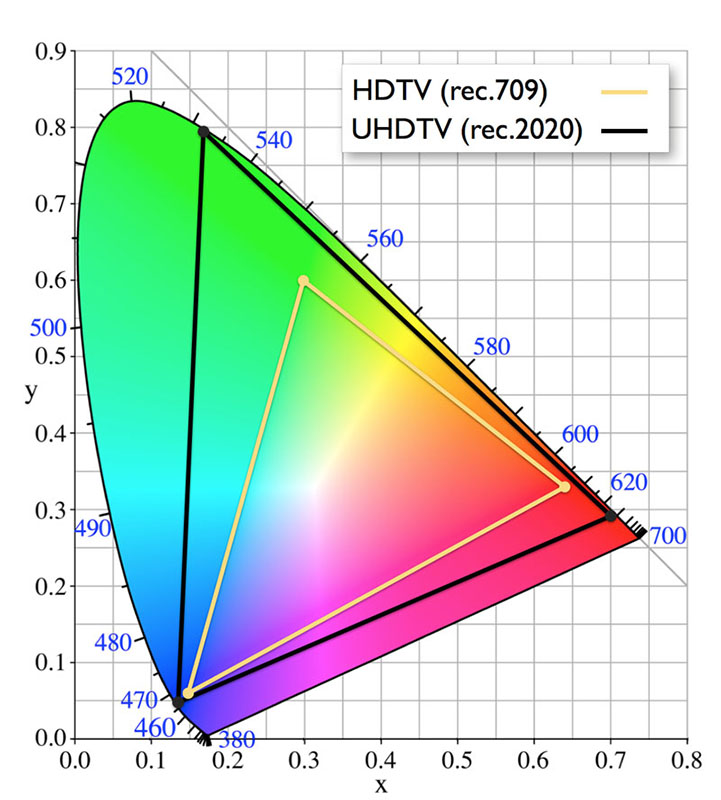
RS_HDR_GRAPHIC_tres.jpg

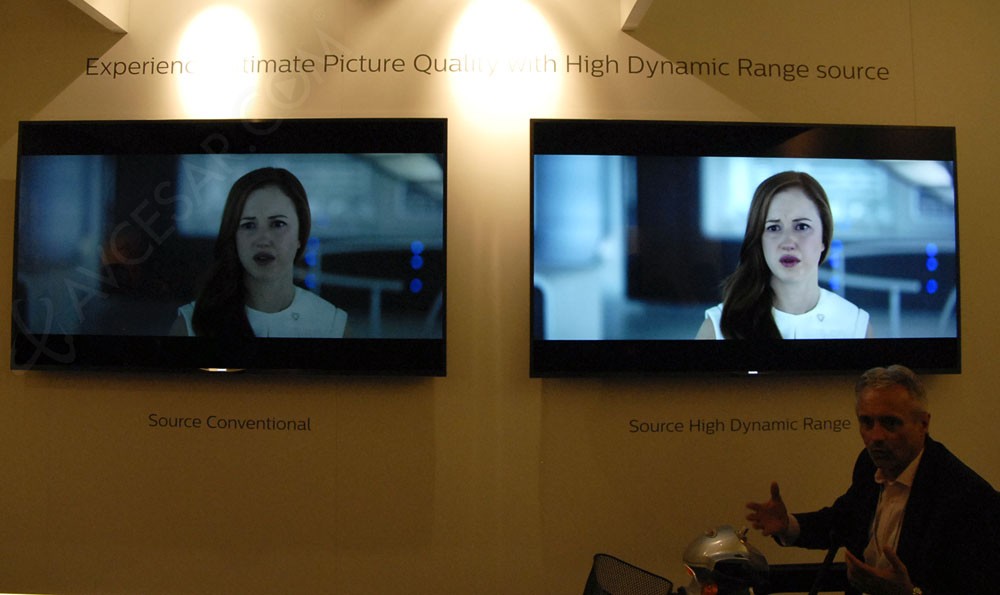
tv-led-ultra-hd-philips-hdr-adoption-de-la-norme-open-source_034131_034131.jpg


more important than 4k imo

giphy.gif
 
just wish there weren't a format war regarding HDR. (HDR10 vs Dolby Vision). Kind of sucks to be honest. Some sets support both, but the best sets (IMO) support one or the other.

Anyway is there a list of games that have HDR considerations in their production?
 
I have not read too much into HDR for gaming, but aren't games already 'HDR' and 'beyond it'?

Since HDR uses a 10-bit color depth, and most games are either 16-bit or 32-bit color depth?

Or is this, again, something totally different?
 
There is no such thing as true HDr. It just what the standard is for UHD blueray. That is HDMI 2.0a, Dolby vision is dynamic meta data and tvs can be updated to to support that via firmware update. But the current standard is Hdr10 and that most likely won't change for years. I don't think that applys to gaming because it can be done all in engine. It being real or not does not matter. It all about quality. Just play uncharted 4 HDr is used all over the place.

HDR is not just for Blu-ray, it's on streaming media as well like Netflix, Amazon, and Vudu. You can not update a TV to support Dolby Vision. It's hardware related, so your TV has to support it from the beginning.
 
Yes. All of them.

It's a hardware level change to pixel protection - not a software thing.
If you intend to actually display the HDR information properly you need to change how your tonemapping pass works, so it is a software thing.

GDC 2016: HDR Rendering in Lumberyard
Advanced Techniques and Optimization of HDR Color Pipelines (GDC2016 - Timothy Lottes)
I have not read too much into HDR for gaming, but aren't games already 'HDR' and 'beyond it'?

Since HDR uses a 10-bit color depth, and most games are either 16-bit or 32-bit color depth?

Or is this, again, something totally different?
In bit depth it's important to remember what we are talking about.
In old era 16, 24 and 32 bit color was when all RGB/A channels were combined. (24bit was 8bits per channel RGB, 32bit added Alpha channel) (Even older 2, 4, 8 bits were total bits within image and palette was used to select colors which each bit was pointing to.)

When talking about redering into HDR buffer, we use terms like FP16, which means FP16 value for each channel. (so 48bits for RGB)
Before display those images must be tonemapped to become classic 8bit channel images. (And to differentiate 'white' from scorching white of a sun we add bloom to brights and perhaps some noise and color loss to dark..etc.)

New 'HDR' TVs are either 10bits or 12bits per channel, so the difference to old 8bits isn't huge, but added dynamic range certainly is visible.
Tone mapping must still be used as we are far from displaying realistic dynamic ranges. (It's most likely not even good thing to try as we do not want blinding people by showing realistic sun in screen.)
 
I work with HDR content a lot. It's impressive but most of the time harder to discern from simply being brighter. My guess is we'll see a lot of games in dark rooms with molten metal because that seems to be the benchmark. Doom would look good.

I think HDR on LED TVs is not worth the price of admission. OLED + HDR is pretty impressive due to the insane contrast ratios on top of the HDR content.

I have a 4k TV, but don'the know if it has HDR. How can I check?

It's likely not. The sets are still fairly expensive and few and far between. There's also two formats. HDR 10 and Dolby Vision. The latter is less common.
 
Microsoft is probably just using it as a buzz word. Because HDr has been in games for years. Its when bright areas are very bright but transition to be visible. The same for dark areas like looking into a dark cave that gets brighter the closer you get to it. It basically simulates your eye adjusting to visible light. On UHD tv HDr is similar to that but they are also including wide color gamut.w hich means 10 bit color. 10 bit color is 1 billion color shades.

Mainly for games HDR should just be in the gaming engine no extra hardware needed.

You have no clue what you're talking about. They are referring to HDR as the hardware tech and accompanying software used in the newest model TV's and monitors not the damn software tech.

HDR doesn't start with HDMI 2.1, it does with HDMI 2.0 for streaming (amazon, netflix) and HDMI 2.0a for HDR via HDMI. It remains to be seen whether the next one will be HDMI 2.1 or HDMI 2.0b.
Hoping for some HDR compatible monitors soonish.

I believe they are up to HDMI 2.2? I believe it supports HDR Metadata or something along those lines.
 
I have not read too much into HDR for gaming, but aren't games already 'HDR' and 'beyond it'?

Since HDR uses a 10-bit color depth, and most games are either 16-bit or 32-bit color depth?

Or is this, again, something totally different?
HDR10 uses 10-bit, DolbyVision uses 12.

I know you're asking about games, I want to know also. Just want to point out HDR10 vs DV
 
Anyone know?

What kind of HDMI port does it have? I believe at bare basic to stream you need HDMI 2.0. Not too mention there should have been several stickers plastered over it stating HDR in big bold letters when you first bought it. If its over a year old and isnt a state of the art TV when you bought it originally it probably doesn't have HDR, the first several years of 4K TVs didnt have it.
 
I have a 4k TV, but don'the know if it has HDR. How can I check?

Anyone know?
I believe HDR started going into sets in 2015. Some have it, some don't. 2016 is the first year of HDR standards. A set must be rated at 10,000 nits (measurement of luminosity) to be considered HDR. Very few 2015 have nits that high but there a few good HDR sets from last year.

If you are interested in HDR, I recommend a 2016 set or wait until next year to see what improvements were made.

Pay attention to whether or not the HDR tv supports HDR10 or Dolby Vision. It's important.
 
I put it on in the options of HL2, doesn't make a big difference IMO.
It's not some massive thing that will wow anyone.

You're referring to a different setting entirely lol. That's the post processing effect that allows bloom to basically change in real time. Like how our eyes gets used to light and darkness.

And, HL2 didn't even have the standard method for applying it. The Lost Coast was a demo pretty much to showcase that they had a solution for it in Source engine.

This HDR is entirely different.
 
HDR10 uses 10-bit, DolbyVision uses 12.

I know you're asking about games, I want to know also. Just want to point out HDR10 vs DV

Yeah, I just want to know how this applies to gaming, because graphics already support a 16/32-bit color depth.

Anyone know?

What is the make and model? If it is pre-2015 it will not be more than likely.

Some 2015 models have been updated by the manufacturer to support it in firmware. And in 2016 there are models that support it day one.

PSY・S;206989925 said:
Looks worse. The extra detail in dark scenes is nice, though (stars pic).

That is a bullshit picture, one has the brightness, wayyyyy down, lol. I do not have HDR enabled, but my 2015 Sony 4K set looks like the one on the right in the same color lit scenes, not the left, and my Brightness is only 20 out of 100 with Lightsensor on to dim based on lighting conditions in the room (like a cell phone). And never reaches the full 20 due to auto dimming, which is much brighter than the left, and just as detailed as the right one, lol.

 
HDR is massive. To me it's bigger than the from 1080p to 4k.

It looks amazing on my OLED display.

Keep in mind that the quality of the display(Deepest black, brightest white, ability to dim one specific area without it affecting the rest of the screen, etc. etc) has a serious effect on HDR image. Not all HDR displays are equal.

In my opinion if you want to enjoy HDR you should look at LCD screens with FALD or OLED screens.
PSY・S;206989925 said:
Looks worse. The extra detail in dark scenes is nice, though (stars pic).
Outside of those pictures being faked. You're watching it an sdr encoded file on a sdr display. HDR can't be shown on a non-HDR screen.
 
Yeah, I just want to know how this applies to gaming, because graphics already support a 16/32-bit color depth.

32 bit colours are 8 bit per channel (red, green, blue, alpha). 10 bit for UHD will refer to per channel.

[edit] But movies are not encoded like pc signal, pc uses '4:4:4 chroma' and movies are 4:2:2 or 4:2:0 or something, essentially throwing away half the colour resolution. So you can't really compare the 2.
 
Can someone tell me how to use HDR from a computer to a TV?

I have a GeForce 1080 (supports HDR), an LG 55EF9500 (OLED with HDR10 capability), and an HDMI 2.0a cord.

However, when I plug it in and look through the control panel, I can't find any option to "turn on" HDR. The display will say "HDR ON" if a source is in HDR, as well as noting HDR as the video preset (as evidenced by the TV's Amazon app).
 
Yeah, I just want to know how this applies to gaming, because graphics already support a 16/32-bit color depth.


What is the make and model? If it is pre-2015 it will not be more than likely.

Some 2015 models have been updated by the manufacturer to support it in firmware. And in 2016 there are models that support it day one.


That is a bullshit picture, one has the brightness, wayyyyy down, lol. I do not have HDR enabled, but my 2015 Sony 4K set looks like the one on the right in the same color lit scenes, not the left, and my Brightness is only 20 out of 100 with Lightsensor on to dim based on lighting conditions in the room (like a cell phone). And never reaches the full 20 due to auto dimming, which is much brighter than the left, and just as detailed as the right one, lol.


No, I think the ones on the right look worse in nearly every example and that Wishmaster's examples are plain ridiculous, lol.

HDR is massive. To me it's bigger than the from 1080p to 4k.

It looks amazing on my OLED display.

Keep in mind that the quality of the display(Deepest black, brightest white, ability to dim one specific area without it affecting the rest of the screen, etc. etc) has a serious effect on HDR image. Not all HDR displays are equal.

In my opinion if you want to enjoy HDR you should look at LCD screens with FALD or OLED screens.
Outside of those pictures being faked. You're watching it an sdr encoded file on a sdr display. HDR can't be shown on a non-HDR screen.

Then why even try to show it off on regular displays other than to point out the increase in detail?
 
PSY・S;206991737 said:
No, I think the ones on the right look worse in nearly every example and that Wishmaster's examples are plain ridiculous, lol.

The female pic was where I was mentioning how the left one just looks like Brightness set to 0, lol, and the right one set to 50 or 100, lol.

32 bit colours are 8 bit per channel (red, green, blue, alpha). 10 bit for UHD will refer to per channel.

[edit] But movies are not encoded like pc signal, pc uses '4:4:4 chroma' and movies are 4:2:2 or 4:2:0 or something, essentially throwing away half the colour resolution. So you can't really compare the 2.

Ok, so does HDR for video get it to the 4:4:4 levels then or beyond that, meaning gaming has the potential to go beyond as well?

I still do not see how there can be noticeable advantages in stylized graphics, like there is in the compressed color for video, other than looking like 'color saturation' turned up.
 
What's the TV brand and model?

Also, here in EU you can get a Sony 50" 4K HDR TV for 1.400 €, so they're not that expensive.

I'll dig up the specs tonight. It's an LG 49" model as far as I can remember and I bought it in December 2015.
 
Gemüsepizza;206986241 said:
But HDMI 2.0 does not support dynamic HDR meta data, therefore I would not recommend buying a HDMI 2.0 device until it is clear if it can be upgraded. HDMI 2.1 will support it:

http://www.flatpanelshd.com/news.php?subaction=showfull&id=1457513362
That's what Philips says, yeah.
Good thing about Samsung is that they say that their 2016 TV's will be upgradable to HDMI 2.1 if it really comes to fruition.
Who knows about LG who screwed over owners of the EG9600 since not every owner is granted the necessary hardware upgrade. Sad enough, that a simple FW update isn't possible.

I believe they are up to HDMI 2.2? I believe it supports HDR Metadata or something along those lines.
You're confusing it with HDCP 2.2 copy protection.
 
So how is hdr image data stored? In RGB or HSL values?
HDR uses a different electro-optical transfer function, not color space. (edit: but UHD does)
EOTF is the function that maps input levels (e.g. 0-255) to specific display brightness levels.
I.e. instead of using Rec.709/sRGB ("gamma"), HDR uses SMPTE.2084 ("Perceptual Quantisation").

With this they are able to display a wider range of brightness levels more efficiently.
 
I have a 4k TV, but don'the know if it has HDR. How can I check?

It should have been one of the top selling points of the TV. Like when you looked at the the features list it would have been one of the top 5 bullet points. Do you have a model number?
 
I still do not see how there can be noticeable advantages in stylized graphics, like there is in the compressed color for video, other than looking like 'color saturation' turned up.
Brightness range of image can be wider.

Think what advantage you have when using gray scale brightness up to 255 instead of 200.
 
Ok, so does HDR for video get it to the 4:4:4 levels then or beyond that, meaning gaming has the potential to go beyond as well?

I still do not see how there can be noticeable advantages in stylized graphics versus real life other than looking like 'color saturation' turned up.

HDR video will still use chroma subsampling. It's a kinda hard thing to explain, but you can read about what it is here https://en.wikipedia.org/wiki/Chroma_subsampling
 
interesting, so your saying a HDR compliant TV could still have chroma subsampling? surely for a TV to be classified 'HDR' it shouldn't have subsampling as that effects colour?

The tv itself doesn't subsample, this is done when compressing the movie before streaming or putting it on a bluray. The tv should be able to handle a 4:4:4 video signal from a pc for instance.
 
In the top image, the "improved" image just looks like they increased the color saturation.

And in the other one, they just increased the backlight level.

Another gimmick to justify selling high priced tvs?

The pictures are trying to show something that can't really be shown unless you see the tv's themselves...
 
I'm all for new technology to improve the end user experience, but I just went and upgraded all of my TV's to 1080P a few years back. Not about to jump into the 4K waters for a long time.

Considering most streaming options are still at 1080P, and current consoles struggle to even maintain 1080P with 30 FPS, I'll believe these new consoles can maintain 4K at 30 FPS when I see it. I'm not buying in just yet that these new consoles will maintain this high standard.
 
When I change sources on my Sony TV from 3 years ago, it says something like "1080p 12bit" in the corner. Does that have anything to do with HDR?
 
High Dynamic Range. It's part of the UltraHD standard of video playback but I dont know if it will apply to games. If you have the right screen to match then it makes things prettier.

Most simply it means that the image has more visible detail in the highlights and the shadows (though it has an effect on the overall picture and colors as well). More nuanced contrast for the bits that usually crush or blow out. It uses metadata to work with your TV to find the output limits and tailor it to your screen settings so that you don't miss out on any detail.

It's not 'dumb' like current signals where it just throws the pixels to your tv and whatever happens happens. TVs built with HDR support work in conjunction with the other hardware to figure out the best way to display the content.
 
In the top image, the "improved" image just looks like they increased the color saturation.

And in the other one, they just increased the backlight level.

Another gimmick to justify selling high priced tvs?

More like another bullshitty way to communicate a feature you can't really appreciate fully in a still photo.

It's a real thing that makes a real difference, but it's probably not much of a selling point for most people. Either way ,the marketing images being thrown around certainly don't do it justice.

Doesn't help most people already associate it with the whole HDR/Bloom hype from HL2 days.
 
Seems great but I was confusing this HDR with the other HDR.

Very niche still seeing as it's only in 4k TVs and not even in all 4k TVs. It certainly makes the Xbone S a very compelling media device if you have the equipment.

I'm sure it will be great for games but I wonder if it is something difficult to support.
 
Can someone tell me how to use HDR from a computer to a TV?

I have a GeForce 1080 (supports HDR), an LG 55EF9500 (OLED with HDR10 capability), and an HDMI 2.0a cord.

However, when I plug it in and look through the control panel, I can't find any option to "turn on" HDR. The display will say "HDR ON" if a source is in HDR, as well as noting HDR as the video preset (as evidenced by the TV's Amazon app).

After further research, it looks like games have to be modified to include HDR and it hasn't been done yet:

GTX-1080-HDR-635x288.png


http://wccftech.com/nvidia-pascal-g...upport-for-games-and-4k-streaming-for-movies/

I guess the source video needs to have HDR capabilities, and that a desktop, internet, or pictures won't have HDR? Still confused...
 
Basically https://youtu.be/El9VTLpix1Q
And from what I've seen on uhd its sublime

Great video : Short, to the point, has a bad pun. 10/10 Would watch again.

In the top image, the "improved" image just looks like they increased the color saturation.

And in the other one, they just increased the backlight level.

Another gimmick to justify selling high priced tvs?

No. Anything about image quality is impossible to translate to your monitor. I suggest going to a Best Buy and seeing for yourself.
 
It's today's new jargon, is all. It requires HDR televisions, which are still few and far between. And it doesn't make a big enough difference for people to run out and buy new TVs for it, so this is something that will be slow going for a long time. It's not anything that could be used to push a particular game, I don't think. Any moreso than 3D was for last-gen.
 
Yes. And we'll see less colour banding as a result of the higher bit depth.

You haven't heard of HDR10 or Dolby Vision? You aren't aware than Amazon Instant Video has had HDR content for some time now and Netflix recently joined the party too?

High end 4K TVs have had HDR options since last year. My B6 OLED has both HDR10 and Dolby Vision support.

https://www.avforums.com/article/what-is-hdr.11039
http://www.trustedreviews.com/opinions/hdr-tv-high-dynamic-television-explained

E6 Owner here
high-five!
, and as you can attest, HDR is legit and amazing to behold when used correctly. It's one of those things that you can rightfully be dismissive of until you see it for yourself.
 
Top Bottom