

For the purposes of this discussion, I'm mainly asking about GBA to present.

Resolution: 240 × 160 pixels (3:2 aspect ratio)

Resolution: 240 × 160 pixels.

A backlit, 3.12-inch, transmissive TFT color LCD with 256x192-pixel resolution and .24mm dot pitch, capable of displaying a total of 262,144 colors.

The top screen is a 15:9 (5:3) autostereoscopic LCD screen with a display resolution of 800×240 pixels (400×240 pixels per eye, WQVGA). On the original Nintendo 3DS, the screen measures at 3.53 in (90 mm), while on the 3DS XL it measures at 4.88 in (124 mm). The screen is able to produce a three-dimensional effect without the need of 3D-enabling glasses using a parallax barrier. In order to adjust the effect's intensity, there is a 3D Depth Slider next to the screen allowing the user to adjust the intensity of the 3D effect or turn it off altogether. The bottom screen is a 4:3 resistive touchscreen with a display resolution of 320×240 pixels (QVGA). On the original Nintendo 3DS, the screen measures at 3.02 in (77 mm), while on the 3DS XL it measures at 4.18 in (106 mm).
Here's a link to some comparison charts: http://en.wikipedia.org/wiki/Comparison_of_Nintendo_portable_consoles#Comparison
So, I am pretty technologically uneducated.
I have a DS Lite and OG 3DS and am trying to figure out the best way to play GBA, DS Lite and 3DS games in order for them to display at the crispest, best resolution. Forgive me if I'm using the wrong terms here, and please feel free to correct me. I've been playing a lot of GBA, DS and 3DS games lately, and they don't appear terribly visually different to me.
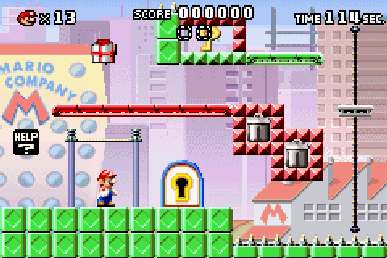

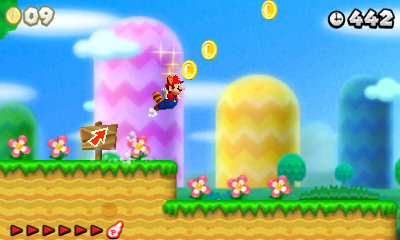
The polygonal models unquestionably improve over time, but when look at the games on the DS Lite (for GBA and DS games) and the OG 3DS (for 3DS games), they go from slightly blurrier to semi-blurry/semi-crisp to semi-crisp in terms of resolution, respectively. There doesn't appear to be a massive leap in crispness between these. Apologies if I'm speaking erroneously here. But again, my goal is to figure out what's going to look the best on each system and how to get each one at the proper brightness and resolution (the GBA games look a bit bright). I'd be eager to hear any thoughts. Thanks for your time!
Resolution: 240 × 160 pixels (3:2 aspect ratio)
Resolution: 240 × 160 pixels.
A backlit, 3.12-inch, transmissive TFT color LCD with 256x192-pixel resolution and .24mm dot pitch, capable of displaying a total of 262,144 colors.
The Nintendo DS only uses one screen when playing Game Boy Advance games. The user can configure the system to use either the top or bottom screen by default. The games are displayed within a black border on the screen, due to the slightly different screen resolution between the two systems (256 × 192 px for the Nintendo DS, and 240 × 160 px for the Game Boy Advance).
The top screen is a 15:9 (5:3) autostereoscopic LCD screen with a display resolution of 800×240 pixels (400×240 pixels per eye, WQVGA). On the original Nintendo 3DS, the screen measures at 3.53 in (90 mm), while on the 3DS XL it measures at 4.88 in (124 mm). The screen is able to produce a three-dimensional effect without the need of 3D-enabling glasses using a parallax barrier. In order to adjust the effect's intensity, there is a 3D Depth Slider next to the screen allowing the user to adjust the intensity of the 3D effect or turn it off altogether. The bottom screen is a 4:3 resistive touchscreen with a display resolution of 320×240 pixels (QVGA). On the original Nintendo 3DS, the screen measures at 3.02 in (77 mm), while on the 3DS XL it measures at 4.18 in (106 mm).
The original DS display resolutions are displayed in a scaled and stretched fashion due to the increased resolution of the 3DS's screens. If the user holds down the START or SELECT buttons upon launching Nintendo DS software, the emulated screens will be displayed in Nintendo DS's native resolution, albeit smaller with black borders. On the Nintendo 3DS XL, this method yields a viewing size for DS games similar to their native sizes (due to the larger screen size of the XL), unlike on the original 3DS models, where the games appear to be shrunk.
Here's a link to some comparison charts: http://en.wikipedia.org/wiki/Comparison_of_Nintendo_portable_consoles#Comparison
So, I am pretty technologically uneducated.
I have a DS Lite and OG 3DS and am trying to figure out the best way to play GBA, DS Lite and 3DS games in order for them to display at the crispest, best resolution. Forgive me if I'm using the wrong terms here, and please feel free to correct me. I've been playing a lot of GBA, DS and 3DS games lately, and they don't appear terribly visually different to me.
The polygonal models unquestionably improve over time, but when look at the games on the DS Lite (for GBA and DS games) and the OG 3DS (for 3DS games), they go from slightly blurrier to semi-blurry/semi-crisp to semi-crisp in terms of resolution, respectively. There doesn't appear to be a massive leap in crispness between these. Apologies if I'm speaking erroneously here. But again, my goal is to figure out what's going to look the best on each system and how to get each one at the proper brightness and resolution (the GBA games look a bit bright). I'd be eager to hear any thoughts. Thanks for your time!


 Give me a few to put together something.


