• Hey Guest. Check out your NeoGAF Wrapped 2025 results here!

How "oldschool" graphics worked

You can do scrolling screens on the C64, IIRC there is a scroll setting with which you can shift the whole display pixel-precise. Then it is matter of hiding the edges of the displayed image behind the borders, shift your character (tile) positions every 8 pixels and add new tiles behind the border at the same time.

The character scrolling trick works by scrolling (actually rolling, with wraparound) a repeatable pattern within one character (or multiple) and then repeating those characters over a whole area. You can then even do parallax scrolling within that pattern, or do repeating patterns of multiple characters for more detail.

There are also tricks like pre-shifting images, just store the graphics of all shifted positions, so you don't have to calculate them in real-time. (memory use vs speed)

I also had a game on the VIC-20 that repeatedly scrolled (also with wraparound) a projectile vertically through a character sequence (like a,b,c,d,e), then when an enemy fired, it drew the projectile characters starting at the one the bullet currently was in. Pretty cool trick to speed things up.
 
Just bought a new book called "Amiga a visual companion". Such a great book.. took me down memory lane (also bought the same book for the C64, but that book is dissappointing)..

There was a part about Deluxe Paint, and how it was used by almost everyone who used to make games for the Amiga.

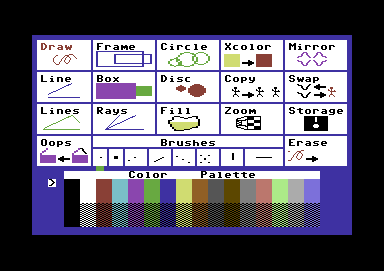
On the C64 they used Koala Painter.
KoalaPainter.png

I remember using it myself, and it was a great and versatile program.

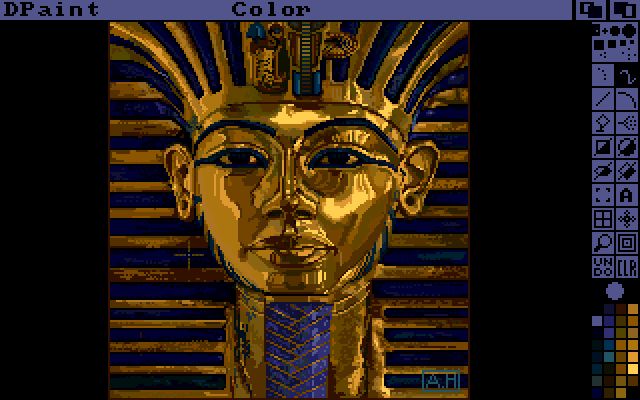
But when I got my Amiga 500 and got Deluxe Paint.
deluxepaint_2.jpg

I was blown away.. that picture ... mama mia.. back then that was crazy..

With Deluxe Paint 3 (or 4) they added the animation tool... shit I made so many crazy simple animations.. it was just simple fun..

I never realized that most games (like Shadow of the Beast) had graphics that were handdrawn in Deluxe Paint. Even most animations in games back then were done in Deluxe Paint.

The book I bought had lots of comments from game makers back then, and it really shows you how much work was put into games, and that most games back then were made in very short time by very few people.
 
I thought it was an OK video, but it made things a bit more complex sounding than they needed to be.

Its just a case of bit-mapping versus character mapping, and the core ability to handle independent multiple level playfields in hardware (or not).

The way he describes stuff is fine, but by not emphasising how character/tile based screens can facilitate stuff like (cpu) cheap scrolling playfields and screen wide animations he's kind of selling the differences short.

The thing is, on something like the c64, each 8x8 "cell" or character is a reference to a specific bitmap. So, for sake of a simple example imagine you have a screen full of text, by changing the bitmap referenced as the letter 'a' every instance where the letter is used onscreen will change instantly and simultaneously. It had a whole bunch of interesting uses, especially as you could produce animation and scrolling effects by simply operating on single/groups of characters. This for instance was used to create simple parallax effects.

yes I think not talking about tiles really hurt the video, especially since he mentioned the nes (I'm not that familiar with c64, but at least that has some sort of bitmap mode I believe), but of course there's supposed to be more videos later. When you explain nes graphics, tiles should really be the absolute first concept you talk about.

The stuff he talked about the frame not fitting in ram, and the machines having no dedicated video ram doesn't really apply to NES at all. The graphics data isn't stored in ram but read directly from the rom cart; and the things that the PPU does use ram for have very specific memory locations. And even so it's in no way designed to, or capable of displaying a full screen bitmap (without using mid frame bank switching). It's all about tiles & sprites.
 
Excellent video and an interesting conversation to boot.

Sadly I don't have much to add to this... I thought I knew my shit about the Amiga but I learned stuff even there.
 
This guy seems pretty cool. Hopefully he does one on 16-bit systems.

Gonna watch the music episode when I get home tonight.
 

CGA was able to manage 8 different colours, with an additional bit for its intensity. Like a ZX Spectrum, but the Spectrum had another limitations due to its character-based graphics. The limit of 8 colours was a limit of the card, NOT "a limit of the monitor itself". The monitor was a pretty standard 15Khz RGB CRT, aka a TV.

At least he's being honest at the end when saying Composite is a disgusting mess of blurred colours. He's arguing Composite is better because its blur kind of makes more colours, I'm saying it's worse because the fake colours are just way too blurry.

There's something that he didn't explain quite clearly. "RGBI mode" and "Composite mode" weren't just the same output via a different connector, allowing Composite to merge colours. The colour layout itself was altered to have pixels of different colours close together to allow for Composite to merge them, whereas in "RGBI mode", concurrent pixels are all of the same colours. Trying to use Composite by for example running the RGBI output into an RGB-to-Composite" encoder would simply make a blurry mess of four colours. This is very briefly seen in the Battle Chess example. What he did not do however, is try the "Composite mode" through RGB, to see how pixels of different colours close together would behave, to See Composite colours without the blur of Composite. But that would probably have defeated his whole argument. Dithering still looks good in RGB on a CRT.
 
CGA was able to manage 8 different colours, with an additional bit for its intensity. Like a ZX Spectrum, but the Spectrum had another limitations due to its character-based graphics. The limit of 8 colours was a limit of the card, NOT "a limit of the monitor itself". The monitor was a pretty standard 15Khz RGB CRT, aka a TV.

At least he's being honest at the end when saying Composite is a disgusting mess of blurred colours. He's arguing Composite is better because its blur kind of makes more colours, I'm saying it's worse because the fake colours are just way too blurry.

There's something that he didn't explain quite clearly. "RGBI mode" and "Composite mode" weren't just the same output via a different connector, allowing Composite to merge colours. The colour layout itself was altered to have pixels of different colours close together to allow for Composite to merge them, whereas in "RGBI mode", concurrent pixels are all of the same colours. Trying to use Composite by for example running the RGBI output into an RGB-to-Composite" encoder would simply make a blurry mess of four colours. This is very briefly seen in the Battle Chess example. What he did not do however, is try the "Composite mode" through RGB, to see how pixels of different colours close together would behave, to See Composite colours without the blur of Composite. But that would probably have defeated his whole argument. Dithering still looks good in RGB on a CRT.

There is one other advantage of composite output for CGA cards - accidental colors. This is mainly a display hack thing, where, by rapidly alternating between dither pattern and, in effect, changing the frequency of the drawing gun, you can create entirely new colors outside of the normal color spectrum. This is different from relying on 50-50 half blends from blurriness, this can be used to create entirely new shades well beyond the 8+intensity colors available.
 
Top Bottom