• Hey Guest. Check out your NeoGAF Wrapped 2025 results here!

How to delete DLC from PS4 storage

Crossing Eden

Hello, my name is Yves Guillemot, Vivendi S.A.'s Employee of the Month!
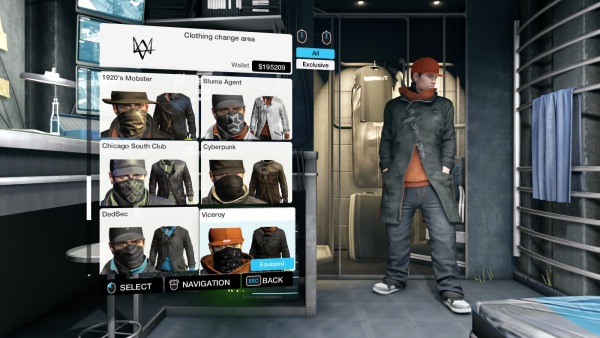
Thanks to psn maintenance happening at the worst possible time. The ULC pack for Watch Dogs which unlocks all the season pass dlc content is having some issues verifying some of the content that I downloaded, like the outfits. I tried searching online about how to delete the content manually from the ps4 storage so that I can reinstall it but couldn't find a good answer. Any advice gaf?
 
Settings > Application saved data > Saved data in system storage > Delete > [Name of Game]

Should give you a list of things to choose from. Try that!
 
I'm pretty sure that doesn't work. From what I can tell the only way to get rid of the dlc is to completely wipe your hard drive.
 
I don't think there's an option to delete just DLC, you have to delete the whole game if you want to wipe it from the system.
 
I'm pretty sure that doesn't work. From what I can tell the only way to get rid of the dlc is to completely wipe your hard drive.

What.jpg


I think what Fushichou187 is true. Just don't delete your save file!
 
I'm telling you man I tried. I deleted bf4 a number of times before and when I reinstalled it I didn't have to download any of the dlc.
 
I don't think there's an option to delete just DLC, you have to delete the whole game if you want to wipe it from the system.
<looks at calendar> It is June 2014, right? Because that answer strikes me as one I should have expected back in the mid-2000s.
 
<looks at calendar> It is June 2014, right? Because that answer strikes me as one I should have expected back in the mid-2000s.
They really released a console that wasn't capable of deleting individual dlc files? &#3232;_&#3232;
 
Apparently you couldn't do this on PS3 either. It's not really out of the ordinary though, you can't do it on Steam or Origin.

On PS3, it was possible if the games made a separate file for DLC. Some games rolled everything into the installed data so you would have to delete that and redownload the patches and wait for the game to install data onto the hard drive.
 
Doesn't the Vita work the same way?

Anyways yeah in 2014 it seems weird, but I see the logic. "DLC" and updates and the game itself are one in the same now.
 
Can you do this from the download list menu in the store?

No. Nor can you do it from the Library section in your software list on the main UI. It shows you every bit of DLC you have per game but no option to delete it. Just an option to re-download it.
 
It shows you every bit of DLC you have per game but no option to delete it. Just an option to re-download it.
When I delete the game install I don't even have the option to re-download it. I could be wrong and they fixed it in the recent update but last time I tried it you cannot get rid of the dlc no matter what
 
No. Nor can you do it from the Library section in your software list on the main UI. It shows you every bit of DLC you have per game but no option to delete it. Just an option to re-download it.

This could become problematic when games like Destiny start dropping big expansions in the future. Kind of a weird omission.
 
I have no idea. It's just something I noticed when I would delete and reinstall battlefield 4. For some reason the ps4 hides the info.
FWIW, I deleted BF4 (retail) a couple of months ago and it wiped the DLC when I did so.
 
Looks like I'm eating crow my bad. Just tried it out. Still I remember not being able to redownload the dlc before when I deleted the install. Now I know how being a conspiracy theorist feels like
 
Looks like I'm eating crow my bad. Just tried it out. Still I remember not being able to redownload the dlc before when I deleted the install. Now I know how being a conspiracy theorist feels like
Just deleted my install. And it deleted my save....um, ok then, hopefully the cloud save still works..ok it says
"Installation in progress 13%, this option will be available when the installation is completed."
When I hover over continue, which is greyed out atm.
 
Why would it delete your save? It should have just deleted the install and yeah anyways your save SHOULD be in the cloud
Because someone thought it would be a good idea to not imitate the industry standard of hardware and save data management when it came to storage management of this next gen console.
 
Because someone thought it would be a good idea to not imitate the industry standard of hardware and save data management when it came to storage management of this next gen console.

what the fuck
so youre telling me your gave save is tied to the game install like on vita?
come on, sony
 
I deleted Assassin's Creed 4 off my hard drive but the DLC is still there. I even deleted the save game and still no luck. Seems retarded to have no easy means to remove the DLC on PS4 after deleting the game.
 
I've never deleted anything off my PS4, and this thread is blowing my mind.

People are saying conflicting things, does this stuff vary between games or something?
 
what the fuck
so youre telling me your gave save is tied to the game install like on vita?
come on, sony
Yup. The kicker is that after all of this i still haven't gotten my costumes. This is what the costumes are supposed to look like according to the ubisoft support site
ViceroyOutfit.jpg

Yet in my game I only got two new costumes.
BrBRUG3IIAEYOEV.jpg
 
Yup. The kicker is that after all of this i still haven't gotten my costumes. This is what the costumes are supposed to look like according to the ubisoft support site
ViceroyOutfit.jpg

Yet in my game I only got two new costumes.
BrBRUG3IIAEYOEV.jpg
Are you sure this is even seperate dlc and not just unlock keys? Ubisoft is pretty notorious for just including all the exclusive DLC in every version and then locking it behind license checks.

Edit: I have also deleted installs on ps4 before and it NEVER deleted my save. They are in completely seperate locations.
 
I deleted Assassin's Creed 4 off my hard drive but the DLC is still there. I even deleted the save game and still no luck. Seems retarded to have no easy means to remove the DLC on PS4 after deleting the game.
I knew it! But I don't understand I just deleted bf4 couple minutes ago just to see if still does that and it totally did delete the dlc too. Redownloading everything as we speak. I really don't know what else to say. This is way too confusing. I should have noted that I own the retail version not PSN. I hope your save file is safe Crossing
 
Are you sure this is even seperate dlc and not just unlock keys? Ubisoft is pretty notorious for just including all the exclusive DLC in every version and then locking it behind license checks.

Edit: I have also deleted installs in ps4 before and it NEVER deleted my save. They are in completely seperate locations.
Yeah I haven't noticed saves tied to the game installs. AFICT, saves fall under the App Saved Data folder while games fall under the Apps folder.
 
This is a thread full of conflicting misinformation. Just goes to show how Fing convoluted Sony has made this process, if it even exists...
 
Sorry for hijacking your thread, OP, but I recently got a PS4 nd I have a question. How on earth do I delete the preinstalled apps? Things like WWE Network or Redbox Instant. I'm never going to use those and I want them off of the system.
 
Are you sure this is even seperate dlc and not just unlock keys? Ubisoft is pretty notorious for just including all the exclusive DLC in every version and then locking it behind license checks.

Edit: I have also deleted installs on ps4 before and it NEVER deleted my save. They are in completely seperate locations.
My save file is recovered. But when I deleted the game install and put the disk back in I couldn't continue until I downloaded my save from the cloud. And this dlc is supposed to come with the season pass. I haven't seen any uproar like back when Capcom had disc locked content so idk if it's behind a license check or anything. And I just noticed that the only things missing are
-Dedsec outfit
-Chicago South Club outfit
 
Yeah, I just went and deleted BF4 (physical copy) to test this, and it deleted the DLC as well.

WTF?!

Is there no hidden option somewhere? Who designed this garbage?
 
Sorry for hijacking your thread, OP, but I recently got a PS4 nd I have a question. How on earth do I delete the preinstalled apps? Things like WWE Network or Redbox Instant. I'm never going to use those and I want them off of the system.
Short answer, you can't.

Long answer, they're not installed, they're just shortcuts to the PS Store so you can download them. And no, you cannot delete the shortcuts. The only preinstalled app is The Playroom and afaik you can't delete that either.
 
Short answer, you can't.

Long answer, they're not installed, they're just shortcuts to the PS Store so you can download them. And no, you cannot delete the shortcuts. The only preinstalled app is The Playroom and afaik you can't delete that either.
The next update better include an option to separate apps and games.
 
Top Bottom