• Hey Guest. Check out your NeoGAF Wrapped 2025 results here!

Lez talk mechanical keyboards

Finally picked up my first mechanical keyboard. I got a KBParadise V60 Mini with red Cherry MX switches. This thing feels far nicer than I expected, but typing is going to take some getting used to. I've been using laptop style keyboards with low-profile keys for like 15 years, so using regular keys again feels odd. (This is the one I was using until today)

I'm sure some of the customization on this thing is semi-standard on better keyboards, but I've only ever used cheap ones and I'm really impressed. The number of remappable keys, which even came with alternate keycaps, was not something I was expecting.

Very nice, wish I'd dropped the numpad on my first mechanical keyboard - it gets literally no use and just takes up space.
 
Straight to a 60%? Good man! Reclaim your desktop space with confidence!

Though yeah typing takes a bit to get used to.

Yeah, I started using smaller keyboards when I built a SFF PC for LANs in college, and haven't gone back to a full sized one since. I love the narrower hand positions. This is the first time I've gone with this few keys though.
 
People who use 60% keyboards, do you not use arrow keys much?
I don't feel these keyboards would be useful for programming, at least not for what I do (visual studio, c++), even though I'd love having something still smaller than my tkl.
 
People who use 60% keyboards, do you not use arrow keys much?
I don't feel these keyboards would be useful for programming, at least not for what I do (visual studio, c++), even though I'd love having something still smaller than my tkl.

The arrow keys on my 60% are Fn + the okl; keys. And Fn is where my caps lock is because there's no reason to have that.
 
"People who use 60% keyboards, do you not use arrow keys much?
I don't feel these keyboards would be useful for programming, at least not for what I do (visual studio, c++), even though I'd love having something still smaller than my tkl."


They're pretty popular with programmers. You still have access to arrow keys, they're on a command layer. So you'd just hold down your command button and press whatever keys are designated as your arrow keys (something like IJKL).

That said, if you still want physical arrow keys but less footprint, you can look into 75% keyboards like the Keycool Hero 84, KBT Race, Noppoo Nano 75-S, or build a custom like Winkeyless.kr or Gon.
 
I've got the Logitech G910 Orion Spark... amazing keyboard....

The custom profiles and the API provides endless possibilities.
 
People who use 60% keyboards, do you not use arrow keys much?
I don't feel these keyboards would be useful for programming, at least not for what I do (visual studio, c++), even though I'd love having something still smaller than my tkl.
You now that a good chunk of programmers use Vi/Vim where you have no use for arrow keys?

You can even have Vi bindings in Visual Studio (VSVim, ViEmu, etc.)

Even outside of Vi bindings, I think having keys on/near the home row, even at the cost of a modifier, is better than moving your hand, when you code.
 
You now that a good chunk of programmers use Vi/Vim where you have no use for arrow keys?

You can even have Vi bindings in Visual Studio (VSVim, ViEmu, etc.)

Even outside of Vi bindings, I think having keys on/near the home row, even at the cost of a modifier, is better than moving your hand, when you code.
Programmers never working in a modern IDE, word processor, spreadsheet, etc. where dedicated arrow keys matter is a tiny niche.

One big missed opportunity with the compact keyboards is that they very rarely have dedicated function keys. The appeal of the boards is that compact width has an ergonomic benefit. I honestly don't understand why the designs voluntarily chuck away a whole standard row of keys that is useful in every common IDE, many games, etc. Even if you are a hardcore Vim user there's a lot of stuff where a single physical keypress is much more convenient than a command string. Something like Leopold FC660 is seriously worse off for not having the F keys.

I still use Vim for my miscellaneous text editing and used it for coding back in the day, but these days am 100% in Visual Studio due to Unity. If we don't go into seriously exotic designs (split, ergo, multiple thumb keys) then my dream keyboard is pretty much Happy Hacking Lite2 but with mech switches and a dedicated F row on top. It's a big deal that HH2 Lite has dedicated arrow keys squeezed under the right Shift, and the Fn+arrow key combinations are very intuitive for PgUp/PgDn/Home/End. Actually it's pretty much the same layout as Apple laptops, except that HH has the Esc closer and puts Control in the right place without having to assign it in software.
 
One big missed opportunity with the compact keyboards is that they very rarely have dedicated function keys. The appeal of the boards is that compact width has an ergonomic benefit. I honestly don't understand why the designs voluntarily chuck away a whole standard row of keys that is useful in every common IDE, many games, etc.
Fn keys are a bit far above on many keyboards (three rows is far, three row with a gap is even farther), so I guess having them nearer home row on an alternate layer may make sense. That being said, I think having them isn't an issue even if you don't use them, so they could leave them there, indeed.

Anyway, when I code, I prefer having more keys available then less, even if I have substitutions on layers. In fact, I wish Ergodox-like layouts had TWO side columns for the pinkie than one. There's too many symbols that I'd like to see directly usable, because complex layer switchs sequences can slow you a lot.

(As for Fn keys, I have dedicated F2-F8 keys myself on my Dox, but I moved them on the bottom row, nearer than the (inexistant) Fn-row)
 
People who use 60% keyboards, do you not use arrow keys much?
I don't feel these keyboards would be useful for programming, at least not for what I do (visual studio, c++), even though I'd love having something still smaller than my tkl.

On the Pok3r there is a key combo that toggles the largely useless right bottom corner to arrow keys. I use the same setup permanently on my custom 60% because I rarely need the Right Ctrl, Win, App and Shift keys. The bigger keys are actually more pleasant to use than normal arrows.

Also function keys are much easier to reach with Fn+numbers. Replacing either caps lock or left Ctrl with Fn makes it very easy to use. I have left Ctrl as Fn and Caps Lock as Ctrl.
 
Can I just mention 75% keyboards again? You get dedicated arrow and function keys, but only slightly larger than a 60% keyboard. Best of both worlds (if you can get over the odd right shift size).
 
"but where's Insert doe ;_;"

Depends on the 75%, but they usually have insert, either dedicated or on a layer. If it's fully programmable then you can just put insert wherever you want.
 
I highly recommend 60% but they have to be programmable with layers, either via software or straight from the keyboard like the Pok3r.

Most full size keyboards have tons of keys you rarely use or ones that are placed far away so you need two hands to operate. Windows Alt+function key shortcuts are probably the worst offenders. For example to hit Alt+F4 to rage quit >:D you have to make quite a stretch vs just holding down one extra key and comfortably going for the number 4 on the top row.

This is what I currently use, a custom built 60%:

TYmjYvt.jpg


The Alt and Spacebar keys are reversed for extra comfort and the left Ctrl is actually Fn (same as the star button next to right shift) and Backspace is moved one row down. The two keys above it are \ and Delete. Fn+period,comma or / change layers similar to how it is on a Pok3r (which I also own and use at work).
 
Well, the Lapdog itself seems somewhat expensive ($120 for a plastic shell to hold a keyboard in? Hrm.), but $250 would be $130 for the keyboard. Which taking a look, is a $0 discount.

Unless that mouse is free I guess, but I highly doubt that. More annoying is it looks like the shell of course only accommodate those two keyboards, which would be annoying if you already had a different keyboard.

I'm looking up lapboards again and what sucks is that the Corsair seems to be the ONLY one that fits my specific needs: it has cushioning and supports a full keyboard.

Lapboards seem to be a really small industry. Most are just laptop lap desks which I don't really need. There are those fold-out ones that mostly suck, and then there are maybe a couple other gaming-specific ones that don't support full keyboards or have cushioning.
 
I'm looking up lapboards again and what sucks is that the Corsair seems to be the ONLY one that fits my specific needs: it has cushioning and supports a full keyboard.

Lapboards seem to be a really small industry. Most are just laptop lap desks which I don't really need. There are those fold-out ones that mostly suck, and then there are maybe a couple other gaming-specific ones that don't support full keyboards or have cushioning.

Yeah, from what I can see it's pretty much the best one there is. Just a matter of the value proposition at that point. The keyboard that it comes with is really well known so I guess there's that, it's not exactly a shitty keyboard.
 
I'm in love.

I don't know if it's the picture or what but there's so much light bleeding...

I just got the Logitech 610 in today and don't know how I feel about going back to browns after having blues. It's so quiet and I can't decide if I miss the clicky or not. I do love the look of this thing. So understated and perfect for what I want.

Has anybody tried the Romer-G keys? What is it like? I need to find somewhere that has it out to try. Maybe bestbuy? Would love to pickup the G810 with RGB lights if the Romer-G is a nice cross between blue and black.
 
Has anybody tried the Romer-G keys? What is it like? I need to find somewhere that has it out to try. Maybe bestbuy? Would love to pickup the G810 with RGB lights if the Romer-G is a nice cross between blue and black.

well Romer-G's aren't anything like blacks

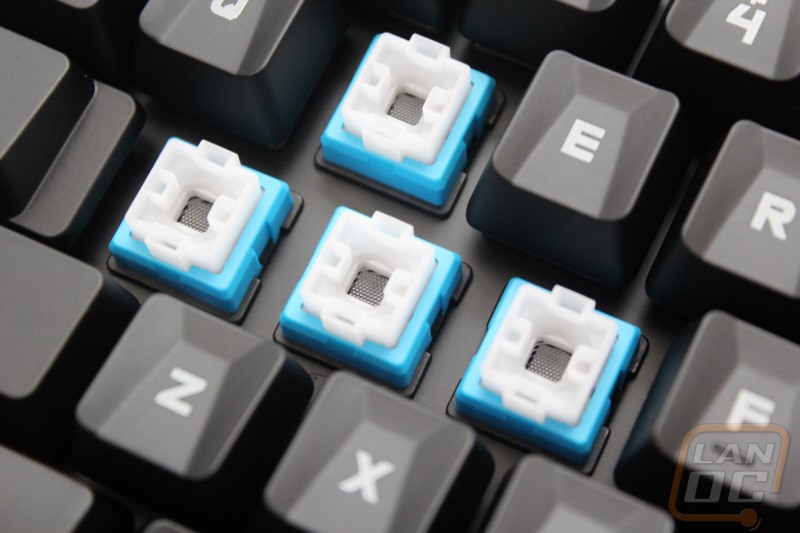
They're basically browns with a 3 mm travel distance as opposed to cherry's 4 mm and their actuation point is on top of the key. The bottoming out is mushy like a membrane which means there's less clacking and more rebound. The travel force feels lighter too.

The thing that really distinguishes them from cherrys is that the stem is a wide gate that makes it feel more level when you push down the key. Feels good tbh


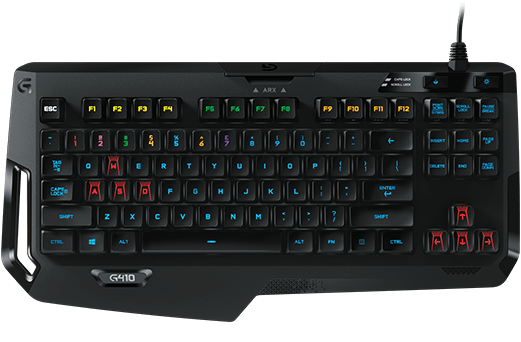
They're actually great keys, I would've kept the G410 if the case wasn't the most stupid keyboard case ever made.


I mean look at that, WHAT THE FUCK was Logitech thinking when they made it?! Like, is that wrist rest meant to punish you for typing? And wtf that cell phone stand and all that space around the keys. That cable placement and the hole on the side Oh God.
 
well Romer-G's aren't anything like blacks

They're basically browns with a 3 mm travel distance as opposed to cherry's 4 mm and their actuation point is on top of the key. The bottoming out is mushy like a membrane which means there's less clacking and more rebound. The travel force feels lighter too.

The thing that really distinguishes them from cherrys is that the stem is a wide gate that makes it feel more level when you push down the key. Feels good tbh


They're actually great keys, I would've kept the G410 if the case wasn't the most stupid keyboard case ever made.


I mean look at that, WHAT THE FUCK was Logitech thinking when they made it?! Like, is that wrist rest meant to punish you for typing? And wtf that cell phone stand and all that space around the keys. That cable placement and the hole on the side Oh God.

Wait so there's even less clacking than the browns? By clacking do you mean the sound it makes when bottoming out? I've never tried blacks so don't know what those feel like. But I really want something with the feel of the blues, but just a little more quiet..

And wow, that thing is hideous lol
 
yeah the romer-g keys are way dampened to where you can only hear the tactile bump make noise, like there's padding underneath the keycaps

the typing actually feels nice and crisp, I hope people start copying Romer-G's instead of Cherrys
 
How are you finding it? I'm most likely going to get the K65 RGB.

Regarding K70 I was on the fence for a while mainly because it was an old model and was deciding between either Chroma X or 810 Orion. Then the new revision came out was and just went for it, imo nothing can beat Corsair build quality. It looks and feels fantastic, it's gonna take me a while to adjust to the new MX Speed switches but so far I'm liking it. Comes with improved lighting, USB passthrough that was missing on the old RGB, larger font size, full key rollover. Was considering the K65 but it's missing the extra media keys and that awesome volume wheel.

So make sure you get either LUX with normal switches or RAPIDFIRE. I chose the latter for gaming reasons and for being not that different from Cherry Reds.
 
Regarding K70 I was on the fence for a while mainly because it was an old model and was deciding between either Chroma X or 810 Orion. Then the new revision came out was and just went for it, imo nothing can beat Corsair build quality. It looks and feels fantastic, it's gonna take me a while to adjust to the new MX Speed switches but so far I'm liking it. Comes with improved lighting, USB passthrough that was missing on the old RGB, larger font size, full key rollover. Was considering the K65 but it's missing the extra media keys and that awesome volume wheel.

So make sure you get either LUX with normal switches or RAPIDFIRE. I chose the latter for gaming reasons and for being not that different from Cherry Reds.

I had a K65 RGB but really missed the numpad, how got the RGB Strafe Silent and its really nice, and yes the corsair build quality on the keyboards its great. Far far better than the Razor thingy i had.
 
Strafe RGB lighting looks amazing due to the white baseplate, really emphasizing color brightness but too bad it's made of plastic and again missing media keys and volume knob. Definitely doesn't feel cheap though.

The anodized brushed metal of K70 feels really nice and gives it weight. At 1.2kg you have to really struggle to slide it around.
 
Anyone know of a place one can grab Corsair Keyboards in the UK with US/International key layout? This has been really problematic for me.
 
Got my first mechanical keyboard, a KUL ES-87 with reds. I was hesitant to have something without any feedback, but it feels pretty smooth. My WPM dropped by about 10 and my amount of errors went way up on some preliminary tests, but that doesn't seem all that bad coming from doing the majority of my typing on a laptop keyboard. I'll have to get used to it, but I like the feeling.

I'm still getting the itchy feeling that I'd want to try something like browns or clears, but I think I'm happy.

Of course, I've heard all about the dangerous path of buying a ton of keyboards... hopefully I'll avoid that for a little bit.
 
Got my first mechanical keyboard, a KUL ES-87 with reds. I was hesitant to have something without any feedback, but it feels pretty smooth. My WPM dropped by about 10 and my amount of errors went way up on some preliminary tests, but that doesn't seem all that bad coming from doing the majority of my typing on a laptop keyboard. I'll have to get used to it, but I like the feeling.

I'm still getting the itchy feeling that I'd want to try something like browns or clears, but I think I'm happy.

Of course, I've heard all about the dangerous path of buying a ton of keyboards... hopefully I'll avoid that for a little bit.

Reds are known to cause that for the first while. As you get used to how light they are, and where they actuate, you'll start speeding back up all while having a more comfortable typing experience.
 
My WPM dropped by about 10 and my amount of errors went way up on some preliminary tests, but that doesn't seem all that bad coming from doing the majority of my typing on a laptop keyboard. I'll have to get used to it, but I like the feeling.

I'm experiencing the same thing, as all of my keyboards for years have had laptop style keys, and I just bought a mechanical with reds. I don't type enough to even know my WPM though. I'm considering buying o-rings just to make the key travel more shallow, but I don't know that I'd like the squishier feel they're supposed to give the keys.
 
I'm experiencing the same thing, as all of my keyboards for years have had laptop style keys, and I just bought a mechanical with reds. I don't type enough to even know my WPM though. I'm considering buying o-rings just to make the key travel more shallow, but I don't know that I'd like the squishier feel they're supposed to give the keys.

They don't change the travel much and over time the O-rings get squashed a bit so you feel the squishiness less. They're mostly for making the keyboard make less noise.
 
I'm going to Japan this month- anything I should be on the lookout for? Thinking about picking up an HHKB with the small spacebar and arrow keys.
 
Just bought an aluminum case for a leopold fc660m. Super excited. Gonna be a while until it's complete.
 
yeah the romer-g keys are way dampened to where you can only hear the tactile bump make noise, like there's padding underneath the keycaps

the typing actually feels nice and crisp, I hope people start copying Romer-G's instead of Cherrys

You were right in how the romer feels. Tried out the 810 and didn't like it. I found myself really missing the click feeling from the blues. The browns in the 610 are already pretty quiet, and the romer basically feel almost exactly the same but a bit more quiet and shorter.

Not sure how I feel about the 610 either, I can't decide if I want to give up the feeling of blues for the look of this keyboard. I don't hate the browns or anything, it just feels boring.

Are there any RGB keyboards that are able to give off an actual white light? Not a mix of colors? And anybody know of a cherry blue, clean keyboard with white led that looks like the G610 with media keys/volume?
 
You were right in how the romer feels. Tried out the 810 and didn't like it. I found myself really missing the click feeling from the blues. The browns in the 610 are already pretty quiet, and the romer basically feel almost exactly the same but a bit more quiet and shorter.

Not sure how I feel about the 610 either, I can't decide if I want to give up the feeling of blues for the look of this keyboard. I don't hate the browns or anything, it just feels boring.

Are there any RGB keyboards that are able to give off an actual white light? Not a mix of colors? And anybody know of a cherry blue, clean keyboard with white led that looks like the G610 with media keys/volume?

Pretty sure the Orion Spark can do that.
 
FYI
Amazon and Newegg have the Gigabyte K83 mechanical keyboards on sale for $59.99 after a $20 rebate. Comes in cherry red or blue.

non-backlit, but cherry switches. I really want one, but can't decide on reds or blue. i love typing on my blackwidow ultimate, but i'm also curious about reds.

i noticed on my blackwidow that certain keys have sank down a bit, like the d,f and j keys, by like a millimeter or two. is this because of the knock off kalih switches?
 
So I got a present today, a Razer Blackwidow Ultimate Stealth to be precise.


However, I'm a laptop user and not sure if it's worth it to use a separate keyboard on a laptop just because it's a mechanical one. Any advise on this? Maybe other people that use a separate keyboard on their laptop? I could trade it in for something else as I got the receipt.
 
So I got a present today, a Razer Blackwidow Ultimate Stealth to be precise.


However, I'm a laptop user and not sure if it's worth it to use a separate keyboard on a laptop just because it's a mechanical one. Any advise on this? Maybe other people that use a separate keyboard on their laptop? I could trade it in for something else as I got the receipt.

If you have a desk or anything like that where you use the laptop frequently, absolutely. Laptop keyboards are terrible in large part precisely because they are a part of the laptop. Terrible ergonomics, and you can't shift the keyboard freely. I say keep it.
 
So I got a present today, a Razer Blackwidow Ultimate Stealth to be precise.


However, I'm a laptop user and not sure if it's worth it to use a separate keyboard on a laptop just because it's a mechanical one. Any advise on this? Maybe other people that use a separate keyboard on their laptop? I could trade it in for something else as I got the receipt.

i've used the same keyboard albeit not the stealth version and I had no issues using it on the laptop other than it made me wish I had a monitor connected to it because my screen was fairly small, but other than that it worked like you think it would(assuming you use the laptop on the table and put the keyboard infront of said laptop).

also how does the stealth version sound when using it? i'm might buy a stealth version of a blackwidow if the one I use now gets old or malfunction
 
If you have a desk or anything like that where you use the laptop frequently, absolutely. Laptop keyboards are terrible in large part precisely because they are a part of the laptop. Terrible ergonomics, and you can't shift the keyboard freely. I say keep it.

i've used the same keyboard albeit not the stealth version and I had no issues using it on the laptop other than it made me wish I had a monitor connected to it because my screen was fairly small, but other than that it worked like you think it would(assuming you use the laptop on the table and put the keyboard infront of said laptop).
Thanks for the feedback. Something about using a keyboard infront of a laptop seemed really silly to me, but I do always sit at tables with my laptop so I guess it does have some perks for me.
also how does the stealth version sound when using it? i'm might buy a stealth version of a blackwidow if the one I use now gets old or malfunction
It doesn't seem that much quieter overall than regular mechanical keyboards to my ears, though the sound does seem lower/deeper, less clicky in a way.
 
However, I'm a laptop user and not sure if it's worth it to use a separate keyboard on a laptop just because it's a mechanical one. Any advise on this? Maybe other people that use a separate keyboard on their laptop? I could trade it in for something else as I got the receipt.

here you go my man http://enlofting.com/2016/05/30/ducky-announces-new-ducky-air-bluetooth-65-keyboard/

you can just stick it in your bag and whip it out whenever you want to impress the coffee shop patrons
 
Thanks for the feedback. Something about using a keyboard infront of a laptop seemed really silly to me,
I'd tend to agree, but I've had head/neck problems last summer probably because I worked too much with a laptop. I think that, when you work on a laptop, either the screen is too low (and probably too close, although I'm too short-sighted for this) or the keyboard is too high.

After raising the laptop and using a keyboard, everything was better.

Add a better keyboard than the laptop one, and profit...
 
Top Bottom