
Make sure to get MX-Blacks to work harder at Finger Gains.I think I am going to get a Blue Ducky One as opposed to the Ducky Shine 5. I like the translucent case.

-
Hey Guest. Check out your NeoGAF Wrapped 2025 results here!
You are using an out of date browser. It may not display this or other websites correctly.
You should upgrade or use an alternative browser.
You should upgrade or use an alternative browser.
Lez talk mechanical keyboards
- Thread starter Scuba Steve
- Start date
FallingEdge
Member
Make sure to get MX-Blacks to work harder at Finger Gains.
nope! Reds all day.
Maybe blue cause I love the click-clack sounds.

RadioactiveLobster
Member
Enjoying my K95 RGB (Browns) so far.
One thing I don't like is that the keyboard doesn't seem to have any onboard memory for keeping the lighting profile active during bootup or when the system is locked, it defaults back.
Seems to only work when on the desktop so the CUE software can do it's thing.
Unless I am missing something.
EDIT: Found out how to store profiles on device memory...
One thing I don't like is that the keyboard doesn't seem to have any onboard memory for keeping the lighting profile active during bootup or when the system is locked, it defaults back.
Seems to only work when on the desktop so the CUE software can do it's thing.
Unless I am missing something.
EDIT: Found out how to store profiles on device memory...
Deleteeeeee
Member
Everyone in here: rotate your space bar 180 degrees. Thank me later.
I tried that on my rosewill keyboard, for some reason it felt really mushy, maybe it was rubbing up against something, on my cm storm xt the spacebar would get stuck somehow. I find that having my wrists raised helps to avoid pressing the space bar on the front edge and more on the top side like how it is meant to be.
Deleteeeeee
Member
I'm not a fan at all of the inverted space bar. It makes the keyboard look awful and doesn't benefit my typing.
yeah i don't like the look either, makes it look broken or something.
Teknopathetic
Member
"Everyone in here: rotate your space bar 180 degrees. Thank me later."
Unnecessary on the G20 keycaps I use.
Unnecessary on the G20 keycaps I use.

solid mike
Member
Hey guys, I'm considering the Cooler Master QuickFire Ultimate Mechanical Gaming Red Switch as my first ever mechanical keyboard.
Can anyone vouch for it? I will use it mainly for gaming but of course I'd like the clickity-clack sound when I type for work and chat.
Can anyone vouch for it? I will use it mainly for gaming but of course I'd like the clickity-clack sound when I type for work and chat.
jim2point0
Banned
Everyone in here: rotate your space bar 180 degrees. Thank me later.
I always do this. I have no idea why spacebars are they way they are on a lot of mechanical keyboards... but they hurt my thumb like crazy. So I flip it around.
Cherry red isn't clickity-clack, though?
It'll clack, but it won't click.
solid mike
Member
Cherry red isn't clickity-clack, though?
Älg;183579566 said:It'll clack, but it won't click.
It isn't loud at all? Like the sound it produces is no different from ordinary desktop keyboards?
It isn't loud at all? Like the sound it produces is no different from ordinary desktop keyboards?
Cherry MX Reds are a linear switch, the only sound they make is if you bottom a key out.
The switch you want if you're thinking of loud, clicky keys are Blues (Greens are similar but with more resistance and are far less common). Tactile feedback with an audible click as you actuate.
solid mike
Member
Cherry MX Reds are a linear switch, the only sound they make is if you bottom a key out.
The switch you want if you're thinking of loud, clicky keys are Blues (Greens are similar but with more resistance and are far less common). Tactile feedback with an audible click as you actuate.
I understand. Seeing as I don't always bottom keys out but sometimes do, I may still go for Cherry MX reds. Thanks.
Deleteeeeee
Member
Just so you know the clack sound makes this keyboard much louder than regular keyboards, even though there is no click.I understand. Seeing as I don't always bottom keys out but sometimes do, I may still go for Cherry MX reds. Thanks.
Gully State
Member
So after playing around with mechanical keyboards at Fry's, I've determined that I want one with MX-Blue switches. Is the following any good? What are some good sub $100 MX-Blues (that's my budget unfortunately)?
http://www.amazon.com/CM-Storm-QuickFire-XT-Mechanical/dp/B00DKXXABK/ref=sr_1_2?ie=UTF8&qid=1446492698&sr=8-2&keywords=cm+storm+cherry+mx+blue
http://www.amazon.com/CM-Storm-QuickFire-XT-Mechanical/dp/B00DKXXABK/ref=sr_1_2?ie=UTF8&qid=1446492698&sr=8-2&keywords=cm+storm+cherry+mx+blue
Mr_Kuschels
Member
Guys I need your help.
Since my job requires a lot of typing I finally decided to take some money and afford a mechanical keyboard.
For almost 6 years now, I've only been using laptop or flat keyboards (Alienware M15x, AW 17, Macbook Air and Logitech K360), so I'm a little bit worried about the raised/higher keys.
Like many of you guys who posted here before, I'm not sure which switches I should get. The keyboard of my choice is probably going to be a Ducky Shine 4 or 5.
I haven't tried any mechanical keyboards yet because up to now I wasn't really interested in them and since moving to Fairbanks,Alaska my choices of places to try them are rather limited.
Judging from videos on Youtube, I do like the sound of the blues, but am worried about people reporting that in order to activate them again, I'd have to release them completely. The browns on the other side seem to be easier to handle, but don't have that nice clicky sound.
I'm going to make sure, that I read through the last couple pages but would also appreciate some imput from you guys or someone who has a similar background.
Since my job requires a lot of typing I finally decided to take some money and afford a mechanical keyboard.
For almost 6 years now, I've only been using laptop or flat keyboards (Alienware M15x, AW 17, Macbook Air and Logitech K360), so I'm a little bit worried about the raised/higher keys.
Like many of you guys who posted here before, I'm not sure which switches I should get. The keyboard of my choice is probably going to be a Ducky Shine 4 or 5.
I haven't tried any mechanical keyboards yet because up to now I wasn't really interested in them and since moving to Fairbanks,Alaska my choices of places to try them are rather limited.
Judging from videos on Youtube, I do like the sound of the blues, but am worried about people reporting that in order to activate them again, I'd have to release them completely. The browns on the other side seem to be easier to handle, but don't have that nice clicky sound.
I'm going to make sure, that I read through the last couple pages but would also appreciate some imput from you guys or someone who has a similar background.
Guys I need your help.
Since my job requires a lot of typing I finally decided to take some money and afford a mechanical keyboard.
For almost 6 years now, I've only been using laptop or flat keyboards (Alienware M15x, AW 17, Macbook Air and Logitech K360), so I'm a little bit worried about the raised/higher keys.
Like many of you guys who posted here before, I'm not sure which switches I should get. The keyboard of my choice is probably going to be a Ducky Shine 4 or 5.
I haven't tried any mechanical keyboards yet because up to now I wasn't really interested in them and since moving to Fairbanks,Alaska my choices of places to try them are rather limited.
Judging from videos on Youtube, I do like the sound of the blues, but am worried about people reporting that in order to activate them again, I'd have to release them completely. The browns on the other side seem to be easier to handle, but don't have that nice clicky sound.
I'm going to make sure, that I read through the last couple pages but would also appreciate some imput from you guys or someone who has a similar background.
In my experience the Browns make plenty of noise as it is. I was also looking at Ducky Shines but eventually went for the Logitech G710+, the Ducky's alway get good reviews though.
Anybody got one of these switch samplers?
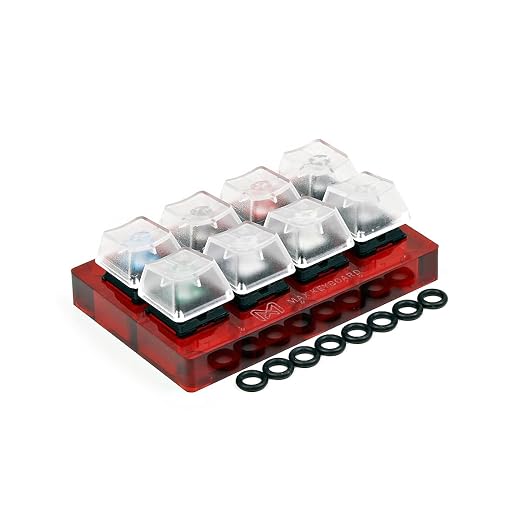
I'm thinking of getting one, but I don't know if I'll be able to feel the keys properly given I won't get to fully type on it.
I'm thinking of getting one, but I don't know if I'll be able to feel the keys properly given I won't get to fully type on it.
Mr_Kuschels
Member
I did a little bit more research and went with browns and a Ducky Shine 5 (oh my wallet).In my experience the Browns make plenty of noise as it is. I was also looking at Ducky Shines but eventually went for the Logitech G710+, the Ducky's alway get good reviews though.
The shine 5 hasn't been released yet but can be pre ordered. Its going to be a tough time until it gets here in about 3 weeks.
I'm looking to get a Shine 5 to replace my K70 RGB that I want to donate to my brother. The Shine 3 was going to be my first mech keyboard but it was impossible to find at the time in Canada.
Looks like the same situation here for the Shine 5. The official reseller, NCIX, has no mention of it anywhere on their website. I might import it, but knowing that I'll get slapped with customs fees makes me think twice.
Looks like the same situation here for the Shine 5. The official reseller, NCIX, has no mention of it anywhere on their website. I might import it, but knowing that I'll get slapped with customs fees makes me think twice.
Deleteeeeee
Member
Anybody got one of these switch samplers?
I'm thinking of getting one, but I don't know if I'll be able to feel the keys properly given I won't get to fully type on it.
I have the 4 switch version of that, they will give you a small preview of what it is like to actually type on the keys, a small tip is to press each key with all of the fingers that you type with. The clack sound generally isn't representative of what it will be like in an actual keyboard though. It's helpful in also deciding if you like the clicky sound made by blue and green switches.
I've wanted a mechanical keyboard for a while but have never took the plunge up to now, mainly due to not knowing what keys I want. Up to now I thought I was settled on Cherry MX Brown after hearing that they were good for typing as well as decent for gaming (I do quite a bit of typing on the keyboard it'd be replacing), but were quieter than for example MX Blues.
I've never been able to find anywhere to try out mechanical keyboards, until today. I was browsing my local Game and they had two mechanical keyboards out on display - the Razer Blackwidow Chroma, and the Logitech G910 Orion Spark. A bit of a drawback is that neither of these use Cherry switches, so it doesn't really settle the debate for me. Testing time with them did surprise me though - from the few minutes had, I massively preferred the Razer for typing on.
I'd assumed I wouldn't like it as it uses clicky keys (my main issue being the loudness of typing sound), but the sound isn't as loud as I was expecting, and the feel when the keys click was much better than the feel of the G910 keys when they were pressed. The G910 uses Romer-G switches which I can't find much information about in relation to how they compare to Cherry switches - I did find one review which said they feel like Cherry MX Brown switches with O-Rings.
This is making me doubt my choice up to now of MX Brown switches, as even though they'd presumably feel different, I didn't really like the G910 at all - its only positive was it's very, very quiet. I didn't like the shape of the key caps, and it didn't feel nearly as good to type on as the Razer did.
Can anyone who's owned a Razer Blackwidow Chroma (or if it uses the same switches as the Blackwidow Ultimate, that too), and any other mechanical keyboards advise me how the keys feel compared to Cherry keys? Importantly too is the sound as I'm not the only one in the house - the Razer "clickiness" to me sounded tolerable - are MX Blues for example noticeably louder, or do they sound similar? I've tried watching Youtube video comparisons for key sound, but there's so many variables that could affect each one that I'm hesitant to use them as reliable evidence.
Any help appreciated, cheers!
I've never been able to find anywhere to try out mechanical keyboards, until today. I was browsing my local Game and they had two mechanical keyboards out on display - the Razer Blackwidow Chroma, and the Logitech G910 Orion Spark. A bit of a drawback is that neither of these use Cherry switches, so it doesn't really settle the debate for me. Testing time with them did surprise me though - from the few minutes had, I massively preferred the Razer for typing on.
I'd assumed I wouldn't like it as it uses clicky keys (my main issue being the loudness of typing sound), but the sound isn't as loud as I was expecting, and the feel when the keys click was much better than the feel of the G910 keys when they were pressed. The G910 uses Romer-G switches which I can't find much information about in relation to how they compare to Cherry switches - I did find one review which said they feel like Cherry MX Brown switches with O-Rings.
This is making me doubt my choice up to now of MX Brown switches, as even though they'd presumably feel different, I didn't really like the G910 at all - its only positive was it's very, very quiet. I didn't like the shape of the key caps, and it didn't feel nearly as good to type on as the Razer did.
Can anyone who's owned a Razer Blackwidow Chroma (or if it uses the same switches as the Blackwidow Ultimate, that too), and any other mechanical keyboards advise me how the keys feel compared to Cherry keys? Importantly too is the sound as I'm not the only one in the house - the Razer "clickiness" to me sounded tolerable - are MX Blues for example noticeably louder, or do they sound similar? I've tried watching Youtube video comparisons for key sound, but there's so many variables that could affect each one that I'm hesitant to use them as reliable evidence.
Any help appreciated, cheers!
I've wanted a mechanical keyboard for a while but have never took the plunge up to now, mainly due to not knowing what keys I want. Up to now I thought I was settled on Cherry MX Brown after hearing that they were good for typing as well as decent for gaming (I do quite a bit of typing on the keyboard it'd be replacing), but were quieter than for example MX Blues.
I've never been able to find anywhere to try out mechanical keyboards, until today. I was browsing my local Game and they had two mechanical keyboards out on display - the Razer Blackwidow Chroma, and the Logitech G910 Orion Spark. A bit of a drawback is that neither of these use Cherry switches, so it doesn't really settle the debate for me. Testing time with them did surprise me though - from the few minutes had, I massively preferred the Razer for typing on.
I'd assumed I wouldn't like it as it uses clicky keys (my main issue being the loudness of typing sound), but the sound isn't as loud as I was expecting, and the feel when the keys click was much better than the feel of the G910 keys when they were pressed. The G910 uses Romer-G switches which I can't find much information about in relation to how they compare to Cherry switches - I did find one review which said they feel like Cherry MX Brown switches with O-Rings.
This is making me doubt my choice up to now of MX Brown switches, as even though they'd presumably feel different, I didn't really like the G910 at all - its only positive was it's very, very quiet. I didn't like the shape of the key caps, and it didn't feel nearly as good to type on as the Razer did.
Can anyone who's owned a Razer Blackwidow Chroma (or if it uses the same switches as the Blackwidow Ultimate, that too), and any other mechanical keyboards advise me how the keys feel compared to Cherry keys? Importantly too is the sound as I'm not the only one in the house - the Razer "clickiness" to me sounded tolerable - are MX Blues for example noticeably louder, or do they sound similar? I've tried watching Youtube video comparisons for key sound, but there's so many variables that could affect each one that I'm hesitant to use them as reliable evidence.
Any help appreciated, cheers!
Can't speak to the feel much, but Razer's clicky switches are essentially clones of Cherry MX Blues and should have pretty similar volume. They use the same type of "jumping bean" mechanism and are precisely the same size.
Thanks, that's great.Can't speak to the feel much, but Razer's clicky switches are essentially clones of Cherry MX Blues and should have pretty similar volume. They use the same type of "jumping bean" mechanism and are precisely the same size.
I'm attempting to find a decently-priced switch tester before I decide properly on a switch type, in the UK that seems easier said than done, with the cheapest / only options seemingly £16 for 4 keys or £27 for 8 keys. A bit pricey, but unless I can find any other options I might just have to go for one of them.
Check out what I picked up for $10 at a local mom and pop PC shop.
OG Model M. Made in the USA. Cleaned it up a bit and took this photo. Using it now! I likes it! I miss having a Windows key though.
Looks nice.
Also, Ctrl+Esc is your new friend.


The Lamonster
Member
I feel like it's my duty to pop in here every once and a while and recommend the Max Keyboard Nighthawk.
It really doesn't get enough love around here and IMO it's one of the best mechanical keyboards and ones of the best companies to buy them from.
It really doesn't get enough love around here and IMO it's one of the best mechanical keyboards and ones of the best companies to buy them from.
I'm looking for a new keyboard, and I am kinda interested in the CM Storm QuickFire TK, because I need something compact for my small desk but I need a 10 key pad. Are there any other compact options with a 10 key?
I'd prefer Brown switches I think, or Blue is fine.
I'd prefer Brown switches I think, or Blue is fine.
br0ken_shad0w
Member
I'm looking for a new keyboard, and I am kinda interested in the CM Storm QuickFire TK, because I need something compact for my small desk but I need a 10 key pad. Are there any other compact options with a 10 key?
I'd prefer Brown switches I think, or Blue is fine.
Ducky keyboards are pretty compact and some have the 10 keypad.
I'm looking for a new keyboard, and I am kinda interested in the CM Storm QuickFire TK, because I need something compact for my small desk but I need a 10 key pad. Are there any other compact options with a 10 key?
I'd prefer Brown switches I think, or Blue is fine.
Really depends on what you want/need, but keep in mind a separate keypad is a possibility.
br0ken_shad0w is right that Ducky's seem to be a bit more compact, but that's really only in comparison to some of the gaudy gaming boards.
It's not feasible in the space I have, unfortunately. My previous keyboard is tenkeyless and I love the size but I'm going crazy without my numpad haha.Really depends on what you want/need, but keep in mind a separate keypad is a possibility.
Mister Negative
Member
After buying and owning an HHKB pro 2 for about a month, it's shocking to me that it's not more fatiguing to type on than it is. The initial bump of the rubber dome feels more harsh than my clears do, but I guess it's the smooth sailing after that that makes it so comfortable for extended periods.
Deleteeeeee
Member
Finally got my VORTEX white PBT+POM, keycaps on my board. The step up from painted polycarbonate to PBT is such a worthwhile upgrade. There are some downsides to these keycaps but overall they have much improved the feel of my keyboard. Love it. 
My first mech got delivered today - CM Storm Quickfire Rapid-i with MX Browns.
From an hour or so of testing it, I love it. It feels so good to type on. I'm kicking myself for letting the cost of mechanicals put me off making this switch sooner. It feels absolutely miles better than my previous rubber dome keyboard (a cheap Logitech K120).
I originally wanted an XT (too attached to the numpad), but then it went out of stock indefinitely on Amazon UK and CM said it's been discontinued so chances of a restock look slim to none. My other choice was a QF Ultimate or a more expensive board like a Ducky or Filco.
/r/MechanicalKeyboards told me that the Ultimate has non-standard keycaps in case I ever want to replace them (which I might well do looking at ukkeycaps.bigcartel.com). So that was out, and I started to think how much I actually use the numpad. Apart from the annual Steam sale spreadsheet, it was minimal. So I decided to try a TKL, and here we are.
The Rapid-i arrived today and I love it. I just hope the LEDs hold out since I've not heard great things about their reliability. I likely won't be using them too much anyway so it shouldn't be too much of a big deal.
From an hour or so of testing it, I love it. It feels so good to type on. I'm kicking myself for letting the cost of mechanicals put me off making this switch sooner. It feels absolutely miles better than my previous rubber dome keyboard (a cheap Logitech K120).
I originally wanted an XT (too attached to the numpad), but then it went out of stock indefinitely on Amazon UK and CM said it's been discontinued so chances of a restock look slim to none. My other choice was a QF Ultimate or a more expensive board like a Ducky or Filco.
/r/MechanicalKeyboards told me that the Ultimate has non-standard keycaps in case I ever want to replace them (which I might well do looking at ukkeycaps.bigcartel.com). So that was out, and I started to think how much I actually use the numpad. Apart from the annual Steam sale spreadsheet, it was minimal. So I decided to try a TKL, and here we are.
The Rapid-i arrived today and I love it. I just hope the LEDs hold out since I've not heard great things about their reliability. I likely won't be using them too much anyway so it shouldn't be too much of a big deal.

Baleoce
Member
The Rapid-i arrived today and I love it. I just hope the LEDs hold out since I've not heard great things about their reliability. I likely won't be using them too much anyway so it shouldn't be too much of a big deal.
Had to RMA my rapid-i from scan.co.uk after just under a year because about 5-6 LEDs failed on it. Hopefully my second one fairs better. Other than that, it's an absolute joy to type on. Could never go back to membrane after this.
OK I didn't know this thread was a thing.. Can I get some help :-D
I'm new to PC gaming and I'm using a wireless Microsoft keyboard and mouse... I'm thinking of an upgrade. What would be a reasonable mechanical keyboard that won't break the bank and is good wireless. Maybe there is one which comes with a mouse?
I need wireless as I'm a PC couch gamer and want to keep the wires down. Is this even possible or do I need a wired keyboard and mouse?
Oh and I'm in the UK and would probs pay up to £150 or so.
Cheers
I'm new to PC gaming and I'm using a wireless Microsoft keyboard and mouse... I'm thinking of an upgrade. What would be a reasonable mechanical keyboard that won't break the bank and is good wireless. Maybe there is one which comes with a mouse?
I need wireless as I'm a PC couch gamer and want to keep the wires down. Is this even possible or do I need a wired keyboard and mouse?
Oh and I'm in the UK and would probs pay up to £150 or so.
Cheers
While Ctrl-Esc replace a Windows key press, the Windows key act kinda like Ctrl for a lot of shortcuts (W-F for Find, W-R for Run, W-P to activate external display, W-L for Lock, W-E for explorer, etc.)Also, Ctrl+Esc is your new friend.
I've read quite a few similar stories, it really seems like quite a widespread issue and was the only thing putting me off the board. I don't think I'll be using the LEDs much so hopefully that'll save them at least for a while. I'd have thought CM would have worked to fix it though considering how widespread it seems - must be costing them a fair bit in returns / replacements.Had to RMA my rapid-i from scan.co.uk after just under a year because about 5-6 LEDs failed on it. Hopefully my second one fairs better. Other than that, it's an absolute joy to type on. Could never go back to membrane after this.
I absolutely agree about the typing though, I've found myself trying to think of things to type just for the sake of typing. So good. I'm not looking forward to getting back to work and typing on a rubber dome, chances are it's going to feel terrible after this and I'll start looking into a mech for work. Not the right time of year for that expense!
Wireless mechs are less common than wired, you'll struggle to get one for a reasonable price so I'd advise looking at wired unless you absolutely have to have wireless. Some of the "cheaper" wired options are the CM Storm boards, I got my Rapid-i from Amazon for £81. There are cheaper options such as TT eSports Poseidon but those don't use standard sized keys on the bottom row, so if you ever wanted to replace the keycaps with better quality / different coloured ones you may struggle. The QuickFire Rapid-i has standard keys.OK I didn't know this thread was a thing.. Can I get some help :-D
I'm new to PC gaming and I'm using a wireless Microsoft keyboard and mouse... I'm thinking of an upgrade. What would be a reasonable mechanical keyboard that won't break the bank and is good wireless. Maybe there is one which comes with a mouse?
I need wireless as I'm a PC couch gamer and want to keep the wires down. Is this even possible or do I need a wired keyboard and mouse?
Oh and I'm in the UK and would probs pay up to £150 or so.
Cheers
If you need wireless, your options are limited but you could look at the Filco Convertible (be warned this is US layout keys so no big enter key etc, but better for replacement keycaps if you want the option of those). The Majestouch MINILA is UK layout but smaller (no number pad). There might be other options I'm not aware of as well.
Adam_Roman
Member
I caved in. I was gonna just buy an AmazonBasics keyboard for my new desktop, but I decided to get a Corsair K70 RGB with Cherry MX Brown switches. It was $150 on Amazon and should be here Monday.

Lemonte
Member
Sound of blues really started to annoy me so I bought Cooler Master Storm QuickFire TK with cherry mx brown switches. Browns feel pretty good to type on but not quite good as blues. Not sure about this form factor either but Blackwidow ultimate was so big and wanted smaller keyboard with numpad.

But I guess I just have to get used to it. One small annoying thing is that keyboard is little bit higher than blackwidow. I probably need to get wrist rest.
But I guess I just have to get used to it. One small annoying thing is that keyboard is little bit higher than blackwidow. I probably need to get wrist rest.
apieceofstrange
Member
So the numpad + key on my K70 RGB suddenly stopped working after maybe 4 months. I had to exchange this keyboard twice with amazon before I got one without any issues so that probably should have tipped me off. I pulled off the key and there doesn't seem to be any obvious issues with the switch. Is there anything I can try to do to fix this on my own? Corsair's RMA process sounds painfully with some saying it took several months to get their keyboards back. I really like the keyboard, but now I'm feeling kind of burned.
Maybe unrelated, but I have also noticed getting double key presses on all 3 of the keyboards I tried. It seems to randomly happen with just about any key, not specific ones. At first I thought maybe I just wasn't used to typing on a mechanical and was making input errors, but it definitely happens on its own. Not frequently enough to be a big problem, but it's still pretty annoying for such an expensive keyboard.
Maybe unrelated, but I have also noticed getting double key presses on all 3 of the keyboards I tried. It seems to randomly happen with just about any key, not specific ones. At first I thought maybe I just wasn't used to typing on a mechanical and was making input errors, but it definitely happens on its own. Not frequently enough to be a big problem, but it's still pretty annoying for such an expensive keyboard.

Lightning Count
Member
Anyone here familiar with the Razer Black Widow Ultimate, considering getting one to replace my old keyboard.
KoruptData
Member
Have had my Logitech G710 for over a year now and it has been a blessing. No problems and it's a dream to type on.
Mad Season
Banned
Reds are better for gaming. What are blues good for?Recently got a Corsair K70 non RGB with Cherry MX Blue switches it's my first mechanical keyboard and I'm loving it.
The clicks are goodly.
Reds are better for gaming. What are blues good for?
Typing and I haven't had any issue with gaming to be honest. I can see double tapping being an issue for FPS players but I don't play many FPS I'm more of a MOBA or RPG/SRPG guy so it's perfect for me.