

-
Hey Guest. Check out your NeoGAF Wrapped 2025 results here!
You are using an out of date browser. It may not display this or other websites correctly.
You should upgrade or use an alternative browser.
You should upgrade or use an alternative browser.
Lez talk mechanical keyboards
- Thread starter Scuba Steve
- Start date
Logitech G Pro just got released, it is basically G810 TKL. A bit overpriced, need to wait for retailers to go below MSRP.
http://www.pcgamer.com/logitechs-g-pro-mechanical-keyboard-takes-aim-at-esports-crowd/
https://www.youtube.com/watch?v=zMe9dW-qmEQ
Romer-Gs are interesting, sort of an amalgation between brown, speed and rubber-dome. They do give the absolute best RGB effect of any switch, if you're into that kinda stuff.
http://www.pcgamer.com/logitechs-g-pro-mechanical-keyboard-takes-aim-at-esports-crowd/
https://www.youtube.com/watch?v=zMe9dW-qmEQ

Romer-Gs are interesting, sort of an amalgation between brown, speed and rubber-dome. They do give the absolute best RGB effect of any switch, if you're into that kinda stuff.
Any thoughts on Cherry MX clears vs browns for typing and gaming?
I want the WASD Code 87-Key but the version with brown switches is out of stock until May. The one with clear switches is available to order.
I have a DAS keyboard with brown switches, which works fine for typing and gaming, but I don't like how easy it is to bottom out the keys and to accidentally press the wrong key.
I've used a Filco with blue switches but, while it addresses my above concerns, it's too clicky.
It seems like clear switches would also address my concerns while not being too clicky but, I'm unsure of the force required and complaints of a "pinging" when the keys hit the keyboard backplate.
Clears might feel too sluggish for gaming, but I love typing on it. I rank it third after Topres and Zealios.
KUL ES-87 are considered the best clear TKL keyboards (if you can find them). No pinging issues either.

Duxxy3
Member
So I've tried red, black, brown and blue switches.
Honestly they're all pretty good. I absolutely adore the blues, but they're not a good choice for shared space. The others are all fairly quiet. Now that I've tried everything, I'll probably stick to just brown switches in the future. They're not really loud and they still feel nice.
I've had Cherry, Oetemu and now Content switches. They're all pretty good, and they all work as they should.
Edit: These black switches are too much of a pain for me use for gaming. So now I get to give the keyboard away to a friend
Edit 2: Just got in a zorro brown keyboard. These are easily the lightest switches that I've ever used. Honestly they're even lighter than your average membrane keys.
Honestly they're all pretty good. I absolutely adore the blues, but they're not a good choice for shared space. The others are all fairly quiet. Now that I've tried everything, I'll probably stick to just brown switches in the future. They're not really loud and they still feel nice.
I've had Cherry, Oetemu and now Content switches. They're all pretty good, and they all work as they should.
Edit: These black switches are too much of a pain for me use for gaming. So now I get to give the keyboard away to a friend
Edit 2: Just got in a zorro brown keyboard. These are easily the lightest switches that I've ever used. Honestly they're even lighter than your average membrane keys.
So I've tried red, black, brown and blue switches.
Honestly they're all pretty good. I absolutely adore the blues, but they're not a good choice for shared space. The others are all fairly quiet. Now that I've tried everything, I'll probably stick to just brown switches in the future. They're not really loud and they still feel nice.
I've had Cherry, Oetemu and now Content switches. They're all pretty good, and they all work as they should.
Edit: These black switches are too much of a pain for me use for gaming. So now I get to give the keyboard away to a friend
Edit 2: Just got in a zorro brown keyboard. These are easily the lightest switches that I've ever used. Honestly they're even lighter than your average membrane keys.
Brown switches are my favourite :3
So I have a Das Keyboard 4 I got a few months ago. Recently the numpad 5 on it stopped working. I put in a support ticket with Das and they said to send it in. I decided to try one more thing: I downloaded AquaKeyTest and tried it there...it shows I am pressing the 5!
So this has to be something software related...any idea what gives?
Update: I tried the Windows On-Screen Keyboard, enabled the numpad. Typed the 5 from it and....it didn't work there either?!
So this has to be something software related...any idea what gives?
Update: I tried the Windows On-Screen Keyboard, enabled the numpad. Typed the 5 from it and....it didn't work there either?!
Just my two cents on a Corsair K70 Lux w/ browns I've been using for a few weeks... definitely prefer these over the reds in my CM Storm QF. The slight bump/resistance on browns when you first press down on them is great... my reds were so light that I'd accidentally press down on keys I didn't mean to. Spacebar is louder on the Corsair than the CM by a longshot, but I don't notice it anymore. Overall, really nice keyboard, I like the extra USB port, appreciate the media keys, regularly on sale, and thus quite reasonably priced compared to most.
im a complete noob to this topic would like some advice.
i came from a Saitek Eclipse 2 keyboard
now i have a Razer BlackWidow Chroma
the KEYS ARE TOO LOUD i mean i kind of like it but its also really annoying me...
considering selling it (what is it worth??) and buying something else..
but i really like how this one can be programmed by games like overwatch for instance to light up based upon whats happening in game at the moment..
i came from a Saitek Eclipse 2 keyboard
now i have a Razer BlackWidow Chroma
the KEYS ARE TOO LOUD i mean i kind of like it but its also really annoying me...
considering selling it (what is it worth??) and buying something else..
but i really like how this one can be programmed by games like overwatch for instance to light up based upon whats happening in game at the moment..
So I have a Das Keyboard 4 I got a few months ago. Recently the numpad 5 on it stopped working. I put in a support ticket with Das and they said to send it in. I decided to try one more thing: I downloaded AquaKeyTest and tried it there...it shows I am pressing the 5!
So this has to be something software related...any idea what gives?
Update: I tried the Windows On-Screen Keyboard, enabled the numpad. Typed the 5 from it and....it didn't work there either?!
er... have you got numlock on?
Astral/H3X
Member
im a complete noob to this topic would like some advice.
i came from a Saitek Eclipse 2 keyboard
now i have a Razer BlackWidow Chroma
the KEYS ARE TOO LOUD i mean i kind of like it but its also really annoying me...
considering selling it (what is it worth??) and buying something else..
but i really like how this one can be programmed by games like overwatch for instance to light up based upon whats happening in game at the moment..
The board you have is likely whatever switch that Razer uses that is most similar to the clicky ass "Blue" switches. They also make a "Stealth" one that uses a switch similar to brown -- that will get rid of the hard clicking noise, though it'll still be noisier than a membrane keyboard -- that's just the fact that it isn't all rubber.
er... have you got numlock on?
lol, yes, of course I do. That was the first thing I checked, and saw I was able to enter other numbers from the numpad.
Sectorseven
Member
Are blue switches fine for MMOs?
Do you need to bash shit into the ground?Are blue switches fine for MMOs?
I'm still using my black widow ultimate 2014 and am quite pleased with it. It has Razer designed switches though they are not really different to the cherry mx blues(mostly more durable and a tad "quicker" -But I guess the newer switches will probably be better anyway than these old ones). I went with Razer because it's one of the few mechanical keyboards that still offer Macro buttons, even though I've just configured them to play/pause music and movies, forward and back a chapter and increasing or decreasing volume.
I don't share the notion that they're so hard to hit, they are very responsive and while typing wasn't that easy at first I soon learned to like the tactile feel of the keyboard.
I don't share the notion that they're so hard to hit, they are very responsive and while typing wasn't that easy at first I soon learned to like the tactile feel of the keyboard.
Johannsson
Member
THANK YOU

Whaaaat. C'mon, I don't want to have to worry about input lag from my keyboard, too

Sounds like hell for use-every-GCD classes.Are blue switches fine for MMOs?
Whaaaat. C'mon, I don't want to have to worry about input lag from my keyboard, too
You don't. It's marketing bullshit. Literally every keyboard will be faster to respond than you can type on it.

Dirk Benedict
Gold Member
Got the Corsair Strafe few days ago. This thing isn't too loud for a mechanical. Cherry MX Switches.

Excellent build quality, control over the LED brightness, extra grip-keys for WADS. Sort of heavy and can double as a weapon.
Excellent build quality, control over the LED brightness, extra grip-keys for WADS. Sort of heavy and can double as a weapon.
So after using this chinese mechanical keyboard as my first one for 2 months, i think im ready to step it up. I really love the clicky feel and sound of these blue switches.
I really want to keep it tenkeyless, i have small desk space. I prefer logitech for my peripherals but it seems like both of their tenkeyless are only romer-g switches instead of cherry mx blue. Anyone have any ideas about these romer-g switches?
I really want to keep it tenkeyless, i have small desk space. I prefer logitech for my peripherals but it seems like both of their tenkeyless are only romer-g switches instead of cherry mx blue. Anyone have any ideas about these romer-g switches?
Astral/H3X
Member
So after using this chinese mechanical keyboard as my first one for 2 months, i think im ready to step it up. I really love the clicky feel and sound of these blue switches.
I really want to keep it tenkeyless, i have small desk space. I prefer logitech for my peripherals but it seems like both of their tenkeyless are only romer-g switches instead of cherry mx blue. Anyone have any ideas about these romer-g switches?
Apparently the Romer G switches are pretty alright, and feel most like Cherry Brown. However, you won't be able to get any other keycaps for them, since they aren't MX compatible switches.
But there's a million billion TKL keyboards out there, I wouldn't limit yourself to just one brand.
sixteen-bit
Member
Scored a MK80 on a flea market this weekend for 5 bucks. Gonna use at work. It was pretty disgusting though xD had to use soap and clean it. Hopefully the sound won't annoy my coworkers to much.
nice deal; dirty or not, lol

Skyr
Member
Does anybody here have experience with ducky keyboards?
I got myself a "Ducky One TKL RGB brown" recently. I really liked it.
Built quality was solid and I especially liked that the RGB lighting could be configured just by key combinations without the need of any drivers.
Unfortunately the Enter key was borked at arrival. It got stuck occasionally when fully pressed down.
So I had to return it..
Should I go for a replacement or get something else? I have to say that it is pretty much impossible to get them at the moment here in germany.
Only one shop that sells them here and they are in stock at the end of april again.
I got myself a "Ducky One TKL RGB brown" recently. I really liked it.
Built quality was solid and I especially liked that the RGB lighting could be configured just by key combinations without the need of any drivers.
Unfortunately the Enter key was borked at arrival. It got stuck occasionally when fully pressed down.
So I had to return it..
Should I go for a replacement or get something else? I have to say that it is pretty much impossible to get them at the moment here in germany.
Only one shop that sells them here and they are in stock at the end of april again.
Does anybody here have experience with ducky keyboards?
I got myself a "Ducky One TKL RGB brown" recently. I really liked it.
Built quality was solid and I especially liked that the RGB lighting could be configured just by key combinations without the need of any drivers.
Unfortunately the Enter key was borked at arrival. It got stuck occasionally when fully pressed down.
So I had to return it..
Should I go for a replacement or get something else? I have to say that it is pretty much impossible to get them at the moment here in germany.
Only one shop that sells them here and they are in stock at the end of april again.
Look into availability of Cooler Master Masterkeys Pro S, it is a tenkeyless keyboard with RGB lighting. It should have the ability to control the backlighting without software.
Really any mechanical keyboard is fine for gaming, there is no single mechanical switch that is better for gaming. There is only the personal preference of a particular switch. You should check if there are any stores near you that carry mechanical keyboards so you could try out different switches to see which one you like the best.New to this thread .. which is good for a gaming keyboard?:O
So after using this chinese mechanical keyboard as my first one for 2 months, i think im ready to step it up. I really love the clicky feel and sound of these blue switches.
I really want to keep it tenkeyless, i have small desk space. I prefer logitech for my peripherals but it seems like both of their tenkeyless are only romer-g switches instead of cherry mx blue. Anyone have any ideas about these romer-g switches?
If you like the clicky feel and sound of the blue switches, don't get a keyboard with Romer-G switches, since they are similar in feel to MX Brown and lack the click of the blues.
If you like the floating keys look of your Chinese keyboard, look into Varmilo's VA87M keyboard.
Skyr
Member
Look into availability of Cooler Master Masterkeys Pro S, it is a tenkeyless keyboard with RGB lighting. It should have the ability to control the backlighting without software.
That looks like a legit alternative right there.
Thanks man, I think I will just get this one. It's also in stock at amazon.
That looks like a legit alternative right there.
Thanks man, I think I will just get this one. It's also in stock at amazon.
I got mine today and it's really nice. With the software you can easily configure the LED's.

Skyfireblaze
Member
Okay so after nearly a decade of using Logitech G15 and G19 keyboards my last G19S seems to be on its last legs and since I don't want to buy second-hand G19's for all eternity I guess it's finally time to move on So yeah I'm in the market for mechanical keyboards now.
Since I only used rubber-dome keyboards before and I know there are a ton of different switches, the first thing I did this afternoon was to go to a big electronics-retailer and test all the mechanical boards they had on display and made some observations so maybe someone can guide me a little bit to the type of switches I seem to like?
Keyboards I liked:
Logitech G810/G910
Razer Blackwidow Chroma
Razer Ornata (although I learned this isn't a true mechanical keyboard)
Keyboards that were okay but not good:
Roccat Suora with brown switches
Keyboards I disliked:
Corsair K70 Red
Steelseries 6 GV2
That's all they had on display and I was surprised how different they all feel. What I didn't like about the K70 and the GV2 was that the keypresses felt off compared to the rubber-dome keyboards I'm used to. It felt like I didn't know when they keypress was done and actually registered and the keys offered way too little resistance.
Another criteria I've been looking at coming from the G19 are the extra features. I understand that nothing on the market seems to offer something like the G19 extra-screen that I used heavily be it for news-tickers, temperature and frequency monitoring and even watching videos on it from time to time at a glance so I know I have to part with this sadly.
Though I also used the 12x3 macro-keys on my G19 extensively from Windows to games to work usage and from what I saw only the Logitech G910 Orion Spark/Spectrum seems to offer something comparable and its full-control RGB lighting would be a nice bonus. So I'm more or less set on the G910 even though I'm not really happy with the whole package compared to what I paid for the G19 and what it offered since the G19 was essentially also a powered USB-hub which means I have to buy a external hub now anyhow. Logitech Arx Control is also a poor substitute for the old G19 screen system, not only are the software-applets very minimal in function but I also can't imagine it would be healthy for a phone to be powered with its screen on for hours on end.
The Razer ones, while nice, are shooting out of my price-range and while I never owned a Razer keyboard before I made bad experiences regarding quality with Razer mice.
What else could I look at for my needs? I'm willing to pay 130€ maximum if I really have to as that's the price a G910 goes for.
Also I know this might not be the best topic for this but does anyone maybe have an idea what's wrong with my G19S and if it's maybe just a simple fix?
The G19S comes with its own power-supply which is needed to power the backlight, screen and USB hub, without it the keyboard works in "dumb-mode". My issue is ever since a few weeks ago when I boot my PC up the keyboard's screen just flickers on and off over and over, the driver doesn't detect that the keyboard is present. It works still in dumb-mode which means all normal keyboard-keys work, anything else is a no-go though. I can eventually get it working by replugging the power-supply which wouldn't be a big deal as at the beginning one or two times was enough to get the keyboard working again. Fast forward to today I had to replug the keyboard 32! times to get it to work correctly and I can't imagine it getting better from here out on. I also tried a replacement power-supply and a different surge-protector which both made zero difference. The interesting thing is, once they keyboard does decide to work again it works 100% fine with no issues until I shut my PC down.
I also don't think it's a software or driver issue as the blinking starts the moment I turn my PC on while the EFI is still going. Warranty and such is also impossible as this G19S is a second-hand keyboard and the G19 series hasn't been in production for years.If I can fix this keyboard anyhow I would be happy as it still works great when it works but I'm also prepared to buy a new one if I have to.
So yeah I'm in the market for mechanical keyboards now.Since I only used rubber-dome keyboards before and I know there are a ton of different switches, the first thing I did this afternoon was to go to a big electronics-retailer and test all the mechanical boards they had on display and made some observations so maybe someone can guide me a little bit to the type of switches I seem to like?
Keyboards I liked:
Logitech G810/G910
Razer Blackwidow Chroma
Razer Ornata (although I learned this isn't a true mechanical keyboard)
Keyboards that were okay but not good:
Roccat Suora with brown switches
Keyboards I disliked:
Corsair K70 Red
Steelseries 6 GV2
That's all they had on display and I was surprised how different they all feel. What I didn't like about the K70 and the GV2 was that the keypresses felt off compared to the rubber-dome keyboards I'm used to. It felt like I didn't know when they keypress was done and actually registered and the keys offered way too little resistance.
Another criteria I've been looking at coming from the G19 are the extra features. I understand that nothing on the market seems to offer something like the G19 extra-screen that I used heavily be it for news-tickers, temperature and frequency monitoring and even watching videos on it from time to time at a glance so I know I have to part with this sadly.
Though I also used the 12x3 macro-keys on my G19 extensively from Windows to games to work usage and from what I saw only the Logitech G910 Orion Spark/Spectrum seems to offer something comparable and its full-control RGB lighting would be a nice bonus. So I'm more or less set on the G910 even though I'm not really happy with the whole package compared to what I paid for the G19 and what it offered since the G19 was essentially also a powered USB-hub which means I have to buy a external hub now anyhow. Logitech Arx Control is also a poor substitute for the old G19 screen system, not only are the software-applets very minimal in function but I also can't imagine it would be healthy for a phone to be powered with its screen on for hours on end.
The Razer ones, while nice, are shooting out of my price-range and while I never owned a Razer keyboard before I made bad experiences regarding quality with Razer mice.
What else could I look at for my needs? I'm willing to pay 130€ maximum if I really have to as that's the price a G910 goes for.
Also I know this might not be the best topic for this but does anyone maybe have an idea what's wrong with my G19S and if it's maybe just a simple fix?
The G19S comes with its own power-supply which is needed to power the backlight, screen and USB hub, without it the keyboard works in "dumb-mode". My issue is ever since a few weeks ago when I boot my PC up the keyboard's screen just flickers on and off over and over, the driver doesn't detect that the keyboard is present. It works still in dumb-mode which means all normal keyboard-keys work, anything else is a no-go though. I can eventually get it working by replugging the power-supply which wouldn't be a big deal as at the beginning one or two times was enough to get the keyboard working again. Fast forward to today I had to replug the keyboard 32! times to get it to work correctly and I can't imagine it getting better from here out on. I also tried a replacement power-supply and a different surge-protector which both made zero difference. The interesting thing is, once they keyboard does decide to work again it works 100% fine with no issues until I shut my PC down.
I also don't think it's a software or driver issue as the blinking starts the moment I turn my PC on while the EFI is still going. Warranty and such is also impossible as this G19S is a second-hand keyboard and the G19 series hasn't been in production for years.If I can fix this keyboard anyhow I would be happy as it still works great when it works but I'm also prepared to buy a new one if I have to.
Apparently the Romer G switches are pretty alright, and feel most like Cherry Brown. However, you won't be able to get any other keycaps for them, since they aren't MX compatible switches.
But there's a million billion TKL keyboards out there, I wouldn't limit yourself to just one brand.
I have MX Brown switches, are there any low profile key caps? Like this
Teknopathetic
Member
"I have MX Brown switches, are there any low profile key caps? Like this"
Not sure how tall they are exactly, but DSA and G20 profile keycaps are pretty short.
Not sure how tall they are exactly, but DSA and G20 profile keycaps are pretty short.
"I have MX Brown switches, are there any low profile key caps? Like this"
Not sure how tall they are exactly, but DSA and G20 profile keycaps are pretty short.
Something like this would be amazing
But damn it's already hard to find german keycaps. Adding LP makes it worse.
Astral/H3X
Member
I have MX Brown switches, are there any low profile key caps? Like this
I do not think there are any like that for Romer G, no. In fact, I believe the *only* keycaps available aside from those that come standard with the board, are ones that are similar to what you'd find on a regular mechanical keyboard.
That being said, "low profile" keycaps don't really make the keyboard behave like a laptop's low profile keyboard, if that's what you're hoping for.
Teknopathetic
Member
What you could do is find a Cherry MX 3.0/G80-3850 board and salvage the caps from that, they look pretty similar to the board you linked.
I do not think there are any like that for Romer G, no. In fact, I believe the *only* keycaps available aside from those that come standard with the board, are ones that are similar to what you'd find on a regular mechanical keyboard.
That being said, "low profile" keycaps don't really make the keyboard behave like a laptop's low profile keyboard, if that's what you're hoping for.
I know, it would be purely cosmetic.
What you could do is find a Cherry MX 3.0/G80-3850 board and salvage the caps from that, they look pretty similar to the board you linked.
70 for a Cherry MX 3.0 just to change caps? :/ A bit to much at the moment.
I NEED AN INTERVENTION

Over the last six months I've went a little mechanical keyboard crazy. I have owned all of the following:
. Realforce RGB 108U - Topre
. IBM Model M - Buckilng Spring
. Happy Hacking Keyboard Professional 2 - Topre
. Anne Pro - Gateron Blues
. Corsair K70 Rapidfire RGB - Cherry MX Speed
. Varmilo VB87M - Gateron Browns
. Rosewill Apollo - Cherry MX Blues
. Logitech G10 - Romer G
So here's my conclusion:
A. My daily driver is the Realforce RGB 108u. This keyboard is a perfect blend of tactile, nonfatiguing, and elegant. This is the first RGB board Topre has done, and compared to its contemporaries the LED's illuminate better than most. It doesn't sound or feel as good as an OG Topre board. I don't know what they've done to it, or maybe its an after effect of the Cherry MX Stem, but this feels like Topre JR. It doesn't pop as hard nor does it cushion as well, but it's still distinctly a topre. Nevertheless, if you can stomach the crazy price, it feels EXCELLENT. It has Cherry MX adapters so you can modify keycaps to your liking and it has RGB. If any one knows someone who can help me modify this into a Bluetooth 5.0 board and make it the best board ever, I'll thank you forever.
B. My favorite keyboard to type on is the HHKB. The sound - the sound - the THOCK! The feel of tiny little electrical balloons popping at your fingertips alongside the cushioned landing is amazing. However, it is NOT my daily driver for two reasons. 1. The layout omits the navigation cluster which completely wrecks my experience. 2. Topre's propietary stem makes it hard to customize the thing. This is huge for me. 3. It lacks any bells or whistle - no wireless, backlight, etc.
I found a bluetooth board someone has made for this board and found some Topre to MX adapters. Now I'll have to find someone to install it for me. My long term goal is to have this keyboard with an RGB installation alongsdie the cases edge so it looks like a B.Face with Topre keys.
C. My best looking keyboard is the Anne Pro. Anne Pro is essentially a 70% Wireless Bluetooth, RGB keyboard from China in an extremely small form factor. No other keyboard I know of has wireless AND RGB together, but more importantly, the software on it is absolutely incredible. Check out what I've done to mine here:
Here's a video of mine -
https://twitter.com/isaparrot/status/846192114564136961
I essentially made this with it (not mine):
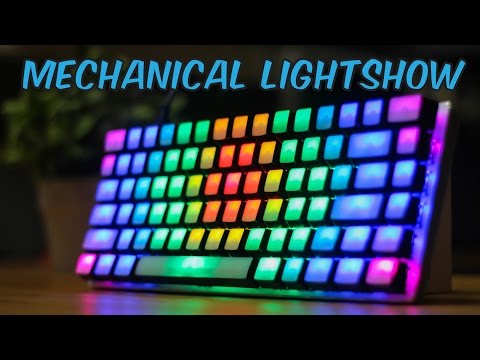
Over the last six months I've went a little mechanical keyboard crazy. I have owned all of the following:
. Realforce RGB 108U - Topre
. IBM Model M - Buckilng Spring
. Happy Hacking Keyboard Professional 2 - Topre
. Anne Pro - Gateron Blues
. Corsair K70 Rapidfire RGB - Cherry MX Speed
. Varmilo VB87M - Gateron Browns
. Rosewill Apollo - Cherry MX Blues
. Logitech G10 - Romer G
So here's my conclusion:
A. My daily driver is the Realforce RGB 108u. This keyboard is a perfect blend of tactile, nonfatiguing, and elegant. This is the first RGB board Topre has done, and compared to its contemporaries the LED's illuminate better than most. It doesn't sound or feel as good as an OG Topre board. I don't know what they've done to it, or maybe its an after effect of the Cherry MX Stem, but this feels like Topre JR. It doesn't pop as hard nor does it cushion as well, but it's still distinctly a topre. Nevertheless, if you can stomach the crazy price, it feels EXCELLENT. It has Cherry MX adapters so you can modify keycaps to your liking and it has RGB. If any one knows someone who can help me modify this into a Bluetooth 5.0 board and make it the best board ever, I'll thank you forever
. B. My favorite keyboard to type on is the HHKB. The sound - the sound - the THOCK! The feel of tiny little electrical balloons popping at your fingertips alongside the cushioned landing is amazing. However, it is NOT my daily driver for two reasons. 1. The layout omits the navigation cluster which completely wrecks my experience. 2. Topre's propietary stem makes it hard to customize the thing. This is huge for me. 3. It lacks any bells or whistle - no wireless, backlight, etc.
I found a bluetooth board someone has made for this board and found some Topre to MX adapters. Now I'll have to find someone to install it for me. My long term goal is to have this keyboard with an RGB installation alongsdie the cases edge so it looks like a B.Face with Topre keys
. C. My best looking keyboard is the Anne Pro. Anne Pro is essentially a 70% Wireless Bluetooth, RGB keyboard from China in an extremely small form factor. No other keyboard I know of has wireless AND RGB together, but more importantly, the software on it is absolutely incredible. Check out what I've done to mine here:
Here's a video of mine -
https://twitter.com/isaparrot/status/846192114564136961
I essentially made this with it (not mine):
Apparently the Romer G switches are pretty alright, and feel most like Cherry Brown. However, you won't be able to get any other keycaps for them, since they aren't MX compatible switches.
But there's a million billion TKL keyboards out there, I wouldn't limit yourself to just one brand.
In my experience, Romer G feels almost like a linear switch. I have no idea how they can get away with calling it "tactile" because it might be one of the LIGHTEST tactile switches I've ever played with, and that's saying a lot since I own a Gateron Brown as well.
Teknopathetic
Member
"70€ for a Cherry MX 3.0 just to change caps? :/ A bit to much at the moment."
I think you'll find that a lot of aftermarket keycap sets aren't much cheaper than 70 euros. The fancier, limited run color/font/profile sets are often quite a bit more than that.
I think you'll find that a lot of aftermarket keycap sets aren't much cheaper than 70 euros. The fancier, limited run color/font/profile sets are often quite a bit more than that.
I switched out my regular Cosair Strafe with MX Cherry Browns keyboard to try out the Monoprice multicolor (This shit ani't RGB, lol) keyboard with Kailh blue switches, which is currently on sale for $35.
I also went and picked up a Gateron blue keyboard by Nixus that will come end of April though Massdrop.
Typing on a keyboard with Kailh blue switches is interesting. I am feeling all of the keys with even the MX Cherry Browns, I didn't notice hitting every key while I was typing.
I also went and picked up a Gateron blue keyboard by Nixus that will come end of April though Massdrop.
Typing on a keyboard with Kailh blue switches is interesting. I am feeling all of the keys with even the MX Cherry Browns, I didn't notice hitting every key while I was typing.

1morerobot
Member
So I'm thinking about picking up the Logitech G810 tomorrow. Anyone have one? Thoughts? It would be used for mostly day-to-day typing and some gaming (more when I get a new PC).

G810 has some pretty looking RGB lighting. Not everyone likes Romer-G switches though, you should try it first I think. Still, at its price point you can buy better boards.
I have G610 which is exactly same as this keyboard but with white LED and Cherry MX instead. Build quality is great on it, I have had no issues but it's quite a bit cheaper than G810 so I think it was a much a better deal at $80-90 it goes for with standard cherry switches compared with 810 that goes for quite a bit above $100. I prefer single color white LED. I didn't want RGB so it was great for me.
I have G610 which is exactly same as this keyboard but with white LED and Cherry MX instead. Build quality is great on it, I have had no issues but it's quite a bit cheaper than G810 so I think it was a much a better deal at $80-90 it goes for with standard cherry switches compared with 810 that goes for quite a bit above $100. I prefer single color white LED. I didn't want RGB so it was great for me.
Jeff Stephen
Member
So I'm interested in picking up a TKL cherry mx keyboard but not exactly sure which one I should go with atm. Anyone have any experience with the keyboards listed below?
https://www.newegg.com/Product/Prod...1,23-129-065^23-129-065,23-816-089^23-816-089
https://www.newegg.com/Product/Prod...1,23-129-065^23-129-065,23-816-089^23-816-089
Hi guys, would like some advice about where to head for my next keyboard. I've been using low profile scissor switch keyboards for probably around 10 years now and I would purchase another of the same model I've been using but the manufacturer no longer makes them so I figured I might as well look into mechanical keyboards
So far have tried a friend's Corsair K70 with cherry MX reds and a Razer Blackwidow Ultimate. MX reds felt too squishy/loose but I quite liked the clickiness of the razer green switches (but not the keyboard itself).
My ideal keyboard would be something with low profile keys but since that doesn't seem possible with mechanicals I'm currently eyeing a Das Keyboard 4 Pro with cherry MX blue switches since I've heard they're the closest to razer greens and they claim to be the lowest profile mechanical keyboard available.
Should I go with the Das + mx blues or is there something else that might fit better? Would use it mostly for typing and non-competitive gaming.
So far have tried a friend's Corsair K70 with cherry MX reds and a Razer Blackwidow Ultimate. MX reds felt too squishy/loose but I quite liked the clickiness of the razer green switches (but not the keyboard itself).
My ideal keyboard would be something with low profile keys but since that doesn't seem possible with mechanicals I'm currently eyeing a Das Keyboard 4 Pro with cherry MX blue switches since I've heard they're the closest to razer greens and they claim to be the lowest profile mechanical keyboard available.
Should I go with the Das + mx blues or is there something else that might fit better? Would use it mostly for typing and non-competitive gaming.
What size of keyboard do you need? If you want to play games I'd recommend a less-than-full size kb for comfort.Hi guys, would like some advice about where to head for my next keyboard. I've been using low profile scissor switch keyboards for probably around 10 years now and I would purchase another of the same model I've been using but the manufacturer no longer makes them so I figured I might as well look into mechanical keyboards
So far have tried a friend's Corsair K70 with cherry MX reds and a Razer Blackwidow Ultimate. MX reds felt too squishy/loose but I quite liked the clickiness of the razer green switches (but not the keyboard itself).
My ideal keyboard would be something with low profile keys but since that doesn't seem possible with mechanicals I'm currently eyeing a Das Keyboard 4 Pro with cherry MX blue switches since I've heard they're the closest to razer greens and they claim to be the lowest profile mechanical keyboard available.
Should I go with the Das + mx blues or is there something else that might fit better? Would use it mostly for typing and non-competitive gaming.
Anything in particular? I could go either way I think. By compact do you mean key spacing or something with fewer than the 104~ standard keys?What size of keyboard do you need? If you want to play games I'd recommend a less-than-full size kb for comfort.