• Hey Guest. Check out your NeoGAF Wrapped 2025 results here!

Looking to purchase a new router. I have a few questions.

I'm starting to get some trouble with the net gear router I currently use that I've "owned" for almost 3 years since I first got Comcast. I'm now looking into a new one but want to make sure I get the perfect one for me that could last me a few years.

1. What's a good router for gaming/streaming? I've been getting more into twitch streaming and I want to make sure I can get the best out of wireless internet. My PS4 is currently connected through ethernet. I'd like one that is "affordable" but very good for what I do.

2. How is the setup for a new router? I took forever to set this router up resulting in me having to contact comcast and net gear to help me set it up. Will it set itself up or would I have to input numbers and stuff?

3. Is it even my router that needs to be changed? I've noticed in the past two days that things tend to slow down at times and I am currently having to turn my macbook wifi on and off for it to work like normal for a while. Something similar to this happens at least once a month resulting in me having to turn my router and modem on and off to temporarily fix it.

I have 50-56mbps download and 11mbps upload if that helps.
 
You will probably get two populations. One that just says get an AirPort Extreme and another that says apple routers are crap and recommend the net gear night hawk series
 
You will probably get two populations. One that just says get an AirPort Extreme and another that says apple routers are crap and recommend the net gear night hawk series

I've heard a lot of good things about the NH. There is a hundred dollar difference though. Hows the range for both and strength when wireless and wired?
 
Apple AirPort Extreme.
I didn't expect this to come up in this thread at all, but came to post as well. Might not be a popular choice here, but it is the simplest thing to set up, and works so so well. I haven't noticed any downtime or had to restart it once since I bought it a few months ago, which is something I can't say for the many D-Link, TP Link, LinkSys or Billion routers I've had over the years.

That being said your network issues could be due to many things. A router is a good place to start though.


That would work for all consoles and devices?
Works perfectly for my PS4, PS3, 360, and XB1 wired (not all at the same time, it only has 3 Ethernet ports), and perfect for my Wii U and any other phone / tablet on WiFi.
 
Apple routers are overpriced and terrible.

How much do you want to spend?

Sort of disagree on this, but to each their own. Been happy with an Airport Extreme for about 2 years now with no restarts, and great performance. Works with all of my systems without a hitch (and we have a lot connected to it...).

I wanted a router that didn't need to be constantly fiddled with and restarted. Wasn't disappointed.
 
I didn't expect this to come up in this thread at all, but came to post as well. Might not be a popular choice here, but it is the simplest thing to set up, and works so so well. I haven't noticed any downtime or had to restart it once since I bought it a few months ago, which is something I can't say for the many D-Link, TP Link, LinkSys or Billion routers I've had over the years.

That being said your network issues could be due to many things. A router is a good place to start though.

What else could be the issue? The current issue started out of nowhere yesterday while I was streaming Outlast. It was very unexpected and hasn't been working properly since.
 
Consider an Asus RT-AC66U or RT-AC68U. The 68 is newer but has fewer options for alternate firmwares as a result.


This is the wrong answer. By a large margin.
Agreed here. Replaced my old Linksys with an Asus RT-AC66U and it's been a major improvement.

The Apple Airport Extreme I bought died in about 3 months.
 
Agreed here. Replaced my old Linksys with an Asus RT-AC66U and it's been a major improvement.

The Apple Airport Extreme I bought died in about 3 months.

Wow. I just wish the Asus wasn't so expensive :( Is this router available at Target? I own a Target Red Card that I don't mind putting to good use for my credit.
 
I have the airport extreme as well. It's expensive, but has not failed on me. With my 200 Mbps through webpass, I am able to get a steady speed and reliability. No compliant other than I wish it had airplay, although I can airplay through youtube videos... I can't do air mirroring.
 
Apple routers are amazing. I have never seen something so easy and simple to set up, and you can do it from your iPhone without having to download any apps. If you don't want headaches, I recommend them.
 
I have the airport extreme as well. It's expensive, but has not failed on me. With my 200 Mbps through webpass, I am able to get a steady speed and reliability. No compliant other than I wish it had airplay, although I can airplay through youtube videos... I can't do air mirroring.

What does airplay do?
 
I've had troubles with comcast before with using netgear routers but I found out it was just comcast crappy service. What I recommend you to do is first is to take out all cables from both your router and unplug it. Then if you have a Motorola comcast modem or a similar one with a battery, take out the battery first. Then disconnect ALL cables. Wait 15-30 mins. While you wait check out all your cables if there's any defects. Apparently most network problems are result of bad cables. Finally put everything back in reverse: plug the modem to the outlet, attach cables, put in battery. Plug in router and make sure all the lights come on. Then attach the cable from the modem to the router.

That should do the trick. I suggest calling comcast automated phone number to send over a signal and it should tell you if its successful or not. If you still having problems try borrowing a friends. It might just be with your netgear router.
 
I've had troubles with comcast before with using netgear routers but I found out it was just comcast crappy service. What I recommend you to do is first is to take out all cables from both your router and unplug it. Then if you have a Motorola comcast modem or a similar one with a battery, take out the battery first then unplug then modem. Then disconnect ALL cables. Wait 15-30 mins. While you wait check out all your cables if there's any defects. Apparently most network problems are result of bad cables. Finally put everything back in reverse: plug the modem to the outlet, attach cables, put in battery. Plug in router and make sure all the lights come on. Then attach the cable from the modem to the router.

That should do the trick. I suggest calling comcast automated phone number to send over a signal and it should tell you if its successful or not. If you still having problems try borrowing a friends. It might just be with your netgear router.

I appreciate it, I'll give this a go tomorrow after work.
 
http://www.amazon.com/dp/B00CUD1KJK/?tag=neogaf0e-20

This is the router I just upgraded to from a Linksys E-1000. The feature-set is amazing, and the speeds are excellent (I get the full 170mbit downlink I have via my cable provider, wirelessly on my laptop using a Wireless-AC card. My girlfriend's modern Wireless-N laptop also gets 170mbit down, so it has excellent wireless and WAN-to-LAN performance).

Setting up should be simple if you have cable. Just plug the Ethernet cord from your cable modem into the internet port on the back of the router, and you should be online. You'll have to follow instructions to get the wireless security info setup, but the included instructions are excellent.

Routers can be really important for streaming as a quality connection will reduce latency, and hardware NAT also makes for faster routing (cheaper routers have software NAT and are slow at routing, causing latency.)

PM me if you want specific help with your setup. I just went through upgrading my whole home network specifically for HD/3D streaming, gaming, and streaming from my PS4. I'll be happy to help.
 
I'll put in another vote for Apple routers although I'm not crazy about the app used to configure them. I wish there was the standard web interface. Aside from that they really are very solid and once setup they just run. I have the newer style Airport Express with the dual band and guest network and it works great. I think the new Airport Extreme is ugly but it supports AC if you're trying to plan ahead. To me, 2.4Ghz is still king because it can pass through walls much better than 5Ghz and anywhere that I want speed/reliability I use hardwired anyway. The wireless range on the express models is acceptable but not stellar, my understanding is that the extreme is better for range.
 
http://www.amazon.com/dp/B00CUD1KJK/?tag=neogaf0e-20

This is the router I just upgraded to from a Linksys E-1000. The feature-set is amazing, and the speeds are excellent (I get the full 170mbit downlink I have via my cable provider, wirelessly on my laptop using a Wireless-AC card. My girlfriend's modern Wireless-N laptop also gets 170mbit down, so it has excellent wireless and WAN-to-LAN performance).

Setting up should be simple if you have cable. Just plug the Ethernet cord from your cable modem into the internet port on the back of the router, and you should be online. You'll have to follow instructions to get the wireless security info setup, but the included instructions are excellent.

Routers can be really important for streaming as a quality connection will reduce latency, and hardware NAT also makes for faster routing (cheaper routers have software NAT and are slow at routing, causing latency.)

PM me if you want specific help with your setup. I just went through upgrading my whole home network specifically for HD/3D streaming, gaming, and streaming from my PS4. I'll be happy to help.

Wow! I never heard of this one but it looks similar to the Asus one being recommended. I don't have speeds as fast as you though lol. How good has this been working for you? And I'll also definitely PM you if I decide to go with this.
 
I'll put in another vote for Apple routers although I'm not crazy about the app used to configure them. I wish there was the standard web interface. Aside from that they really are very solid and once setup they just run. I have the newer style Airport Express with the dual band and guest network and it works great. I think the new Airport Extreme is ugly but it supports AC if you're trying to plan ahead. To me, 2.4Ghz is still king because it can pass through walls much better than 5Ghz and anywhere that I want speed/reliability I use hardwired anyway. The wireless range on the express models is acceptable but not stellar, my understanding is that the extreme is better for range.

Ok cool and you're speaking about the one that is currently 99.99 right?
 
Was about to make this thread. My linksys isn't cutting it. Lots of drops and remote play with PS4 has been terrible.

AirPort Extreme seems a little too pricey though.
 
Apple routers are overpriced and terrible.

How much do you want to spend?

It's worth the money for something that will work out of the box for years and never need to be restarted.

My second choice would be a higher end Asus router, but those tend to run hot and aren't as reliable as the Apple routers.

I manage IT for a mid market company, and whenever one of our sales people, VPs, etc have network issues at home, we send them an Apple router. Fixes their issue every damn time. Zero complaints.

I know it's hip to hate on Apple and all, but you aren't just paying for the name contrary to popular belief. They spend gobs of money on very, very talented engineers.

You can spend $100 or less on a router, or you can buy something that works. Your choice. I'd rather buy a used 2-3 gen old Apple router than a brand new Netgear or Linksys piece of crap.

Edit: one thing to keep in mind is the PS4's WiFi is simply not that great. You will get much, much better throughput on wired.
 
It's worth the money for something that will work out of the box for years and never need to be restarted.

My second choice would be a higher end Asus router, but those tend to run hot and aren't as reliable as the Apple routers.

I manage IT for a mid market company, and whenever one of our sales people, VPs, etc have network issues at home, we send them an Apple router. Fixes their issue every damn time. Zero complaints.

I know it's hip to hate on Apple and all, but you aren't just paying for the name contrary to popular belief. They spend gobs of money on very, very talented engineers.

You can spend $100 or less on a router, or you can buy something that works. Your choice. I'd rather buy a used 2-3 gen old Apple router than a brand new Netgear or Linksys piece of crap.

This looks pretty good. Worth it? http://store.apple.com/us/product/MC414LL/A/airport-express?fnode=4d
 
Agreed here. Replaced my old Linksys with an Asus RT-AC66U and it's been a major improvement.

The Apple Airport Extreme I bought died in about 3 months.

Same here: minus the apple extreme info.

Simple to set up. 5g is a bonus I don't actually use though.

This asus rules.
 

It has the reliability of it's bigger brother, with two caveats.

Only 1 network port. You will need a cheap gigabit hub or router to plug into it to get more hardwired ports.

The WiFi antenna isn't quite as strong. Not a big deal in an apartment, but if you have a decent sized house, it's not going to get the job done.

The Express is really meant to extend an existing WiFi signal. It WILL work standalone, but does have the limitations above.
 
Yes. It's $99, does b/g/n plus 5Ghz n.

AirPlay lets you stream audio from iPhones, iPods and Macs. Apple's Apple TV also does AirPlay and with newer iPhone/iPod models and newer Macs you can stream the display as well.

So in an apartment, this should be sufficient? I only have one connection going in and don't wire anything going out so that's all I need.
 
It has the reliability of it's bigger brother, with two caveats.

Only 1 network port. You will need a cheap gigabit hub or router to plug into it to get more hardwired ports.

The WiFi antenna isn't quite as strong. Not a big deal in an apartment, but if you have a decent sized house, it's not going to get the job done.

The Express is really meant to extend an existing WiFi signal. It WILL work standalone, but does have the limitations above.

Oh ok. The router and modem is on my desk in my room with all my consoles and set up so it shouldn't be a problem alone right?
 
So in an apartment, this should be sufficient? I only have one connection going in and don't wire anything going out so that's all I need.

Absolutely. It covers both floors of my entire rambler style house but the signal is a bit weak in one bedroom. If my house wasn't studs/drywall it wouldn't work but in an apartment you'll be fine.
 
I always go for the "good enough" product since I'm not rich.

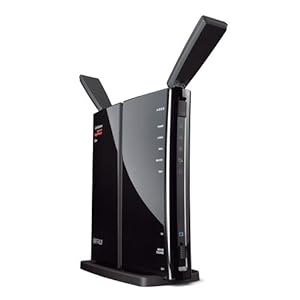
I recently bought this:
http://www.amazon.com/gp/product/B0096239G0/?tag=neogaf0e-20
419083KR3zL._SY300_.jpg


802.11n Dual Band Router
Gigabit Ethernet
DD-WRT
USB port for network drive/printer
$70
 
Top Bottom