• Hey Guest. Check out your NeoGAF Wrapped 2025 results here!

Mac Steam has been released. Steam Play for cross-client ownership. TF2 out on Mac!

mjc said:
Quick question. These are the specs for my iMac:

2.4 GHz processor with 1GB 667MHz DDR2 SDRAM

It's about two years old now and I've already played a bit of Dragon Age on it a month or so ago. Is it still pretty viable? I'm gonna use it for some lesser-intensive titles like Torchlight, Machanarium, etc but I wanna make sure it can run Starcraft 2 and so on.

Graphics info?
 
mjc said:
Quick question. These are the specs for my iMac:

2.4 GHz processor with 1GB 667MHz DDR2 SDRAM

It's about two years old now and I've already played a bit of Dragon Age on it a month or so ago. Is it still pretty viable? I'm gonna use it for some lesser-intensive titles like Torchlight, Machanarium, etc but I wanna make sure it can run Starcraft 2 and so on.

Viable? Not really. You should be able to play stuff like SC2 with the settings turned way down, though.
 
ok, this is pretty weird. Telltale version of Sam and Max 301 = runs great. Steam version of Sam and Max 301 = runs like ass. anybody care to explain to my what on earth is going on? :lol
 
mjc said:
Quick question. These are the specs for my iMac:

2.4 GHz processor with 1GB 667MHz DDR2 SDRAM

It's about two years old now and I've already played a bit of Dragon Age on it a month or so ago. Is it still pretty viable? I'm gonna use it for some lesser-intensive titles like Torchlight, Machanarium, etc but I wanna make sure it can run Starcraft 2 and so on.

If Dragon Age Origins works, it should be able to run Starcraft 2.
 
hoverX said:
If i download civ 4 for mac will i be able to play with my non-steam using friends on PC?

I have no idea. That may depend on what the mac versions have been patched up to, since I think you need to be on the same patch version to play multiplayer between two PCs.
 
EU3 IS OSX COMPATIBLE!!!!!!!!!!!!!!!!!!!!!!!!!!!!!!!


Edit: However steam servers are busy and not letting me install it for now.

Edit 2: I don't think that it is really OSX compatible, probably a steam error, can anyone confirm?
 
hoverX said:
If i download civ 4 for mac will i be able to play with my non-steam using friends on PC?

Yeah, Civ 4 doesn't use Steam for matchmaking, so it doesn't matter where your friends got it from.

However, I'm not sure if there is cross platform online play.
 
Downloaded portal, changed a few settings and the game is running fine on my 2008 macbook pro 2.4 ghz 2 gb ram nvidia 8600 gt beast :P Downloading torchlight now.

edit: What sucks is that the macbook pros are going to run REALLY HOT after like 30 mins of playtime :(
 
Konig94 said:
Does anyone know if there is a way to make the dock icon smaller? It towers over the rest of my icons.
It is quite big. There may be easier ways to shrink it but I'd just edit the icon in Photoshop and make it the size you want then save as .png and get info on the app itself and drag the new smaller icon over the old icon at the top and done.

My instructions suck, sorry. I don't know any other way.
 
Hari Seldon said:
EU3 IS OSX COMPATIBLE!!!!!!!!!!!!!!!!!!!!!!!!!!!!!!!


Edit: However steam servers are busy and not letting me install it for now.

Edit 2: I don't think that it is really OSX compatible, probably a steam error, can anyone confirm?


EU3?

you mean UE3? not sure what you mean.
 
LCfiner said:
EU3?

you mean UE3? not sure what you mean.

Europa Universalis III. It is the pinacle of grand strategy games on PC, but I didn't think they made an OSX version, but it is listed under OSX compatible games along with Hearts of Iron III.
 
Fraull said:
Downloaded portal, changed a few settings and the game is running fine on my 2008 macbook pro 2.4 ghz 2 gb ram nvidia 8600 gt beast :P Downloading torchlight now.

edit: What sucks is that the macbook pros are going to run REALLY HOT after like 30 mins of playtime :(

I have the same computer (15") except 6GB RAM. First thing I did was switch to native resolution, but kept default settings. I haven't played the game yet, but would be curious to know what you turned down in case I have issues.
 
i can see my library and am currently downloading portal and peggle, which i own on steam pc, but whenever i go to the store inside steam or look at the pop-up box telling you about steam news; all i get is a blank box. what's up with that?
 
Fraull said:
Downloaded portal, changed a few settings and the game is running fine on my 2008 macbook pro 2.4 ghz 2 gb ram nvidia 8600 gt beast :P Downloading torchlight now.

edit: What sucks is that the macbook pros are going to run REALLY HOT after like 30 mins of playtime :(

i have the same laptop, what settings are you using?


Wonder if Steam gaming catches on big time with mac users if Apple will put out higher end 3d hardware + perhaps some more up to date games in their benches!
 
Ok, so i'm sure this is in the thread somewhere, but help a dude out...

So I bought Orange Box on Steam through Crossover, and finished HL2 on it, and i'm now onto the episodes, so I can now finish them on my mac account after redownloading the mac version? Will it just automatically transfer my save files?
 
Can someone help me out?

Portal.jpg

untitled-5.jpg


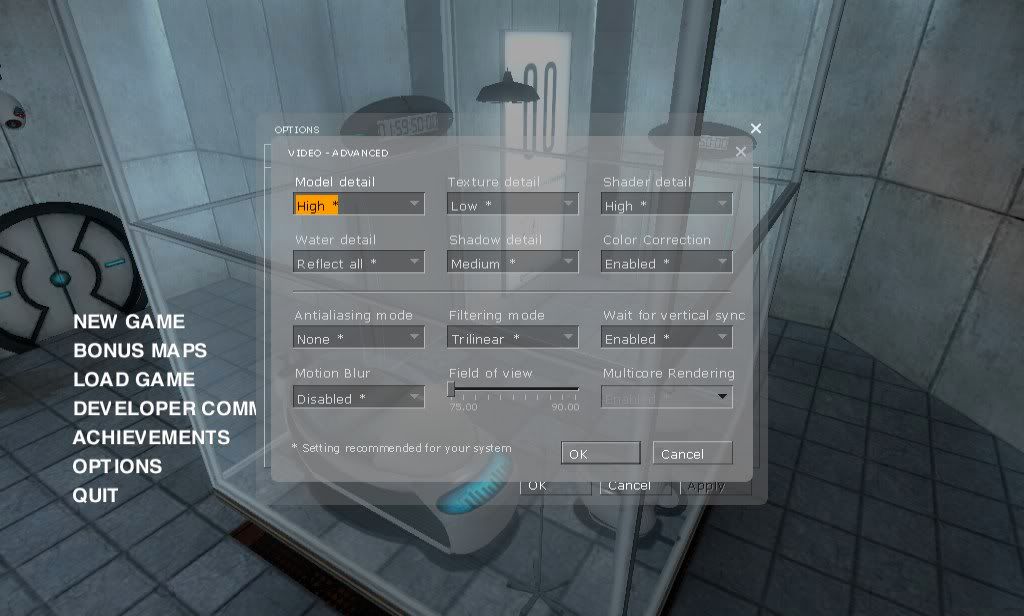
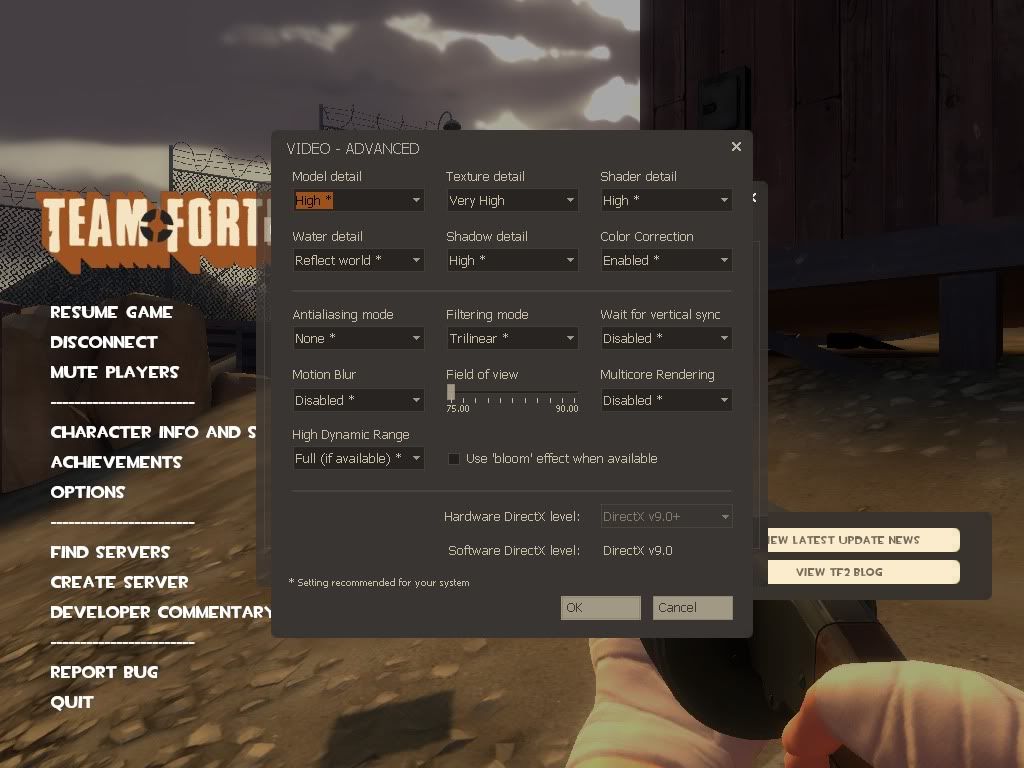
Both of these game are running on the exact same machine, only Portal is in OSX and TF2 is in Windows. I'm getting a nice 60FPS in TF2, sometimes dropping down to no lower then 40. Portal is running at about 30FPS, constantly dropping. Aren't both games running on the same engine? Why is one so drastically better then the other?
 
rex64 said:
yeah but still steam visualize all my games (regardless if I can play or not on my mac)

everything but TF2 :(

is that normal?
I'm assuming it's normal, since it's doing that for me too. HL2 shows up, but not TF2.

I was hoping to get in some games tonight. :\

Blu_LED said:
Can someone help me out?

http://i6.photobucket.com/albums/y228/yankeekidfm2/Portal.jpg[IMG]
[IMG]http://i6.photobucket.com/albums/y228/yankeekidfm2/untitled-5.jpg[IMG]

Both of these game are running on the exact same machine, only Portal is in OSX and TF2 is in Windows. I'm getting a nice 60FPS in TF2, sometimes dropping down to no lower then 40. Portal is running at about 30FPS, constantly dropping. Aren't both games running on the same engine? Why is one so drastically better then the other?[/QUOTE]
I'm just gonna assume Portal and TF2 were really optimized for DX9 or whatnot, and they're not too perfect running OpenGL. Give it a few months, maybe?
 
Blu_LED said:
Both of these game are running on the exact same machine, only Portal is in OSX and TF2 is in Windows. I'm getting a nice 60FPS in TF2, sometimes dropping down to no lower then 40. Portal is running at about 30FPS, constantly dropping. Aren't both games running on the same engine? Why is one so drastically better then the other?
Performance is at the moment (much) better on Windows given the same hardware. Probably Source engine runs better on Dx (Ms developed) than Opengl (what OSX uses). Perhaps Valve will continue to update their Opengl engine with time. Or maybe much better driver support on the Windows side? What graphics card does your mac uses? (Nvidia is supposed to have better OpenGL drivers than ATI).
 
Lonely1 said:
Performance is at the moment (much) better on Windows given the same hardware. Probably Source engine runs better on Dx (Ms developed) than Opengl (what OSX uses). Perhaps Valve will continue to update their Opengl engine with time.
So I should just keep playing all my games on my Windows Bootcamp?
 
Blu_LED said:
Can someone help me out?


Both of these game are running on the exact same machine, only Portal is in OSX and TF2 is in Windows. I'm getting a nice 60FPS in TF2, sometimes dropping down to no lower then 40. Portal is running at about 30FPS, constantly dropping. Aren't both games running on the same engine? Why is one so drastically better then the other?

V-Sync, disable that right now and report back!
performance is still lackluster under native OSX :(
 
I thought if anyone was to port their games between platforms it would be Valve that would do it right. I thought wrong. I guess booting up Windows every time I want to play games isn't such a big deal.
:(
 
At the next big revamp for the macbook pros and imacs at least Apple can use more upto date games for the benchmarks and promote steam. Torchlight is pretty nifty I must say, glad I waited for it to come to mac steam before I bought it.
 
That's actually the most interesting part of this*. Apple now has something that doesn't quite help them sell software, but does add value to their OS X line. Yet it's not their outlet, so they don't directly profit much.

Will Apple care more about GPUs going forward, namely for their desktop lines? WIll they put more emphasis on drivers? Does Valve have any deals/promises with Apple for a certain amount of support? We'll see.

*Besides Audiosurf. I want Audiosurf OS X so bad.

Fraull said:
At the next big revamp for the macbook pros and imacs at least Apple can use more upto date games for the benchmarks and promote steam. Torchlight is pretty nifty I must say, glad I waited for it to come to mac steam before I bought it.

Is it trackpad friendly?
 
i can''t even connect to steam. Says I'm not online and to check my internet connection. Apparently I made this post with my mind powers.

It's been doing this since the start of the beta. Makes no sense.
 
Blu_LED said:
So I should just keep playing all my games on my Windows Bootcamp?

Does your mac have the dual video cards (ie macbook pro)? If so, have you switched to the faster video card when you are running OSX? When you run windows in bootcamp it automatically defaults to the faster video card (9600M) but in OSX it usually uses the 9400 as the default. Something to consider if it applies to you.
 
Your games are in ~/Documents/Steam\ Content

You can make a symbolic link for ~/Documents/Steam\ Content if you want that shit to actually reside elsewhere.
Works at least on the same drive, so I think it should work across drives as well.

An example:
Code:
cd ~/Documents
mv Steam\ Content testmove
ln -s testmove Steam\ Content

Works like it should!
 
agk said:
Does your mac have the dual video cards (ie macbook pro)? If so, have you switched to the faster video card when you are running OSX? When you run windows in bootcamp it automatically defaults to the faster video card (9600M) but in OSX it usually uses the 9400 as the default. Something to consider if it applies to you.
I own an iMac. Here are the specs:

Model Name: iMac
Model Identifier: iMac8,1
Processor Name: Intel Core 2 Duo
Processor Speed: 2.4 GHz
Number Of Processors: 1
Total Number Of Cores: 2
L2 Cache: 6 MB
Memory: 4 GB
Bus Speed: 1.07 GHz
 
What sucks is that the Macbook Pros are probably strapped in with crappy GPUs for what's going to be a long time. Apple just updated their Macbook Pro platform to the already mediocre on release (for the 15" and 17", anyways) 320M/330M series. We're likely stuck with those until at least Sandy Bridge in early 2011, and I would guess we're going to see the series make its way into the other Mac products as well before then.
 
Blu_LED said:
I own an iMac. Here are the specs:

Model Name: iMac
Model Identifier: iMac8,1
Processor Name: Intel Core 2 Duo
Processor Speed: 2.4 GHz
Number Of Processors: 1
Total Number Of Cores: 2
L2 Cache: 6 MB
Memory: 4 GB
Bus Speed: 1.07 GHz

Ok, the iMac has a single video card so what I mentioned won't be applicable for you.
 
SnakeXs said:
Is it trackpad friendly?

I only used the trackpad in Portal's main menu and it was fine, but I have the mac razer deathadder, so I don't know. From my experiences with gaming with a trackpad though is that it sucks bad :lol
 
Top Bottom