• Hey Guest. Check out your NeoGAF Wrapped 2025 results here!

Maintaining a powerful PC, how do people cope?

Status
Not open for further replies.
I spent about 1200-1500 on mine in 2012, though I was also working at intel and got a $600 dollar processor for about $290 (3930k). I had a 670, I upgraded last year to a 980 but all the other parts of my PC are holding up fine. I honestly don't really need to upgrade my CPU for another year or two at least (especially since I have it overclocked to 4.5ghz).

I think its never been easier to maintain a PC since even an i7 Sandy Bridge (2700k) will still competently run all games. The biggest bottleneck is the GPU, and even a 670 from 2012 will be competent.

Hehe I was in almost the exact same position. I invested in a more expensive CPU than I originally intended, I myself got the 3770K. Not even sure when it'd make sense to upgrade it.

I to came from a 670 :)
 
I have about 4-5 high end systems and so far have been as lucky as neither of them requiring any maintenance whatsoever (other than the occasional video driver update).
Even my most current build which i spent around 4k on, requires absolutely no maintenance at all, keeping in mind that this system has about 10 120mm fans running, is crossfire, dual-bios, etc.... Then the previous one which is still pretty much alive and kicking on the same settings (crossfire, etc...)
I can go as far as to say these systems ran for days without a single issue or hiccup, and are as solid as tanks since I had originally built them for crypto-mining (24-7 constant on)

Sorry OP but sounds like you've just had the worst of luck on component quality.
 
Maintaining a pc?

Aside from paying electricity, there's nothing do to.

I buy a new rig every two/three years. In between I upgrade gpus (usually sli).
 
It sounds like you've just had really, really bad luck with your parts. Sorry, dude.

That does sound like it. Every part of my PC seems to run just a little slower than it's supposed to, so whilst people are saying "the 970 and i5 4690k will get constant 60fps at these settings" I'm having dips all the time at those exact same settings.
 
Never had a problem with components ever. I just clean out the Pc every other month. Although I tend to upgrade to often so I guess that helps. Only thing I don't upgrade at least every other year is Monitors and HDD'S. I want to watercool but I'm afraid of having problems lol.

Edit: I have plenty of OS and program issues all the time though.
 
So I just tried to play some Battlefield 4 because of the BF1 reveal and, after the three minutes of crunching and grinding from my HDD I get a GPU driver error message and a crash to black...

3930417+_1272d699cd9848f1465c42e0aa9dcd12.gif
 
I've never had to maintain my PC, and I've been swapping parts for years and years now. I just swapped in a 980ti a few weeks ago, and it was almost as easy as plugging in a phone charger. The closest thing to maintenance that I have to do is open it up and blast the dust out every now and then.
 
Huh? All I do is clean mine and that's it.

Only had a single issue and that was solved by getting rid of a dead SSD (Fuck you Samsung)
 
However, both PCs have been an absolute nightmare to maintain... Every week there seems to be a completely new issue however minor that crops up and it takes hours, if not days of searching to find a solution that the majority of the time doesn't even work...

So I ask all the PC-builders of GAF, how do you cope with the maintenance required to keep a PC with thousands+ worth of equipment inside it? What tips would you give a neurotic PC builder like me in keeping a calm head?

Build computers that don't have problems. If they do, find out why and fix the problem, learning more about computers in the process.

I had to reinstall Windows once but that was completely my own fault. I forced Windows to install a bad driver for an outdated piece of hardware (a monitor calibrator) and it screwed everything up.

That's 1 of 2 major problems I've had in the last 3 years, when I built my current computer.

Generally I do the following
- Create a clean restore image of a fresh Windows install
- Have Windows Restore checkpoints on
- Be selective about what system applications and drivers I install
- Use a quality, well supported motherboard, because a bad motherboard can lead to all kinds of weird problems
- Use a good anti-virus program (free)
- Don't hyper-overclock (some is ok, depending on the CPU/GPU)
- Use a good case, power supply, cooling solutions

Since Windows 7 launch, over the course of 2 computers, I think I've only had 2 or 3 problems that required much trouble shooting, and most were irritations rather than actual crashes.The only times I've had to reinstall Windows 7 were due to my own actions.

The other major problem I encountered was a crash problem with my first R9 290. It required actually sending the card back to AMD for a replacement. I had to educate myself on reading crash logs to identify the driver causing the fault. I recommend reading up on that in order to better identify any crash issues you're having.

So I just tried to play some Battlefield 4 because of the BF1 reveal and, after the three minutes of crunching and grinding from my HDD I get a GPU driver error message and a crash to black...

Sounds like a GPU/driver problem.

 
OP, with regards to Witcher 3 performance, have you tried rolling back your drivers?

My own PC issues have come from cheaping out on certain parts- my case's USB ports were shit and lead to a series of unfixable BSOD's; and I've had the stock fan (the bearings specifally) on my EVO 212 grind, requiring replacement with a Noctua.

As for hard drives- if there's important data, mirror it. I buy drives on sale and in pairs. Also pick an uninterruptible power supply if your building is prone to black/brownouts. Those can murder your electronics right quick.
 
Good airflow, cable management and OS HDD backups are key to maintaining a computer with minimal stress.

Parts breaking or DOA are rare, but it happens with all electronics, so make sure you chase that warranty, and keep your old parts for a couple of weeks after a new purchase. with an OS backup, HDD exchanges are fast.
 
Good news.

You can cut out the middle man. Go to WD website and go to the RMA/Warranty section. They should replace it

I was reading this thread just to see if anyone was going to help the op with this info haha.


I'm not a fan of can air. Last time I used that stuff I killed a video card and a psu some how. I plan on buying one of these things at some point. Seems like a much better investment over buying cans and taking the risk.
 
Guess I've just been lucky with hardware but I haven't really had many hardware related problems in the past 15 years. Do a clean install of Windows every 6 months and use canned air to clean dust. All of my disks are solid-state drives so no need to worry about mechanical failures. :)

My recommendations would be to ensure the equipment is kept clean.

That sounds like a waste of time
 
You don't worry about it unless you suffer from general anxiety disorder and/or obsessive compulsive disorder.

Buy stuff that's best for money and upgrade in 5+ year or longer spans.

Dust off the insides with a swiffer cloth at least once an year. If you have an air compressor in your garage, then bring that out and funnel air in your machine once in a while.

I'm also assuming your have an automated backup system in place. That's why these people don't worry.

That does sound like it. Every part of my PC seems to run just a little slower than it's supposed to, so whilst people are saying "the 970 and i5 4690k will get constant 60fps at these settings" I'm having dips all the time at those exact same settings.

There's a lot of bullshit advice out there with people stating how slow CPUs can't work for every day use when you see stuff like Chromebooks sold on the market with "gamer expert" disapproved specs running very well.
 
I build my PC like about 8 years ago and since then I have been swapping components so it still is a high-end PC today.

I have got rid of almost all regular HDD for SSD since the first ones tend to fail too often. Other than that, and some dusting with compressed air a few times a year, no major maintaining has been necessary. The OS installation has been pretty much the same from like 4 years and its been two motherboard changes since. I'm too lazy to do a clean install.

BTW, my power supply is the same (Corsair TX650w). It has been holding as a champ! Don't go cheap on it.
 
I build it up, put it in a spot where it won't gather much dust and the side is accessible and hope for the best.
 
I have filters on my air intakes.

Every 6 months I buy 2 cans of compressed air and give the interior a blow out. Apart from that I don't have to maintain my PC at all.
 
I have filters on my air intakes.

Every 6 months I buy 2 cans of compressed air and give the interior a blow out. Apart from that I don't have to maintain my PC at all.

If you know someone who owns an air compressor, have that person refill those compressed air cans.

I think you can probably install an air valve, too, and refill with a manual pump.
 
I feel like maintaining a PC is substantially easier than maintaining a car, and if you can't maintain either yourself you can bring them to experts who can help (and it's easier to go without your PC than your car during repairs)
 
TBH, I never maintained a PC other than downloading drivers in my life. I just buy a new PC every 5 years or so. I've never even cleaned a PC out.
 
New videocard every two years or so, sell the old one. Maybe every 4 years or so upgrade cpu/etc. It's no big deal, that works out to be maybe 300-500 a year? That's nothing.
 
I was reading this thread just to see if anyone was going to help the op with this info haha.


I'm not a fan of can air. Last time I used that stuff I killed a video card and a psu some how. I plan on buying one of these things at some point. Seems like a much better investment over buying cans and taking the risk.

Man, now I know what to buy lol. Air cans give me issues too, but thankfully not a whole card failure. That would tick me off so bad
 
Western Digital doesn't have a great reputation. They're much better than Seagate, but their hard drives do fail once in awhile. Just order another hard drive and plug the new one in and hope you can transfer some of your files before a complete failure. I don't get your pov OP.
 
Mechanical hard drives will fail on you. You are lucky if you have one that doesn't. That's just part of the game. Buy high quality components. Try to dust the machine at least once a month. Try to not damage your components with static electricity when handling them. You don't necessarily need to use a wrist strap, but don't build on carpeting,and try to put your hands on metal parts of the case to discharge. If you live in area with brownouts and electrical storms, use a UPS and my advice would be to even unplug your computer during thunderstorms. I had a system get fried when lightning struck my house.

When it comes to software, keep your drivers updated, Operating system patched, and don't download stupid shit to give you malware.
 
I was reading this thread just to see if anyone was going to help the op with this info haha.


I'm not a fan of can air. Last time I used that stuff I killed a video card and a psu some how. I plan on buying one of these things at some point. Seems like a much better investment over buying cans and taking the risk.

Just a FYI using compressed air,....

Turn off the computer and hold the fan blades if cleaning the fans so they don't spin. You can get it spinning faster than the bearings can handle and mess it up.
 
I feel like maintaining a PC is substantially easier than maintaining a car, and if you can't maintain either yourself you can bring them to experts who can help (and it's easier to go without your PC than your car during repairs)

I think it's the complete opposite. Maintaining a computer with a full blown OS (Windows, Mac or Linux) is much more complicated, mostly because it's much easier to break.

For example recently my brother had to do his taxes, which required downloading a government made program, which required Java. That required him to install Java, and if that wasn't bad enough on its own look at what kind of crap that installer can do to a PC. People can't be expected to take their computers to an expert every time they need to do something different on them.

Cars don't have that problem. Mobile devices are popular computing platforms in large part because they avoid that problem.

I use the data vac to dust my PC. http://www.amazon.com/Metro-ED500-DataVac-500-Watt-Electric/dp/B001J4ZOAW/ref=sr_1_1?ie=UTF8&qid=1462592375&sr=8-1&keywords=datavac


I used to think that way. The last drive that failed on me was a Hitachi.
Point being that mechanical hard drives are inherently unreliable.

Yep, my last failure was a 160Gb Hitachi (that came with the PS3). Hard drives suck.
 
Yep, my last failure was a 160Gb Hitachi (that came with the PS3). Hard drives suck.

I hear that there are 2 TB 2"5 sata SSD's coming out. Hopefully, the prices become reasonable and they become the new standard for data drives, with people using PCIE or M.2 for boot drives.
 
mechanical hard drives are inherently unreliable.

SSDs can fail, too.

Every user can benefit from a backup system. That's something not to save money unless the data is not important.

Something like the OP's setup needs fan cooling as those drives run hot.

I hear that there are 2 TB 2"5 sata SSD's coming out. Hopefully, the prices become reasonable and they become the new standard for data drives, with people using PCIE or M.2 for boot drives.

SATA is considered a bottleneck, but with more ultraportables coming out, they're probably going to go away since manufacturers are pushing out smaller components using those new interfaces. Maybe SATA will just be on desktops.
 
SSDs can fail, too.

Every user can benefit from a backup system. That's something not to save money unless the data is not important.

Something like the OP's setup needs fan cooling as those drives run hot.

True. Not arguing with need for backups, but they fail for different reasons, and from the stats I've seen, much lower percentage because of lack of moving spindle and platter.

SSDs can fail, too.


SATA is considered a bottleneck, but with more ultraportables coming out, they're probably going to go away since manufacturers are pushing out smaller components using those new interfaces. Maybe SATA will just be on desktops.

SATA is not going to go away anytime soon. Think of all the PC's out there that will probably be used for 5-10 years because of the focus on energy efficiency over performance in newer systems. Apple just tried to make fun of all the old PC's out there and it kind of backfired on them.
 
Usually the problem is drive platter heads start sticking and don't return to the resting position, which causes the clicking noise on start up.

You usually can just open up the drive and recenter them if you don't want to go through warranty.

Process requires tearing down the sticker, so it's obvious that a user has tampered with it.

Otherwise, finding matching parts/board is tough if the problem is more severe.

SATA is not going to go away anytime soon. Think of all the PC's out there that will probably be used for 5-10 years because of the focus on energy efficiency over performance in newer systems.

If you look at ultraportable machines, none of them use SATA, and those sell more than desktops.

Apple just tried to make fun of all the old PC's out there and it kind of backfired on them.

Apple's ultimate goal is to control all parts of the production process to limit its userbase to using their products. Seems obvious that they're going to kick x86 to the curb and only include players that will build their proprietary products. Make customers buy their products since their services only work on their hardware that they designed. Good for stockholders. They started the trend of soldering components on the board to prevent upgrades on x86.

Google is somewhat set since their services are on the cloud. They're making affordable products that appeals to all markets and use their services. Don't think any of them use SATA.

Microsoft has also done that Google-type cloud transition (Azure) although still a work in progress (Skype) but has a problem of moving away from x86. Its cloud integration is part of the plan, but they wish they could achieve what Apple is ultimately going to do or what Google has already done for hardware. Last two Xboxes (Xbox 360 and Xbox One) are the only machines that use a full-size SATA port I think.

As I said before, I think we'll see more of those SSDs that use newer interfaces that you mentioned (M.2) as SATA usage continues to decline.
 
Maybe I'm just lucky...I've had practically zero hardware issues I can recall with two desktops over the last 8 years. I built them both from scratch, occasionally clean with compressed air, and occasionally upgrade videocards or hard drives. I have a mix of internal rotating drives, external rotating drives, and SSDs.

I'm actually not sure a single part has failed on me. They stay on the floor of a moderate temperature bedroom.
 
Installing an HDD is an evening of stress? It's literally two connectors and 2-4 screws.

Dunno i never had to do any maintenance on my pc aside the first couple days when assembling it...
I can only think of three possibilities here, first one is that you have been extremely unfortunate with your hardware, second one is that your pc is plugged into a bad electric plug so even if the hardware is good it gradually screws up your hardware and the third one based on the "evening of stress" comment is that something is wrong on how your pc are assembled.

Point being that mechanical hard drives are inherently unreliable.

Lucky me, the only hard drive that failed on me was more than 10 years old which to me surpassed its lifespan by a lot.
Edit: No wait that was a lie, i had a couple of 2.5 drives that failed me within 5 years, they were used as external ones though so they were not treated kindly.
 
Maybe I'm just lucky...I've had practically zero hardware issues I can recall with two desktops over the last 8 years. I built them both from scratch, occasionally clean with compressed air, and occasionally upgrade videocards or hard drives. I have a mix of internal rotating drives, external rotating drives, and SSDs.

I'm actually not sure a single part has failed on me. They stay on the floor of a moderate temperature bedroom.

Packaging + handling are crucial for mechanical drives.

If your stuff is delivered in a box that suspends the drive in the center with plastic guides or molded foam, then you're usually set.

Broken hard drives are usually ones that are wrapped in bubble wrap and thrown in boxes that bounce around in shipping.
 
Crappy luck maybe?
About every 5 years I drop about 3 to 4 grand building a custom PC. 3 so far. I've never had an issue with any of them ever. Never had to replace a part on any of em.

Maybe I'm the lucky one.
 
Well, I'm running a water cooled system, delided CPU, liquid metal TIM and no RAID HDD back up. Some days I question my sanity.
 
Crappy luck maybe?
About every 5 years I drop about 3 to 4 grand building a custom PC. 3 so far. I've never had an issue with any of them ever. Never had to replace a part on any of em.

Maybe I'm the lucky one.

How do you even spend that much? I built a top of the line rig (6700k, 980ti, etc.) and it was around $1500 (+/- 200, I bought the parts in batches during seperates sales over a few weeks, never added up the total because I never wanted to see the number). Are you blowing tons on storage or what? I even got a gsync monitor, but that just pushes me to around $2100 total.
 
It's all about futureproofing your build and understanding the market for PC components.

Picking good RAM, getting an SSD, and a great CPU to suit your needs makes all the difference in the world. The only forseeable upgrade in my future is getting a GTX 1070 to replace my GTX 680, since I want to max out all my current games with no exceptions.
 
How do you even spend that much? I built a top of the line rig (6700k, 980ti, etc.) and it was around $1500 (+/- 200, I bought the parts in batches during seperates sales over a few weeks, never added up the total because I never wanted to see the number). Are you blowing tons on storage or what? I even got a gsync monitor, but that just pushes me to around $2100 total.

Server grade CPUs maybe?
 
If you know someone who owns an air compressor, have that person refill those compressed air cans.

I think you can probably install an air valve, too, and refill with a manual pump.

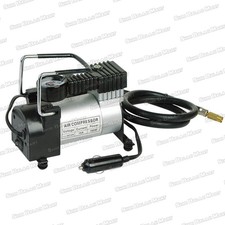
I use an actual air compressor. . . bought it for something else now it's just a giant air can for my PC. Been using it for years.

Similar but better than this:
s-l225.jpg
 
I've been building my PCs since my first Celeron 266. I never really had any problems which weren't caused by me due to too much overclocking or because I broke something.

In this nearly 20 year span, I've had one actual hard drive failure where the drive just died and all data was lost. I've owned hard drives from all the major manufacturers.

I think you're just unlucky, OP. Sorry :(
 
Status
Not open for further replies.
Top Bottom