• Hey Guest. Check out your NeoGAF Wrapped 2025 results here!

NEOGAF PC Gaming Thread 2019+ On the road to Night City....

Do some tests and see if the CPU is actually holding you back any before you take the leap. The 4770K can handle a lot of overclocking so if you haven't already, get those numbers up. Swapping that CPU with a more current CPU will require a new mobo so you're looking at a pretty expensive upgrade for potentially little gain. I'd just wait until you're no longer happy with the 980ti's performance and upgrade the mobo/CPU/GPU all at once.
Thanks for the Info. And hell, there are new Mobo-connections again? the GPU is holding on for good, i'd say, but cpu is sometimes a bit overwhelmed. Never overclocked the latter, but will look into it. Maybe OC and a new fan (mine is...not the best) may do the trick for a while.
 
Personally I tend to do my upgrading on a rotation of CPU/MB/Ram one year and GPU the following. Given general stasis with consoles at present I don't see the need to at present. I think once the next gen are out then I'll do a review but for the moment quite happy with my current setup and it should be good enough for CP2077 which is all I'm interested in in the long term atm.
 
Thanks for the Info. And hell, there are new Mobo-connections again? the GPU is holding on for good, i'd say, but cpu is sometimes a bit overwhelmed. Never overclocked the latter, but will look into it. Maybe OC and a new fan (mine is...not the best) may do the trick for a while.

There are always new mobo connections my friend. I'd say it was underhanded but higher bandwidth, better memory capacity and all that jazz.

I don't know what motherboard you're running, but the Asus board I'm running has a really easy to use BIOS where I can basically tell it to do what I want, or I can go through each step manually and change voltages and clock speeds. PC people are great in that they like to make videos about how to do these things. I should state, do not OC if you're running a basic cooling solution, upgrade your CPU cooler before you start fidgeting with the clock speeds. 4.5 is perfectly achievable with the 4770K, but at that speed with a basic cooler you're likely going to see a massive jump in temps.
 
There are always new mobo connections my friend. I'd say it was underhanded but higher bandwidth, better memory capacity and all that jazz.

I don't know what motherboard you're running, but the Asus board I'm running has a really easy to use BIOS where I can basically tell it to do what I want, or I can go through each step manually and change voltages and clock speeds. PC people are great in that they like to make videos about how to do these things. I should state, do not OC if you're running a basic cooling solution, upgrade your CPU cooler before you start fidgeting with the clock speeds. 4.5 is perfectly achievable with the 4770K, but at that speed with a basic cooler you're likely going to see a massive jump in temps.
Yeah... I think, i will have to invest into a cooler fan first or two or three. :)
 
Great CAPCOM deals, not sure how long they last.
I would list them but it 1:20 am and I am too tired.

Games Tagged with Gold (like this one) get a 100% Voucher to use on some selected free games, a 15% voucher for their next Sale purchase and an exclusive Intel Starter Pack bundle


Also Tekken 7 $16


Dark Souls III $15


Soul Calibur VI $20.40


Resident Evil 7 Gold Edition $14.99 (Regular ed is $4.99)
 
Last edited:
Those of you who have multiple monitors, how do you game on one, while browsing on a second? I was using software called Actual Multiple Monitors for a while but it doesn't work with every game.
 
Those of you who have multiple monitors, how do you game on one, while browsing on a second? I was using software called Actual Multiple Monitors for a while but it doesn't work with every game.
Alt+Tab? :pie_thinking:
Almost always have a stream or a YT-Video running on the second one...

EDIT: Or do you mean the splitting? There is a internal function for that in Windows 10. Win-Key + P - you can choose between duplicating, "spreading" and single monitor use...
 
Last edited:
After some long thinking finally upgraded my PC:

From
I7 870 4,2ghz
16gb ddr3 1333mhz
512 840 evo ( runs at half speeds 270mb a sec write and read ) because sata 2
Some random motherboard from that time.
MSI gaming 970 gtx 4gb

Towards:

9900k 5ghz on all cores
16gb 3200mhz ddr4
MSI gaming 1080 ti 11gb v-ram ( will pick it up tommorow can't wait )
samsung evo 970 plus ssd ( 3500 read and 3200 write ).

I wanted a new system for cemu, and frankly in order to run it at 4k resolution downsampled to my 1080p screen, it needs a metric ton of cpu performance for 60 fps if not the most + a really strong GPU which the 1080 ti is.

I am stoked going from a 970 > 1080 ti the jump should be huge and i can't wait for it.

The SSD and CPU are also really quick tho, i love how nothing really has much load times anymore and everything is butter smooth.

I will mostly play at 1080p, so this setup will have some legs for sure. And with next gen arriving i just didn't wanted to move into the 8gb v-ram limits on the new gpu's. I got lucky to find a 1080 ti for cheap 450 euro's and frankly with 2070 super sitting at 630 euro's here right now, its just not worth it at that point.

Other games i will be playing are the assassin creed series and with oddesey even getting 60 fps stable is a challange so a good solid gpu will work really well here.
 
After some long thinking finally upgraded my PC:

From
I7 870 4,2ghz
16gb ddr3 1333mhz
512 840 evo ( runs at half speeds 270mb a sec write and read ) because sata 2
Some random motherboard from that time.
MSI gaming 970 gtx 4gb

Towards:

9900k 5ghz on all cores
16gb 3200mhz ddr4
MSI gaming 1080 ti 11gb v-ram ( will pick it up tommorow can't wait )
samsung evo 970 plus ssd ( 3500 read and 3200 write ).

I wanted a new system for cemu, and frankly in order to run it at 4k resolution downsampled to my 1080p screen, it needs a metric ton of cpu performance for 60 fps if not the most + a really strong GPU which the 1080 ti is.

I am stoked going from a 970 > 1080 ti the jump should be huge and i can't wait for it.

The SSD and CPU are also really quick tho, i love how nothing really has much load times anymore and everything is butter smooth.

I will mostly play at 1080p, so this setup will have some legs for sure. And with next gen arriving i just didn't wanted to move into the 8gb v-ram limits on the new gpu's. I got lucky to find a 1080 ti for cheap 450 euro's and frankly with 2070 super sitting at 630 euro's here right now, its just not worth it at that point.

Other games i will be playing are the assassin creed series and with oddesey even getting 60 fps stable is a challange so a good solid gpu will work really well here.

That's a massive upgrade all at once. Hold on to your fucking shorts! :messenger_grinning_smiling:
 
TepidEarlyDog-size_restricted.gif

The color craze of the century!

Update from the old thread of setting out to run that GTA V modded:


Just started using a DualShock so that driving is horrid. But I am content with my settings (not OC here but that cinematic FPS though😎) .
 
What is the deal with TF2 crates on the Steam marketplace suddenly selling for tons of cash?
 
After rebuilding my PC and getting rid of all the water cooling nonsense, I'm uh... honestly kinda shocked by how quiet this thing is. Be Quiet fans have always been good, but when you have like 8 of them running at low RPMs? It's eerie.
 
What is the deal with TF2 crates on the Steam marketplace suddenly selling for tons of cash?
A bug was introduced with the latest patch where some of the old series had 100% chance to unbox unusuals. This started spreading pretty quickly with unusuals going as down as 4$ and crate prices going as high as 17$. I'm not sure if it's fixed now but check the marketplace if you still have some old crates, you might be getting a good deal for them.
In general, the crates that have first genereration type unusuals effects sell the highest.
 
Last edited:
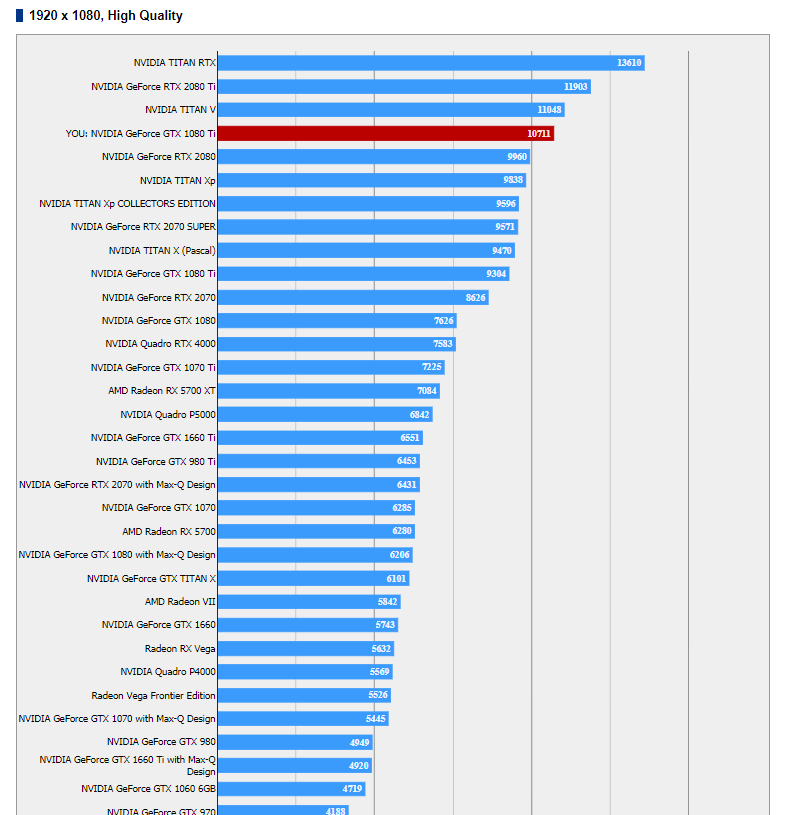
As i am going to start my final fantasy 15 playthrough, just did the benchmark.

The lowest card is my old 970, red score is my oced 1080 ti.

Must say, amazed at the results.

4215f29511522f0feb5c955bb944c8b4.png
``````````````````````
 
As i am going to start my final fantasy 15 playthrough, just did the benchmark.

The lowest card is my old 970, red score is my oced 1080 ti.

Must say, amazed at the results.

4215f29511522f0feb5c955bb944c8b4.png
``````````````````````

No doubt 1080ti has best value/price score right now. I don't need to upgrade my PC now but if I did, I would go for 1080ti aswell.
 
doom hunter is dope, i hope it lives up to the name and they iterate its AI so it becomes a significant threat to varying skill ceilings
 
As i am going to start my final fantasy 15 playthrough, just did the benchmark.

The lowest card is my old 970, red score is my oced 1080 ti.

Must say, amazed at the results.

``````````````````````

Don't discount the huge generational leap for your processor either. When I went from a 5Ghz 2500k to a 4.7Ghz 6700k, even then I noticed a big difference in games with the same GPU.


Been meaning to watch this. Will check it out later.
 
Last edited:
Rocking a 4790k with a slight OC to 4.5ghz, a gtx 780 and 16gb of ram. I'll be upgrading the graphics card when Cyberpunk comes out. I only game at 1080p 60hz, so I don't really need a monster right. My 4790k is still more than capable.
 
Replaying Doom 3 BFG. Back in 2004 Doom 3's technological thunder was stolen by Far Cry, HL2 and even Riddick.
Turns out it's the game that aged best. It's still visually impressive.
That first hour is one of the best openings of all time. As for the rest, it's relentless, maybe even more so with all the extra ammo in this edition. I love the monster closets, it's fun as hell having them pop out all around. I remember playing it like a survival horror back in the day and it felt very repetitive, but if you run and gun it's surprisingly similar to the old games.
 
I'm glad someone made this thread. I just bought this:
CUK Stratos Gaming PC (Liquid Cooled Intel Core i9-9900K, NVIDIA GeForce RTX 2080 Ti, 32GB RAM, 1TB NVMe SSD + 2TB, 750W Gold PSU, Z390 Motherboard, Windows 10) Best Tower Desktop Computer for Gamers

I'm a recent PC gaming convert and now I want to convert everyone else. I can't see myself going back to using consoles as my primary platform for playing games, there's just too many advantages to PC gaming. For a gaming enthusiast, it's the best platform to play games. In addition, it's so nice to go back to old games I played on console at 30 FPS and play them in 4K at 60 FPS with the settings maxed.
 
I'm glad someone made this thread. I just bought this:
CUK Stratos Gaming PC (Liquid Cooled Intel Core i9-9900K, NVIDIA GeForce RTX 2080 Ti, 32GB RAM, 1TB NVMe SSD + 2TB, 750W Gold PSU, Z390 Motherboard, Windows 10) Best Tower Desktop Computer for Gamers

I'm a recent PC gaming convert and now I want to convert everyone else. I can't see myself going back to using consoles as my primary platform for playing games, there's just too many advantages to PC gaming. For a gaming enthusiast, it's the best platform to play games. In addition, it's so nice to go back to old games I played on console at 30 FPS and play them in 4K at 60 FPS with the settings maxed.

holy fuck at that rig

giphy.gif
 
I'm glad someone made this thread. I just bought this:
CUK Stratos Gaming PC (Liquid Cooled Intel Core i9-9900K, NVIDIA GeForce RTX 2080 Ti, 32GB RAM, 1TB NVMe SSD + 2TB, 750W Gold PSU, Z390 Motherboard, Windows 10) Best Tower Desktop Computer for Gamers

I'm a recent PC gaming convert and now I want to convert everyone else. I can't see myself going back to using consoles as my primary platform for playing games, there's just too many advantages to PC gaming. For a gaming enthusiast, it's the best platform to play games. In addition, it's so nice to go back to old games I played on console at 30 FPS and play them in 4K at 60 FPS with the settings maxed.
The problem with buying that kind of pre-build is that they cheap out on components where they can.
 
I'm glad someone made this thread. I just bought this:
CUK Stratos Gaming PC (Liquid Cooled Intel Core i9-9900K, NVIDIA GeForce RTX 2080 Ti, 32GB RAM, 1TB NVMe SSD + 2TB, 750W Gold PSU, Z390 Motherboard, Windows 10) Best Tower Desktop Computer for Gamers

I'm a recent PC gaming convert and now I want to convert everyone else. I can't see myself going back to using consoles as my primary platform for playing games, there's just too many advantages to PC gaming. For a gaming enthusiast, it's the best platform to play games. In addition, it's so nice to go back to old games I played on console at 30 FPS and play them in 4K at 60 FPS with the settings maxed.

You should be able to play West of Loathing at full settings with that setup! Full RTX too!
 
I'm looking at getting a 144hz monitor, 1440p, Gsync and possibly HDR. I literally don't know where to begin as I'm finding it hard to grasp what the general consensus is for the best value monitor with these specs. Can anyome give a hand?
 
I'm looking at getting a 144hz monitor, 1440p, Gsync and possibly HDR. I literally don't know where to begin as I'm finding it hard to grasp what the general consensus is for the best value monitor with these specs. Can anyome give a hand?
I went with this monitor although it doesn't have gsync (only freesync):

MSI Full HD Gaming Red LED Non-Glare Super Narrow Bezel 1ms 2560 x 1440 144Hz Refresh Rate 2K Resolution FreeSync 27" Curved Gaming Monitor (Optix MAG27CQ) https://www.amazon.com/dp/B079NGSWRL/?tag=neogaf0e-20

I was searching for a gsync compatible monitor myself but it seems to be holding out just well.


I'm glad someone made this thread. I just bought this:
CUK Stratos Gaming PC (Liquid Cooled Intel Core i9-9900K, NVIDIA GeForce RTX 2080 Ti, 32GB RAM, 1TB NVMe SSD + 2TB, 750W Gold PSU, Z390 Motherboard, Windows 10) Best Tower Desktop Computer for Gamers

I'm a recent PC gaming convert and now I want to convert everyone else. I can't see myself going back to using consoles as my primary platform for playing games, there's just too many advantages to PC gaming. For a gaming enthusiast, it's the best platform to play games. In addition, it's so nice to go back to old games I played on console at 30 FPS and play them in 4K at 60 FPS with the settings maxed.
Same here, don't think I'll ever be going back unless it's an oldass handheld platform. It's nuts how these machines are 3.5k+ (at least that's what my price tag was for my build). Twice the ram, 100+ more watts from PSU but we're otherwise the same.

 
Last edited:
I'm looking at getting a 144hz monitor, 1440p, Gsync and possibly HDR. I literally don't know where to begin as I'm finding it hard to grasp what the general consensus is for the best value monitor with these specs. Can anyome give a hand?

Not many games on PC support HDR, so I'd say it is pointless atm so just focus on the g-sync aspect.

https://www.blurbusters.com/gsync/list-of-gsync-monitors/

This is what I have https://www.amazon.com/dp/B01LWJMM1S/?tag=neogaf0e-20 which has an ugly design but technically speaking it's a fantastic monitor overall.
 
I went with this monitor although it doesn't have gsync (only freesync):

MSI Full HD Gaming Red LED Non-Glare Super Narrow Bezel 1ms 2560 x 1440 144Hz Refresh Rate 2K Resolution FreeSync 27" Curved Gaming Monitor (Optix MAG27CQ) https://www.amazon.com/dp/B079NGSWRL/?tag=neogaf0e-20

I was searching for a gsync compatible monitor myself but it seems to be holding out just well.


Same here, don't think I'll ever be going back unless it's an oldass handheld platform. It's nuts how these machines are 3.5k+ (at least that's what my price tag was for my build). Twice the ram, 100+ more watts from PSU but we're otherwise the same.

I was considering getting a PC with 64 GB of RAM but the ones I found on Amazon were too expensive. That's the nice thing about PC gaming though, if you want to spend $3.5K on a gaming PC, you can.
 
I was considering getting a PC with 64 GB of RAM but the ones I found on Amazon were too expensive. That's the nice thing about PC gaming though, if you want to spend $3.5K on a gaming PC, you can.
Yeah, some of the RAM expenses are ridiculous (looking dead at T-Force Nighthawk RGB). Overall I'm very satisfied. I can output 4K video quickly in Premiere pro as well as have a ton of other graphics intensive applications running without worry or cause for concern.

I was leaning towards swapping my 2080ti for one of the high-end binned "OC boost" version but I don't wanna deal with the hassle of sales.

But ayy... another one


If you have a sharp eye @1:23
 
Last edited:
Don't discount the huge generational leap for your processor either. When I went from a 5Ghz 2500k to a 4.7Ghz 6700k, even then I noticed a big difference in games with the same GPU.


Been meaning to watch this. Will check it out later.

Yea the boost is massive from what i find out. In battlefield 1 i had issue's even hitting a solid 50 fps at times when it gets stressful, in final fantasy 15 i could not get over the 45 fps even my gtx 970 would plump in usage a lot. Ac origin i couldn't get more then 40 in parts.

With 9900k5ghz everything on low on a 970, i saw in battlefield 250 fps going, in final fantasy 15 ~170 fps around that, in ac origin ( didn't test on low but on ultra with a 1080 ti ) i see 130 fps often in emptier area's. More crowded area's hit my gpu a lot.

What i do notice however is that games are insanely demanding these days for ultra settings. I bought a 1080 ti as most people used it for 1440p or 4k to have more headroom on 1080p to keep it more longer valid ( i hope the card lasts for 4 years about that ).

But when i see at ultra in final fantasy 15 at 1080p lows as low as 64 fps with average on ~90, with ac origin average ~100 with lows 71 and metro exodus as low as mid 60's at 1080p but all those are like the 0,1%. Mostly the fps sits way above it. It makes me worry.

Specially final fantasy 15 that even uses pretty much all of my v-ram with ultra settings and all the nvidia stuff uff. But god the game looks so beautiful almost cgi at times.

But god are those games so dam beautiful maxed out.
 
Last edited:
I'm looking at getting a 144hz monitor, 1440p, Gsync and possibly HDR. I literally don't know where to begin as I'm finding it hard to grasp what the general consensus is for the best value monitor with these specs. Can anyome give a hand?

Check the LG ultraGear 27GL850 out.
HDR
144hz
1440p
1ms IPS ( yea 1 ms IPS )
Freesync
500 bucks.
 
Last edited:
So after recently going from a 1070 to 2070 Super for 1440p/144hz. I decided to work on Audio a bit. Currently have a Razer Soundbar and Logitech G933 headphones. Ordered a Soundblaster X6 external sound card. I've noticed the onboard audio is a bit spotty with certain audio levels in games. Onboard is from a Asus Maximus Hero X. Sound card just showed up today.

My 3tb hdd is almost dead so I ordered a WD Black 6Tb. Gonna rearrange things between the SSDs and the 6TB over the weekend.

Got the soundblaster hooked up. Holy hell, I can't believe how shitty audio was before on my PC. I am an audio snob on my home theater but jesus. I am using G933s, 3.5mm hooked up to the X6 and still connected to wireless at the same time. Switching back and forth I am shocked at how different the audio is. The X6 has a very wide sound to it and the vocals and channels are very distinct. I also fired up Wildlands and you can even hear the footsteps and wind now. Crazy.
 
Last edited:
If you get a moment, have a watch of this and you'll see what I mean.


I watched the video, thanks for sharing. I've heard bad things about CyberPowerPC before so I think this is something that varies based on the company that builds the PCs. I looked up most of the components in my rig and the parts range from middle to high end in terms of their quality. I'll definitely keep this video in mind though when purchasing pre-built PCs in the future.
 
Top Bottom