-
Hey Guest. Check out your NeoGAF Wrapped 2025 results here!
You are using an out of date browser. It may not display this or other websites correctly.
You should upgrade or use an alternative browser.
You should upgrade or use an alternative browser.
PC wont show 720p correctly. help please
- Thread starter ASTROID2
- Start date

Rentahamster
Rodent Whores
Using a TV? Monitor? What brand? Native resolution? etc.
nhlducks35
Member

Aphallatosis
Member
Update your video card drivers. Had the same thing after upgrading to 8, and not bothering to reinstall nvidia drivers.
KojiKnight
Member
Update your video card drivers. Had the same thing after upgrading to 8, and not bothering to reinstall nvidia drivers.
This. This is 100% a graphics driver issue. If the new drivers don't automatically fix it, there should be an option in the graphic settings.
BurnOutBrighter
Banned
Your video settings should have options for how it manages non-native resolutions.
Update your video card drivers. Had the same thing after upgrading to 8, and not bothering to reinstall nvidia drivers.
How exactly would I do this? Never had to do it before. I'm very lost in win8.
grimshawish
Banned
How exactly would I do this? Never had to do it before. I'm very lost in win8.
Should be able to open windows updates and go to optional ones and tick everything.
What ever happened to that guy?
OP, you should try to be as informative as possible to minimize the amount of guesswork. You've basically told us nothing about your setup.
Is it a laptop or a desktop? Are you using a monitor or a TV? What is the native resolution of the screen you're using. Of what brand is your GPU?
Is it a laptop or a desktop? Are you using a monitor or a TV? What is the native resolution of the screen you're using. Of what brand is your GPU?
Aphallatosis
Member

What's your monitor's native resolution?
1080p 16:9
polyh3dron
Banned
You probably don't want 720p, you really want 1280x800. (assuming your monitor is 16:10)
Also, your graphics card control panel should have some scaling options in it including the option to make the picture fill the screen regardless of resolution. You want to select that.
You should double check to confirm what the precise native resolution of your monitor is. I'm sure marketing materials say that it displays 1080p just because that's better for marketing than saying it's 1920x1200 which is 16:10 but is equivalent in pixel density to 1920x1080 if it were a 16:9 screen therefore it is capable of displaying 1080p content (ace ventura inhaaaaaaale).
Also, your graphics card control panel should have some scaling options in it including the option to make the picture fill the screen regardless of resolution. You want to select that.
You should double check to confirm what the precise native resolution of your monitor is. I'm sure marketing materials say that it displays 1080p just because that's better for marketing than saying it's 1920x1200 which is 16:10 but is equivalent in pixel density to 1920x1080 if it were a 16:9 screen therefore it is capable of displaying 1080p content (ace ventura inhaaaaaaale).

MrCunningham
Member
AMD drivers strike again.
Yeah I have seen this problem in AMD cards if you are using a monitor with an HDMI connection. You have to go into the catalyst control center and set the screen scaling to 0.
1080p 16:9
Can you find us the actual numbers of pixels vertically and horizontally? Or just post the model number of the monitor.
Mavromatis
Member
I'll ask the generics:
What is the game?
What is the monitor?
What is your desktop resolution and monitors max resolution? And please answer in AxB not just 1080p because that is not a specific resolution.
I'll make this easier for you. Just right click on your actual desktop, and select Screen Resolution.

What is the game?
What is the monitor?
What is your desktop resolution and monitors max resolution? And please answer in AxB not just 1080p because that is not a specific resolution.
I'll make this easier for you. Just right click on your actual desktop, and select Screen Resolution.
Can you find us the actual numbers of pixels vertically and horizontally? Or just post the model number of the monitor.
1920 X 1080
Edit: 1920 X 1080 is also max resolution.

What are you trying to do exactly? Since you are on the gaming side I am going to go ahead and assume you are trying to play a game? On top of resolution settings some games have a setting for aspect ratio.
I'm trying to put the game in 16:9 720p with games like Diablo 3 and portal 2 are what I have downloaded right now. I'm using the same monitor as on my old computer and it never had problems with this.
1. post the monitor model number
2. what resolution is Windows currently in?
3. are you playing the game in fullscreen or windowed?
Dell SR230L_Analog http://www.all-monitors.com/monitors/manufacturers/pos/dell_sr2320l/?photo=1
1920 X 1080
fullscreen
YianGaruga
Banned
So I'm assuming with 720p you mean 1280x720. What happens when you change to other resolutions? Can you take a screenshot of how it looks?
Since you said you updated drivers, which driver version are you on now?
EDIT: Also, if you haven't seen it yet:
Since you said you updated drivers, which driver version are you on now?
EDIT: Also, if you haven't seen it yet:
Yeah I have seen this problem in AMD cards if you are using a monitor with an HDMI connection. You have to go into the catalyst control center and set the screen scaling to 0.
polyh3dron
Banned
Same thing happened by default in Windows 7 with my GTX 650M in my Retina MacBook Pro until I updated the driver and fixed it.Yeah I have seen this problem in AMD cards if you are using a monitor with an HDMI connection. You have to go into the catalyst control center and set the screen scaling to 0.
The main thing that is such a pain to me in Windows is how you have to maintain two separate sets of preferences for your video settings: one in your basic Windows Display control panel and another in the manufacturer-specific graphics card control panel. I never know when one panel's preferences will supersede the other's.
So I'm assuming with 720p you mean 1280x720. What happens when you change to other resolutions? Can you take a screenshot of how it looks?
Since you said you updated drivers, which driver version are you on now?
EDIT: Also, if you haven't seen it yet:
Yes 1280x720. All other 16:9 resolutions work. Can't find driver version.
Edit: can't find screen scale option.
If something like 1360/1366x768 works, why aren't you using those?
Not all games have those such as portal 2.
MrCunningham
Member
Yes 1280x720. All other 16:9 resolutions work. Can't find driver version.
Edit: can't find screen scale option.
Try reading this, maybe it will help: http://support.amd.com/de/kbarticles/Pages/UnableToSetGPUScaling.aspx
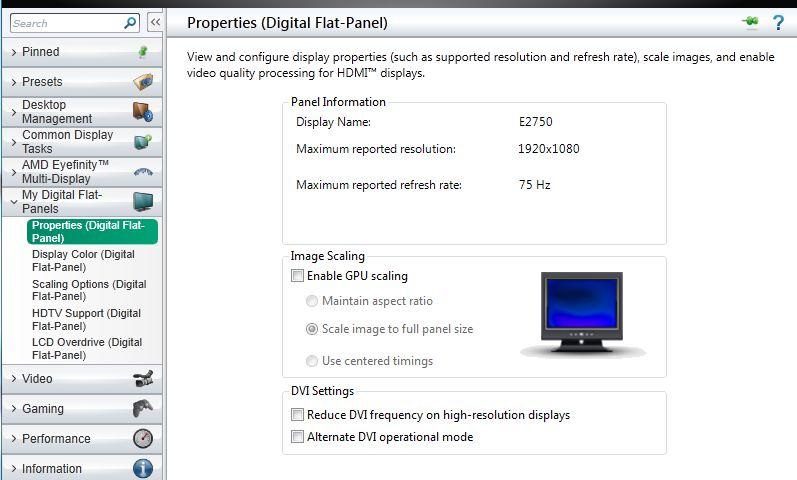
OK so I'm seeing this picture:
But when I open that I get this:

But when I open that I get this:
How do I get all those options?

I just checked and portal 2 has both of those resolutions available.Not all games have those such as portal 2.
OK so I'm seeing this picture:
But when I open that I get this:
How do I get all those options?
Are you sure you're not using the CPU onboard graphics instead of your dedicated card? I'd suggest some ways to check but I'm not familiar with Win8 programs or AMD.
I just checked and portal 2 has both of those resolutions available.
I just checked and didn't see either. Where are you seeing those.
Do you use HDMI?
Edit: If Portal 2 is like other Valve games then you can probably change from 4:3 to 16:10 to 16:9 formats. Then you will see the corresponding resolutions.
If he is using the onboard chip, then the HDMI cable has to be connected to the motherboard instead of the graphics card. What I mean by that is that you don't have to know anything about Win8.Are you sure you're not using the CPU onboard graphics instead of your dedicated card? I'd suggest some ways to check but I'm not familiar with Win8 programs or AMD.
Edit: If Portal 2 is like other Valve games then you can probably change from 4:3 to 16:10 to 16:9 formats. Then you will see the corresponding resolutions.
Do you use HDMI?
No.
Zaraki_Kenpachi
Member
Why are you running 1280x1024 on a 16:9 monitor....?