BizzyBum
Member
No. VR support is exclusive to PSVR for a year. Capcom, like Squeenix, has something of a penchant for unnecessarily accepting bags of money.
Son of a...
That sucks. Oh well, probably will save me from an early heart attack anyway.

No. VR support is exclusive to PSVR for a year. Capcom, like Squeenix, has something of a penchant for unnecessarily accepting bags of money.

I want to play this so badly, but no 21:9 support makes me sad.
He's just informing that his native resolution is 1080p and is running with 1.5 scale, so effectively running at 1620p.

Are you playing with interlaced rendering? Set it to normal.running this on a win10, 5960x @ 4.5ghz, (2x) Titan X-Pascal's in SLI (though the game doesn't seem to use SLI as of current), at 4k (3840x2160).
Performance is fine until I switch to SMAA, then it runs like ass in certain areas.
Textures in game look very low-res, especially outdoors and on certain things indoor. If I up the resolution scale any higher than 1, it murders framerate, but does increase texture quality.
However, I note that at a resolution scale of 1, and even though my resolution is set to 3840x2160, it doesn't at all seem like the game engine is actually running at that res. It appears to do the same as, say, Quantum Break does for PC (or as it initially did), where it's still rendering at a far lower native resolution internally and only upscaling that to my native desktop resolution.
I say this because aliasing and texture quality is far lower than it should be for a in-game 4k resolution setting. It's as if the engine is actually running internally at 720p and upscaling to 3840x2160 (like Quantum Break).
thus implying its a shoddy console port.
Game looks fun though, just ruins the immersion when it looks rather lackluster from low-res textures.
3840x2160. Tried with vsync on and off, 30, 60 and variable fps.Hmm... When selecting a resolution in game are there multiple selections for 3840x2160? Sometimes there will be more than one, 3840x2160 @30 and 3840x2160 @60 for example.
It's hard to trouble shoot this from work and not sitting in front of my rig.
Yes, HDR is working.
It's all over guys. Sell your 1080s and convert to last gen AMD technology.
http://www.guru3d.com/articles_pages/resident_evil_7_pc_graphics_performance_benchmark_review,6.html


Are you playing with interlaced rendering? Set it to normal.
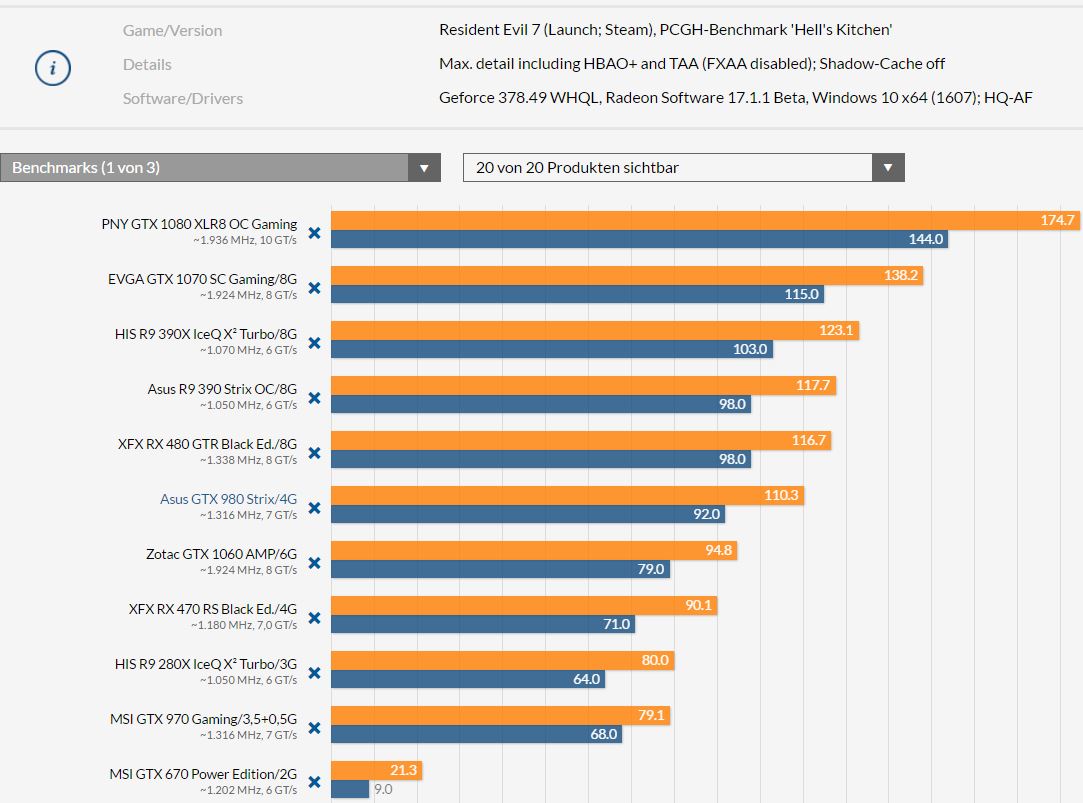
I have a 980, what would it be comparable to on that graph?
My guess would be between R9 470 and 1070, but I'm an amateur
We also see very weird behaviour for the Fury series and for Nvidia the GTX 970/980 the results have been so weird that we cannot trust a steady FPS mark, hence we left them out.
Found out why they left it out
That's discouraging. In the demo I got drops from 60 right down to 20something for no reason when turning in certain areas. Just assumed it was a bug.
3840x2160. Tried with vsync on and off, 30, 60 and variable fps.
If I set the resolution to 1920x1080 I can set 59.97Hz.
Strange.

I have a 980, what would it be comparable to on that graph?
https://www.youtube.com/watch?v=KshZc12x09c
480 > 1060 so the game is definitely favoring Radeons - or maybe it's just Polarises?
Ive got a 970/i5-6500
Any idea of how id fare?
My 1070 upgrade isnt until next month
This game has problems on a 970. I get huge fps drops and almost like full area loads when moving around. Spinning around in a circle drops a ton of frames. The card fans kick up pretty fast.
Also, to the dude asking about the FOV: there's an ini in the game directory that has two different FOV settings (FOV and playerFOV). I bet you can play around with that and make it as wide as you want.
Yes a Samsung TV (JS8005).Are you connected to a television? I actually had this problem once with an LG 4k. I got around it by creating a custom resolution in Nvidia Control Panel.
Yup this is exactly what I saw in the demo on my 980. Turning quickly drops the framerate in half.
Have you tried turning off blur?
Are you using VSync with 60 FPS lock?
Are you using VSync with 60 FPS lock?
5.1 surround sound doesn't seem to be working. Any way to get it to work?
Yes a Samsung TV (JS8005).
I don't have this issue with other games.

Yes I was.
Again I'm talking about my demo experience - I haven't bought the full game yet
The TV has the latest firmware. I have gone through the game settings.Damn. Well, try a custom res anyway. I game on a KS8000 and before one firmware updates, the television wouldn't properly report all supported resolutions properly. So try a firmware update as well? Running out of ideas here.
I haven't had a chance to really dive into the RE7 setting yet either but maybe there is something that is set that is locking you at 30fps?
With capped 60fps on, the game runs great and consistently. However the voice dialogue is way off sync. I switched to variable framerate and it fixed the audio issue, however the framerate is noticeably inconsistent now. Anyone experience this? Any advice?
GTX 970 here.
So my GTX 980ti is at the Vram Limit at this Game.
It uses more than 6GB Vram and more than 16GB Page File for me. Incredible!
Deactivate shadow cache.
First 1080p benchmarks from pcgh.de
A GTX 670 is able to reach 70-90 fps on low settings at 1080p according to them.
They also recommend to deactivate shadow cache on cards with 4 or less gb of vram (benchmark was done with deactivated shadow cache).