

-
Hey Guest. Check out your NeoGAF Wrapped 2025 results here!
You are using an out of date browser. It may not display this or other websites correctly.
You should upgrade or use an alternative browser.
You should upgrade or use an alternative browser.
Retroarch shaders
- Thread starter mild sriracha
- Start date


nkarafo
Member
Cheers.Ok that looks legit. Almost all of them I've seen just look like shitty lines across the screen which makes absolutely no sense, but the screen you showed actually has the image being made up of those vertical rectangle things. I'll have to look into this one next time I emulate.
I would recommend RetroArch with Guest-Venom shader, using the "lottes" scanline type in the options.
Here is SF2 using that shader (direct screencap at 1080p. You might want to enable some options for a 4K monitor, otherwise it will look wrong):

Here is the same screen, pictured from my phone but zoomed in:

Here's the closest i can get:

Would you believe this is a picture of a real CRT if i told you? But it's the shader, pictured directly from my LCD PC monitor.
RetroArch shaders can be amazing. Don't get disheartened by the generic CRT filters you usually get in things like the mini consoles or official releases of retro games. These are just straight lines most of the time.
CRT shaders in RetroPie or Pandora setups may also not look as good, because these weak systems don't have enough GPU grunt. Good CRT shaders use the GPU.
Bilinear is far better than nothing. It at least blends the pixels a bit (which is also what a low-res CRT would do). Raw pixels is just wrong IMO.more than 20 years with ZSNES, Snes9x .. bilinear filtering and thats all .. no interlace fx, CRT shaders etc.
Last edited:

Kuranghi
Member
How do you download/install/set up the CRT-Royale? Namely the Kurozumi preset?
I figured out a couple of things since my previous message:
First you have to set the renderer/API to Vulkan to use "slang" shaders which is the form the CRT-Royale Kurozumi preset shader is in. Second, the shaders themselves are in "crt" folder but thats just the default versions, go back up one folder and go into "presets" and you'll find the Kurozumi preset.
That might seem obvious but that folder was always empty for me because I was running OpenGL, the ".slangp" presets will only show up when you are using the Vulkan API so I thought that presets folder was just an empty folder for me to save my own presets in.
Configuring a preset or default shader is the same, you go "Shader Parameters" and change what you want, if you press spacebar it will reset to the default in case you mess it up, but bear in mind thats the shader default so if you are using the kurozumi preset then it will go back to the CRT-Royale default and not the Kurozumi default, just reload the Kurozumi preset and it will be at default again.
Or you can save it when you've made some changes you are happy with and then if you keep tweaking and goose it up you can reload your own modification of the preset to save starting from scratch. I believe as long as your display is set up properly and can auto detect the right colour space (it should) the default settings should be fine, it looked great in Super Metroid and Super Mario World for me just there on a display mode calibrated to 2.4 gamma.
On some shaders, one of the shader parameters near the top will be labelled like "monitor/display/output gamma" and ideally that should be set to your displays gamma I think. If there is one that says something like "CRT" or "Game" gamma then I don't think you need to touch that one though.
Here is what I did to compare different shaders:
If you press "n" and "m" you will cycle up and down the shaders/shader presets in the folder your current preset is in, so you can load, say, the Kurozumi preset from the presets folder and then go back to the game and press n/m to cycle through and compare that with the rest of the presets in that folder quickly while staying in-game.
There will probably be a bunch you don't want to compare though and have to scroll through to get to the ones you want so when you find the ones you like, even if you don't modify them, save them all to the same folder (it will save them in the shader root be default anyway) and now pressing n and m will only cycle those ones you saved/want to see.
I'm not an expert in this stuff but AT ALL btw, I just learned it by doing. Hope that helps

nkarafo
Member
You can use "glcore" in the drivers options if you prefer OpenGL over Vulkan (i think a few cores require it) and you can still use slangp with it.That might seem obvious but that folder was always empty for me because I was running OpenGL, the ".slangp" presets will only show up when you are using the Vulkan API
Kuranghi
Member
 Alexios
I'm an amateur regarding shaders, and so are many others in this thread I'm sure, I just learned this stuff via doing. So instead of putting laughing reactions on every message you disagree with or think is stupid why don't you actually share some of your knowledge with us.
I'm sure some (most? lol) of what I posted about scaling is wrong but I'm still learning and I'm open to being told anything is wrong and getting it right going forward. Just laughing at us doesn't help anyone learn anything.
Most people are idiots about most things until they learn better. I'm guessing you never worked in retail, or you worked there too much maybe lol.
Last edited:
Kuranghi
Member
It was an accident, meant to react to another, but even if it wasn't, chill, making assumptions about people's jobs and experiences out of freaking forum reactions, wtf, lol.
Sounds like you have nothing to contribute to the thread.

mild sriracha
Member
Maybe what I really want is HD remaster of 240p games. Granted, scalefx isn't that.
Most of you want authenticity and CRT. I can respect that. But personally I don't care about accurate pixels, and that's just me.


Most of you want authenticity and CRT. I can respect that. But personally I don't care about accurate pixels, and that's just me.
There's always a focus on sprite based games but what about 3D polygon based games from say fifth gen consoles?
It is better to play at native res and apply a CRT shader or just downsample the game with no shaders applied?
There's something odd when applying a CRT filter in a polygon based game... I am using a slang shader from the preset folder img border kurozomi and the scan lines don't look that good.
It is better to play at native res and apply a CRT shader or just downsample the game with no shaders applied?
There's something odd when applying a CRT filter in a polygon based game... I am using a slang shader from the preset folder img border kurozomi and the scan lines don't look that good.
Last edited:
Kuranghi
Member
Maybe what I really want is HD remaster of 240p games. Granted, scalefx isn't that.
Most of you want authenticity and CRT. I can respect that. But personally I don't care about accurate pixels, and that's just me.
Nah man, each to their own, I personally don't like this but you do you and more power to you.
What exact model screen are you playing these games on?
mild sriracha
Member

yeah you keep giggling like a bitch

mild sriracha
Member
Just a generic 1080p monitor.Nah man, each to their own, I personally don't like this but you do you and more power to you.
What exact model screen are you playing these games on?
I think I should get a 27" 4k monitor and crank up the brightness and use it as a dedicated display only for CRT filters.
nkarafo
Member
I feel like these scaleFX and HQ filters not only mangle the art, you also lose shading detail with them.Maybe what I really want is HD remaster of 240p games. Granted, scalefx isn't that.
Most of you want authenticity and CRT. I can respect that. But personally I don't care about accurate pixels, and that's just me.
mild sriracha
Member
isn't that the Japanese version of the same game ?Isn't the game in the OT called pocket fighter?
Edit: also, some of those screenshot look disgusting, yes there are no pixels anymore but the made up details make it look worse in my opinion.
nkarafo
Member
They already use AI to improve pre-rendered backgrounds in many games.I tend to hate those upscaling filters, they never look right to me. But there's been a lot of progress with AI upscaling in the last few years and I wonder if something like that couldn't be trained on retro games to do a better job.
Not sure how AI would improve pixel art though.
mild sriracha
Member
I'm going to assume shading, dithering, half-tone are all the same thing. If that is what you meant, then yes I agree with you. Dot patterns should be preserved or translated properly and scalefx is not doing it.I feel like these scaleFX and HQ filters not only mangle the art, you also lose shading detail with them.


squidilix
Member
blasphemousI was introduced to scalefx shader in retroarch (I know I'm late to the party) and my god it is a wonderful thing to look at. Some 240p games start feeling like legit 480p. I'm still learning how to use this shader, default settings are being used, so go easy on giving me shit about "your settings suck, it's blurry" or whatever.
This game is called Super Gem Fighter.


What shaders are you people using? Show me your screenshots.

SF Kosmo
Banned
Yeah it's good with stuff like pre-rendered CG or hand painted backgrounds where it's already being downsampled and the AI is just kind of working that backwards.They already use AI to improve pre-rendered backgrounds in many games.
Not sure how AI would improve pixel art though.
Pixel art tends to involve a lot more abstraction, and you don't really have a base truth to compare it to. It's the sort of thing that would probably depend a lot on the game and the model being a good fit.

Null Persp
Member
Oh no I hate that soft upscaled look, never looks right.
I usually use crt-mattias and crt lottes with many emulators and reshade.


I usually use crt-mattias and crt lottes with many emulators and reshade.

Haemi
Member
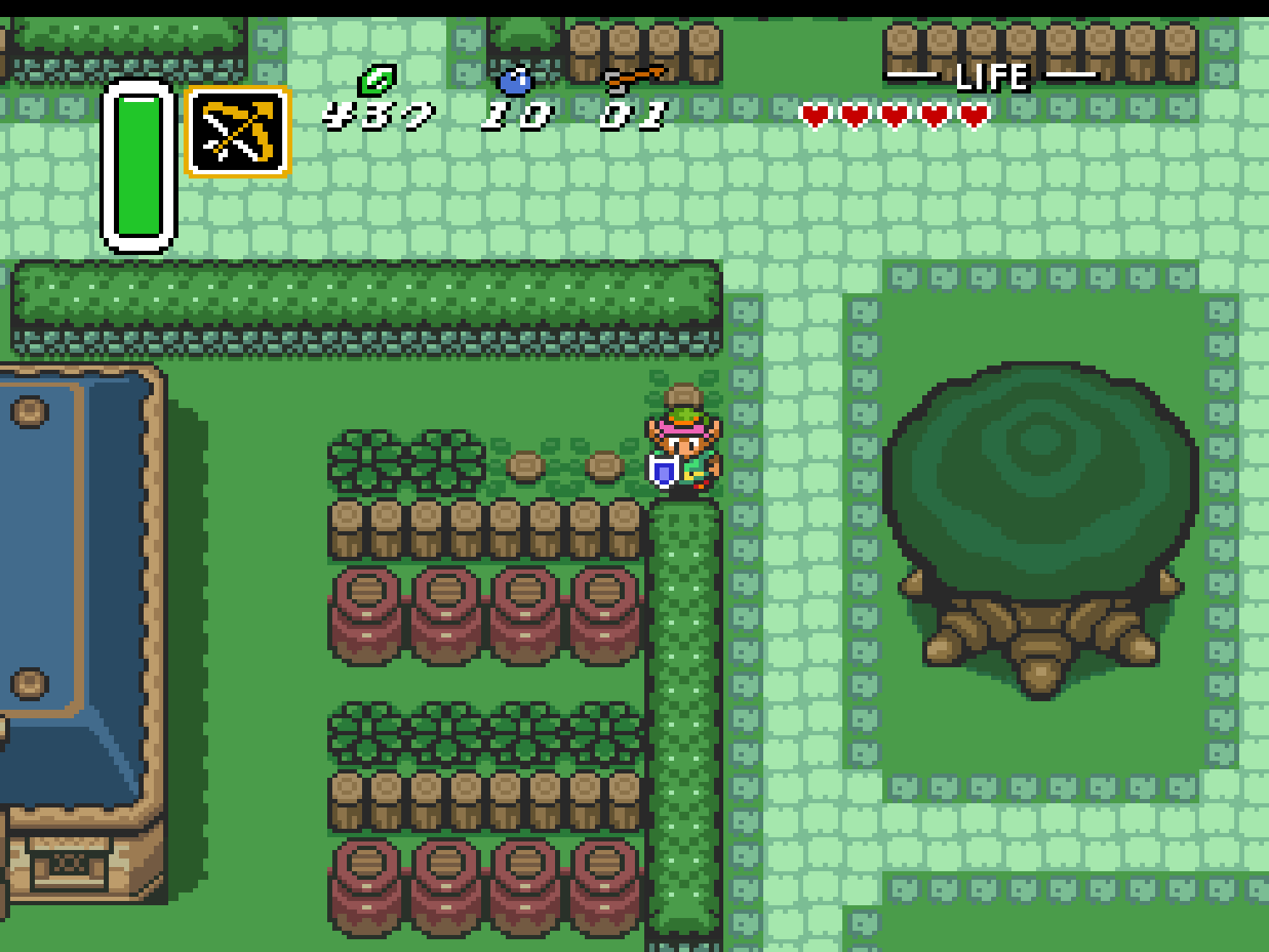
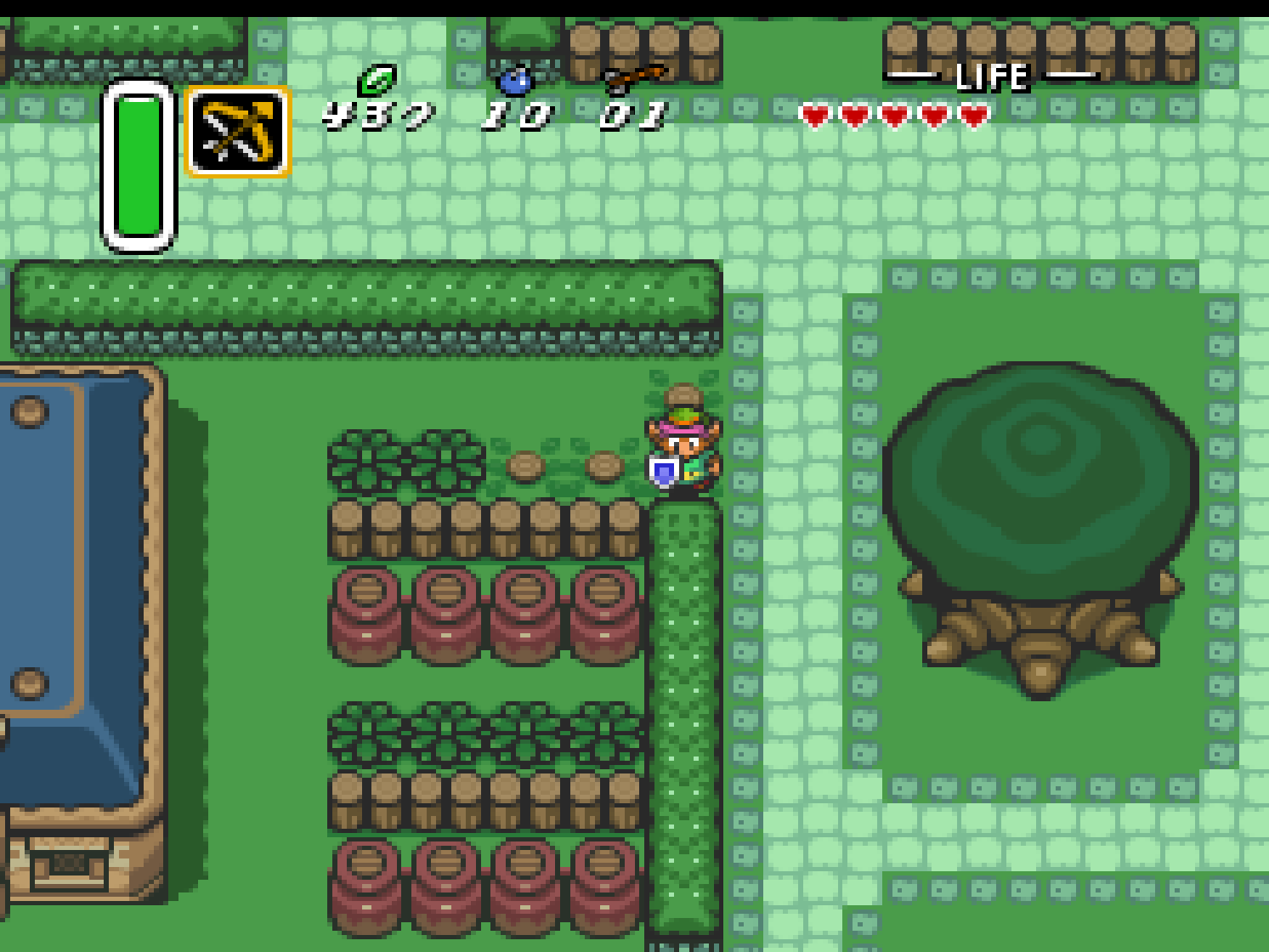
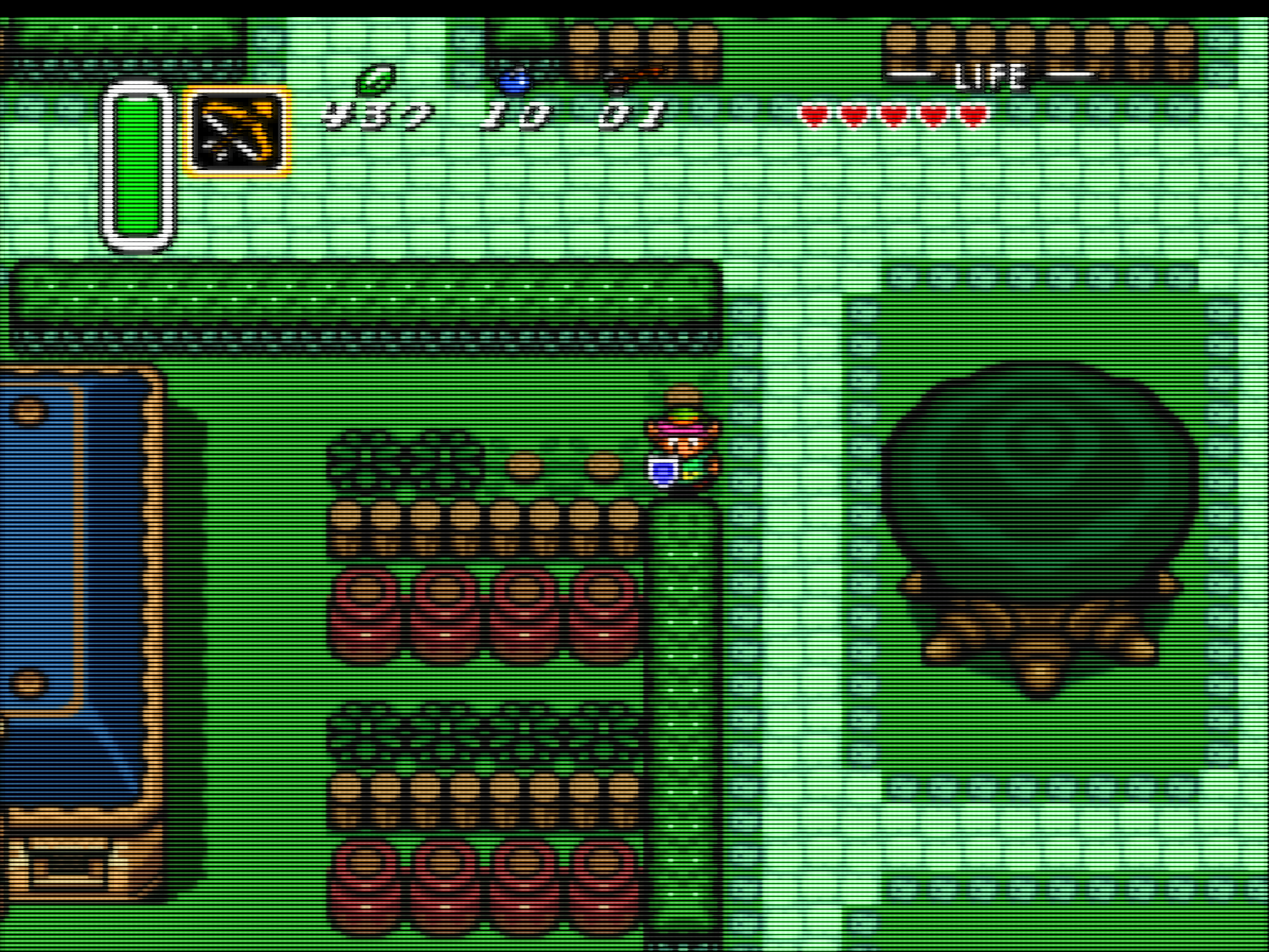
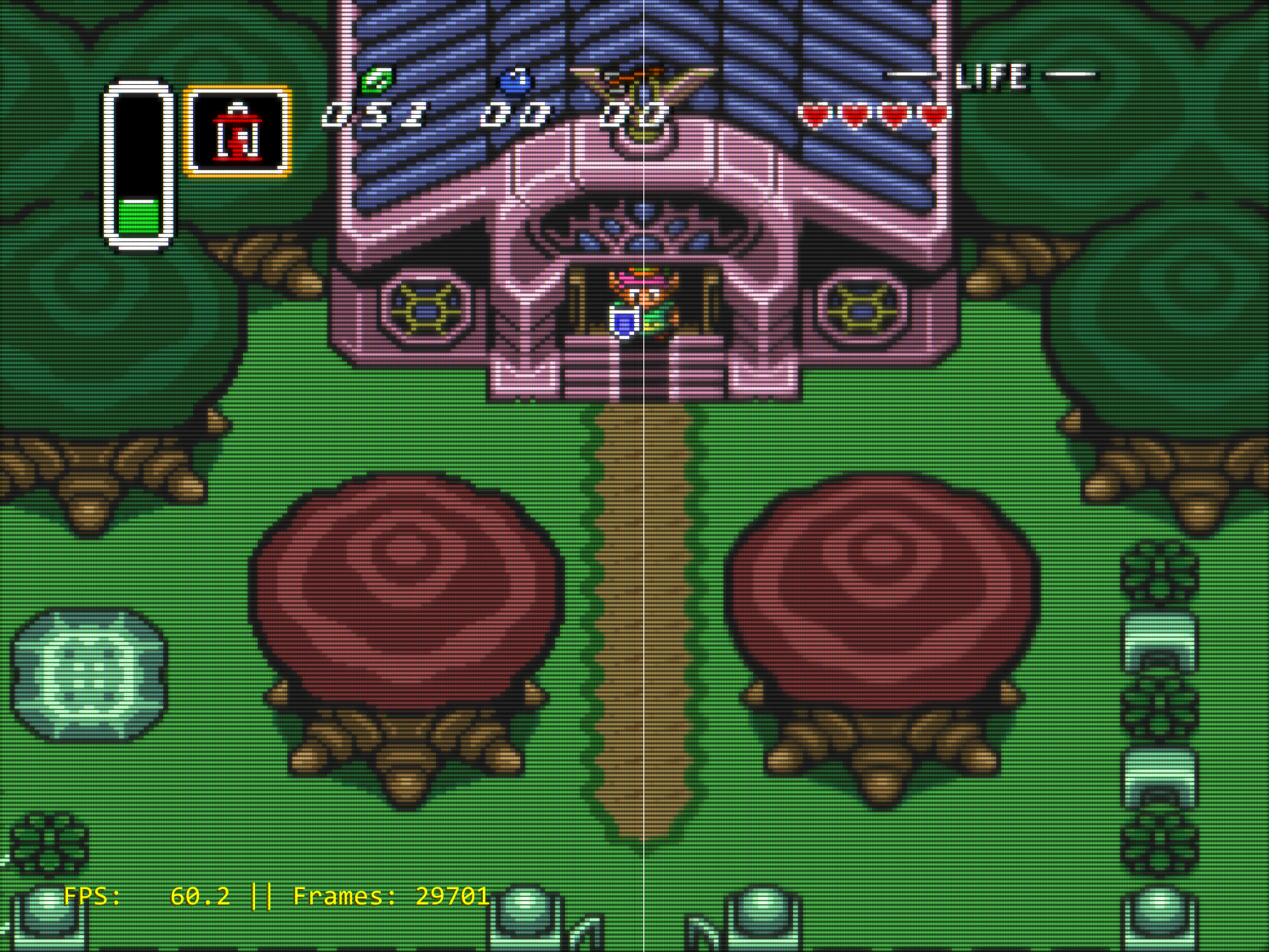
When i started playing with shaders, i did not really like the look of these upscale shaders. Then i noticed, that i don't have a problem with the low resolution, but the aliasing caused by the limited amount of colors these old machines could display. I decided to write my own AA-shader, that doesn't increase the resolution, but reduces the amount off jaggies and also blends dithering patterns:
Picture without shaders:
With AA-shader:
And i think it looks really good with a CRT-shader on top:
Here for example look at the roof of the building (left without AA-shader/ right with AA-shader):
Picture without shaders:
With AA-shader:
And i think it looks really good with a CRT-shader on top:
Here for example look at the roof of the building (left without AA-shader/ right with AA-shader):


Bonfires Down
Gold Member
Ok, interesting. Any examples of how it compares to a normal bilinear filter?When i started playing with shaders, i did not really like the look of these upscale shaders. Then i noticed, that i don't have a problem with the low resolution, but the aliasing caused by the limited amount of colors these old machines could display. I decided to write my own AA-shader, that doesn't increase the resolution, but reduces the amount off jaggies and also blends dithering patterns:
Picture without shaders:
With AA-shader:
And i think it looks really good with a CRT-shader on top:
Here for example look at the roof of the building (left without AA-shader/ right with AA-shader):
Last edited:
Haemi
Member
A bilinear filter increases the resolution by linear interpolation which results in a blurry image. My shader does not increase the resolution. It is searching for jaggies with a step size of up to 5 pixels and manipulates the pixels, so that there is a gradient transition just like with classic antialiasing. There are a bunch of different rules in the shader when it should be applied or shouldn't. It's not perfect, but imo there is more positive than negative to it.Ok, interesting. Any examples of how it compares to a normal bilinear filter?
nkarafo
Member
So you are using a real CRT TV then? Because these games don't look how they originally were without shaders, if you use a modern panel.I think am old school and like the look of how they originally were ,shaders look ok though just don't do it for me

phil_t98
#SonyToo
Am using a modern panel but still prefer the look without the shaders tbh, i have old school consoles to play them as well as the emulators and like i say my personal opinion is the original looks better to meSo you are using a real CRT TV then? Because these games don't look how they originally were without shaders, if you use a modern panel.

Soodanim
Gold Member
I might be offended by
 mild sriracha
's first Chrono Trigger screenshot and what the filter did to Crono (although I'm glad you like it, that's all that matters), but there's some quality shaders out there and I've enjoyed seeing all the examples so far. Good thread, I should get RA and post some of my own shots one day.
mild sriracha
's first Chrono Trigger screenshot and what the filter did to Crono (although I'm glad you like it, that's all that matters), but there's some quality shaders out there and I've enjoyed seeing all the examples so far. Good thread, I should get RA and post some of my own shots one day.
mild sriracha
's first Chrono Trigger screenshot and what the filter did to Crono (although I'm glad you like it, that's all that matters), but there's some quality shaders out there and I've enjoyed seeing all the examples so far. Good thread, I should get RA and post some of my own shots one day.
Last edited:
nkarafo
Member
When you say the original looks you mean how the original console looks on a modern TV, not how "they originally were" like you said in your previous post. Because originally, these games were supposed to look correct on a CRT with scanlines and all.Am using a modern panel but still prefer the look without the shaders tbh, i have old school consoles to play them as well as the emulators and like i say my personal opinion is the original looks better to me
I still have a CRT. That's how games looked on a CRT.Scanline shaders are the worst, yet some "purists" think that's how games looked on a CRT... Maybe if you put your eyes 5cm from the TV otherwise not.
One is a real CRT, the other is a CRT shader on a modern LCD.
Panel size doesn't change the fact.
phil_t98
#SonyToo
When you say the original looks you mean how the original console looks on a modern TV, not how "they originally were" like you said in your previous post. Because originally, these games were supposed to look correct on a CRT with scanlines and all.
I still have a CRT. That's how games looked on a CRT.
One is a real CRT, the other is a CRT shader on a modern LCD.
Panel size doesn't change the fact.
Again its personal preference, i like them untouched in how they look
nkarafo
Member
It's an interesting solution but i feel like it smudges the graphics a bit. Also, that CRT shader on the "before" example looks way too sharp.
That's fine. I'm just pointing out that "untouched" doesn't mean it's how they originally looked. These games were not intended to be seen as raw pixels on a modern panel. A lot of people still prefer that and that's great. But it's not the original look (like you imply in your first post).Again its personal preference, i like them untouched in how they look
Last edited:

Dr.D00p
Banned
There's always a focus on sprite based games but what about 3D polygon based games from say fifth gen consoles?
It is better to play at native res and apply a CRT shader or just downsample the game with no shaders applied?
There's something odd when applying a CRT filter in a polygon based game... I am using a slang shader from the preset folder img border kurozomi and the scan lines don't look that good.
You can make 3D games look 'modern' if you want.
PS1 games @2160p upscale can look nice, especially the few games with in-built Widescreen support, like Bloody Roar II. I use a Trinitron mask CRT filter...

The thing to remember is that these shaders can look very different on other peoples monitors, I have my CRT shaders set up specifically for my 4K monitor, so I don't know what they will like on lower res panels..


Wonko_C
Member
LCD/Plasma etc weren't widely available until my mid 20's. I was even still using a CRT during the first year of the Xbox 360.I have a legitimate question.
Did you guys use LCD, or CRT to play video games when you were teenagers ?
Haemi
Member
True. Thats a side effect of the low resolution. Every form of AA applied to low res images results in slightly blurry diagonal lines. And fine detail gets lost a little bit unless the game was designed with it in mind.It's an interesting solution but i feel like it smudges the graphics a bit.
Absolutly. It's an older version of a selfmade CRT shader on this image. But it's the same on both sides.Also, that CRT shader on the "before" example looks way too sharp.
phil_t98
#SonyToo
It's an interesting solution but i feel like it smudges the graphics a bit. Also, that CRT shader on the "before" example looks way too sharp.
That's fine. I'm just pointing out that "untouched" doesn't mean it's how they originally looked. These games were not intended to be seen as raw pixels on a modern panel. A lot of people still prefer that and that's great. But it's not the original look (like you imply in your first post).
Yeah each to their own. I don't like the way the colours and thing s look and how it looks after the filters. To others it looks good but am more old school


8BiTw0LF
Banned
There is only one "right" method to "upscale" sub-1080p: Pixel-perfect integer-ratio scaling with no blur (integer scaling) (tanalin.com)

Esppiral
Member
How far from the CRT? Also camera lens=\= human eye.When you say the original looks you mean how the original console looks on a modern TV, not how "they originally were" like you said in your previous post. Because originally, these games were supposed to look correct on a CRT with scanlines and all.
I still have a CRT. That's how games looked on a CRT.
One is a real CRT, the other is a CRT shader on a modern LCD.
Panel size doesn't change the fact.
nkarafo
Member
Obviously CRT TVs were smaller and the distance between us was usually larger.How far from the CRT? Also camera lens=\= human eye.
But if this is an issue, you can always scale the image at half of it's size and have some black borders around the screen or increase your distance.
Fact is, if you want the art to be authentic, a good CRT shader is the final graphics layer that brings all of it together. Developers made the graphics so when the CRT displays them, they appear as intended. It's like the final layer. Without it you just see the sharp, raw pixels that you weren't really supposed to see. These clean pixels are kinda like having a peak at the backstage area, if that makes any sense.
And that's the big issue with many indie developers. Most of them are young and probably never played old games on CRTs. Or they just don't remember them. So when they make those "Retro style" games, they go for the pixelly, sharp look. But that's not "retro", games didn't look that way back then. Not to mention 99% of people were playing them using composite or RF cables. A ton of games even take that into consideration, like how dithering patterns intentionally become new colors or transparencies with composite blending, that you completely miss if you use RGB cables or, let alone, modern panels + upscalers.
People do like their upscalers and their sharp, raw pixels. I get that. But that's just a preference and has nothing to do with authenticity or viewing the games the way the developers intended.
Last edited:

Alexios
Cores, shaders and BIOS oh my!
Surely if it looks so close up close then it also gives a similar effect when viewed from further away or in a smaller window (assuming enough resolution to render in this way).How far from the CRT? Also camera lens=\= human eye.
Noone's saying to glue yourself to your PC monitor to look at the cathodes' detail, just play normally and enjoy the final result giving a similar impression as back then.
Plz go check and give your exact settings plox cos stuff like "scanline type lottes" mentioned earlier doesn't help when scanline type is chosen between 0-1-2 and crt mask (iirc, whatever) has 3-4-5 or whatever attributed as lottes etc.I prefer the Guest-venom preset with some adjustments

I use some curvature, bloom for the bright pixels and a tiny bit of deconvergence to blend the colors a little and make it look more analog and less digital.

That said I only have 1440p monitor so might not be enough to render all the details it's said to be possible in 4K so I might not see much difference from what I said I use in my first page post I guess.
I think the only time I ever used upscalers like in the op was messing around with some hq2x or whatever stuff in ancient GBA emulators, heh.
Last edited:

VanEs
Member
I prefer the Guest-venom preset with some adjustments
I use some curvature, bloom for the bright pixels and a tiny bit of deconvergence to blend the colors a little and make it look more analog and less digital.
I had a very similar preset and you're right, it looks slightly better (still undecided on the curvature). But after updating Retroarch and its shaders pack that preset no longer worked. I'll try your filter and tweaks and make a preset out of it.
That said, CRT-Easymode is still a great fallback, or easy to use default for many 8 and 16 bit games if you don't like tweaking filter settings and just want to get on with it.
nkarafo
Member
I only use lottes (selection "3") when i'm playing arcade games because that's how an arcade monitor would look. Otherwise i'm just using the regular scanlines (selection "0" or "1")Plz go check and give your exact settings plox cos stuff like "scanline type lottes" mentioned earlier doesn't help when scanline type is chosen between 0-1-2 and crt mask (iirc, whatever) has 3-4-5 or whatever attributed as lottes etc.
That said I only have 1440p monitor so might not be enough to render all the details it's said to be possible in 4K so I might not see much difference from what I said I use in my first page post I guess.
I think the only time I ever used upscalers like in the op was messing around with some hq2x or whatever stuff in ancient GBA emulators, heh.
I only use a 1080p monitor. Pretty sure this shader was made with that resolution in mind because if i use my preset on my 4K TV, it doesn't scale the scanlines properly. There is an option though in the preset that fixes this.
Everything else is your preference. I use some bloom and change stuff around a bit until i'm happy with the result. I don't think posting my preset will help because i have no idea if the shaders are the same versions.
Last edited:

nkarafo
Member
IMO, the one thing you need to look in order to fix your preset is the text.
If you can, compare a real CRT with your result.
For example. Look at the text using default Easymode CRT shader:

The text looks very defined and you can clearly see the pixels. And look how sharp the black pixels around them are. Or how abruptly the "0" is cut in the middle. I think this looks closer to a high-quality computer monitor than a TV.
Here is my take:

Sure, it looks blurrier at that distance but if you go close to your CRT, it should look more like that. Text should look bright, bloomy, not as sharply defined and the pixels blend smoother together.
Though maybe it looks different on your CRT TV so dunno. But i think text is the hardest part to get right with CRT shaders.
If you can, compare a real CRT with your result.
For example. Look at the text using default Easymode CRT shader:
The text looks very defined and you can clearly see the pixels. And look how sharp the black pixels around them are. Or how abruptly the "0" is cut in the middle. I think this looks closer to a high-quality computer monitor than a TV.
Here is my take:
Sure, it looks blurrier at that distance but if you go close to your CRT, it should look more like that. Text should look bright, bloomy, not as sharply defined and the pixels blend smoother together.
Though maybe it looks different on your CRT TV so dunno. But i think text is the hardest part to get right with CRT shaders.
Last edited:

rodrigolfp
Haptic Gamepads 4 Life
OP is a sinner.