• Hey Guest. Check out your NeoGAF Wrapped 2025 results here!

Sony Bravia xbr4 gaming lag!

MaX_PL said:
you dont play FPS' or racing games i take it. FPS' are unbearable with game mode off. everything looks amazing with gamemode off, but when its on it looks crappy.

anyone know if theres a way to calibrate it under gamemode to improve PQ just a bit?

also i'm loving the interface and prentation on this tv, and absolutely love how you can have settings for each input; this is something my samsung does not have.

I have been playing some CoD4 with game mode on and the rest if the settings at fa Tory default, it looks fucking amazing. Besides that I have really only played ratchet & clank, simpsons, and SMG since getting the new tv. All have looked just amazing with game mode on.
 
play the game with gamemode on for 20 minutes and then make an immediate switch to it off.

you'll be surprised by how much better it plays and how much worse it looks.
 
Thaedolus said:
Out of any of the HD technologies I've seen, DLP by far looks the best. No ghosting, great black levels, inexpensive. I don't see why anyone dumping thousands of dollars into a TV would get anything else, except they do have a relatively bulky size. Not nearly like the old school RPTVs though.

viewing angle, viewing angle, viewing angle, viewing angle

Brimstone said:
Yes, but they aren't much worse. But who buys a big TV just sit off to the side? When you play a video game don't you sit dead center? If you watch a movie sit dead center as well? When I go to the movie theater, I try to sit in the middle always

A lot of people live in apartments or spaces where sitting at the perfect distance/height is not always feasible, much less when you have 5+ people over and can't begin to accomodate everyone at the "proper" viewing angle. I'd never buy a DLP for this reason alone - ever tried to sit on the floor and watch a DLP? It's god awful. They're great for small families or downstairs movie-rooms that you can always guarantee a straight on viewing angle for, but if you have any sort of variability in number of viewers or seating location they're really quite bad.
 
JB1981 said:
It's too bad that plasma phosphor lag didn't manifest in white colors or something because the yellow/green trails (especially with bright content) is soooo irritating. On par with DLP rainbows.

I think it's something you have to see firsthand

I *hate* lcd motion blur

I don't mind plasma green ghosting

Curiously, I haven't noticed the ghosting on my new plasma at all, I did on a previous model, shrug
 
Some of the DLP floor models at Circuit City didn't have noticable degraded quality when it comes to viewing angles. At least, I didn't notice any :p
 
CoG said:
I went from a Sony Trinitron SDTV to a 46" top of the line Samsung LCD. While I like the new set, having not seen a CRT in months I visited relatives yesterday with the same CRT as I used to have. Four things hit me, two bad, two good. First I noticed the CRT "whistle" as soon as I walked in the house, not everyone can hear it but it's annoying. Second I noticed the scanlines right off the bat, but after a half-hour my eyes filtered them out.

Ok for the good, the contrast absolutely blows *any* flat panel out the window. I'm talking all LCDs, DLP, and plasmas including the Pioneer Kuros. I swear I came home and my LCD seemed black and white in comparison and it's ANSI contrast is just short of 2,000, which is very high for a flat-panel. Second the motion is spot on. All flat-panel displays lag or blur in some manner or another. The CRT was rock solid the entire time (was playing Wii all day). It just made everything seem so much more solid.

IMO, all flat panel has going for it is size, resolution, and less bulk. I'm half tempted to go back to a CRT TV but my eyes are again used to the LCD and it's good enough, but PQ-wise a huge step back in every area but resolution and lack of scan lines.

People with CRTs, don't be in a rush to jump to flat-panel. Even the high-end plasmas are a downgrade in some regards. Just make sure you research and see them in person before you buy.


Damnit that's not what I wanted to hear.

I've got a Sony KD30XS955 HD CRT w/ the super fine pitch tube and apparently it and the XBR versions of Sony's CRT's are the king among displays. I want a Pioneer Kuro...like BAD..but the thing is I don't really have a viable reason to get one besides the upgrade in screen size. My TV is nice and nothings wrong with it besides like I said it's only 30''.
 
TEH-CJ said:
No sony hate man ( check my post history)

But i have all enhancements off and game mode on and yet it still lags more than my previous LCD ( hitatchi), it seriously is unplayable no matter what i do. Its Ironic that my hitachi with half of the specs of the bravia ( not to mention price...) outperforms it when it comes to lag.

its unnaceptable of a TV of this caliber and price to perform worse than a crappy old $1500LCD, it really is. Sure the PQ of the bravia looks phenominal ( boy does it look good) but when it comes to see it in motion, it fals flat on its face.


TEH-CJ, please post all your settings, like all of the sub setting as well?
 
Thaedolus said:
Out of any of the HD technologies I've seen, DLP by far looks the best. No ghosting, great black levels, inexpensive. I don't see why anyone dumping thousands of dollars into a TV would get anything else, except they do have a relatively bulky size. Not nearly like the old school RPTVs though.


You neglect to mention the crappy viewing angles. That, coupled with bulb replacement and the inability to wall mount kills any DLP desires for me.
 
ickingfudiot said:
viewing angle, viewing angle, viewing angle, viewing angle


A lot of people live in apartments or spaces where sitting at the perfect distance/height is not always feasible, much less when you have 5+ people over and can't begin to accomodate everyone at the "proper" viewing angle. I'd never buy a DLP for this reason alone - ever tried to sit on the floor and watch a DLP? It's god awful. They're great for small families or downstairs movie-rooms that you can always guarantee a straight on viewing angle for, but if you have any sort of variability in number of viewers or seating location they're really quite bad.


If you have surround speakers, you want to be dead center as well or close to is as possible.


DLP has excellent horizontal viewing angles. The vertical angles aren't great, but you would never have a guest sit on the floor unless you want to treat them like a dog!


The smaller the screen, the more concerned you need to be with the viewing angle. Since DLP screen sizes are so large, the issue is more or less moot. Even then the horizontal viewing angles are more or less the same as LCD displays.


With 5 or more people over with Plasma display in the room, the situation would be terrible, because the screen is so reflective. Any lights on will be reflected on the Plasmas screen. Who on earth is going to have a whole bunch of people over, then make the room pitch black, so you can actually get decent picture quality? Isn't the point of having people over to socialize? You aren't going to socialize in a pitch black room.


At least with LCD or DLP display you can have light in the room and not worry about reflections on the screen. Of course DLP is faster than LCD, and for video games thats important.
 
dlp ultimately fails in the minds of casual consumers because when they question employees with "DLP huh, now is thata LCD or Plasma?" - "Neither maam" is the response they get and the consumer moves ahead in search of a LCD or Plasma.

Brimstone said:
At least with LCD or DLP display you can have light in the room and not worry about reflections on the screen. Of course DLP is faster than LCD, and for video games thats important.

yeh and DLP is also only available in sizes of 50" plus which suck for gaming imo. anything over 26" sucks for gaming. competitive gaming that is.
 
I think DLP wins when it comes to Cost and Size. I would consider getting a Plasma or LCD for my bedroom for the saved space. For the living room, I want some bigass, kickass HDTV but I dont' want to blow a gross amount of money on it ($2,000+).

65" DLP HDTV = UNF UNF UNF
 
Brimstone said:
If you have surround speakers, you want to be dead center as well or close to is as possible.


DLP has excellent horizontal viewing angles. The vertical angles aren't great, but you would never have a guest sit on the floor unless you want to treat them like a dog!


The smaller the screen, the more concerned you need to be with the viewing angle. Since DLP screen sizes are so large, the issue is more or less moot. Even then the horizontal viewing angles are more or less the same as LCD displays.


With 5 or more people over with Plasma display in the room, the situation would be terrible, because the screen is so reflective. Any lights on will be reflected on the Plasmas screen. Who on earth is going to have a whole bunch of people over, then make the room pitch black, so you can actually get decent picture quality? Isn't the point of having people over to socialize? You aren't going to socialize in a pitch black room.


At least with LCD or DLP display you can have light in the room and not worry about reflections on the screen. Of course DLP is faster than LCD, and for video games thats important.

I live in a 3 br apartment. We regularly have 10+ people over to watch a movie, play Rock Band/Guitar Hero/what have you. We can't begin to fit enough seating for that many people, much less at an ideal angle for DLP.

Also, there's a ton of really high quality antiglare coated plasma screens these days if lighting is a problem.
 
DaCocoBrova said:
You neglect to mention the crappy viewing angles. That, coupled with bulb replacement and the inability to wall mount kills any DLP desires for me.


Well Mitsubishi has a Laser light source DLP coming out. The laser light is supposed to last for 120,000 hours.

The 52 inch model will be 8 inchs deep and wall mountable.


img61.gif
 
FTWer said:
TEH-CJ, please post all your settings, like all of the sub setting as well?

Ok here they are.

Colour tone: warm 2
Brightness: 69 ( RGB full range)
Picture: 80
Sharpness: 65
Cinema drive : Auto 2
Game/ text mode : On
Advanced settings : all off
 
TEH-CJ said:
Ok here they are.

Colour tone: warm 2
Brightness: 69 ( RGB full range)
Picture: 80
Sharpness: 65
Cinema drive : Auto 2
Game/ text mode : On
Advanced settings : all off

Strange, as long as you have the:
Noise Reduction: Off
MPEG Noise Reduction: Off
Than having the TV have more lag than an old Hitachi LCD makes no sense.

The TV set to Standard mode should also improve the handling better than Game mode.
 
I recently purchased a 40" KDL-S3000 and OMG, the picture is amazing after calibrating with my DVE DVD. All i had before was projection, my other HDTV is a 50" Samsung DLP and it just can't compete with the image this new set puts out, it's like discovering HDTV all over again for me.

I do have a question, this model allows me to control the amount of backlight on the screen, does this have any effect in the life of the screen? What level should io set it to?
 
I got an XBR4 a few weeks ago. At first I thought the blurring was terrible, but, like everyone else says, if you turn off all the advanced options and set game mode on it helps a lot.

I can only say that Mario Galaxy looks amazing, I haven't really played anything else since I got it, but I'm sure the PS3 and 360 look just as nice.
 
alterno69 said:
I recently purchased a 40" KDL-S3000 and OMG, the picture is amazing after calibrating with my DVE DVD. All i had before was projection, my other HDTV is a 50" Samsung DLP and it just can't compete with the image this new set puts out, it's like discovering HDTV all over again for me.

I do have a question, this model allows me to control the amount of backlight on the screen, does this have any effect in the life of the screen? What level should io set it to?

I just bought this set myself and I love it. I see some lag depending on the source but for PS3/360 use I have had zero problems. For example, I used Comcast's HD on demand service and ordered two free movies, Mask of Zorro and Lost in Space. Zorro was washed out, low detail, and I saw lag all over the place. Lost in Space was super clear, awesome color, and zero lag. It all depends on the compression of the source really.

I even looked in the instruction manual just now to see if Sony owns up to LCD lag and sure enough in the troubleshooting section it says that it is normal if during fast scenes your picture degrades but the blame is put on the quality of the source, which is true to a point.

Last night I tested Ridge Racer games on 360 and PS3 to see how well they handled the scenery going by at a good clip and I only saw tiny bits of lag when using nitrous around the really tight corners.
 
Xisiqomelir said:
Some people can see it, others can't. I can't see plasma phosphor lag, but I can easily see LCD screen-dooring.

I'm the opposite, stuff like phosphor lag and DLP rainbows drive me crazy. I still see lag with LCDs but anything plasma or DLP is completely unwatchable to me.
 
Xisiqomelir said:
Some people can see it, others can't. I can't see plasma phosphor lag, but I can easily see LCD screen-dooring.
Are you talking about projectors? If not, I'm very surprised at this, as LCDs have much smaller gaps between the pixels than most other technologies right now.
 
Victrix said:
I think it's something you have to see firsthand

I *hate* lcd motion blur

I don't mind plasma green ghosting

Curiously, I haven't noticed the ghosting on my new plasma at all, I did on a previous model, shrug
I used to own one and I couldn't even watch movies in the dark. My eyes were bleeding from the flashes.
 
Xisiqomelir said:
Some people can see it, others can't. I can't see plasma phosphor lag, but I can easily see LCD screen-dooring.

I've never seen SDE on an LCD screen. If anything, they're too perfect and exacerbate any artifacts in the source material.
 
andrewfee said:
Are you talking about projectors? If not, I'm very surprised at this, as LCDs have much smaller gaps between the pixels than most other technologies right now.


Not really.....LCD pixel fill is ~55-65% whereas DLP is 88% and LCOS is 90-92%


As far as inter-pixel gaps (SDE) LCD Rear Projection are the worst....
 
I've owned all three major types (LCD, Plasma, DLP) and have only kept the LCD.

I think it's a personal preference. My gf's brother owns a 50" plasma and loves it. I do have to admit the color on his set is awesome, but I still notice ghosting. :(
 
Bildi said:
A TV with legs?! Now I've seen everything.

:lol Saves you a couple bucks since you don't need a TV for the bedroom, it just follows you up there when you're done downstairs on the couch.

This is a really sharp TV. I didn't get to put it through the paces really, just saw Casino Royale on in, but it looked great. Looking to move out soon, whenever I get that settled, I'll be looking into the new TV for my new place at the same time. Gotta drag in one of my machines and hook it up to it first.

Forgot the link:
http://www.bestbuy.com/site/olspage.jsp?skuId=8457243&type=product&id=1184369167282
 
People should buy what they want. Simple as that. Just like you'll never see me touch a DLP or rear projection ever again. I don't care how much much improved they get. They still don't mesh well with what I have in mind so flat panel is it.
 
Brimstone said:
DLP has excellent horizontal viewing angles. The vertical angles aren't great, but you would never have a guest sit on the floor unless you want to treat them like a dog!
I game from the floor, so that's a dealbreaker straight off the bat.
 
inpHilltr8r said:
I game from the floor, so that's a dealbreaker straight off the bat.


Thats great! It's a freemarket society and people can choose how they want to spend their money.


But facts are facts, and for the frugal gamer, DLP can be a compelling option.
 
Kleegamefan said:
Not really.....LCD pixel fill is ~55-65% whereas DLP is 88% and LCOS is 90-92%


As far as inter-pixel gaps (SDE) LCD Rear Projection are the worst....
what about silk screen effect? that shit sucks
 
DLP hate is unwarranted! I was playing Assassin's Creed on this 65" DLP HDTV and wow just wow. No blurring and killer black levels on a massive screen! All of this on a 80lb set. Sure you can't hang it on a wall but its fucken SWEET :D
 
The problem is Texas Instruments isn't directly involved in the home consumer electronic market on the same scale like a Sony or Panasonic. Most people when they shop think I'm going to get a Sony TV, and don't worry about it being LCD or CRT.


On top of that, the marketing of the word "flatpanel" has been amazing. Worry about how flat the display is, not motion blur (LCD tech) or you can't use display in a room with some sunlight in it (Plasma tech). Nevermind your going to rest it on a display stand thats going to be 20 inches deep anyway.


DLP is 1000 times faster than LCD or Plasma. Yeah just like that OLED tech that is starting to make headlines, but it's available today. Although OLED is still going to suffer from the sample and hold effect just like LCD's. Throw around numbers like 120hz and create some fancy names for the bells and whistles. At all costs, keep reminding people the display is "thin", and they won't notice the emperor has no clothes.


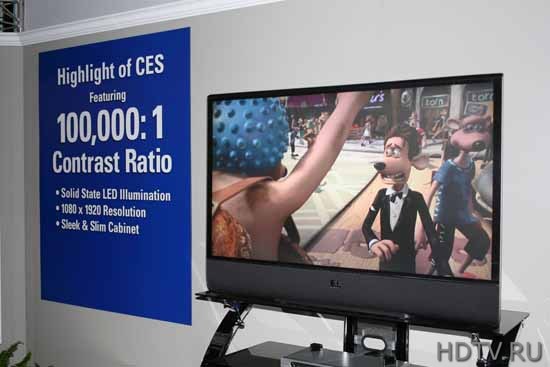
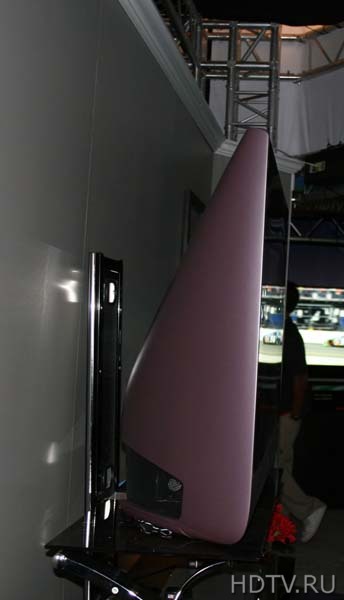
The latest generation of LED DLP comming out next year is going to be 12 inches deep and have a 100,000:1 contrast ratio. That's 5 times greater than a Pioneer Kuro. You don't have to worry about burn in or brightly lit rooms. No phosphor lag, because it's just LED light reflected of the mirrors of the DLP chip.

546_texas.jpg


547_texas2.jpg


3918-3.jpg
 
The 65" one is 22 Inches deep so thats definitely a dramatic reduction

Also, the viewing angle issue is way overblown (or this line of DLP is the exception). The way the seats are arranged in the room with this TV, you'll be sitting directly in front or directly from the side. There absolutely no dimming when watching it from the side. Though there is a perceptible dimming when it comes to vertical viewing angles though.
 
Brimstone said:
DLP is 1000 times faster than LCD or Plasma.

This is a lie. Plasma has no latency while DLP in fact does. And the only way I'd consider the new DLP's coming out is if they didn't suffer from SSE, which is HORRIBLY distracting.
 
so much BS has been spewed in this thread


I have NEVER experienced lag or ghosting with the XBR4, and have spent a lot of time to really look for

and I have played tons to FPS and racing games to test this out


as far as game mode needing to be on, that's another BS statement, all game mode really does is turn off "motion enhancer" which I already leave off anyway. Game mode does look worse when it's on anyway


and gaming/HDTV/Blu-ray looks absolutely amazing on this set
 
my brother's Samsung DLP had the bulb die within the first year. Best Buy came out and replaced it for free but it kind of scared me off DLPs. I don't know if it was a fluke thing/defective bulb or thats just the norm.
 
Ninja Scooter said:
my brother's Samsung DLP had the bulb die within the first year. Best Buy came out and replaced it for free but it kind of scared me off DLPs. I don't know if it was a fluke thing/defective bulb or thats just the norm.

I'm kind of scared about this also since Lamp replacement seems to be common among DLPs (in short amounts of time). Fortunately theres a 1 year Warranty for Lamp Replacement (Toshiba will send you a new Lamp) and the Lamp Bracket in this particular Toshiba DLP is made to be replaced by consumers (they send you a Cage with the Lamp and you unscrew the old Lamp Cage and screw in the new Lamp). A Lamp will run you (quick look Online) $250.

Which is funny since Circuit City offered me a 1 year warranty for $250 which essentially equals out to the price of a Lamp :lol
 
On my 37" Samsung, I turn on game mode, and then set my 360's gamma level to intermediate or whatever. Takes enough of the washed out look out of the pic, but also doesn't seem to lag terribly (I also put the HDMI black level on black).
 
i took back my xbr4 tonight. the amount of motion blur, smearing, darkening of the picture things move and trails behind black objects is not worth the price. there is some lag but even games like hottest party were playable although it's hard to get perfect steps.

lcd just isnt up to par yet and probably wont be for years.

plasma on the other hand looks a lot closer to crt quality than lcd. there is still some slight blur but far, far less than lcd. phosphor lag sucks but isn't too bad. crts have the same effect but to a lesser degree and since the picture remains sharp and the phosphor lag clears up very quickly you end up with a much clearer picture than you would get on an lcd. if your looking for a tv 42" or bigger get a plasma. you'll be getting a much better screen.


Sony XBR4
(motion enhancer is 120hz)
120hz.jpg

motionblur2.jpg


Panny Plasma
60hzplasma.jpg

1plasma.jpg


I got an XBR4 a few weeks ago. At first I thought the blurring was terrible, but, like everyone else says, if you turn off all the advanced options and set game mode on it helps a lot.

I can only say that Mario Galaxy looks amazing, I haven't really played anything else since I got it, but I'm sure the PS3 and 360 look just as nice.

game mode causes quite a bit more motion blur than using the normal settings. all game mode does is decrease the lag between controller and screen action. the actual quality of the picture suffers as a result though.

mario galaxy does look good on the xb4s for some reason though. however go try something like dead rising and be ready to puke.

i took pictures of the various modes on the xbr4 to show how they handle motion. having only the motion enhancer on is the best but for some games like paper mario or other 2d images it causes too many artifacts making stuff look ugly.

xbr4blur.jpg
 
Well done big_z! Being that I'm literally 2 or 3 days from buying a new set this is the type of feedback I'm wanting - and I was leaning very heavily toward the XBR4.

Question about blurring, your shots make this look very apparent on LCDs, but I currently have a Grand Wega III (projection LCD) and I don't see any of the stuff your screen shots indicate - is blurring a flat panel LCD thing or an LCD thing in general?

!
 
Top Bottom