• Hey Guest. Check out your NeoGAF Wrapped 2025 results here!

Sony PSN Network connectivity Issues

I thought you could play games while downloading? Design is half way done but I can't play

Edit: this is wierd I just started downloading contrast and it says contrast is ready to install but not resign?
 
I had two friends that got in no problem. However It took me 45 minutes to an hour. But after that been able to sign in and out with out a hitch.
 
My problems seem to be gone since this morning. Everything is working. Played some COD Ghosts online. Can see Friends and What's New without issue. (Toronto/Canada)
 
I just fixed my problems logging into PlayStation network! I had never turned my system off since first trying to login last night. When I went to bed I left it in standby mode. This morning I tried powering it completely down. Then I turned it back on. When I tried to log into the network everything worked fine I'm up and running now. Good luck to the rest of you.
 
I'll cut to the chase. I'm in safe mode and it won't recognize my update file on the two USB sticks ive tried. I've checked over the file names and they are right. Why isn't it able to find the update on my stick? It keeps saying it cant find it.

I'm using UPDATE
PS4UPDATE.PUP
 
I'll cut to the chase. I'm in safe mode and it won't recognize my update file on the two USB sticks ive tried. I've checked over the file names and they are right. Why isn't it able to find the update on my stick? It keeps saying it cant find it.

I'm using UPDATE
PS4UPDATE.PUP

Is it in the right folders?
 
keeps telling me that the service is undergoing maintenance when I try to download games from PSN :(

edit: oddly I had no problems downloading the system update or setting up my profile on the PS4, I just can't do anything else now...

edit 2: I can queue up downloads from the web store and then they work :)
 
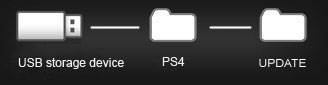
I stuck PS4UPDATE.PUP inside of UPDATE

ps4_pc_update_clip_diagram_us.jpg


Like this?
 
I'll cut to the chase. I'm in safe mode and it won't recognize my update file on the two USB sticks ive tried. I've checked over the file names and they are right. Why isn't it able to find the update on my stick? It keeps saying it cant find it.

I'm using UPDATE
PS4UPDATE.PUP

USB Drive formatted to FAT32? Don't think PS4 will recognize NTFS.

EDIT: Unless you've replaced the hard drive, you only need the ~300MB file.
 
I was stuck for quite a while on "Please Wait"... if it helps, I finally got around it by backing out and doing "Restore Default Settings" from the Initialize menu in the Settings section. When I tried again to log in to PSN, I was able to get to all of the initial sets of screens where you choose privacy options and such.

I hit another "Please Wait" roadblock right before I got to the screen where you are prompted to set your PS4 as the primary one for your PSN account. At that point, I hit the PS button on the controller, selected the "log out" option, logged back in, and gave it another go. That brought me to the "set your primary PS4" screen successfully, and after that, I was off to the races (downloading Resogun now)

Hope that helps!

 
Got my PS4 this morning but downloading the 300 MB update would take 3 hours. I'm doing the thumb drive update then.
 
Got my PS4 this morning but downloading the 300 MB update would take 3 hours. I'm doing the thumb drive update then.
Downloading the update was fast even though PSN sign in is wonky. It was 60% done by the time I finished setting up the console.
 
I was stuck for quite a while on "Please Wait"... if it helps, I finally got around it by backing out and doing "Restore Default Settings" from the Initialize menu in the Settings section. When I tried again to log in to PSN, I was able to get to all of the initial sets of screens where you choose privacy options and such.

I hit another "Please Wait" roadblock right before I got to the screen where you are prompted to set your PS4 as the primary one for your PSN account. At that point, I hit the PS button on the controller, selected the "log out" option, logged back in, and gave it another go. That brought me to the "set your primary PS4" screen successfully, and after that, I was off to the races (downloading Resogun now)

Hope that helps!

Yes, this is what I did also. I think people should do this rather than restarting the system.
 
Is Battledield 4 multiplayer working for anyone? I am signed in and can connect to Killzone mp, but it keeps saying that I must sign in to EA's servers for BF4. Is it working for anyone?


Edit: Nevermind! The application data wasn't installed. I had to quit the game and go back in for it to install
 
My error message is NW-31485-1. Anyone else getting this one?

Keep getting "Please wait" and "Cannot connect to the Internet." Haven't been able to connect at all.
 
Stuck on please wait. I'll get kicked every 5 mins getting a range of different error messages.

Not too worried. I'm going to try a few more times, if not, just rock some singleplayer.
 
I've been trying for an hour (Florida) and I have nothing. I don't even have an account so this is the first thing I want to do. I got to the point (after 45 minutes) where it asked the Language, Country, and DOB. When I hit enter it said that Sony is doing Maintenance. Dirty Rotten Puppies!
 
Stuck on please wait. I'll get kicked every 5 mins getting a range of different error messages.

Not too worried. I'm going to try a few more times, if not, just rock some singleplayer.

But can you make save games without signing in to an account? I don't want to have to log in as "User 1 or 2" every time.
 
But can you make save games without signing in to an account? I don't want to have to log in as "User 1 or 2" every time.

You can edit the name of an account. Even though I can't connect to PSN, I changed the user account name from "User 1" to "Dredguno" (my PSN ID).

You can link your PSN ID (in your case, create a new one when it asks you to link it) later.
 
I can sign in and out without any issue. I can even modify my account info. My wife who got home about an hour ago can't do her initial sign in where it links the psn account to the profile. We get the maintenance message or just an error. If I had known this was going to happen, I would have signed her in myself earlier but I thought she would want to do it herself.
 
Just plugged mine in and it downloaded the update in about 5 minutes. Install is currently at 67% and going smooth.
 
Anyone else getting kicked out of games straight to the dashboard? (games arent crashing since you can just go right back in...) but it seems to happen whenever the PSN Maintenance pops up... is there a way to stop it from kicking out of games?
 
The only game that I wanted (BF4) and got from target promo and I cant even play it online. Great.

80M PS3s can connect to PSN but not ~500k-1M PS4 users...ok.
 
The only game that I wanted (BF4) and got from target promo and I cant even play it online. Great.

80M PS3s can connect to PSN but not ~500k-1M PS4 users...ok.

Totally different PSN server, new :P

So much for me going all digital right now..lol got my ps4 2 hours ago.. have not been able to connect.
 
Downloaded contrast, but apparently it downloaded it multiple times? And when I try to install it just says "installing application" and sits there..
 
Top Bottom