• Hey Guest. Check out your NeoGAF Wrapped 2025 results here!

Steam In-Home Streaming and Steam Link thread

I have this weird issue since last week where my controller buttons are all messed up. Right of the bat, the start button also triggers RT, pressing B also registered a A-buttonpress, etc. Playing directly on my PC it's fine, just streaming messes things up. Nothing has changed this week in terms of hardware, software or updates.
I'm running steam OS on my client, the server is a win10 machine.
 
Haven't read completely through this thread but was curious if anyone had tried playing racing or fighting games yet(sfv, grid, etc)? I don't intend to do any online multi-player, just single player and local versus. I have an old g25 that I've been dying to use but not enough space to use it with my pc. Also I've been using x360ce with my fight sticks and haven't had any problems so far. My host:
Windows 10, i7-4970, 16gb, gtx980.
Client: tv
I have a 5g router for connection. Depending on what you guys say I could pick it up sometime soon but wanted to know if it worth it.
 
I have this weird issue since last week where my controller buttons are all messed up. Right of the bat, the start button also triggers RT, pressing B also registered a A-buttonpress, etc. Playing directly on my PC it's fine, just streaming messes things up. Nothing has changed this week in terms of hardware, software or updates.
I'm running steam OS on my client, the server is a win10 machine.

I had this same problem last week when streaming The Division. I was able to get it working right again by choosing Windowed instead of Fullscreen for video settings.
 
Does Steam Link only work with screen mirroring (same as Steam In Home streaming)?

My gaming computer is in my living room. My wife uses it to watch movies and stuff. I was hoping I could use Steam Link so I could play games on a screen which is in my bedroom. I tried in home streaming but then realized it only worked with screen mirroring which means my wife couldnt watch movies that way.

Would Steam Link work or is it just screen mirroring as well?

Any other solutions?
 
As someone who finally got one of the Steam Link this week. Since day one how much better has the product improved? I am just curious as I now have one and I am wondering if Valve's ongoing work on the streaming tech is actually making a difference.
 
Since Steam Link streams the desktop, is it possible to stream Xbox stuff....say Quantam Break or Gears of War? I have an Xbox 360 controller I can use.
 
Since Steam Link streams the desktop, is it possible to stream Xbox stuff....say Quantam Break or Gears of War? I have an Xbox 360 controller I can use.

It is possible, I found that there was WAY too much input lag. It could work for non-reflex based games, but anything else you'll just be frustrated.
 
Since Steam Link streams the desktop, is it possible to stream Xbox stuff....say Quantam Break or Gears of War? I have an Xbox 360 controller I can use.

You mean like Xbox One games? Can't you just stream from XB1 to Windows 10 natively?

If you mean non-steam games, yeah, it should work fine. Just add them as non-steam games to steam. I've played Need for Speed High Stakes this way.
 
You mean like Xbox One games? Can't you just stream from XB1 to Windows 10 natively?

If you mean non-steam games, yeah, it should work fine. Just add them as non-steam games to steam. I've played Need for Speed High Stakes this way.

I mean the PC versions of QB, Gears and future Microsoft games.
 
You can stream Win10 store games like Gears but since they don't launch through steam (and I don't know an easy way to do so since Win 10 apps aren't programs you can add to steam as 3rd party apps) you can NOT use the 360 pad. Steam automatically puts mouse emulation on the gamepad when running anything 2 degrees seperated from steam.

You can easily start Gears or any Win 10 app over the Steam Link by using "minimize to desktop" and then launching them. At that point your gamepad no longer works as a gamepad. They changed that a couple months ago and it's a really dumb solution IMO (I'm sure there super good reasons but in reality this has only made it worse for me.)
 
I have just purchased 2 powerline network adapters (not for streaming, but I was wondering if it would work).
- Tested file-copy and was at about ~2MB(ytes)/s through 2 routers from one building to another (probably different phases).
- The position I'd put the Steam Link would be routerless direct connection through the powerline adapters.
- I couldn't test bandwidth from where I'd use the steam-link (because for some reason I wasn't able to figure out right that moment, I couldn't log-in from my 7 year old notebook), but tested ping for latency and got a lossless average of 3ms lag with a maximum of 5ms.
- I can't test Steam in-home streaming with that old notebook (no hardware decoding).

In other words probably a low bandwitdh (not sure though, could be same-phase and then speed of up to 6MByte/s, but let's stick to 2MB/s as worst-case), but also low latency connection.

Do you think Steam Link would work?
 
I have just purchased 2 powerline network adapters (not for streaming, but I was wondering if it would work).
- Tested file-copy and was at about ~2MB(ytes)/s through 2 routers from one building to another (probably different phases).
- The position I'd put the Steam Link would be routerless direct connection through the powerline adapters.
- I couldn't test bandwidth from where I'd use the steam-link (because for some reason I wasn't able to figure out right that moment, I couldn't log-in from my 7 year old notebook), but tested ping for latency and got a lossless average of 3ms lag with a maximum of 5ms.
- I can't test Steam in-home streaming with that old notebook (no hardware decoding).

In other words probably a low bandwitdh (not sure though, could be same-phase and then speed of up to 6MByte/s, but let's stick to 2MB/s as worst-case), but also low latency connection.

Do you think Steam Link would work?

If you can get up 15Mbps or higher you should be fine. I'm using powerline from host to router, and 5ghz wireless to steamlink, I typically get between 18Mbps and 30 and it works well. I have it set to "Balanced" for quality, and enabled resolution shifting.
 
If you can get up 15Mbps or higher you should be fine. I'm using powerline from host to router, and 5ghz wireless to steamlink, I typically get between 18Mbps and 30 and it works well. I have it set to "Balanced" for quality, and enabled resolution shifting.
Thanks!
So my worst case ~2MB/s would translate to 13-19Mbps in Bits, which would be on the very low end then... hmm...

Maybe I'll buy it and just try it. If it doesn't work at all, I can send it back, but maybe I can optimize by putting the fuse for that socket onto same phase. (or 720p gaming :// )
 
Thanks!
So my worst case ~2MB/s would translate to 13-19Mbps in Bits, which would be on the very low end then... hmm...

Maybe I'll buy it and just try it. If it doesn't work at all, I can send it back, but maybe I can optimize by putting the fuse for that socket onto same phase. (or 720p gaming :// )

Yeah, you're somewhat on the low end there with ~16 Mbits/s. However, with this application, it's not so much the bandwidth (30 Mbits/s is enough for a great quality stream), but more the consistency and latency. As long as it's stable, you should have a nice time. The whole system is limited to 1920x1080 resolution anyway, so 720 is not the end of the world in my opinion.

If you can get a Windows PC at each end of the network, you can test bandwidth very easily with LAN Bench or similar. If you're using *nix you can use netperf.
Also remember that if you have these two computers, you can just try Steam In Home Streaming without having to buy a Steam Link. There's decent debug info you can turn on during the stream to which reveals most problems.
 
Yeah, you're somewhat on the low end there with ~16 Mbits/s. However, with this application, it's not so much the bandwidth (30 Mbits/s is enough for a great quality stream), but more the consistency and latency. As long as it's stable, you should have a nice time. The whole system is limited to 1920x1080 resolution anyway, so 720 is not the end of the world in my opinion.

If you can get a Windows PC at each end of the network, you can test bandwidth very easily with LAN Bench or similar. If you're using *nix you can use netperf.
Also remember that if you have these two computers, you can just try Steam In Home Streaming without having to buy a Steam Link. There's decent debug info you can turn on during the stream to which reveals most problems.


Thanks for all the help, everyone.
Had to do some tinkering on my super old notebook, but got a PC-to-PC connection via the powerline network adapters:
steamlinkspeedtestl7u61.png

Guess that means plugging in the powerline network adapter into the socket with a network cable across the room my gaming PC is in (edit: 3.22MB/s translates to 25.76Mb/s, the closer but slower socket with 1,74MB/s would be ~14Mb/s) ...and only when I want to play via Steam Link. Not a great solution, but probably better than 720p gaming.

[also tried Steam streaming, and... super ugly with framerate jumps from 3 to 59 with the warning "slow decode", which means that my super old notebook is no steam-link replacement]
 
Got my Steam Link yesterday, works like a charm on the powerline network adapters (not from the socket I wished it would, but whatever).

Question:
All games I've tried work at 1080p/60fps on balanced with minor input lag that is ok with most games, BUT Assassin's Creed Syndicate (normally average of 59fps with my settings) runs between 25 and 35 fps. Is it like that with games I haven't bought on steam but just added to the library? The Crew - also uPlay, but bought via Steam - works without a problem...
I'm asking because I'd like to buy The Witcher 3 and maybe Rebel Galaxy on GOG instead of Steam (just to encourage devs to keep releasing new games on DRM-free platforms).
 
I just got a Steam Link, and I've searched on the steam forums, around reddit, and I can't find an updated answer for this, so I apologize if this has been asked before me.

I'm on a Mac, with dual monitors, and the Steam Link, when any game is launched (windowed or full screen) shows both monitors. The second monitor will be a black rectangle and the main monitor will be full screen, but the problem is that because it shows both monitors, I can hardly see anything going on.

Short of pulling the plug on my second monitor every time I want to use the Steam Link, how can I get it to just show the main display through Steam Link? I found a post 5 months ago from a Valve employee that made it sound like they were going to add this feature of only showing one monitor through Steam Link, but that was over 5 months ago and I can't find anything more current. Is there a setting I'm missing in either the Steam client or on the Steam Link?

Or, is this just for Windows, and Mac users continue to get the shaft on Steam support?

 
I'm on a Mac......
I hope you don't mind using Bootcamp because it's useless under OSX. Every now and then I try it and see that they've made some tiny progress but there's not a single feature that works correctly or reliably. Inevitably I boot into Windows and suck it up.
Sorry but I don't have dual monitors so can't address your specific situation.
 
PSA: Blizzard's Hearthstone works through Steam Link with an Xbox One controller, no fuss whatsoever. It's plug and play.

It's basically Hearthstone on console and it's awesome.
 
I just got a Steam Link, and I've searched on the steam forums, around reddit, and I can't find an updated answer for this, so I apologize if this has been asked before me.

I'm on a Mac, with dual monitors, and the Steam Link, when any game is launched (windowed or full screen) shows both monitors. The second monitor will be a black rectangle and the main monitor will be full screen, but the problem is that because it shows both monitors, I can hardly see anything going on.

Short of pulling the plug on my second monitor every time I want to use the Steam Link, how can I get it to just show the main display through Steam Link? I found a post 5 months ago from a Valve employee that made it sound like they were going to add this feature of only showing one monitor through Steam Link, but that was over 5 months ago and I can't find anything more current. Is there a setting I'm missing in either the Steam client or on the Steam Link?

Or, is this just for Windows, and Mac users continue to get the shaft on Steam support?

I have dual monitors and things work perfectly in Windows (only streams primary monitor).
You will always be a 2nd class citizen when it comes to gaming on a Mac. The machine and the OS just aren't built with gaming in mind so developer support is lacking.
 
I just got a Steam Link, and I've searched on the steam forums, around reddit, and I can't find an updated answer for this, so I apologize if this has been asked before me.

I'm on a Mac, with dual monitors, and the Steam Link, when any game is launched (windowed or full screen) shows both monitors. The second monitor will be a black rectangle and the main monitor will be full screen, but the problem is that because it shows both monitors, I can hardly see anything going on.

Short of pulling the plug on my second monitor every time I want to use the Steam Link, how can I get it to just show the main display through Steam Link? I found a post 5 months ago from a Valve employee that made it sound like they were going to add this feature of only showing one monitor through Steam Link, but that was over 5 months ago and I can't find anything more current. Is there a setting I'm missing in either the Steam client or on the Steam Link?

Or, is this just for Windows, and Mac users continue to get the shaft on Steam support?


My googlefu is poor right now. But I am sure they added an option to the steam client or somewhere to select which monitor gets streamed. I had the problem a few times on windows and I believe they updated the client to allow you to select the monitor.
 
Thanks for the responses, all.

The two things that really bug me is first off, it's now been several weeks since I tried to contact support to find out about these issues, and I've not heard back yet. And, secondly, they're selling this for Mac and Apple users, so it should work properly. Or, just don't sell it to us. It's frustrating.
 
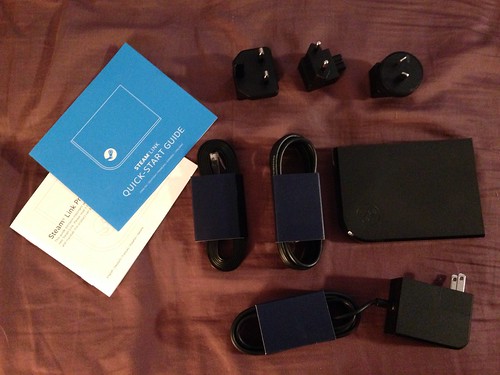
Do all Steam Links come with international power supply adapters? It looks like the cheapest way for me to get one in my country is from amazon (amazon global is shipping them internationally) but I'm not sure if I order from USA Amazon that it will come with a 220v adapter.
 
Do all Steam Links come with international power supply adapters? It looks like the cheapest way for me to get one in my country is from amazon (amazon global is shipping them internationally) but I'm not sure if I order from USA Amazon that it will come with a 220v adapter.

AFAIK, yes:
21605478253_cba6ab3bea.jpg
 
Has anyone tried the move nav controller with the steam link? I tried playing ME3 with the controller mod and it just wasn't ideal for me. I tried with the Steam controller and grew frustrated since I'm still not accustomed to it so I used half the steam controller and a mouse.

I've read of people using the move NAV controller, but not via the steam link.
 
is the color slightly off for everyone when using their steam link?

i'm using powerline connectors from my desktop to my pc. everything runs great, but on my downstairs tv all of the colors are off

edit - samsung tv if that matters
 
is the color slightly off for everyone when using their steam link?

i'm using powerline connectors from my desktop to my pc. everything runs great, but on my downstairs tv all of the colors are off

edit - samsung tv if that matters

Is your host using AMD graphics? If so go into AMD Catalyst Control Center and under Video/Color change Use Video Player Settings to Use AMD Settings.
 
Used In-Home Streaming at a party last week.

Didn't even know about the feature. Just saw the "Stream" option while I was setting up my laptop for the party.

Worked flawlessly the whole night, even with 4 controllers. Such a nice, cool feature.
 
Is your host using AMD graphics? If so go into AMD Catalyst Control Center and under Video/Color change Use Video Player Settings to Use AMD Settings.

no i use an nvidia 980ti

everything else on the tv connect locally looks great - ps4, framemeister and a bunch of retro systems, etc...

just the steam link colors look really off. over saturated or something. the game that highlights it the worst for me is witcher 3
 
no i use an nvidia 980ti

everything else on the tv connect locally looks great - ps4, framemeister and a bunch of retro systems, etc...

just the steam link colors look really off. over saturated or something. the game that highlights it the worst for me is witcher 3

On, over saturated? That's a weird one, all googling comes up with underaaturated. Try checking for limited or full RGB settings on the TV or renaming the input to PC since it's a Samsung.
 
On, over saturated? That's a weird one, all googling comes up with underaaturated. Try checking for limited or full RGB settings on the TV or renaming the input to PC since it's a Samsung.

i guess i am not sure of the definition, under saturated makes sense. the colors all sort of blurred together, reds don't look red, greens dont look green, etc... basically looks terrible

i've tried both rgb full and limited, no difference. i've also tried enabling and disabling hardware encoding, which also made no difference

its strange that this would be an issue with my tv when everything else on it looks great except the steam link
 
no i use an nvidia 980ti

everything else on the tv connect locally looks great - ps4, framemeister and a bunch of retro systems, etc...

just the steam link colors look really off. over saturated or something. the game that highlights it the worst for me is witcher 3

Check your video playback options on the client video drivers. Steam streaming is like playing a DVD or Blu-ray. Sometimes the color, de-interlacing, and other options in the client drivers muck up the playback for streaming. This was the case for me on my HTPC. Extremely washed out IQ. Turned off all color correction, gamma, etc, and it looks good now.
 
I picked up an LG34UC88 ultrawide monitor a few weeks ago and yesterday I noticed an issue with streaming. I'd been playing Just Cause 3 and BLOPS 3 just fine with streaming. All I had to do was set the game for 1080p and it stretched on the monitor so it looked right on the TV.
But I found yesterday that some games, like Pillars of Eternity and Sword Coast legends won't stretch to 21:9 on the host when setting them to 1080p. This causes them to display as a small square on the TV when streaming. So that sucks.....
 
Link is $15 off at GameStop today, as is steam controller. I bought both even though I know in home streaming has the flickering bug with amd gpus, I just keep hoping will remember some customers went amd and start caring about them again.
 
How's audio lag when streaming movies/tv from the PC desktop to the Link, both wired and wireless?

I have a 3M mini projector in my apartment with a Roku that works great but apps for the Roku are starting to stop being supported. I tried running a 20 ft HDMI cord from my PC to the projector but it looks really really ridiculous and forces my PC's resolution to drop to that of the projector's (480p), which is a nuisance when at my desk or on my couch. So the Link would be ideal. I imagine it just adjusts the resolution independent of what the PC is set to, reflecting the device it's connected to?
 
Since EB dropped the price of the Link and I've got an extra DS4 and Xbone controller, which is the most convenient. I heard that the DS4 sort of works, and the Xbone adapter has to be connected to the PC or something?

I guess I could always use the usb cable too.
 
Since EB dropped the price of the Link and I've got an extra DS4 and Xbone controller, which is the most convenient. I heard that the DS4 sort of works, and the Xbone adapter has to be connected to the PC or something?

I guess I could always use the usb cable too.

You can either sync the DS4 or plug it into the Steam Link if you'd like. Games will recognize it as a 360 pad.
 
Top Bottom