

• Hey Guest. Check out your NeoGAF Wrapped 2025 results here!

Tech-GAF: Ethernet crisis. The RealTek Network Adapter/Controller was not found.

Status
Not open for further replies.

Protein

Banned
I have an Asus P7P55D Pro Motherboard. Recently switched from a dead Western Digital Black HD to a sexy new Samsung SSD. Fresh OS install, fresh everything install. Everything is in tip-top shape other than my built-in network/ethernet controller not picking up. Windows 7 says it doesn't exist apparently. I've booted using Ubuntu OS and Ubuntu says Windows 7 is a lying sack of shit (Ubuntu detects it and I can use the internet fine.) So that rules out the possibility of a dead network controller.


I've tried different drivers..

The RealTek Network Adapter/Controller was not found. If Deep Sleep Mode is enabled Please Plug the Cable

Is the message I keep receiving. Apparently this is a widespread problem with Realtek drivers.


I've tried mostly every fix. Removing CMOS battery, removing RAM, unplugging power cord, fiddling with the BIOS, reinstalling Windows, etc.

Things I haven't tried: praying, doing a dance for the computer gods, taking a hammer to the motherboard, flashing the BIOS, begging for help on GAF (check), etc


Help me please, I'm on my knees.

Has anyone ever experienced this problem? I'd rather not purchase a NIC or new MOBO.
 
I have an Asus P7P55D Pro Motherboard. Recently switched from a dead Western Digital Black HD to a sexy new Samsung SSD. Fresh OS install, fresh everything install. Everything is in tip-top shape other than my built-in network/ethernet controller not picking up. Windows 7 says it doesn't exist apparently. I've booted using Ubuntu OS and Ubuntu says Windows 7 is a lying sack of shit (Ubuntu detects it and I can use the internet fine.) So that rules out the possibility of a dead network controller.


I've tried different drivers..


Is the message I keep receiving. Apparently this is a widespread problem with Realtek drivers.


I've tried mostly every fix. Removing CMOS battery, removing RAM, unplugging power cord, fiddling with the BIOS, reinstalling Windows, etc.

Things I haven't tried: praying, doing a dance for the computer gods, taking a hammer to the motherboard, flashing the BIOS, begging for help on GAF (check), etc


Help me please, I'm on my knees.

Has anyone ever experienced this problem? I'd rather not purchase a NIC or new MOBO.
Maybe try: Control Panel-->Power Options-->Change when computer sleeps-->Never.
 
Well if Windows doesn't detect it in the first place it shouldn't have anything to do with drivers.

Edit: Since the OS is fresh, have you tried reinstalling Windows again?
 
It's definitely your drivers, but why it's doing this is beyond me.

If you have wireless, or don't really NEED ethernet, you could always get a usb wifi adapter. I use this one on my gaming machine, haven't missed ethernet at all.
 
What version is the driver?

Check in your Device Manager and the device's properties.

See if there is a version 6 for that particular one.

edit: http://www.asus.com/support/Download/1/32/P7H55-MDVI/17/

Look in the windows xp section 32-bit section and download the vista driver under LAN (version 6.2)

That sounds odd, but you will understand once you look at the webpage.

Use device manager to install it. If it refuses, then brute force it by right clicking the device and delete the device. Check the box to delete the driver. Show Windows this is the correct one.
 
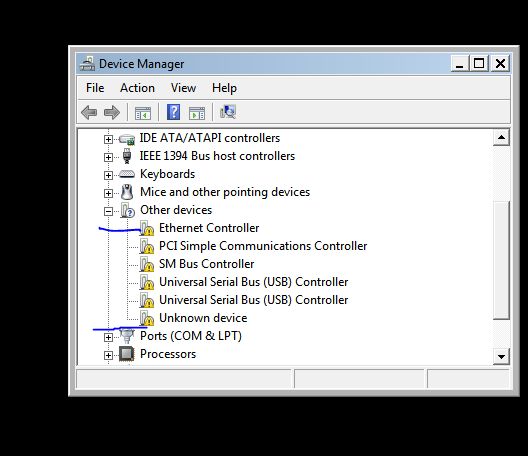
This is what I'm getting

wtf59uv9.png


I've tried different RealTek drivers but the Network Controller itself is acting like a horse's ass. Driver software are telling me that there's nothing there.

The RealTek Network Adapter/Controller was not found. If Deep Sleep Mode is enabled Please Plug the Cable

I'm on Ubuntu as we speak and posting. Windows is blind and can't see the ethernet cable/controller
 
I tried another network controller and same thing. I give up GAF, I'm just going to buy a new motherboard and a better CPU.
 
Didn't that problem have to do with the BIOS fucking up or something?

How long did you leave the battery out to reset the CMOS? How long did you leave out the RAM? Sometimes it takes a while. Maybe.

You already checked that the integrated NIC setting in the BIOS was on "enabled", right? Sometimes with the save and exit and load default settings and load safe mode and whatever else is there, it can get confusing.
 
Maybe you're missing a driver that the NIC driver has a dependency on. Some systems have a 'system' or 'mainboard' driver that you are supposed to load first, maybe look down that path on Asus support site. Try updating those other drivers to get rid of the unknown devices, then come back to the NIC.

If you have some means of getting Internet access in Windows (wireless, USB adapter, etc), try the driver updates from Microsoft and see if it will detect an appropriate driver for each of those devices.

Could try Win8 if you have media (not necessarily to live with, but at least to see if it includes native drivers).

Is the NIC active during Windows installation? (I think you can get a command prompt during setup with something like Shift-F10 and check ipconfig - don't recall exactly, I'm sure Google does).

I agree that if it's working fine for you from a live distro boot CD, it's a Windows/driver issue.
 
I agree with the mainboard driver recommendation above. Really, what you should do is download the mainboard and/or chipset driver files from ASUS in Ubuntu and the network drivers from ASUS. Apply mainboard/chipset drivers, apply network drivers.

Alteratively try windows 8, which has a more robust out of the box driver set. Buying new hardware seems super bad.
 
I'll try some of the new suggestions. Is the promo for windows 8 upgrade still going on? I'd rather pay $15 than full price.
 
Try resetting your whole IP stack from a command prompt

ipconfig /flushdns
nbtstat -R
nbtstat -RR
netsh int reset all
netsh int ipv4 reset
netsh int ipv6 reset
netsh winsock reset

EDIT: Didn't see this was a fresh install. Sounds like you are just using the wrong drivers in that case.
 
This is what I'm getting

wtf59uv9.png


I've tried different RealTek drivers but the Network Controller itself is acting like a horse's ass. Driver software are telling me that there's nothing there.


I'm on Ubuntu as we speak and posting. Windows is blind and can't see the ethernet cable/controller

This picture shows that you neglected to install the Intel Chipset Drivers.

Driver installation order is as follows:

1) Install Windows
2) Install Intel Chipset drivers via administrative command prompt and using the -OVERALL option on the command line with the installer. You can also add this via a shortcut to the installer then just edit the shortcut target to add the -OVERALL to it. If you don't use the -OVERALL option it won't install the drivers if something has already been detected. You don't want that. Once installed, reboot.
3) Install Video Card/Graphics Drivers. Reboot.
4) Install Audio/Networking/Intel Rapid Storage Technology drivers.

I can probably provide links for you if you want.


Edit: Going to add some more detail here.

1) Get into BIOS and set up your SATA controller so it says AHCI.
2) Install Windows 7 (Must do step 1 first..)
3) Download and install the Intel Chipset Device Software infinst_autol.exe 9.4.0.1017. Remember, make a shortcut to this installer and add -OVERALL to the Target box in the shortcut properties (make sure there's a space between infinst_autol.exe -OVERALL) Reboot once installed.
4) Download and install your video card drivers. Latest ones, of course. Never use the ones that come on DVD with the board.
5) Download and install your VIA VT1828S drivers. Here's a direct link from the VIA website: v10_1200a.zip. Here's the VIA website for the drivers: http://www.via.com.tw/en/support/drivers.jsp
6) Download and install your Realtek RTL8112L Network Drivers from here: Realtek PCI Express Driver Downloads You want the package named "Win7 and WinServer 2008 R2 Auto Installation Program" should be 5938K. Install those drivers. Don't worry that your chip isn't listed on that page. The 8112L chip is included in the drivers, they just don't list it on the top of the page due to OEM reasons.


Don't listen to those guys telling you to download the motherboard drivers from the ASUS site. Those are out of date. Download the ones I linked to in this post. They come directly from Intel. All the drivers I link to are directly from the manufacturer of the part. (Very latest)
 
Install the driver cd that came with your mobo. It seems like you are missing alot of the drivers provided by the mobo manufacture.
 
This picture shows that you neglected to ithanksnstall the Intel Chipset Drivers.

Driver installation order is as follows:

1) Install Windows
2) Install Intel Chipset drivers via administrative command prompt and using the -OVERALL option on the command line with the installer. You can also add this via a shortcut to the installer then just edit the shortcut target to add the -OVERALL to it. If you don't use the -OVERALL option it won't install the drivers if something has already been detected. You don't want that. Once installed, reboot.
3) Install Video Card/Graphics Drivers. Reboot.
4) Install Audio/Networking/Intel Rapid Storage Technology drivers.

I can probably provide links for you if you want.


Edit: Going to add some more detail here.

1) Get into BIOS and set up your SATA controller so it says AHCI.
2) Install Windows 7 (Must do step 1 first..)
3) Download and install the Intel Chipset Device Software infinst_autol.exe 9.4.0.1017. Remember, make a shortcut to this installer and add -OVERALL to the Target box in the shortcut properties (make sure there's a space between infinst_autol.exe -OVERALL) Reboot once installed.
4) Download and install your video card drivers. Latest ones, of course. Never use the ones that come on DVD with the board.
5) Download and install your VIA VT1828S drivers. Here's a direct link from the VIA website: v10_1200a.zip. Here's the VIA website for the drivers: http://www.via.com.tw/en/support/drivers.jsp
6) Download and install your Realtek RTL8112L Network Drivers from here: Realtek PCI Express Driver Downloads You want the package named "Win7 and WinServer 2008 R2 Auto Installation Program" should be 5938K. Install those drivers. Don't worry that your chip isn't listed on that page. The 8112L chip is included in the drivers, they just don't list it on the top of the page due to OEM reasons.


Don't listen to those guys telling you to download the motherboard drivers from the ASUS site. Those are out of date. Download the ones I linked to in this post. They come directly from Intel. All the drivers I link to are directly from the manufacturer of the part. (Very latest)

Sir, please proceed to drop your pants so I may fellate you.
1000 thanks, those drivers from realtek worked. The default CD drivers were the problem after all. And thank you all that took the time to help me out. Much appreciated!
 
Sir, please proceed to drop your pants so I may fellate you.
1000 thanks, those drivers from realtek worked. The default CD drivers were the problem after all. And thank you all that took the time to help me out. Much appreciated!

Lewd :O
 
Sir, please proceed to drop your pants so I may fellate you.
1000 thanks, those drivers from realtek worked. The default CD drivers were the problem after all. And thank you all that took the time to help me out. Much appreciated!

Glad to see you didn't have to resort to buying a new NIC!
 
Status
Not open for further replies.
Top Bottom