

-
Hey Guest. Check out your NeoGAF Wrapped 2025 results here!
You are using an out of date browser. It may not display this or other websites correctly.
You should upgrade or use an alternative browser.
You should upgrade or use an alternative browser.
UDK Thread: Unreal Development Kit
- Thread starter Mik2121
- Start date
Rocket Scientist
Member
Great video! And yeah the filter seems a bit distracting.
RelentlessRolento
Member
Probably been answered before, but how hard is it to transition from knowing Unity to UDK?
They acknowledged that at their GDCE presentation this year, although not in the foreseeable future, certainly not before UE4 games are out.Since this thread was bumped, I'll note that there has not been a new update since July. I am hoping this is because Epic has been working hard on moving closer to a UE4 UDK.
Programming is WAY harder, they use their own proprietary scripting language UnrealScript which is all sorts of fucked up. At this stage I would wait for the UnrealEngine4 SDK because they have ditched UnrealScript in favour of C++ and is a lot easier to use.Probably been answered before, but how hard is it to transition from knowing Unity to UDK?
 I really need to get started on side projects for a portfolio.
Since this thread was bumped, I'll note that there has not been a new update since July. I am hoping this is because Epic has been working hard on moving closer to a UE4 UDK.
They've just moved to 2 month cycle now, so we should get September release. It's unlikely that ue4 kit will be available for another year, or till first ue4 game ships.
Stallion Free
Cock Encumbered
That sucks the wait for the UE4 UDK is gonna be so long.
MrCookiepants
Member
Need to use this for an assignment. It's really daunting. Guess I'll check out the tutorials in the OP.
Maybe my google fu is terrible. I can't seem to find any kind of material or static mesh bundles online. Do I have to learn 3ds max or maya as well if I want to make levels/environments that aren't based on the mostly metal UT3 meshes that come with UDK? :S I barely have time to grind UDK skills for a portfolio as it is 
For the most part I would assume so. You might find some free resources on the UDK forums, but otherwise I believe 3D environment artists have to make the resources for their portfolios, which is perhaps one of the biggest obstacles for making UDK stuff. Just having UDK skills alone presumably isn't as good as being a good 3D artist who can also use the UDK to show off their levels.Maybe my google fu is terrible. I can't seem to find any kind of material or static mesh bundles online. Do I have to learn 3ds max or maya as well if I want to make levels/environments that aren't based on the mostly metal UT3 meshes that come with UDK? :S I barely have time to grind UDK skills for a portfolio as it is
Take a look at the works in progress forum and released projects forum on the UDK site for some possible examples on portfolio stuff.
I messed with Blender some but 3D art takes practice.
You might be right. I would assume there're dedicated level designers and separate graphics designers on bigger projects though, right? I don't think there's enough time for one person to do both static meshes and tweak level layouts in a hot project. We had separate teams for that even during our small 15 man school projects. I'll check up on the forum though, good idea. I literally have hundreds of potential graphics designers around me that I can ask for help too, so I'm looking into that as well.For the most part I would assume so. You might find some free resources on the UDK forums, but otherwise I believe 3D environment artists have to make the resources for their portfolios, which is perhaps one of the biggest obstacles for making UDK stuff. Just having UDK skills alone presumably isn't as good as being a good 3D artist who can also use the UDK to show off their levels.
Take a look at the works in progress forum and released projects forum on the UDK site for some possible examples on portfolio stuff.
I messed with Blender some but 3D art takes practice.
Yeah, I don't mean to be a jerk, and I think I"m just trying to say two things:You might be right. I would assume there're dedicated level designers and separate graphics designers on bigger projects though, right? I don't think there's enough time for one person to do both static meshes and tweak level layouts in a hot project. We had separate teams for that even during our small 15 man school projects. I'll check up on the forum though, good idea. I literally have hundreds of potential graphics designers around me that I can ask for help too, so I'm looking into that as well.
1. Though in a big project you might indeed have dedicated level designers, one of the benefits of UE3/UDK is that artists can themselves update levels and adjust scripting (Kismet). If you want to show off level design skills using a limited set of resources, the built-in UT stuff might give you at least a starting point. I think there have been a few threads or scenes on the forums where people tried to make something just using stock assets.
2. Though things can take forever, some people can do crazy things in limited time. Specifically, there was a Minas Tirith video and thread...I may have actually posted it earlier in this thread, but I'd have to search. Anyway, I think the guy modeled it and laid it out etc. in a month or less for a portfolio thing. It's tough, but depending on the scope of a scene and how modular you make things, you might be able to model some stuff yourself as well.
Good luck!
PetriP-TNT
Member
Bumping this topic as I am starting to make a DM-style map in UE3 for a class assignment. I haven't done anything with UE3 yet, but the guy I am making the map with has already done some groundwork / showed me the basics so I guess that speeds up things a bit. And 3 years of 3dsMax exprience helps too hopefully.
Stallion Free
Cock Encumbered
Bumping this topic as I am starting to make a DM-style map in UE3 for a class assignment. I haven't done anything with UE3 yet, but the guy I am making the map with has already done some groundwork / showed me the basics so I guess that speeds up things a bit. And 3 years of 3dsMax exprience helps too hopefully.
Please post WIP screens for us!
Stallion Free
Cock Encumbered
Has it been confirmed that we'll be seeing a UE4 UDK at all? Would be awfully nice.
I didn't know that they ditched UnrealScript, either. Sounds like a good call.
Idk if it's confirmed officially, but it's guaranteed to happen. It was a brilliant move with UE3.
PetriP-TNT
Member
Please post WIP screens for us!
Sure thing!
If I recall correctly, some of the demo videos had "Unreal Development Kit 4" or similar wording at the top of the development windows, but no, I don't know of any official word for if/when it would come out. I think the general opinion is that it will not come out until after a couple of games have been released with UE4, though I'd love for it to happen earlier.Idk if it's confirmed officially, but it's guaranteed to happen. It was a brilliant move with UE3.
Stallion Free
Cock Encumbered
If I recall correctly, some of the demo videos had "Unreal Development Kit 4" or similar wording at the top of the development windows, but no, I don't know of any official word for if/when it would come out. I think the general opinion is that it will not come out until after a couple of games have been released with UE4, though I'd love for it to happen earlier.
If they were smart they would release it on Christmas for everyone. For science.
Oh man, I wish. I'd -like- to think that even if the released UDK4 before any major games release, indie devs and modders could make some awesome things with it that would draw attention to the user. As it is, I feel like UDK community may be pretty stagnant, since I suspect some people may wait on the new version to start major projects, and there hasn't been an update to the older version in months.If they were smart they would release it on Christmas for everyone. For science.
PetriP-TNT
Member


PetriP-TNT
Member
^those were from the default packs, this is something I made by hand just now:
Eventhough I have worked with 3ds Max for years now, I don't have much texturing experience: most objects I've worked with had just some regular materials, no decals and such. But I think that worked out ok for try one. I don't know any chinese so I sorry if that says "cunt" or something, eeh.

Eventhough I have worked with 3ds Max for years now, I don't have much texturing experience: most objects I've worked with had just some regular materials, no decals and such. But I think that worked out ok for try one. I don't know any chinese so I sorry if that says "cunt" or something, eeh.
BTW, I will hopefully work this weekend on a simple and newbie-friendly tutorial for creating an environment in 3D Studio Max and then bringing that to UDK, setting up some simple lighting and being able to move around.
I will divide it in a few parts I think, one being the first rough model in 3DSMax and exporting to UDK, also the basic lighting setup that I use. Then another tutorial for some extra stuff like lightmaps, basic materials and if I have enough time, also improving the visuals.
I still don't know what kind of environment to do though, so if you guys got any ideas... I don't care whether it's futuristic, fantasy, cityscape or landscape... If you guys have some conceptart you like and wanna suggest it, feel free to post a link to it.
I will divide it in a few parts I think, one being the first rough model in 3DSMax and exporting to UDK, also the basic lighting setup that I use. Then another tutorial for some extra stuff like lightmaps, basic materials and if I have enough time, also improving the visuals.
I still don't know what kind of environment to do though, so if you guys got any ideas... I don't care whether it's futuristic, fantasy, cityscape or landscape... If you guys have some conceptart you like and wanna suggest it, feel free to post a link to it.
Stallion Free
Cock Encumbered
Oh I would absolutely love that. Sci-fi preferably.
I will hopefully work this weekend on a simple and newbie-friendly tutorial for creating an environment in 3D Studio Max and then bringing that to UDK
I haven't touched 3DS max or UDK in so long.............makes me think perhaps I won't go back to them. But i got a few old 3ds max mock levels I wouldnt mind learning how to put em in UDK so this will be nice if you put a tut together.
As for environments, I like this modernized Japanese architecture from Dreamfall.
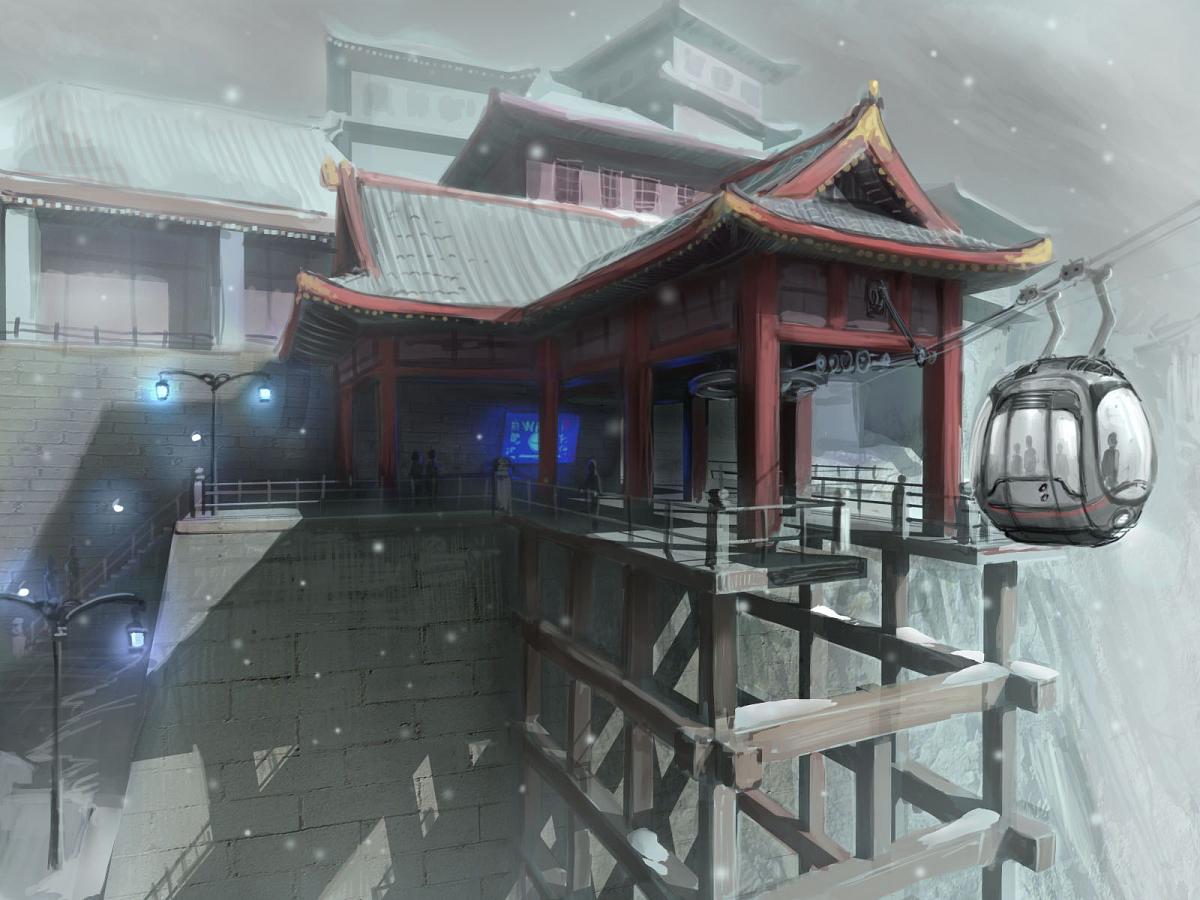
Scifi is perhaps the most common UE3 environment, so I would say that cityscape, fantasy, or landscape would be awesome, especially if it's a way to escape the common "UE3 look" complaint. The Japanese architecture mentioned above is cool, for instance.BTW, I will hopefully work this weekend on a simple and newbie-friendly tutorial for creating an environment in 3D Studio Max and then bringing that to UDK, setting up some simple lighting and being able to move around.
I will divide it in a few parts I think, one being the first rough model in 3DSMax and exporting to UDK, also the basic lighting setup that I use. Then another tutorial for some extra stuff like lightmaps, basic materials and if I have enough time, also improving the visuals.
I still don't know what kind of environment to do though, so if you guys got any ideas... I don't care whether it's futuristic, fantasy, cityscape or landscape... If you guys have some conceptart you like and wanna suggest it, feel free to post a link to it.

I haven't touched 3DS max or UDK in so long.............makes me think perhaps I won't go back to them. But i got a few old 3ds max mock levels I wouldnt mind learning how to put em in UDK so this will be nice if you put a tut together.
As for environments, I like this modernized Japanese architecture from Dreamfall.
Scifi is perhaps the most common UE3 environment, so I would say that cityscape, fantasy, or landscape would be awesome, especially if it's a way to escape the common "UE3 look" complaint. The Japanese architecture mentioned above is cool, for instance.
Gotcha. Do you guys have any other suggestion just in case? Living in Japan, one sorta gets kinda tired of that type of architecture. Also it doesn't really show much so it could be kinda boring...
If you guys don't post any other concept art (landscape, cityscape, scifi or fantasy doesn't matter) I guess I'll go with that one.
Can you quote that pic? It's kinda big...Working on a Unreal Engine 1 map, hope this is the right place to post

But otherwise, the environment seems to be looking nice!. May I ask though, why are you using the UnrealEd 1 now? Kinda late don't you think? Heheheh...
Concept art may be more difficult...how about a more stylized or fantasy scene then, like Miyazaki architecture? Castle in the sky: http://www.oocities.org/dreamcatcher_chan/laputa.jpgGotcha. Do you guys have any other suggestion just in case? Living in Japan, one sorta gets kinda tired of that type of architecture. Also it doesn't really show much so it could be kinda boring...
If you guys don't post any other concept art (landscape, cityscape, scifi or fantasy doesn't matter) I guess I'll go with that one.
Like, that big candy-looking tower someone made in UDK. I'd suggest castle/fantasy landscape also, like Lord of the Rings, but that's probably been done a bit in UDK already.
Concept art may be more difficult...how about a more stylized or fantasy scene then, like Miyazaki architecture? Castle in the sky: http://www.oocities.org/dreamcatcher_chan/laputa.jpg
Like, that big candy-looking tower someone made in UDK. I'd suggest castle/fantasy landscape also, like Lord of the Rings, but that's probably been done a bit in UDK already.
Concept Art is alright. Stuff like Feng Zhu's concept art is also fun, but the more detailed the better because otherwise things take a lot of guess work ;P But yeah, if you guys don't have any other suggestions, then that's fine.
PetriP-TNT
Member

Testing the new floor / wall materials. The walls are pretty much the same as on one tutorial on World Of Level Design which was very useful as far as making "futuristic" simple textures. I previously just used Crazybump which fit most of my needs but creating the normal maps with nDo provided better results.
I also did my first smoke particle effects, tomorrow I'll start doing the static meshes and other enviromental stuff.
PetriP-TNT
Member
Slow progress, have done some basic sets (walls, corners, steps, railings, windows) etc. in 3dsMax and today I revamped my theme (again) from clean futuristic to post-apocalyptic futuristic if that makes any sense heh.

So much to learn. I need to make some trim materials and trim pieces/something to break it from being too tiled too but no idea what.
So much to learn. I need to make some trim materials and trim pieces/something to break it from being too tiled too but no idea what.
Hey, there's the first UDK beta update since July: http://www.unrealengine.com/news/november_2012_udk_beta_upgrade_notes/
iOS updates:
Landscape support is now also enabled on mobile. There's a mobile shader analyzer too.
Some non-mobile updates:
iOS updates:
Support for iOS 6
The engine now builds using iOS SDK 6.0 by default.
The minimum supported iOS version is now 4.3.
Support for Retina display
Support for iPhone 5 and 5th-generation iPod touch
Optimizations for the new iPad mini and 4th-generaton iPad, including the A6X processor
Landscape support is now also enabled on mobile. There's a mobile shader analyzer too.
Some non-mobile updates:
Improved Primitive Tracking
Track Primitive modes, which allow stepping through individual rendering primitives, are now exposed as console commands and also support mobile devices.
This is useful when attempting to debug a single draw call and when measuring the performance of a subset of draw calls.
Clean Starter Project Tool
Developers now have the option to start with a “clean” project with bare minimum code and content upon install.
This is a great way to begin development of a new game from scratch!
Bonus: Free Epic Art Tool
Developed by Epic Games Senior Environment Artist Warren Marshall, Carapace is a simple, standalone app that lets you place vanishing points around an image placeholder to flesh out the shell of your drawing. Download it here! [link on page]
Slow progress, have done some basic sets (walls, corners, steps, railings, windows) etc. in 3dsMax and today I revamped my theme (again) from clean futuristic to post-apocalyptic futuristic if that makes any sense heh.
So much to learn. I need to make some trim materials and trim pieces/something to break it from being too tiled too but no idea what.
Try to avoid large detail like those white scratches from the stuff that will get tiled alot. To break up the repetition you can also use decals and vertex paint.
Didn't read the whole tread so I don't know if it was posted before, but if you haven't seen this tutorial on modular stuff it might be helpful.
http://www.thiagoklafke.com/modularenvironments.html
End result:
http://www.thiagoklafke.com/zestfoundation.html
PetriP-TNT
Member
Try to avoid large detail like those white scratches from the stuff that will get tiled alot. To break up the repetition you can also use decals and vertex paint.
Didn't read the whole tread so I don't know if it was posted before, but if you haven't seen this tutorial on modular stuff it might be helpful.
http://www.thiagoklafke.com/modularenvironments.html
End result:
http://www.thiagoklafke.com/zestfoundation.html
Yeah, I have read both of those but thanks! Both have been very useful. My plan is to use 3 textures to which to sample from, one with highlights/one plain and one trim/enviromental stuff.
I am going to use that for walls that need some highlights, otherwise the walls with will be more plain (like just that blue color) and get, like you said, some vertex coloring / decals going on.
I'd like to work much more with this, but other work is getting closer to deadlines so this map is going to be pretty crude enviroment wise. But I asked if I could do my thesis on this similar subject (I study mediatechnology) and the teacher gave tentatively a ok so this is just a practice run.
PetriP-TNT
Member
EDIT2: Actually I'll ask it again: how is the mesh paint/vertex coloring is supposed to work? I can paint my whole static mesh but not parts of it. click & drag just zooms in and out.
What is your texturing workflow?
What is your texturing workflow?
I just installed the November edition and I'm having some weird ghosting artifacts on my TV (so I guess it could be input lag) when I start the game window. I'm using two screens if that matters. I have the latest ati drivers now and that made no difference. I'm also having some doubt about performance. Granted, I only have 4 gigs of ram and my pc is far from new, but the default map that loads up takes about 30 seconds to build/bake with one light source. Is that normal for my ram?
You can paint part of the mesh, however vertex paint is dependent of vertex count, so if you're using just a simple quad plane, you won't have enough of them to properly supporting that paint. These 2 pics demonstrate it. On the left is a simple quad, while on the right you can see in wireframe that it;s much more dense plane (it's even overkill, but serves just for better explanation).
Like it can be seen on the pic, simple plane with 4 verts isn't enough to isolate the effect to a specific area.
I've really used them mostly for stuff like giving some variation to the ground by blending 2 textures, but from what I've seen on that page he used it to add color tint. If you don't want to add additional polys there, you can always mask out with texture certain parts of the mesh you want to tint and do essentially the same at the expense of using additional texture channel or a texture. So vertex paint is cheaper to use if you have enough geo, but for a simple plane you wont have enough to support it.
I've haven't done much textruing so tons of stuff to improve there, but when I started I watched this tutorial. First time I watched it though i really didn't know how to work in PS, so it's recommended that you have some basic knowledge of it.
http://cg.tutsplus.com/tutorials/photoshop/how-to-hand-paint-convincing-metal-textures/
There are more links on this Polycount wiki page for:
http://wiki.polycount.com/TexturingTutorials
Like it can be seen on the pic, simple plane with 4 verts isn't enough to isolate the effect to a specific area.


I've really used them mostly for stuff like giving some variation to the ground by blending 2 textures, but from what I've seen on that page he used it to add color tint. If you don't want to add additional polys there, you can always mask out with texture certain parts of the mesh you want to tint and do essentially the same at the expense of using additional texture channel or a texture. So vertex paint is cheaper to use if you have enough geo, but for a simple plane you wont have enough to support it.
I've haven't done much textruing so tons of stuff to improve there, but when I started I watched this tutorial. First time I watched it though i really didn't know how to work in PS, so it's recommended that you have some basic knowledge of it.
http://cg.tutsplus.com/tutorials/photoshop/how-to-hand-paint-convincing-metal-textures/
There are more links on this Polycount wiki page for:
http://wiki.polycount.com/TexturingTutorials
PetriP-TNT
Member
You can paint part of the mesh, however vertex paint is dependent of vertex count, so if you're using just a simple quad plane, you won't have enough of them to properly supporting that paint. These 2 pics demonstrate it. On the left is a simple quad, while on the right you can see in wireframe that it;s much more dense plane (it's even overkill, but serves just for better explanation).
Like it can be seen on the pic, simple plane with 4 verts isn't enough to isolate the effect to a specific area.
I've really used them mostly for stuff like giving some variation to the ground by blending 2 textures, but from what I've seen on that page he used it to add color tint. If you don't want to add additional polys there, you can always mask out with texture certain parts of the mesh you want to tint and do essentially the same at the expense of using additional texture channel or a texture. So vertex paint is cheaper to use if you have enough geo, but for a simple plane you wont have enough to support it.
I've haven't done much textruing so tons of stuff to improve there, but when I started I watched this tutorial. First time I watched it though i really didn't know how to work in PS, so it's recommended that you have some basic knowledge of it.
http://cg.tutsplus.com/tutorials/photoshop/how-to-hand-paint-convincing-metal-textures/
There are more links on this Polycount wiki page for:
http://wiki.polycount.com/TexturingTutorials
Thanks for the links and the vertex paint help, I'll try it later again. The making the textures part isn't the hard point for me, more the UVW unwrapping. I can unwrap them fine and all, make templates and so on. But in a scenario, I have a cube, a 2x2 texture sheet that has a yellow, brown, red and white square in it. I want two sides of the cube to be yellow, two brown and two red.
How (and if?) can I use the same color twice with two different faces? In 3dsMax, I can just put 3 of those Textures side by side and use other areas outside the 0,1 part to pick the two squares.
But UDK doesn't like if you have maps outside 0,1-area, those show up as black.
Any tips?
I'd probably try it a bit differently, but it all depends what you need really. Anyway if I wanted to color separate faces if the cube, for texture I would still set them to whole 0-1 space. Then select 2 faces, apply a material, and to the same for other 4 faces. Those materials are just needed to give 3 material slots for the static mesh in UDK, I'll use Master material with 3 Instanced materials instead. Master material is fairly simple here texture multiplied by a Vector Constant for color and 3 Instanced materials created from it and assigned to those 3 slots. After that I just apply different colors in those instances. Back of the cube looks the same as the front just can't show it of course.
Now the other case if you let's say had 4 textures on one texture sheet like a texture atlas, you could still do it, just a bit differently. For that same cube example you could either position UVs over those texture, but you could also again set all faces to use whole 0-1 space. Part with material instances is the same, just now master material will be is different. There you can multiply TexCoord node to scale texture UVs (since I have 2x2 and I want to stretch them to use whole space, "UVTile" value should be set to 0.5). By adding a value you can control offset of the texture, so in this case you can access all 4 textures by adding (0,0) , (0.5, 0) , (0, 0.5) or (0.5, 0.5).
You can have UVs outside of 0-1 space for textures, actually I use them quite often, but not for lightmaps. In that case you will need to create one more UVset for the lightmaps where all of them will be in 0-1 space. However with mirrored textures it still tends to show annoying seams in UDK, kinda long story to explain though.

Now the other case if you let's say had 4 textures on one texture sheet like a texture atlas, you could still do it, just a bit differently. For that same cube example you could either position UVs over those texture, but you could also again set all faces to use whole 0-1 space. Part with material instances is the same, just now master material will be is different. There you can multiply TexCoord node to scale texture UVs (since I have 2x2 and I want to stretch them to use whole space, "UVTile" value should be set to 0.5). By adding a value you can control offset of the texture, so in this case you can access all 4 textures by adding (0,0) , (0.5, 0) , (0, 0.5) or (0.5, 0.5).


You can have UVs outside of 0-1 space for textures, actually I use them quite often, but not for lightmaps. In that case you will need to create one more UVset for the lightmaps where all of them will be in 0-1 space. However with mirrored textures it still tends to show annoying seams in UDK, kinda long story to explain though.
PetriP-TNT
Member
Thanks a ton USIGSJ, that second part pretty much answered my problem.
I had a question about those lightmap->seams thing in my original question, but I edited it out.
I'll try those out tomorrow!
I had a question about those lightmap->seams thing in my original question, but I edited it out.
I'll try those out tomorrow!
PetriP-TNT
Member
Whats up with these, same wall in two different maps:
More dumb questions
More dumb questions
mine:

midday-lightning template
