

• Hey Guest. Check out your NeoGAF Wrapped 2025 results here!

Video Capture from consoles

Forsete said:
My workflow is like this. First I capture then I use VirtualDub to re-encode the MJPEG video into XVID MPEG4 (VirtualDub is also able to do some basic stuff like cutting and merging) also cutting the framerate to 30fps. The re-encoded file can be used within Sony Vegas.

I made this short Gran Turismo 5 Prologe trailer that way. :P

http://www.youtube.com/watch?v=uEgfALu0iKM

VDUB was nice back then... it's time for you to upgrade to MeGUI ;)
 
I use AviDemux from time to time, when creating AVC MP4's

Kirashi said:
I use ffdshow for all my codec needs in windows. it is a directshow "replacement" that you can then use any editor supporting directshow sourcing. the best answer for me is avisynth. However there's a HUGE curve you have to go through to learn how to use it... it's basicly a scripting language. However after you master it, it's really awsome, especially with all the other hobbiest writing function scripts/plugin/dlls for it that you can use. it's way more flexible than what commercial program offers in term of compatibility with files.
More info than I needed, I figured ffdshow would have a JMPEG option, thanks.
 
Kirashi said:
you connect straight to the console. it has an hdmi out though.

.
Thanks. Another question, does anyone know if your graphic card effects the quality of captured video? I have an old 6600 and am using a Hava Platinum to capture video from my Wii and was curious as to whether a better video card would make a difference.
 
hateradio said:
More info than I needed, I figured ffdshow would have a JMPEG option, thanks.

ffdshow is like a software hook, it's a lib to be called by other softwares. it does include a decoder for motion jpg if that's what you want. of course your editing tools need to be able to pick up that codec.
 
Kirashi said:
ffdshow is like a software hook, it's a lib to be called by other softwares. it does include a decoder for motion jpg if that's what you want. of course your editing tools need to be able to pick up that codec.
No, I want to see how efficient it is to use JMPEG as someone had mentioned when capturing; I used FFDshow's Encoder and set it to JMPEG.
 
hateradio said:
No, I want to see how efficient it is to use JMPEG as someone had mentioned when capturing; I used FFDshow's Encoder and set it to JMPEG.
it has an encoder for mjpg too, however you don't set it... i mean ffdshow isn't an encoder =/ i doubt the software that came with the card will beable to hook onto ffdshow. does it go through windows codec stack?
 
Durante said:
That actually works with my Winnov Videum 4400 AV Xpress. Granted that's only in SD but the thing still gets smoothed, heh.

A shame the interface is all in Japanese :( Need some translation...

Oh, everyone who is capturing - what are you using to split the component/HDMI video signals? Or do you just watch the preview window while playing the game?
 
Forsete said:
My workflow is like this. First I capture then I use VirtualDub to re-encode the MJPEG video into XVID MPEG4 (VirtualDub is also able to do some basic stuff like cutting and merging) also cutting the framerate to 30fps. The re-encoded file can be used within Sony Vegas.

I made this short Gran Turismo 5 Prologe trailer that way. :P

http://www.youtube.com/watch?v=uEgfALu0iKM

Not sure what version of Vegas you're using, but I can use the captured MJPEG's just fine in Vegas Pro 8.0b. Saves you the time of re-encoding. Although you're results look pretty good so if you're workflow is working, why not stick with it?
 
Man, this thread reminds me of how I always wanted to buy an HD capture card but never got around to it - I'd love to get the Blackmagic Pro as I always go for the best, but at this moment in time I don't have a powerful PC, but actually a powerful laptop so I can't use a card option...

So the next best thing seems to be the HD PVR from Hauppauge, which sounds very convient from what I read, especially since I wouldn't have to change one of my external HDD's to RAID for it...

Question for anyone who knows about the HD PVR: I game via the VGA cable, and from what I read, the PVR connects via component - is there any way to properly connect to it via VGA outside of getting an adapter?
 
Skilotonn said:
Man, this thread reminds me of how I always wanted to buy an HD capture card but never got around to it - I'd love to get the Blackmagic Pro as I always go for the best, but at this moment in time I don't have a powerful PC, but actually a powerful laptop so I can't use a card option...

So the next best thing seems to be the HD PVR from Hauppauge, which sounds very convient from what I read, especially since I wouldn't have to change one of my external HDD's to RAID for it...

Question for anyone who knows about the HD PVR: I game via the VGA cable, and from what I read, the PVR connects via component - is there any way to properly connect to it via VGA outside of getting an adapter?

you probably convert vga from component... just connect your component cable to the PVR
 
evil costanza said:
I'm using Hauppage HD PVR model 1212 at work a lot and it works pretty well. The only downside it doesn't have HDMI.

I think I am going to move toward the Hauppage now...
I really want the black magic intensity however the fact it doesn't do 480p really kills me
I will need to shell out 500$ at least for a component upconverting receiver, which i'd rather not to waste the money on.
And since we probably won't be distributing the video in any way other than compressed format over the web anyways... the quality might not be that much a problem. I just wonder hwo good the Hauppage hardware h264 encoder is.
Does anyone have any 720p game capture example using Hauppage? I am not looking for youtube links, but I want the actual raw AVCHD file.
 
Durante said:
Looks interesting, but everything being in Japanese makes it rather hard to understand. How does it work? Just adds a smoothing filter? Doesn't look like it since only certain parts of the image is affected.

Just looked around on the website, and this page has some interesting stuff which reminds me of something which occurs on my recordings: http://axts10.web.infoseek.co.jp/kusunoki/hd_capture_study/

http://axts10.web.infoseek.co.jp/kusunoki/hd_capture_study/uncompress.png - See those odd purple pixels to the lower left? That happens to my recordings when pure black and pure white pixels are next to eachother (which is actually extremely rare. it's only noticable when recording from Windows or certain games like EXIT). Does anyone have any idea why this happens? This website seems to explain it... but well, I can't understand japanese.
 
evil costanza said:
I'm using Hauppage HD PVR model 1212 at work a lot and it works pretty well. The only downside it doesn't have HDMI.

I'm really looking to get this one, my only thing is that I want to have a proper connection via VGA so that I won't have to disconnect things whenever I want to record something for example...

And I also play at 1080p, does it record at that also? I'd hate to have to bring it down to 720p every time I want to record...
 
I made my FAQ videos using a regular PCI capture card, but SD only of course. Good to know there's something simple and relatively cheap for HD.
 
YYZ said:
I made my FAQ videos using a regular PCI capture card, but SD only of course. Good to know there's something simple and relatively cheap for HD.

it's anywhere from simple... hdcp, not capable at 480p are 2 big part of it.
 
Guys, halp me! I have this thing I bought like two years ago...


kstar_pca-dav2


If I'm not wrong, this is composite, right? I usually have my PS3 connected using an HDMI cable to my HDTV, but I wanted to record some videos without expending any further money so.. what ways are there for me to record SD video with the cable I posted before, on a free software?
 
Schrade said:
Oh, everyone who is capturing - what are you using to split the component/HDMI video signals? Or do you just watch the preview window while playing the game?

I run HDMI from the 360 to the BM, then from the BM to my monitor...no spliting. Set the monitor input to HDMI and play as normal. Switch back to DVI when Im done.
 
cameltoe said:
I run HDMI from the 360 to the BM, then from the BM to my monitor...no spliting. Set the monitor input to HDMI and play as normal. Switch back to DVI when Im done.
Well I'm more interested in component since PS3 has HDCP over its HDMI :(

I'm not interested in 360 stuff but you're lucky you can do that.
 
Flek said:

Huh, I don't know about that, does it have Component/HDMI input? Very few consumer devices actually record HD streams, unfortunately. A good Handicam with S-VIDEO input and Firewire output used to be the ultimate poor man's video tool (especially if you've got a family and/or need a videocamera anyway), but I haven't see one that takes anything but analog inputs. Has that changed in the last two years?
 
What sort of live view lag do you guys see with your Blackmagic Intensity cards? I've read elsewhere that it tends to be 100-250ms, does that match your experiences with it?
 
When I had to capture a video I just used a DVD recorder. A friend of mine does something similar, except he first records it to a VHS and then transfers it to a DVD. But thats only a good solution if you have access to one.
 
I just picked up a Hava Titanium. It does a decent job of 480p. (actually 480i, but deinterlace in editor.)

I'd rather have the Blackmagic Intensity or Hauppauge HD PVR, but no worthy PC in the living room.

The Hava is very handy to record, just turn on a notebook, fire up the app and press the record button. It starts recording to the HD.
 
I tried hooking up my Saturn to the Hauppage HD PVR model 1212 the other day through SVideo and it FREAKS OUT.

I don't know if it's because of a different region (thus, it's not NTSC), but it only records in 20 fps (when it does). After a couple seconds (50, at best) it locks up and stops being identified by the computer. I need to power cycle it for it to come back.

Weird.

Also, Hauppauge recording software (TotalMedia Extreme) is STILL horrible, even after the big update it got in the middle of the year. The lack of WDM drivers is a shame, and something to be considered.

But it's still one of the best recording box (that doesn't use CPU power) I've seen.
 
thatbox said:
What sort of live view lag do you guys see with your Blackmagic Intensity cards? I've read elsewhere that it tends to be 100-250ms, does that match your experiences with it?

When you say liveview, are you talking about what's displayed on the PC monitor or what gets sent to the TV? I haven't seen much, if any, lag on the TV, but I'm not sure about what gets output onto the montior since I don't really play many latency critical games. I haven't tried with BlazBlue...can try and see tonight or tomorrow if I get the chance to set everything up.
 
thatbox said:
What sort of live view lag do you guys see with your Blackmagic Intensity cards? I've read elsewhere that it tends to be 100-250ms, does that match your experiences with it?
I dont experience any using the HDMI out to another display. As for the preview on PC, through Virtualdub I don't notice any really. The only time it "lags" (stutters) is when you have audio preview off.
 
Drastic said:
I just picked up a Hava Titanium. It does a decent job of 480p. (actually 480i, but deinterlace in editor.)

I'd rather have the Blackmagic Intensity or Hauppauge HD PVR, but no worthy PC in the living room.

The Hava is very handy to record, just turn on a notebook, fire up the app and press the record button. It starts recording to the HD.
I own a Hava too and was wondering what editing program you use because I cant seem to find the option to deinterlace in Ulead Video Studio 11.
 
So there's no cheap way to just plug your console into your computer and record using fraps or something? I'm interested in recording small video (quality barely matters).
 
MiniDitka said:
I own a Hava too and was wondering what editing program you use because I cant seem to find the option to deinterlace in Ulead Video Studio 11.

Sony Vegas 9. You can download the free 30 day trial from their site. Purchase the Pro Pack for $75 from Amazon.
 
Kirashi said:
ok i was ready to place an order for the intensity pro then something hit me
IT DOESN"T SUPPORT 480P
whyyyyyyyyyyyyyyyyyyyy
I want to use it for my Wii too damn it.

News Bot said:
I use a 480p capture card right now, soon I'll double up with the Blackmagic Intensity Pro.

If you want to see my videos (480p examples would be Umbrella Chronicles and RE4 and RE5), check out http://projectumbrella.net/media/videos

Drkirby said:
When I had to capture a video I just used a DVD recorder. A friend of mine does something similar, except he first records it to a VHS and then transfers it to a DVD. But thats only a good solution if you have access to one.

News Bot said:
I use a 480p card with component.

Gonna get a Blackmagic Intensity Pro soon enough for my 720p needs.


Well, after the 2 pages, I'm pretty interested in those quotes.

I need to capture 480p video from a Wii for a walkthrough we may prepare in a week.

Video captured quality must be high, so I guess we have to look for 480p (and not 480i/576i) using a Wii component connection.

I see some of you mention the "standard PCI SD device" or even a DVD recorder for doing the job.

So, I need something more specific. I mean, what does other online sites use for capturing that crisp 480p Wii videos? Even clerarer, where do they plug their component signal?

Thanks in advance to everyone, this is very interesting.
 
Drastic said:
Sony Vegas 9. You can download the free 30 day trial from their site. Purchase the Pro Pack for $75 from Amazon.
I downloaded the free trial but cant figure out how to enable the de-interlace feature? The interface is much different than ULead and has me very confused.


CaVaYeRo said:
Well, after the 2 pages, I'm pretty interested in those quotes.

I need to capture 480p video from a Wii for a walkthrough we may prepare in a week.

Video captured quality must be high, so I guess we have to look for 480p (and not 480i/576i) using a Wii component connection.

I see some of you mention the "standard PCI SD device" or even a DVD recorder for doing the job.

So, I need something more specific. I mean, what does other online sites use for capturing that crisp 480p Wii videos? Even clerarer, where do they plug their component signal?

Thanks in advance to everyone, this is very interesting.
I'm using a Hava Platinum and while it only does 480i the quality for Wii games is pretty good.

Here are a few clips I recorded

Yoshi's a brick house - http://www.youtube.com/watch?v=fz5VZmG0Law

Spyborgs - http://www.youtube.com/watch?v=fVgls4PBySI

The Grudge - http://www.youtube.com/watch?v=2KWC8lCKPqw
 
thanks for the footage. That 480i Spyborgs stuff looks great, indeed.

Do you know if there's any similar device ready for component 480p input?

If I cannot find anything, I'll try with 576i
 
Banzaiaap said:
I really like the BlackMagic card, but is there a card compatible with the iMac? I can't put the PCI card in my iMac :lol
This was never answered, so i'm assuming that's a no way in hell right?
 
Just realized I posted on each page pretty much the same message :lol

The only real 480p card is the Leadtek PxDTV2300 H. Good luck finding it though, I think I actually got the last one quite literally. Discontinued. I think they have a different card with 480p now but it pales in comparison. As for 480p screens:

2i8cbxx.png


23h6mau.png


343sqo5.png
 
CaVaYeRo said:
thanks for the footage. That 480i Spyborgs stuff looks great, indeed.

Do you know if there's any similar device ready for component 480p input?

If I cannot find anything, I'll try with 576i

The Hauppage HD PVR 1212 will do 480p in H.264.

It's what I use to record our weekly SF4 tournaments - you can see the quality here
www.youtube.com/timekillr

Try to watch the FLV high quality footage for 60fps. MP4 HQ is 30fps but much higher quality.

And this is recoded by Youtube. :) If you record to AVCHD, you can record at 13.5mbps, which is very high for this type of content (this is about the bitrate for HD DVDs - some blu-rays are around 20/30 mbps).
 
Try to watch the FLV high quality footage for 60fps. MP4 HQ is 30fps but much higher quality.

Umm, the 30fps video doesn't look natural, it seems as though the encode has dropped half the amount of frames.

I wouldn't recommend Hauppage cards. But if you can't find a Leadtek 480p card, might as well go for it.

If you record to AVCHD, you can record at 13.5mbps

Thats pretty low, I take it you aren't recording uncompressed?
 
News Bot said:
Umm, the 30fps video doesn't look natural, it seems as though the encode has dropped half the amount of frames.

I wouldn't recommend Hauppage cards. But if you can't find a Leadtek 480p card, might as well go for it.


Thats pretty low, I take it you aren't recording uncompressed?

As I said, Youtube reduces the framerate to 30 when compressing to MP4. And yes, of course the 30fps video doesn't look natural and it seems as though the encode dropped half the frames, it's BECAUSE IT DID. :lol

If you watch the videos on youtube in High Quality FLV, it's 60 fps (and looks much better in motion).

The quality off my source files is insane. And yes, it's not recording uncompressed - the HD PVR has a H.264 hardware encoder that encodes to AVC natively. It's VERY good, and at 13.5mbps it looks gorgeous.

There are a few advantages to having the HD PVR over a Black Magic Intensity Pro, the most notable being portability. When we do our tournaments, I just bring my HD PVR and my netbook (yes, my NETBOOK) to record the matches. I wouldn't see myself lugging my desktop around to a venue to record matches. :) The funny this is my netbook is completely unable to playback any of the recorded videos but it has enough horsepower to just write data (13.5mbps isn't that much data to write anyway).

I find it hilarious that people are comparing 13.5mbps H.264 to MJPEG. Whatever you do, MJPEG will never look as good as H.264. The JPEG compression algorithm is quite old, and while it's now incredibly fast, it's still lacking in PQ.
 
CaVaYeRo said:
thanks for the footage. That 480i Spyborgs stuff looks great, indeed.

Do you know if there's any similar device ready for component 480p input?

If I cannot find anything, I'll try with 576i

The videos would probably even look a bit better if I could figure out how to de-interlace them. The only one I know of thats readily available is the the Hauppage HD PVR 1212 but I think it cost twice as much as the Hava. If money isn't an issue and you're dead set on 480P then Hauppage might be the way to go.
 
MiniDitka said:
The videos would probably even look a bit better if I could figure out how to de-interlace them. The only one I know of thats readily available is the the Hauppage HD PVR 1212 but I think it cost twice as much as the Hava. If money isn't an issue and you're dead set on 480P then Hauppage might be the way to go.

Just run interlaced video through Vdub ou Avidemux - they both have deinterlacing filters that are easy to use.

Vegas will also let you deinterlace a video, although you have to know what you're doing (it's not a set filter but just video properties).
 
I spent $15 on an EasyCap USB 2.0 and $6 on a Universal S-Video cable (PS3/360/Wii). For the price, it has served me very well.

Example videos that I have recorded with the device:

Bayonetta First Climax (360) Part 1, Part 2
Better Late than Never Video Review: Shenmue
DiRT 2 Demo Replay
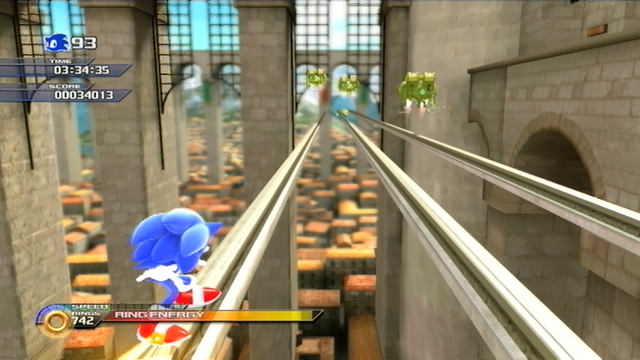
Sonic Unleashed: Rooftop Run S-Rank

It takes a little bit of coaxing to get that quality of video out of it, though, but really - for $15, what do you expect? The end result is about as clear as standard definition video can get.

crystalclear.png


It also features very little input lag, making it easy to play games through it without needing to deal with a splitter.
 
As I said, Youtube reduces the framerate to 30 when compressing to MP4. And yes, of course the 30fps video doesn't look natural and it seems as though the encode dropped half the frames, it's BECAUSE IT DID.

Ohh, wasn't aware of that. :lol Looks great in 60fps though.

I'd still go for the Leadtek over the Hauppage though if you're not looking for portability.

Just run interlaced video through Vdub ou Avidemux - they both have deinterlacing filters that are easy to use.

NOT recommended unless you want your videos looking like a blurry mess.
 
News Bot said:
NOT recommended unless you want your videos looking like a blurry mess.

You just gotta know how to use them, really. If you're going to use VirtualDub to deinterlace, I'd suggest this area-based deinterlacer. That only deinterlaces parts of the video that are in motion (just make sure you uncheck the box marked "Blend").

That's what was used on that Sonic Unleashed screenshot I posted a little bit ago.
 
Top Bottom