

-
Hey Guest. Check out your NeoGAF Wrapped 2025 results here!
You are using an out of date browser. It may not display this or other websites correctly.
You should upgrade or use an alternative browser.
You should upgrade or use an alternative browser.
WARNING: Don't update your NVIDIA drivers, breaks memory speed, more
- Thread starter Sky87
- Start date
Well, too late, hopefully my 680 doesn't blow up.
Only supposed to affect the 10-series, and if you're on a 680 i don't think you will ever see improvement in a driver again as that card is ancient in PC terms.
Too late
I'm new to PC, how do I roll back to the previous driver?
You should be able to just download the prior version (dated end of october) and just install that over what you're using now.
Personally i would do a clean uninstall by using DisplayDriverUninstaller: http://www.wagnardmobile.com/forums/viewtopic.php?f=5&t=673
Download that tool, choose to use the safemode, PC will reboot automatically, window will pop up with Nvidia already selected (make sure to be 100%), then click Clean and Restart. Really simple and you don't risk some leftover files from the newest driver still remaining.
Too late
I'm new to PC, how do I roll back to the previous driver?
Use Nvidia's driver website and in the search options make sure it looks for older / beta drivers.

Baleoce
Member
Yeah, unless I'm already having problems, or it's actually a substantial update that of which I'd actually see noticable gains, I don't tend to update on release anymore. Too many times I've had to go into safe mode and use DDU with Nvidia drivers. But in general, this is happening far too often as of late.
You might actually be lucky and unaffected, mind testing it? Should be noticable at once, framerates should be 50% of what they used to be. Try running GPUZ to monitor memory clocks as well.
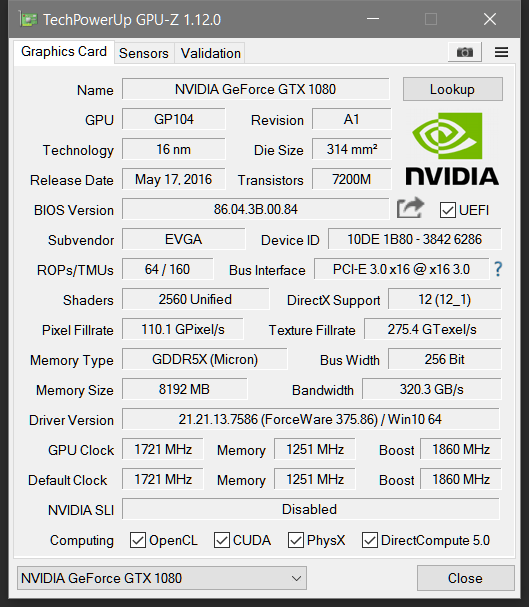
Memory clock is as it should be so I'm fine I guess. Phew.
I might still roll back just in case though.
Memory clock is as it should be so I'm fine I guess. Phew.
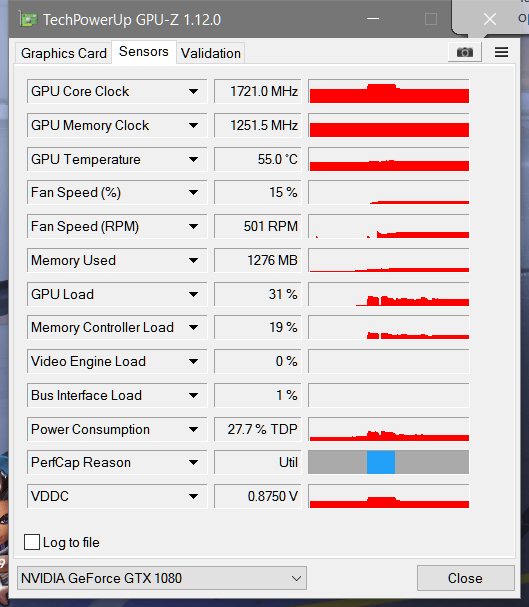
Click the sensor tab and then play a game for a few minutes. Note the max memory clock and see if it remains constant.
EDIT: Here's mine:

Not sure why my memory is that high compared to yours.
SuperÑ;224591277 said:I hope Nvidia gets the same amount of shit as other manufacturers when they mess up the drivers.
Too bad it won't happen. ever.
Stone Ocean
Member
Again? Jesus
Berzerkiymc
Neo Member
is this happening for everyone? A mass recall?
Just installed, so far so good here.
Just installed, so far so good here.
SuperÑ;224591277 said:I hope Nvidia gets the same amount of shit as other manufacturers when they mess up the drivers.
Other manufacturers?
Seems like they are rightly getting plenty of 'shit' here anyhow.
Only supposed to affect the 10-series, and if you're on a 680 i don't think you will ever see improvement in a driver again as that card is ancient in PC terms.
You should be able to just download the prior version (dated end of october) and just install that over what you're using now.
Personally i would do a clean uninstall by using DisplayDriverUninstaller: http://www.wagnardmobile.com/forums/viewtopic.php?f=5&t=673
Download that tool, choose to use the safemode, PC will reboot automatically, window will pop up with Nvidia already selected (make sure to be 100%), then click Clean and Restart. Really simple and you don't risk some leftover files from the newest driver still remaining.
Use Nvidia's driver website and in the search options make sure it looks for older / beta drivers.
Thanks guys
Click the sensor tab and then play a game for a few minutes. Note the max memory clock and see if it remains constant.
Not sure why my memory is that high compared to yours.
Ran Overwatch for a bit. Everything seems to be in order.

They sell way too many cards to give a damn about thatSuperÑ;224591277 said:I hope Nvidia gets the same amount of shit as other manufacturers when they mess up the drivers.
Ran Overwatch for a bit. Everything seems to be in order.
Something is up with your memory clock. It should not be at 1251 with a 1080 when my 1070 manages just past 2000.
EDIT: My bad, see below.
FPS murderer
Member
Click the sensor tab and then play a game for a few minutes. Note the max memory clock and see if it remains constant.
EDIT: Here's mine:
Not sure why my memory is that high compared to yours.
Because he has a 1080 not a 1070. 1080's use QDR GDDRX5.

FPS murderer
Member
Something is up with your memory clock. It should not be at 1251 with a 1080 when my 1070 manages just past 2000.
His memory is fine. That's a 1080, uses GDDRX5, which is QDR basically plus double data rate. Mine does 1250 too (1250*4=5000*2=10000 effective).

I remember back in 2013 where every driver after 314.22 caused screen freezing and cursor corruption on my 560ti for about 7 months. Was a complete shitshow and there was never any apology for it. Also since then i've had microstuttering on particular applications (e.g eDuke32) that were fine on the 314.22 drivers.
This is the problem with having little to no effective competition.
This is the problem with having little to no effective competition.

nkarafo
Member
I also have the same problem with eDuke for a few years now. I don't think i ever managed to run this smoothly and i tried every possible tweak.Also since then i've had microstuttering on particular applications (e.g eDuke32) that were fine on the 314.22 drivers.
PHOENIXZERO
Member
What a surprise, saw the update notification pop up this morning and was like "yeah, I'll hold off on that".
I also have the same problem with eDuke for a few years now. I don't think i ever managed to run this smoothly and i tried every possible tweak.
Yeah it's bizarre. If you have an older card you can roll back to those drivers and it'll be smooth as silk. Really frustrating.
Quadraphonic
Member
Oh for fucks sake. I buy a 970 and the 3.5 meme happens, I buy a 1060 and every other driver update breaks something.
I'm sticking to AMD from now on, I never had a problem with my 390 that I used to replace my 970.
Haha. If you've never had AMD driver issues then you haven't been using them long enough
Glad I have the automatic updates turned off. I did get the pop-up from GeForce Experience when I got home a little bit ago, but I ignored it. I have no new games that would need it, so I don't bother updating unless I have to. The next game I even might buy is WD2, and that's a couple weeks out.


NeOak
Member
Other manufacturers?
Seems like they are rightly getting plenty of 'shit' here anyhow.
The NVIDIA defense force denies there is something like bad NVIDIA drivers while pointing out to AMD's bad drivers in the early 2000s as if that justifies NVIDIA fucking people with bad software and causing W10 to be unstable like if it were Windows Me.
Hero Prinny
Member
i don't remember which update but I've been having artifacting issues on chrome for quite sometime now, i know its not cause my gpu getting messed up either cause my brother has the same issue.
Felix Lighter
Member
Dodged that bullet.
Probably diverted software resources to work on expanding initiatives like deep learning and automotiveSo did Nvidia just randomly fire their previous driver team? They've been unpredictably shit for the last year.
I'm getting the streaming video graphical glitch (YouTube, etc) bug with the driver prior to this one. I might still need to rollback.
Ugh.. fucking Nvidia.
Edit;
Fuck me 6 ways. You too??!!
Ugh.. fucking Nvidia.
Edit;
i don't remember which update but I've been having artifacting issues on chrome for quite sometime now, i know its not cause my gpu getting messed up either cause my brother has the same issue.
Fuck me 6 ways. You too??!!