• Hey Guest. Check out your NeoGAF Wrapped 2025 results here!

1080p Content on a 4k T.V.?

Status
Not open for further replies.
What I don't get is why 4K projector prices haven't fallen as fast as 4K TV's. Going to have to change my lamp soon enough anyway, figured I could just get a 4K projector instead, but those bastards still cost like $10000 minimum (in Sweden at least).

To make you think you need 4K... complete bollocks.

ps why do they call it 4K? Why not 2K or 2160p? Why change the whole resolution convention just to make it seem more impressive?

Yeah, it's marketing, but at the same time, 2k, or 2160p would suggest to the average consumer that it'd be twice as good/as many pixels as 1080p, when in fact you're pushing 4x the pixels with 4096x2160.
 
What I want to know is if there is really much delay to worry about playing 1080p on 4K displays
Depends. Sony's 4K sets have significantly more display lag to their 1080p counterparts however, they are still peerless. (and the lag on the 4K sets isn't particularly noticeable)

Surely no TV is gonna do nearest-neighbor resizing, there will be some degree of filtering.
Well they bloody well should, the resolution lends itself well to it, all you really get is lower ppi which doesn't look as bad as extrapolation tends to lool.

It should look exactly the same if you get a 4k TV that has proper 1x4 pixel scaling.
Damn, you win Panasonic.
 
Yeah, it's marketing, but at the same time, 2k, or 2160p would suggest to the average consumer that it'd be twice as good/as many pixels as 1080p, when in fact you're pushing 4x the pixels with 4096x2160.

I'm pretty sure it's 3840 x 2160...
 
I'm pretty sure it's 3840 x 2160...

Well, both are true... sort of. 4k is 4096x2160, UHD is 3840x2160, TV manufacturers still seem to use 4K designation for UHD though.
http://en.wikipedia.org/wiki/4K_resolution

So yeah you are correct., 3840x2160 for TV's.

Still, it's 4x the amount of pixels to push, which could be one of the reasons behind calling it 4k instead of 2160p or 2k or whatever.

Edit: also, seems projectors tend to do 4096x2160 rather than UHD, but that could be cause Sony pretty much are one of the only ones releasing them atm, and they chose that resolution to go with.
 
Well, both are true... sort of. 4k is 4096x2160, UHD is 3840x2160, TV manufacturers still seem to use 4K designation for UHD though.
http://en.wikipedia.org/wiki/4K_resolution

So yeah you are correct., 3840x2160 for TV's.

Still, it's 4x the amount of pixels to push, which could be one of the reasons behind calling it 4k instead of 2160p or 2k or whatever.
It's all marketing. There is no single definition for 4K. Even in cinema there is multiple definitions. It's an inherently ambiguous term.
It makes perfect sense for TV manufacturers to not target 4096 though. It would require a lot of work to get 1080p content on these sets otherwise.
 
It's all marketing. There is no single definition for 4K. Even in cinema there is multiple definitions. It's an inherently ambiguous term.
It makes perfect sense for TV manufacturers to not target 4096 though. It would require a lot of work to get 1080p content on these sets otherwise.

Yeah, it honestly makes more sense at 3840 than 4096, scaling wise, not sure why Sony decided to go 4096 on their projectors, but they're not really targeted at the average consumer as it stand right now anyway, with the price point they're at.

Well no, 4K = 4000. not 4 x the pixels

From a marketing stand point, not technical. 4k sounds like you go from 1k (1080p) to 4k (4000whateverp), which would give you 4x the resolution. The original post I replied to asked why they'd call it 4k, and this would be one of the reasons for it.
 
Yeah, it honestly makes more sense at 3840 than 4096, scaling wise, not sure why Sony decided to go 4096 on their projectors, but they're not really targeted at the average consumer as it stand right now anyway, with the price point they're at.
They are pushing it to home cinema owners and are currently delivering native content for that no? There is an argument to be made about basing it on DCI 4K in that case which is a derivative of DCI 2K.
UHD is the designation going forward I'd guess so the marketing on TVs might change as of 2016, though UHD contains far more than just resolution.
 
Yeah, it honestly makes more sense at 3840 than 4096, scaling wise, not sure why Sony decided to go 4096 on their projectors, but they're not really targeted at the average consumer as it stand right now anyway, with the price point they're at.


From a marketing stand point, not technical. 4k sounds like you go from 1k (1080p) to 4k (4000whateverp), which would give you 4x the resolution. The original post I replied to asked why they'd call it 4k, and this would be one of the reasons for it.

Oh yeah I can dig, my point is they change the whole axis that has been counted since the dawn of TV just for marketing spiel, on the off chance that someone forgot the answer to 2X2.
 
well 3840x2160 is 2:1 for 1080p content and 3:1 for 720p content. if anything if you care about perfect pixel image quality "4k" TV's are your best bet.
 
Oh yeah I can dig, my point is they change the whole axis that has been counted since the dawn of TV just for marketing spiel, on the off chance that someone forgot the answer to 2X2.
This is rather hyperbolic. For starters these terms are relatively new and definitely don't date back to the start of TV. Terminology has always fluctuated and standards were made to correct this but even those standards are not consistent so you would need a fair bit of disambiguation. Marketing terms are even worse since they are intended to be ambiguous by design.

well 3840x2160 is 2:1 for 1080p content and 3:1 for 720p content. if anything if you care about perfect pixel image quality "4k" TV's are your best bet.
That is the manufacturer's prerogative unfortunately. Many fuck this up quite royally.
 
This is rather hyperbolic. For starters these terms are relatively new and definitely don't date back to the start of TV. Terminology has always fluctuated and standards were made to correct this but even those standards are not consistent so you would need a fair bit of disambiguation. Marketing terms are even worse since they are intended to be ambiguous by design.

There is nothing hyperbolic about it and there is nothing new about the Y axis being used for definition, it's the number of scan lines present on the screen. So it went 240, 480, 576, 720, 1080... 4K...
 
Oh yeah I can dig, my point is they change the whole axis that has been counted since the dawn of TV just for marketing spiel, on the off chance that someone forgot the answer to 2X2.

I think it comes more from movies, which makes sense since movies come with different aspect ratios, meaning the number of horizontal pixels stays the same, but the number of vertical pixels varies. A 2.35:1 movie on Blu-ray has a resolution of 1920x817. A 1.85:1 movie on Blu-ray has a resolution of 1920x1038. Referring to both as being 2K makes as much sense as anything.
 
I notice that 1080p up-scaled to 4k looks great on my TV. The pixels square into the whole screen just fine. 720p up-scaled to 4k, not so much.
 
There is nothing hyperbolic about it and there is nothing new about the Y axis being used for definition, it's the number of scan lines present on the screen. So it went 240, 480, 576, 720, 1080... 4K...
The 'y-axis' is a rather modern approach to resolution as is the distinction of scan type. Commonly you would be referring to the scan itself which you could define as lines but is distinct from the anachronistic 240p etc. There is a bit of a transition there as older terminology was reconciled with new digital displays and that is fairly new. And it's entirely arbitrary. I don't see why you complain unless you are a broadcast engineer and if you were you wouldn't really be concerned with this anyway.
 
Vizio p-Series owner here...

1080p looks wonderful on the set. I am playing through the HDMI2 port as it lowers lag to a measly 33ms.

Absolutely no complaints.
 
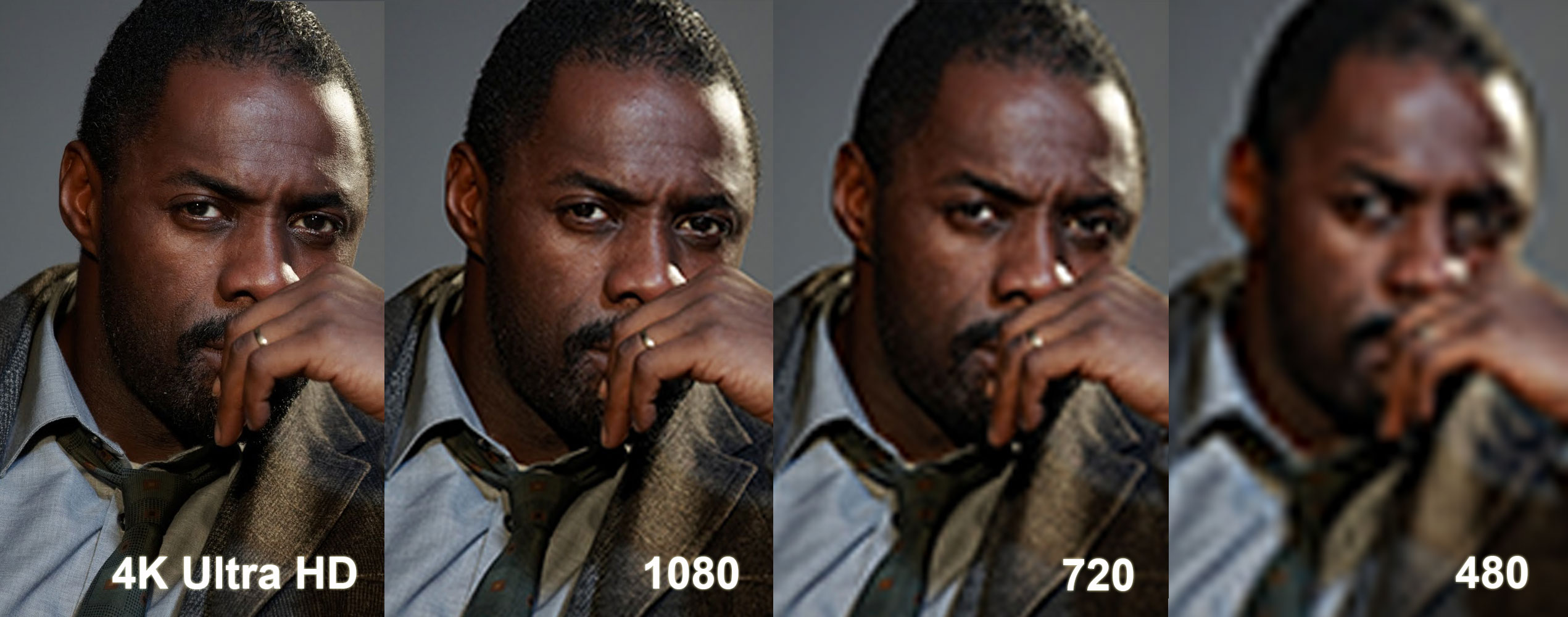
lol that elba picture again.

That annoys me every time I see it, so I re-made it some time ago using the source image and Photoshop. I kept the 4K side of things at its native resolution:

idriselbaresolution0vq6d.png


Full face O' Elba

 
4k definitely looks better, but my primary concern is how will my 1080p blu-rays look on a 4k tv If they're upscaled to 4k, will they look better than a native 1080p display displaying the same movies??

Depends.

I've seen some (the Sony mastered in 4k blu-rays, on a Sony player, linking to a Sony TV) that look really pretty damned good and notably better than blu-ray.

But I've seen some other combinations of equipment that were, not to put too fine a point on it, like watching VHS. But granted I didn't have time to play around with those, maybe they could have been configured better.

But yes, in theory with good upscalers on good displays they will probably look pretty good. But you will be paying a significant premium to get those.
 
Wait so there is not much point in me getting a 42' 4K TV for my room?
How big is your room and how good is your eyesight?
The other thing to consider is that UHD screens which will eventually support wider colour gamuts will look very significantly better to a comparable 1080p set such that it is as big if not a bigger difference from the transition to HD.
 
lol that elba picture again.

That annoys me every time I see it, so I re-made it some time ago using the source image and Photoshop. I kept the 4K side of things at its native resolution:

idriselbaresolution0vq6d.png


Full face O' Elba

Hmm, did you use lots of extra contrast and/or edge enhancement on the "lower res" pictures? cause they seem sort of "off".
 
Hmm, did you use lots of extra contrast and/or edge enhancement on the "lower res" pictures? cause they seem sort of "off".

I did nothing, other than resizing the 4K picture to a lower resolution and then upscaling it back up to 4K, for each resolution.
 
How big is your room and how good is your eyesight?
The other thing to consider is that UHD screens which will eventually support wider colour gamuts will look very significantly better to a comparable 1080p set such that it is as big if not a bigger difference from the transition to HD.

Definitely not. Personally, I've seen a 55" and 84" 4K TV, I could only tell the difference at 84".

Nope, you'd be far better served with a good 42' 1080p set. At the price range of a 4k set at that size you'll get an exceptionally good HD one.


Thanks well I was going to go for this as it seems like an ok price for a 4K TV.


Not that good when it comes to TV's and that lol.
 
lol that elba picture again.

That annoys me every time I see it, so I re-made it some time ago using the source image and Photoshop. I kept the 4K side of things at its native resolution:

idriselbaresolution0vq6d.png


Full face O' Elba
Still a huge difference in your example, the lower ends just aren't hilariously compressed.
 
I did nothing, other than resizing the 4K picture to a lower resolution and then upscaling it back up to 4K, for each resolution.

I'm guessing the upscaling you did has added a bit of edge enhancement to the picture, not sure which program you used for it, but you could try it again, and not choosing any particular algorithm for the upscaling, or doing it in something basic, like MS Paint?
 
The pictures can seem misleading if you are comparing it to anything outside of the picture. They are meant to be compared to each other. If this was for 8K and they did the same thing 4K would look like the 1080p and so on, give or take from that point down since below 1080p the standards aren't 1/4 the previous resolution.

As to those talking about the "bullshit" viewing distance chart. I see people here all the time say that it is bullshit but never back up their reasoning. I know everyone has different vision acuity but I know no one can see the difference between 1080p and 720p on a 50 inch screen from say 100 yards away with their naked eye. On the opposite end it is easy for most people to tell from a few inches away. The actual viewing distance should depend from person to person but I don't see how a chart cannot be made with a 20/20 standard and be at least reasonably accurate. Could someone please explain why not to trust the viewing distance charts?

Of course this only deals with pure resolution which makes up for a small part of the total image.
 
Still a huge difference in your example, the lower ends just aren't hilariously compressed.
It's still misleading because of two factors.
1) The 4K image is unscaled whereas all the others are scaled twice
2) Photoshop features very poor scaling features that aren't suited for this.
 
I might get a new TV next year as I have to remove my old one from its wall bracket anyway, it's from 2009 so it really isn't too bad.

It seems these curved TV's are everywhere and I don't see the appeal at all. And the input lag on 4K TV's worry me a bit as my primary focus is gaming. But I guess if I just wait a year, it might be a bit more clear where this is headed. I don't see OLED being in my price range anytime soon.
 
The 'y-axis' is a rather modern approach to resolution as is the distinction of scan type. Commonly you would be referring to the scan itself which you could define as lines but is distinct from the anachronistic 240p etc. There is a bit of a transition there as older terminology was reconciled with new digital displays and that is fairly new. And it's entirely arbitrary. I don't see why you complain unless you are a broadcast engineer and if you were you wouldn't really be concerned with this anyway.

I'm not complaining, I'm stating that it's daft going against the grain to make something sound better than it is. I couldn't give a shit either way, but I am happy to point out it's daft.
 
It's still misleading because of two factors.
1) The 4K image is unscaled whereas all the others are scaled twice
2) Photoshop features very poor scaling features that aren't suited for this.

The topic is 1080p on 4K Native sets. In that situation the 4K would be unscaled and everything else would be scaled. I would also think Photoshop has a better scaler than the real time ones found in TVs.

Despite that I agree with you that this is misleading overall and gives a best case scenario for 4K. You would have to be incredibly close to the screen to see it like that.
 
The topic is 1080p on 4K Native sets. In that situation the 4K would be unscaled and everything else would be scaled. I would also think Photoshop has a better scaler than the real time ones found in TVs.

Despite that I agree with you that this is misleading overall and gives a best case scenario for 4K. You would have to be incredibly close to the screen to see it like that.
The point is, that you will never have a display that will take a 4K signal, scale it to another resolution which will degrade its quality significantly especially in PS, then try to upscale it back into 4K.
And I'd say PS's scalers are typically poorer* than those you would find in many higher end sets, which many 4K sets out now will be.
And yes it's very unrepresentative because of how the content is enlarged but then you view both in display that has presumably much lower ppi than a 4K TV. That is an inherent flaw when posting comparisons on websites people are viewing on monitors less than 2 feet away from their face.

Edit: *At least some of them are, hence one should be aware of using the correct scaler for the intended purpose, barring general quality issues.
 
1080P content on a 4k display looks amazing. MY roommate has a 65" sony in the living room, and I fucking love playing my ps4 on that beauty. Ive never actually watched any 4k content on the tv though yet lol.
 
I'm guessing the upscaling you did has added a bit of edge enhancement to the picture, not sure which program you used for it, but you could try it again, and not choosing any particular algorithm for the upscaling, or doing it in something basic, like MS Paint?

Hmm you're right, Photoshop fucked me over with its "automatic" option for resizing images. Def looks better if I just use regular bilinear scaling.

edit: eh whatever did it anyway


1080p sure looks less awful. Good on you for calling it out. :P
 
Is there any instances where up scaling 1080p content to 4k hurts the image quality? Or is it only possible for it to look better or equal to 1080p?
 
I'm kinda in the market for a new tv myself but I did not know if it's worth getting a 65 inch uhd tv or I should go for something bigger like 75 or 80 inch 1080p tv which would have a better refresh rate 240hz.
 
I love how GAF sometimes derails the thread into a theory pissing contest

Go 4k OP, upscale look great and it will be future proof, I've seen ps4 games upscaled (or so I was told) with this 4 to 1 and while I may be vague it looked better to me
 
Here's a comparison between 4K, FHD, HD and SD images, cropped to 720x480 for each image.

4kcomparisoncropcds2d.png


I searched for sharp 4K wallpapers on Google, then reduced the image size to 1920x1080, 1280x720, and 720x480, then stretched them back to 3840x2160. All image processing was done in Photoshop CS6.

At that size I can see the detail and difference between 4k and 1080p, but it's not enough for me to give a shit.

Makes me wonder why anyone gives a shit about 2k and 4k phones.
 
I'm in the market for a new TV(like many others)and I'm trying to find some info on what my current blu-ray collection will look like if I happen to buy a new 4k TV.

I'm sure loads of people here have experience, so my question(s) is, how does it hold up compared to a native 1080p display?
Should I just buy a 1080p TV or does a 4k TV and its upscaling look at least as good as a 1080p display? Do you need a special blu-ray player to upscale them or will the TV do it for you if played from a PS4?

Luther-Resolution-Large.jpg

I bought a Sony 4K during "black Friday" sales and an upscaling 4K blu-ray player. The main reason I bought it, though, is because it will do full, 1080p 3D in a passive format, which I prefer.

The colors pop more, and it totally looks as good as a 1080p TV. It's an LED (as they all are now) and it looks as good as my Panny Plasma.
 
Status
Not open for further replies.
Top Bottom