
Cizeta-Moroder
Banned
Finally someone who's not afraid of sheer progression.Anxiously awaiting 120 FPSmovies to become standard.(And beyond!)

Finally someone who's not afraid of sheer progression.Anxiously awaiting 120 FPSmovies to become standard.(And beyond!)
Same reason I'm not a huge fan of movies filmed in digital. There's something overly clinical about it I don't like.

Looks horrible.24 has "filmic judder" which looks nice.

60>48>30>24, "cinematic" 24fps is just old technology limited bullshit imo.
Looks horrible.
Anyway, i wonder if someone who never saw a movie before and had to see a 24 fps and a 48 fps movie, would he prefer the 24fps one due to "film judder"?
It's really because film has been 24fps for so long the mass public sub consciously associates it with quality. 60fps and 30fps (29.97) is associated with television and cheap consumer video.
24 has "filmic judder" which looks nice.
Also, to those who mentioned it, the hobbit looked terrible at 48fps. Only certain projectors could even display that so it's mostly displayed at 24. On DVD and blu-ray it will be 24....and look much better because of it.
OP, shooting 60 is fine if you want it to be slow mo but you will be mastering in 24 if you do it right or plan for your stuff to be broadcasted in hd.
I suppose the thinking behind this thread was, I know people prefer 24 or 30fps for video, but with gaming, it's possible to capture true 60fps video natively, so it should look much better than the interpolated crap people see on TVs.
At this point, I think I'll likely do it at 60fps. The point was made that YouTube or whatever other place I put it will just ruin the IQ anyway.
Saying that the OP should master at 24FPS for something that will be mostly be played back on 60Hz monitors is completely stupid!
Well we can agree to disagree, but there is a reason 99% of videos are mastered at 24 and it's not 'stupid' or 'ancient'.
People here need to realize every single Hollywood movie they see us shot and mastered, and displayed in 24. Hobbit is the rare exception, and was only projected in 48 in select theatres.
but there is a reason 99% of videos are mastered at 24 and it's not 'stupid' or 'ancient'.
Do you only watch doucementaries and homemade films?
There is a lot of ignorance in this thread...
Well, specifically with gameplay video, can you record at 60fps and safely convert it to 24fps?
I know converting it to 30 isn't an issue, but some people have noted they prefer 24fps over anything else. I'm assuming recording gameplay at 24fps would yield the best results, but I don't know if I could put up with playing at that framerate.
Fake edit: I just remembered Afterburner lets you record at a different framerate than you're playing at.
If the only way or main way that people will be seeing the music videos is through Youtube, there's pretty much zero reason not to record at 30fps because that is the highest frame rate Youtube supports (barring some very weird outliers). They will see absolutely 0 benefit from you recording at 60fps.
IF they will be viewing on youtube, I'd suggest you record at 30fps 1440p or 24fps 1440p.
Viewing in 1440p on youtube actually has a lot of visual benefits.
Here is a Youtube clip of DiRT Showdown at 1440p so you can see how it looks. It's a nice quality boost over plain 1080p.
Well we can agree to disagree, but there is a reason 99% of videos are mastered at 24 and it's not 'stupid' or 'ancient'.
People here need to realize every single Hollywood movie they see us shot and mastered, and displayed in 24. Hobbit is the rare exception, and was only projected in 48 in select theatres.
Well, in this particular game, downsampling gives me input lag which I don't like, but it has an option for 2 or 4xSSAA in the menu, and I can keep a locked 30fps with 2x enabled, so it's a toss-up between 2xSSAA ad 30fps natively, or 60fps and just the FXAA it's stuck with by default.
Personally, I think having a 60fps version available will make more of a visual difference for those who wish to view it, but it'll be an optional download. The IQ will be ruined by YT compression regardless, so I don't think a bit of aliasing will matter much.
60FPS is objectively better, if people don't like it then it is their problem.
Judder NEVER looks nice!
The Hobbit looked great at 48FPS, much nicer than 24FPS films!
Saying that the OP should master at 24FPS for something that will be mostly be played back on 60Hz monitors is completely stupid!
I know 60FPS is ideal, but I don't think it should be shoehorned in every single game.
I'm playing Dark Souls on PC and I actually prefer the game at 30FPS. I've tried running it at 60 and the entire game looks janky. I don't like it at all.
For slow paced games, 30FPS is fine. The problem I have with most games is that their 30FPS isn't actually 30FPS at all. It's more like 25fps.
There are no settings to play aroundAre you sure you were at a locked 60? You should play around with the settings a bit and got a solid 60 locked and see how it feels. Play it for a while and get used to it.
I honestly can't imagine going back to 30 on Dark Souls, 60fps suits it all too well.

There are no settings to play around
I disabled the FPS limit and it just didn't look nice to me. This is coming from someone who will happily tone down the graphic options (to a reasonable degree) to obtain 60fps.
But I personally find 30 perfectly aceptable in DS.
I have SSAO, SMAA and 1080p. It's fine - my FPS counter has remained fixed at 30.5.There are definitely settings to play around with!
SSAO is pretty intensive, there's SMAA, and your rendering resolution, those can all have a big effect on your framerate.
By the way, even if you don't like how 60fps looks, you should still enable the fix and lock it at 30fps. That will prevent the 30 to 15 jump whenever your framerate dips below 30 in more heavy areas.
Shoot in 24. 30/60 will make the video look like it was done by some dudes on a camcorder. If you're on some Blink 182 shit and want to make it look goofy, crappy and low budget on purpose, well go with 30/60. If "goofy, crappy, and low budget" aren't visual qualities you're looking for, stick with 24.
It (24fps) was/is stupid. Give me 60fps or give me death!Well we can agree to disagree, but there is a reason 99% of videos are mastered at 24 and it's not 'stupid' or 'ancient'.
People here need to realize every single Hollywood movie they see us shot and mastered, and displayed in 24. Hobbit is the rare exception, and was only projected in 48 in select theatres.
60fps makes video look like cheap homemade stuff.
Shoot 24fps and master at 24fps. I make my living in film/video production, and trust me when I say 24 > 60 when it comes to video.
You should only shoot 60 if you are shooting sports, slowing the footage down, or TRYING to make your footage look cheaply shot.
All I'm reading is "my opinion is right! you're stupid for thinking otherwise".
Relax, man. People have preferences, maybe?
Shoot in 24. 30/60 will make the video look like it was done by some dudes on a camcorder. If you're on some Blink 182 shit and want to make it look goofy, crappy and low budget on purpose, well go with 30/60. If "goofy, crappy, and low budget" aren't visual qualities you're looking for, stick with 24.
I guess the biggest question is how many people will really be downloading the 60fps version? And is it enough that would make 30fps+glitz that the vast majority will be seeing worth it?
You've gotta keep in mind that 60fps video's are also going to be pretty large files.
Yeah, file size is an issue. I don't know which to go with. If I'm going to do 30fps, I want to downsample from as high a res as I can and still keep a solid 30fps.
Honestly, I think it's the right move.
I'm a huge supporter of 60fps in all mediums, but if the way people are going to be viewing it is forcing it to be 30fps anyway, recording at 30 and getting all the extra benefits you can add on along with it is the right way to go.
It's funny how I'm concerned with things like this now. Used to be that I'd just put some video together and throw it online, but screenshotting has bled over to the video side of things for me.
I hope there's no problem with linking to some of my stuff, it's just the best reference I have for the sort of question OP asks. Recently we had to put up a trailer that kinda went through something similar.
All the source footage was:
- 60 FPS
- 1080p with no AA
Our main goal was Youtube, but we did provide a separate 60 FPS video. However, since I wanted some of the smoothness from 60 FPS to show up in the 30 FPS Youtube version, we used some frameblending. After Effects has some frameblending options, but it kinda depends on the footage. IQ takes quite a hit when using it tho, since there's just other frames in there.
Since our footage was very fast-paced, the frameblending we did was kinda manual. Overlay the same video some frames behind with different levels of opacity (It was something like 75% 15% 7%).
There's ways to actually get the "Filmic blur" effect some people mention here out of game footage if the framerate is high enough and you use software/plugins for it. I have some experimental 240 FPS footage downsampled to 60 FPS with that, and it looks ridiculously good. (Download the file, don't use the embedded player)
If you really want to do an ugly cheat tho and have a way to play 60 FPS videos on Youtube, you could go for what this guy did (Use the HTML5 player and put 2x speed). But your audience will be more limited as the result of that, and the audio will get ruined. Including it as an optional different version seems a bit pointless since you could just link people to the 60 FPS video file instead. 60 to 30 FPS should look fine as well.
As for the AA, I think H264 makes it look pretty good regardless of that in motion. If you have a capture card that supports it, you could try downsampling to 1080p and record with the capture card instead, as long as it has a good bitrate. That should help take off the load quite a bit. Only problem is that 60 FPS @ 1080p is something a bit hard for a capture card on a budget.
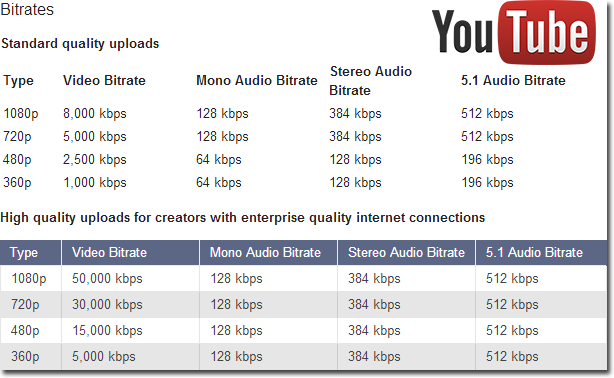
Youtube at 1080p caps at 5k bitrate AFAIK. If you want more bitrate, you'll have to upscale it from 1080p to something higher and upload that instead, so the quality option "Original" shows up.
I have some experimental 240 FPS footage downsampled to 60 FPS with that, and it looks ridiculously good
That's just for uploading it to their servers for the processing. They don't stream 50k videos, you can check that by downloading the file with any of the many plugins available (that don't do any re-encoding and just grab the video file out of the player). The trailer I uploaded to Youtube was 55k bitrate (encoded from After Effects), and when I downloaded the 1080p version directly from Youtube later on, it was capped to 5k.Youtube actually says it can do at least up to 50,000k
*pic*
If you find a way to record the game at 240 FPS (Game has a variable time-scale, in the case of my video above, I slowed down the game to 1/4th), then you can use that footage as a source for any fancy effects you want. I say experimental because this is something that will only work with games that are pretty consistent when slowed down. In the case of my video, the physics and camera movement change slightly when slowed down, so it's not such a good method after all.Also, can you explain the method for this

That's just for uploading it to their servers for the processing. They don't stream 50k videos, you can check that by downloading the file with any of the many plugins available (that don't do any re-encoding and just grab the video file out of the player). The trailer I uploaded to Youtube was 55k bitrate (encoded from After Effects), and when I downloaded the 1080p version directly from Youtube later on, it was capped to 5k.
If you find a way to record the game at 240 FPS (Game has a variable time-scale, in the case of my video above, I slowed down the game to 1/4th), then you can use that footage as a source for any fancy effects you want. I say experimental because this is something that will only work with games that are pretty consistent when slowed down. In the case of my video, the physics and camera movement change slightly when slowed down, so it's not such a good method after all.
I'm sorry I should clarify, I meant what method you used to get filmic blur when using 240fps source materiel. I've got some 120fps footage and I'd like to see how it would look at 30 with the effect you mentioned, compared to just cutting the frame rate straight down to 30.
Twixtor for After Effects. I don't know about any free alternatives at the moment. It has bugged out for me sometimes on very long footage tho.
Here's a test I did with Twixtor for 60 -> 30. Different amounts of blur work nicely for different games.
You read wrong.
He is passing his preference that is backed up by nothing off as a fact.
60FPS is objectively better, if people don't like it then it is their problem.
Judder NEVER looks nice!
No, not really. He asserted his opinion as fact, but so did you, in a much more aggressive tone:
Both of you have no 'objective' information to stand on. Both of you are spouting preferences as indisputable facts. I was just telling you to relax, because you seem particularly adamant about it.
I like to edit music videos to help tighten up my editing skills. I've been wondering, though, would they be more preferable at 30fps with supersampling, or 60fps with aliasing (at 1080p)?
The place they would be most commonly viewed would be on YouTube, which doesn't support 60fps, so the 60fps version would have to be downloadable separately. Unless there's a host that does 60fps that I don't know about.
I honestly don't know which to choose. I prefer 60 while gaming, but I like my bullshots. What say ye?
Edit: I'm talking about editing gaming footage to music. Like the dozens of Call of Duty montages you've seen, but better.
Technically, 60fps is objectively better because it provides you with more visual information.
