How did you all get this console pre-ordered? I was there for launch and sold out, yet you all have it.
Pisses me off. I love this game. I imported the hong kong version before atlus released it in the states.
What pisses me off more is who know when a restock of ps5s will come. It may be a year+ due to covid...
I built a new pc to hold me over, but seeing this makes me salty as f... hrrumph... lol
How did you all get this console pre-ordered? I was there for launch and sold out, yet you all have it.
Pisses me off. I love this game. I imported the hong kong version before atlus released it in the states.
What pisses me off more is who know when a restock of ps5s will come. It may be a year+ due to covid...
I built a new pc to hold me over, but seeing this makes me salty as f... hrrumph... lol
onesvenus
you see? It's annoying, but you've thrown plenty of those lol's at me immaturely before like the trolls around here. So that was a small taste of it.
And no, I've shown my proofs. Bluepoint said 4K@60fps back then, and 4K@60fps now. I take their word when there is zero evidence from those outrageous claims stating otherwise. It's just damage control now.
And no, I've shown my proofs. Bluepoint said 4K@60fps back then, and 4K@60fps now. I take their word when there is zero evidence from those outrageous claims stating otherwise. It's just damage control now.
Damage control from John and Lance? For what reason?
And can you provide something that's not Sony's marketing website claiming the first trailer, the one you said it was 4k and DF said it was 1440p, where BluePoint says that was 4K?
Thanks!
How did you all get this console pre-ordered? I was there for launch and sold out, yet you all have it.
Pisses me off. I love this game. I imported the hong kong version before atlus released it in the states.
Damage control from John and Lance? For what reason?
And can you provide something that's not Sony's marketing website claiming the first trailer, the one you said it was 4k and DF said it was 1440p, where BluePoint says that was 4K?
Thanks!
Sony said there was going to be a 4k mode, it didn't say that the video you claimed to be 4k was. So yeah, in that precise video, which is what I'm talking about and nothing else, it's your word against two people who have more experience than you.
Sony said there was going to be a 4k mode, it didn't say that the video you claimed to be 4k was. So yeah, in that precise video, which is what I'm talking about and nothing else, it's your word against two people who have more experience than you.
More of showing than talking from my side. I'll wait for their 800% if they are right. I've made 1600% zooms as well. So no, words are too weak when the image doesn't show any evidence of below 4K.
More of showing than talking from my side. I'll wait for their 800% if they are right. I've made 1600% zooms as well. So no, words are too weak when the image doesn't show any evidence of below 4K.
The thing is that they were talking about the first video, the one you compared and claimed to be 4k.
They both said that now the game runs at 4K so it's obvious what their analysis will say. That doesn't give you the reason when talking about that first video
The thing is that they were talking about the first video, the one you compared and claimed to be 4k.
They both said that now the game runs at 4K so it's obvious what their analysis will say. That doesn't give you the reason when talking about that first video
The thing is that they were talking about the first video, the one you compared and claimed to be 4k.
They both said that now the game runs at 4K so it's obvious what their analysis will say. That doesn't give you the reason when talking about that first video
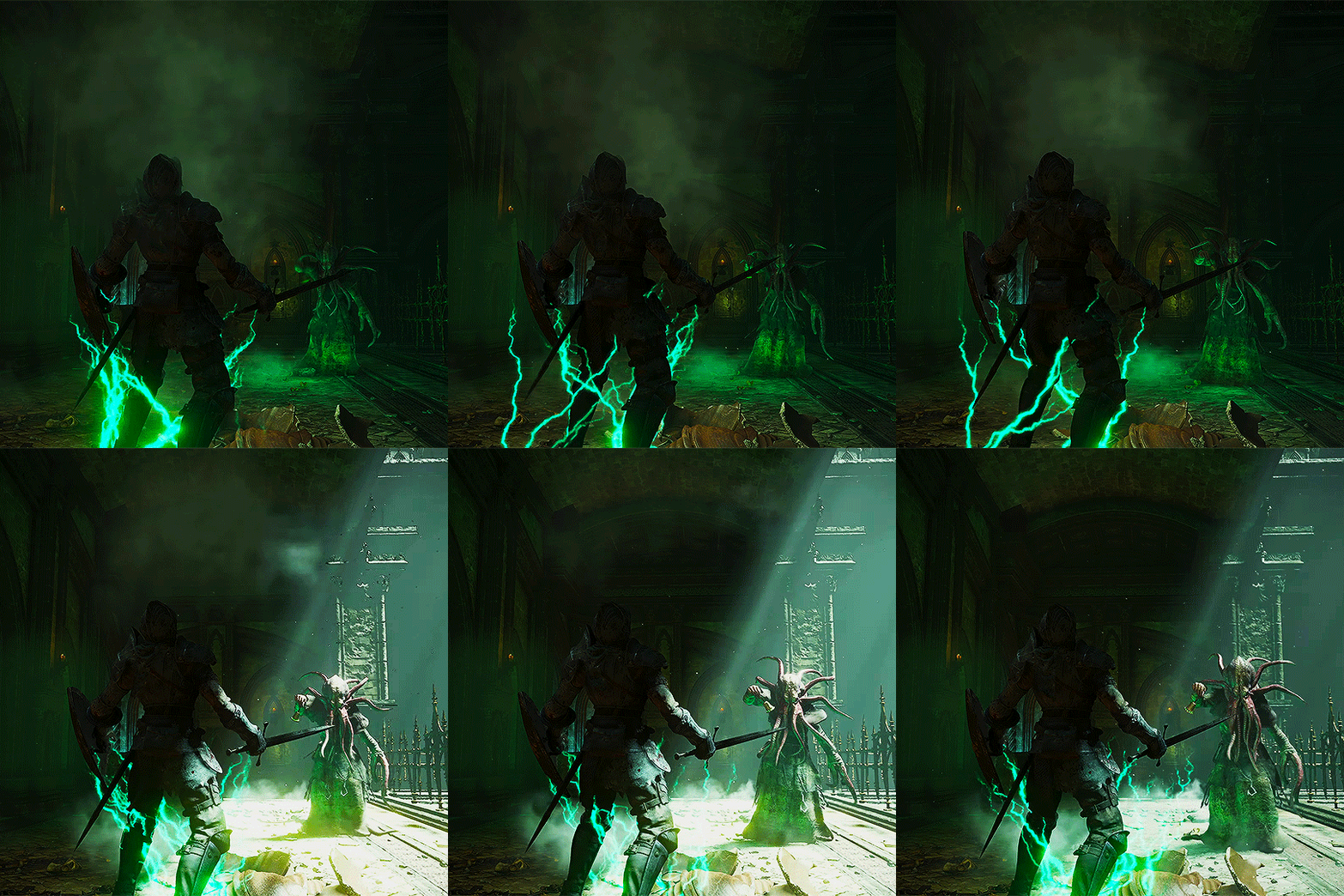
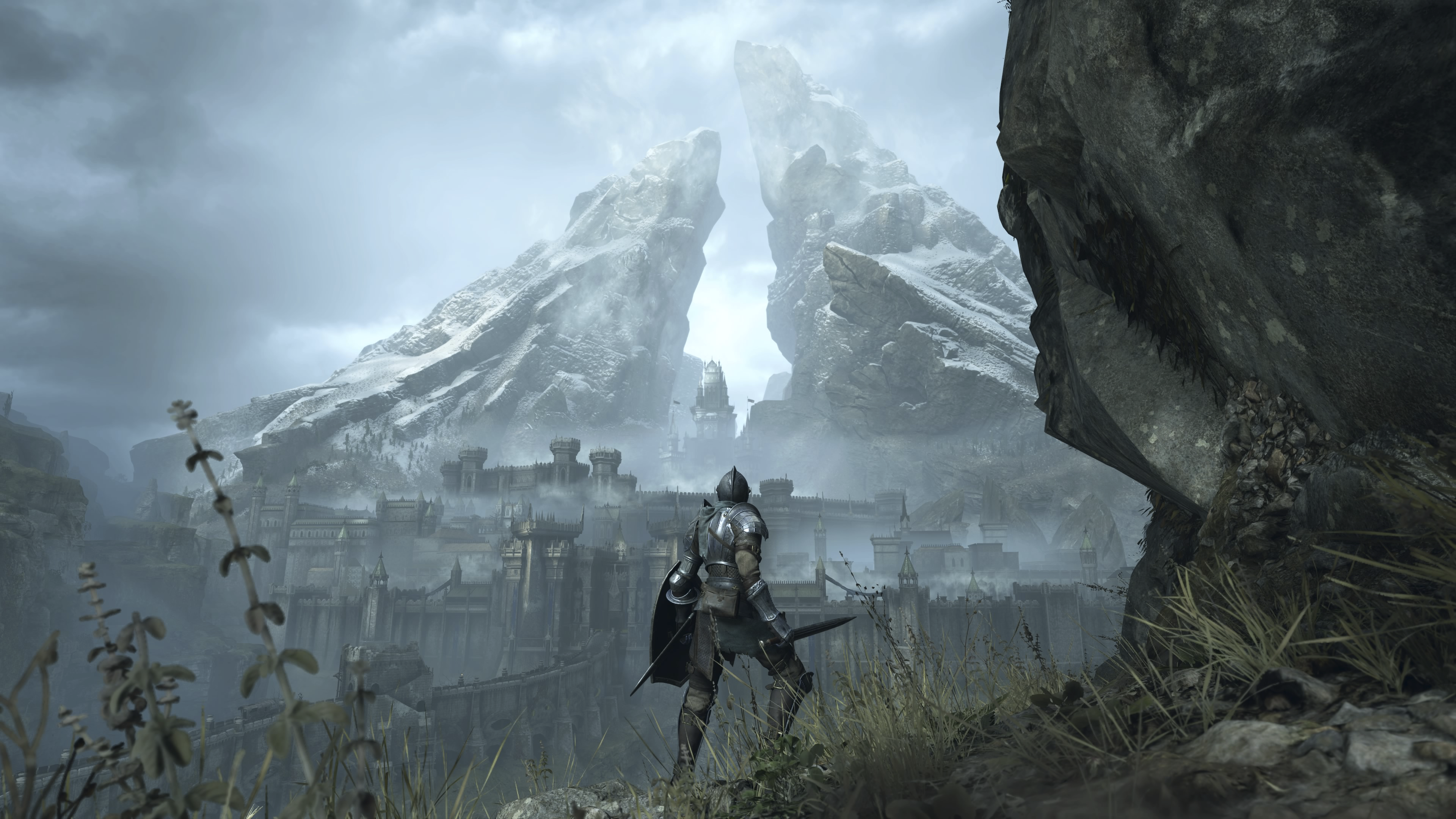
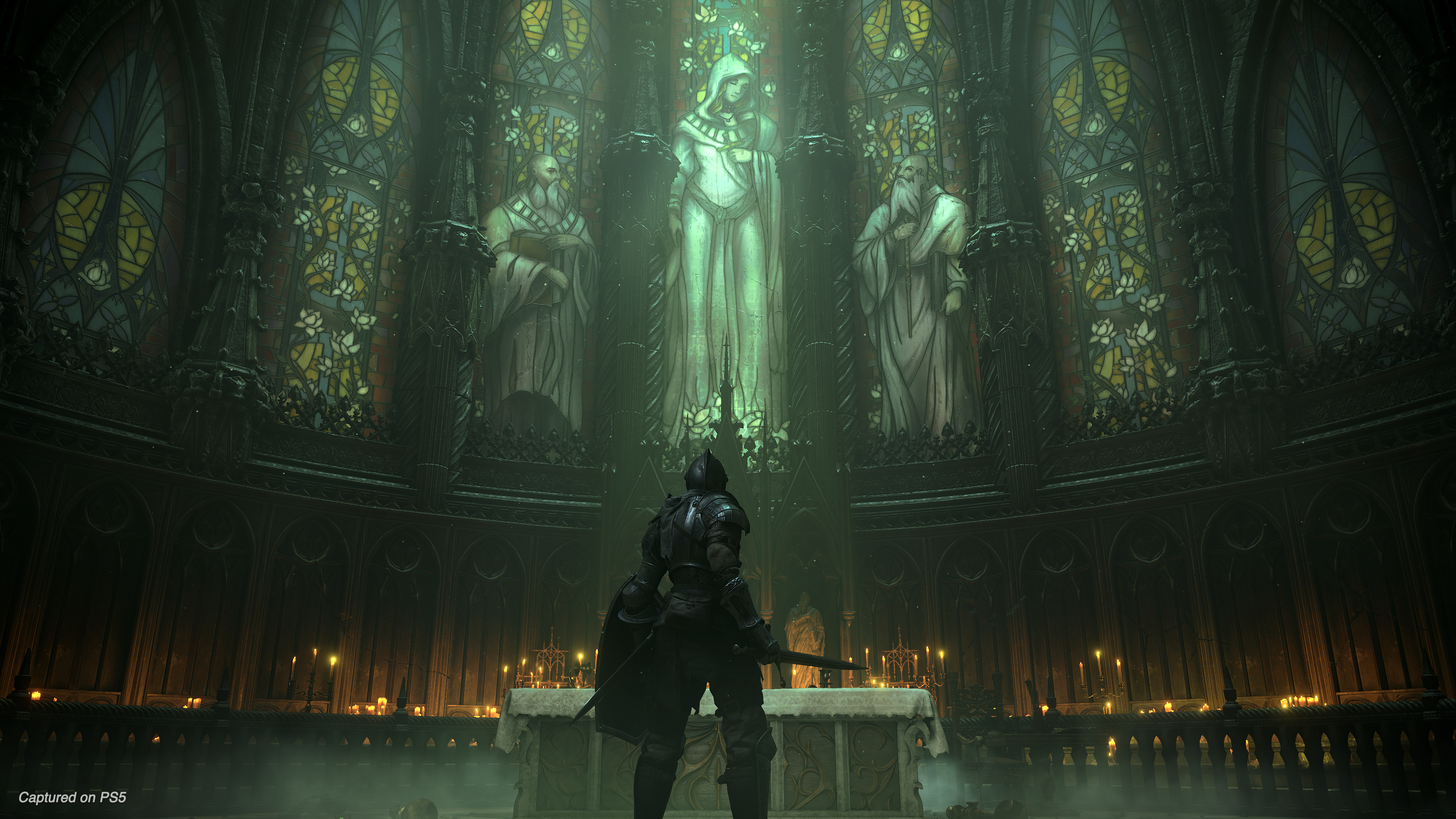
Now Sony official performance mode direct feed, months ago: (you know it from the low res foliage)
Most likely the visual mode, foliage is much better and graphics also is better:
Break down any of these, or send them to any person on earth, and let them show which one is 1440p. All of them are in PNG, the first two from the trailers I made from the compressed video but the best possible version at 4K WebM.
I fucking hate the Mind Flayers!
That whole location is nightmare material.
I think it is worse (in a good way) than Mergo's Loft or The Nightmare of Mensis from Bloodborne, especially when you get to the bottom in the second area.
Break down any of these, or send them to any person on earth, and let them show which one is 1440p. All of them are in PNG, the first two from the trailers I made from the compressed video but the best possible version at 4K WebM.
How does pixel counting work?
First a little recap for the ones who have joined us late about how pixel counting works. There's a DF video that really showshow it's done but I know their knowledge is in debate here most of the time so let me explain it.
First of all I want to leave something clear. Counting vertical steps is sometimes subjective, maybe there is not enough contrast on the zone you are counting or maybe the colors are too similar. You also really need to have seen a lot of images to train your eye. I say this because the total number of samples (counted steps) can change between two different people: maybe one interprets something as an start step and another one doesn't. What matters is not the exact number but where that number rounded to.
To pixel count on the vertical axis (we are assuming a 16:9 image whatever the resolution) you have to find a more horizontal than vertical (this means less than 45 degrees) edge with good contrast. Now, this can't be something in a texture because those can have a lower quality than the game resolution, so we need to find geometry edges where there's a lot of contrast. Can every edge be used? Unfortunately not. The chosen edge must go across 30 vertical pixels at least. I'll explain why later but it's just maths. Notice that means that we would need a larger edge depending on how horizontal it is.
Once we have a valid edge that's more horizontal than vertical and spans more than 30 pixels vertically, we proceed to create our counting window. That is, we create a 30 pixels height window from one point of that edge to another.
Finally, we count the number of vertical steps (samples) found inside that window. A 1440p buffer would give us 20 steps on a 30 pixels height window (1440/2160*30). A full 4K (2160p) buffer would give us 30 steps on a 30 pixels height window. As I said before, the number of samples varies depending on who counts it because some are not clear. What's important is that if you get 23 instead of 20 you can be almost certain that's a 1440p buffer instead of a 2160p one and if you get 28 insteaf of 30 you can be almost certain that's a 2160p one.
Let's practice!:
I've created a black background image with a red rectangle rotated 5º both in 1440p and upscaled to 2160p and a native one at 2160p. You can find them below:
1440p upscaled to 2160p
Native 2160p image
Now, I've created a 30 pixels height window (the region between white lines) in both images and created a zoomed gif of them to compare: 1440p 30 pixels height window:
2160p 30 pixels height window:
Difference GIF:
Now, I've annotated each of those images, showing where I can see vertical steps using a 800% zoom. You can use whatever zoom level you want but I find going higher to be difficult because it's too easy to loose sight of steps and going lower they are difficult to see for me. Having said that, here are the annotated images. You can see that as we expected, the 1440p image show more or les 20 steps and the 2160p image show more or less 30 steps.
Annotated 1440p image at 800%:
Annotated 2160p image at 800%:
Demon's souls pixel counting
Ok, now that I have shown the method used to pixel count, let's take a look at the DS images.
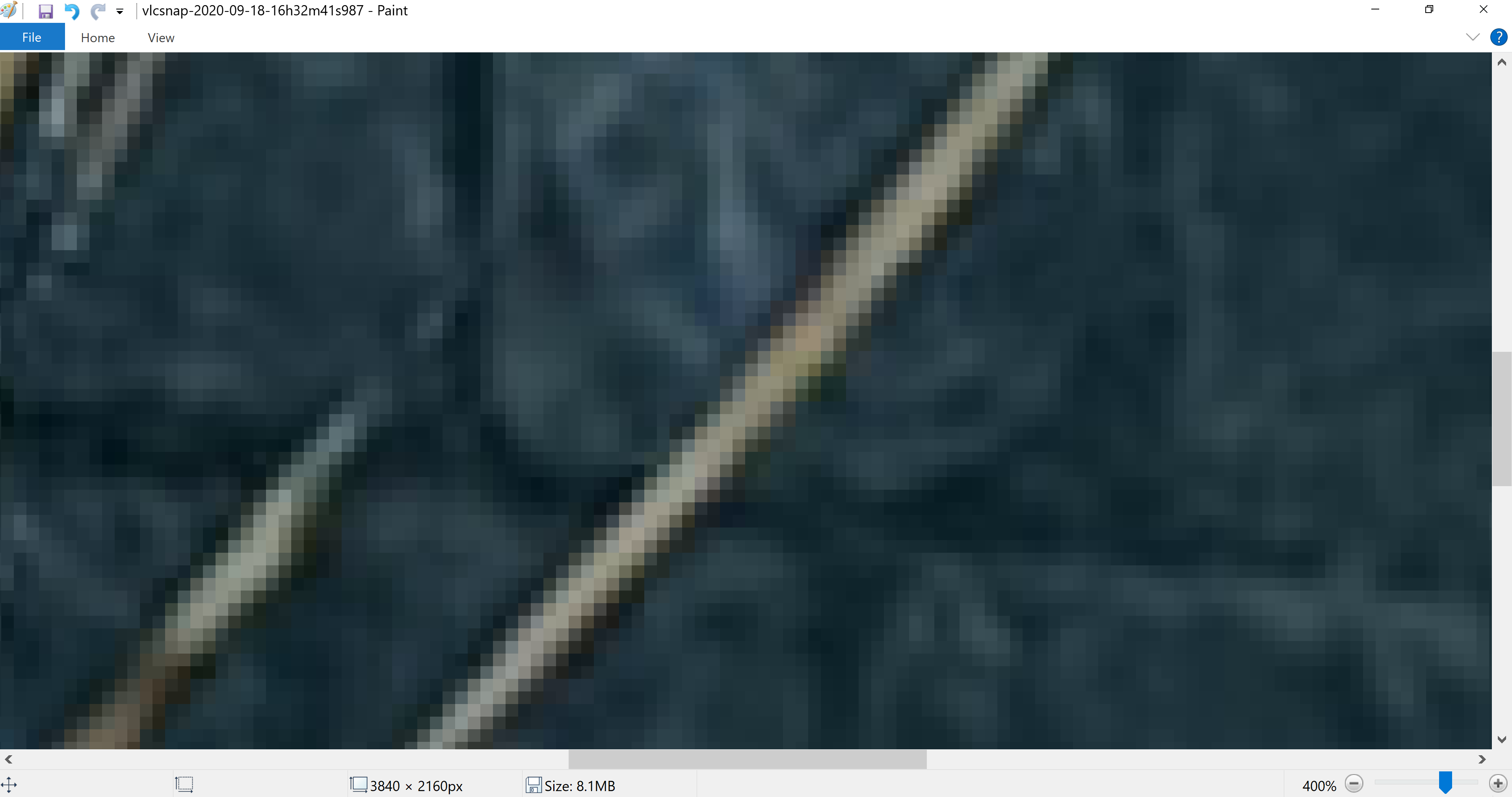
Looking at the old trailer image, I choose one of the bricks on the floor. I've also been looking at the sword but the lighting there makes it harder to count for me. I think that looking at that image without any annotation you can clearly see that it is NOT a 2160p image. Looking at the circles in blue in the cropped image, you can see there are two steps that are too big.
Here's my annotation of the steps I counted on a 800% image (each blue line is a step):
Notice that with that zoom you have to guess a little what's blur and what is geometry. I've counted 19 vertical steps so I'd say this image is in fact 1440p.
Now, let's do the same with the new one:
I've chosen the lower edge of the sword.
I think it's clear, looking at the old screenshot that it's a higher resolution image than the one before as there doesn't seem to be such big vertical steps but let's count them.
Here's my annotation of the steps I counted on a 800% image (each blue line is a step):
I count 28 vertical steps so I'd say it's in fact a 2160p image.
TL: DR
All in all, I think it's quite difficult to exactly count what's a vertical step and what's not but I think there is enough evidence to at least doubt Bo_Hazem
claims and think that the game was rendering at 1440p in the old trailer and at full 4K in the new one.
Feel free to double count my own images and see if you get different results.
How does pixel counting work?
First a little recap for the ones who have joined us late about how pixel counting works. There's a DF video that really showshow it's done but I know their knowledge is in debate here most of the time so let me explain it.
First of all I want to leave something clear. Counting vertical steps is sometimes subjective, maybe there is not enough contrast on the zone you are counting or maybe the colors are too similar. You also really need to have seen a lot of images to train your eye. I say this because the total number of samples (counted steps) can change between two different people: maybe one interprets something as an start step and another one doesn't. What matters is not the exact number but where that number rounded to.
To pixel count on the vertical axis (we are assuming a 16:9 image whatever the resolution) you have to find a more horizontal than vertical (this means less than 45 degrees) edge with good contrast. Now, this can't be something in a texture because those can have a lower quality than the game resolution, so we need to find geometry edges where there's a lot of contrast. Can every edge be used? Unfortunately not. The chosen edge must go across 30 vertical pixels at least. I'll explain why later but it's just maths. Notice that means that we would need a larger edge depending on how horizontal it is.
Once we have a valid edge that's more horizontal than vertical and spans more than 30 pixels vertically, we proceed to create our counting window. That is, we create a 30 pixels height window from one point of that edge to another.
Finally, we count the number of vertical steps (samples) found inside that window. A 1440p buffer would give us 20 steps on a 30 pixels height window (1440/2160*30). A full 4K (2160p) buffer would give us 30 steps on a 30 pixels height window. As I said before, the number of samples varies depending on who counts it because some are not clear. What's important is that if you get 23 instead of 20 you can be almost certain that's a 1440p buffer instead of a 2160p one and if you get 28 insteaf of 30 you can be almost certain that's a 2160p one.
Let's practice!:
I've created a black background image with a red rectangle rotated 5º both in 1440p and upscaled to 2160p and a native one at 2160p. You can find them below:
1440p upscaled to 2160p
Native 2160p image
Now, I've created a 30 pixels height window (the region between white lines) in both images and created a zoomed gif of them to compare: 1440p 30 pixels height window:
2160p 30 pixels height window:
Difference GIF:
Now, I've annotated each of those images, showing where I can see vertical steps using a 800% zoom. You can use whatever zoom level you want but I find going higher to be difficult because it's too easy to loose sight of steps and going lower they are difficult to see for me. Having said that, here are the annotated images. You can see that as we expected, the 1440p image show more or les 20 steps and the 2160p image show more or less 30 steps.
Annotated 1440p image at 800%:
Annotated 2160p image at 800%:
Demon's souls pixel counting
Ok, now that I have shown the method used to pixel count, let's take a look at the DS images.
Looking at the old trailer image, I choose one of the bricks on the floor. I've also been looking at the sword but the lighting there makes it harder to count for me. I think that looking at that image without any annotation you can clearly see that it is NOT a 2160p image. Looking at the circles in blue in the cropped image, you can see there are two steps that are too big.
Here's my annotation of the steps I counted on a 800% image (each blue line is a step):
Notice that with that zoom you have to guess a little what's blur and what is geometry. I've counted 19 vertical steps so I'd say this image is in fact 1440p.
Now, let's do the same with the new one:
I've chosen the lower edge of the sword.
I think it's clear, looking at the old screenshot that it's a higher resolution image than the one before as there doesn't seem to be such big vertical steps but let's count them.
Here's my annotation of the steps I counted on a 800% image (each blue line is a step):
I count 28 vertical steps so I'd say it's in fact a 2160p image.
TL: DR
All in all, I think it's quite difficult to exactly count what's a vertical step and what's not but I think there is enough evidence to at least doubt Bo_Hazem
claims and think that the game was rendering at 1440p in the old trailer and at full 4K in the new one.
Feel free to double count my own images and see if you get different results.
You've skipped many steps here, although it's no 100% straight line, but you've skipped existing "steps" in those empty gaps. Due to the great tessellation and highly detailed textures, there are no clear straight line. And assuming 19, that's not half of 28.
Now, will use this because it's "more" straight, using the low polygon grass on the right:
This is 1200% zoom, first 800%, then print screen, then zoom again 400%. Now every pixel is independently drawing the line instead of 2-4 pixels for one step. If we do the same for most of the "so-called" 4K games on PC, I doubt you'll get better results.
And yes, your results are around 1200% zoom as well, which is quite telling how far we are going.
Black squares inconsistently spread at the boundary a colorful area and a black area are not jaggies. Compression does that by making nearby pixels the same color (in this case, crushing them to black).
Compression artifacts are not jaggies.
19 vertical steps in a 30 pixels vertical window resolve to 1368p, rounding it's 1440p.
28 vertical steps in a 30 pixels vertical window resolve to 2016p, rounding it's 2160p.
That's basic math
I think you don't really understand how this works, at all
Black squares inconsistently spread at the boundary a colorful area and a black area are not jaggies. Compression does that by making nearby pixels the same color (in this case, crushing them to black).
Compression artifacts are not jaggies.
Then, it's compressed. Beware when checking jaggies at boundaries of similar colors (high contrast should not be thrown away by compression though), and don't draw any conclusions about textures from it.
Because showing HDR content on youtube with many not sporting HDR screens would result in bad footage and many grades of colors will simply merge together which ends up looking bad. That is still SDR but gives the illusion of HDR, artificially made. That's why Ubisoft games look good in SDR and very bad in HDR because they give you the illusion of HDR in SDR.
Then, it's compressed. Beware when checking jaggies at boundaries of similar colors (high contrast should not be thrown away by compression though), and don't draw any conclusions about textures from it.
If you read my post you'll see that I'm checking jaggies in high contrast edges, those are the ones that work better to pixel count anyway.
And I haven't said anything about textures at all
So if we can't use those images to check if it really was 1440p we can't check if it was 2160p either, can we?
If you read my post you'll see that I'm checking jaggies in high contrast edges, those are the ones that work better to pixel count anyway.
And I haven't said anything about textures at all
Those aren't straight lines as well, checked many and they are all textured so it's not really that easy. Good effort from your side anyway. So far, you can measure how many pixels are compensating for a line, and 1-2 pixels in sharp ends and up to 3-4 pixels for softer edges is quite the norm in native 4K games like the one posted previously with RDR2 official trailer on PC at 4K.
Game looks incredible. I haven't owned a PlayStation in years, but this looks amazing. Picture quality is just flawless. Now, I just have to wait mi the for it to be in stock