• Hey Guest. Check out your NeoGAF Wrapped 2025 results here!

Dishonored 2 PC performance thread

I read something about putting maximum frame at 1 in nvidia control panel my only issue is the sluggish turning with controller and occasional mouse
 
Core i7 4790k

16 gigs corsair ram

Samsung pro ssd

gtx 1080

what kind of experience would I get on this rig @ 4k?

2160.png


Good if you lock it to 30FPS

Edit: or drop settings to get to 60 might work as well.
 
Try a combination of RTSS frame limit and setting "Vertical sync" to "1/2 refresh rate" in nvidia inspector.
You can also try the new "Frame limiter v2" in latest versions of nvidia inspector (available from the dropdown, you need to scroll).


I really doubt that the in-game "TXAA" is in fact the Nvidia's proprietary TXAA that uses MSAA ( http://www.geforce.com/hardware/technology/txaa - it's rarely used nowadays) . If it's selectable on AMD card then it almost certainly isn't that TXAA. I know that some people report massive performance improvements when disabling TXAA but I did not notice much difference with it being on or off, I suspect it's jest a transparency AA postprocessing filter like in many other contemporary games (Division, Fallout 4 etc.).

Did anyone do a proper analysis of this "TXAA" impact on performance?

Also is "Maximum Prerendered Frames" just snake oil/placebo? I tested it and did nothing for me.
 
Anyone found a good way to lock at 30 and still allow for good frame pacing? Tried both RTSS and Nvidia Half-Vsync and both look like crap.

Try Nvidia 1/2 refresh & RTSS 30 fps cap (one for refresh lock, the other for frametime lock). You can also set pre-rendered frames to 1 for less input latency.

I really doubt that the in-game "TXAA" is in fact the Nvidia's proprietary TXAA that uses MSAA ( http://www.geforce.com/hardware/technology/txaa - it's rarely used nowadays) . If it's selectable on AMD card then it almost certainly isn't that TXAA. I know that some people report massive performance improvements when disabling TXAA but I did not notice much difference with it being on or off, I suspect it's jest a transparency AA postprocessing filter like in many other contemporary games (Division, Fallout 4 etc.).

Did anyone do a proper analysis of this "TXAA" impact on performance?

Also is "Maximum Prerendered Frames" just snake oil/placebo? I tested it and did nothing for me.

So far, TXAA has a 5 or less frame impact over FXAA High for me. Pretty much in line with the performance impact for TAA, maybe a little more.

I assume the TXAA x1 setting signifies it is using Nvidia's TXAA temporal filter without the MSAA component, but it could be something else.

Finally, results for max pre-rendered frames at "1" really varies from game to game, as well as your CPU power and the framerate you're playing at. Some games already set pre-rendered frames to 1 internally, others are at 3 or more; depends. At best, you'll probably see a frame or two less input latency. Very few games benefit from increased frames with the setting at lower values.
 
Did anyone do a proper analysis of this "TXAA" impact on performance?

Also is "Maximum Prerendered Frames" just snake oil/placebo? I tested it and did nothing for me.

There could be better testing grounds, but here we go. Maybe in very open areas performance impact is more noticeable between different solutions.

TXAA x1
FXAA High
FXAA Low
Off
Also that "Maximum Prerendered Frames" seem to help some while not others. For me it was no use.
 
Is TXAA available for AMD users?

If it is, does anyone know if previously TXAA was ever available for AMD users in games that utilized it?

If the answer to the first question is Yes and to the second is no, than it would strongly suggest that this is not nvidia's TXAA, or nvidia changed its policy.
 
Try Nvidia 1/2 refresh & RTSS 30 fps cap (one for refresh lock, the other for frametime lock). You can also set pre-rendered frames to 1 for less input latency.

Well that certainly looks better but my load times went from seconds to literally minutes so that won't work.

Oh well.
 
They made this "FAQ" to fix all your problems........

We are aware that some of you may be encountering issues with Dishonored 2 on PC. Please take a moment to review our recommendations to help better your experience.

Systems
Check to ensure that your machine meets the game’s minimum requirements and that you are not running any other programs in the background. If your system is on the lower end of the spectrum avoid setting presets to High / Very High / Ultra which will decrease your performance.
If your PC meets the Recommended Specs we encourage you to play with High settings for a more consistent 60fps experience. Only PCs that far exceed those Recommended Specs should opt for Ultra settings.
Windows
Dishonored 2 was tested against the latest updates for Windows 7/8/10 -
Please check your system to ensure you have the latest Windows updates for your OS version.
Please visit our support page for more information on how to update Windows - https://support.microsoft.com/en-us/help/12373/win...
DirectX
Dishonored 2 was tested against the latest update for DirectX - please check your system to ensure you have the latest version of Direct X. Please visit the following support page for the latest version of DirectX -https://support.microsoft.com/en-us/kb/179113
Video Card
Update Your Graphics Card Drivers
To ensure you are getting the best performance out of your graphics card, you can download and install latest drivers (based on manufacturer) here:
NVIDIA: 375.70
NVIDIA - http://www.nvidia.com/Download/index.aspx
AMD: 16.10.2
AMD - http://support.amd.com/en-us/download
Tips for getting for best performance

General recommendations
Avoid using Alt-Tab when playing. Relaunch the game if you see performance dropping after using Alt-Tab.
Avoid having background applications running in addition to the game.
Video Settings
If you have performance issues, try lowering the resolution.
Use 1440p resolution only if you have a very high-end GPU ( GTX 1070/1080 or equivalent)
Keep the V-Sync activated, especially if you have large framerate fluctuations.
If you have framerate under 30 fps, adjust the “Adaptive Resolution” between minimum (50%) and default value (75%).
Advanced Settings
Use the “Auto” presets: this should adjust your visual settings without impacting your framerate.
If you still have performance issues with “Auto” presets:
Try deactivating the “TXAA Anti-Aliasing”
Try lowering the texture details
If you experience performance issues, you can contact Bethesda Customer Support at http://help.bethesda.net/ with your DxDiag file for further troubleshooting.

Information on creating a DxDiag file and contacting customer support can be found here - http://help.bethesda.net/app/answers/detail/a_id/2...
Or contact us on Twitter @BethesdaSupport

 
So nothing we did not know already. Have latest drivers (duh), do not have programs running in the backgroun (duh), If you have problems lower settings and resolution - genius!

And don't alt-tab - what year is it?
 
I have an i7 6700k and a 1060 SC what kind of performance could I expect? The first game was a fav of mine but looking at steam reviews about performance is worrying...
 
Definitely something strange going on with frame pacing.

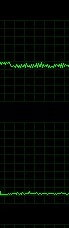
Framerate (top), frametime (bottom)

38b23bd407b00ec4ea9681c625736a7c.png

The above graph was captured during the first level of the campaign in the first room. I simply stood in front of the desk, looked directly down, and strafed left and right at a steady pace for a little over a minute.

The fps fluctuated rapidly between the high 80's, low 90's, creating that saw tooth pattern visible in the above graph. What's really strange, is the frametime graph looks great, with no rapid or large spikes at all.

The entire time I strafed, panning looked akin to a slow form of strobing. I don't know what's going on here.

Well that certainly looks better but my load times went from seconds to literally minutes so that won't work.

Oh well.

Tried it but the game is loading nearly 5minutes everytime i have a loading screen when i lock it to 30.

Yup, it appears the loading times are connected to the refresh/framerate. Last time I saw that load screen behavior was in a LEGO game.
 
I had that problem - switched to Borderless Window and then I was able to use DSR resolutions, but the performance is bad at 1440p and now I am unable to go back to fullscreen mode.

Thanks! This worked for me. The game looks quite good now with downsampling from 3840*1620 to 2560*1080. The performance hit going from the tutorial to the actual game is real, though ... Still mostly above 60 fps thankfully
 
Surely they have to be joking with that FAQ, there is literally no help in there its all obvious stuff. Not to mention blaming people's pc's they can get out of here with these excuses.
Instead they should be looking at fixing or patching some of these issues and notifying the community/accepting feedback on bugs and performance.
 
I'm sure this goes without saying, but those "latest drivers" are weeks out of date.
 
Is TXAA available for AMD users?

If it is, does anyone know if previously TXAA was ever available for AMD users in games that utilized it?

If the answer to the first question is Yes and to the second is no, than it would strongly suggest that this is not nvidia's TXAA, or nvidia changed its policy.
According to PCGH Dishonored 2 is the first game where TXAA is also available for Radeons.
But there is another curiosity, HBAO+ is not.
 
I expected the worst after seeing this thread, but my 1080 runs this perfectly at 4K, with 40-50 fps - which is more than enough in a game I slowly sneak around in. Everything is on Ultra, except shadows and decals. Dynamic res is at 100%.

Game controls also very well with the Xbone controller, I don't notice anything weird.

Maybe it's a vram issue that causes problems for mid-range cards?
 
Surely they have to be joking with that FAQ, there is literally no help in there its all obvious stuff. Not to mention blaming people's pc's they can get out of here with these excuses.
Instead they should be looking at fixing or patching some of these issues and notifying the community/accepting feedback on bugs and performance.

It may be obvious to you and many people of this forum but think of random joe using outdated drivers on their crap infested PC (background running processed).
 
Not to encourage abuse, but to those concerned about running over two hours of playtime due to tinkering, be aware that time played while in Offline Mode is not a factored into the equation. Valve actually added the necessary code to have Steam perpetually record Offline Mode playtime shortly after introducing the refund policy but has thus far neglected to "activate" it.
 
So it's not early to say that this is another disastrous PC port? I... am not even surprised anymore. And sadly this is what i expected for this game since few weeks ago.

I think that Steam needs to do something about this, something has to be done. Because majority of AAA titles are not working as they should.

Oh and ppl need to STOP pre-ordering games!
 
So it's not early to say that this is another disastrous PC port? I... am not even surprised anymore. And sadly this is what i expected for this game since few weeks ago.

I think that Steam needs to do something about this, something has to be done. Because majority of AAA titles are not working as they should.

Oh and ppl need to STOP pre-ordering games!

I mean we have refund policy, but this game is mostly fine till 2 hours in
 
Just booted the game to make sure. Here are some screens.

I can take a video if you want too.

Soooo... yea.

http://i.imgur.com/9XGpfhQ.png
http://i.imgur.com/SmiIN8A.png
http://i.imgur.com/ZhAJbaV.png
http://i.imgur.com/5FTAsTc.jpg
http://i.imgur.com/dZVjQCW.jpg

FPS counter is on top right corner.

you posted 2 screens, both racing against no cars, one of which still had fps lower than your reported minimum. post a video of some actual races, maybe through forests, night time, rain etc. you wont be getting anything close to a steady 60.
 
Top Bottom