• Hey Guest. Check out your NeoGAF Wrapped 2025 results here!

Dragon's Dogma PC Performance thread

Really enjoying the game on my desktop Core i5-4690K, 280X which runs it pretty much perfectly on highest details. I've only run into a sound glitch where it fed some pretty loud noise into my headphones just before an FMV.

I've now just tried running this on my Surface Pro 4 Core i5-6300U with Intel HD 520 integrated graphics and, during the hour that I played it doing an early escort quest, it actually runs quite playably at 720p (1280x800) and a mix of low-medium settings. Seems like a solid port.

Great to hear. I have a similar build with a 4790K and R9 285. I'm hoping for 1080p/60fps
 
I'm having problems getting my laptop to run Dragon's Dogma decently. I can't even get a clean 30 fps at the lowest settings.

Here are the specs:
i5 6300HQ 2.3 GHz
8 GB Ram
GTX 960M 4GB GDDR5

I know they are below the recommended, but I feel like I should be able to run it at 60 fps somehow. This laptop runs League of Legends, CS:GO, Rocket League, and pretty much every other game decently. Anyone have an Idea?

There is this note on the steam page: "Some high end integrated graphics chips and modern gaming laptops with a discrete GPU may work but have not been tested, nor are they officially supported by Capcom." Luckily I have a desktop pc, but I hope that doesn't mean I can't play it on my laptop.

set the game to use your nvidia card in the nvidia control panel, it's using the integrated card atm
 
I'm having problems getting my laptop to run Dragon's Dogma decently. I can't even get a clean 30 fps at the lowest settings.

Like SmartWaffles said it's probably due to how weaker laptop CPUs are in comparison to desktop ones. I've noticed this more than a few times with CPU bound games on my laptop. Here are my specs:

CPU: Intel i7 3635QM
GPU: AMD Radeon HD 8870m
RAM: 12 GB

I can't get a solid 60 FPS even on low settings at 720p but if I switch it to 30 FPS I can max the in-game settings at 1080p.

set the game to use your nvidia card in the nvidia control panel, it's using the integrated card atm

This is also possible. Still, I assume most laptop users know that they have to switch GPUs for games.
 
As previous posters said the game is CPU bound due to being DX9, so your laptop CPU might not cut it.

set the game to use your nvidia card in the nvidia control panel, it's using the integrated card atm

Thanks for the answers.

This was part of the problem. I set it to use the Nvidia graphics card, but then it gave me a black screen and "D3DERR_DEVICELOST". I googled around and I had to set to Windows 7 compatibility mode and run as admin. Now Dragon's Dogma runs great. I thought I should post my solution just in case someone has a similar problem.
 
Great to hear. I have a similar build with a 4790K and R9 285. I'm hoping for 1080p/60fps

I'm about 9 hours into the game (but not terribly far because of my OCD searching of every area) and it's been pretty much smooth 1080p60 except for a very occasional stutter when its loading things.
 
980
i5 4570
20gigs

Turning the camera around in the room you start in where you pick your class and get your gear literally made my framerate go from 120 to something in the 60s.

There's a wall(basically the back of the Alehouse in Gran Soren) that for whatever reason I've seen go as low as the 40s.

Otherwise, the game generally sits in the 70-120 range, depending on what I'm looking at. A far cry from the locked 120 I was hoping for from as last gen MT Framework game, but given how it ran on consoles, what can ya do.

Bumping the resolution from 1080 to 1440p seemed to make practically zero difference, so yeah, definitely a CPU bound game.
 
I have a 4930K at 4.5 Ghz and a 970. Running at max settings and 4K 3840x2160.
At some special places fps go below 60 but outside its always above. No stutter.
Ex. where it goes below 60 and stutter is tutorial dragon and forst Cyclop fight.

I guess one 970 cant manage full 4K and max settings above 60fps
 
980
i5 4570
20gigs

Turning the camera around in the room you start in where you pick your class and get your gear literally made my framerate go from 120 to something in the 60s.

There's a wall(basically the back of the Alehouse in Gran Soren) that for whatever reason I've seen go as low as the 40s.

Otherwise, the game generally sits in the 70-120 range, depending on what I'm looking at. A far cry from the locked 120 I was hoping for from as last gen MT Framework game, but given how it ran on consoles, what can ya do.

Bumping the resolution from 1080 to 1440p seemed to make practically zero difference, so yeah, definitely a CPU bound game.

Try to set distance scaling to medium.
 
Does anyone have a step by step for getting downsampling working using Gedosato? I have tried and I can choose the rendering res in the game's video options but it doesn't downsample--it just runs at an incorrect aspect ratio--everything is zoomed in and half the display is cut off as a result. It's been annoying me since I tried especially because I have rocked Gedosato for Dark Souls 2 and other games.
 
http--www.gamegpu.ru-images-stories-Test_GPU-RPG-Dragons_Dogma_Dark_Arisen-test-DDDA_2560.jpg
Huh, isn't the framerate locked at 150? How are they getting 166/184?

Q) WhatÂ’s the maximum frame rate supported by the game?
A) DragonÂ’s Dogma currently supports up to 150 frames per second, which means the game can take full advantage of 144Hz monitors provided you have a capable PC. Please note an upper limit has been imposed at 150 fps in order to avoid any potential game-breaking issues. (e.g., physics interaction and rendering error)

https://steamcommunity.com/app/367500/discussions/0/487877107137271918/
 
So is SLI a lost cause unless Nvidia releases an official profile? Not really a big deal, but it would be nice to run the game at 4k with AO.
 
Finally booted this today for the first time. Fullscreen is a slideshow ~7-15fps, but windowed is buttery smooth. Literally single digit frames in fullscreen. I hope it's fixed soon or someone has an idea for me. Other than that, did the Gryphon fight and had a lot more fun than I expected. Gonna go to bed soon so I won't play more till later.

980Ti
i74770k@3.8Ghz
16gb ram
120gb SSD
1440p Gsync.
 
I've been playing this for a while and I've observed the best, most consistent performance using the following settings.

Fullscreen Off
V-Sync Off
Framerate Variable

I use ENB to cap my framerate and also to run an ENB setting. This gives me no screen tearing and pretty stable framerate unless I'm by Grand Soren on a clear day.
 
For the best experience I recommend;

Any external framelimiter turned off (RTSS etc.)
In game framerate set to variable
In game v-sync on (adaptive can causing tearing)
DOF off
FSAA off
Downsampling


Looks great downsampling from 4K on a 980Ti.
 
What does the HDR setting do? Should I bother enabling it if I don't have an HDR screen?

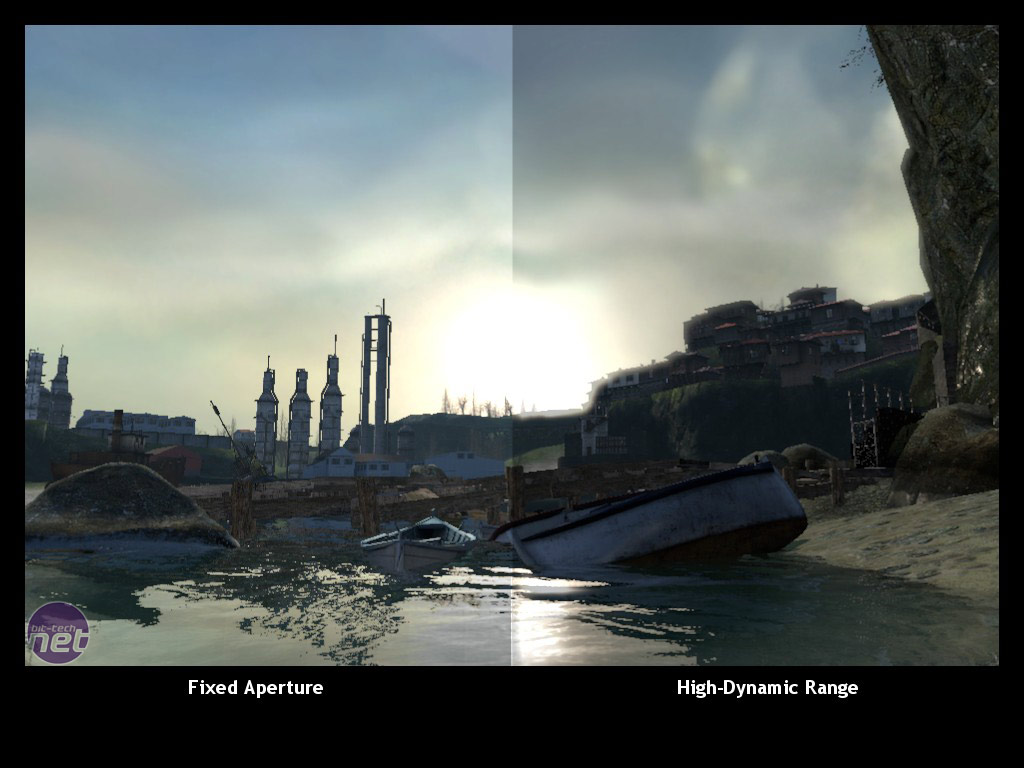
It's High Dynamic Range lighting, has nothing to do with HDR TV's. It simulates light levels changing when going from dark to light, so for example you leave a dark cave into the daylight, it will be blindingly bright for a second while your "eyes" adjust and lower the light to normal.
 
What does the HDR setting do? Should I bother enabling it if I don't have an HDR screen?
As Sinatar said. Here's an example of how it usually works in-game. It's more to do with how light works, doesn't really affect colour that much.

The bottom example is from Half-Life 2 but you get the gist of it.
hdr_demo2.jpg
 
I know this is an old thread, but I've been banging my head against the wall for a few hours, and this is my last hope.

Recently bought a new computer (GTX 1070, i5-6600k, 16 GB ram, etc.), and thought I would give this a shot since I've never played it. Bougit it on Steam, installed it on my SSD. Fired it up, ready for some action and.. it's unplayable.

I mean, it's not literally unplayable, but I get 10-15 FPS. I've tried everything. Windowed mode, running it in Win 7 compability mode, made some changes in the .ini-file, all settings as low as possible and nothing works. No matter what I do, no improvements. None.

Should I just accept my fate and move on?
 
I know this is an old thread, but I've been banging my head against the wall for a few hours, and this is my last hope.

Recently bought a new computer (GTX 1070, i5-6600k, 16 GB ram, etc.), and thought I would give this a shot since I've never played it. Bougit it on Steam, installed it on my SSD. Fired it up, ready for some action and.. it's unplayable.

I mean, it's not literally unplayable, but I get 10-15 FPS. I've tried everything. Windowed mode, running it in Win 7 compability mode, made some changes in the .ini-file, all settings as low as possible and nothing works. No matter what I do, no improvements. None.

Should I just accept my fate and move on?

Install MSI Afterburner, turn on the OSD, take a screenshot and then report back. That way we'll be able to see if it's something simple such as your GPU not running at full speed during this game.
 
Install MSI Afterburner, turn on the OSD, take a screenshot and then report back. That way we'll be able to see if it's something simple such as your GPU not running at full speed during this game.

I have no idea why, but after installing MSI Afterburner, it runs perfectly.
So.. Thanks, I guess :)
 
Top Bottom