
Horsemama1956
Member
For the people that think that looks good, what do you normally run settings at on your TV?


I'll have to play around with the slider, it got me thinking because it says adjust until pictures are visible/not visible etc, which led me to believe I'd lose detail or something, as the cogs disappear right at the low end of the slider, can't imagine the option is any different than Forza or Deus??
Wow thanks for the game mode tip. Forza isn't dimming and looks waaayyy better,On my Samsung i have my game mode setting with UHD color enabled for HDMI slot one and the screen is always bright and vibrant even in non HDR game so. When I push display it says "game mode" at the top of my display options. On the times when my screen dimmed and lost its pop when playin forza, I went to the display menu and it no longer said "game mode" but said "standar". Must be a bug with Samsung TVs but it rarely does it. Once I go into options and put it back into game mode all my settings reappear and I'm left with a beautiful vibrant HDR picture. Every time after that the game would correctly boot into HDR mode with all my settings still intact. It did the disaplay setting switch once again last night but I fixed it and it hasn't happened again since.

I have a Samsung 60" JS7000For the people that think that looks good, what do you normally run settings at on your TV?
Glad I can help! I know this HDR stuff is different for everyone so make sure you pass along the tip to anyone having dimming issues on a Samsung.Wow thanks for the game mode tip. Forza isn't dimming and looks waaayyy better,
Yeah, HDR works fine in Game Mode.How's the KS8000? Is it true that HDR works even in Game Mode, where input lag is lower?
I just set up my HDR using the Xbox One S settings. There is calibration in settings. I also used Amazon's recommendations for HDR before doing that. I got some settings from AV Forums too. It's just about testing the waters really.
Do you have HDMI UHD Colour switched on? That is important. You'll know if HDR is working as the backlight and brightness will be flicked up to full. I notice on Netflix too that it flashes grey for just a second as it loads up.
On Forza I think I have the HDR slider quite close to the far left. I play games in Dynamic rather than Movie mode, it looks much better. I've not bothered with Game Mode.
I have a Samsung 60" JS7000
Game mode on
Backlight at 14 (HDR sets it to full at 20)
Contrast at 90 (HDR sets it to 100)
Brightness at 47 (HDR sets it to 50)
Color at 75
Gamma at 0
Dynamic Contrast on High
Black levels on auto
And UHD color enabled.
Everything else is set to it's standard setting.
This is the best settings I found for my tv and I think forza looks stunning in HDR.
Glad I can help! I know this HDR stuff is different for everyone so make sure you pass along the tip to anyone having dimming issues on a Samsung.
Those with a 2016 LG OLED what HDR picture mode do you use? I read HDR Vivid displays the widest spectrum. HDR Standard looks horrible, like a yellow filter is on the screen. But I don't know if I should be adjusting modes or changing any settings? I have a B6V.
Woah....color at 75??? Is thid a thing with JS series? Color normally stays 45-55 on almot every TV
I use HDR standard but mine is calibrated with a meter and test patterns. In all honesty do not copy settings you find online. calibrating in general you shouldn't do it because panel variance is as much as 20% for the same model and will definitely differ across models. As teh settings are based off the light in your room.
Calibrating HDR is hard in itself with patterns and a meter, so just going in and changing settings to the white balance probably just going to make it worse.
Just tried these settings. There's no colour alterations so still looks like a yellow/grey filter is applied to everything - certainly not how it should look.When the ISF profiles are calibrated as well, it should. (This goes for the C6, dunno if the other models differ)
I am starting to wonder if Samsung has just done a poor job of the HDr implementation. While from a technical perspective they are hitting all the right notes. But a customer shouldn't have to adjusting brightness and contrast around for every game. I wonder if their image processing has an issue. Ultimately you should be able to get your base tv settings setup the way you like. And the majority of content should look great. Because at the end of the red is red and blue is blue. As well as bright is bright and dark is dark. It's not like a bright area in forza horizon is different from a bright area in gears of war. The implementation can be different but ultimately a bright area in one game shouldnt be completely different to the point of having to change tv settings.
Yeah, HDR works fine in Game Mode.
Anyone have settings for JU7100 ? Its very dark and dull my screen
I am starting to wonder if Samsung has just done a poor job of the HDr implementation. While from a technical perspective they are hitting all the right notes. But a customer shouldn't have to adjusting brightness and contrast around for every game. I wonder if their image processing has an issue. Ultimately you should be able to get your base tv settings setup the way you like. And the majority of content should look great. Because at the end of the red is red and blue is blue. As well as bright is bright and dark is dark. It's not like a bright area in forza horizon is different from a bright area in gears of war. The implementation can be different but ultimately a bright area in one game shouldnt be completely different to the point of having to change tv settings.
It's was on my 9000 until I used dynamic contrast.
Well, but it doesn't hurt either, you can always just go and hit Reset if the results are unsatisfactory.
I mean, the calibration tools for HDR are still in their infancy, and professional service doesn't come cheap.
Edit: and the ISF Dark profile should not differ toooo much, as its for a dark ambience anyway.
Exactly. Perfect example is after I calibrated mine movies that were mastered at 1000 nits looked great, as they were mastered at higher nits, it still looked alright but you can tell the difference.Actually, the problem is it very well could be. The fact there is no standard for how HDR should be implemented, or what levels things should be mastered at, etc. is a real issue right now.
Thanks, I'm thinking of buying it myself. How is the TV overall and how much difference does HDR make in your opinion?
Just tried these settings. There's no colour alterations so still looks like a yellow/grey filter is applied to everything - certainly not how it should look.
This is true but you have to find a balance. I calibrated mine with Calman 5 2016 enthusiast, C6 HDR, and 4k test patterns speced to LG's white paper on what they say it needs to be calibrated to. Standard is pretty close to what it should be by default and moving the CMS really doesn't get you in spec much because of how green tracks (at least on mine). The whole point of calibration is to meet a standard. The issue with HDR is that standard is not really there yet. So you have to find a good balance of what you can do. Especially with movies being mastered at various nits.
Best bet is to learn how to do it yourself. I have been doing it now going on 9 years, my own personal displays, friends, and even some paid jobs.It's something that pays for itself and is definitely worth it if you upgrade fairly often.
Do those settings remove the disgusting yellow filter that looks like it's applied when on HDR Standard? Because I can't honestly see why anyone would happily use that.
I absolutely agree on all points.
And you made me curious - would you mind sharing your settings?

It's what everybody says. Yet it's impossible to have a white white with those settings. Will appear yellow. Maybe it's how pro wants the picture to looks like but it's not real looking at all imho.lol it's not a yellow filter. The problem is you are used to whites being cool blue shades and when you go back to a true standard white color, it looks off to you.
Warm2 is theoretically accurate as the creator intended.
I have an E6. How is HDR input lag for those with 2016 Oled now that we have a shooter example vs. Forza.


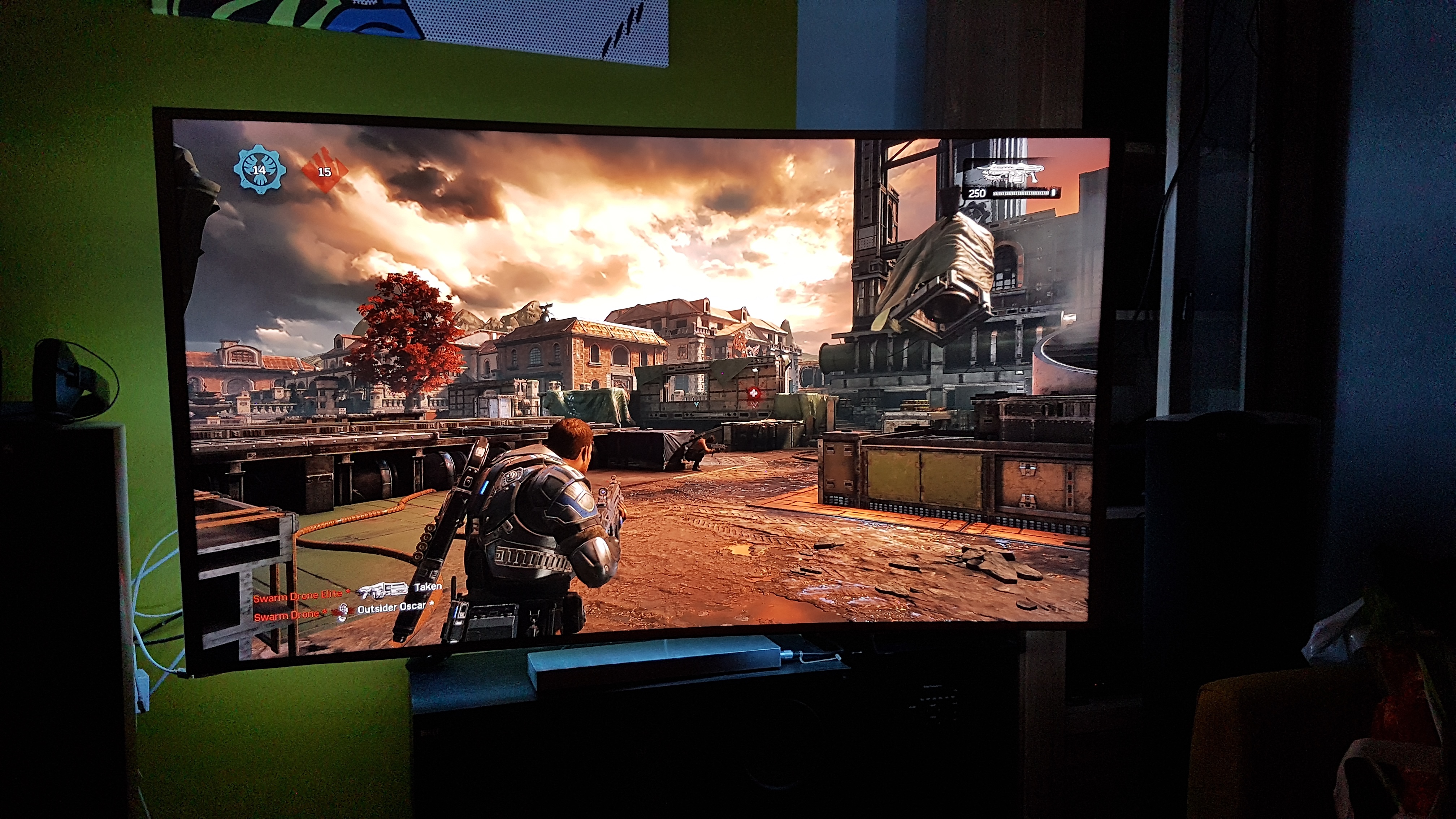
A few quick ones.
Quick question, why did you decide to buy a curved screen? It's always seemed so weird that these things are even real. Like the curved glass of old CRT monitors was admonished to the point where "flat screen" displays were marketed aggressively as such. And now it's curved the other way? I don't understand why anyone would want this.
Why did it appeal to you?
Don't know for him but I bought the lg C6 (65) because here E6 was 6500 when c6(curved) and b6(flat) are 5000. C6 got some better input lag and 3D so it was a no brained. And curve is so small that it's same as flat for meQuick question, why did you decide to buy a curved screen? It's always seemed so weird that these things are even real. Like the curved glass of old CRT monitors was admonished to the point where "flat screen" displays were marketed aggressively as such. And now it's curved the other way? I don't understand why anyone would want this.
Why did it appeal to you?

Quick question, why did you decide to buy a curved screen? It's always seemed so weird that these things are even real. Like the curved glass of old CRT monitors was admonished to the point where "flat screen" displays were marketed aggressively as such. And now it's curved the other way? I don't understand why anyone would want this.
Why did it appeal to you?
Yeah I can send them to you when I get home from work. So probably won't be until around 6 or 7pm pst when I get a chance to really sit down and pull the report and settings.

Why did it appeal to you?
Quick question, why did you decide to buy a curved screen? It's always seemed so weird that these things are even real. Like the curved glass of old CRT monitors was admonished to the point where "flat screen" displays were marketed aggressively as such. And now it's curved the other way? I don't understand why anyone would want this.
Why did it appeal to you?

Is the HDR calibration tool showing the three logos as basically the same for everyone else? I've got the bar at around 10% and all three are "barely visible".
I am starting to wonder if Samsung has just done a poor job of the HDr implementation.
But a customer shouldn't have to adjusting brightness and contrast around for every game.
Is the HDR calibration tool showing the three logos as basically the same for everyone else? I've got the bar at around 10% and all three are "barely visible".
Around the same but a bit different depending on your settings. But ya it was a tiny bit odd
can someone test if xbox one s will output hdr at 1080p?
Just tested this, and interestingly the Xbox S automatically forces me to output 4K when I select Gears in HDR, don't understand this as it's not a 4K game......


Just tried these settings. There's no colour alterations so still looks like a yellow/grey filter is applied to everything - certainly not how it should look.
I replaced an older LCD that didn't even have adjustable settings in Game Mode (ugh), so it's a huge upgrade to me for that reason alone. Picture looks great with 720p/1080p sources, and the input lag is very good for a TV of its size. I'm super sensitive to input lag, so that was a huge factor in my purchase. There are obviously more expensive TVs on the market, but I feel like the asking price for this one was more than reasonable for its features and performance. Zero buyer's remorse.Thanks, I'm thinking of buying it myself. How is the TV overall and how much difference does HDR make in your opinion?

Just tested this, and interestingly the Xbox S automatically forces me to output 4K when I select Gears in HDR, don't understand this as it's not a 4K game......
On a side note, I urge anyone who wants to see incredible HDR on their new TV, to download LG chess from http://demo-uhd3d.com/categorie.php?tag=hdr
Wow I'm very impressed, just shows how 4K WCG and HDR can really take it to the next level.
Its the same in FH3.
I would if the servers on this site weren't shit.

Get them here: https://mega.nz/#F!aBAGBJBb!vGOiLiLo9HT7fBA1qww3-Q (rename .lge = .mkv iirc)Its the same in FH3.
I would if the servers on this site weren't shit.
You (or your TV) are definitely doing something wrong unless you prefer comparatively dull lightning, reflections etcHDR looks...... Weird on my TV. Samsung JU6500. I kinda prefer it off. Unless I'm doing something wrong

Anyone have good settings for Samsung UE40JU7100 HDR tv ?
If the pictures were taken in HDR, I don't see why not.
Get them here: https://mega.nz/#F!aBAGBJBb!vGOiLiLo9HT7fBA1qww3-Q (rename .lge = .mkv iirc)
You (or your TV) are definitely doing something wrong unless you prefer comparatively dull lightning, reflections etc