

-
Hey Guest. Check out your NeoGAF Wrapped 2025 results here!
You are using an out of date browser. It may not display this or other websites correctly.
You should upgrade or use an alternative browser.
You should upgrade or use an alternative browser.
iPad/iPhone Music Production app thread
- Thread starter Fusebox
- Start date
- Status
- Not open for further replies.
Red Blaster
Member
I use the iRig in GarageBand but it's really noisy even using a guitar with humbuckers. I realize it's only an analog signal but is there a way to minimize the noise? The noise gate doesn't seem to work that well.
polyh3dron
Banned
I have it... I'm not a fan though. This is coming from a former owner and prolific user of a MPC2000XL as well.So I am thinking of buying the SynthStation 49 for my iPad... I really want to get into music production and I've already dicked around with FruityLoops and GarageBand for iPad.
Has anyone used this or know anyone that has since I can't find any videos online about them... it looks decent.
So, which ones to get? I've already penciled in iKaossilator, but are there others that are decent? Like an iOS version of that synth that was released for the DS?All Korg apps are 1/2 price through May, 7th.
Dynamite Shikoku
Congratulations, you really deserve it!
Moog Filtatron is on sale for .99 cents
Dynamite Shikoku
Congratulations, you really deserve it!
ikaossilator is 50% off for halloween. Awesome app.
Guys check out Figure by Propellerheads on the AppStore. It's limited but it's great fun and it sounds totally bad-ass when you get a loop cranking.
Just went Universal a few days ago. This thing is so damn fun.

jombag
Member
DJ Player app is free til 12/4! I think its one the best dj app in the appstore as it supports midi and dvs. It's 45 dollars when the promo ends.
https://itunes.apple.com/us/app/dj-player/id339810085?mt=8
https://itunes.apple.com/us/app/dj-player/id339810085?mt=8

Jedeye Sniv
Banned
DJ Player app is free til 12/4! I think its one the best dj app in the appstore as it supports midi and dvs. It's 45 dollars when the promo ends.
https://itunes.apple.com/us/app/dj-player/id339810085?mt=8
wow, that's an amazing deal. I'm going to download it just to see how it is.
FreeMufasa
Junior Member
DJ Player app is free til 12/4! I think its one the best dj app in the appstore as it supports midi and dvs. It's 45 dollars when the promo ends.
https://itunes.apple.com/us/app/dj-player/id339810085?mt=8
Thaaaaaaaaaaaaank uuuuuuuuuuuuuuuu!
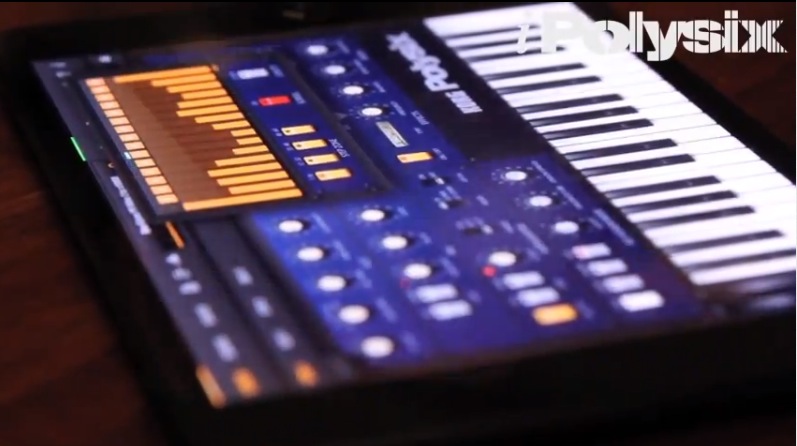
Damned if I'm not tempted to get both the Polysix as well as the Electribe. Are they able to integrate at all to anything else or is their only value as an audio output app?
I have the camera connection thingy if that makes a difference. But only running iOS5.1.1, which means I can't use a USB soundcard in apps like djay to have dual audio outputs
I have the camera connection thingy if that makes a difference. But only running iOS5.1.1, which means I can't use a USB soundcard in apps like djay to have dual audio outputs
DM1 - The Drum Machine will be free tonight.
Jedeye Sniv
Banned
DM1 - The Drum Machine will be free tonight.
That's a really solid app, I use it all the time.
polyh3dron
Banned
DM1 - The Drum Machine will be free tonight.
Thank you, based Heelio.
Also, DJ Player App seems to still be free but it's like a F2P kind of deal because it annoys you with ads until you make a $18 IAP.

I just bought it, downloading now. Having never used one of these before, I'm not sure what my opinion would be worth but after I play with it for a bit I will leave some impressions.

hyp
Member
Audiobus is out too! and it's a total game changer.
https://itunes.apple.com/us/app/audiobus/id558513570?mt=8
https://itunes.apple.com/us/app/audiobus/id558513570?mt=8
hyp
Member
Me too. But having never used an MPC IRL, I don't know how I'd know.
Are MPCs "just" drumpads or do they sequence as well a la the Electribe series?
they sequence as well. I have a hardware MPC at home and this app looks legit. might try it out but lack of Audiobus support makes me wary.
After playing with iMPC for a couple hours, I have to say, it's an awesome app. I'm by no means a hardcore dj / audio guy, but I love playing with audio software and this program is exactly what I was looking for after seeing some cool midi pad / launchpad / maschine mikro videos lately.
It comes with a decent amount of sounds / beats / loops etc. and adding your own from your iTunes library is easy. Mapping everything is pretty intuitive, and I've only referred to the manual a couple times when setting things up.
I've had 1 crash, and some of the sounds were getting distorted after a while of playback, not sure why that was.
It comes with a decent amount of sounds / beats / loops etc. and adding your own from your iTunes library is easy. Mapping everything is pretty intuitive, and I've only referred to the manual a couple times when setting things up.
I've had 1 crash, and some of the sounds were getting distorted after a while of playback, not sure why that was.
So that app is kind of like the virtual rack that was in Reason (if memory serves). Good idea!Audiobus is out too! and it's a total game changer.
https://itunes.apple.com/us/app/audiobus/id558513570?mt=8
Going by your last post though, the specific app needs to support it. I wonder if there'd be a need for it to support external controllers or USB devices as well?
(don't mind me, just thinking out aloud
 )
)Audiobus is out too! and it's a total game changer.
https://itunes.apple.com/us/app/audiobus/id558513570?mt=8
This is seriously slick and powerful! I'm just learning how it all works now, trying to get a decent workflow going.
hyp
Member
So that app is kind of like the virtual rack that was in Reason (if memory serves). Good idea!
Going by your last post though, the specific app needs to support it. I wonder if there'd be a need for it to support external controllers or USB devices as well?
(don't mind me, just thinking out aloud
yea, it's basically a bridge between your iOS audio apps. any app that supports it either acts as an input (mic, synth, instrument), fx/filter module, or output (DAW). it essentially makes the apps work together. loving the hell out of it. once beatmaker 2 is on board, it's on baby!
hyp
Member
This is seriously slick and powerful! I'm just learning how it all works now, trying to get a decent workflow going.
right on! if more apps provide support I can pretty much ditch my desktop DAW.
Dynamite Shikoku
Congratulations, you really deserve it!
Audiobus is pretty great. It will be even greater if all the apps I have are updated to support it. A lot of my favs have already said they will be updating, which is good.
Dunno if this is of interest, but Steinberg has just released Cubasis for the iPad. Pretty hefty pricetag at $49.99, but I'm curious about its capabilities.
https://itunes.apple.com/en/app/cubasis/id583976519
https://itunes.apple.com/en/app/cubasis/id583976519
polyh3dron
Banned
As always with any MPC, the stock sounds are lame as all fuck. Sample your own drums and such and this thing can be great, but lack of midi support makes it not worthy of the MPC name. I used to run lots of external gear through my MPC back in the day.After playing with iMPC for a couple hours, I have to say, it's an awesome app. I'm by no means a hardcore dj / audio guy, but I love playing with audio software and this program is exactly what I was looking for after seeing some cool midi pad / launchpad / maschine mikro videos lately.
It comes with a decent amount of sounds / beats / loops etc. and adding your own from your iTunes library is easy. Mapping everything is pretty intuitive, and I've only referred to the manual a couple times when setting things up.
I've had 1 crash, and some of the sounds were getting distorted after a while of playback, not sure why that was.
Jedeye Sniv
Banned
DM-1 is pretty nice. Emulates a lot of different machines.
Yeah totally. Also has some really nice processing effects too, I found it quite easy to make some really dirty beats with it.
crazygambit
Member
I'm looking for something that will auto make party mixes without user input. Basically to use while I'm driving so I really don't want to look at it. I've heard of Pioneer's Mixtrax, but have found no reviews on it. Anything else that might do the same and you guys have tried.
I want it to blend one song in to the next, like a DJ would, but automatically. Hope you guys can help me out.
I want it to blend one song in to the next, like a DJ would, but automatically. Hope you guys can help me out.
That Mixtrax sounds alright, and I'd say the only reason you can't see any reviews on it (at least, on the app store) is because the latest update was released on the 13th. But it's only $4.50, would be worth a crack I think... especially considering it seems to take things into account like the key it's in, speed, where different parts of the song are etc.
hyp
Member
http://samplr.net/
http://www.youtube.com/watch?v=SQUrXaDIZNo
just discovered this badassery of an app. if you like sampling your own sounds this app lets you play them back as instruments using various multi touch gestures. truly some next level shit in iOS music production.
http://www.youtube.com/watch?v=SQUrXaDIZNo
just discovered this badassery of an app. if you like sampling your own sounds this app lets you play them back as instruments using various multi touch gestures. truly some next level shit in iOS music production.
So guys... how exactly could I record a set using Garageband? I have the camera connection kit and a USB soundcard, but whenever I record... it records about 30 secs then stops.
Or is there something else I can use which is better/more straightforward at basic recording?
Have you got a specific number of bars set up for the song length, or is it set to Auto? There's a '+' in the top right hand corner of the main song screen, tap that and make sure it's on Auto (it defaults to 8 bars or something).
Have you got a specific number of bars set up for the song length, or is it set to Auto? There's a '+' in the top right hand corner of the main song screen, tap that and make sure it's on Auto (it defaults to 8 bars or something).
Yeah, that took me too long to figure out when I first got into GarageBand.
There's lots of things that are not even slightly intuitive in GB.
Fuck, I bet that's it. Woo!Have you got a specific number of bars set up for the song length, or is it set to Auto? There's a '+' in the top right hand corner of the main song screen, tap that and make sure it's on Auto (it defaults to 8 bars or something).
Are there any other apps I could use to record but have a smaller footprint? Garageband being ~700mb is fucking killing me.
Dynamite Shikoku
Congratulations, you really deserve it!
http://samplr.net/
http://www.youtube.com/watch?v=SQUrXaDIZNo
just discovered this badassery of an app. if you like sampling your own sounds this app lets you play them back as instruments using various multi touch gestures. truly some next level shit in iOS music production.
Samplr is excellent. I emailed the dev about audiobus support and he said he's looking into it.
- Status
- Not open for further replies.