• Hey Guest. Check out your NeoGAF Wrapped 2025 results here!

Is it just me or is the edit posts function not working correctly?

Status
Not open for further replies.
Its a browser thing, not a GAF issue..

But i will continue investigating.

And 3rd edit without problem.
 
Its a browser thing, not a GAF issue..

But i will continue investigating.

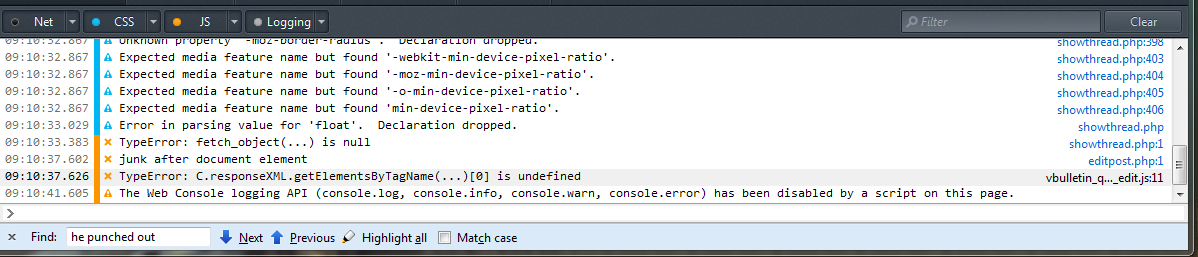
It's manifest in the browser, but there is clearly an error in the GAF vbull scripts.

See error:

Capture.png
 
It's manifest in the browser, but there is clearly an error in the GAF vbull scripts.

See error:

I see...

With no code change on gaf since... 6 months and now popping this error.

I will look into it anyway.
 
I see...

With no code change on gaf since... 6 months and now popping this error.

I will look

I traced the HTTP request and found this in the response:

Code:
<br /><strong>Warning</strong>: Invalid argument supplied for foreach() in <strong>[path]/includes/class_bbcode.php</strong> on line <strong>550</strong><br />

This is preceding the XML response and thus breaking the script because the response is no longer valid XML.

Here is the response:

Code:
HTTP/1.1 200 OK
Server: nginx
Date: Wed, 05 Jun 2013 13:25:25 GMT
Content-Type: text/xml; charset=windows-1252
Connection: close
Cache-Control: private
Pragma: private
X-UA-Compatible: IE=7
Content-Length: 5097

<br /><strong>Warning</strong>: Invalid argument supplied for foreach() in <strong>[path]/includes/class_bbcode.php</strong> on line <strong>550</strong><br /><?xml version="1.0" encoding="windows-1252"?>
<postbit><![CDATA[<!-- post #61378789 -->

OTHER CONTENT HERE

</postbit>

A normal response should only have <postbit></postbit>

So I would check class_bbcode.php on line 550 :)

It's not clear to me why it works after multiple clicks, but definitely something wrong on the server side code.

It's been kind of annoying but I wasn't even going to bother with it until I saw you locked the thread :D
 
You guys don't need to keep spamming edit, just press "save" once. The edit is working, it's just that the page isn't reloading.

EDIT - works half the time for me
 
Having the same issues yesterday and today, thought it was my browser but reading this I'm not sure. Basically when the Save button is pressed the edit area sometimes doesn't respond and requires a manual page refresh.
 
I'm gonna test it!

Edit: Test!

2nd edit: It worked!

3rd edit: It didn't work on the 2nd edit :(

4th edit: Or the third :(

5th edit: Worked on the fourth though
 
Having the same issues yesterday and today, thought it was my browser but reading this I'm not sure. Basically when the Save button is pressed the edit area sometimes doesn't respond and requires a manual page refresh.

It is definitely not your browser.

There is an explicit error in the server side code that needs to be fixed.
 
Was thinking of making a thread for this, I just repeatedly click on edit until it works.

edit: testing...

edit: still not complaining, I remember the days before Quick Edit after all, but it's still annoying.
 
How did I not see this thread sooner?
Thought I was experiencing some weird bug in chrome due to conflicts between add-ons..

Now I just need to figure out what's wrong with YouTube and Steam, and all will be back to normal.
 
Status
Not open for further replies.
Top Bottom